Your company just rolled out AI assistants. Now what?
Your company bought ChatGPT, Claude, Copilot or Cursor seats. Connect them to Data Workers over MCP and they answer from governed context and do approved data work with receipts.
The rollout went fine. IT turned on ChatGPT Enterprise or Microsoft 365 Copilot for every employee, engineering got Cursor, Claude Code or GitHub Copilot, and an admin approved a short list of connectors. Now people chat. They ask the assistant to draft, summarise and explain, and every week someone on the data team gets a message that starts "the assistant says revenue is..." followed by a number nobody recognises.
That's the moment this page is about. Your company bought seats and people chat. Connected to Data Workers over MCP, the same assistants answer from governed context and do real data work through approvals and receipts. Nothing about the assistant changes. What changes is what sits underneath it: Data Workers, the agentic data platform, with one governed context graph across your estate and 20+ specialist agents that find, fix, verify and record.
This hub is the map for the whole series. It explains the role swap, shows what an assistant can ask Data Workers to do at each autonomy level, and links a guide for every assistant and coding agent your company is likely to run.
Key takeaways
- •Seats in, data work out. The assistant stays where people already work. Data Workers sits underneath it over MCP and turns questions into governed answers and requests into approved changes with a receipt.
- •Every major chat assistant and nearly every coding agent speaks MCP in 2026. Chat assistants take a remote MCP server URL; coding agents take a local or remote config file. Data Workers serves both from the same agents.
- •Two locks on every write. The assistant's own confirmation prompt and Data Workers' per-domain guardrail both have to agree, and no agent can approve its own work.
- •Climb one domain at a time. Start at L1 observe (answers and lineage), move to L2 propose (fixes for a person to approve), then L3 act reversibly where the record earns it.
- •Nothing is migrated. The assistants, the warehouse, dbt, Airflow and your permission systems stay as they are.
The role swap for the whole category
Every tool in this series is excellent at its job. ChatGPT, Claude and Gemini reason and write. Copilot lives inside Office and the IDE. Cursor, Codex and Devin write and ship code. Their vendors have built the hard client side of MCP well: OAuth sign-in, admin allowlists, registries, and a confirmation step before any write. OpenAI's developer mode documentation says write actions "by default require confirmation", and Notion's Custom Agents default write tools to "Always ask".
What an assistant can't know on its own is your estate. It doesn't know which fct_revenue is the governed one, who owns it, which dbt model feeds it, what a schema change would break, or how to undo a change in Snowflake if it goes wrong. Give it raw warehouse access and every seat gets a slightly different answer to the same question.
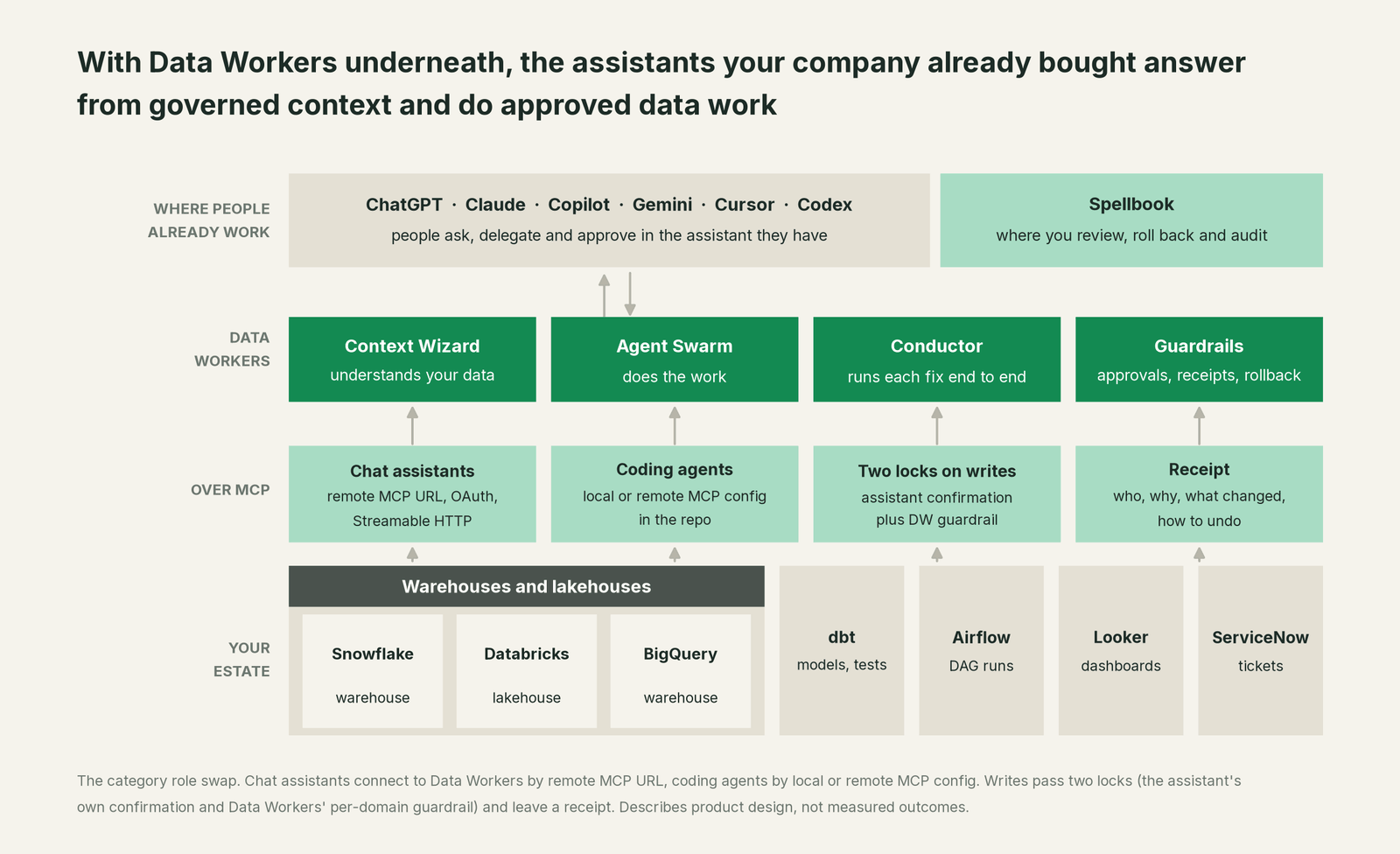
Put Data Workers underneath and the picture changes. The assistant asks, Data Workers answers from the Data Context Wizard graph (definitions, owners, lineage, quality and usage across every platform), and when the request is a change, the Data-Agents Swarm scopes it, a person approves it, the agent makes it, the Autonomous Data-Conductor verifies it downstream, and the receipt lands in Spellbook Data Catalog (in preview), where people review, roll back and audit.
Every Data Workers agent is a standalone MCP server. Local clients connect over stdio; chat assistants that take a URL connect over Streamable HTTP, the transport Copilot Studio and Gemini Enterprise now require. Local setup follows the documented client setup path: clone the open-source repo and add one start-agent.sh entry per agent to the client's MCP config. Our Claude Code, Cursor and Codex guide shows that path end to end.
Why doesn't your assistant just do this itself?
Focus and risk. An assistant is a general client by design: its job is to reach every system through a connector and reason over what comes back. That design is right. The vendors built the gate (allowlists, OAuth, "Ask before running"), and they sensibly leave the consequences of a write to whatever server runs the system being written to.
Changing production data across systems is a different product. It needs a blast radius before anything runs, an approval routed to the owner of that domain, a rollback path in the system that changed, a check that the dashboard downstream is right again, and a receipt an auditor can read. It also needs context about tools the assistant vendor doesn't own and shouldn't take liability for. That is the product Data Workers is. The assistant keeps the conversation; Data Workers carries the change.
One request, end to end
An illustration, not a customer case. At 08:40 a finance analyst asks ChatGPT Enterprise why revenue by plan dropped 40% overnight in the Looker dashboard.
- •ChatGPT calls Data Workers' search and catalog tools. Data Workers answers from the governed graph: the tile reads
fct_revenuein Snowflake, built by a dbt model, fed by a Fivetran sync from the billing Postgres database. - •Data Workers traces the cause: a product team renamed
plan_tiertoplan_codein Postgres at 01:50, Fivetran synced it, and the 02:30 dbt run wrote nulls. - •It proposes the dbt change mapping the new column as a diff for the owner to merge, with the blast radius (one model, two downstream tables, one Looker Explore) and a backfill plan.
- •The on-call engineer approves the change from Cursor at 09:05. ChatGPT never held write access to dbt or Snowflake.
- •The backfill runs, the null check on the rebuilt table passes with no null plans, the Looker tile is right again, and the receipt (who asked, who approved, what changed, how to undo it) is in Spellbook.
The analyst got an answer in the assistant they already use. The engineer approved one change. Nobody opened a Slack thread.
The L0 to L4 climb for assistants
You set the autonomy level per domain, and any domain can be dialled back at any time. Here is what an assistant can ask Data Workers to do at each level.

| Level | What the assistant can ask Data Workers to do | Who decides |
|---|---|---|
| L0 manual | Nothing on the data. People work by hand and the assistant drafts text only. | People |
| L1 observe | Find the right table and its owner, explain a metric definition, show lineage for a dashboard, summarise an incident, explain a bill spike. | Nobody needs to; nothing changes |
| L2 propose | Draft the dbt fix, a new test or a masking policy with its blast radius, or a scoped grant with its dry run, for a person to approve. | The domain owner approves each change |
| L3 act reversibly | Rerun a failed DAG run or apply a pre-approved class of fix, with rollback ready. | Policy set by the owner; every action has a receipt |
| L4 autonomous | Run a trusted, scoped domain (for example freshness incidents) end to end, verifying and recording without waiting. | The owner reviews receipts and can dial it back |
Most teams start every domain at L1, move incidents and data quality to L2 in the first weeks, and earn L3 on one or two reversible fix classes. Our safety guide covers exactly what an agent can and can't do at each level.
A guide for every assistant and coding agent
Each guide shows setup in that tool, one request end to end, and the L0 to L4 climb in its own vocabulary.
Chat assistants
ChatGPT Enterprise. Admins enable developer mode and publish a custom app that points at Data Workers' MCP endpoint; write actions ask for confirmation by default. Read You're on ChatGPT Enterprise, and the leader's guide for the executive version.
Claude. Owners add Data Workers as a custom connector for the Claude apps, and engineers add the same agents to Claude Code with claude mcp add, governed by managed-mcp.json. Read You're on Claude and the Claude leader's guide.
Microsoft 365 Copilot. A declarative agent with an MCP plugin brings governed data answers into Outlook, Teams and Office files, published through the Microsoft 365 admin center. Read You're on Microsoft 365 Copilot.
Microsoft Copilot Studio. Business makers add Data Workers as an MCP tool over Streamable HTTP, and Power Platform data policies govern it like any connector. Read You're on Microsoft Copilot Studio.
Gemini Enterprise. A custom MCP server data store turns Data Workers' tools into actions, with org policy and egress allowlists in Google Cloud. Read You're on Gemini Enterprise.
Perplexity Enterprise. Admins add Data Workers as an org-wide custom remote connector, so cited answers can include your governed metrics. Read You're on Perplexity Enterprise.
Mistral Vibe (formerly Le Chat). An admin adds Data Workers as a custom MCP connector in Vibe's Work mode, with per-function permissions, and Enterprise customers can run Vibe on-premises or in a private cloud. Read You're on Mistral Le Chat Enterprise.
Notion AI. Custom Agents connect to Data Workers by URL, and write tools default to "Always ask", which pairs neatly with Data Workers' own approvals. Read You're on Notion AI.
WRITER. All connector traffic runs through WRITER's MCP gateway, with read and write operations set per tool. Read You're on WRITER.
Salesforce Agentforce. Register Data Workers in the Salesforce API Catalog so its tools become agent actions, and keep the data behind CRM workflows right. Read You're on Salesforce Agentforce.
ServiceNow AI Agents. AI Agent Studio's MCP client adds Data Workers, AI Control Tower inventories it, and data incidents arrive at the service agent with the receipt linked from the ticket. Read You're on ServiceNow AI Agents.
Coding agents
Codex. One [mcp_servers] block in config.toml serves the CLI, the IDE extension and the desktop app. Read You're on Codex.
Cursor. Add Data Workers in .cursor/mcp.json; Enterprise admins govern it through the MCP Allowlist. Read You're on Cursor.
GitHub Copilot. Copilot in VS Code, Visual Studio and JetBrains reads .vscode/mcp.json, and the "MCP servers in Copilot" policy governs it on Business and Enterprise. Read You're on GitHub Copilot.
Devin. Install Data Workers at organization scope from Devin's MCP settings, and Devin takes data tickets with governed context. Read You're on Devin.
Devin Desktop (formerly Windsurf). Devin Local, the agent that succeeded Cascade, reads Data Workers from .devin/mcp_config.json, and permission rules decide which tools it may call. Read You're on Windsurf.
Factory. Droids add Data Workers with droid mcp add, and Enterprise mcpPolicy sets which servers run and how much autonomy each gets. Read You're on Factory.
Gemini CLI. One mcpServers entry in settings.json, with tool filters per server. Read You're on Gemini CLI.
Google Antigravity. Add Data Workers to mcp_config.json; unconfigured tools run in Ask mode until you trust them. Read You're on Google Antigravity.
Amazon Q Developer. Q Developer agents load Data Workers locally or remotely, and its admin settings, including the MCP registry, now sit in the Kiro console. Read You're on Amazon Q Developer.
Kiro. Spec-driven pipelines with Data Workers as a registry-approved server in the IDE, CLI and web. Read You're on Kiro.
Cline. Open-source agent in the IDE with bring-your-own inference; Data Workers sits in its MCP Servers panel. Read You're on Cline.
Roo Code. A project .roo/mcp.json plus a custom data-engineer mode. Read You're on Roo Code.
Aider. Aider pairs with you in the terminal and commits to git; Data Workers runs alongside it and hands over approved dbt diffs for Aider to work on. Read You're on Aider.
OpenCode. A remote or local entry in opencode.json, and organizations can ship it as a default server. Read You're on OpenCode.
Amp. The coding agent that started at Sourcegraph asks for explicit approval of workspace MCP servers, so Data Workers enters the way your team already vets tools. Read You're on Amp.
Augment Code. Augment's context engine knows the code; Data Workers adds what the code touches in the warehouse. Read You're on Augment Code.
JetBrains AI and Junie. IDE Services or JetBrains Central admins can preconfigure Data Workers for every IntelliJ-family IDE. Read You're on JetBrains AI and Junie.
Tabnine. Private and self-hosted code assistance with Data Workers in mcp_servers.json, running where you deploy it. Read You're on Tabnine.
Replit Agent. Internal data apps built in the browser, reading governed metrics through a custom MCP server. Read You're on Replit Agent.
Warp. The agentic terminal where DAG runs get debugged, with Data Workers in .warp/.mcp.json. Read You're on Warp.
goose. The open-source agent, now at the Agentic AI Foundation, loads Data Workers as an extension. Read You're on goose.
What changes for your data team
The assistants become the front door to work the data team used to do by hand. Here is what that looks like on a normal week.
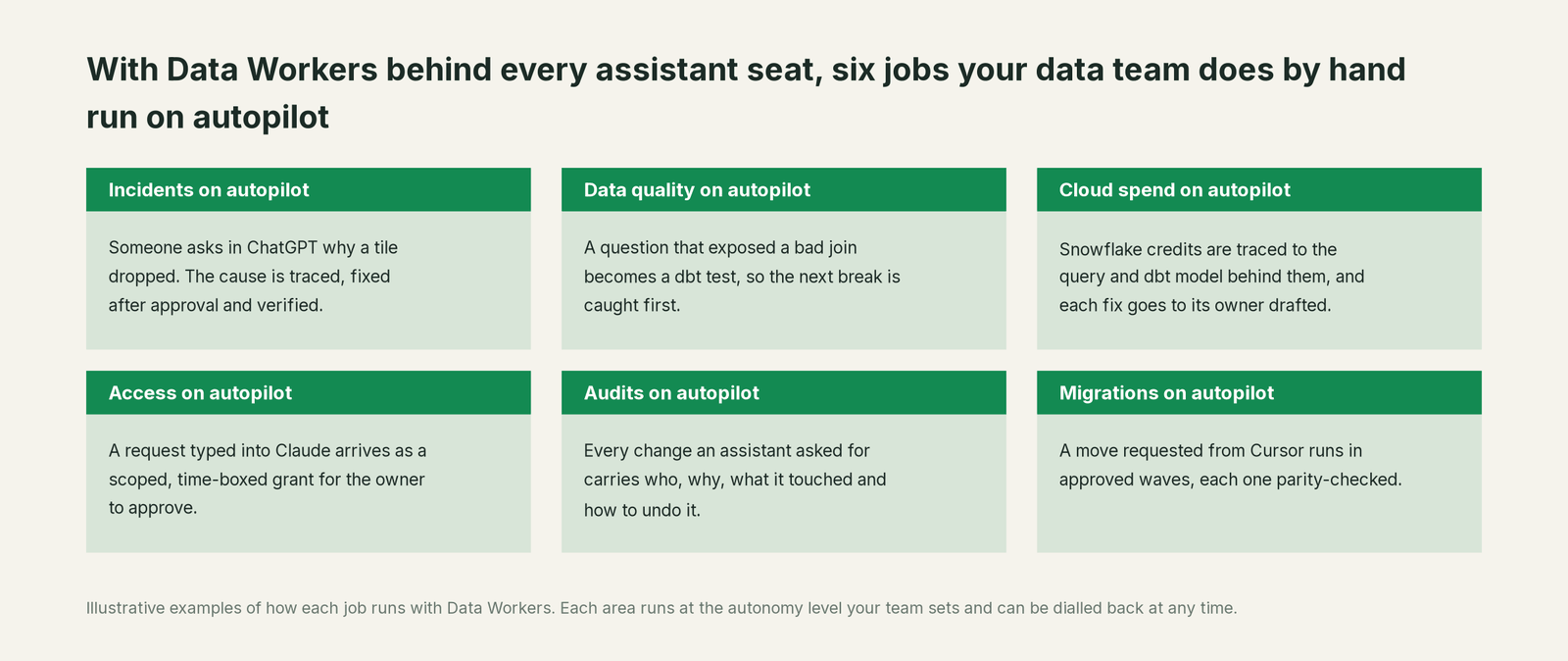
- •Questions stop becoming tickets. "Which table is the real revenue table?" gets answered from the governed graph, with the owner named, in the assistant the person already uses.
- •Every seat gets the same number. Assistants read governed definitions, so ChatGPT, Copilot and Claude agree on what revenue means.
- •Engineers approve instead of chase. A fix arrives as a scoped diff with its blast radius, for the owner to merge. One approval, then verification and a receipt.
- •Audits get easier. Every change an assistant asked for carries who asked, who approved, what it touched and how to undo it.
- •IT keeps its controls. The allowlist, the registry and the confirmation prompt you already set stay in force. Data Workers adds the per-domain guardrail behind them.
Leader buy-in: what to tell the room
The outcome. The company already pays for assistant seats. Data Workers turns that spend into closed incidents, granted access, cleaner spend and audit evidence, without a new tool for anyone to learn.
The risk story. At L1 agents only read and explain. At L2 they propose and a named person approves. At L3 they act only on reversible change classes you chose, and every action has a receipt and a rollback. No agent approves its own work, and Data Workers acts through each platform's own permission system with the grants you give it. Our security and deployment guide covers where data goes.
Why now. In the last year MCP became the default way every assistant reaches company systems, and every vendor shipped admin allowlists and write confirmations. The client side is ready. What's missing in most estates is a governed server behind it.
Build or buy. Some teams try to wire their own MCP servers to the warehouse. It works for reads. Writes need scoping, approvals, rollback and receipts across every system, and we compare the paths in build it ourselves with Claude Code and MCP servers.
The case for your CFO
The company bought AI assistants to make people more productive. For the data team, the gain stays small while assistants can only chat, because the expensive work is the changing, checking and fixing that still happens by hand. Data Workers is what lets the seats you already pay for do that work: the assistant asks, Data Workers scopes the change, a person approves, and the change is verified and recorded.
The risk story is short. Nothing changes without an approval at the level each domain owner sets. Every change has a receipt with who, why, what it touched and how to undo it, and any domain can be dialled back at any time. The assistants, the warehouse, dbt and your access controls stay exactly as they are, and nothing is migrated.
Why now: every major assistant now connects over MCP, so the integration cost that used to block this is gone. The first win is narrow and measurable: route data questions and incident triage through Data Workers at L1, then let one reversible fix class (failed DAG reruns or freshness incidents) run at L3. Our ROI guide shows how to size it on your own numbers.
Start with a pilot on one domain. See pricing; the pilot is credited in full against the first year.
The sentence to repeat upstairs: "We already paid for the assistants; Data Workers is what lets them do governed data work, with an approval and a receipt on every change."
FAQ
Do we have to switch assistants to use Data Workers? No. Data Workers serves every MCP client from the same agents, so ChatGPT, Claude, Copilot and Cursor can all connect at once and get the same governed answers.
Can an assistant change production data on its own? Only inside the level you set for that domain. Writes pass the assistant's own confirmation and Data Workers' guardrail, and at L2 a named person approves every change.
Whose permissions does the assistant use? Data Workers acts through each platform's own permission system with the grants you give it, so Unity Catalog, Snowflake roles and IAM stay the lock.
What about too many tools slowing the assistant down? Install only the agents a team needs. Analysts might get search and catalog; on-call engineers add incidents and pipelines.
Is there a free way to try it? The Apache 2.0 core runs in any MCP client today: clone the open-source repo and follow client setup. The governed write path, Conductor and Spellbook come with the platform.
Sources
- •OpenAI, Developer mode and MCP apps in ChatGPT, https://help.openai.com/en/articles/12584461-developer-mode-and-mcp-apps-in-chatgpt (checked Oct 2, 2026)
- •OpenAI, Developer mode (write actions require confirmation by default), https://developers.openai.com/api/docs/guides/developer-mode (checked Oct 2, 2026)
- •Anthropic, Custom connectors using remote MCP, https://support.claude.com/en/articles/11175166-getting-started-with-custom-connectors-using-remote-mcp (checked Oct 2, 2026)
- •Anthropic, Claude Code MCP, https://code.claude.com/docs/en/mcp (checked Oct 2, 2026)
- •OpenAI, Codex MCP, https://learn.chatgpt.com/docs/extend/mcp?surface=cli (checked Oct 2, 2026)
- •Cursor, MCP, https://cursor.com/docs/mcp (checked Oct 2, 2026)
- •GitHub, Extend Copilot Chat with MCP, https://docs.github.com/en/copilot/how-tos/copilot-in-your-ide/customize-copilot/extend-copilot-with-tools-and-context/extend-copilot-chat-with-mcp (checked Oct 2, 2026)
- •Microsoft, Build MCP plugins for Microsoft 365 Copilot, https://learn.microsoft.com/en-us/microsoft-365-copilot/extensibility/build-mcp-plugins (page dated Sep 30, 2026; checked Oct 2, 2026)
- •Microsoft, Extend Copilot Studio agents with MCP, https://learn.microsoft.com/en-us/microsoft-copilot-studio/agent-extend-action-mcp (page dated Aug 26, 2026; checked Oct 2, 2026)
- •Google Cloud, Set up a custom MCP server data store in Gemini Enterprise, https://docs.cloud.google.com/gemini/enterprise/docs/connectors/custom-mcp-server/set-up-custom-mcp-server (page dated Sep 30, 2026; checked Oct 2, 2026)
- •Perplexity, Adding custom remote connectors, https://www.perplexity.ai/help-center/en/articles/13915507-adding-custom-remote-connectors (modified Sep 3, 2026; checked Oct 2, 2026)
- •Mistral AI, Mistral Vibe (formerly Le Chat), https://mistral.ai/products/vibe/ (checked Oct 2, 2026)
- •Mistral AI, MCP connectors (Vibe Work), https://docs.mistral.ai/vibe/work/connectors/mcp-connectors.md (checked Oct 2, 2026)
- •Notion, MCP connections for Custom Agents, https://www.notion.com/help/mcp-connections-for-custom-agents (checked Oct 2, 2026)
- •WRITER, MCP gateway, https://dev.writer.com/home/mcp-gateway.md (checked Oct 2, 2026)
- •Salesforce, Agentforce and MCP, https://developer.salesforce.com/docs/ai/agentforce/guide/mcp.html (checked Oct 2, 2026)
- •ServiceNow, Add an MCP server from the MCP Catalog, https://www.servicenow.com/docs/r/zurich/intelligent-experiences/aict-add-an-mcp-server-from-mcp-catalog.html (checked Oct 2, 2026)
- •Cognition, Devin MCP, https://docs.devin.ai/work-with-devin/mcp (checked Oct 2, 2026)
- •Cognition, Devin Desktop Cascade MCP (formerly Windsurf), https://docs.devin.ai/desktop/cascade/mcp (checked Oct 2, 2026)
- •Factory, MCP, https://docs.factory.com/harness/mcp (checked Oct 2, 2026)
- •Google, Gemini CLI MCP servers, https://geminicli.com/docs/tools/mcp-server/ (checked Oct 2, 2026)
- •Google, Antigravity MCP, https://antigravity.google/docs/mcp (checked Oct 2, 2026)
- •AWS, Amazon Q Developer MCP governance, https://docs.aws.amazon.com/amazonq/latest/qdeveloper-ug/mcp-governance.html (checked Oct 2, 2026)
- •AWS, Kiro MCP registry, https://kiro.dev/docs/mcp/registry/ (checked Oct 2, 2026)
- •Cline, MCP overview, https://docs.cline.bot/mcp/mcp-overview (checked Oct 2, 2026)
- •Roo Code, Using MCP in Roo Code, https://roocodeinc.github.io/Roo-Code/features/mcp/using-mcp-in-roo (checked Oct 2, 2026)
- •Aider, Documentation, https://aider.chat/docs/ (checked Oct 2, 2026)
- •OpenCode, MCP servers, https://opencode.ai/docs/mcp-servers/ (checked Oct 2, 2026)
- •Amp, MCP, https://ampcode.com/docs/customize/mcp (checked Oct 2, 2026)
- •Augment Code, MCP setup, https://docs.augmentcode.com/setup-augment/mcp (checked Oct 2, 2026)
- •JetBrains, AI Assistant MCP, https://www.jetbrains.com/help/ai-assistant/mcp.html (checked Oct 2, 2026)
- •Tabnine, MCP setup, https://docs.tabnine.com/main/getting-started/tabnine-agent/mcp-intro-and-setup (checked Oct 2, 2026)
- •Replit, MCP overview, https://docs.replit.com/replitai/mcp/overview (checked Oct 2, 2026)
- •Warp, MCP, https://docs.warp.dev/agents/capabilities/mcp/ (checked Oct 2, 2026)
- •goose (Agentic AI Foundation), Using extensions, https://goose-docs.ai/docs/getting-started/using-extensions (checked Oct 2, 2026)
- •Data Workers, data-workers-agent-swarm README and agents (MCP servers, transports, approval gates, audit trail) (checked Oct 2, 2026)