You're on Microsoft 365 Copilot: Copilot answers your data questions in Teams, and Data Workers does the data work behind it
Your company bought Microsoft 365 Copilot. Add Data Workers as a Copilot agent over MCP, and Copilot in Teams and Outlook answers from governed context and does approved data work with a receipt.
Your company rolled out Microsoft 365 Copilot. IT assigned the licenses, Copilot Chat sits in Teams, Outlook, Word, Excel and PowerPoint, and your AI administrator curates agents in the Microsoft 365 admin center: which are published to which groups, which three are pinned, which get blocked. Sales asks Copilot to summarize the pipeline; finance asks it to draft variance commentary. Somebody always asks the question that lands on the data team: "Why doesn't the Power BI number match what I see in Dynamics?"
Copilot answers that well once it has an agent that knows your data estate and is allowed to change it safely. Data Workers is that agent. Microsoft 365 Copilot is where your people ask, in Teams and Outlook. Data Workers is the agentic data platform underneath: it answers from one governed context graph and does the data work behind approvals, with a receipt on every change. Copilot, the admin center, Entra and Purview stay exactly as they are.
Key takeaways
- •The role swap. You bought Copilot seats and people chat in Teams and Outlook. Connected to Data Workers over MCP, Copilot answers from governed context and does real data work through approvals and receipts.
- •One agent, published like any other. Data Workers reaches Copilot as a declarative agent with an MCP plugin, built in the Microsoft 365 Agents Toolkit and published to the groups you choose from the Agent Registry in the Microsoft 365 admin center.
- •Two locks on every write. By default, Copilot asks the user before any tool call that changes data. Data Workers' per-domain guardrail, set on the ladder from L0 manual to L4 autonomous, sits behind it. A change Copilot asks for runs only when both agree.
- •The whole lifecycle, one audit trail. Copilot goes deepest on answers inside Microsoft 365 and on securing its own use. Data Workers covers the whole data lifecycle with one context, one approval flow and one audit trail.
- •Zero migration. Licenses, Entra identities, Purview labels, Fabric, Power BI and dbt stay where they are.
Microsoft 365 Copilot is where people ask. Data Workers is what does the data work.
Here is a Tuesday morning many sales and finance teams on Microsoft will recognize. It's an illustration, not a customer case.
| Time | System | What happens |
|---|---|---|
| Mon 17:00 | Dynamics 365 Sales | Sales ops enables Swiss francs (CHF) as a deal currency for a new region. |
| 01:30 | Fabric Data Factory | The nightly pipeline copies new opportunities and the treasury FX table from SQL Server into OneLake. Nothing fails. |
| 02:15 | dbt on Fabric | fct_bookings inner-joins deals to FX rates. Treasury has no CHF rate yet, so every Swiss deal drops out. All tests pass. |
| 08:10 | Copilot in Teams | A sales VP asks the Data Workers agent why EMEA bookings in the Power BI report fell 9% overnight. |
| 08:11 | Power BI, via Data Workers | Data Workers traces the report to fct_bookings, then to Dynamics 365, and finds 37 closed deals in CHF missing from the model. |
| 08:13 | Copilot in Teams | Copilot answers with the cause, the lineage and the three reports that read the same model. |
| 08:25 | dbt | Data Workers proposes a diff that adds the CHF rate source, keeps unmatched deals visible and adds a test, with its blast radius: two models, three reports. |
| 08:50 | Spellbook | An analytics engineer reviews the diff and approves. The VP's own Copilot confirmation covered only the request to propose it. |
| 09:00 | Fabric | Data Workers rebuilds the affected models. Totals match Dynamics 365 to the deal. |
| 09:05 | Power BI, Teams, Outlook | The report is right before the forecast call. The receipt lands in the Teams thread and the approver's inbox. |
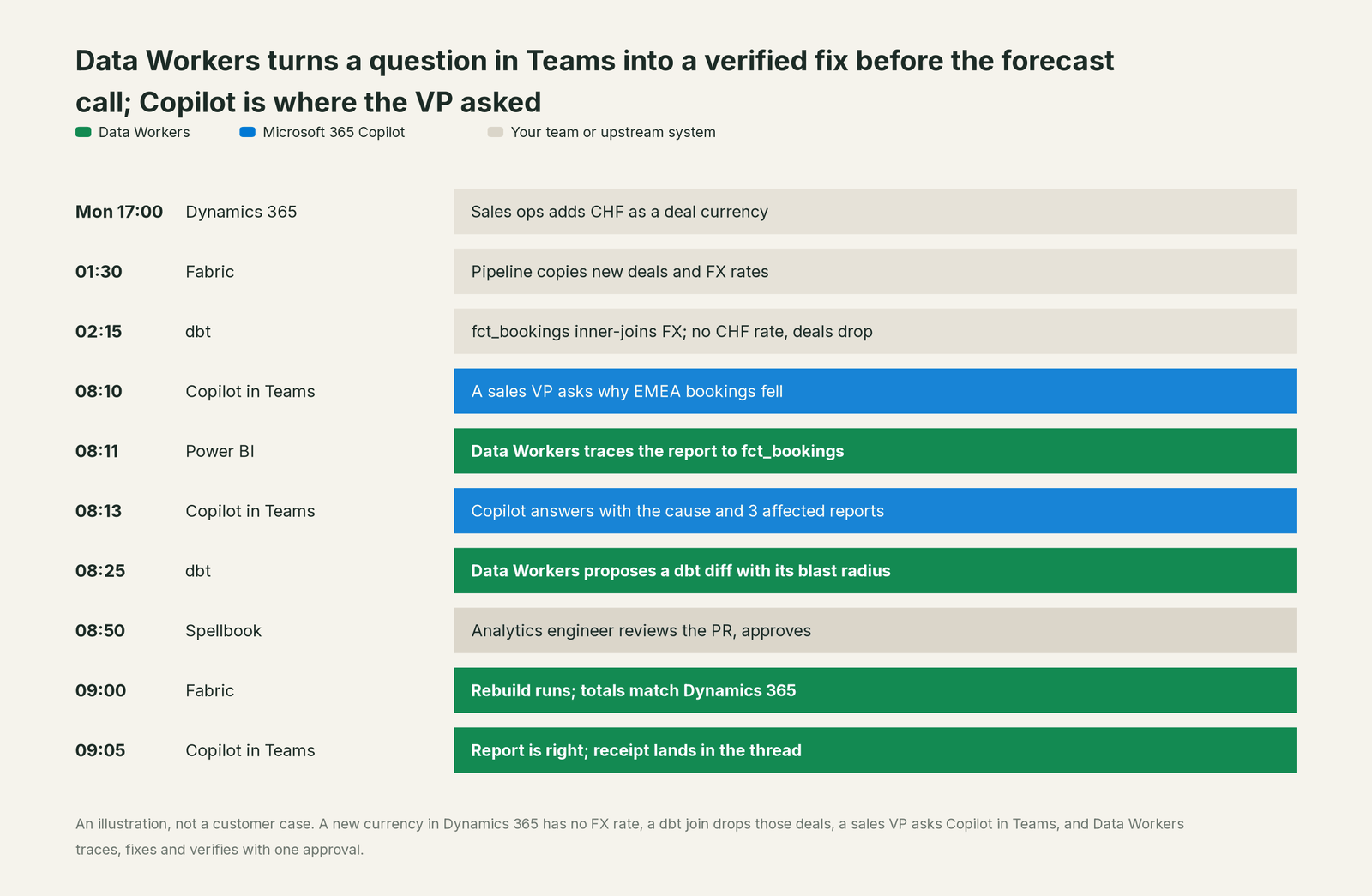
Copilot did what it's built for: it understood the question, picked the right agent, asked before anything changed and explained the answer in the VP's words. Data Workers did the parts that need your estate: lineage across five systems, a scoped fix, a verified rebuild and the receipt.
| Step | What Microsoft 365 Copilot does | What Data Workers does |
|---|---|---|
| The question | Understands the VP's question in Teams and routes it to the Data Workers agent | Supplies governed definitions and lineage from the Power BI report back to Dynamics 365 |
| The cause | Explains the cause in the chat, in plain language | Finds the missing currency by comparing the source, the model and the report |
| The fix | Shows a confirmation prompt before any tool that changes data | Writes the dbt change as a diff with its blast radius and waits for approval |
| The review | Keeps the conversation and the approver's context in Teams and Outlook | Holds the change until a person approves; no agent approves its own work |
| Verification | Reports what Data Workers returns | Rebuilds, diffs totals against Dynamics 365, re-checks the reports |
| The record | Keeps the chat under your Purview retention | Writes a tamper-evident receipt: who asked, why, what changed, how to undo it |
Why doesn't Microsoft 365 Copilot just do this itself?
Copilot is the assistant for all of Microsoft 365, and Microsoft made sensible choices about focus and risk.
Copilot works across mail, meetings, chats, files and every agent your organization approves. Copilot Cowork, now generally available, carries out multistep tasks across Microsoft 365 and asks for approval before sensitive actions such as sending an email. Microsoft also built the governance around agents: MCP and API plugins in declarative agents, a confirmation prompt on tools that change data, the Agent Registry with publish, deploy, block and pin, and Microsoft Agent 365 (generally available since May 1, 2026) to observe, govern and secure agents with Entra, Purview and Defender. Microsoft's admin docs say a third-party MCP server is connected at the customer's own risk and recommend "implementing approval mechanisms and monitoring cascading behaviors." That's the right line for a general assistant to draw.
Writing to production data across systems is a different product. It must know which models, reports and consumers a change touches before it runs, and it needs per-domain approvals, rollback, verification against the source and a receipt an auditor can read. It also carries liability for changes inside systems Microsoft doesn't run for you: your dbt repository, your warehouse grants, the Snowflake account finance uses next to Fabric. Taking that on would change what Copilot is. Data Workers is built for exactly that job, and it plugs into the confirmation prompt and the admin center Microsoft already built.
Every tool owns a slice. Data Workers covers the whole lifecycle
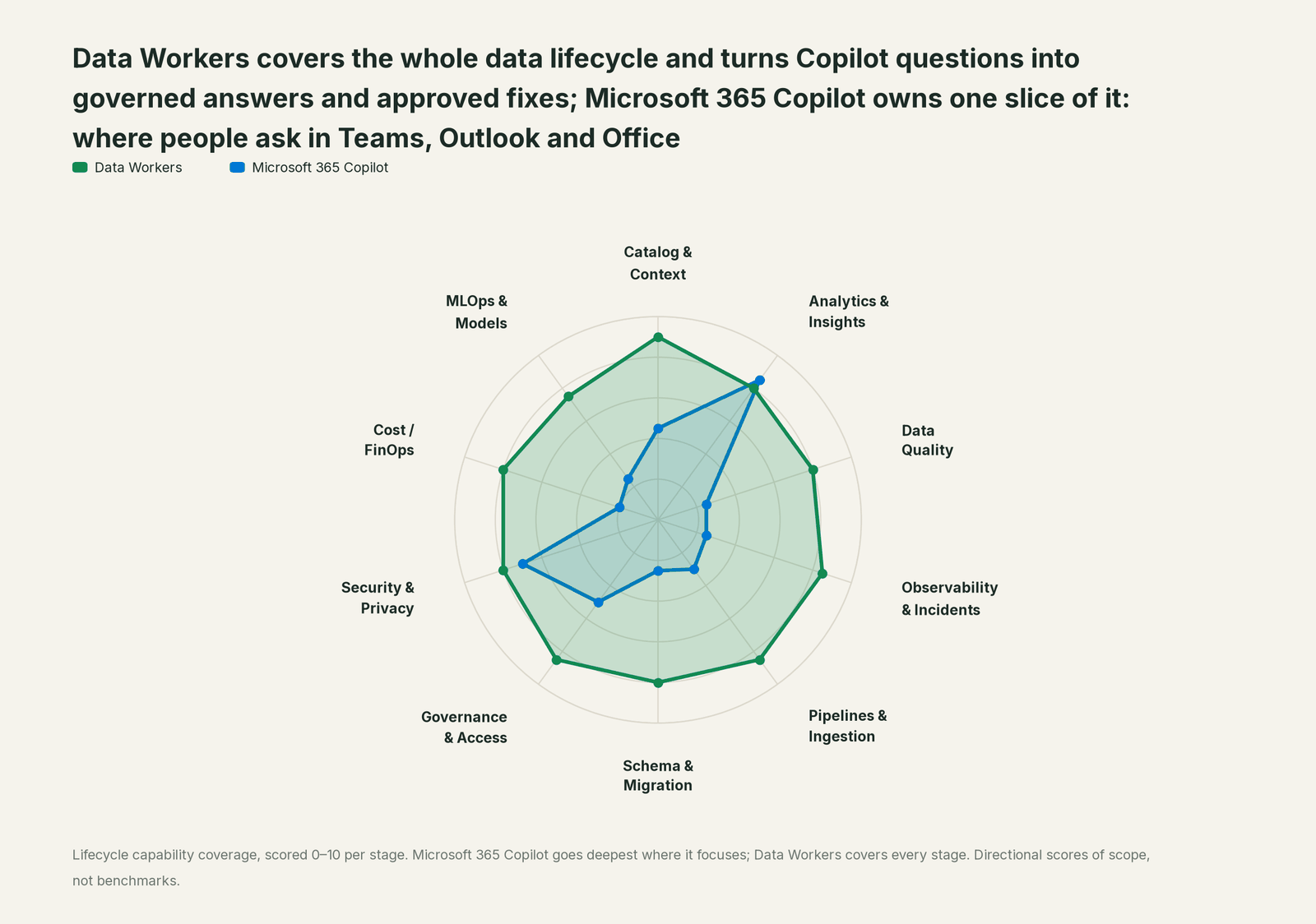
A data team's work runs across ten stages, from context and quality to cost and models. Each point tool adds another console, another contract and another handoff. Data Workers covers the whole lifecycle with one context, one approval flow and one audit trail.
Microsoft 365 Copilot leads on Analytics & Insights, its home stage, where Copilot Chat, Analyst and Excel answer questions inside the apps people use all day. Security & Privacy, built on Entra, Purview and Defender, is its second strength. Data Workers covers all ten.
| Stage | Data Workers | Microsoft 365 Copilot | Why we scored it this way |
|---|---|---|---|
| Catalog & Context | 9 | 4.5 | Copilot grounds answers in Microsoft Graph, SharePoint and Copilot connectors. Data Workers keeps one governed context graph across warehouses, dbt, orchestration and BI. |
| Analytics & Insights | 8 | 8.5 | Copilot's home stage: Copilot Chat, Analyst and Excel turn a question into an answer inside the apps people already use. Data Workers answers from governed definitions with lineage behind every number. |
| Data Quality | 8 | 2.5 | Copilot can explain a check or draft a formula when asked. Data Workers writes, runs and repairs checks and dbt tests across the estate. |
| Observability & Incidents | 8.5 | 2.5 | Copilot summarizes an incident thread in Teams. Data Workers detects, traces, fixes and verifies, and closes the incident with a receipt. |
| Pipelines & Ingestion | 8.5 | 3 | Copilot calls the actions an agent is given. Data Workers changes the pipeline behind approval and confirms the rerun. |
| Schema & Migration | 8 | 2.5 | Copilot can describe a schema it is shown. Data Workers assesses blast radius and plans platform moves in parity-checked waves. |
| Governance & Access | 8.5 | 5 | The Agent Registry, Entra and publish-to-groups govern which agents people can use. Data Workers proposes least-privilege grants on your data platforms. |
| Security & Privacy | 8 | 7 | A second home stage: Entra, Purview, Defender and Microsoft 365's commercial data boundary protect Copilot. Data Workers leaves a tamper-evident receipt on every data change. |
| Cost / FinOps | 8 | 2 | Admins manage Copilot licenses and Copilot Credits. Data Workers traces Snowflake credits to the dbt model behind them and drafts the fix for its owner. |
| MLOps & Models | 7.5 | 2.5 | Copilot can explain a model result it is given. Data Workers keeps the data under models healthy and connects to MLflow and W&B. |
How Microsoft 365 Copilot and Data Workers work together
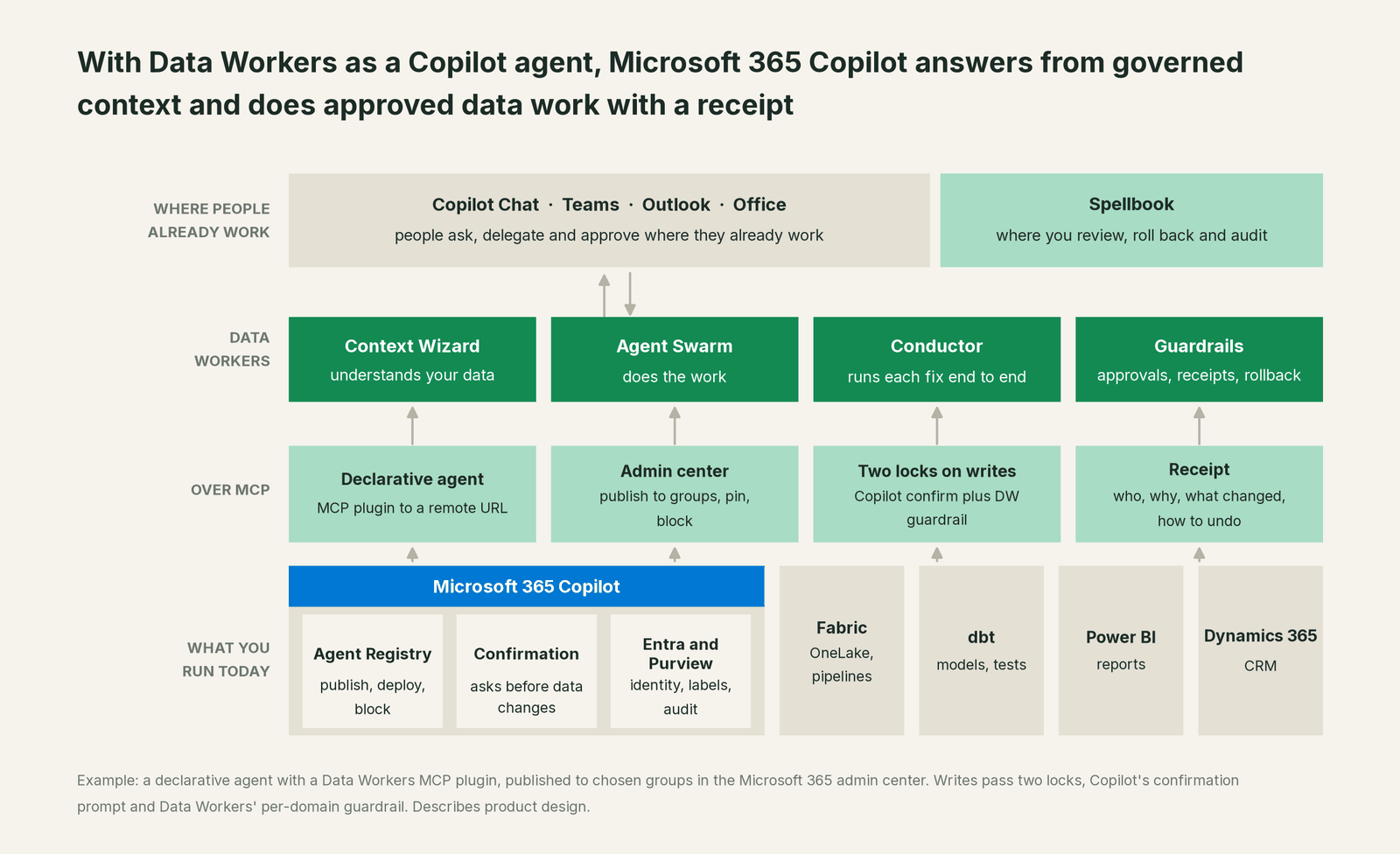
Copilot stays where people ask and confirm: Teams, Outlook, the Office apps and Copilot Chat. Spellbook Data Catalog (in preview) is where your data team reviews proposals, rolls changes back and reads the audit trail. Underneath, Data Context Wizard builds one governed graph across your warehouses, dbt, orchestration and BI. The Data-Agents Swarm does the work, and the Autonomous Data-Conductor runs each fix end to end: detect, diagnose, fix, review, verify, remember. Every Data Workers agent is an MCP server, and Copilot calls it over Streamable HTTP. Data Workers connects to Fabric, Power BI, Purview and Dynamics 365 over their APIs and MCP servers today.
Setup in Microsoft 365 Copilot. Copilot reaches MCP servers through declarative agents, where an MCP plugin is an action inside the agent. A developer does this once.
- •Install the Microsoft 365 Agents Toolkit (6.12.0 or later) in Visual Studio Code. Select Create a New Agent/App, then Declarative Agent, then Add an Action, then Start with an MCP Server, and enter your Data Workers MCP server URL.
- •Choose OAuth (static or dynamic registration) or Entra SSO, so each person signs in as themselves and Data Workers applies that person's permissions. Register
https://teams.microsoft.com/api/platform/v1.0/oAuthRedirectas the redirect URL with your identity provider. - •Write the agent's instructions and conversation starters ("Why did this Power BI number change?", "Who owns this table?"). The toolkit sets up dynamic tool discovery, so Copilot reads Data Workers' current tools at runtime; you can pin a curated set instead.
- •Provision and test in a dev tenant. Your Microsoft 365 account needs Custom App Upload Enabled and Copilot Access Enabled.
If you package Data Workers inside a Microsoft 365 app instead, the same server registers as an agent connector in the app manifest. Example (manifest.json):
"agentConnectors": [
  {
    "id": "data-workers",
    "displayName": "Data Workers",
    "description": "Governed answers about your data, and approved fixes with a receipt.",
    "toolSource": {
      "remoteMcpServer": {
        "mcpServerUrl": "https://<your-data-workers-host>/mcp",
        "authorization": { "type": "OAuthPluginVault", "referenceId": "<your-oauth-config-id>" }
      }
    }
  }
]
For your Microsoft 365 administrator. Upload the agent package under Agents > All agents > Add agent in the Microsoft 365 admin center. Under Publish, choose the groups that can install it, usually finance, sales operations and the data team first. Under Deploy, preinstall it for those groups, apply a security template, and pin it if you want it among the three admin-pinned agents. The Agent Registry then tracks its owner, channel and status, and with Agent 365 you also see risk signals from Entra, Purview and Defender. Teams that also build in Copilot Studio plug in the same server there; see You're on Microsoft Copilot Studio.
One request, L0 to L4. Take one ask in Teams, "Why are EMEA bookings low, and fix it," at each autonomy level, set per domain.

- •L0 manual. Data Workers is connected but not acting; your engineer investigates by hand.
- •L1 observe. Copilot answers from Data Workers with the cause, the lineage from Power BI to Dynamics 365 and the affected reports.
- •L2 propose. Data Workers drafts the dbt diff with its blast radius. Copilot confirms the propose call with the user, and a person approves the change in Spellbook.
- •L3 act reversibly. Data Workers applies changes it can undo in this domain, such as rebuilding affected models, then verifies and records the receipt.
- •L4 autonomous. For a trusted, scoped class such as a late FX load in one domain, Data Workers fixes and verifies on its own and posts the receipt to Teams for review.
Every change Copilot asks for passes two locks. Copilot's confirmation decides whether the user lets Copilot send the call. Data Workers' guardrail decides whether the change may run in that domain, and no agent approves its own work.
What changes for your team
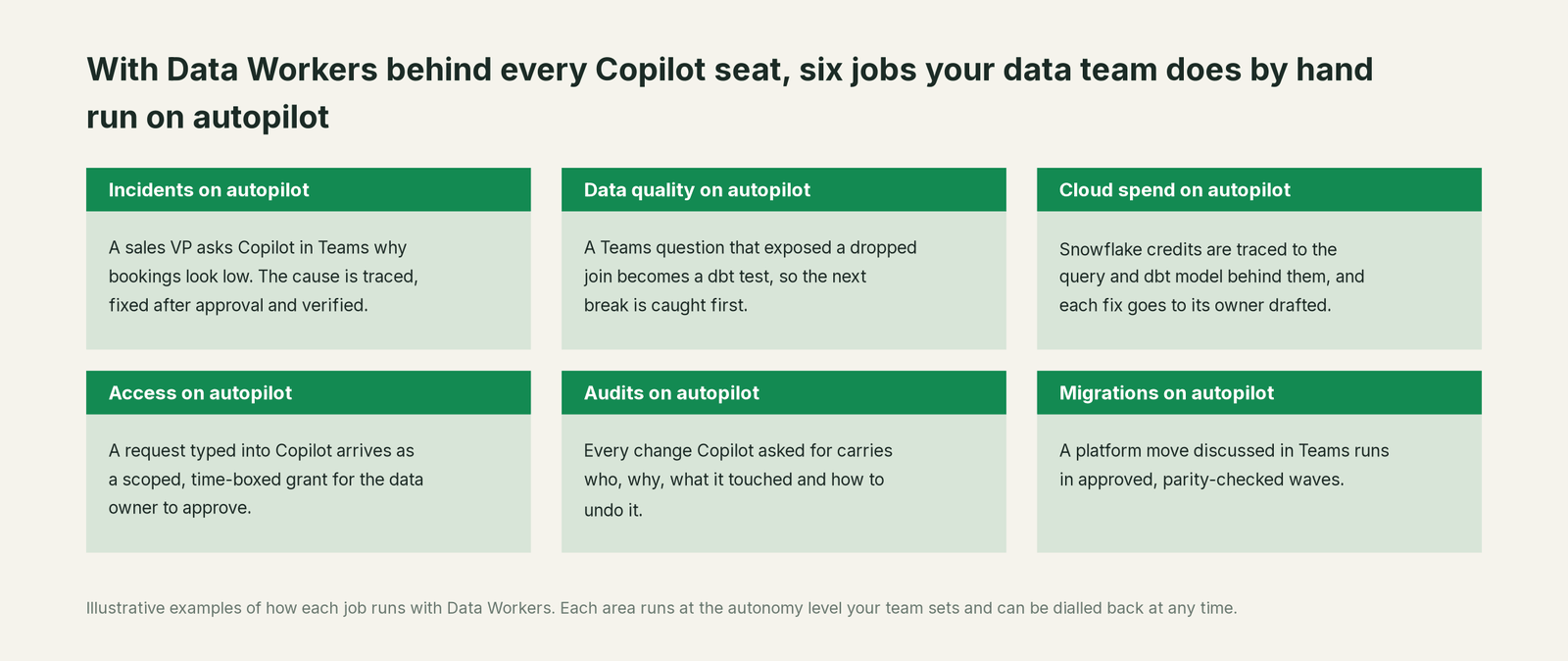
The people asking questions keep their habits. The sales VP still asks in Teams; finance still drafts in Word and Excel. What changes is where the questions end. Today a question about a broken number often ends in a ticket for the data team. With Data Workers behind the agent, it ends in a governed answer, or in a proposed fix that one person approves. Your data team spends its time on modeling the business, setting guardrails and deciding which domains move up the ladder.
Sensitive data stays governed. Data Workers applies the asking person's permissions and its PII middleware before anything reaches the chat, and Purview keeps applying your labels and retention.
Keep Microsoft 365 Copilot, or consolidate?
Keep Microsoft 365 Copilot if you love it; Data Workers works with it from day one. Many teams consolidate once Data Workers runs that slice too.
For Copilot, keeping it is the natural answer: it's your company's assistant across Microsoft 365, and Data Workers is built to sit behind it. What teams consolidate is the sprawl around it: the separate catalog, quality tool, incident runbooks and access queue that Copilot would otherwise need one agent each to reach. If you run Fabric, read Data Workers on Microsoft Fabric for the platform side and Microsoft Fabric data agents vs Data Workers for where Fabric's own agents fit. The same Data Workers server sits behind every assistant; see the guides for ChatGPT Enterprise, Claude and GitHub Copilot, and the section overview, Your company just rolled out AI assistants. Now what?
The case for your CFO
The outcome. The company already pays for Copilot seats. With Data Workers as a Copilot agent, those seats produce answers from governed numbers and approved fixes, so bookings, revenue and cost figures are right before the forecast call and the board deck.
The risk story. Data Workers starts at observe. At propose, every change is a draft a person approves. At act reversibly, it runs only changes it can undo, in domains you've moved up. Autonomous is a per-domain choice, never a default. Copilot confirms every call that changes data, no agent approves its own work, and every receipt records who acted, why, what changed and how to undo it. Zero migration: your data stays where it is. The safety guide and the security and deployment guide go deeper.
Why now. Microsoft shipped the admin surface: MCP plugins in declarative agents, the Agent Registry and Agent 365. As Copilot takes on more multistep work, the choice is between departments wiring their own agents to raw tables and one governed agent across the company.
The first win. "Why doesn't this number match?" answered in Teams at observe, then late-load and missing-reference fixes in one domain at act reversibly.
What stays the same. Copilot licenses, the admin center, Entra, Purview, Fabric, Power BI, Dynamics 365 and dbt.
The path. Start with a pilot. See pricing; the pilot is credited in full against the first year. The ROI guide sizes it, and build it ourselves with Claude Code and MCP servers? answers the build-vs-buy question.
The sentence to repeat upstairs: "We already pay for Copilot; Data Workers is the agent that lets it answer from our governed numbers in Teams and fix data behind an approval, with a receipt on every change."
Getting started
Start with a pilot. A developer builds the Data Workers declarative agent in the Agents Toolkit, your administrator publishes it to one or two groups, and every domain starts at observe, so people first see Copilot answering from governed context with lineage behind each number. Then move one domain, usually bookings or revenue, to propose and watch the receipts. See pricing; the pilot is credited in full against the first year.
FAQ
Do people need a Microsoft 365 Copilot license to use the Data Workers agent? No. Microsoft's capability table lists custom actions in declarative agents for licensed users and in Copilot Chat without the license, where usage limits apply. Copilot connectors and SharePoint grounding need a license or Copilot Studio pay-as-you-go billing; email, people and Teams knowledge need the license. The Data Workers agent's answers come from Data Workers itself, over MCP.
Who can install and publish the agent? Developers build and test it in a tenant where Upload custom apps is on. An administrator uploads the package in the Microsoft 365 admin center, chooses who can install it, can preinstall and pin it, and can block it at any time.
Can Copilot write to our production data? Only through Data Workers, behind two locks. Copilot asks the user before any tool call that changes data, and Data Workers holds each change at the autonomy level set for that domain. Every change is approved or reversible, verified and recorded with a receipt.
Whose permissions does the agent use? With OAuth or Entra SSO, each person signs in as themselves, and Data Workers applies that person's access on your data platforms. A shared API key is possible; most security teams prefer per-user sign-in for an agent that can propose changes.
Does our data leave the Microsoft 365 boundary? The MCP server runs outside Microsoft 365, as with any plugin, and you choose where, including your own cloud. Data Workers stores metadata and scrubbed facts about your data, not copies of your tables, and applies PII middleware before results reach Copilot. The security and deployment guide covers the options.
We already use Fabric data agents. Why add Data Workers? Fabric data agents answer questions over Fabric data well; keep them. Data Workers works across Fabric and everything beside it, and fixes what it finds behind approvals. The Fabric comparison covers where each fits.
Sources
Microsoft 365 Copilot capabilities, statuses and admin steps, from Microsoft Learn: Build a plugin for a declarative agent from an MCP server (updated September 30, 2026), MCP and API plugins for declarative agents (September 30, 2026), Declarative agents for Microsoft 365 Copilot (September 30, 2026), Set up your development environment (September 30, 2026), Confirmation prompts for MCP and API plugins (July 14, 2026), Register MCP servers as agent connectors (June 19, 2026), Agent Registry in Microsoft 365 admin center (September 21, 2026), Manage agents in the Microsoft 365 admin center (updated August 18, 2026), Microsoft Agent 365 overview (August 19, 2026) Extend your agent with Model Context Protocol in Copilot Studio (August 26, 2026), Copilot Cowork common questions (September 29, 2026) and Manage Copilot Cowork for your organization (September 14, 2026), all checked October 2, 2026. Data Workers transports are from the Data Workers repository README, checked October 2, 2026. Product names and settings change quickly; tell us if something here is out of date.