Data Workers on Microsoft Fabric: what it adds to data agents, Copilot and Fabric IQ
Fabric runs your data and analytics, and its data agents, Copilot, operations agents and Fabric IQ answer and alert. Data Workers fixes what breaks across Fabric and everything around it.
Microsoft Fabric is where your data and analytics run. Data Workers is the agentic data platform that runs the operations across Fabric and every system around it. That's the whole guide in two sentences, and the rest of this page is the detail.
Here is the estate most Fabric teams run. OneLake holds the lakehouses and warehouses. Data Factory pipelines copy data in from an on-premises SQL Server through a gateway, and dbt jobs build the models. Power BI semantic models in Direct Lake mode sit on top, and the reports are what finance opens every morning. Purview labels the sensitive tables. And because few estates are only Fabric, there's usually a Databricks workspace for the ML team, a Snowflake share for finance, or both, connected through shortcuts and mirroring.
Fabric now ships a lot of AI on that estate. Data agents answer questions in Teams and Microsoft 365 Copilot. Copilot writes pipelines, DAX and KQL. Operations agents watch live data and message you in Teams. Fabric IQ gives agents a business vocabulary. Project Osmos runs data engineering tasks in a lakehouse. When a pipeline fails at 2 a.m., though, a person still opens the monitor hub, finds the renamed column in the source, fixes the copy mapping and the dbt model, reruns both and checks the report before the 9:00 review.
Data Workers does that work. It finds the cause wherever it started, fixes it there behind your approval, verifies the Power BI number downstream and leaves a receipt on every change. It also runs the jobs around incidents: access requests, capacity cleanup, schema changes, catalog upkeep, migrations and audit evidence. Your data stays in OneLake while it does.
Key takeaways
- •Fabric is where your data and analytics run. Data Workers runs the operations across Fabric and the systems around it, at the autonomy level you set per domain.
- •Fabric's agents answer, assist and alert inside Fabric. Data agents only generate read queries. Copilot helps one person in one item. Operations agents run an action you configured, after a Teams approval, with the creator's permissions.
- •Data Workers owns the loop: detect, diagnose, fix, review, verify and remember, across Fabric, dbt, on-premises SQL Server, Databricks, Snowflake and your BI layer.
- •Keep everything Microsoft. OneLake, Purview, Entra, the OneLake catalog and Power BI stay where they are. Data Workers reads Purview through its own connector and works with Fabric over Fabric's MCP servers and REST APIs today.
- •Agents can already change Fabric. The Fabric Core MCP Server can create and delete workspaces and items and grant roles. Data Workers puts blast-radius scoping, approvals, rollback and receipts in front of changes like those.
- •Flat pricing. Fabric bills Copilot and agent work as capacity units. Data Workers is a flat platform fee with unlimited seats and no usage meter.
For the step-by-step climb, read the playbook From Microsoft Fabric to an autonomous data platform. For the leadership view, read the Microsoft Fabric data leader's guide. The same comparison for other platforms is in Data Workers on AWS and Data Workers on Databricks. Our earlier Data Workers vs Microsoft Fabric Data Agents overview and the Data Workers for Microsoft Fabric page cover adjacent ground.
Six things Data Workers adds on top of Fabric
1. Failed runs fixed and closed. The Autonomous Data-Conductor takes a failed pipeline, notebook or semantic model refresh, traces it to the cause in whichever system it lives in, has the right agent fix it there and confirms the report is right again. A run isn't closed until the downstream checks pass.
2. Fixes that land where the problem started. Most Fabric incidents start upstream: a renamed column in an on-premises source, a dbt model that assumed the old name, a Databricks job that writes to a shortcut target. The Data-Agents Swarm proposes the dbt change as an approval-gated diff for the owner to merge, proposes the copy mapping fix and triggers the rerun once you approve.
3. Schema changes caught before the refresh. The Schema Evolution agent sees a source contract change and its blast radius through pipelines, dbt models and semantic models before the next run. The Data Change Review agent diffs lineage, schema, row counts and values on the fix before it merges.
4. Capacity spent on work that matters. Idle items, duplicate refreshes and pipelines nobody reads compete with the nightly loads for the same capacity units. The Cost Savings & Cleanup agent finds that work and proposes its removal only after a dependency check, and it covers Snowflake, Databricks and BigQuery spend next to Fabric.
5. One governed context graph. Data Context Wizard builds one graph from Purview assets, lineage and glossary terms, your dbt manifest, the warehouses beside Fabric and your BI metadata, through 50+ connectors. Fabric IQ definitions and semantic model measures come in as first-class sources, with provenance on every fact.
6. Receipts your auditors can read. Purview Audit logs who did what in Fabric. Every Data Workers change also records why, what it touched downstream, who approved it and how to undo it, in Spellbook Data Catalog (in preview).
Behind all six are 20+ specialist agents, one context graph and the coding agent your team already uses (Claude Code, GitHub Copilot, Codex or Cursor) as the way in. Each agent is an MCP server.
One incident, six systems
Here is a scenario most Fabric teams will recognize. It's an illustration, not a customer case.
- •01:20. An ERP release renames
regiontosales_regionin the on-premises SQL Server. - •01:40. The Data Factory copy activity runs through the gateway and succeeds, but it lands null regions in the bronze lakehouse table.
- •02:30. The dbt job builds
fct_revenue_by_regionin the Warehouse. Every new row is "Unknown". - •06:05. An operations agent watching the revenue ontology sees unknown-region revenue jump and messages the on-call channel in Teams.
- •09:00. Finance opens the Power BI revenue report, built on a Direct Lake semantic model, for the weekly review. The Databricks churn job reads the same table through a OneLake shortcut.
| Step | What Fabric sees | What Data Workers does |
|---|---|---|
| Rename in SQL Server | Nothing. The source sits outside Fabric, behind a gateway. | Reads the source schema and the copy activity's mapping, and finds the renamed column. |
| Copy lands nulls | A successful pipeline run in the monitor hub. | Ties the null spike to the rename and maps the blast radius: the dbt model, the semantic model, the report and the Databricks job. |
| dbt writes "Unknown" | A successful dbt job run. | Proposes the copy mapping fix and an approval-gated dbt diff, with the blast radius attached. |
| Operations agent alert | A Teams message and a recommended action from the configured list, such as rerunning the pipeline. | Uses the alert as the start of the loop and holds the Databricks churn job off the bad partition. |
| Fix approved | A rerun would repeat the same nulls until the mapping changes. | After the on-call engineer approves at 07:40, the owner merges the dbt diff, the copy mapping fix goes in over Fabric's API, and Data Workers reruns the copy and the dbt job and backfills. |
| Verify and record | The report refreshes. | Checks the null rate is zero, row counts match the source and the report total is right, then records a tamper-evident receipt and remembers the pattern. |
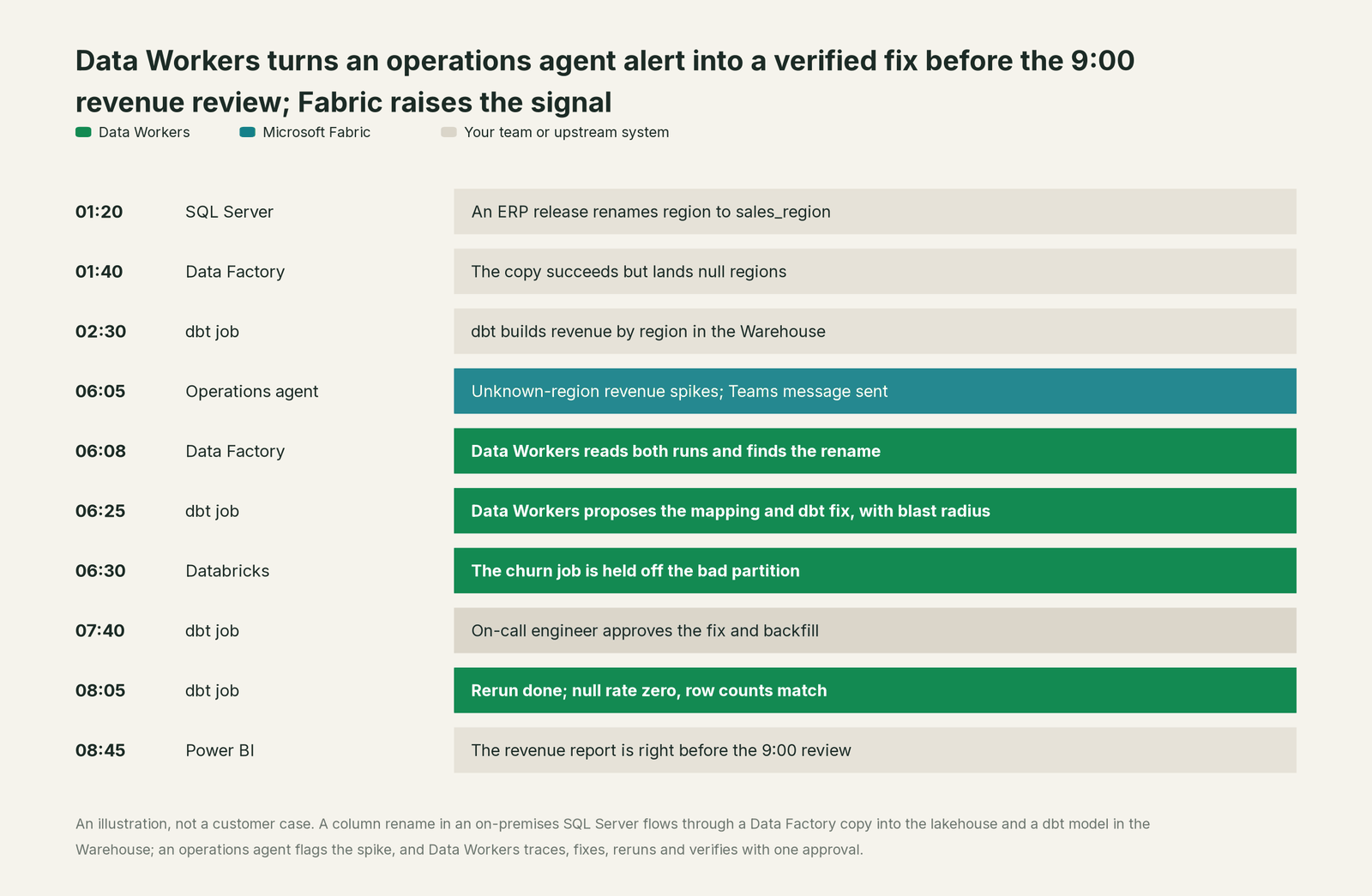
Fabric raised the signal at 06:05, and that signal is useful. The difference between the two products is what happens between 06:05 and 09:00. With Fabric alone, a person spends that window in the monitor hub, the SQL Server, the dbt repo and the report. With Data Workers, one person spends it on one approval.
What Fabric covers, as of October 2026
Microsoft moved fast this year, and FabCon Barcelona (September 28 to October 1, 2026) added more. Here is what Microsoft's own documentation says Fabric ships. Where Microsoft's pages disagree on a status, we use the more conservative one or leave the status out.
| Area | What Fabric ships | Status (Oct 2026) |
|---|---|---|
| Data agents | Natural-language Q&A over up to five sources: lakehouse, warehouse, semantic model, KQL database, mirrored database, ontology and Microsoft Graph. Read-only by design; answers capped at 25 rows and 25 columns | Microsoft's pages differ on status; Copilot Studio integration GA (Aug 2026); MCP endpoint, service principals and Foundry observability in preview |
| Copilot in Fabric | Pipeline generation, summaries and error troubleshooting in Data Factory; DAX and report help in Power BI; KQL in Real-Time Intelligence; SQL in warehouses; "Fix with Copilot" in notebooks behind an approval diff | Data Factory, Power BI and RTI GA; Warehouse and notebook experiences in preview |
| Fabric IQ | Ontology of entity types, relationships, rules and DAX measures bound to OneLake data; graph; ontology agent that "proposes changes for your review" | Fabric IQ in Copilot Chat and Cowork GA (Sept 28, 2026); ontology item and agent in preview |
| Operations agents | Rules run on a five-minute cycle over an eventhouse or ontology; a Teams message with a recommended action; Fabric item and Power Automate actions run after a recipient approves, with the creator's permissions; own Entra Agent ID | Available; root-cause analysis and pre-approved actions in preview (Sept 28, 2026) |
| Data engineering agent | Project Osmos plans, runs and validates Spark work in a lakehouse from GitHub Copilot CLI, Codex or Claude Code | Preview; "not intended for production use" |
| OneLake catalog | Explore, Govern (governance insights, recommended actions, domains, endorsement) and Secure tabs; lineage across Fabric items; Catalog Search API | GA; search API, MCP and CLI tools in preview |
| Purview with Fabric | Sensitivity labels, DLP on structured data, audit of all Fabric user activity, Insider Risk, controls for Copilot and agents | Mixed GA and preview |
| Data Factory | Pipelines, Dataflow Gen2, dbt jobs, Apache Airflow jobs, mirroring (BigQuery GA Aug 2026), approval activity | Mostly GA; dbt job GA Sept 2026; approval activity and Operations Agent for Pipelines in preview |
| MCP | Remote Core MCP (workspaces, items, roles), Fabric IQ MCP (read-only Power BI), Warehouse, Eventhouse, Activator, operations agent, data agent and ontology servers; local Fabric, Data Factory, RTI and Power BI Modeling servers | Mostly preview |
| Platform observability | Workspace monitoring, monitor hub job alerts and capacity views | Preview (Sept 28, 2026) |
That's a strong platform for storing, shaping, analyzing and governing data, and for putting answers in front of everyone who uses Microsoft 365. Every agent row above ends inside Fabric, at an answer, an alert, a recommendation or a task you started. That is where Data Workers picks up.
Why doesn't Fabric just do this itself?
Because Microsoft is building the best data foundation for Copilot and agents, and it made sensible choices about risk to get there.
Fabric sells capacity to every kind of Microsoft tenant, from a five-person BI team to a global bank. To make AI safe at that scale, its agents stay inside the Fabric perimeter and inside each user's permissions. Data agents "strictly enforce read-only access". Copilot "can't, and doesn't, aim to replace the people who today create and manage reports or other Fabric items". Operations agents run actions you configured in advance, after a person approves in Teams, with the creator's rights. Project Osmos works inside one lakehouse task and is in preview. Even the Core MCP Server leaves the safety question to you: Microsoft's docs warn that "autonomous or misconfigured clients may perform destructive actions" and tell you to review your client's approval settings.
Writing to production data across systems is a different product category. It needs blast-radius scoping before every change, approvals that vary by domain, rollback, a receipt an auditor can read, context about every other system in the estate, and the liability for changes inside tools Microsoft doesn't run: your on-premises SQL Server, your dbt repo, your Databricks jobs, your Snowflake share. Taking that on would change what Fabric is and who it's sold to. Microsoft's answer is to give you the building blocks (MCP servers, operations agent actions, Osmos) and let you assemble the operating model. Data Workers is that operating model, already built.
One platform across the data lifecycle
A data team's lifecycle has ten stages: keep context current, answer business questions, check quality, run observability and incidents, build pipelines, evolve schemas and migrate, govern access, protect sensitive data, cut spend and keep models fed. Fabric hosts many of these, and every point tool you add around it brings another console, another contract and another handoff. Data Workers covers the whole lifecycle with one context, one approval flow and one audit trail.
We score the same ten stages on every comparison page, so you can compare tools across pages. Fabric leads on its home stages, Analytics & Insights and Pipelines & Ingestion, which are the core of the product. Data Workers covers all ten.
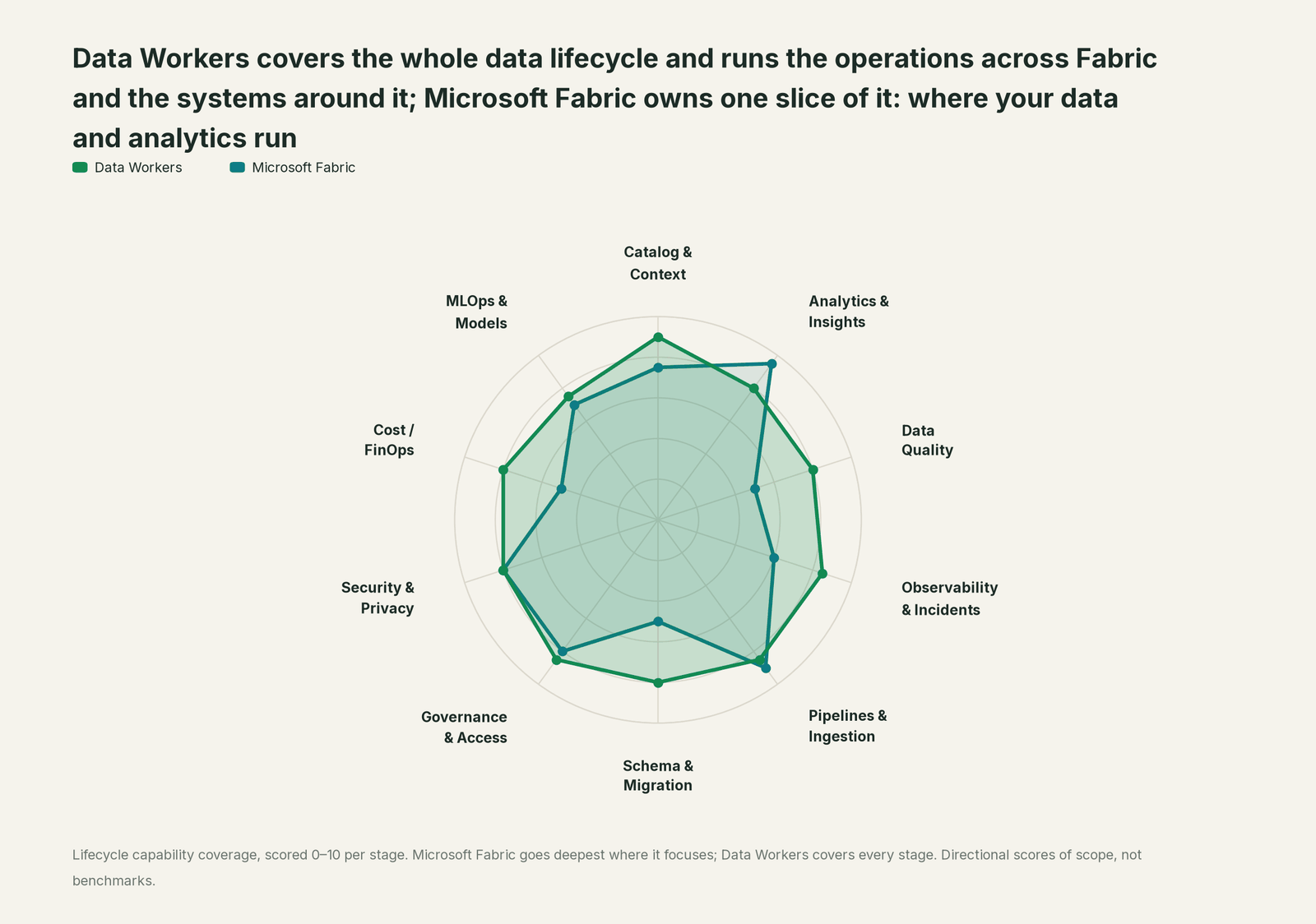
| Stage | Data Workers | Microsoft Fabric | Why we scored it this way |
|---|---|---|---|
| Catalog & Context | 9 | 7.5 | The OneLake catalog, Purview and the Fabric IQ ontology (preview) describe Fabric items and business entities. Data Workers keeps one context graph across Fabric, dbt, other warehouses and on-premises sources. |
| Analytics & Insights | 8 | 9.5 | Fabric's home stage: Power BI, Copilot and data agents answer questions in reports, Teams and Microsoft 365. Data Workers answers across every platform from the same governed graph. |
| Data Quality | 8 | 5 | Checks are built by your team in notebooks, dbt tests or Purview, and Copilot helps write them. Data Workers writes, runs and repairs checks and turns a recurring break into a test upstream. |
| Observability & Incidents | 8.5 | 6 | The monitor hub and operations agents raise the signal and recommend a configured action after a Teams approval. Data Workers owns the loop after the alert: diagnose, fix, verify, record. |
| Pipelines & Ingestion | 8.5 | 9 | Fabric's home stage: Data Factory pipelines, dbt jobs, mirroring, shortcuts and Eventstream move and shape data at scale. Data Workers writes the pipeline change and triggers the rerun behind approval. |
| Schema & Migration | 8 | 5 | Mirroring and shortcuts pick up a source as it lands, and Project Osmos (preview) rewrites lakehouse work on request. Data Workers catches an upstream schema change before the next run and plans moves in parity-checked waves. |
| Governance & Access | 8.5 | 8 | OneLake security roles, the Govern tab, domains and endorsement manage access and ownership inside Fabric. Data Workers works the request queue and proposes least-privilege changes for Fabric to apply. |
| Security & Privacy | 8 | 8 | Entra, Purview labels, DLP and audit protect and log Fabric activity. Data Workers acts with the identity you grant and leaves a tamper-evident receipt on every change. |
| Cost / FinOps | 8 | 5 | The Capacity Metrics app shows which items used capacity units, and on-demand billing changes how you pay. Data Workers finds idle and duplicate work and proposes its removal after a dependency check. |
| MLOps & Models | 7.5 | 7 | Fabric Data Science covers experiments, models and AI functions on OneLake data. Data Workers keeps the data under models healthy and connects to MLflow and W&B. |
The outcomes you buy, side by side
The lifecycle view shows breadth. This view scores eight outcomes a data leader pays for. Fabric leads on three, all on its own ground: answers in the Microsoft 365 apps people already use, help inside Fabric items, and one business vocabulary on OneLake data. Data Workers leads on the five outcomes that sit after the alert or outside Fabric.
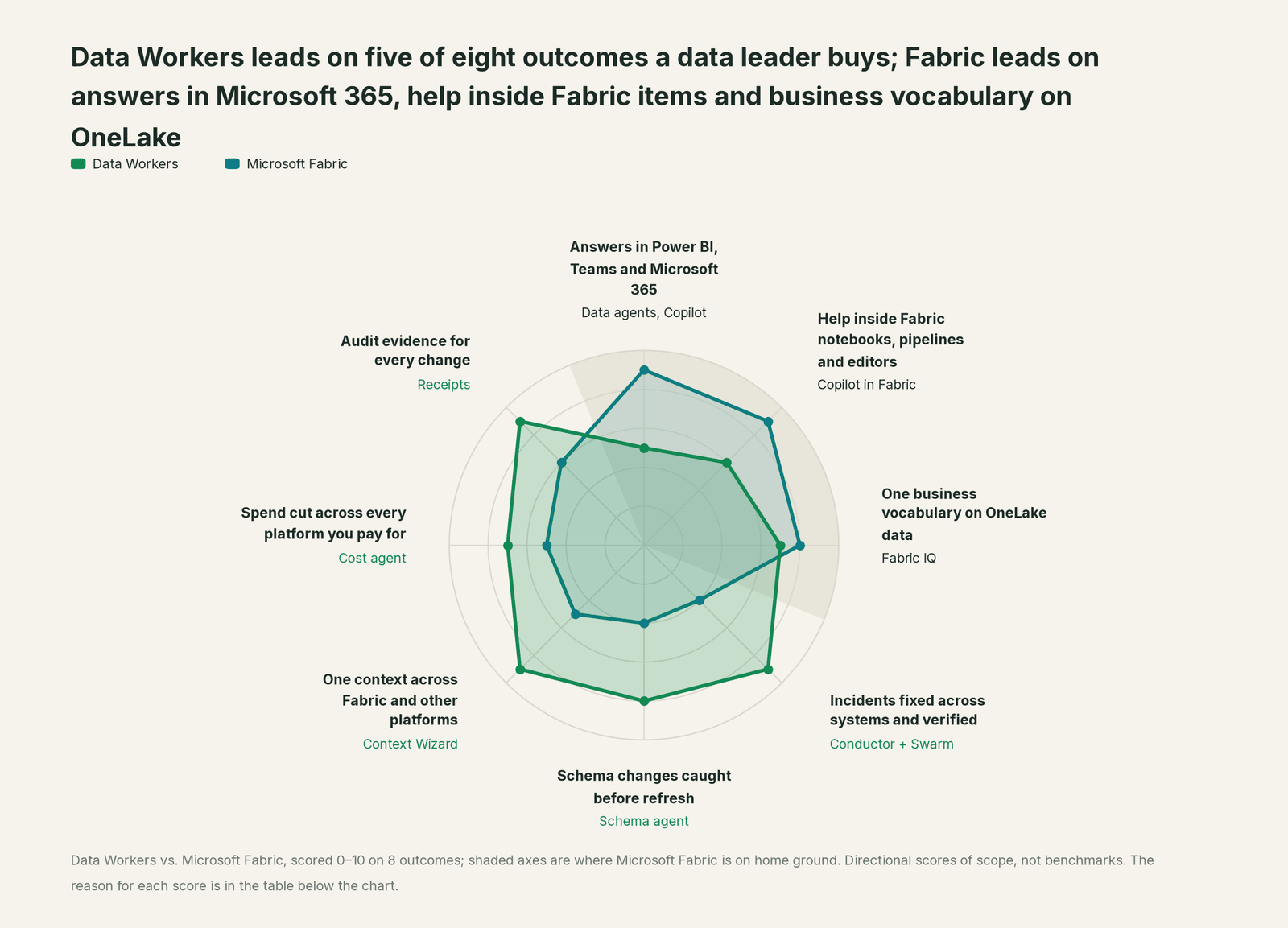
| Outcome | Data Workers | Microsoft Fabric | Why we scored it this way |
|---|---|---|---|
| Answers in Power BI, Teams and Microsoft 365 | 5 | 9 | Data agents publish into Microsoft 365 Copilot, Copilot Studio and Teams, and Copilot works in every Power BI report. Data Workers' business-user app is Spellbook Data Catalog (preview), with Teams and Slack access coming. |
| Help inside Fabric notebooks, pipelines and editors | 6 | 9 | Copilot generates, summarizes and troubleshoots pipelines, writes DAX, SQL and KQL, and fixes notebook cells behind an approval diff. Data Workers works through the coding agent your team already uses and through Spellbook. |
| One business vocabulary on OneLake data | 7 | 8 | The Fabric IQ ontology (preview) binds entities, rules and DAX measures to OneLake data, and its agent proposes changes for review. Data Workers reads that context and joins it to lineage, quality and incident history across platforms. |
| Incidents fixed across systems and verified | 9 | 4 | Operations agents detect a condition and run a configured Fabric action after a Teams approval. Data Workers traces the cause from SQL Server to Data Factory to dbt, fixes it where it starts and checks the report downstream. |
| Schema changes caught before refresh | 8 | 4 | A renamed source column flows through a copy activity and shows up as nulls or a failed refresh. Data Workers sees the change, maps its blast radius through pipelines, dbt and semantic models, and proposes the fix first. |
| One context across Fabric and other platforms | 9 | 5 | Mirroring and shortcuts bring Snowflake, BigQuery, Databricks and S3 data into OneLake to read. Data Workers keeps one governed graph across Fabric and those platforms where they run, including Purview metadata. |
| Spend cut across every platform you pay for | 7 | 5 | The Capacity Metrics app shows capacity units by item and operation. Data Workers reads Fabric usage over MCP today, next to Snowflake, Databricks and BigQuery, and recommends removing waste after a dependency check. |
| Audit evidence for every change | 9 | 6 | Purview Audit logs every Fabric user activity, which is strong evidence of what happened. Every Data Workers change also records why, what it touched downstream, who approved it and how to undo it. |
These are directional scores of scope, not benchmarks. We've shown the reasoning so you can check every line.
Where Fabric stops
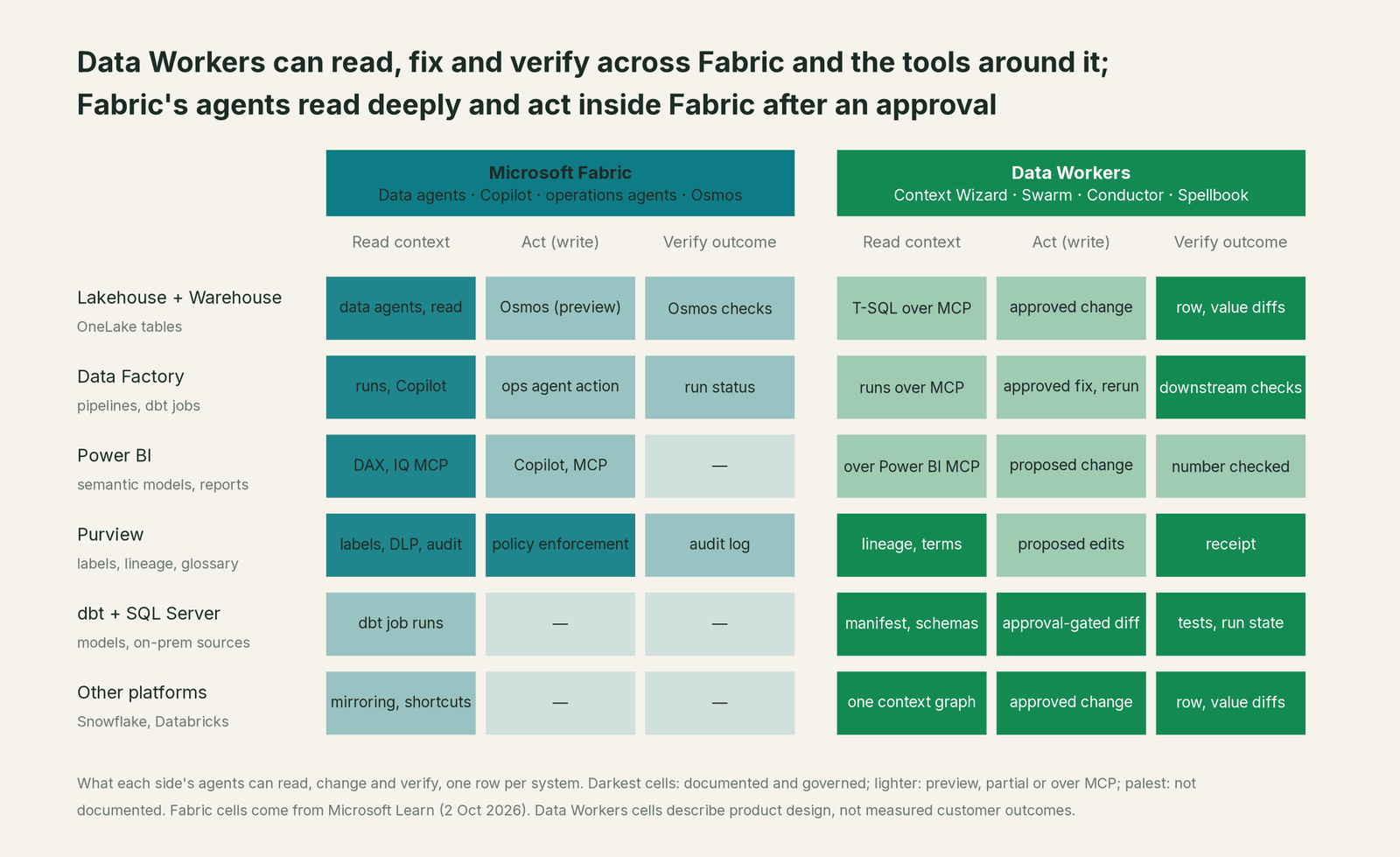
Each limit below comes from Microsoft's own documentation, and each follows from Fabric's choice to keep its agents inside its own perimeter and inside each user's permissions.
Data agents read. The data agent documentation says it "only generates SQL, DAX, and KQL 'read' queries" and doesn't trigger notebooks, anomaly detection jobs or other write workflows. Answers are capped at 25 rows and 25 columns. That's the right design for conversational analytics, and it means the agent can explain a wrong number but can't fix it.
Operations agents run what you configured. An operations agent picks from the actions you set up in advance (a notebook, a pipeline, a user-defined function or a Power Automate flow), and the action runs after a recipient approves it in Teams, with the creator's permissions. It doesn't change a dbt model, a SQL Server source or a Databricks job, and it doesn't verify that the report is right afterwards. Root-cause analysis is in preview.
Copilot assists one person in one item. Copilot troubleshoots a pipeline error or proposes a notebook fix while someone is in that item. Nobody is on call when that person logs off, and nothing ties the pipeline fix to the dbt model and the semantic model it affects.
Osmos is one task in one lakehouse, in preview. Project Osmos plans, runs and validates Spark work you started from a command line, with operating settings you review first. Microsoft says it's "not intended for production use" while in preview, and its scope is the lakehouse task, not the estate.
Lineage and context end at the edge of OneLake. The OneLake catalog traces lineage across Fabric items. Mirroring and shortcuts bring other platforms' data in to read, but the dbt project in your repo, the on-premises source's schema history and the Databricks job that writes to a shortcut target sit outside it.
Where the two overlap
"Both" means Data Workers uses the Fabric capability and does the work around it.
| Job to be done | Microsoft Fabric | Data Workers | What we recommend |
|---|---|---|---|
| Storage and compute | OneLake, Lakehouse, Warehouse, Eventhouse | Not our job | Fabric |
| Access enforcement | Workspace roles, OneLake security, Entra | Works the request queue and proposes least-privilege changes for Fabric to apply | Both: Fabric enforces, Data Workers operates |
| Questions over Fabric data | Data agents, Copilot in Power BI, Fabric IQ in Copilot Chat | Spellbook chat (preview) across every platform | Both: Fabric for Microsoft 365 users and Fabric-only questions, Spellbook when the answer spans platforms or turns into a fix |
| Business vocabulary | Fabric IQ ontology (preview), semantic models | Ingests both as first-class sources, joined to lineage and incident history | Both: Fabric IQ stays the source for Fabric definitions |
| Catalog and governance | OneLake catalog, Purview | Spellbook Data Catalog as the control plane for agent work; Purview read through our connector | Both: the OneLake catalog and Purview stay authoritative |
| Pipeline authoring | Data Factory, Copilot, Osmos (preview) | Pipeline Building agent across dbt, Airflow, Dagster and Prefect; Fabric over its MCP servers today | Fabric for Fabric-only builds; Data Workers for mixed stacks |
| Alerting | Operations agents, monitor hub, Activator | Uses those alerts as inputs | Fabric |
| Incident resolution | Recommended action after a Teams approval | Autonomous Data-Conductor: detect, diagnose, fix, review, verify across systems | Data Workers, starting from Fabric's alert |
| Schema changes | Visible after the run | Schema Evolution and Data Change Review agents | Data Workers |
| Capacity and spend | Capacity Metrics app, on-demand billing | Removes idle and duplicate work after a dependency check | Both: Fabric reports, Data Workers acts |
| Sensitive data | Purview labels, DLP | Proposes label and policy changes for Purview to apply; receipts | Both |
| Migrations | Microsoft migration tooling for Data Factory and warehouses | Plans waves, checks parity row by row | Both |
What it costs as agents do more of the work
Fabric is priced as capacity. Copilot and agents draw on the same capacity units as your pipelines and refreshes: Microsoft's Copilot overview warns that Copilot consumption can lead to "throttling and disruption of your other Fabric operations", and Project Osmos bills its model tokens as capacity units under the Copilot and AI meter. On-demand billing, generally available since FabCon, changes how you pay for peaks. It doesn't remove the work behind them.
Data Workers is priced the other way round. The Apache 2.0 core is free. The Pilot Program is $7,500 one-time, credited in full against your first year. Scale starts at $1,000 a month and Enterprise at $3,000 a month, billed annually. Seats are unlimited, there's no usage meter, and there's no markup on model spend because you bring your own model. See pricing. The only Fabric capacity Data Workers uses is for the queries and reruns it issues under the identity you grant, and its cleanup work aims to give capacity back.
The case for your CFO
The outcome. Today Fabric turns data problems into alerts and answers, and engineers turn them into fixes. Data Workers closes that second step for the work you allow, so failed runs become closed incidents with a receipt, and the Power BI reports leadership reads are right before anyone opens them. The same platform drains the access queue and gives capacity back.
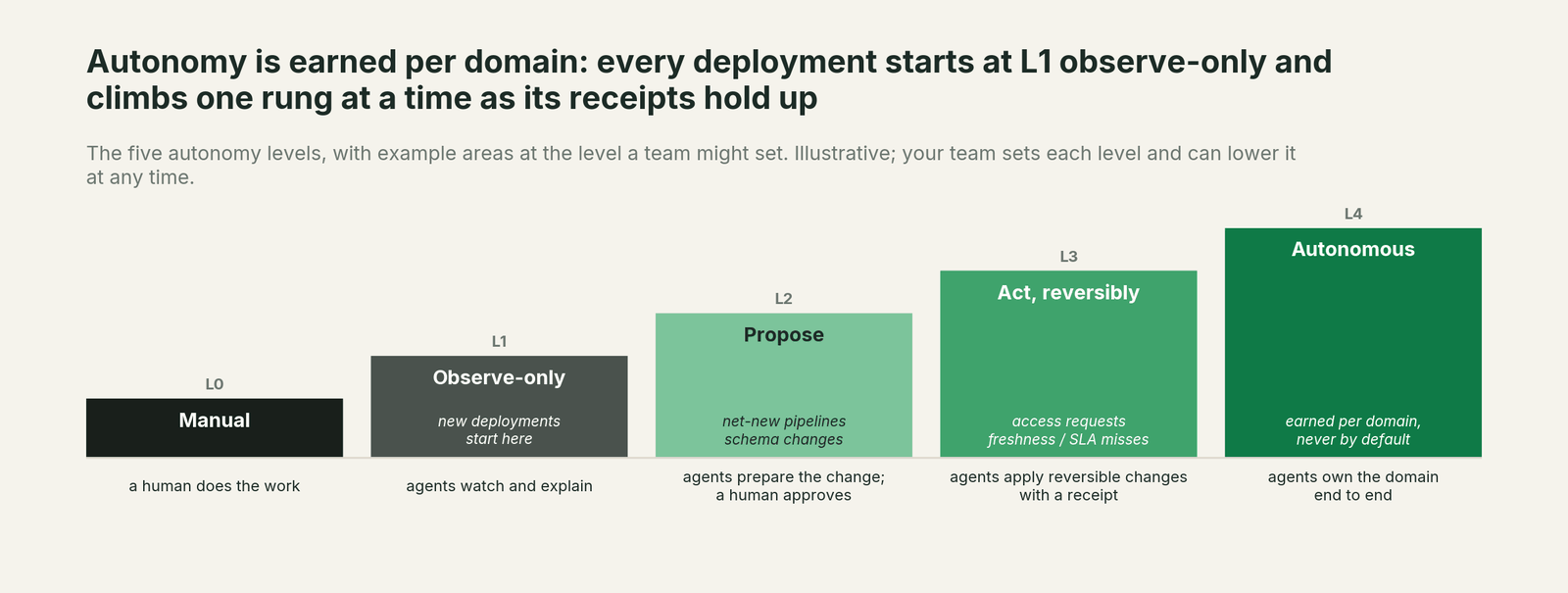
The risk story. Data Workers starts observe-only (L1): it reads and reports. At propose (L2) every fix is a draft a person approves. At act reversibly (L3) it runs only changes it can undo, and only in the domains you've moved up. Autonomous (L4) is a per-domain choice, never a default. Every write is scoped before it runs, no agent can promote its own work, and every receipt records who or what acted, why, what it touched and how to undo it. Zero migration: your data stays in OneLake and the systems around it.
Why now. Agents can already create, change and delete Fabric items through the Core MCP Server, using whatever identity they're given. The question is whether those changes run through one governed loop across the estate or through individual sessions.
The first win. Failed pipelines and refreshes in one workspace, handled in propose mode.
What stays the same. Fabric, OneLake, Purview, Entra, Power BI, your data agents and Copilot, and the coding agent your engineers already use.
The path. Start with a pilot. See pricing; the pilot is credited in full against the first year.
The sentence to repeat upstairs: "Fabric holds our data, our reports and the agents that answer questions; Data Workers fixes what breaks across Fabric and the systems around it, behind our approvals, with a receipt for every change."
The fastest first win: failed pipelines and refreshes
Start with the failures that end the same way every time. A failed copy, a dbt job that ran on bad input or a refresh that never completed usually needs a mapping fix, a rerun and a check. Point Data Workers at one workspace with that domain in propose mode. Each failure arrives in the Spellbook inbox with the root cause, the proposed fix or rerun and its blast radius through semantic models and reports. When your team has approved those proposals as-is for a few weeks, move the domain up to reversible actions. Your operations agents keep alerting throughout. The playbook covers the full sequence in From Microsoft Fabric to an autonomous data platform.
What each Data Workers product does on Fabric
Autonomous Data-Conductor. The orchestrator that owns an outcome rather than a step. It runs detect, diagnose, fix, review, verify and remember across the estate, directs the right agents, scopes the blast radius before acting and leaves a tamper-evident receipt on every change. Operations agent alerts, monitor hub failures and Purview findings are inputs to the detect step.
Data-Agents Swarm. 20+ specialist agents. On Fabric the ones that matter most are the Incident Debugging agent, the Pipeline Building agent, the Schema Evolution agent, the Data Change Review agent, the Quality Monitoring agent, the Data Access & Governance and Identity agents for the request queue, and the Cost Savings & Cleanup agent. For Eventhouse, a read-only tool previews a KQL query's plan and cost before anything heavy runs.
Data Context Wizard. One governed graph across Fabric and everything around it. Its Purview connector reads assets, lineage, glossary terms and classifications, and description updates are proposed for your Purview owners to approve. Its Azure Blob and ADLS Gen2 connector reads containers and dataset schemas. It reads your dbt manifest and the Snowflake, Databricks and BigQuery estates beside Fabric, and every fact carries its source, author, confidence and the time it was observed.
Spellbook Data Catalog. The control plane for agent work, in preview. Every proposed change lands in one inbox (approve, steer, send back or roll back), asset pages cover the whole estate, and an authority guard enforced in code stops any agent from promoting its own work. The OneLake catalog stays Microsoft's governance surface for Fabric items, and Purview stays the protection and audit layer.
Autonomy guardrails and security
Fabric manages agent risk by keeping its agents read-only or approval-bound and inside each user's permissions. Data Workers lets agents act, under graded, reversible control, because that's how incidents get closed.
- •Autonomy is set per domain. Failed-run fixes can run at L3 (act, reversibly) while schema changes stay at L2 (propose).
- •New deployments start observe-only. You extend autonomy one domain at a time as the receipts earn trust.
- •Every write is scoped before it runs, with blast radius computed across Fabric items and the systems around them.
- •Every action is approved or reversible, and leaves a tamper-evident receipt.
- •No agent can promote its own work. This is enforced in code, not left to a prompt.
- •Least privilege. Data Workers acts with the Entra identity and Fabric roles you grant, so workspace roles, OneLake security and Purview policies still apply to everything it touches.
"Fabric has MCP servers and operations agents. Doesn't that close the gap?"
It closes part of it. With the Core MCP Server, an engineer's coding agent can create a lakehouse, update an item or add a contributor, and the Warehouse and Eventhouse servers let it query data. Operations agents can run a pipeline after someone approves in Teams. That beats clicking through the portal.
It's still one session or one pre-configured action at a time. Microsoft's own guidance leaves approvals to your MCP client's settings. Nobody scopes the blast radius across dbt and Databricks, gates the change by domain, verifies the report afterwards or records the outcome in a shared graph. MCP gives an agent one more tool. Data Workers gives you an operating model across the estate, and every Data Workers agent is itself an MCP server your coding agent can call, next to Fabric's.
How it fits together
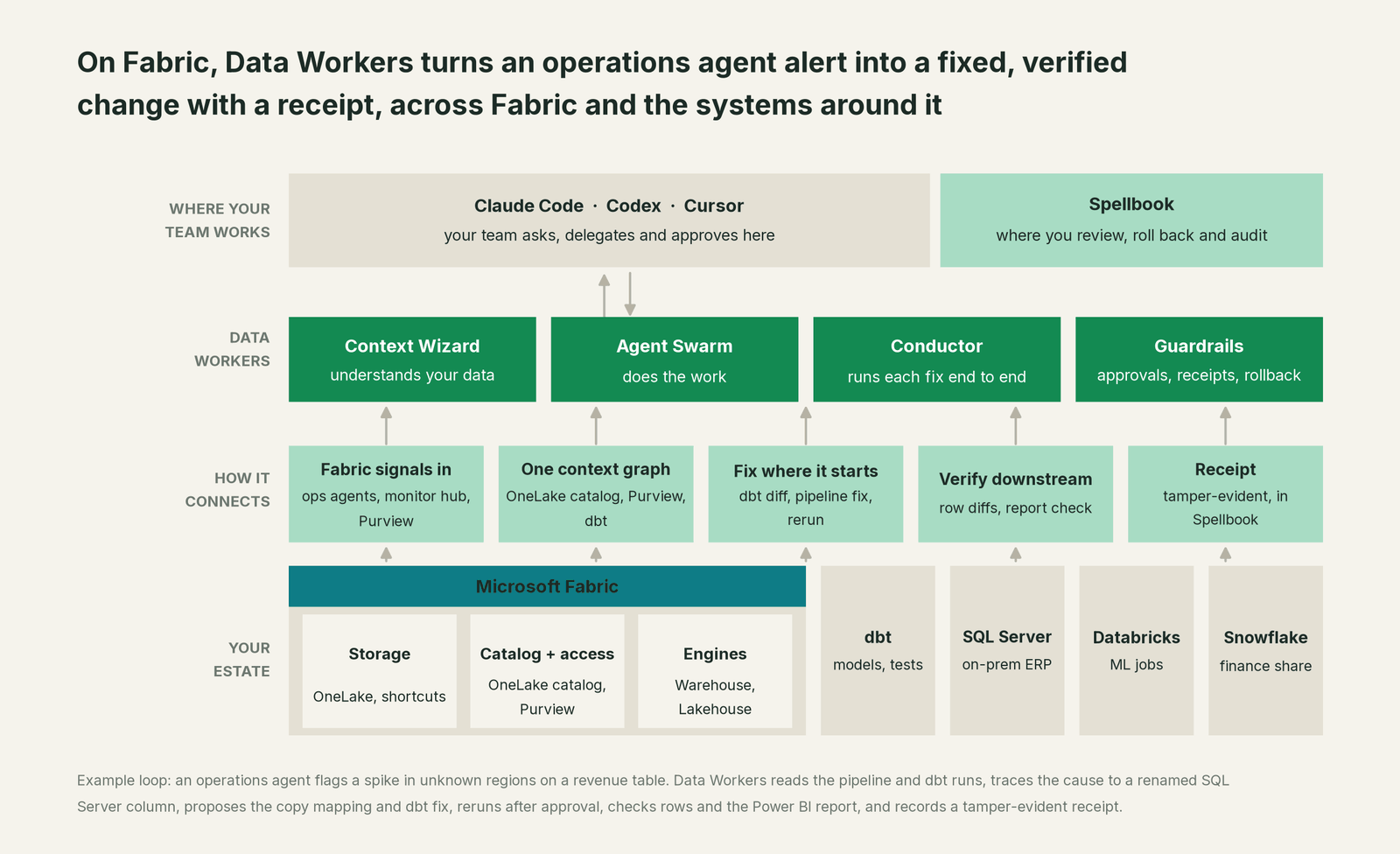
Getting started takes no migration. Connect Data Workers to Fabric over its MCP servers and REST APIs with a scoped identity, then add Purview, your dbt project, your on-premises sources and the platforms beside Fabric. The Context Wizard builds the graph, every agent starts in observe-only mode, and the first thing you see is what each recent failure's fix would have been, with its blast radius.
When Fabric alone is enough
Fabric alone can be enough if your whole estate lives in Fabric, your transformations run in Data Factory and dbt jobs inside it, your sources are already mirrored, and your main need is answers in Power BI and Microsoft 365. Data agents and Copilot do that well. If your engineers spend their mornings between a monitor hub failure and a correct report, or your critical path crosses into SQL Server, Databricks or Snowflake, that window is the work Data Workers takes on.
FAQ
Does Data Workers replace Purview or the OneLake catalog? No. The OneLake catalog stays the governance surface for Fabric items and Purview stays the protection, labeling and audit layer. Data Workers reads Purview through its connector, and Spellbook is the approval and audit plane for changes agents propose.
How is this different from Fabric data agents? Data agents answer questions with read-only queries over Fabric data. Data Workers does the operating work: it fixes what broke across Fabric and the systems around it and verifies the result. Many teams keep data agents for Microsoft 365 users. Our earlier comparison covers that question in more depth.
Don't operations agents already take action? They run an action you configured, after a person approves in Teams, with the creator's permissions. Data Workers takes the alert as an input, finds the cause wherever it is, proposes the fix there, verifies the report and records a receipt.
Can our data agents or Copilot Studio agents call Data Workers? Yes. Every Data Workers agent is an MCP server, so any MCP-capable client or agent runtime can call it, alongside Fabric's own MCP servers.
Does Data Workers use our Fabric capacity? Only for the queries and reruns it issues under the identity you grant. Reasoning runs in the Data Workers agents in your own infrastructure, with your own model key.
What leaves our tenant? Metadata and facts about your data (definitions, lineage, owners, incident history), not copies of your tables. PII is redacted from what agents write to the graph, tenants are isolated, and the agents run in your infrastructure on every tier. Your data stays in your systems; the hosted Conductor sees workflow metadata only.
What happens if an agent gets a fix wrong? Data Workers scopes every write before it runs and sends it to review at the autonomy level you set for that domain. Every action is approved or reversible and leaves a tamper-evident receipt. No agent can promote its own work.
Is Data Workers open source? The Data Workers core is Apache 2.0 and free to run. See pricing for what the platform adds.
Sources
Microsoft Fabric capabilities and statuses are current as of October 2, 2026, from Microsoft's own documentation and announcements: Fabric data agent concepts, What's new in Fabric, release status of AI and Copilot in Fabric, Copilot in Fabric overview, What is Fabric IQ?, operations agents and operations agent actions, Project Osmos overview and consumption, OneLake catalog overview, Purview with Fabric, Fabric MCP servers overview, Core MCP Server, the Fabric MCP server directory and the FabCon and SQLCon 2026 announcement (September 28, 2026). Product names and statuses change quickly; if we've got something wrong, tell us and we'll fix it.