From Microsoft Fabric to an Autonomous Data Platform: A Stage-by-Stage Playbook
A practical path from a hands-on data team on Microsoft Fabric to an agentic enterprise: five autonomy levels across OneLake, Data Factory, lakehouses, warehouses and Power BI, what to turn on at each, and when to move up.
Our mission is to help traditional data teams and data platforms become agentic enterprises. This playbook is the practical version of that mission for teams whose estate runs on Microsoft Fabric: Fabric is where your data lives and your analytics run, and Data Workers is the agentic data platform that runs the whole estate, Fabric included.
Most Fabric teams today are a hands-on team with a well-integrated set of workloads. Everything lands in OneLake, some of it through mirrored databases and shortcuts to ADLS or S3. Data Factory pipelines and Dataflow Gen2 move and shape it. Notebooks write the lakehouse tables, Fabric Warehouse serves SQL, and Power BI semantic models and reports are where the business looks. Workspaces sit on F-SKU capacities. The OneLake catalog and its Govern tab show lineage, endorsement and governance insights, OneLake security roles decide who sees which rows and columns, and Microsoft Purview applies sensitivity labels and DLP.
Microsoft has put AI into almost every one of those workloads. Copilot drafts a pipeline, a query or a DAX measure for the person in front of it. The Data Factory error message assistant explains a failed pipeline and suggests what to check. Fix with Copilot, in preview, proposes a code change to a failed notebook as an approval diff. Fabric data agents answer questions over lakehouses, warehouses and semantic models, read-only by design. The operations agent watches live data and recommends business actions for someone to approve in Teams. Each is good at its own job. The engineers are still the ones who notice the failed refresh, trace it to the source column that changed, rerun the load, work the access queue and explain why the capacity throttled at 10 a.m.
An autonomous data platform changes who does that work. Agents run the back office (access, pipelines, schema changes, catalog upkeep, capacity spend, incidents and audit evidence) across OneLake, Data Factory, lakehouses, warehouses and Power BI, and across Azure Databricks, Snowflake, dbt, Airflow or Tableau when they're in the picture. People set the rules, approve what needs approving and handle the exceptions. You get there one domain at a time, moving up a ladder as the evidence builds. For what Fabric covers workload by workload and how Data Workers connects, see Data Workers on Microsoft Fabric.
The timing is good. Fabric is consolidating the Microsoft analytics estate onto one OneLake, Microsoft ships REST APIs and an MCP server for Fabric, and Purview now governs Fabric's own Copilots and agents. The surface an agent platform needs to read and act across your estate is already there, so connecting and observing is a setup task.
Key takeaways
- •Five levels, set per domain. L0 manual, L1 observe, L2 propose, L3 act on reversible changes, L4 fully autonomous. Access requests can run at L3 while schema changes are still at L2.
- •Entra, workspace roles and OneLake security stay the lock. Every agent acts as a service principal with the roles you give it, so nothing goes around your existing controls.
- •You move up on evidence, not faith. Every change leaves a tamper-evident receipt. A domain moves up when its receipts show the agents have been right, and it can be moved down at any time.
- •The first quarter is concrete. Connect and observe, then turn on proposals for access, failed runs and capacity spend, then let the reversible fixes run on their own.
The five levels
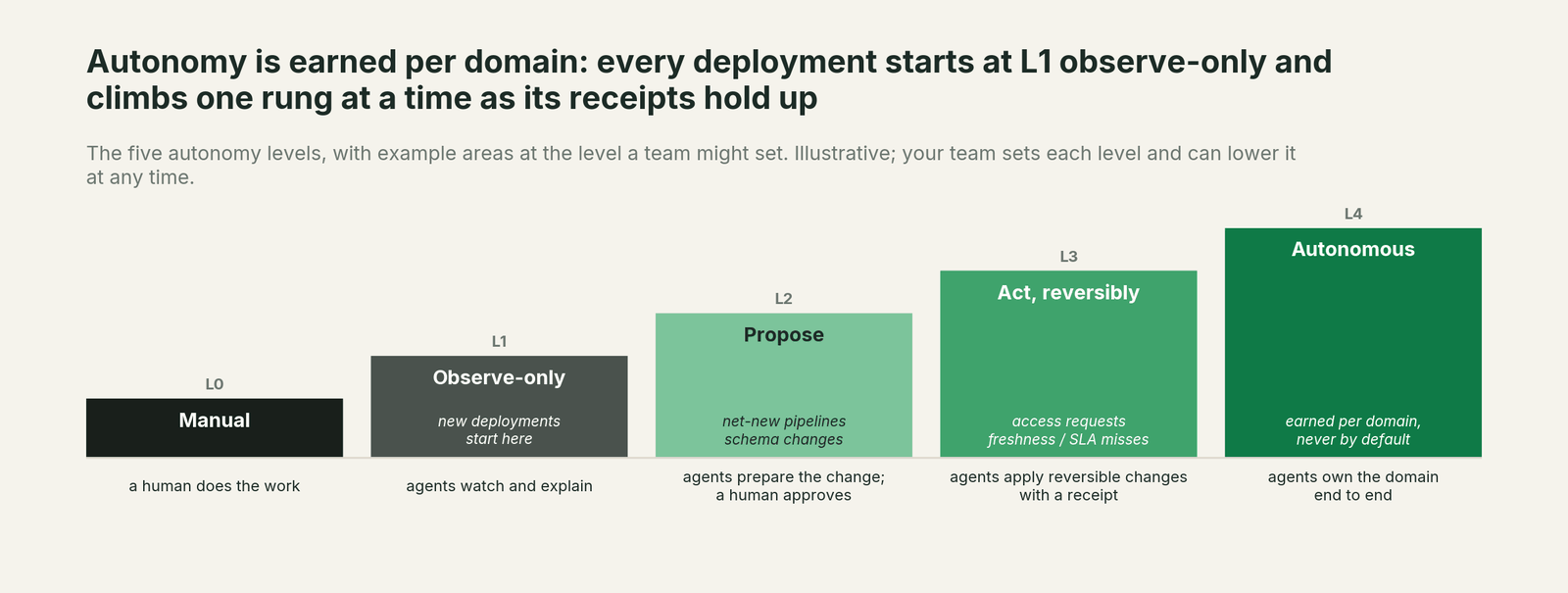
| Level | What agents do | What people do | Typical Fabric domains at this level |
|---|---|---|---|
| L0 Manual | Nothing on their own. Copilot helps a person who asks. | All of the work. | Where most Fabric teams are today. |
| L1 Observe | Read OneLake catalog metadata and lineage, workspace roles and OneLake security roles, pipeline and notebook run history, semantic model refreshes, Purview labels and capacity usage, build the context graph, and explain what's happening. | Read the explanations, correct the context. | Every domain on day one. |
| L2 Propose | Prepare the complete change: the OneLake security role change, the notebook fix and rerun, the refresh schedule, the migration batch, with a blast-radius report. | Approve, steer, send back. | Schema changes, sensitivity labels, catalog and ontology metadata. |
| L3 Act, reversibly | Apply changes that can be undone, inside a pre-approved blast radius, check the result and leave a receipt. | Review receipts; roll back if needed. | Access requests, failed runs, capacity spend. |
| L4 Autonomous | Own the domain end to end: detect, fix, verify and remember. | Set policy; handle exceptions. | Earned per domain, never by default. |
What to turn on at each level
L1: Connect and observe.
Register Data Workers as a service principal in Entra, give it Viewer on the workspaces in scope, and connect it to the tools around Fabric: dbt, Airflow, Azure Databricks or Snowflake if you run them, and Tableau if Power BI isn't your only BI tool. Fabric workspaces, OneLake, pipeline runs and capacity data connect over the Fabric REST APIs or MCP today. Data Workers reads Microsoft Purview directly: assets, lineage, glossary terms and classifications. Nothing moves and nothing is copied.
Two Fabric settings make this level richer. A tenant admin has to allow service principals to use Fabric APIs, for the security group that holds the Data Workers principal. And turn on OneLake diagnostics, so data access through OneLake APIs is recorded in a lakehouse you choose, next to the Fabric audit log that already records control-plane changes.
Data Context Wizard builds one governed graph from all of it: OneLake catalog and Purview metadata, OneLake security roles, Data Factory and notebook run history, semantic model refreshes, capacity usage, dbt and anything outside Fabric. Spellbook Data Catalog (in preview) turns that graph into asset pages your team can read and correct.
What you get right away: lineage that runs from an Azure SQL source through a mirrored database, a pipeline and a lakehouse into the semantic model and the report, an incident history that shows where problems really start, and a first map of who has access to what and which workloads use your capacity.
Move up when: your team trusts the graph. Owners and definitions are corrected, and the agents' account of last month's failed refreshes matches what your engineers found.
L2: Propose in three domains.
Pick three domains with high volume and clear rules. For most Fabric teams that's access requests, failed runs, and capacity spend.
- •Access requests. Requests for a lakehouse table or a warehouse wait on a workspace admin or member, who adds someone to a workspace role or shares the item, often with more access than the request needed. The Data Access & Governance agent and the Identity agent turn each one into a least-privilege, time-boxed change: membership in a OneLake security role scoped to the tables, rows and columns the policy allows, ready for the owner to approve.
- •Failed runs. A pipeline fails, a notebook writes nulls, or a semantic model refresh errors out. The Autonomous Data-Conductor and the Incident Debugging agent trace the failure to its cause, often an upstream change in a mirrored source or a shortcut, and propose the fix and the rerun.
- •Capacity spend. The Fabric Capacity Metrics app shows throttling and the heaviest operations, and leaves the follow-up to you. The Cost Savings & Data Cleanup agent proposes what to change: refreshes that overlap at peak hours, items nobody has opened in months, duplicate copies of the same table, each with a dependency check.
Every proposal lands in the Spellbook inbox with its blast radius. People can also ask and approve from the coding agent they already use, whether that's GitHub Copilot in VS Code, Claude Code, Codex or Cursor.
What you get: the toil arrives prepared. An access request arrives as a ready-to-approve role change. A failed refresh arrives with its root cause and a fix attached.
Move up when: a domain's proposals are approved as-is, week after week, with no reversals.
L3: Let the reversible work run.
For domains that pass, let agents apply reversible changes inside a blast radius you define: role memberships that expire, reruns and backfills, moved refresh schedules, and archiving unused tables instead of dropping them. On Fabric, every change goes through the workspace roles and OneLake security roles you grant Data Workers, so the controls you already audit stay in force. A fix isn't done until the pipeline reruns, the row counts and tests check out, the semantic model refreshes and the report number is right. Each change is reversible and leaves a tamper-evident receipt.
At the same time, move the next domains to L2:
- •Schema changes. The Schema Evolution agent sees an upstream change (a renamed column in an Azure SQL or Dataverse source, a new field arriving through a shortcut) before the next pipeline run, and proposes the notebook, view and semantic model changes. The Data Change Review agent checks them before they merge through Fabric's Git integration.
- •Sensitivity labels. Agents propose Purview sensitivity labels for new tables and columns and the OneLake security roles that follow from them. Purview and OneLake security stay the enforcement points.
- •Catalog and ontology metadata. Copilot suggests measure descriptions, and the Fabric IQ ontology agent proposes ontology changes for review. Data Workers checks those against lineage, usage and the definitions in your other tools, and sends a reviewed batch to the owner.
What you get: the first real hours back. Most access requests and failed-run alerts now close on their own, with a receipt your auditors can read.
Move up when: the reversal rate stays near zero and exceptions are rare and well understood.
L4: Autonomous, domain by domain.
A domain at L4 is owned end to end. The Conductor detects the problem, has the right agent fix it wherever it lives, confirms the downstream number is right, and records what happened so the next occurrence is faster. People set policy and handle what the agents escalate. You'll reach L4 in some domains within a few quarters. Net-new pipeline design and sensitivity policy may stay at L2 for a long time, and that's fine.
This is also the right time for the migrations a Fabric program puts on your roadmap. The Data Migration agent plans reviewable waves for an Azure Synapse dedicated SQL pool or an on-premises SQL Server warehouse moving into Fabric Warehouse, or for older Power BI datasets moving onto lakehouse tables. It proves parity with row counts, checksums and statistical profiles, and cuts over while the old system stays live. Each wave is one approval.
A first quarter on Microsoft Fabric
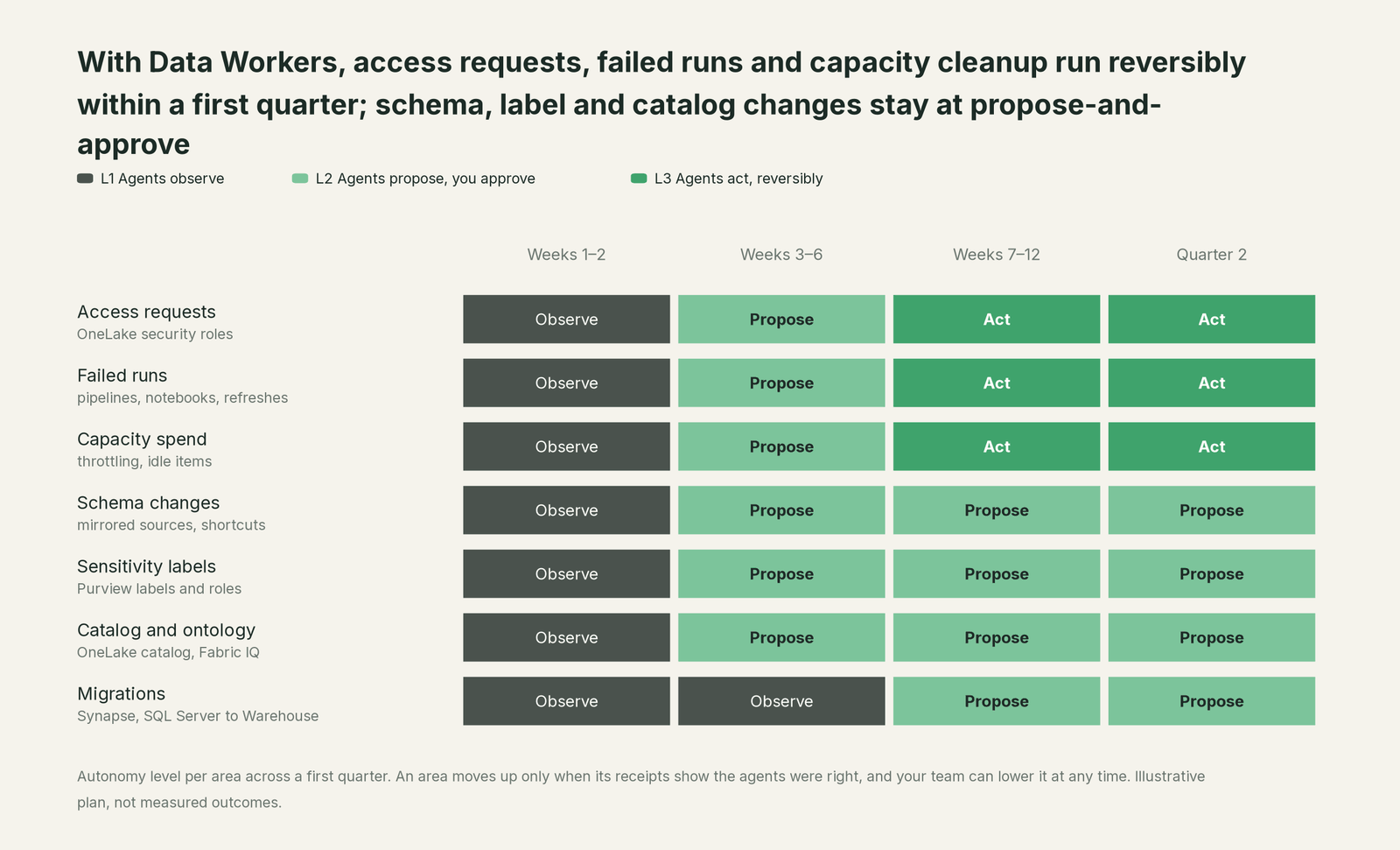
This is an illustrative plan, not a promise. Access requests, failed runs and capacity spend reach reversible changes by the end of the first quarter. Schema changes, sensitivity labels and catalog and ontology metadata spend the quarter at propose-and-approve. Migrations are planned in the first quarter and run in waves after it. The pace depends on how clean your context is and how much evidence each domain builds up.
How to measure progress
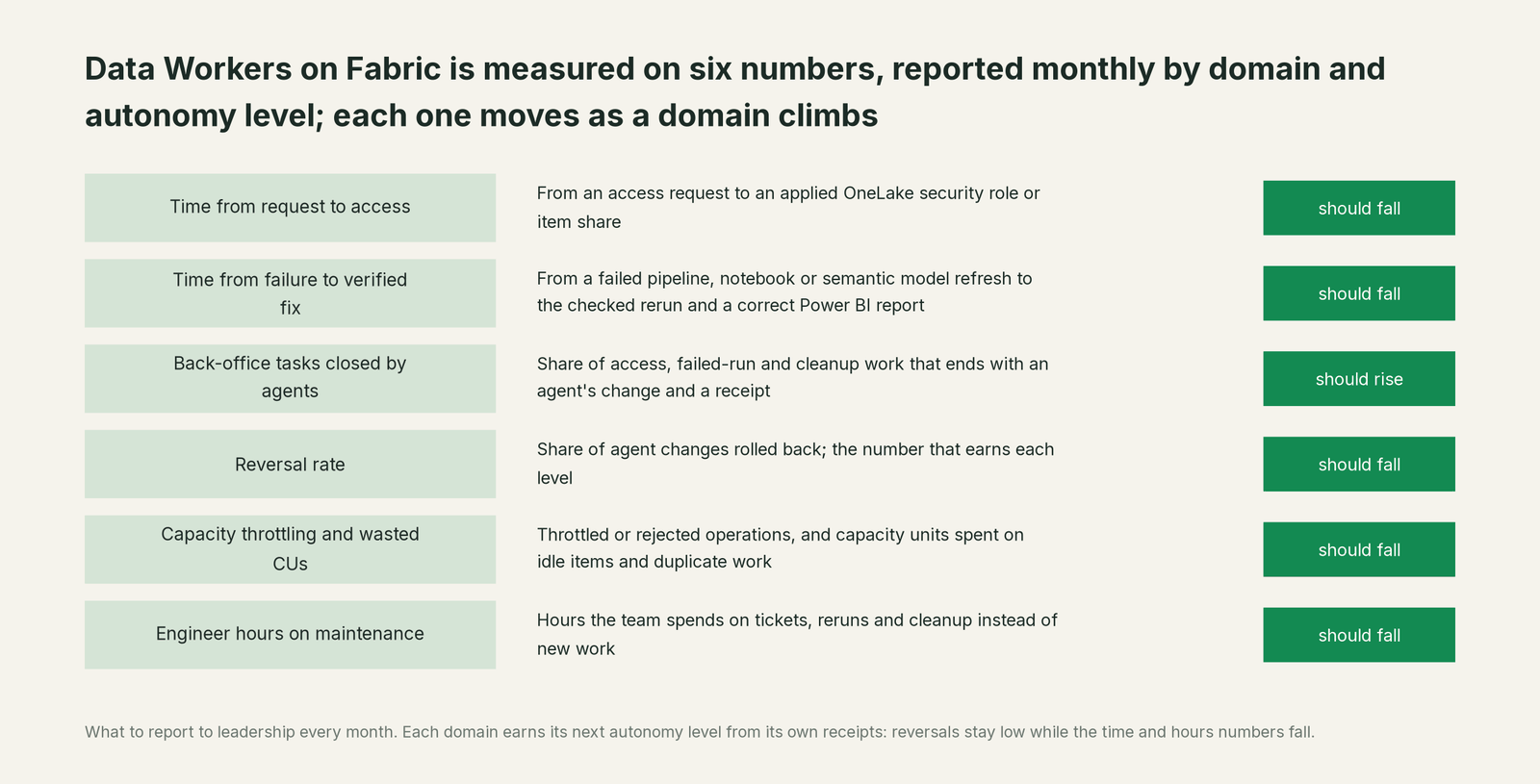
Report these to your leadership every month, by domain and level:
- •Time from request to access. From the access request to an applied OneLake security role or item share. This is usually the first number to move.
- •Time from failure to verified fix. From the failed pipeline, notebook or semantic model refresh to the moment the rerun is checked and the Power BI report is right.
- •Share of back-office tasks closed by agents. How many access requests, failed runs and cleanup items ended with an agent's change and a receipt, split by the level each domain runs at.
- •Reversal rate. The share of agent changes that were rolled back. This is the number that earns each level.
- •Capacity throttling and wasted CUs. Throttled or rejected operations, and capacity spent on idle items and duplicate work, month over month, with the changes that moved them.
- •Engineer hours on maintenance. The number the whole program exists to shrink.
Why doesn't Fabric do this itself?
Because Microsoft built each AI experience for one workload and one person, and that's the right design for a platform that serves every kind of user from the analyst to the executive. Fabric data agents strictly enforce read-only access and answer as the person asking. Copilot drafts the pipeline, query or fix and the person commits it, and Microsoft says plainly that Copilot aims to augment the people who build and manage Fabric items. The operations agent recommends actions on business data that a person approves in Teams.
Writing to production across a mirrored source, a pipeline, a lakehouse, a semantic model and tools Microsoft doesn't run (dbt, Airflow, Databricks, Snowflake, Tableau) is a different product. It needs blast-radius scoping, approvals, rollback, receipts, context about every other system, and responsibility for changes outside Fabric. That's the product Data Workers is.
The case for your CFO
The outcome is a data team that spends its hours on new work while the back office runs itself: access granted the same day it's asked for, failed refreshes fixed and checked before the business opens the report, and a Fabric capacity that stops throttling because the waste behind it is removed instead of bought around.
The risk story is short. Agents start read-only. They earn each level per domain on their own record, act only through the Entra principal, workspace roles and OneLake security roles you grant, and leave a receipt on every change: who or what made it, why, what it touched and how to undo it. Anything irreversible needs a named person's approval. Nothing is migrated to start.
Why now: Microsoft is consolidating analytics onto OneLake and building agents into every workload, so the estate is connected enough for one platform to run it. The first win is usually access requests or failed runs, where the numbers move inside a quarter.
What stays the same: Fabric, Power BI, Purview and the people who use them.
The path is a pilot. A forward-deployed engineer connects your estate and runs the first domains with your team, and the pilot is credited in full against the first year. See pricing for how it works.
The sentence to repeat upstairs: Fabric gave every workload its own Copilot; Data Workers gives the estate one crew that fixes, approves and records the work across all of them.
What stays the same
- •Entra, workspace roles and OneLake security stay the lock. Data Workers acts as a service principal with the roles you give it, inside your tenant, and never creates a second permission system. Its changes show up in the Fabric audit log and Purview Audit like any other principal's.
- •Your Fabric workloads keep doing their jobs. OneLake, Data Factory, lakehouses, Fabric Warehouse and Power BI run exactly as before. Nothing is migrated to get started, and no tables are copied out. Data Workers stores metadata and scrubbed facts about your data.
- •People keep the tools they like. Analysts keep Copilot and Fabric data agents. Business users keep Power BI, and Spellbook adds one chat box across the estate, with Slack and Teams coming. Data Workers can also run on the models you already use in Azure OpenAI.
- •Your engineers stay in charge. They set the levels, approve what needs approving, and can lower any domain's level at any time. No agent can approve its own work, and anything irreversible needs a named person's approval.
FAQ
Fabric already has Copilot and data agents. Why add Data Workers? Fabric's AI works inside one workload and one person's session: Copilot drafts the pipeline or query you commit, the error assistant explains a failed pipeline, and data agents answer questions read-only. That's a sensible design for a workload team. Data Workers owns the outcome across workloads and tools, with one approval flow and one audit trail.
Do agents get admin rights on our Fabric tenant? No. You create the service principal and choose its workspace roles. Data Workers starts with Viewer at L1, and at L2 and above it acts only inside the roles and blast radius you define for each domain.
Does data leave our tenant? Data Workers stores metadata and scrubbed facts about your data, not your tables. You can bring your own model, including models in Azure OpenAI.
We're all-in on Microsoft. Is this still for us? Usually, yes. Even a Fabric-only estate spans mirrored sources, pipelines, notebooks, lakehouses, warehouses, semantic models, Purview and capacity administration, each with its own experience, and many teams also run Azure Databricks, dbt or a second BI tool. The work between them is what Data Workers takes on.
Doesn't more AI mean more capacity spend? Fabric Copilot runs on your capacity. Data Workers runs outside it and reads usage over the Fabric APIs, so its main job on capacity is finding and removing the waste that causes throttling.
How long until the first domain runs on its own? Most teams can plan for access requests and failed runs to run reversibly within a first quarter. The pace depends on how clean your context is and how much evidence each domain builds up.
Where to go next
- •For what Fabric covers workload by workload, what Data Workers adds and how it connects, read Data Workers on Microsoft Fabric.
- •For the executive version, read the data leader's guide for Microsoft Fabric teams.
- •For the thinking behind the levels, read our thesis and the whitepaper Context Is Not All You Need.
Sources
- •Microsoft Learn, Fabric data agent creation (concepts), checked Oct 2, 2026: https://learn.microsoft.com/en-us/fabric/data-science/concept-data-agent
- •Microsoft Learn, Overview of Copilot in Fabric, checked Oct 2, 2026: https://learn.microsoft.com/en-us/fabric/fundamentals/copilot-fabric-overview
- •Microsoft Learn, Release status of AI and Copilot in Fabric, checked Oct 2, 2026: https://learn.microsoft.com/en-us/fabric/fundamentals/copilot-ai-feature-state
- •Microsoft Learn, Copilot in the Data Factory workload, checked Oct 2, 2026: https://learn.microsoft.com/en-us/fabric/data-factory/copilot-fabric-data-factory
- •Microsoft Learn, Create and configure operations agents, checked Oct 2, 2026: https://learn.microsoft.com/en-us/fabric/real-time-intelligence/operations-agent
- •Microsoft Learn, What is Fabric IQ?, checked Oct 2, 2026: https://learn.microsoft.com/en-us/fabric/iq/overview
- •Microsoft Learn, OneLake data security overview, checked Oct 2, 2026: https://learn.microsoft.com/en-us/fabric/onelake/security/get-started-security
- •Microsoft Learn, Use Microsoft Purview with Microsoft Fabric, checked Oct 2, 2026: https://learn.microsoft.com/en-us/fabric/governance/microsoft-purview-fabric
- •Microsoft Learn, What is the Microsoft Fabric Capacity Metrics app?, checked Oct 2, 2026: https://learn.microsoft.com/en-us/fabric/enterprise/metrics-app
- •Microsoft, Fabric MCP Server (microsoft/mcp), checked Oct 2, 2026: https://github.com/microsoft/mcp/blob/main/servers/Fabric.Mcp.Server/README.md