You Built on Microsoft Fabric. Now Make Your Whole Estate Agentic & Autonomous with Data Workers
A guide for heads of data on Microsoft Fabric: why your platform team is still the human control plane between OneLake, Data Factory, lakehouses and Power BI, and how to put the data back office on autopilot.
Microsoft Fabric is where your data lives and your analytics run. Data Workers is the agentic data platform that runs the whole estate, Fabric included. This guide is for the leader who owns that estate and wants the back office to run itself.
You built on Fabric for good reasons. OneLake gives the whole company one lake, with mirrored databases and shortcuts bringing in data without new copies. Data Factory moves it, notebooks and lakehouses shape it, Fabric Warehouse serves SQL, and Power BI is where the business already looks. Entra, workspace roles, OneLake security and Purview give you one security and compliance story your auditors recognise.
But look at how the work actually gets done. A semantic model refresh fails at 6 a.m. because a column was renamed in the Azure SQL database behind a mirrored source. A request for a finance lakehouse waits until a workspace admin gets to it, and then gets more access than it asked for. The capacity throttles during the month-end close and nobody can say which workspace did it. Some transformations live in dbt, some data in Azure Databricks, and a business unit still has Tableau. Each fix means a platform engineer opening four experiences, pinging three people and doing it by hand.
Your data platform has a control-plane problem, and the control plane is your team. People are the connective tissue between well-built workloads, carrying context from one to the next by hand. The expensive part isn't knowing what needs doing. It's the doing: the building, the changing, the checking and the fixing.
What Fabric solved, and what it didn't
Fabric solved the platform. Storage, compute, the catalog, security and BI come from one vendor on one lake, and they're yours to configure. Microsoft has also put AI into almost every workload. Copilot drafts pipelines, queries and DAX for the person in front of it. The Data Factory error assistant explains a failed pipeline. Fabric data agents answer business questions, read-only. The operations agent recommends actions on live data for someone to approve in Teams. Fabric IQ gives agents a shared business vocabulary.
What Fabric doesn't do is operate your estate as a whole. Each assistant works inside one workload and one person's session, and none of them owns a business outcome from the source change to the right number in the Power BI report.
Why doesn't Fabric do this itself?
Focus and risk. Microsoft builds AI that helps every kind of user inside each workload, and it says Copilot aims to augment the people who build and manage Fabric items. Its data agents are read-only by design. Taking responsibility for changes across mirrored sources, pipelines, lakehouses, semantic models and the tools Microsoft doesn't run is a different product with a different risk: blast-radius checks, approvals, rollback and a receipt for every change. That's the product we built.
Why now: Microsoft is consolidating the analytics estate onto OneLake, exposing it through REST APIs and an MCP server, and extending Purview to govern Fabric's own agents. Everything an agent platform needs to work across your estate is in place, so the first results come from your own data within a pilot.
Microsoft Fabric is where your data lives and your analytics run. Data Workers is the agentic data platform that runs your whole data estate, Fabric included.
Or, in one sentence for your team: Fabric gave every workload its own Copilot; Data Workers gives the estate one crew that fixes, approves and records the work across all of them.
What goes on autopilot
This is the part that changes your week. Each of these is a queue your platform team runs by hand today.
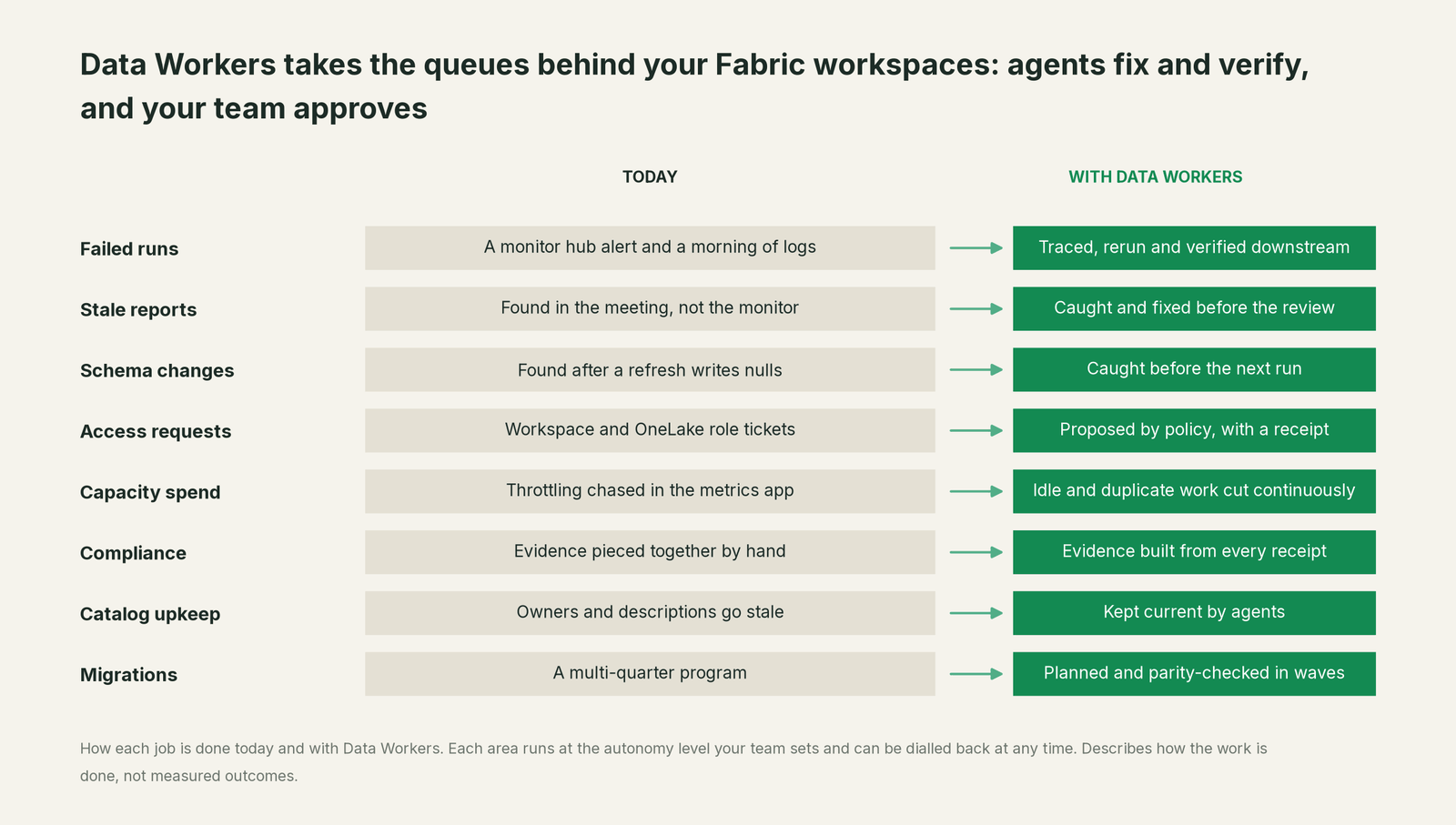
None of this requires replacing anything. Data Workers works inside the workloads and tools you already run, reasons across all of them, and leaves an auditable record of every change it makes. Your data stays in your tenant.
What changes for your organization
Here's what that looks like in a normal week.
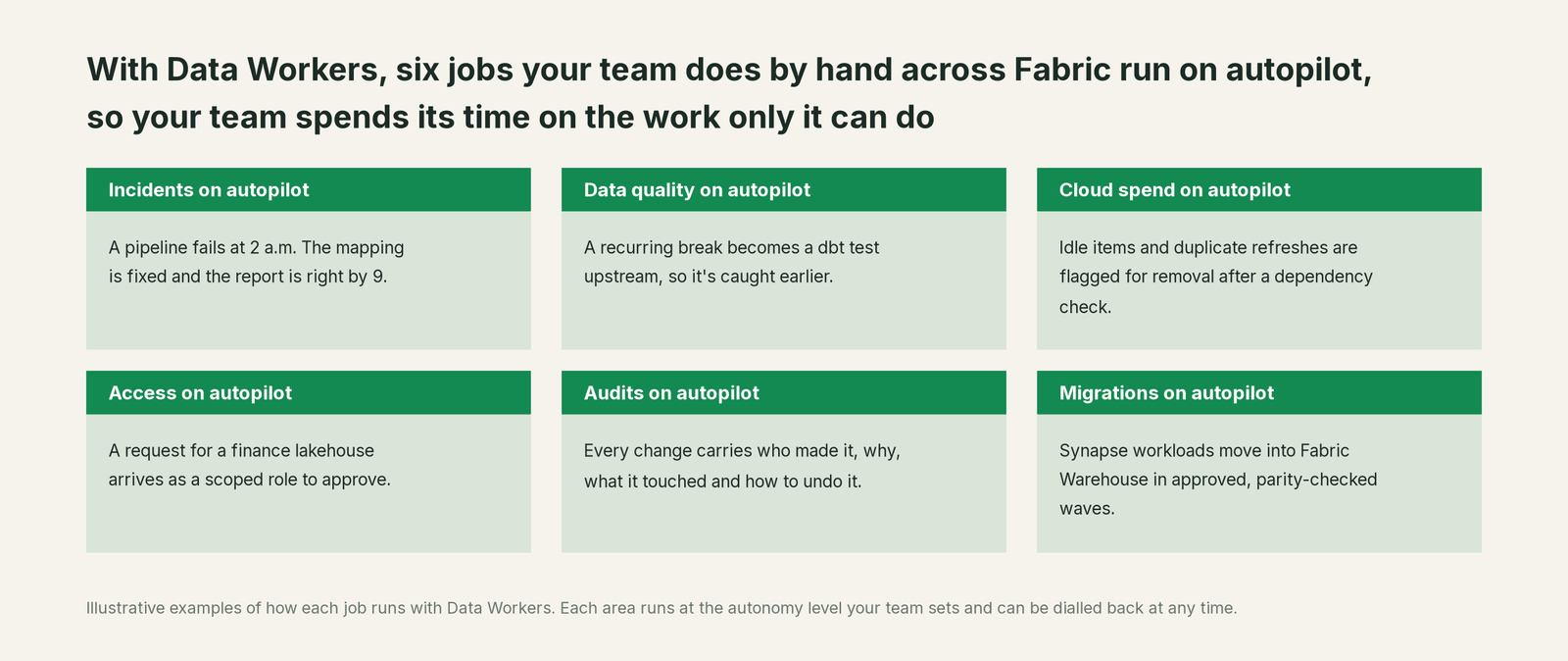
- •Your platform team stops being the human control plane. The queues that used to wait for a platform engineer (access, schema changes, failed runs, cleanup and catalog upkeep) move without them. Engineers spend their time on the work only they can do.
- •Incidents stop becoming meetings. A broken number is traced to its cause in whatever source, pipeline or tool it started in, fixed there and checked in the report, and the record is there when someone asks what happened.
- •Capacity is managed continuously. Overlapping refreshes, idle items and duplicate tables are found and cleaned up as they appear, with a dependency check first, so throttling stops being a month-end surprise.
- •Audits get easier. Every change has a receipt: who or what made it, why, what it touched and how to undo it. Evidence builds up as a side effect of the work, next to the Fabric audit log you already keep.
- •The migrations on your Fabric roadmap get smaller. Moving a Synapse or SQL Server warehouse into Fabric becomes a series of approvals instead of a dedicated project.
- •Everyone works from one shared understanding of your data. Definitions, owners and lineage across Fabric and every tool around it live in one governed place, and nothing becomes official until a person approves it.
One incident, start to finish
This is an illustration, not a customer case.
- •A product team renames a column in an Azure SQL database overnight, and the mirrored database carries the change into OneLake.
- •The Data Factory pipeline runs its notebook on schedule, succeeds, and writes blank regions into the lakehouse sales table.
- •The semantic model refreshes, and nothing alerts.
- •By 9 a.m. the revenue-by-region report in Power BI is wrong, and the data agent in Teams gives the same wrong answer.
Today that's a morning of Teams threads. With Data Workers, the rename is traced to its source, the notebook fix arrives ready to approve, the table is backfilled, the model refreshes and the report number is confirmed before finance logs in. A receipt records every step. Fabric's tools explain the symptom. Data Workers closes the ticket.
You choose how far and how fast
Our thesis is that data teams will climb from people working alongside a coding agent, to people governing a team of agents, to a largely self-running agentic enterprise. You don't have to jump. You choose the altitude, one area at a time.
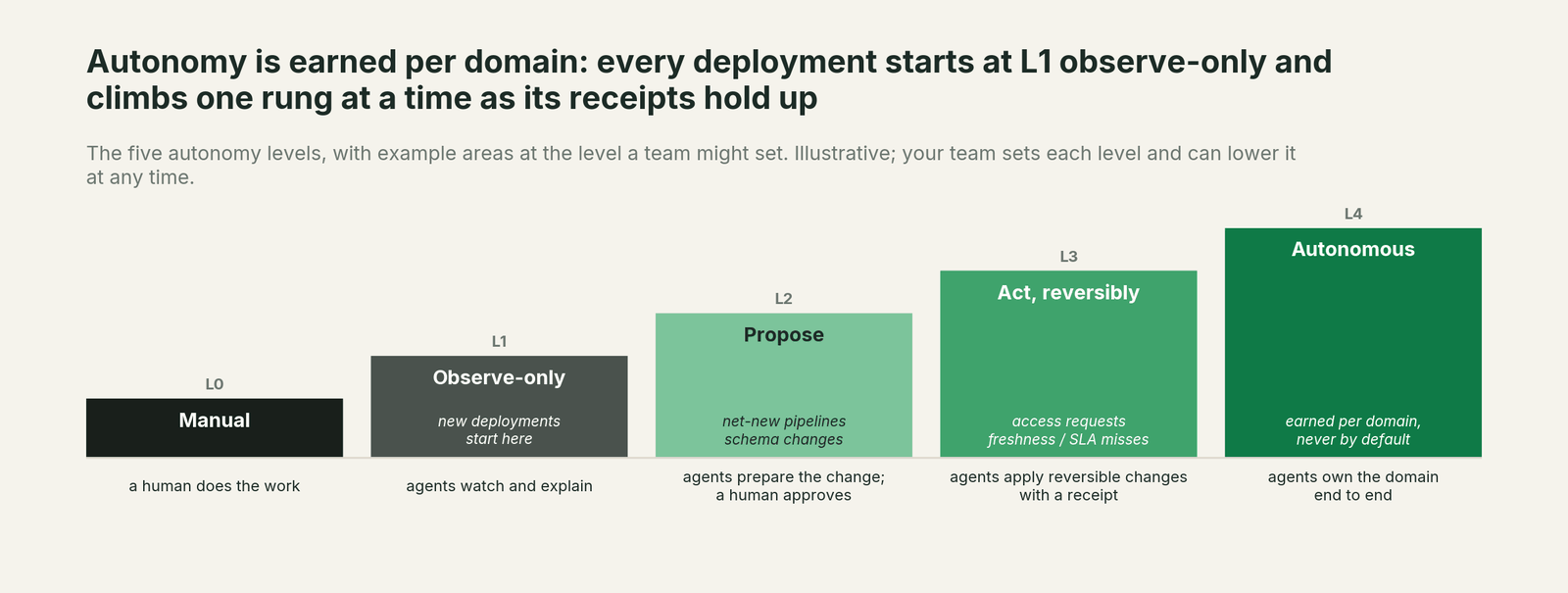
Every area starts with agents watching and explaining. Then they propose changes for your team to approve. Then they make reversible changes on their own and leave a receipt. Only areas that have earned it run fully on their own, and any area can be dialled back at any time. No agent can approve its own work.
The detailed, stage-by-stage version, with a first-quarter plan, is in our Microsoft Fabric autonomy playbook.
How it fits with Fabric
- •Entra, workspace roles and OneLake security stay the lock. Every change goes through the service principal and roles you give Data Workers, inside your tenant. There's never a second permission system, and its changes show up in the Fabric audit log and Purview Audit like anyone else's.
- •Your Fabric workloads keep doing their jobs. OneLake, Data Factory, lakehouses, Fabric Warehouse and Power BI run exactly as they do today. Nothing is migrated, and no tables are copied out. Data Workers stores metadata and scrubbed facts about your data.
- •Your people keep their tools. Analysts keep Copilot and Fabric data agents. Business users keep Power BI. Engineers ask and approve from the coding agent they already use, including GitHub Copilot in VS Code.
- •Your models stay your choice. Data Workers can run on the models you already use in Azure OpenAI.
The case for your CFO
The outcome: your data team's hours go to new work while the back office runs itself. Access is granted the day it's asked for, broken numbers are fixed and checked before the business sees them, and the capacity stops throttling because the waste behind it is removed instead of bought around with a bigger SKU.
The risk story: agents start by watching. Each area earns the right to propose, then to make reversible changes, on its own record. Every change goes through the roles you grant and leaves a receipt saying who or what made it, why, what it touched and how to undo it. Anything irreversible needs a named person's approval, and nothing is migrated to start.
Why now: Microsoft has connected the estate on OneLake, so one platform can run it. The first win is usually access requests or failed refreshes, where results show inside a quarter. What stays the same: Fabric, Power BI, Purview and how your people use them.
The path is a pilot, and the pilot is credited in full against the first year. The sentence for upstairs: Fabric gave every workload its own Copilot; we're adding one crew that runs the work across all of them.
When you don't need Data Workers
Be honest with yourself about these:
- •Your estate is a few Fabric workspaces, with no dbt, Databricks, second warehouse or outside BI tool in the critical path.
- •Your only need is help writing queries and answering questions, which Copilot and Fabric data agents handle well.
- •Your platform team isn't the bottleneck.
If all three are true, keep your budget. If any of them isn't, the rest of this guide is about you.
Where to start
Pick one area where your team is the bottleneck. Most Fabric teams start with one of three: access requests waiting on workspace admins, the failed pipelines and refreshes that end the same way every time, or capacity throttling. Each is high-volume, rule-bound and easy to measure.
Start with a pilot. A forward-deployed engineer connects your estate and runs the first areas alongside your team, so you see results on your own data before you commit. See pricing for how the pilot works.
If your architects want the detail, send them Data Workers on Microsoft Fabric. It covers what each Fabric workload does, what Data Workers adds, and the four products that do the work: Data Context Wizard keeps one governed graph across the OneLake catalog, Purview and everything outside Fabric; the Data-Agents Swarm makes the changes; the Autonomous Data-Conductor runs each fix from detection to a verified result; and Spellbook Data Catalog (in preview) is where your team approves, audits and rolls back, with Slack and Teams access coming. The thinking behind them is in our thesis.
Sources
- •Microsoft Learn, Fabric data agent creation (concepts), checked Oct 2, 2026: https://learn.microsoft.com/en-us/fabric/data-science/concept-data-agent
- •Microsoft Learn, Overview of Copilot in Fabric, checked Oct 2, 2026: https://learn.microsoft.com/en-us/fabric/fundamentals/copilot-fabric-overview
- •Microsoft Learn, Copilot in the Data Factory workload, checked Oct 2, 2026: https://learn.microsoft.com/en-us/fabric/data-factory/copilot-fabric-data-factory
- •Microsoft Learn, Create and configure operations agents, checked Oct 2, 2026: https://learn.microsoft.com/en-us/fabric/real-time-intelligence/operations-agent
- •Microsoft Learn, What is Fabric IQ?, checked Oct 2, 2026: https://learn.microsoft.com/en-us/fabric/iq/overview
- •Microsoft Learn, OneLake data security overview, checked Oct 2, 2026: https://learn.microsoft.com/en-us/fabric/onelake/security/get-started-security
- •Microsoft Learn, Use Microsoft Purview with Microsoft Fabric, checked Oct 2, 2026: https://learn.microsoft.com/en-us/fabric/governance/microsoft-purview-fabric
- •Microsoft Learn, What is the Microsoft Fabric Capacity Metrics app?, checked Oct 2, 2026: https://learn.microsoft.com/en-us/fabric/enterprise/metrics-app