Self-healing pipelines: diagnosed fast, fixed with approval
Pipeline failures still start with a 2 a.m. page and a blank alert. Data Workers diagnoses the root cause on its own, proposes the fix with its blast radius and the way back, and runs it on your orchestrator once a named person approves.
Before and after
| Today | With Data Workers |
|---|---|
| A page at 2 a.m. and a blank alert | An alert that arrives with a diagnosis |
| Hours spent finding which change broke the run | Root cause written up in plain language |
| A fix improvised under pressure | A proposed fix, its blast radius and how to undo it |
| The same failure fixed by hand again next month | Every incident and fix on record for the next one |
| Stakeholders asking what happened | Status posted to Slack, PagerDuty or ServiceNow as it moves |
Every data team has a list of common pipeline failures and a runbook that someone has to find, read and trust at the worst hour. The cost is not the failure itself but the hours of searching before anyone can act, and the engineers who carry the pager. For the long version of the method, read our guide to self-healing data pipelines; this page is the operating change.
How it works
1. Detect and gather
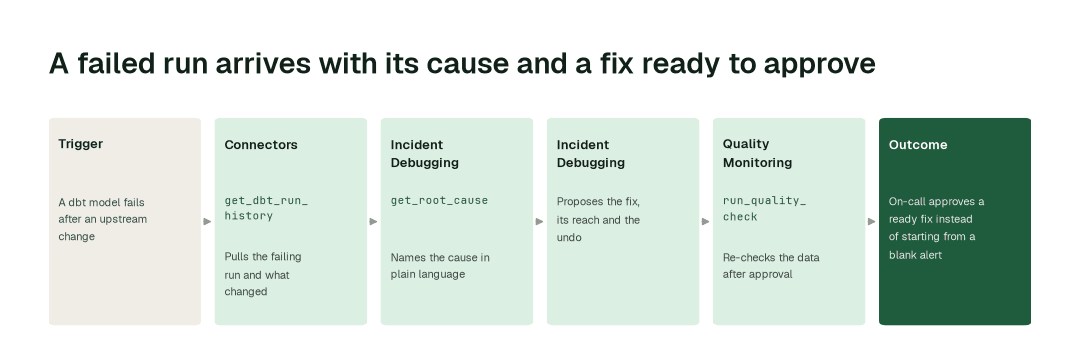
When a run fails or a table goes wrong, the Connectors Agent pulls the run history from dbt and your orchestrator (get_dbt_run_history), and the Incident Debugging Agent (monitor_metrics) collects recent changes across the warehouse, models and schedules into one picture.
2. Diagnose the root cause
The Incident Debugging Agent (diagnose_incident, get_root_cause) names the cause in plain language and checks it against past incidents (get_incident_history). This part is automatic, so the on-call engineer opens the alert already knowing what broke and why.
3. Propose, approve, fix, verify
The Incident Debugging Agent (remediate) proposes the fix with a preview of what it will touch and how to undo it. A named approver signs off, the fix runs on your orchestrator (trigger_airflow_dag, trigger_dagster_job, trigger_prefect_flow), and the Quality Monitoring Agent (run_quality_check) re-checks the data before the incident closes.
The impact metrics we move
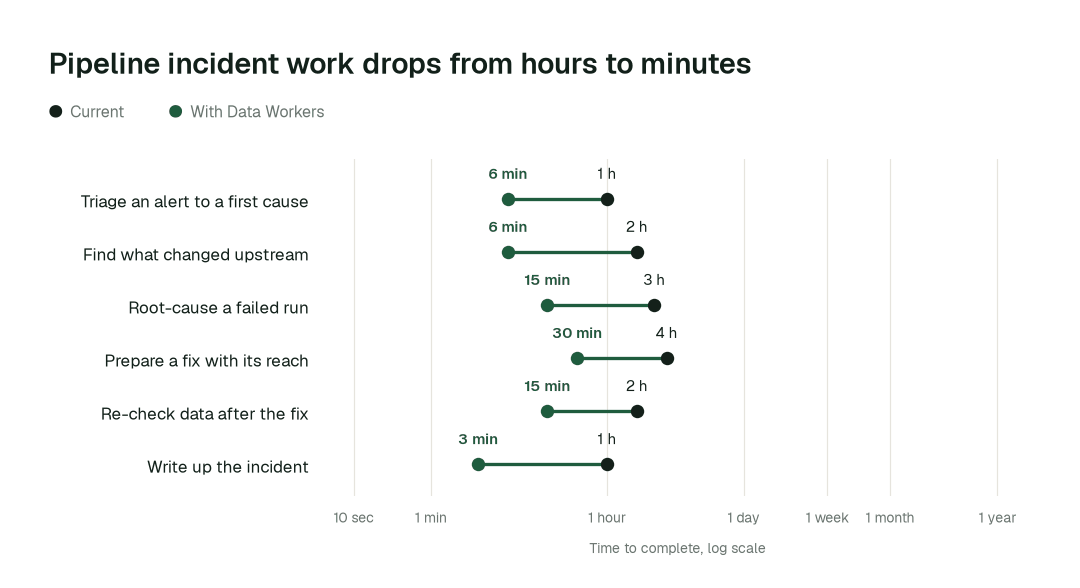
- •Time to root cause: from about 3 h to 15 min
- •Fix ready for review: from about 4 h to 30 min
- •Post-fix data check: from about 2 h to 15 min
Where teams start
- •dbt failures. Failed runs and failing tests traced to the model change or upstream table behind them.
- •Airflow, Dagster or Prefect DAGs. Late and failed runs diagnosed, with the retry or fix proposed for approval.
- •Warehouse freshness. Snowflake, BigQuery or Databricks tables that stopped updating, traced to the job that owns them.
- •Paging. Diagnosis attached to the PagerDuty or Opsgenie alert, so the first responder starts from an answer. See PagerDuty.
- •Ticketing. The same diagnosis and status kept current in ServiceNow or Jira Service Management.
What powers it
The Data-Agents Swarm does the work: the Incident Debugging Agent diagnoses and proposes, the Connectors Agent reads your stack and carries the approved fix to your orchestrator, and the Quality Monitoring Agent verifies. The Autonomous Data-Conductor coordinates the agents, Autopilot Routines keep the watch running, and the Data Context Wizard supplies lineage so every proposed fix shows what it touches. Read how the Incident Debugging Agent is built to work alongside your on-call. Where this transformation shows up in a data-team playbook:
The climb: from assisted to autonomous to agentic
Agents start by watching and suggesting, then act on the work you approve. Diagnosis runs on its own today; fixes run after a named person approves them, and a domain can earn more autonomy only on evidence. See the thesis.
The pilot
- •Scope. One orchestrator and one domain: for example your dbt project and the DAGs that feed it.
- •First week. Agents watch your alerts and failed runs and write up what they would have diagnosed, so you can compare them with what your team found. Our incident response playbook is a good baseline to bring.
- •By week two. Diagnoses arrive with the alert, and proposed fixes go to a named approver before anything runs.
- •At day 30. We review the impact metrics against your baseline:
- •Time to root cause: from about 3 h to 15 min
- •Fix ready for review: from about 4 h to 30 min
- •Post-fix data check: from about 2 h to 15 min
- •Cost. Start with a pilot ($7,500 one-time, credited in full against the first year). Scale is from $1,000 a month and Enterprise from $3,000 a month, billed annually, with unlimited seats, no usage meter and no markup on model spend. See pricing.
FAQ
Does it change production without asking? No. A named person approves each fix, and it shows what it will touch and how to undo it before it runs.
Which stacks does it work with? dbt, Airflow, Dagster, Prefect, and the Snowflake, BigQuery and Databricks warehouses, with alerts to Slack, PagerDuty, Opsgenie, ServiceNow and Jira Service Management.
What stays with our engineers? Approving fixes, judging business impact and owning the pipelines. Agents take the searching and the write-up.
What if the diagnosis is wrong? The approver sees the evidence and the proposed change before anything runs, and can reject it. Every incident and decision is recorded.