Manage hundreds of pipelines without growing the on-call rota
Every new pipeline adds another owner to find, another alert to read and another change to track. Data Workers keeps agents watching the whole estate, lets each domain choose how much they do on their own, and shows every change in one place. Scale the estate without scaling the on-call rota.
Before and after
| Today | With Data Workers |
|---|---|
| Pipelines nobody has looked at since they shipped | Agents watching the whole estate, all the time |
| Work that waits until a person notices it | Each trigger routed to the right agent |
| One policy for everyone: approve everything or trust everything | Autonomy set per domain by the people who own it |
| Changes scattered across Airflow, dbt, Slack and tickets | One place that shows what changed, why and who approved it |
| An on-call rota that grows with every new pipeline | An estate that grows while the rota stays the same size |
Pipeline sprawl is rarely one big failure. It is the long tail: jobs with no owner, shared tables that feed many others, and upkeep that slips because nobody has the week. Your orchestrator runs every DAG but does not know how they depend on each other, which is the gap we cover in why your DAGs need a brain. This page is the operating model for pipeline management at scale.
How it works
1. Watch the whole estate
The Autonomous Data-Conductor runs continuously across the orchestrators and warehouses you connect. It takes each trigger (a failed run, a schema change, a stale table) and routes it to the right agent, so routine work does not wait for someone to spot it. The Connectors Agent (get_connector_status, get_dbt_run_history) reads run state from Airflow, Dagster, Prefect and dbt.
2. Set autonomy by domain
Each domain's owner chooses how much the agents do there: watch only, suggest, or act after approval. Every domain starts at watch or suggest, and only its owner raises it. The Data Context & Catalog Agent (blast_radius_analysis) attaches what a change would touch, and the Data Access & Governance Agent (request_governance_review) sends it to the named approver. If people start reverting the agents' changes, that domain pauses itself.
3. See every change in one place
The Observability Agent (list_active_agents, check_agent_health, get_audit_trail) shows what each agent is doing, what changed, why, and who approved it. The view stays the same however many pipelines there are. Approved changes run on your own orchestrator (trigger_airflow_dag, trigger_dagster_job).
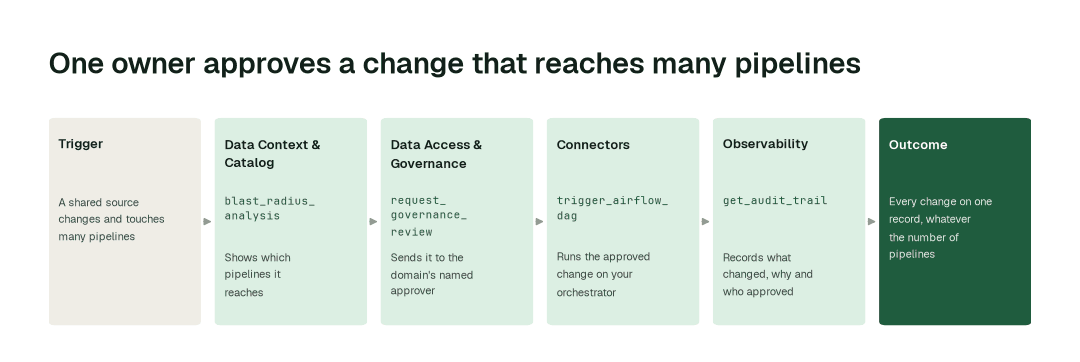
The impact metrics we move
- •Status review across domains: from about 4 h to 15 min
- •Impact of a shared-source change: from about 8 h to 30 min
- •Weekly upkeep check: from about 16 h to 2 h
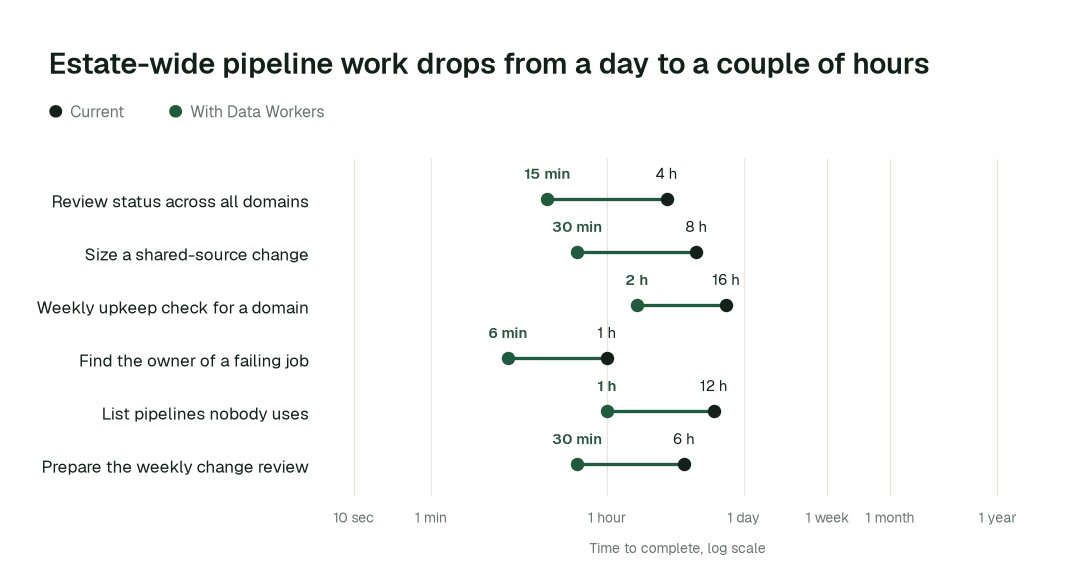
Where teams start
- •One domain's orchestrator. The Airflow, Dagster or Prefect DAGs of a single team, with agents watching and suggesting. See the Airflow guide for data leaders.
- •Shared sources. The few tables that feed many pipelines, with the blast radius shown on every change.
- •Weekly upkeep. Freshness, documentation gaps and test coverage across a domain, run as Autopilot Routines.
- •Pipelines nobody touches. Dead and ownerless jobs listed with their consumers, so an owner can claim or retire each one.
- •The weekly change review. One view for the platform lead of what changed this week and who approved it.
What powers it
The Autonomous Data-Conductor coordinates the Data-Agents Swarm, and the Data Context Wizard gives every agent the same picture of your estate: what each table means, who owns it and which pipelines depend on it. Autopilot Routines run recurring upkeep on a schedule or when something changes, and Autopilot Standards let you write a rule once and keep every domain to it. The Connectors, Data Context & Catalog, Data Access & Governance and Observability agents do the work. Read how the Conductor Agent coordinates the swarm, who sets autonomy in who owns the agents, and what the Observability Agent watches. Where this transformation shows up in a playbook:
The climb: from assisted to autonomous to agentic
Agents start by watching and suggesting, then act on what each domain's owner approves. Watching, suggesting and acting after approval run today, domain by domain; a domain can go further only on its own review record, never by switching everything on at once. See the thesis.
The pilot
- •Scope. One domain and its orchestrator, chosen by you. A second domain joins only after you have reviewed the first one's record.
- •First week. Agents watch and suggest, and a week-one baseline shows where you started.
- •By week two. Routines run the recurring upkeep, and every proposal goes to a named approver with its blast radius and how to undo it.
- •At day 30. We review the impact metrics against your baseline:
- •Status review across domains: from about 4 h to 15 min
- •Impact of a shared-source change: from about 8 h to 30 min
- •Weekly upkeep check: from about 16 h to 2 h
- •Cost. Start with a pilot ($7,500 one-time, credited in full against the first year). Scale is from $1,000 a month and Enterprise from $3,000 a month, billed annually, with unlimited seats, no usage meter and no markup on model spend. See pricing.
FAQ
Does it replace our orchestrator? No. Airflow, Dagster, Prefect and dbt keep running your pipelines; the agents watch them, propose changes and run approved ones through them.
Will it handle our scale? It is built to run across a large estate, and we do not ask you to take that on trust. The pilot starts with one domain, and you judge the record before adding the next.
Who decides how much the agents do alone? The owner of each domain, and nobody else. Domains start at watch or suggest, and one pauses itself if people keep reverting the agents' changes.
What stays with our people? Owning each domain, approving changes and judging business impact. Agents take the watching, the checking and the write-up.
What if an agent is wrong? Each proposal shows the full change, what it affects and how to undo it. The approver can reject it, and every decision is on the record.