Bring AI agents into your data lake or warehouse
Agents belong where your data already lives: Snowflake, Databricks, BigQuery and the lakehouse. Data Workers connects with read-only access, watches every table and pipeline first, then proposes fixes for a named approver. Nothing moves and nothing changes until you say so.
Before and after
| Today | With Data Workers |
|---|---|
| AI pilots that stall at the security review | Read-only access first, so the review has something safe to approve |
| One vendor's agent per warehouse, none across the estate | One set of agents across Snowflake, Databricks and BigQuery |
| Data copied into a new platform before anything useful happens | Each question runs inside the warehouse that owns the data |
| Engineers as the first and only line of defence for incidents | Agents watch every table and pipeline and bring a diagnosis |
| Agents that change things before anyone trusts them | Agents start by watching and suggesting, with the full change shown first |
Step 1 of 4 on the AI maturity curve for data teams. Most teams meet their first AI agent as a chat box on top of the warehouse, and it answers from whatever tables it guesses are right. The better first step is giving agents the context and the job of watching the platform, so the people who own it see what the agents would do before anything is allowed to act. That is also the plainest answer to what agentic data engineering means in practice.
How it works
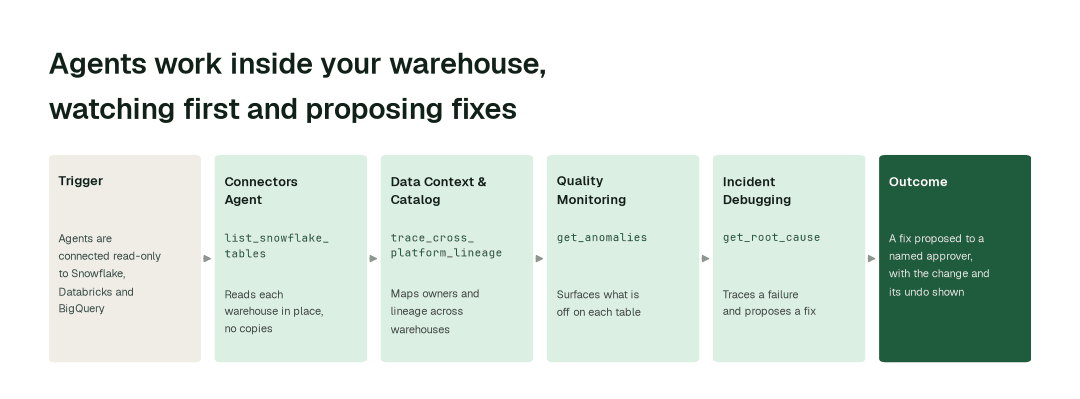
1. Connect read-only where the data lives
The Connectors Agent reads Snowflake, Databricks and BigQuery through your existing roles, using tools such as list_snowflake_tables, list_databricks_tables and list_bigquery_tables. Lakehouse catalogs and the rest of the 50+ connectors sit alongside. Nothing is copied into a new platform and the agents hold no write access at this stage.
2. Build context before anyone asks a question
The Data Context & Catalog Agent maps tables, owners, definitions and lineage with explain_table and trace_cross_platform_lineage, so a change in one warehouse is traced into the others. Every later answer starts from the right tables instead of a guess.
3. Watch, diagnose and suggest
The Quality Monitoring Agent learns each table's normal behaviour and surfaces what is off with get_anomalies. The Incident Debugging Agent traces a failure to its cause with get_root_cause. Each finding arrives as a proposal for a named approver, showing the full change, what it would affect and how to undo it.
The impact metrics we move
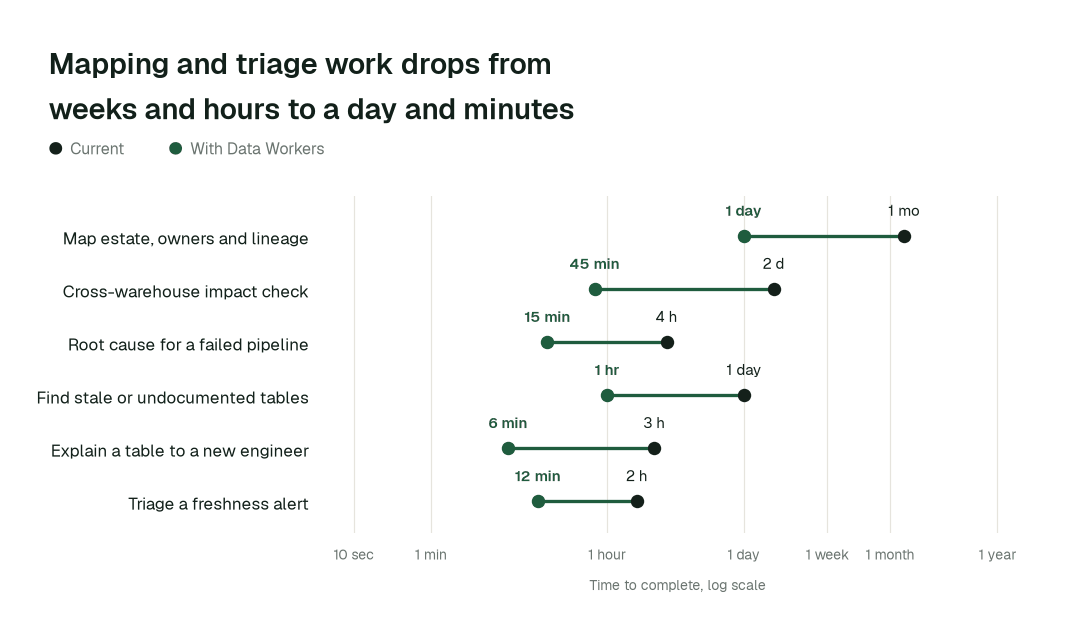
- •Estate map with owners and lineage: from about a month to 1 day
- •Cross-warehouse impact check: from about 2 days to under 1 h
- •Root cause for a failed pipeline: from about 4 h to 15 min
Where teams start
- •One Snowflake account. Read-only roles on a single database, with lineage and owners mapped for its top consumers.
- •Databricks Unity Catalog. One workspace and its production jobs watched for failures and drift.
- •BigQuery datasets feeding finance reporting. Freshness and anomalies tracked on the tables the close depends on.
- •A lakehouse with two engines. Cross-warehouse lineage for the tables that exist in both Snowflake and Databricks.
- •The on-call rota. Incident triage on the one pipeline domain that pages people most.
What powers it
The Data-Agents Swarm, 20 specialised agents coordinated by the Autonomous Data-Conductor, shares one context layer and one approval and audit path. The Data Context Wizard supplies definitions, lineage and ownership, Autopilot Routines run the watching on a schedule, and Autopilot Standards hold the rules each domain is judged against. The open-source core is free to self-host and reads, analyses and recommends. For platform detail, see the guides for Snowflake, Databricks and Google Cloud. Where this shows up: One back office across Snowflake, Databricks and BigQuery and Agents that cut data platform costs every week. Next step: Build your semantic layer.
The climb: from assisted to autonomous to agentic
Every domain starts at watch or suggest, and only its owner can raise it. Watching (L0), suggesting (L1) and acting after approval (L2) run today; L3 and L4 are where a domain can go on its own review record, one domain at a time. The full ladder is in our thesis.
The pilot
- •Scope. One warehouse or workspace and one domain, connected read-only.
- •First week. Agents start by watching and suggesting. You see what they would have flagged and fixed, with receipts.
- •By week two. The routine watching and triage run on their own; anything that changes production waits for a named approver.
- •At day 30. We review the impact metrics against your baseline:
- •Estate map with owners and lineage: from about a month to 1 day
- •Cross-warehouse impact check: from about 2 days to under 1 h
- •Root cause for a failed pipeline: from about 4 h to 15 min
- •Cost. Start with a pilot ($7,500 one-time, credited in full against the first year). Scale is from $1,000 a month and Enterprise from $3,000 a month, billed annually, with unlimited seats, no usage meter and no markup on model spend. See pricing.
FAQ
Does it copy our data out of the warehouse? No. Each question runs inside the warehouse that owns the data, under your existing roles. See our note on read-only roles for AI data agents.
Which platforms does it cover? Snowflake, Databricks and BigQuery, plus the lakehouse catalogs and tools around them. Connections are verified against your own warehouses during the pilot.
What stays with people? Every change to production waits for a named approver, and only a domain's owner can raise its autonomy.
What if an agent is wrong? The proposal shows the full change and how to undo it before anyone approves it. If people keep reverting a domain's changes, that domain pauses itself.