Data quality on autopilot: tests, anomalies and SLAs
Data quality work piles up in hand-written tests, noisy alerts and SLAs nobody reports on. Data Workers agents write and maintain the tests, learn what normal looks like for each table, catch anomalies before consumers see them and track an SLA for every data product.
Before and after
| Today | With Data Workers |
|---|---|
| Tests written by hand, after the first incident | Tests written by agents when a pipeline is built |
| Thresholds that fire constantly or never | Alerts based on what is normal for each table |
| Analysts report the bad numbers first | Anomalies caught before consumers see them |
| SLAs in a wiki page nobody checks | An SLA per data product, tracked every day |
| Three quality tools, three dashboards | One view across your existing checks |
The test suite behind your dashboards rarely keeps pace with the pipelines it guards, so the first sign of a bad number is often a message from an analyst. Agents can write and maintain the tests, which frees your engineers for the decisions only they can make. For the full vocabulary, start with the data quality guide; this page is about changing who does the work.
How it works
1. Write the tests when the pipeline is built
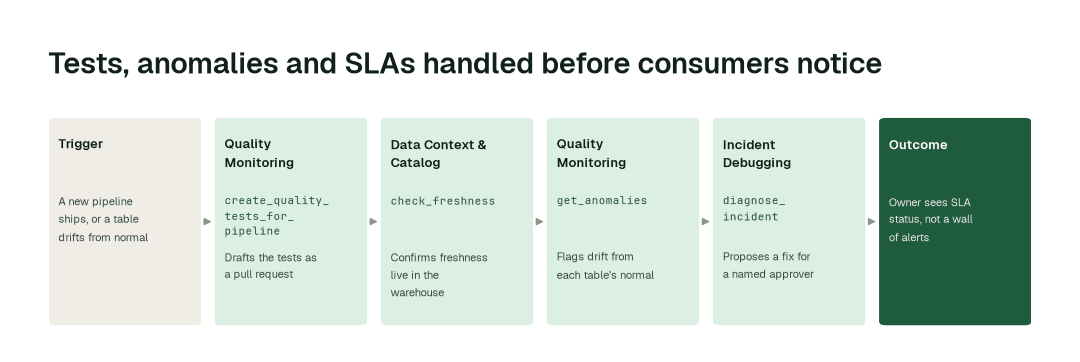
The Quality Monitoring agent uses create_quality_tests_for_pipeline to draft the checks each new pipeline needs and can open them as a pull request against your dbt project. A named engineer reviews and merges. It also uses set_sla to record an SLA for the data product, so freshness and volume targets exist from day one.
2. Learn normal, then watch
The same agent learns what normal looks like for each table and watches freshness, volume, nulls and distribution with run_quality_check. The Data Context & Catalog agent confirms freshness live in the warehouse with check_freshness. Results from Great Expectations, Soda and Monte Carlo come into the same view, so you keep the tools you have (see how the options compare).
3. Catch it, then hand it on
get_anomalies flags a table that has drifted from its normal before a dashboard shows it. The Incident Debugging agent picks the case up with the context already attached and proposes a fix for a named approver through diagnose_incident. The owner of the data product sees the SLA status, not a wall of alerts.
The impact metrics we move
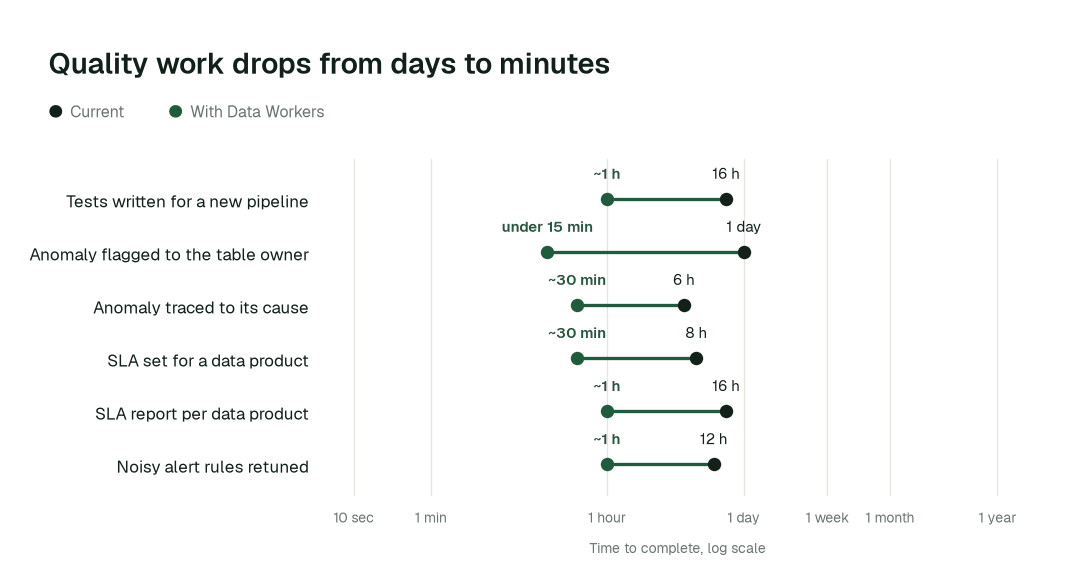
- •Tests for a new pipeline: from about 2 days to 1 h
- •Anomaly flagged to the table owner: from about a day to under 15 min
- •SLA report per data product: from about 2 days to 1 h
Where teams start
- •Your ten most-queried tables. Freshness, volume and anomaly watch on the tables behind executive dashboards.
- •New dbt models. Agents draft the tests for every model in the pull request.
- •Existing quality tools. Pull Great Expectations, Soda or Monte Carlo results into one view.
- •Customer-facing data products. An SLA per product, reported to its owner each week.
- •A warehouse with alert fatigue. Replace fixed thresholds with checks tuned to each table.
What powers it
The Data-Agents Swarm does the work: the Quality Monitoring agent owns tests, anomalies and SLAs, the Data Context & Catalog agent supplies freshness and lineage, and the Incident Debugging agent takes over when a check fails. The Autonomous Data-Conductor coordinates them, and Autopilot Routines run the daily watch while Standards keep every new pipeline shipping with its tests. For how this differs from observability tools that stop at the alert, read Data Workers vs data observability. Where this shows up in practice:
The climb: from assisted to autonomous to agentic
Every transformation runs on the ladder from our thesis. Agents start by watching and suggesting (L0 to L2 run today), and a domain can move further up on evidence from its own receipts. For checks that route failures to a verified fix, see the Snowflake data metric functions comparison.
The pilot
- •Scope. One domain: the tables behind your most-viewed dashboards, plus the dbt project that builds them.
- •First week. Agents start by watching and suggesting: they learn what normal looks like, list the tests they would add and show the anomalies they would have flagged, with receipts.
- •By week two. Tests for new models arrive as pull requests, SLAs are set per data product, and anything sensitive stays with a named approver.
- •At day 30. We review the impact metrics against your baseline:
- •Tests for a new pipeline: from about 2 days to 1 h
- •Anomaly flagged to the table owner: from about a day to under 15 min
- •SLA report per data product: from about 2 days to 1 h
- •Cost. Start with a pilot ($7,500 one-time, credited in full against the first year). Scale is from $1,000 a month and Enterprise from $3,000 a month, billed annually, with unlimited seats, no usage meter and no markup on model spend. See pricing.
FAQ
Do we have to replace Great Expectations, Soda or Monte Carlo? No. The agents pull their results into one view and add the tests and anomaly watch on top. SLA examples for analytics teams show what to track per product.
Will agents change our tests without asking? No. New tests arrive as a pull request for your engineers to review and merge.
Which warehouses are covered? Freshness is measured live in the warehouse today, and some checks are still being extended to Databricks and BigQuery. We scope the pilot to the checks that run on your stack.
What if an alert is wrong? The agent shows the evidence behind each alert, and a person decides what happens next.