Snowflake data metric functions vs the Autonomous Data-Conductor: an alert or a resolved incident
Snowflake DMFs, expectations and anomaly detection tell you a table went wrong. The Autonomous Data-Conductor fixes the cause, proves the DMF is green and leaves a receipt.
Snowflake's data metric functions are the gauges on your warehouse. The Autonomous Data-Conductor is the crew that answers them. A DMF tells you that FCT_ORDERS has too many NULLs or that a table stopped updating. The Conductor finds out why, fixes it where it started, checks that the DMF is green again and leaves a receipt. One gives you an alert. The other gives you a resolved incident.
Here is the estate most Snowflake data quality buyers run. Fivetran or Openflow lands data from Postgres, Salesforce and a dozen SaaS tools into a RAW database. dbt builds the models, and Airflow schedules the DAG runs. Tableau, Power BI or CoWork sits on top. On an Enterprise Edition account, the team has started attaching data metric functions to the tables that matter: NULL_COUNT and NULL_PERCENT on key columns, FRESHNESS and ROW_COUNT on every table in a schema, a few custom DMFs for business rules, each with an expectation. Anomaly detection watches volume and freshness. Failed checks show up on the Data Quality tab in Snowsight and go out as an email or a webhook to Slack.
That is a good setup. It runs next to the data, bills as serverless credits and needs no extra vendor. What it leaves open is the part after the notification. Snowflake's own page on fixing data quality issues shows a user writing an UPDATE statement against the failed rows. When the cause sits in a Postgres release, a Fivetran schema change or a dbt model, the fix happens outside Snowflake, by hand.
Data Workers is the agentic data platform that does that work. It reads the DMF result, traces the cause across every system, fixes it at the source behind your approval, verifies the DMF and the downstream numbers, and records a receipt. It also runs the rest of the lifecycle: access, cost, schema changes, migrations and audit evidence. Keep your DMFs. They become the first step of the loop.
Key takeaways
- •An alert vs a resolved incident. Snowflake's data metric functions, expectations and anomaly detection measure quality inside the warehouse and notify you. The Autonomous Data-Conductor resolves the incident: cause, fix, verification, receipt.
- •Snowflake's features are good at their job. Dozens of system DMFs, custom DMFs, expectations in SQL, schema-level monitoring, an account-wide dashboard (preview) and anomaly detection on row count and freshness (preview).
- •They stop at the notification. Fixing is DML your team writes. The CoCo data quality skill investigates failing metrics; CoCo automations run unattended on a schedule under one user's default role, without approval prompts.
- •Keep the DMFs. Data Workers treats a failed expectation or an anomaly as the start of the loop, through its Snowflake connection.
- •One platform for the rest of the lifecycle, with one context, one approval flow and one audit trail across Snowflake and everything around it.
If you want the platform-wide view of Snowflake's agents, read Data Workers on Snowflake. If you're comparing third-party monitors such as Bigeye, Anomalo, Sifflet and Soda, read our data observability tools comparison. This page is about choosing between Snowflake's native data quality features alone and those features plus a resolution loop.
Snowflake's data quality features at a glance
All statuses below are from Snowflake's documentation and its preview features list, checked October 2, 2026. Data quality monitoring requires Enterprise Edition.
| Feature | What it does | Status |
|---|---|---|
| Data metric functions (system and custom) | Measure an attribute of a table or view: NULLs, blanks, duplicates, accepted values, freshness, row count, outliers, schema changes | Generally available |
| Expectations | A Boolean rule on a DMF's value; a FALSE result is recorded as a violation | Generally available |
| Schema-level monitoring | ROW_COUNT and FRESHNESS on every object in a schema with one statement | Generally available |
| Data profile | Row count, last update, NULLs, min and max, most common values per column | Generally available |
| Data quality anomaly detection | Learns a baseline for ROW_COUNT and FRESHNESS and flags values outside it | Preview, open since November 2025 |
| Data quality in Snowsight | Per-table Data Quality tab: results, 7-day trend, quality checks, impacted assets, failed records | Preview, open since September 2025 |
| Data quality monitoring dashboard | Account-wide health, coverage and open issues | Preview, open since July 2026 |
| Notifications | Email or webhook (Slack, Teams, PagerDuty) on failed expectations and anomalies | Enterprise feature |
| CoCo data quality skill | Health scoring, root cause analysis for failing metrics, regression detection, SLA alerting | Part of CoCo (formerly Cortex Code) governance skills |
Every row measures, shows or notifies. That's the right design for a warehouse feature, and it's where the Conductor picks up.
Data metric functions and expectations: quality measured where the data lives
What it is. A data metric function measures one attribute of your data. Snowflake ships system DMFs in the SNOWFLAKE.CORE schema across six families: accuracy (NULL_COUNT, BLANK_PERCENT, INVALID_JSON_COUNT and more), freshness, schema (SCHEMA_CHANGE_COUNT), statistics (averages, quantiles, outliers), uniqueness (DUPLICATE_COUNT, ACCEPTED_VALUES) and volume (ROW_COUNT). You can write custom DMFs in SQL for rules the system set doesn't cover. An expectation turns a DMF into a check, for example EXPECTATION no_nulls (VALUE = 0). When the expression is FALSE, Snowflake records a violation in SNOWFLAKE.LOCAL.DATA_QUALITY_MONITORING_RESULTS_RAW.
Where it's strong. It runs inside the warehouse. You attach DMFs with ALTER TABLE ... ADD DATA METRIC FUNCTION, set a schedule per table (hourly by default, an interval, a cron expression, or TRIGGER_ON_CHANGES so it runs when rows change) and Snowflake runs it on serverless compute. You aren't billed for creating a DMF, only when scheduled DMFs run, and the credits show up as their own line, "Data Quality Monitoring." Schema-level monitoring puts ROW_COUNT and FRESHNESS on a whole schema in one statement. Results are queryable SQL views, so anything that can read Snowflake can read them. For a team already on Enterprise Edition, this is the cheapest way to get broad checks running.
Where it stops. A DMF measures and an expectation judges. Neither one changes data. Snowflake's documentation on fixing issues shows the path: call SYSTEM$DATA_METRIC_SCAN to return the rows that failed, then write DML yourself to correct them. That works when the bad rows live only in Snowflake. When the cause is upstream, in a Postgres column, a Fivetran connector or a dbt model, correcting rows in place treats the symptom. Tomorrow's load brings the problem back.
The role swap. DMFs are the gauges on the warehouse. The Conductor is the crew that reads the gauge, walks upstream to the fault and fixes it.
Anomaly detection: volume and freshness without writing a rule
What it is. Snowflake's data quality anomaly detection, in open preview since November 2025, learns what normal looks like for the ROW_COUNT and FRESHNESS DMFs and flags values outside the predicted range. You set sensitivity to LOW, MEDIUM or HIGH. It needs history first: at least two weeks for frequently scheduled DMFs, and Snowflake recommends 60 days to capture monthly seasonality. Results land in the same event table and in a flattened anomaly status view.
Where it's strong. It catches the two most common symptoms, a table that stopped loading and a load that came in half empty, with no thresholds to hand-tune. Combined with schema-level monitoring, it gives a whole schema a volume and freshness baseline in one step.
Where it stops. It covers two metrics. A bad value with a normal row count, such as revenue arriving as NULL on every new order, passes both. You still need expectations for that. And like every DMF, anomaly detection reports. It doesn't say why the volume dropped, and it doesn't rerun the load.
The role swap. Anomaly detection is the gauge that learns the room's normal temperature. The Conductor is the crew that finds the open window.
The Snowsight dashboard and notifications: one view, one alert path
What it is. The Data Quality tab in Snowsight (preview) shows each table's latest DMF results with a seven-day trend, its quality checks with pass or fail status, an Impacted Assets list of downstream objects and failed records for system DMFs. The data quality monitoring dashboard (open preview since July 2026) adds an account-wide view: the percentage of healthy tables, monitoring coverage, and counts of open volume anomalies, freshness anomalies and failed expectations. Notifications send failed expectations and anomalies to an email list or a webhook for Slack, Teams or PagerDuty, set per database through DATA_QUALITY_MONITORING_SETTINGS. For anything else, Snowflake alerts (CREATE ALERT) run a SQL condition on a schedule or on new rows and take a SQL action.
Where it's strong. Morning triage. Snowflake describes the dashboard as suited to broad account assessments, such as morning incident triage, rather than deep investigation of one table. The Impacted Assets view, built on Snowflake lineage, shows which downstream objects read the failing column.
Where it stops. The dashboard counts open issues; it doesn't own them. A notification reaches a channel or a pager. From there, a person picks it up, investigates outside Snowflake and decides on a fix. Lineage stops at what Snowflake can see, so the Postgres source and the dbt repo aren't on the map.
The role swap. The dashboard is the control-room wall of gauges, and notifications are the alarm bell. The Conductor is the crew that answers the bell and signs off when the gauge reads normal.
The CoCo data quality skill and automations: investigation inside Snowflake
What it is. CoCo (formerly Cortex Code) ships five built-in data governance skills, and one is data quality. Snowflake lists what it does: "health scoring, root cause analysis for failing metrics, regression detection, trend analysis, SLA alerting, table comparison for migration validation, and dataset popularity analysis." CoCo automations, in open preview since August 2026, turn a prompt into a recurring, unattended run in a Snowflake-managed sandbox.
Where it's strong. An engineer can ask CoCo why a metric is failing and get an investigation inside Snowflake in plain language. For migration checks, table comparison is useful. Automations let a team schedule that investigation, for example a morning health report.
Where it stops. The skill investigates within Snowflake. Automations are schedule-only: Snowflake's docs say "Event-based triggers are not supported," so a failed expectation can't start one. Each run uses the creator's default role, and "Tools that are available to the run can execute without waiting for approval," because interactive permission prompts are off during unattended runs. That is a sensible design for a developer's own scheduled tasks. It is a different thing from an incident process with per-domain approvals, rollback and a record an auditor can read.
The role swap. CoCo is a skilled engineer at the warehouse console. The Conductor runs the incident across the estate, with every change approved or reversible.
One incident, six systems
Here is a failure that Snowflake's data quality features catch well and can't close on their own. It's an illustrative example.
- •21:30. A checkout release in the Postgres application database starts writing
amount_centsand leavesamountNULL on new orders. - •22:00. Fivetran syncs the new column into
RAW.ORDERSin Snowflake. - •00:30. Airflow runs dbt.
FCT_ORDERSbuilds, andAMOUNT_USDis NULL for every new order. The row count is normal. - •00:45. A
NULL_PERCENTDMF onFCT_ORDERS.AMOUNT_USD, scheduled withTRIGGER_ON_CHANGES, violates its expectation. Volume anomaly detection stays quiet, correctly. - •00:46. Snowflake's notification integration posts the failure to the team's Slack channel, and Data Workers reads the violation from the expectation status view over its Snowflake connection.
- •08:30. Finance opens the Tableau revenue dashboard.
| Step | What Snowflake's data quality features see | What Data Workers does |
|---|---|---|
| Postgres release, Fivetran sync | SCHEMA_CHANGE_COUNT on RAW.ORDERS ticks up, if attached | Sees the new column in Fivetran's schema and maps every dbt model that reads amount |
| dbt nulls new revenue | The NULL_PERCENT expectation fails; the Data Quality tab lists FCT_ORDERS with a failed check and its impacted assets | Reads the violation through its Snowflake connection, confirms the cause in Postgres and proposes an approval-gated dbt diff that falls back to amount_cents / 100, with a dbt test and its blast radius to Tableau attached |
| Fix the rows | SYSTEM$DATA_METRIC_SCAN returns the failed rows for a person to correct with DML | After the on-call analytics engineer approves, triggers the Airflow backfill for the two affected days |
| Verify | The DMF re-evaluates on its next run | Confirms the DMF expectation passes, diffs revenue against Postgres, checks the dbt tests and records a tamper-evident receipt |
| Tableau revenue dashboard | Impacted Assets lists the downstream view | The number is right before finance opens it, and the pattern is remembered so the next column change is caught before the dbt run |
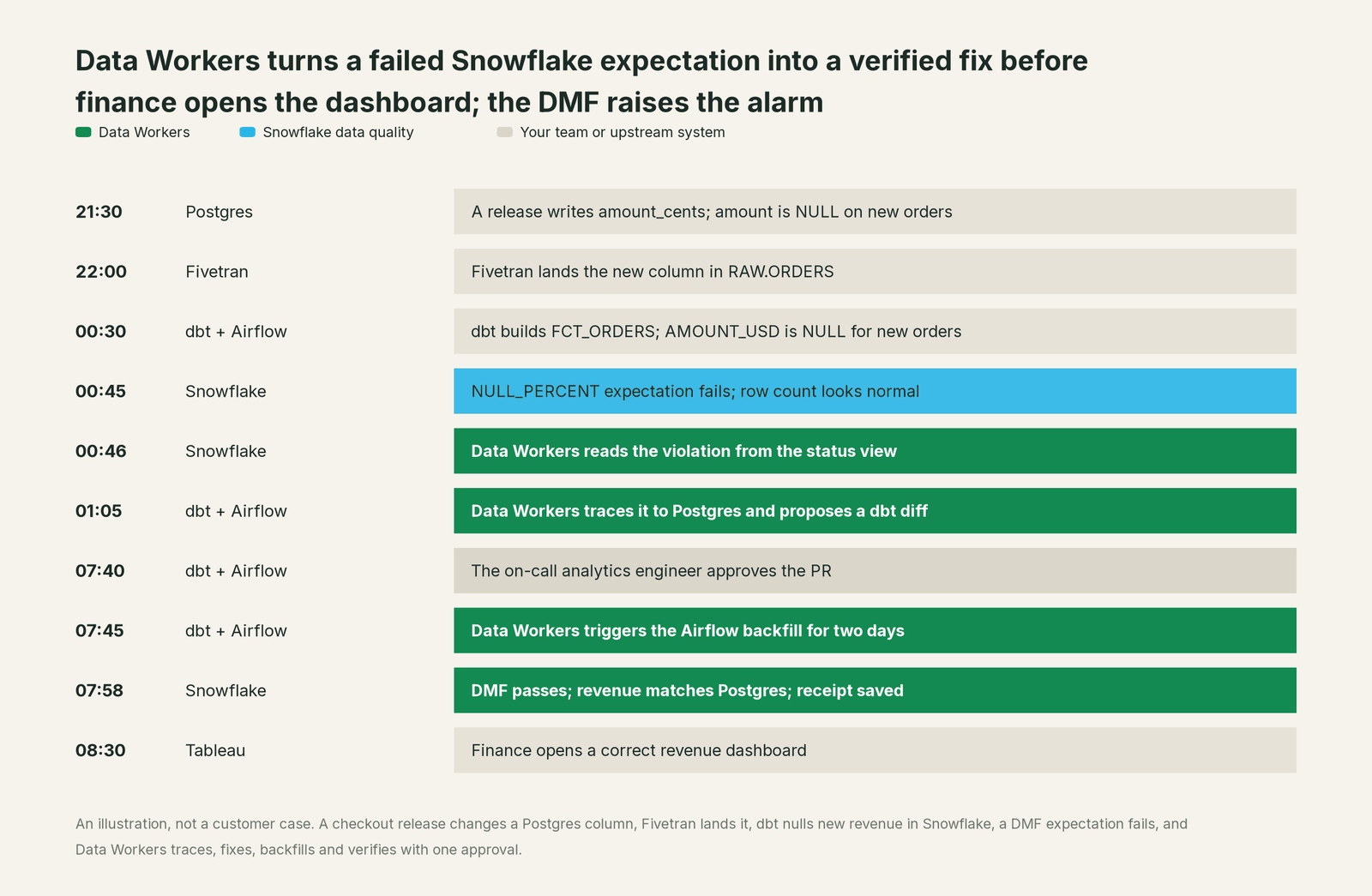
Snowflake caught this at 00:45, and that catch is worth having. Anomaly detection alone would have missed it, because the row count was normal. The difference is what happens between 00:45 and 08:30. With Snowflake's features alone, an engineer spends the morning in Postgres, Fivetran, dbt and Airflow. With Data Workers, one engineer spends it on one approval.
Why doesn't Snowflake just do this itself?
Because Snowflake built a great warehouse feature for one job, and it made a sensible call about scope and risk.
DMFs run where the data sits, on serverless compute, under Snowflake's own access control. They read tables and write results to Snowflake's own event table. That's why they're easy to turn on: their blast radius is close to zero, and their cost is a metered line Snowflake can explain.
The cause of most data quality failures lives outside the warehouse. In the incident above, nothing was wrong with Snowflake. The fix belonged in a dbt model, and the follow-up in an Airflow backfill and a conversation with the team that owns the Postgres release. Writing into those systems is a different product category. It needs blast-radius scoping across platforms, approvals that vary by domain, rollback, a receipt an auditor can read, context about every other system and liability for changes in tools Snowflake doesn't own: your dbt repo, your Airflow deployment, your Fivetran connectors.
Snowflake's own documents draw the line in the same place. The fixing page hands DML to the user. CoCo investigates and, in automations, runs unattended with one user's role and no approval prompt, which is right for a developer tool and not designed as an incident process. Snowflake's job is to be an excellent warehouse. The resolution loop across the estate is the product Data Workers is.
One platform across the data lifecycle
Measuring quality is one stage of a data team's lifecycle. The same team keeps context current, answers business questions, changes pipelines, migrates schemas, handles access, protects sensitive data, cuts spend and keeps models fed with healthy data. Each point tool adds another console, another contract and another handoff. Data Workers covers the whole lifecycle with one context, one approval flow and one audit trail.
We score the same ten stages on every comparison page. Here, one line covers Snowflake's data quality features together, since DMFs, expectations, anomaly detection, the dashboard and the CoCo skill all serve the same stage. They lead on Data Quality, their home ground. Data Workers covers all ten.
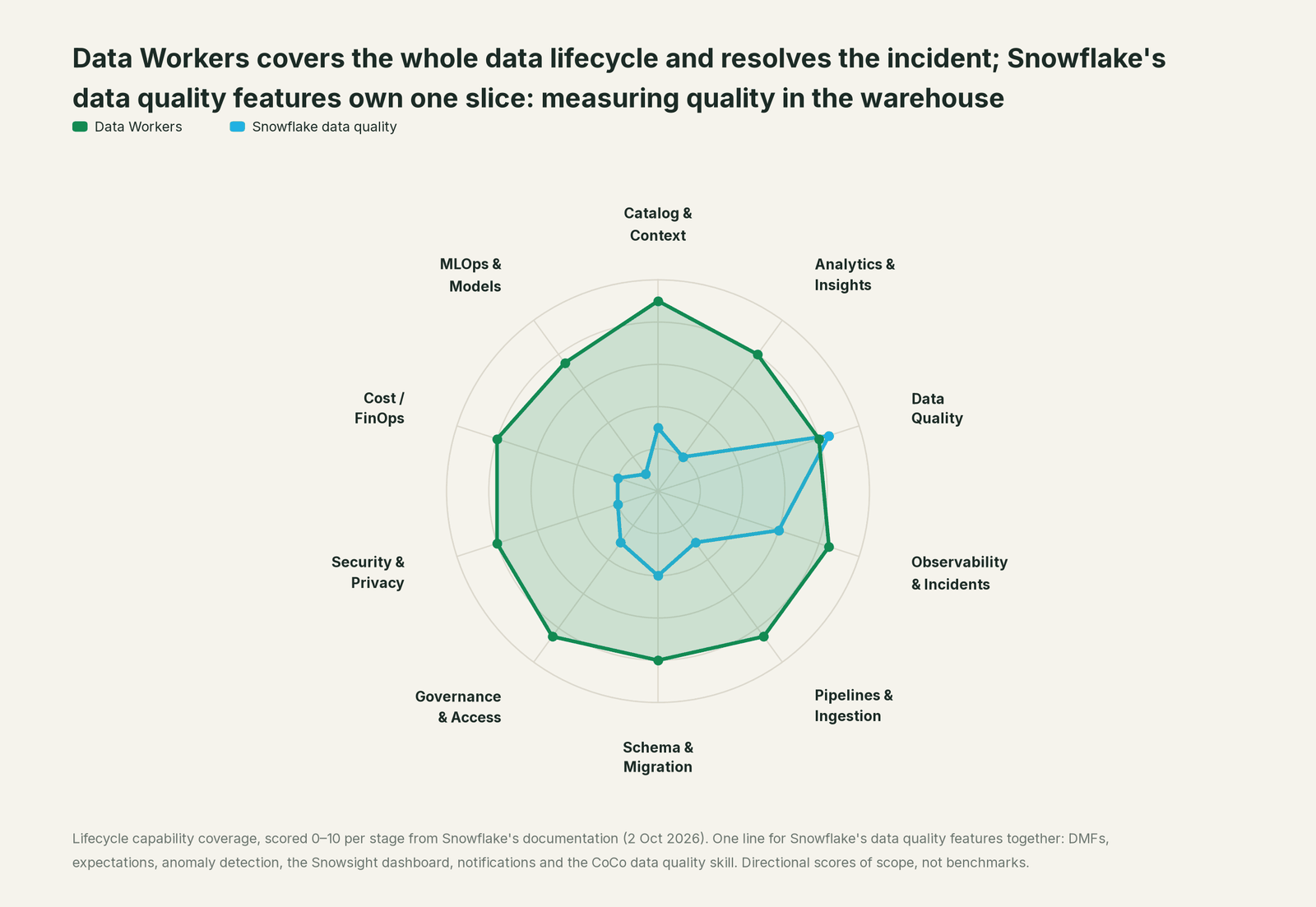
| Stage | Data Workers | Snowflake data quality | Why we scored it this way |
|---|---|---|---|
| Catalog & Context | 9 | 3 | The data profile and Impacted Assets view sit in Catalog Explorer for Snowflake objects. Data Workers keeps one context graph across Snowflake, dbt, Fivetran, Airflow and BI. |
| Analytics & Insights | 8 | 2 | Not the job of DMFs; questions go to CoWork. Data Workers answers business questions over the same governed graph its agents use. |
| Data Quality | 8 | 8.5 | Snowflake's home ground: dozens of system DMFs, custom DMFs and expectations, run serverless next to the data. Data Workers writes, runs and repairs checks and dbt tests. |
| Observability & Incidents | 8.5 | 6 | Anomaly detection (preview) covers row count and freshness; the dashboard (preview) lists open issues; notifications go to email or webhooks. Data Workers owns the loop after the alert. |
| Pipelines & Ingestion | 8.5 | 3 | DMFs can run on every change and gate a task graph. Data Workers writes the pipeline change and triggers the rerun behind approval. |
| Schema & Migration | 8 | 4 | SCHEMA_CHANGE_COUNT counts column changes between runs. Data Workers assesses schema changes, drafts each migration with rollback SQL for the owner to apply and plans migrations. |
| Governance & Access | 8.5 | 3 | A MANAGE DATA QUALITY privilege governs who sets up checks. Data Workers proposes least-privilege grants on Snowflake behind approvals. |
| Security & Privacy | 8 | 2 | DMFs measure quality; masking and classification are separate Horizon features. Data Workers flags new sensitive column names in pull request review and records every change. |
| Cost / FinOps | 8 | 2 | DMF runs bill as serverless credits; managing warehouse spend is outside the data quality features. Data Workers traces Snowflake credits to the dbt model behind them and drafts the fix for its owner. |
| MLOps & Models | 7.5 | 1 | No model coverage in the data quality features. Data Workers keeps the data under models healthy and connects to MLflow and W&B. |
The scores measure scope, what each side covers, not answer quality. They're directional scores of scope, not benchmarks, and the reasoning is shown so you can check every line.
An alert vs a resolved incident, outcome by outcome
The lifecycle view shows breadth. This view splits Snowflake's data quality features into four columns and shows the eight outcomes a data leader pays for when a check fails.
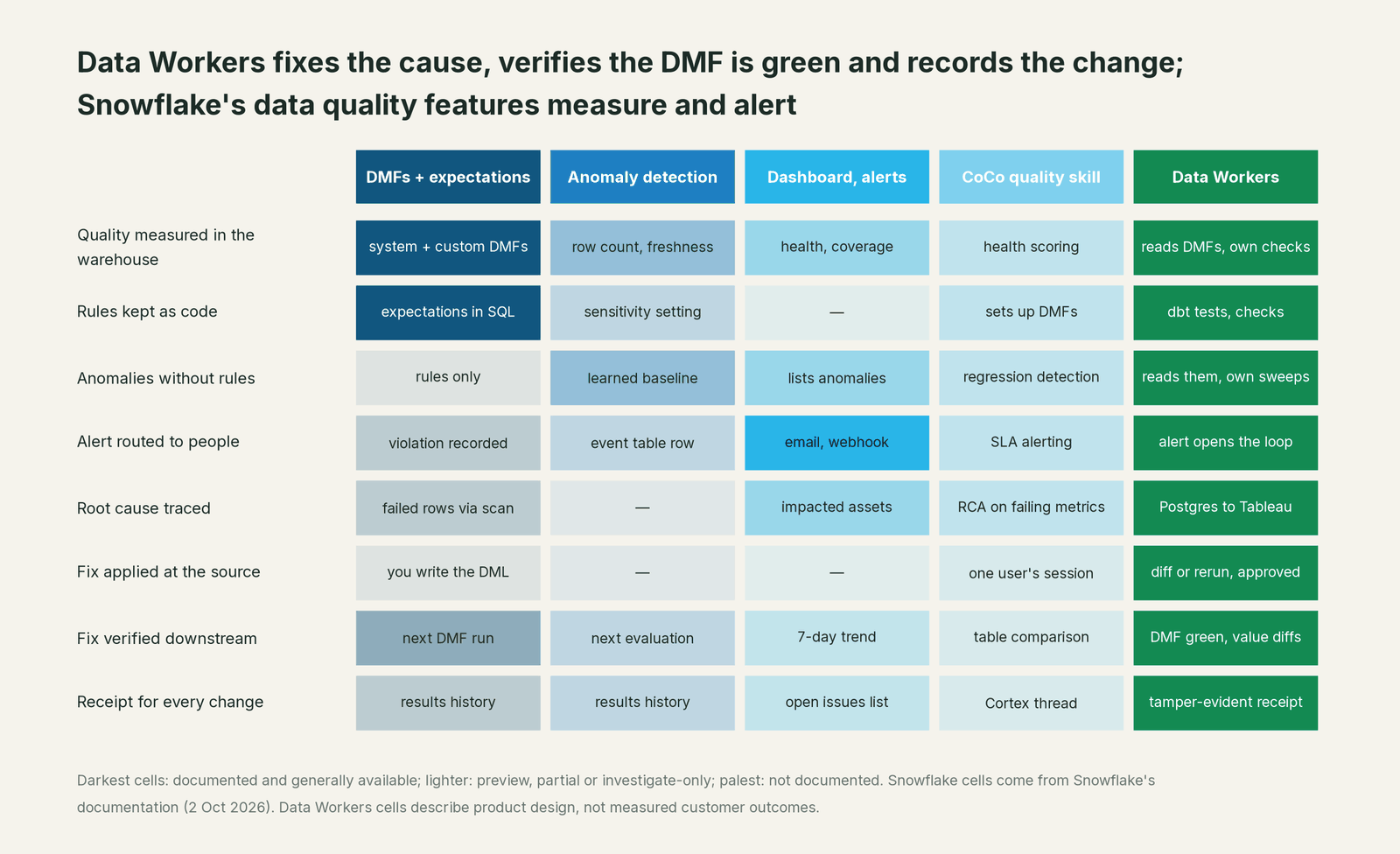
Two rows carry the decision. On "Quality measured in the warehouse," Snowflake's DMFs are the strongest native option you have, and Data Workers reads them rather than replacing them. On "Fix applied at the source," Snowflake's features stop at a scan of failed rows or a CoCo session, by design. That row is the reason to add the Conductor.
What it costs
Snowflake's data quality features bill as serverless credits under "Data Quality Monitoring," charged when scheduled DMFs run. The levers are how many DMFs you attach and how often they run, so TRIGGER_ON_CHANGES on tables that load once a day is usually cheaper than a fixed hourly schedule. Enterprise Edition is required.
Data Workers doesn't add a second set of monitors on the same tables. It reads the DMF results you already pay for and adds the resolution loop. Its own checks run where a DMF can't reach, such as dbt tests or sources outside Snowflake. The Apache 2.0 core is free. The pilot is $7,500 one-time, credited in full against your first year. Scale starts at $1,000 a month and Enterprise at $3,000 a month, billed annually, with unlimited seats, no usage meter and no markup on model spend. See pricing.
Keep your DMFs, or consolidate
Keep them and add Data Workers. This is the natural starting point and, for most Snowflake teams, the long-term answer. DMFs run next to the data, cost little at sensible schedules and need nothing new in your security review. Data Workers connects to Snowflake through its full control-plane connector, reads DMF results and expectation status through that connection, and treats a failed check or an anomaly as the start of the loop. Your DMFs keep measuring; the Conductor does the work.
Reasons to keep Snowflake's features for good:
- •Your checks are already attached and tuned, with expectations your analytics engineers trust.
- •You want measurement inside the account with no extra vendor reading your tables.
- •Anomaly detection fits your volume and freshness patterns once it has history.
Consolidate where it helps. Some checks are better as dbt tests in the repo, next to the model they protect, and some sources sit outside Snowflake. Data Workers writes and runs dbt tests and its own quality checks there, and its Schema Evolution and Data Change Review agents stop many breaks before a DMF fires. Every recurring violation becomes a test upstream. The DMF stays as the warehouse gauge.
Either way, nothing moves. Data Workers stores metadata and scrubbed facts about your data, not copies of your tables.
The case for your CFO
The outcome. Today Snowflake turns data problems into failed checks, and engineers turn failed checks into fixes. Data Workers closes the second step for the incident classes you allow. Failed expectations become closed incidents with a receipt, and the revenue number is right before finance opens the dashboard.
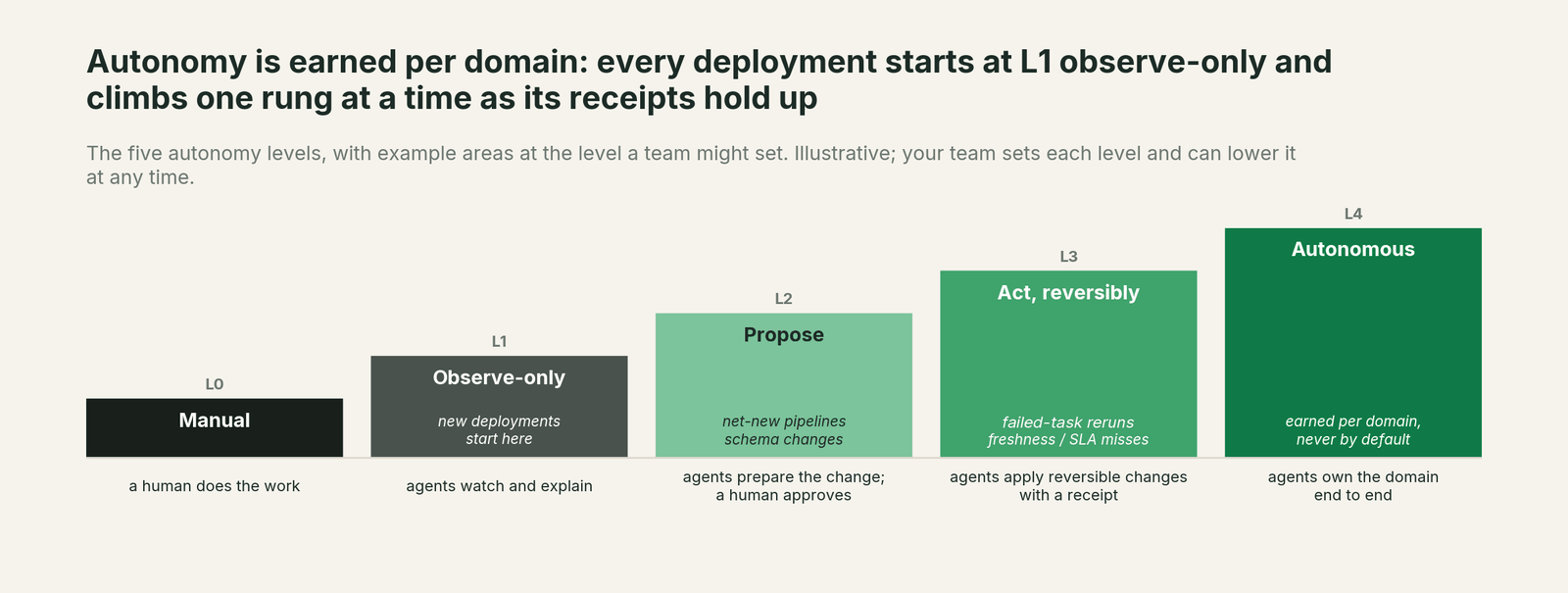
The risk story. Data Workers starts observe-only (L1): it reads and reports. At propose (L2), every fix is a draft a person approves. At act reversibly (L3), it runs only changes it can undo, in the domains you've moved up. Autonomous (L4) is a per-domain choice, never a default. Every write is scoped before it runs, no agent approves its own work, and every receipt records who or what acted, why, what it touched and how to undo it. Zero migration: your data stays in Snowflake.
Why now. Snowflake has made measurement cheap, and AI investigation now runs inside the account. Execution is moving to agents either way. The choice is between unattended sessions on one user's role and one governed loop across the estate.
The first win. NULL and freshness expectation violations in one schema, handled in propose mode.
What stays the same. Your DMFs, expectations, anomaly detection and notification routing; dbt, Airflow and Fivetran; and the coding agent your engineers already use.
The path. Start with a pilot. See pricing; the pilot is credited in full against the first year.
The sentence to repeat upstairs: "Snowflake tells us a number went wrong; Data Workers fixes it where it started, proves the check is green and leaves a receipt, so failed checks become closed incidents instead of tickets."
The fastest first win: failed expectations in one schema
Pick the schema whose checks fail most often, usually a fact table fed by an application database. Point Data Workers at its DMF results with that domain in propose mode. Each failed expectation arrives in the Spellbook inbox with the root cause, the proposed dbt diff or rerun, and its blast radius. When your team has approved those proposals as-is for a few weeks, move freshness reruns up to reversible actions and keep schema changes at propose. Snowflake keeps measuring throughout.
What each Data Workers product does here
Autonomous Data-Conductor. The Autonomous Data-Conductor owns an outcome rather than a step. It runs detect, diagnose, fix, review, verify and remember across the estate, directs the right agents and scopes the blast radius before acting. A DMF violation is one input to the detect step, and a green DMF is part of the verify step.
Data-Agents Swarm. The Data-Agents Swarm is 20+ specialist agents that do the work. Here the Incident Debugging agent, the Schema Evolution agent, the Data Change Review agent and the Quality Monitoring agent matter most. The last one runs quality checks and anomaly sweeps against the warehouse and turns a recurring violation into a dbt test.
Data Context Wizard. Data Context Wizard builds one governed graph from Snowflake, the dbt manifest, Fivetran, Airflow and BI metadata. Every fact carries its source, author, confidence and the time it was observed, so the agent fixing FCT_ORDERS knows the Postgres column and the Tableau view that depend on it.
Spellbook Data Catalog. Spellbook Data Catalog (in preview) is the control plane for agent work. Every proposed change lands in one inbox to approve, steer, send back or roll back, and an authority guard enforced in code stops any agent from approving its own work.
Autonomy guardrails and security
Snowflake keeps data quality risk low by measuring and reporting. Data Workers lets agents act on your estate, under graded and reversible control, because that's how incidents get closed.
- •Autonomy is set per domain. Freshness reruns can run at L3 (act, reversibly) while schema changes stay at L2 (propose).
- •New deployments start observe-only. You extend autonomy one domain at a time as the receipts earn trust.
- •Every write is scoped before it runs, with blast radius computed across platforms. Incidents it hasn't seen before route to a person.
- •Every action is approved or reversible, and leaves a tamper-evident receipt.
- •No agent can approve or promote its own work. This is enforced in code, not left to a prompt.
- •Least privilege. Data Workers acts with the Snowflake roles and grants you give it, through Snowflake's own access control.
"CoCo has a data quality skill and automations. Isn't that the same thing?"
It covers part of it, and the progress is real. An engineer can ask CoCo why a metric fails and get a root cause analysis inside Snowflake. An automation can run that investigation every morning.
It's still one user's session, scoped to Snowflake, on that user's default role. Automations run on a schedule, so a failed expectation can't start one, and tools run without approval prompts. Nobody gates the change by domain, rolls it back cleanly, fixes the dbt model or the Fivetran connector, verifies the result in Tableau or records the outcome where the next incident can use it. Data Workers gives you that operating model, and every Data Workers agent is itself an MCP server your coding agent, CoCo included, can call.
FAQ
What are Snowflake data metric functions? Functions that measure one attribute of a table or view, such as NULL count, freshness, row count or duplicates. Snowflake ships system DMFs and lets you write custom ones in SQL. Combined with an expectation, a DMF becomes a pass or fail data quality check. They require Enterprise Edition.
Does Snowflake fix data quality issues automatically? No. Snowflake's documentation shows using SYSTEM$DATA_METRIC_SCAN to find failed rows and writing DML yourself to correct them. Data Workers fixes the cause at its source, behind your approval, and verifies the DMF afterwards.
Is Snowflake's data quality anomaly detection generally available? Not as of October 2, 2026. It's an open preview, covers the ROW_COUNT and FRESHNESS DMFs, and needs at least two weeks of history. Use expectations for value-level problems such as NULLs or out-of-range amounts.
How much do DMFs cost? They run on serverless compute and appear as "Data Quality Monitoring" credits. You pay when scheduled DMFs run, not for creating them. Fewer, well-chosen DMFs on change-triggered schedules keep the line small.
Should checks live in DMFs or dbt tests? Both have a place. DMFs suit continuous monitoring of tables in the warehouse. dbt tests suit rules that belong to a model and should fail a build. Data Workers reads DMF results and writes dbt tests, so a recurring DMF violation becomes a test upstream.
Will Data Workers add more DMFs and more credits? No. It reads the DMF results you already have. Its own checks cover places DMFs don't reach.
What happens if a Data Workers agent gets a fix wrong? Every write is scoped before it runs and goes to review at the autonomy level you set for that domain. Every action is approved or reversible and leaves a tamper-evident receipt. No agent can approve its own work.
Sources
Snowflake capabilities and statuses are current as of October 2, 2026, from Snowflake's documentation.
Snowflake data quality: Introduction to data quality monitoring, system DMFs, expectations, working with DMFs and schedules, schema-level monitoring, data profile, anomaly detection, Data Quality tab in Snowsight, data quality monitoring dashboard, notifications, results views and fixing data quality issues (all checked Oct 2, 2026).
Snowflake alerts and CoCo: alerts, data governance skills for CoCo, CoCo automations (all checked Oct 2, 2026).
Statuses: Snowflake preview features (anomaly detection, Nov 2025; data quality in Snowsight, Sep 2025; dashboard, Jul 2026; CoCo automations, Aug 2026; checked Oct 2, 2026).
Product names and statuses change quickly. If we've got something wrong, tell us and we'll fix it.