You're on PagerDuty: Page the Right Person, Then Let the First Responder Fix the Data
PagerDuty pages the right person and coordinates the response. Data Workers diagnoses the data incident, carries the approved fix and resolves it with a receipt.
Your data team has a service in PagerDuty, something like data-platform-pipelines, with an escalation policy and an on-call schedule. dbt Cloud and Airflow failures and warehouse alerts arrive through Events API v2, Event Orchestration routes and deduplicates them, AIOps groups the noise, and a high-urgency incident pages whoever holds the rotation this week. PagerDuty's flagship PD Reliability Platform (Starter, Essential, Plus and Ultimate plans) promises "automated incident detection, investigation and remediation by blended teams of agents + humans". Its generative AI, called PagerDuty AI in the docs and PagerDuty Advance on the product pages, includes Paige, PagerDuty's SRE Agent: it reads your runbooks and logs, recalls similar incidents, recommends next steps, and can join as a virtual responder (Early Access). PagerDuty is where the right person gets paged and the response is coordinated. Data Workers is where data incidents get diagnosed, fixed and verified.
That split matters at 2 a.m. The page reaches the right phone in seconds. Then the on-call opens a laptop and traces a failed dbt test back through Snowflake to a field someone changed in Salesforce, by hand. Data Workers does that part: it reads the incident, finds the cause, proposes the fix with its blast radius, carries it through approval, verifies it and resolves the PagerDuty incident with a receipt in the notes.
Key takeaways
- •PagerDuty keeps its job. Services, escalation policies, schedules, Event Orchestration and Paige stay as they are. Data Workers works the data incidents they route.
- •The incident arrives diagnosed. Soon after a page on the data service, the incident notes hold the cause, the blast radius and a proposed fix.
- •Every fix leaves a receipt. A named person approves each change you haven't delegated; Data Workers verifies the result downstream and writes the receipt to the incident before resolving it.
- •Connected natively. Data Workers raises, annotates, acknowledges and resolves PagerDuty incidents over the PagerDuty API today, and any MCP client can reach both PagerDuty's hosted MCP server and Data Workers.
- •Fewer pages, by design. Autonomy is set per domain from L0 manual to L4 autonomous, so over time people are paged only for what still needs a human.
PagerDuty is the pager. Data Workers is the first responder.
PagerDuty gets the right human engaged and runs the response around them, across all of engineering. A data incident needs one more role: someone who goes into the warehouse and the dbt project, finds the break, fixes it with approval and proves the numbers are right. Here is one night with both in place. This is an illustration, not a customer case.
| Time | System | What happens |
|---|---|---|
| Tue 17:40 | Salesforce | A Salesforce admin renames the account field "Region" to "Sales Region" for a territory change |
| Wed 01:00 | Fivetran | The Salesforce connector lands the renamed field as a new column, sales_region__c, in Snowflake; region__c stops filling for changed accounts |
| 02:03 | Snowflake + dbt Cloud | The nightly job builds dim_accounts; its not_null test on region fails for 2,318 accounts and the job errors |
| 02:04 | PagerDuty | The dbt Cloud failure reaches the data-platform-pipelines service as a high-urgency incident and pages the data on-call |
| 02:06 | PagerDuty | Paige, added to the escalation level, recalls a past failure on this service and suggests rerunning the job |
| 02:07 | Data Workers | Reads the incident, which carries the failed not_null test on region; run_quality_check finds region__c null for the changed accounts, the team's alert on Fivetran's log names the new sales_region__c column as the rename, and Data Workers posts the diagnosis as an incident note |
| 02:11 | Data Workers | Proposes a model diff that maps sales_region__c with a fallback to the old column, plus the blast radius: three dbt models and the Tableau "Regional pipeline" workbook |
| 02:19 | Spellbook | The on-call analytics engineer, the named approver for the sales models this week, reviews the diff in Spellbook, approves it and merges it |
| 02:41 | Snowflake + dbt Cloud | The analytics engineer reruns the three models in dbt Cloud; Data Workers verifies: zero null regions, account counts per region match Salesforce |
| 02:44 | PagerDuty | Data Workers writes the receipt to the incident notes and resolves the incident |
| 06:00 | Tableau | The scheduled extract refresh reads verified tables; the 9:00 sales forecast call opens on the right numbers |
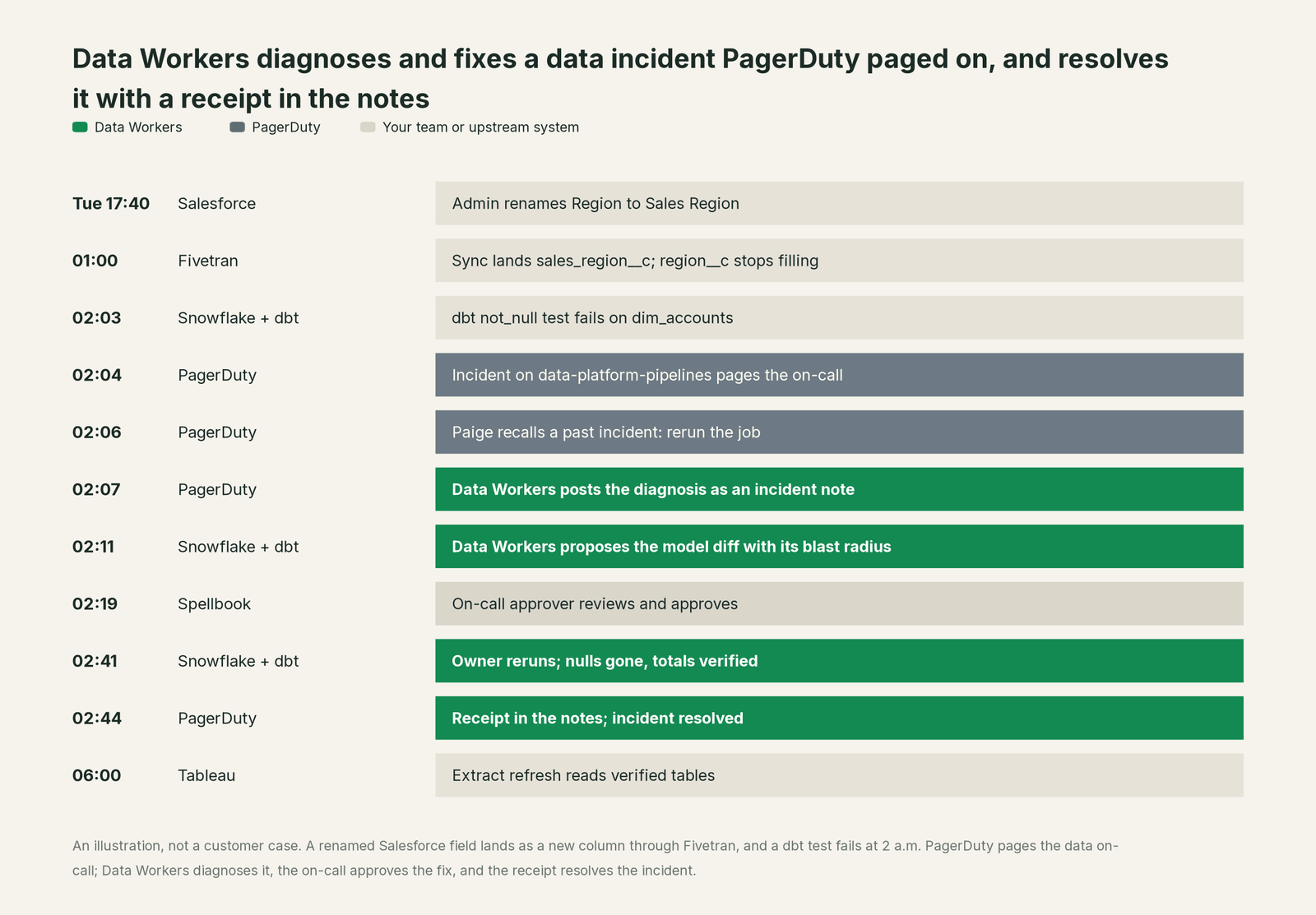
A rerun, the right call for most past failures on this service, would have failed again: the cause was a renamed field, not a flaky run. Paige did its job and got context in front of the responder fast. What changed is that the data cause was in the notes at 02:07, the fix went through one approval, and the incident closed with evidence instead of "rerun, seems fine".
| Job | What PagerDuty does | What Data Workers does |
|---|---|---|
| The signal | Ingests the dbt Cloud failure as an event, dedupes and groups it with Event Orchestration and AIOps | Watches freshness and volume itself and reads schema changes from the dbt manifest, so many breaks are caught before a job fails |
| The page | Routes to the data service and pages the on-call through the escalation policy | Reads the open incident on that service and starts the diagnosis at once |
| The investigation | Paige recalls past incidents, reads runbooks and logs, checks change events, recommends steps | Traces the break through Snowflake, dbt and Tableau lineage to the Salesforce table Fivetran lands, and names the cause |
| The fix | Runs the runbooks and approved remediations you configured for infrastructure | Proposes the model change as a diff with its blast radius, routes it to a named approver, then queues backfills through Airflow and records the dbt Cloud rerun the owner runs |
| The proof | Keeps the incident timeline, notes and log entries | Verifies downstream tables and writes a receipt: what changed, who approved it, how it was checked, how to undo it |
| The close | Resolves the incident and feeds post-incident review | Resolves the PagerDuty incident with the receipt and remembers the pattern for next time |
Why doesn't PagerDuty just do this itself?
Because PagerDuty built its agents for incident response across every team, and that focus is right. Paige is designed to "surface likely root causes", "recommend diagnostic and remediation steps" and remember each service's incidents. PagerDuty says the SRE Agent "performs approved remediation", and the remediations it reaches are the ones your teams wire up: runbooks, Runbook Automation jobs, incident workflows. Its hosted MCP server writes to the response itself: incidents, notes, responders, schedule overrides, orchestration rules, status page posts. Those are the levers an incident platform should own.
Fixing a data incident is a different product category. The fix lives in a dbt model, a warehouse table and a dashboard, in tools PagerDuty doesn't run. It needs lineage from the failed test to every model and workbook that reads it, the model owner's approval, a rollback path, checks after the change, a receipt, and someone who carries the liability for a write to production data. PagerDuty's design keeps it out of that business, which is sensible for a platform that pages every engineering team. Carrying that liability, with blast-radius scoping, approvals and receipts, is the product Data Workers is. And the person tuning escalation policies should think about urgency and fatigue, not about which Salesforce field feeds dim_accounts; Data Workers keeps that knowledge in one governed context graph.
Every tool owns a slice. Data Workers covers the whole lifecycle
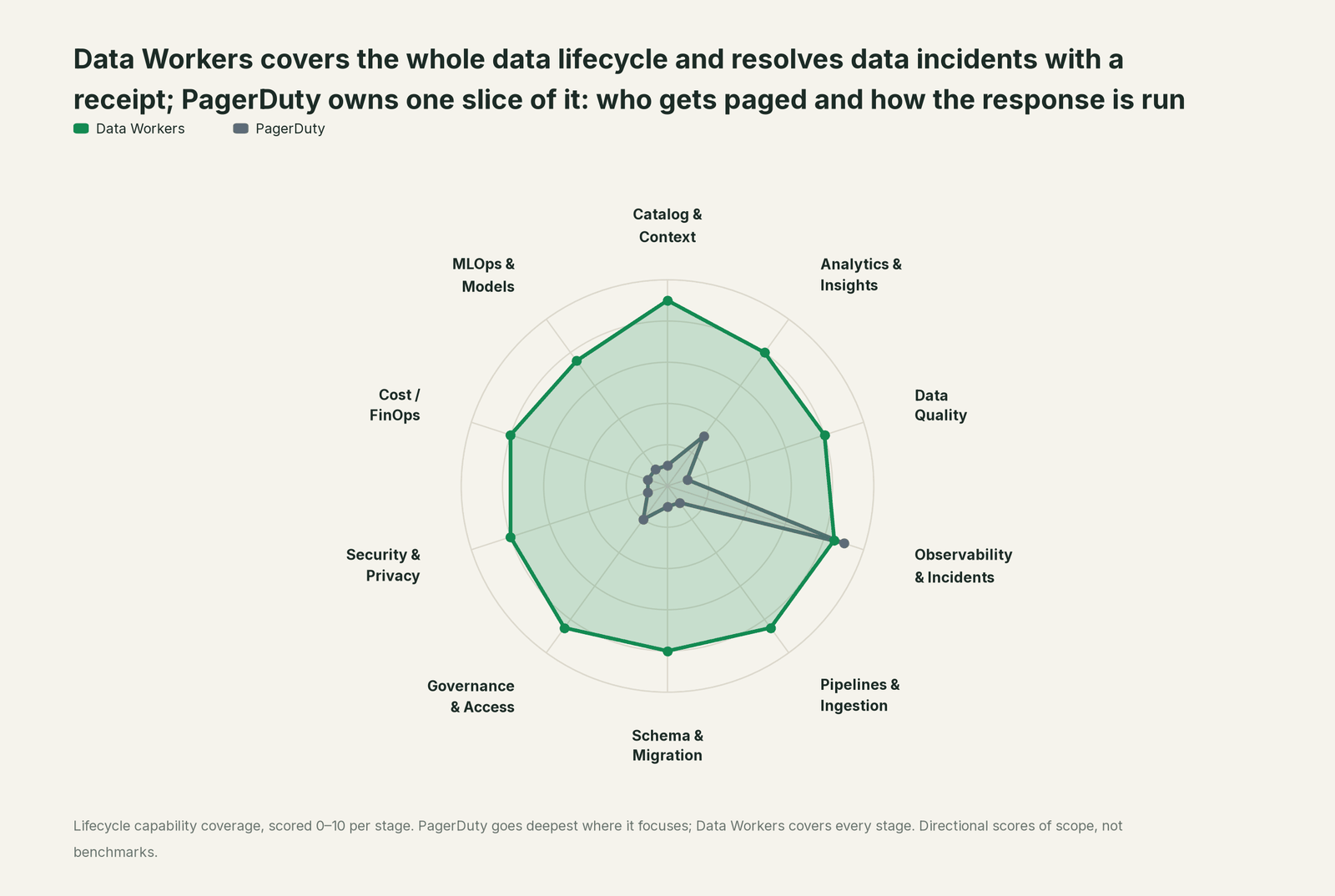
PagerDuty owns one slice deeply: who gets paged and how the response is run. Each point tool adds another console, contract and handoff. Data Workers covers the whole lifecycle with one context, one approval flow and one audit trail, and builds on PagerDuty where your on-call already lives.
| Stage | Data Workers | PagerDuty | Why we scored it this way |
|---|---|---|---|
| Catalog & Context | 9 | 1 | Not PagerDuty's job: service directories map technical and business services, not tables or models. Data Workers keeps one governed context graph of tables, models, metrics, owners and lineage. |
| Analytics & Insights | 8 | 3 | The Insights Agent and analytics report on operations: incident volume, response times, on-call load. Data Workers answers data questions from governed definitions with lineage behind every number. |
| Data Quality | 8 | 1 | Not PagerDuty's job: it receives the failed dbt test as an event. Data Workers writes, runs and repairs the quality checks and dbt tests. |
| Observability & Incidents | 8.5 | 9 | PagerDuty's home stage: routing, escalation policies, on-call schedules, Event Orchestration, AIOps noise reduction and Paige, the SRE Agent, recalling past incidents. Data Workers diagnoses the data incident, fixes it and verifies it. |
| Pipelines & Ingestion | 8.5 | 1 | Not PagerDuty's job: Runbook Automation runs infrastructure jobs; pipelines live in Fivetran, dbt and Airflow. Data Workers reruns and backfills dbt models and orchestrator jobs with approvals; the syncs stay Fivetran's. |
| Schema & Migration | 8 | 1 | Not PagerDuty's job: change events say a deploy happened, not that a column was renamed. Data Workers catches schema changes and assesses blast radius. |
| Governance & Access | 8.5 | 2 | Escalation policies, roles and Scoped OAuth clients govern who is paged and which MCP tools succeed. Data Workers routes every data change to a named approver. |
| Security & Privacy | 8 | 1 | Not PagerDuty's job: security incident response coordinates people, while data classification stays with the data platform. Data Workers leaves a receipt on every data change. |
| Cost / FinOps | 8 | 1 | Not PagerDuty's job: AI actions and seats are metered for PagerDuty itself. Data Workers traces Snowflake credits to the dbt model behind them and drafts the fix for its owner. |
| MLOps & Models | 7.5 | 1 | Not PagerDuty's job: model infrastructure can page through it, but the data under models sits elsewhere. Data Workers keeps the data under your models healthy. |
For data observability tools, read Data Workers vs data observability; if your monitors live in Datadog and page through PagerDuty, you're on Datadog covers the detection side.
How PagerDuty and Data Workers work together
PagerDuty stays on top: incidents are routed, people are paged, Paige helps in the incident and in Slack. Spellbook Data Catalog (in preview) is where the data team looks: each proposed change, who approved it, what it touched and how to roll it back. Between them, Data Context Wizard keeps one governed context graph across Snowflake, dbt and Tableau, including the Salesforce tables Fivetran lands (the sync stays Fivetran's), the Data-Agents Swarm does the work with more than 20 specialist agents, and the Autonomous Data-Conductor runs each fix end to end: detect, diagnose, fix, review, verify, remember.
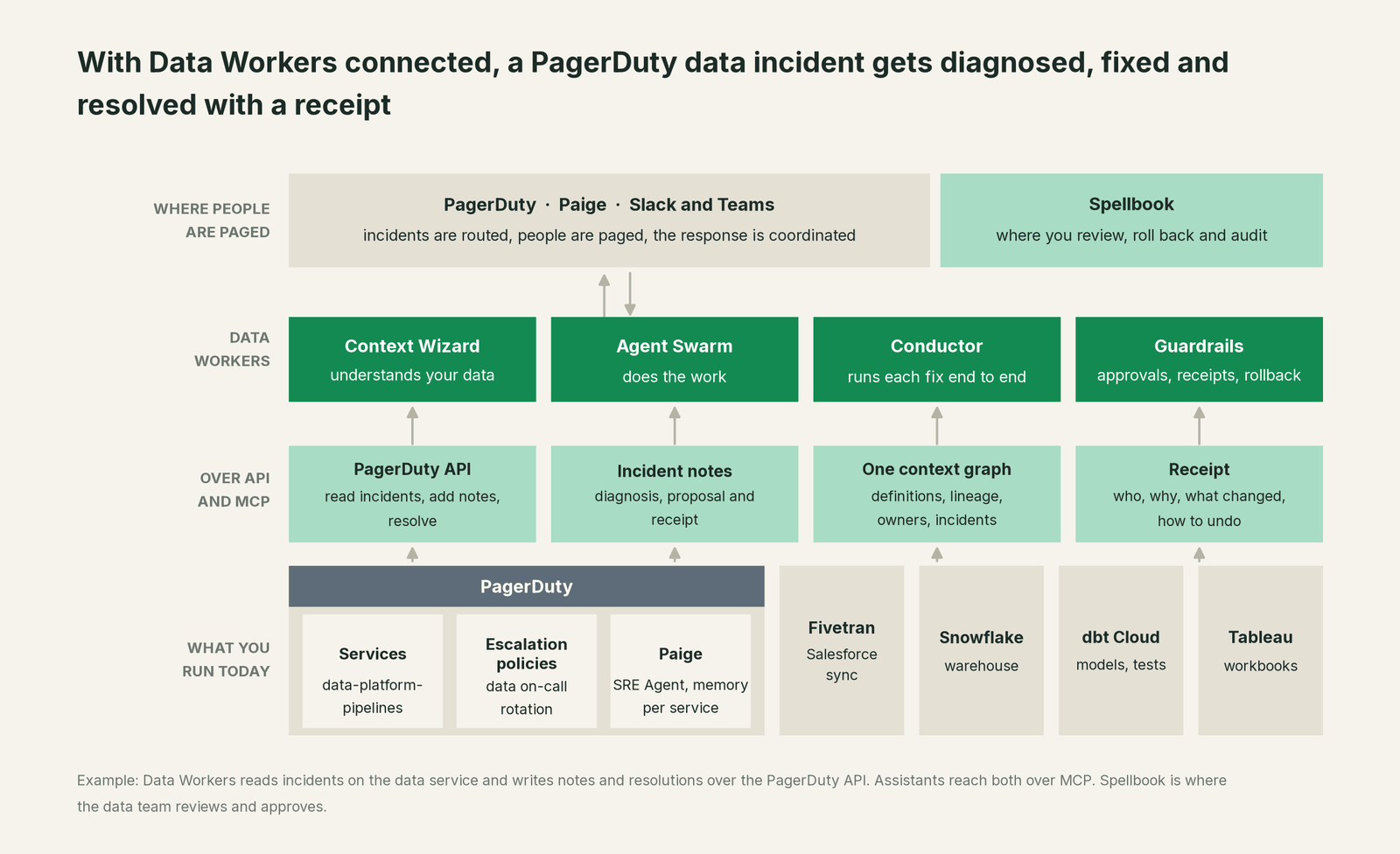
Native, both directions. Data Workers connects over the PagerDuty REST API: it reads open incidents and their log entries, acknowledges, adds notes and resolves. When Data Workers catches a break first, send_pagerduty_alert raises an incident on the data service you configure, and resolve_pagerduty_alert closes it. Your people keep asking Paige; the Data Workers note sits on the same timeline.
The MCP path. PagerDuty runs a hosted MCP server at https://mcp.pagerduty.com/mcp (EU accounts use mcp.eu.pagerduty.com/mcp; the local server is deprecated), with OAuth or an API key. Its tools read and write: manage_incidents creates and updates incidents and adds notes and responders, manage_schedules creates overrides, manage_event_orchestrations appends router rules. Tool filtering isn't available on the hosted server; PagerDuty points to a Scoped OAuth client to limit which tools succeed. Use one, scoped to what the assistant needs (reading incidents and adding notes), and leave schedules, teams and orchestration rules to people.
Setup. Every Data Workers agent is an MCP server; the client setup guide documents the path (clone the repo, one start-agent.sh entry per agent). In Claude Code, both sit side by side:
# Example: PagerDuty's hosted MCP server plus Data Workers agents in Claude Code
# PagerDuty (scoped OAuth client: incidents read + notes only)
MCP_CLIENT_SECRET=YOUR_CLIENT_SECRET claude mcp add-json pagerduty \
  '{"type":"http","url":"https://mcp.pagerduty.com/mcp","oauth":{"clientId":"YOUR_CLIENT_ID","callbackPort":8080}}' --client-secret

# Data Workers agents, from a clone of the open-source repo
claude mcp add --scope user dw-incidents -- "$(pwd)/start-agent.sh" dw-incidents
claude mcp add --scope user dw-catalog -- "$(pwd)/start-agent.sh" dw-context-catalog
claude mcp add --scope user dw-schema -- "$(pwd)/start-agent.sh" dw-schema
claude mcp add --scope user dw-quality -- "$(pwd)/start-agent.sh" dw-quality
For the always-on first responder, Data Workers holds its own PagerDuty API key and works the data services you point it at. In production, its remote endpoint serves /mcp and takes an API key (bearer) or OAuth tokens from your identity provider, verified through JWKS. The agents run in your infrastructure and hold the warehouse credentials; your data stays in your systems, and the hosted Conductor sees workflow metadata only.
The tools in the loop. diagnose_incident and get_root_cause (dw-incidents) find the cause; trace_cross_platform_lineage and blast_radius_analysis (dw-context-catalog) map what the break touches; run_quality_check (dw-quality) verifies the fix; remediate (dw-incidents) runs playbooks such as backfill_data, on its own only for known patterns above 95% confidence; get_audit_trail (dw-observability) keeps the record. dbt changes go to the owner as a diff to merge.
One incident, L0 to L4, set per domain. The page: "dbt Cloud job nightly_core failed: not_null on dim_accounts.region."

- •L0 manual. The on-call opens dbt Cloud, Snowflake and Fivetran and finds the rename after an hour of tracing.
- •L1 observe. Data Workers posts the diagnosis and blast radius as a note. Nothing changes; the on-call starts from the answer.
- •L2 propose. Data Workers proposes the model diff and the reruns. Nothing reaches production until the named approver says yes; an unanswered request expires and escalates, never auto-grants.
- •L3 act reversibly. For change classes with a clean record, such as backfilling through Airflow after an approved mapping change, Data Workers acts with the undo recorded first and verifies; a failed check goes to a named person. The page becomes low urgency: a person reads the receipt in the morning.
- •L4 autonomous. For a scoped domain such as the CRM models, Data Workers catches the emptied
region__cwith a null check in Snowflake, before the nightly test fails, and records the fix with its receipt. Nobody is paged.
Who sets those levels is covered in who owns the agents and how approvals work for AI data agents. For the safety model, read is it safe to let AI agents change production data; for where data and credentials live, where does our data go. Comparing response tools? See you're on Opsgenie and you're on incident.io; the full connector list is in Data Workers integrations.
What changes for your team
PagerDuty makes sure the right person hears about the break. Data Workers gives that person a first responder that has already done the tracing, and over time pages them less.
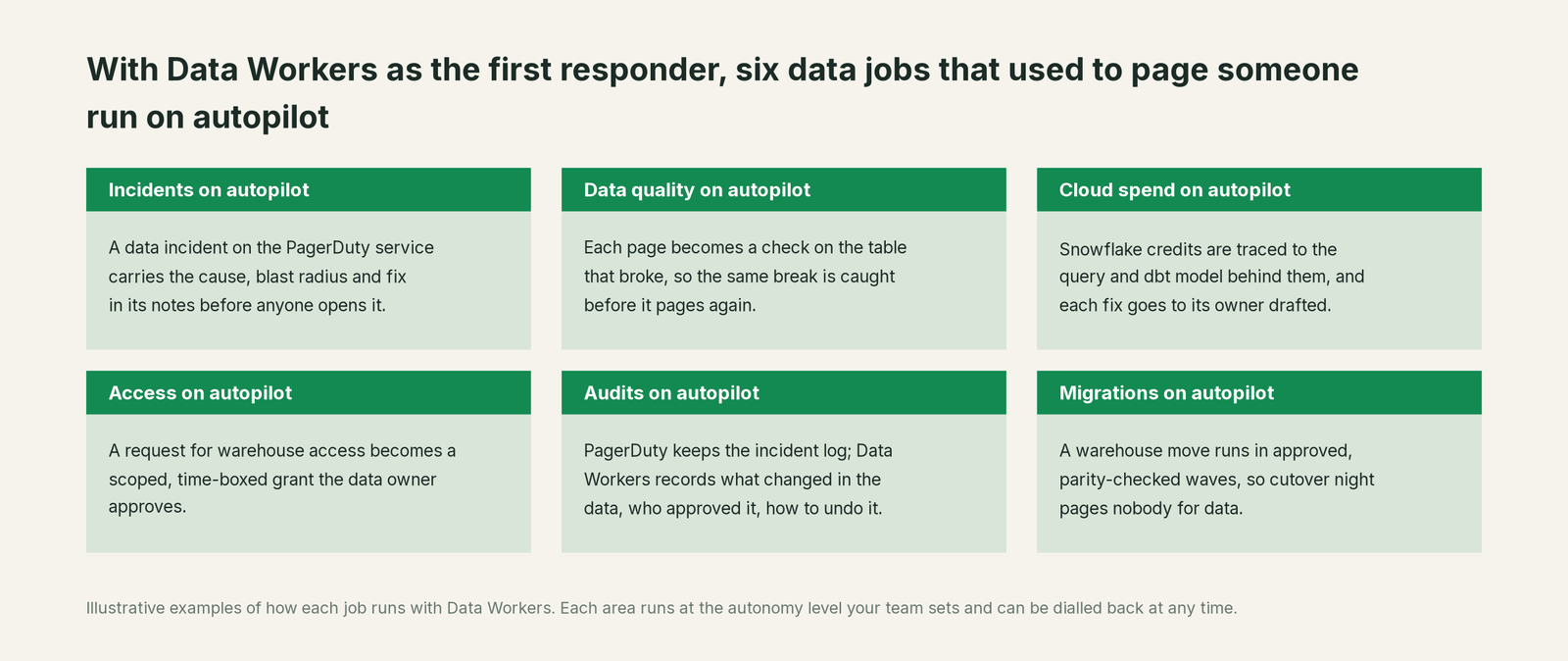
- •Incidents. A data incident carries the cause, blast radius and proposed fix in its notes before anyone opens it.
- •Data quality. Each page becomes a check or dbt test on the table that broke, so the same break is caught earlier next time.
- •Cloud spend. Snowflake credits are traced to the query and dbt model behind them, and each fix goes to its owner drafted.
- •Access. A warehouse access request becomes a scoped, time-boxed grant proposal the data owner approves.
- •Audits. PagerDuty keeps the incident timeline; Data Workers records what changed in the data, who approved it and how to undo it.
- •Migrations. A warehouse move runs in approved, parity-checked waves, so cutover night pages nobody.
Our guide to the data on-call rotation and how to reduce data on-call burden with AI agents cover the practices; the incidents agent PagerDuty integration page walks through the connection.
Keep PagerDuty, or consolidate?
Keep PagerDuty if you love it; Data Workers works with it from day one. Many teams consolidate once Data Workers runs that slice too.
For almost every PagerDuty customer the answer is keep it: engineering's on-call and incident coordination run there, and the data service is one of many. What data teams consolidate is the stack behind the page: a separate data observability tool, a data-quality tool, scripts that watch single tables, and runbooks that say "rerun and check the dashboard". Those signals feed one loop that ends on the PagerDuty incident. Small data-only rotations sometimes let Data Workers run data incidents end to end; PagerDuty for data pipelines: alternatives covers that choice. If you are weighing building this layer yourself on PagerDuty's MCP server and a coding agent, read build it ourselves with Claude Code and MCP servers: connecting MCP servers is the easy part; the context graph, approvals and rollback are the work.
The case for your CFO
The outcome: you already pay to make sure the right engineer hears about every break fast. Data Workers turns the data pages in that stream from an hour of tracing into a diagnosis on arrival and a fix with one approval. Revenue and forecast numbers get corrected before the business opens, with a record of why they were wrong and how they were checked.
The risk story is plain. Data Workers decides nothing alone that you have not delegated; autonomy is set per domain from L0 manual to L4 autonomous. Every change you haven't delegated goes to a named approver, unanswered requests expire and escalate, and no agent can promote its own work. Changes are verified and recorded in a receipt: who approved it, what it touched, how to undo it. An org-wide stop halts all autonomous dispatch. Zero migration: PagerDuty, Fivetran, Snowflake, dbt and Tableau stay where they are.
Why now: PagerDuty's agents can now start investigating the moment an incident fires, so the slow part of a data incident is no longer finding the right person; it is the fix in systems the pager doesn't reach. The first win is L1 on the data service: every data incident gets a diagnosis note before the on-call opens it. What stays the same: escalation policies, schedules, Paige, post-incident reviews, warehouse permissions and dbt review. For the numbers, see the ROI of agentic data operations. Start with a pilot (pricing); the pilot is credited in full against the first year.
The sentence to repeat upstairs: "PagerDuty wakes the right person; Data Workers fixes the data first, so fewer people get woken, and every fix comes with a receipt."
Getting started
Start with a pilot. Pick the PagerDuty service your data alerts already route to, give Data Workers a PagerDuty API key and point it at that service, and run at L1: every incident gets a diagnosis and blast radius in its notes. Then turn on L2 for one domain, such as the CRM models, so fixes arrive as approved changes, and move rerun-and-backfill to L3 once the receipts show the agents were right. The pilot path and plans are on the pricing page, and the pilot is credited in full against the first year.
FAQ
Does Data Workers have a native PagerDuty connector? Yes. Over the PagerDuty REST API, Data Workers reads incidents and log entries, acknowledges, adds notes and resolves, and raises an incident when it catches a break first. The fix happens where the data breaks, in Snowflake, Databricks or BigQuery, dbt and Airflow, which Data Workers also connects to natively.
Paige already finds root causes. Why add Data Workers? Paige works across every PagerDuty service with your runbooks, logs and incident history, and recommends steps. Data Workers works inside the data estate: lineage from a failed test to every model and dashboard that reads it, the schema change behind it, the fix and the verification. Paige helps the responder; Data Workers fixes the data.
Can we just give our assistant PagerDuty's MCP server and let it fix things? It will manage incidents well. Fixing the data still needs the context graph, blast radius, approvals, rollback and receipts on the warehouse side, which is what Data Workers adds. Use a Scoped OAuth client so the assistant can only do what you intend in PagerDuty.
Who approves a fix at 2 a.m.? The named approver for that domain, usually the week's on-call. If they don't answer, the request expires and escalates; it never auto-grants. At L3, change classes with a clean record run without waking anyone and leave a receipt.
What does Data Workers write into the PagerDuty incident? Notes with the diagnosis, the blast radius, the proposed change and, at the end, the receipt: what changed, who approved it, how it was verified, how to undo it. Then it resolves the incident, and your post-incident review starts from that record.
Sources
- •PagerDuty Knowledge Base, Paige (SRE Agent): features, Early Access virtual responder and Teams access, PagerDuty AI availability, AI Actions (page updated Oct 2, 2026), https://support.pagerduty.com/main/docs/sre-agent (checked Oct 2, 2026)
- •PagerDuty Knowledge Base, PagerDuty MCP Server: hosted endpoint, authentication, tool list, Scoped OAuth limitation, local server deprecation (updated Sept 4, 2026), https://support.pagerduty.com/main/docs/pagerduty-mcp-server (checked Oct 2, 2026)
- •PagerDuty, AI Agents: "the next evolution of PagerDuty Advance"; SRE, Scribe, Shift and Insights agents (generally available); "performs approved remediation", https://www.pagerduty.com/platform/ai-agents/ (checked Oct 2, 2026)
- •PagerDuty, AIOps: Event Orchestration, noise reduction, Operations Console, https://www.pagerduty.com/platform/aiops/ (checked Oct 2, 2026)
- •PagerDuty, Plans and Pricing: PD Reliability Platform (Starter, Essential, Plus, Ultimate), Incident Management plans and add-ons including PagerDuty Advance, https://www.pagerduty.com/pricing/ (checked Oct 2, 2026)
- •Data Workers open-source repository (
send_pagerduty_alert,resolve_pagerduty_alertin dw-connectors; tool registrations in dw-incidents, dw-context-catalog, dw-schema, dw-quality, dw-observability), https://github.com/DataWorkersProject/dataworkers-claw-community (checked Oct 2, 2026) - •Data Workers client setup guide, https://dataworkers.io/opensource-docs/client-setup/ (checked Oct 2, 2026)