Cortex Agents MCP: Connect Data Workers to Snowflake CoWork as an MCP Connector
How to add Data Workers agents to a Cortex Agent and Snowflake CoWork as a custom MCP connector, with OAuth through your identity provider and approvals kept in Data Workers.
Your analysts already ask CoWork about the business. A finance lead types "why did APAC revenue fall?", the Cortex Agent behind CoWork reads the semantic view, and an answer comes back with a chart. CoWork is a great place to ask questions of Snowflake data. When the number itself is wrong, though, the question needs someone to find out why and fix it. CoWork is where people ask. Data Workers is the crew that fixes the data under the answer, and keeps the approval and the receipt on its side.
This how-to shows how to connect the two over MCP today. Snowflake's MCP connectors let CoWork and Cortex Agents call tools on a remote MCP server, and every Data Workers agent is an MCP server. You register the endpoint as an external MCP server, add it to the agent your users talk to, and each user signs in through your identity provider. Changes still wait for a named engineer in Data Workers.
Key takeaways
- •CoWork asks; Data Workers does the data work. Questions about wrong, late or missing numbers reach Data Workers agents as MCP tools.
- •Two Snowflake objects: an API integration with OAuth settings and an external MCP server. Users need USAGE on both.
- •Per-user OAuth through your identity provider. Data Workers verifies each token and knows which person asked.
- •Approval stays in Data Workers. A fix returns
approval_requiredand waits for a named engineer in Spellbook Data Catalog. - •Every run leaves a receipt: cause, blast radius, approver, checks, before and after values, and the rollback path.
What it connects
On the Snowflake side: a Cortex Agent, the object that powers a CoWork experience (CoWork was Snowflake Intelligence until Summit 2026, and both are GA). Snowflake's MCP connectors connect "Snowflake CoWork and Cortex Agents to a remote Model Context Protocol (MCP) server". They arrived as an open preview in April 2026, and the current docs page describes them without a preview label. Pre-built connectors cover Atlassian, GitHub, Glean, Linear and Salesforce; anything else, including Data Workers, is a custom connector. This is the inbound direction. Snowflake's managed MCP server, GA since November 2025, runs the other way and exposes Snowflake to outside clients.
On the Data Workers side: the agents of the Data-Agents Swarm, each an MCP server that serves streamable HTTP at /mcp. The Incident Debugging agent is the natural first connector. The Autonomous Data-Conductor sequences multi-step fixes, and Data Context Wizard gives each agent one governed context across Snowflake, Fivetran, dbt, Airflow and the rest of the estate. For the full picture of Data Workers on the warehouse, see Data Workers on Snowflake. Engineers who work in CoCo can call the same agents from CoCo's own MCP client (preview); CoCo vs the Data-Agents Swarm covers that path. This page is about the business-user path.
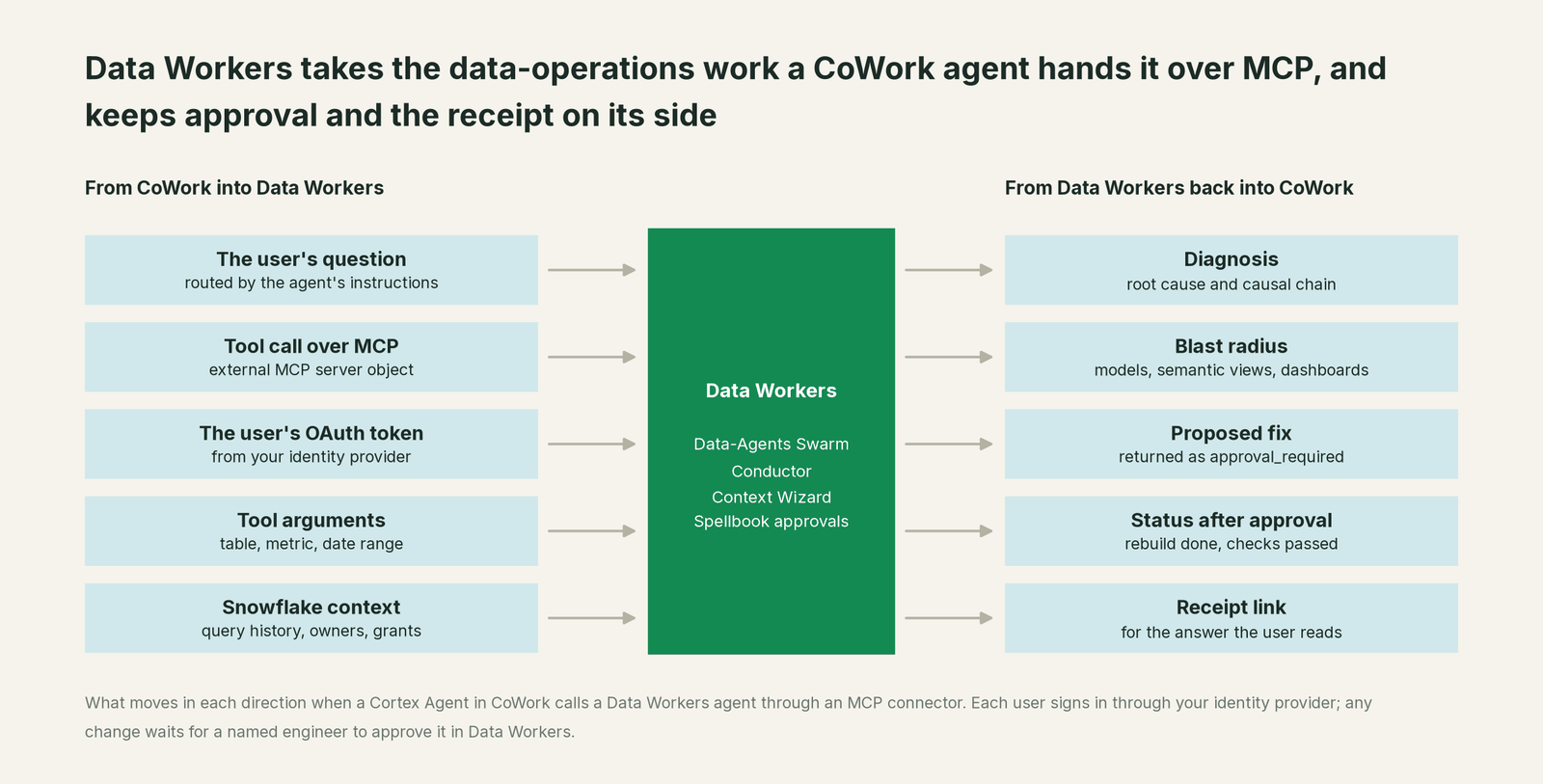
What moves in each direction
| From CoWork into Data Workers | From Data Workers back to CoWork |
|---|---|
| The user's question, routed by the agent's instructions and the tool descriptions | A diagnosis: root cause and causal chain |
| An MCP tool call through the external MCP server object | The blast radius: dbt models, semantic views, dashboards |
| The user's OAuth access token from your identity provider | A proposed fix, returned as approval_required with an approval id |
| Tool arguments: table, metric, date range | Status after approval: rebuild done, checks passed |
| Snowflake context Data Workers already reads: query history, owners, grants | A receipt link the agent can cite in its answer |
Prerequisites
- •A Cortex Agent your CoWork users already use, and a role that can create integrations and holds CREATE EXTERNAL MCP SERVER on a schema. By default only account admins have these.
- •An OAuth app in your identity provider (Okta, Entra ID or similar) that issues signed JWT access tokens for a Data Workers audience. Register Snowflake's callback URL,
https://identity.snowflake.com/oauth2/callback. - •Data Workers serving the agent over HTTPS, reachable from Snowflake, with its remote transport in OAuth mode: it checks each token's signature against your identity provider's keys, plus issuer and audience, and rejects everything else. Use a hostname with hyphens, not underscores; Snowflake requires it.
- •Data Workers connected to the systems your incidents cross: its Snowflake connector with a scoped role, plus Fivetran, dbt and Airflow, each read-only to start.
- •Grants planned. Who gets USAGE on the connector, and who may approve changes in Data Workers. Keep those two lists separate.
Setup
Four steps: serve the agent, create the API integration, create the external MCP server, add it to the agent. Hostnames, names and IDs below are placeholders.
-- Example: adding a Data Workers agent to a Cortex Agent and CoWork as a custom MCP connector

-- 1. On your Data Workers host: serve the Incident Debugging agent over streamable HTTP
--    DW_TRANSPORT=http  ->  https://dw-incidents.example.com/mcp
--    Remote transport in OAuth mode, validating tokens from your identity provider.

-- 2. API integration: Snowflake sends each user through your identity provider
CREATE API INTEGRATION dw_incidents_mcp
  API_PROVIDER = external_mcp
  API_ALLOWED_PREFIXES = ('https://dw-incidents.example.com')
  API_USER_AUTHENTICATION = (
    TYPE = OAUTH2
    OAUTH_CLIENT_ID = '<client id from your identity provider>'
    OAUTH_CLIENT_SECRET = '<client secret>'
    OAUTH_AUTHORIZATION_ENDPOINT = 'https://login.example.com/oauth2/v1/authorize'
    OAUTH_TOKEN_ENDPOINT = 'https://login.example.com/oauth2/v1/token'
    OAUTH_REFRESH_TOKEN_VALIDITY = 28800
  )
  ENABLED = TRUE;

-- 3. External MCP server, and access for the people who use it
CREATE EXTERNAL MCP SERVER ops.integrations.dw_incidents
  WITH DISPLAY_NAME = 'Data Workers: data incidents'
  URL = 'https://dw-incidents.example.com/mcp'
  API_INTEGRATION = dw_incidents_mcp;

GRANT USAGE ON EXTERNAL MCP SERVER ops.integrations.dw_incidents TO ROLE finance_analyst;
GRANT USAGE ON INTEGRATION dw_incidents_mcp TO ROLE finance_analyst;

-- 4. Add it to the agent behind CoWork (keep the rest of the current spec)
ALTER AGENT finance.agents.finance_assistant MODIFY LIVE VERSION SET SPECIFICATION $$
  <current specification>
  mcp_servers:
    - server_spec:
        name: "ops.integrations.dw_incidents"
$$;
You can do steps 3 and 4 in Snowsight instead (AI & ML, Agents, then MCP Connectors on the agent). Each user then opens the sources panel in CoWork, selects Connectors, and connects; your identity provider asks them to sign in once. Set a finite refresh-token validity, as Snowflake recommends, so people re-authenticate on a schedule you choose.
Two details matter more than the SQL. First, Snowflake lists every tool the server offers and the agent picks tools from their descriptions, so scope what an agent can do on the Data Workers side, not by trimming the list. The Incident Debugging agent has no approve tool at all, and its autonomy level decides whether remediate runs, waits for approval or is refused. Second, add a line to the agent's orchestration instructions that names the symptoms users describe ("looks wrong", "late", "missing rows") and says to call Data Workers for them.
A worked run, end to end
This is an illustration, not a customer case. The 01:30 Fivetran sync from NetSuite stops partway and misses the APAC invoices for September 30. At 04:00 the Airflow DAG run finance_daily triggers the dbt job on schedule, and fct_revenue builds without them. At 06:15 the next sync lands the invoices, but nothing rebuilds downstream. The semantic view behind the finance agent reads what the table says.
| Time | System | What happens | Who decides |
|---|---|---|---|
| 01:30 | Fivetran | NetSuite sync stops partway; APAC invoices miss the run | Upstream |
| 04:00 | Airflow | finance_daily triggers the dbt job | Upstream |
| 04:20 | dbt, Snowflake | fct_revenue builds without 1,840 APAC invoices | Upstream |
| 06:15 | Fivetran | The next sync lands the invoices; nothing rebuilds | Upstream |
| 09:10 | CoWork | An FP&A lead asks why APAC revenue fell 22%; the agent reads the semantic view and calls diagnose_incident | The agent routes |
| 09:11 | Data Workers | Traces fct_revenue to stg_netsuite_invoices to the 01:30 sync, and finds the invoices that landed at 06:15 | Read-only |
| 09:12 | CoWork | Answers: a data gap, not a sales drop; remediate returned approval_required | Waiting |
| 09:30 | Spellbook | The on-call analytics engineer reviews the plan and approves | A named engineer |
| 09:32 | Airflow, dbt | Data Workers rebuilds the September 30 partition of fct_revenue | Approved at 09:30 |
| 09:50 | Snowflake | Invoice counts match the raw table; revenue back in range | Read-only checks |
| 09:55 | CoWork | The FP&A lead asks again and gets the right number | The agent routes |
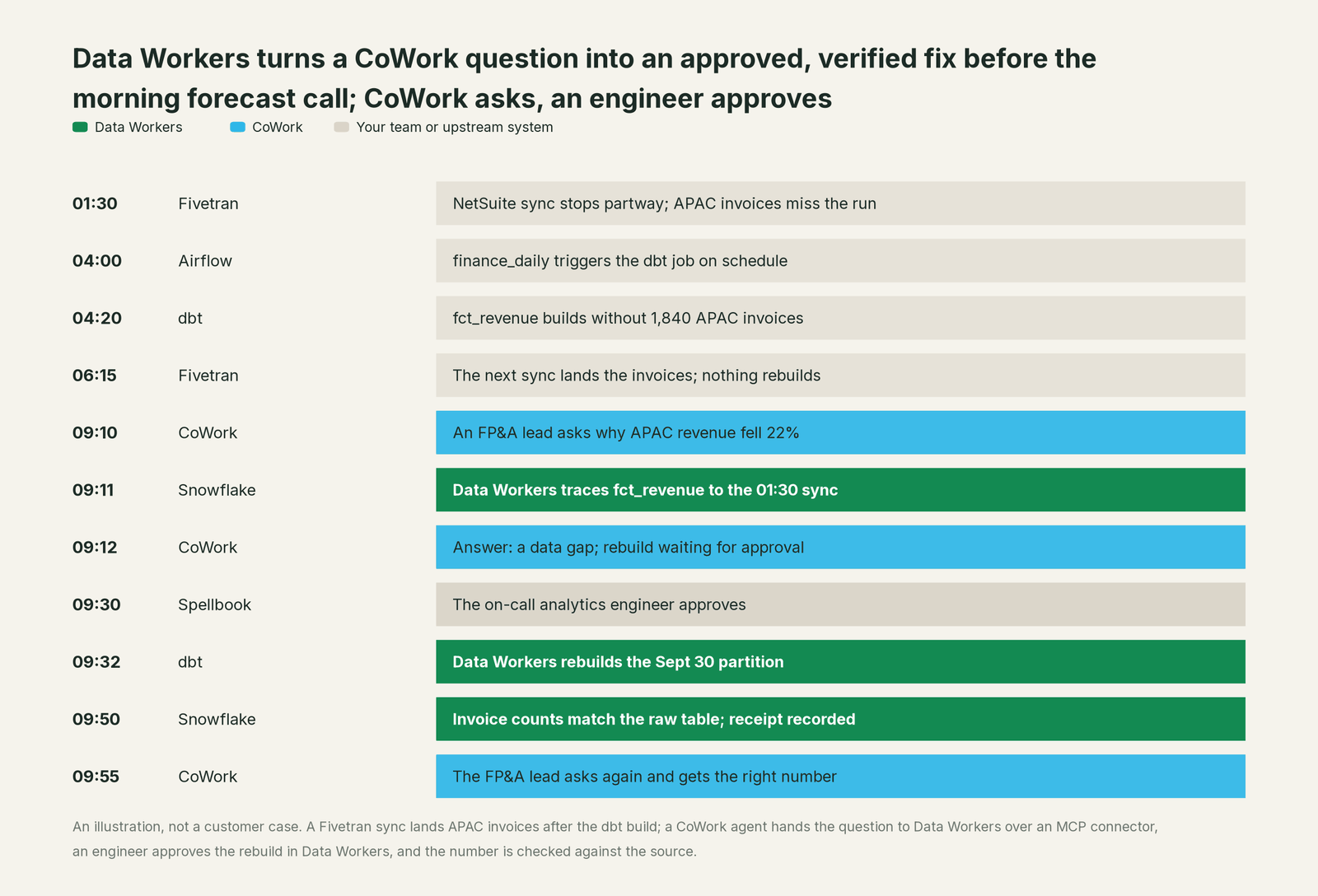
CoWork never held the approval. The request arrived with the FP&A lead's token, so Data Workers recorded who asked. When remediate ran with the backfill_data playbook and verification on, the domain's autonomy level required approval, so it returned approval_required with an approval id, and the agent passed that status to the user. The approval happened in Spellbook Data Catalog (in preview), where a guard rejects any approver that is an agent, including the agent that proposed the change.
The receipt this run leaves. One tamper-evident record, hash-chained with the rest of the audit log:
- •Request: arrived over MCP through the
dw_incidentsconnector from CoWork; the user who asked; tools called and their arguments. - •Cause: the causal chain from
fct_revenueback to the 01:30 sync and the 06:15 load. - •Blast radius: one dbt model, one semantic view, two dashboards.
- •Action: the September 30 partition rebuilt through the dbt job.
- •Approver: the named engineer, with the time of approval.
- •Checks: invoice count against the raw table; APAC revenue against the prior four weeks.
- •Before and after values, and the rollback path.
Why doesn't CoWork just do this itself?
CoWork is built as a personal agent for knowledge workers: ask, explore, build an artifact, schedule an automation. That is the right design for Snowflake. MCP connectors extend it to tools elsewhere, and Snowflake draws a sensible line around them: external MCP servers "are not provided, maintained, or verified by Snowflake," and what those tools do is the provider's responsibility. Snowflake's governance sits at the connection: USAGE grants, per-user OAuth, and the agent's own role in Snowflake.
Fixing production data across Fivetran, dbt and Airflow is a different product category. It needs blast-radius scoping across systems Snowflake doesn't run, approvals tied to the change itself, rollback for each step, receipts an auditor can read, and accountability for changes in tools Snowflake doesn't own. Keeping that out of a business-user agent is a sound business decision. It is the product Data Workers is, and CoWork can call it like any other connector. For how the two context layers fit together, see Snowflake Horizon Context vs Data Context Wizard.
The next autonomy step
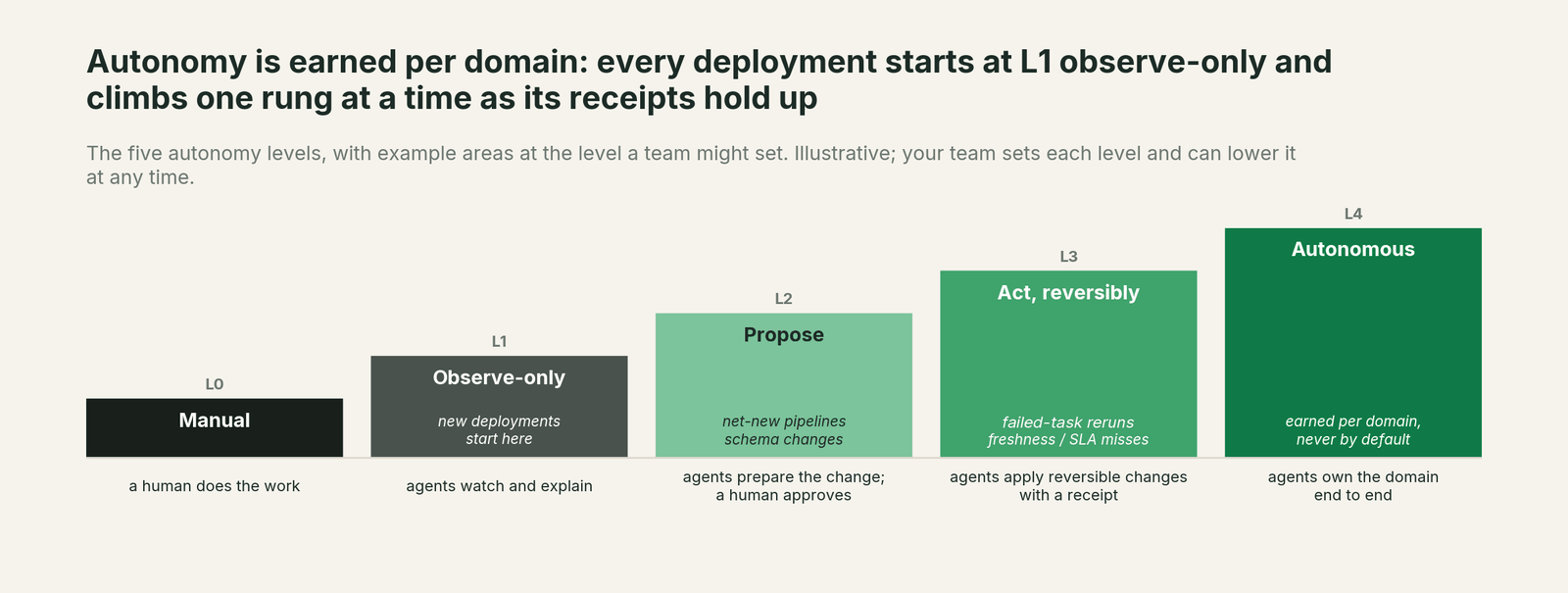
Start at observe: the Incident Debugging agent explains broken numbers and changes nothing, so CoWork users get the cause next to the chart. Move to propose for one domain, as in the run above: every fix waits for a named engineer. Once that domain's receipts show the same fix approved again and again (rebuilding a partition after a late sync is a common first candidate), let that one playbook act reversibly with verification on, while schema and access changes stay at propose. Autonomy is set per domain in Data Workers, so the connector, the grants and the agent spec in Snowflake don't change as you climb.
The case for your CFO
The outcome. When someone asks CoWork why a number moved, they get the cause and a fix in progress, instead of a ticket that waits for the next standup. Fewer wrong numbers reach a forecast or a board pack.
The risk story. At observe, agents read and explain; they change nothing. At propose, every change waits for a named engineer, and no agent can approve its own work or another agent's. Acting levels are reversible and limited to domains you pick. Each request carries the asker's identity, every change carries a receipt and a rollback path, and nothing migrates.
Why now. CoWork is GA, automations went GA in September, and MCP connectors let it reach outside Snowflake. Business users are already asking it about data. The answers should come with a fix and an audit trail.
The first win. Late and partial loads. Connect the Incident Debugging agent to one CoWork agent in observe mode for one domain, and see which answers it would have turned into fixes.
What stays the same. Snowflake, CoWork, semantic views, Horizon policies, Fivetran, dbt, Airflow, and the people who approve changes.
The pilot path. Start with a pilot on one CoWork agent and one domain, observe first, then propose. The pilot is credited in full against the first year.
One sentence for upstairs: "CoWork tells our people what the number says; Data Workers makes sure the number is right, and nothing changes until one of our engineers approves it."
Sources
Snowflake capabilities and statuses, current as of October 2, 2026: MCP Connectors (external MCP server and API integration objects, OAuth2 and DCR, USAGE grants, agent specification, CoWork connect flow, tools only, third-party server disclaimer), preview features (MCP connectors for Cortex Agents listed as open preview in April 2026 on the localized list), 2026 feature releases (CoWork automations GA September 11, 2026; Cortex Agents object enhancements GA September 16, 2026), Snowflake Intelligence GA (November 4, 2025), Snowflake-managed MCP server (GA November 4, 2025) and the CoWork press release (June 2, 2026; formerly Snowflake Intelligence). Product names and statuses change quickly; if we've got something wrong, tell us and we'll fix it.