Snowflake CoCo vs the Data-Agents Swarm: an engineer's coding agent vs agents that run the estate
CoCo, formerly Cortex Code, writes and runs Snowflake code for one engineer. The Data-Agents Swarm runs the estate with approvals, verification and receipts.
CoCo is the engineer's coding agent for Snowflake. The Data-Agents Swarm is the crew that runs the estate. That's the comparison in two sentences, and the rest of this page is the proof.
Here is the estate most CoCo teams run. Snowflake is the warehouse. Fivetran lands source data from Postgres and SaaS apps. A dbt project builds the models, Airflow runs the DAGs, and Tableau or Looker sits on top. Some teams have a Databricks workspace next to it. Your engineers open CoCo (the agent Snowflake called Cortex Code until its June 2026 rename) in the CLI, in CoCo Desktop, in Snowsight or in VS Code. They ask it to write a dbt model, debug a failed DAG run or explain a credit spike, and it does the work: it reads the account, edits the repo, runs SQL and asks before anything risky.
Then the engineer closes the laptop. The rename at 2 a.m., the null keys at 3 a.m. and the wrong revenue tile at 9 a.m. land between sessions, across five systems, with nobody's prompt open.
Data Workers is the agentic data platform that runs that part. The Data-Agents Swarm is 20+ specialist agents that act in every system behind an incident, under a policy you set per domain, with a named approver, a rollback path and a receipt on every change. CoCo makes each engineer faster. Data Workers runs the estate. Every Data Workers agent is an MCP server, so your engineers can call the Swarm from CoCo too.
Key takeaways
- •CoCo is a strong coding agent for Snowflake. CLI GA since Feb 2, 2026, Snowsight GA since Mar 9, Desktop GA since Jul 21 and the VS Code extension GA since Aug 27. It writes and runs SQL, dbt, Python and Airflow DAGs with Snowflake skills built in.
- •CoCo acts as the person at the keyboard. It runs under that user's role and asks that user to approve risky steps. Its scheduled automations (preview) run unattended with approval prompts turned off.
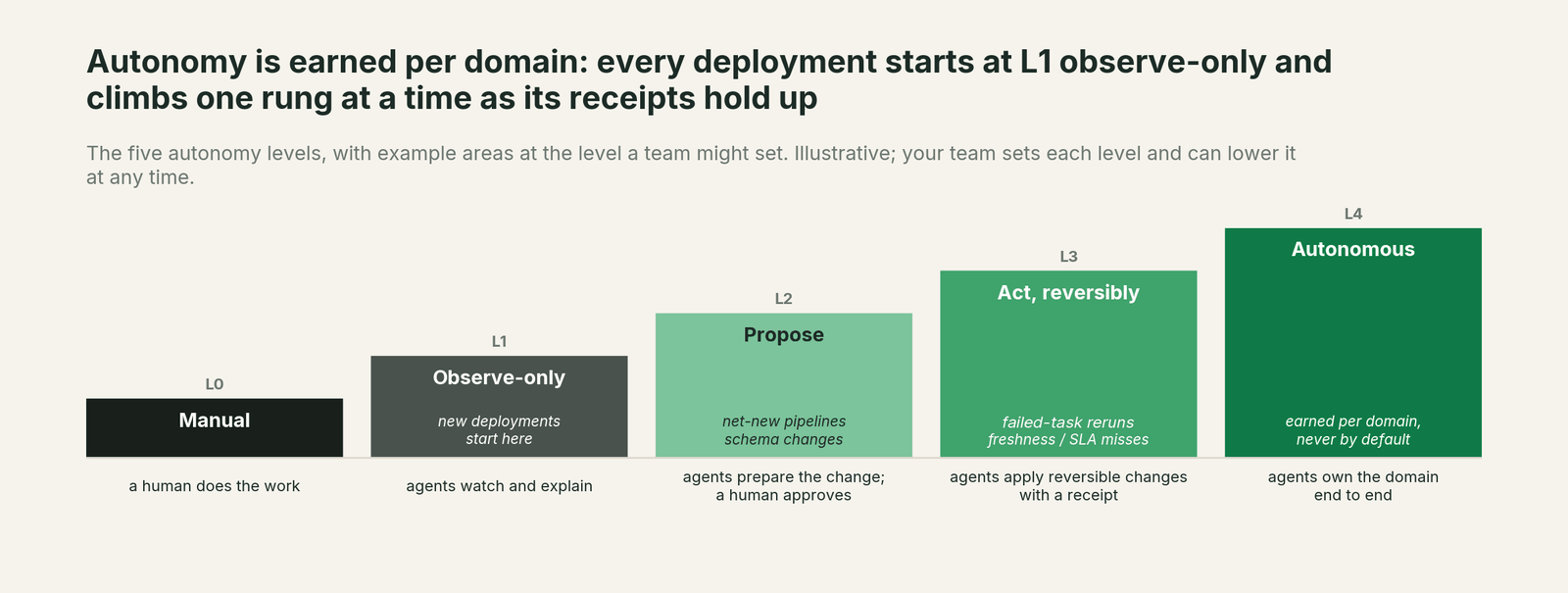
- •The Data-Agents Swarm acts for the estate. Autonomy is set per domain from L1 observe to L4 autonomous, an agent never approves its own work, and every change carries a blast radius, a rollback path and a tamper-evident receipt.
- •Data Workers closes the incident. The Autonomous Data-Conductor traces a failure across Snowflake, dbt, Airflow, Fivetran and BI, fixes it at the source and re-runs the failed check after the fix lands.
- •Keep CoCo. CoCo is an MCP client (preview), so engineers can call Data Workers' agents from it. Nothing moves and nothing is replaced.
- •Flat pricing. CoCo bills on tokens. Data Workers is a flat platform fee with unlimited seats and no usage meter.
For the wider Snowflake picture, read Data Workers on Snowflake. For the context layer, read Snowflake Horizon Context vs Data Context Wizard. For the executive version, read the Snowflake data leader's guide.
Six things the Data-Agents Swarm adds on top of CoCo
1. Work that runs between sessions. CoCo starts when someone prompts it. The Autonomous Data-Conductor runs continuously: it detects, diagnoses, fixes, reviews, verifies and remembers, and it directs the right agent in the Data-Agents Swarm for each step.
2. Fixes that land where the problem started. Most Snowflake incidents start upstream: a source rename, a Fivetran sync, a late Airflow task. The Swarm proposes the dbt change as an approval-gated diff for the owner to merge, triggers the Airflow rerun or applies a scoped Snowflake grant, wherever the cause lives.
3. Approval separated from the actor. In CoCo, the engineer who asked is the one who approves. In Data Workers, a change is approved by a named person, and an authority guard in the write path stops any agent from approving its own work.
4. A receipt and a rollback path on every change. CoCo records prompts, tool calls and SQL as traces in an event table. Data Workers records what changed, who approved it, the blast radius across platforms, the timestamp and how to undo it, in a tamper-evident audit log you review in Spellbook Data Catalog (in preview).
5. One context graph across the estate. Data Context Wizard joins Snowflake metadata and query history with your dbt manifest, Airflow state, Fivetran syncs, Databricks metric views and BI metadata. CoCo reads deeply into the Snowflake account and reaches other tools one plugin or MCP server at a time.
6. The rest of the lifecycle. Access requests, cost cleanup, schema changes, migrations and audit evidence run as owned jobs with one approval flow and one audit trail, instead of as prompts someone has to remember to write.
One incident, five systems: what CoCo sees vs what Data Workers does
This is an illustration, not a customer case.
At 02:10 a source team renames region_id to sales_region_id in the Postgres orders database. At 02:40 Fivetran lands the rename in Snowflake. At 03:15 the Airflow DAG runs dbt, and fct_orders builds with null region keys. The not-null test is set to warn, so the run goes green. Revenue by region in Tableau is read at the 9 a.m. review.
| Time | What CoCo sees | What Data Workers does |
|---|---|---|
| 03:20 | Nothing. No session is open. | The Quality Monitoring agent's null-rate check fails on fct_orders. The Conductor opens an incident. |
| 03:24 | Nothing. | The Incident Debugging agent follows lineage from fct_orders through the Fivetran table to the Postgres rename. The Pipeline agent proposes a dbt diff that maps the new column, with a blast-radius report covering the Tableau workbook. |
| 06:00 | A CoCo automation (preview) the analytics lead set up for freshness posts its digest. It lists the null spike. | The diff is waiting for approval with its evidence attached. |
| 07:30 | If an engineer opens CoCo and asks, it can find the rename and edit the model in their local repo, then run dbt under their role. | The on-call engineer approves the change. |
| 07:35 | The Orchestration agent reruns the Airflow DAG. | |
| 07:55 | The null-rate check re-runs and passes, and the owner reports the dbt tests green. The receipt records the diff, approver, blast radius, timestamps and rollback path. | |
| 08:30 | The Conductor checks revenue by region against the source and records the pattern, so the next rename starts with what this one taught. |
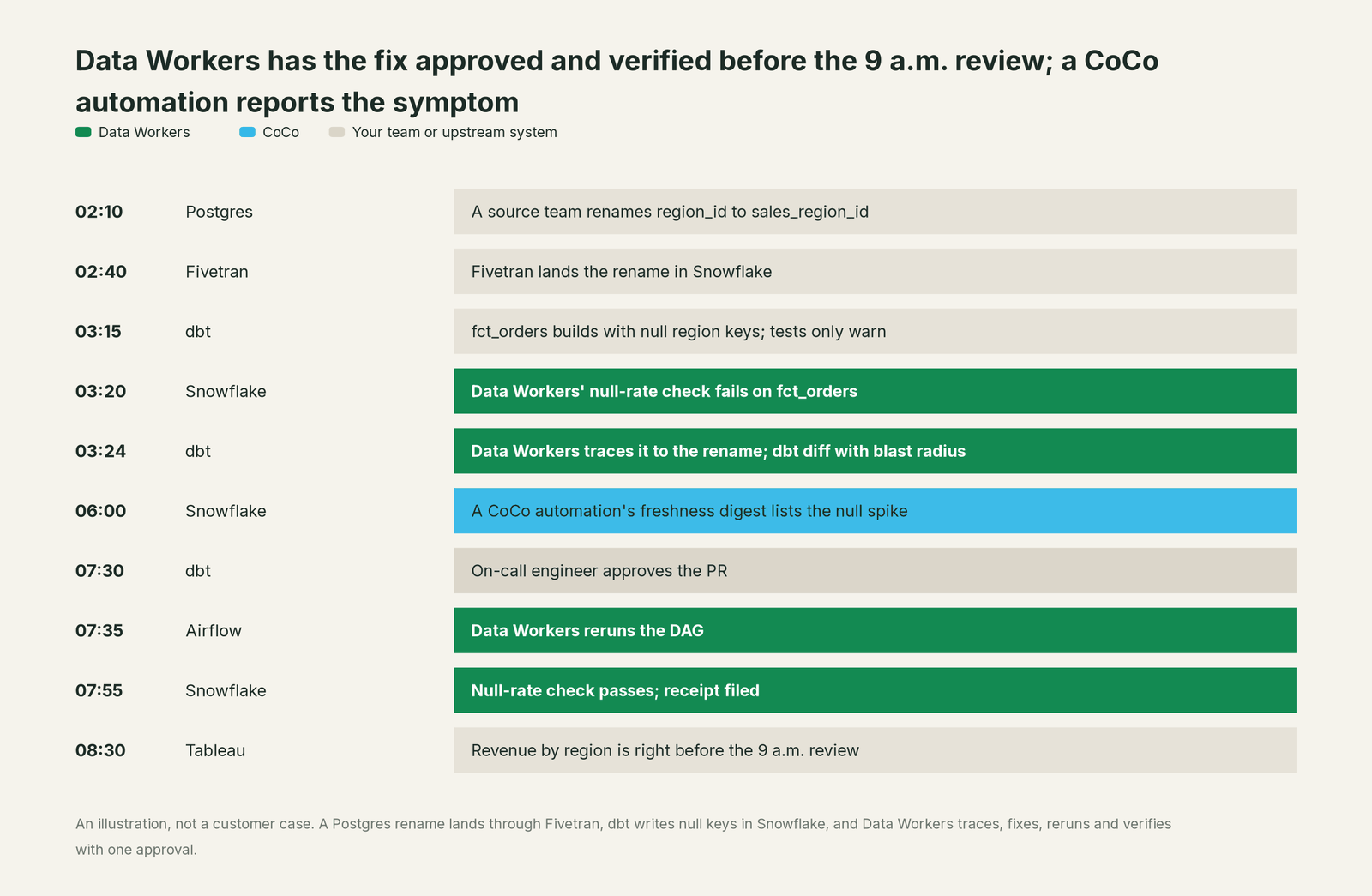
CoCo is fast once an engineer is in the loop, and a good engineer with CoCo would fix this well. The difference is who notices, who acts at 3 a.m., and what record is left when it's done.
What CoCo covers today
CoCo is Snowflake's AI coding agent for data engineering, analytics, machine learning and agent building. The docs describe it as using "an autonomous agent framework to interact directly with your Snowflake environment, with deep understanding of Snowflake's role-based access control (RBAC), schemas, and best practices." Statuses below are from Snowflake's docs and release notes, checked October 2, 2026.
| Capability | What it does | Status |
|---|---|---|
| CoCo CLI | Agentic shell: reads and writes local repos, runs bash and git, executes SQL against Snowflake | GA, Feb 2, 2026 |
| CoCo in Snowsight | SQL and notebook authoring, account administration answers, diff view before changes apply | GA, Mar 9, 2026 |
| CoCo Desktop | VS Code-based IDE for macOS and Windows with agent and editor modes, MCP, browser and notebooks | GA, Jul 21, 2026 |
| CoCo in the Snowflake VS Code extension | CoCo inside VS Code | GA, Aug 27, 2026 |
| CLI cloud sandbox | Runs CoCo's tools in a Snowflake-managed container | GA |
| Automations | A saved prompt runs on a schedule, unattended, as a Snowflake agent task | Preview, Aug 21, 2026 |
| MCP client | Adds external MCP servers (stdio, HTTP, SSE) with OAuth and an admin allowlist | Preview |
| Plugins, ACP, Agent SDK | Packaged skills and hooks; embedding in Zed, JetBrains and Neovim; build agents in Python or TypeScript | Preview |
| Airflow integration | Health checks, trigger and pause DAGs, failure root cause, DAG authoring | Documented, built in |
| AWS Glue and Databricks | Glue databases, crawlers and Iceberg conversion; a Databricks plugin for Unity Catalog, jobs and bundles | Documented, built in |
| Restricted Session Scope | Limits what a session can reach | GA, Sep 14, 2026 |
| Observability | Every interaction emits spans to SNOWFLAKE.LOCAL.AI_OBSERVABILITY_EVENTS | Documented |
That's a capable product, and it acts in more places than "coding agent" suggests: it triggers Airflow runs, creates Glue crawlers and deploys Databricks bundles when an engineer asks it to.
One platform, not one more tool
Writing code is one job on a data team's list. The same team keeps the catalog current, writes quality checks, closes incidents, cuts spend, handles access, changes pipelines, runs migrations and produces audit evidence. Each point tool adds another console, another contract and another handoff.
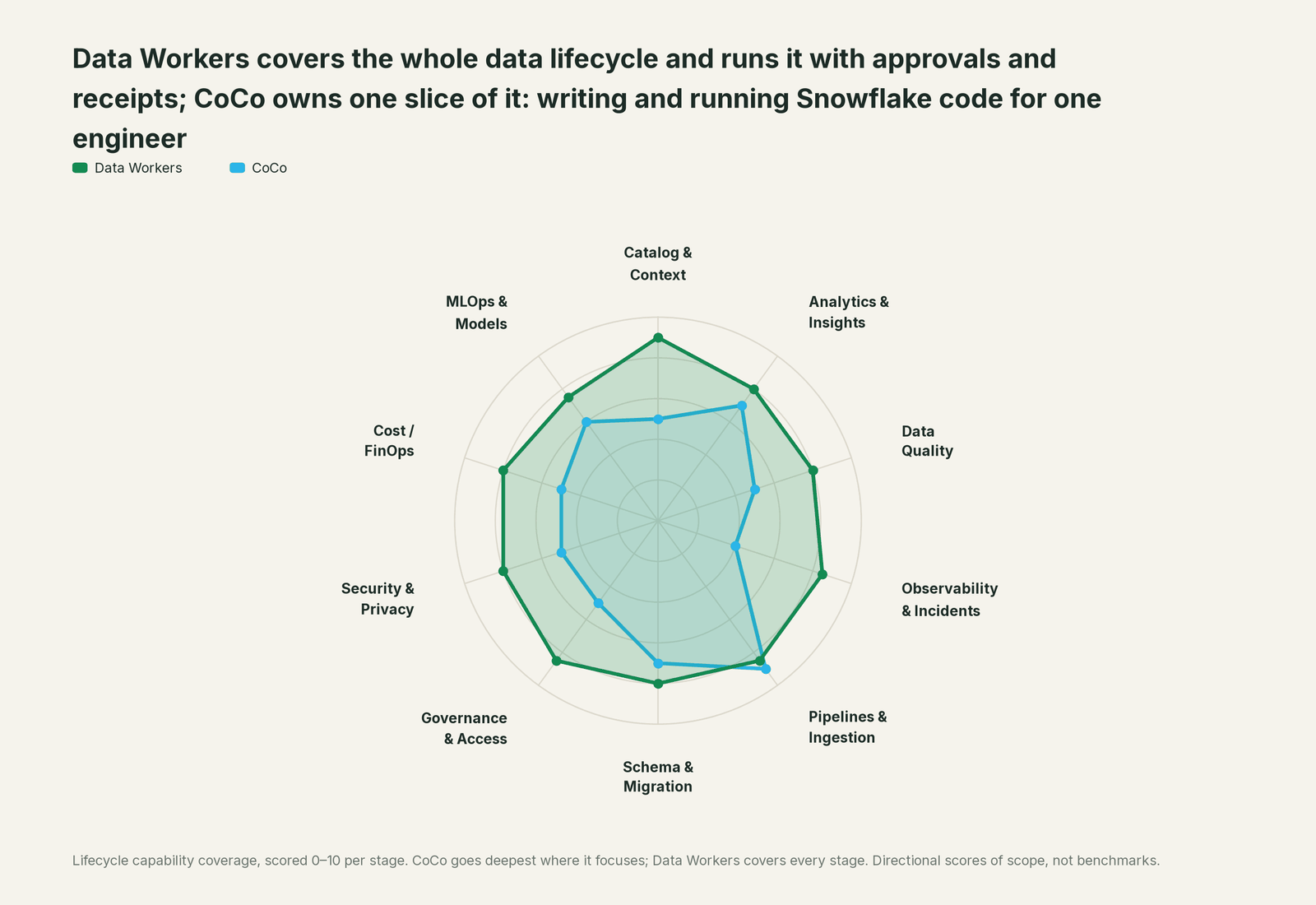
Data Workers covers the whole data lifecycle with one context graph, one approval flow and one audit trail. We score the same ten stages on every comparison page. CoCo leads on pipelines, which is where a coding agent with Snowflake skills belongs.
| Stage | Data Workers | CoCo | Why we scored it this way |
|---|---|---|---|
| Catalog & Context | 9 | 5 | CoCo reads Snowflake metadata, RBAC and semantic views as context; Horizon Catalog keeps the catalog. Data Workers keeps one context graph across every platform. |
| Analytics & Insights | 8 | 7 | CoCo writes SQL and notebooks and charts results in Desktop; CoWork serves business users. Data Workers answers across platforms from governed context. |
| Data Quality | 8 | 5 | CoCo writes a check when an engineer asks, and automations (preview) can check freshness. Data Workers writes, runs and repairs checks across platforms. |
| Observability & Incidents | 8.5 | 4 | CoCo finds the root cause of a failed Airflow run when asked. Data Workers owns the incident from detection to a verified fix. |
| Pipelines & Ingestion | 8.5 | 9 | CoCo leads. Built-in skills for dbt, Airflow, Openflow, Dynamic Tables, Glue and a Databricks plugin make it a strong pipeline builder. |
| Schema & Migration | 8 | 7 | CoCo has migration and DCM skills and makes schema changes in a session. Data Workers catches upstream changes and drafts migrations with rollback SQL for the owner to apply in approved waves. |
| Governance & Access | 8.5 | 5 | CoCo answers permission questions and acts under the user's RBAC. Data Workers runs the access-request queue with least-privilege grants behind approvals. |
| Security & Privacy | 8 | 5 | RBAC, Restricted Session Scope (GA) and sandboxing keep CoCo itself safe. Data Workers flags sensitive column names in pull request review on every platform. |
| Cost / FinOps | 8 | 5 | CoCo answers credit questions and audits Databricks cost on request. Data Workers traces Snowflake credits to the dbt model behind them and drafts the fix for its owner. |
| MLOps & Models | 7.5 | 6 | CoCo has machine learning and data science skills. Data Workers keeps the data under models healthy and connects to MLflow and W&B. |
CoCo vs the Data-Agents Swarm on the outcomes you buy
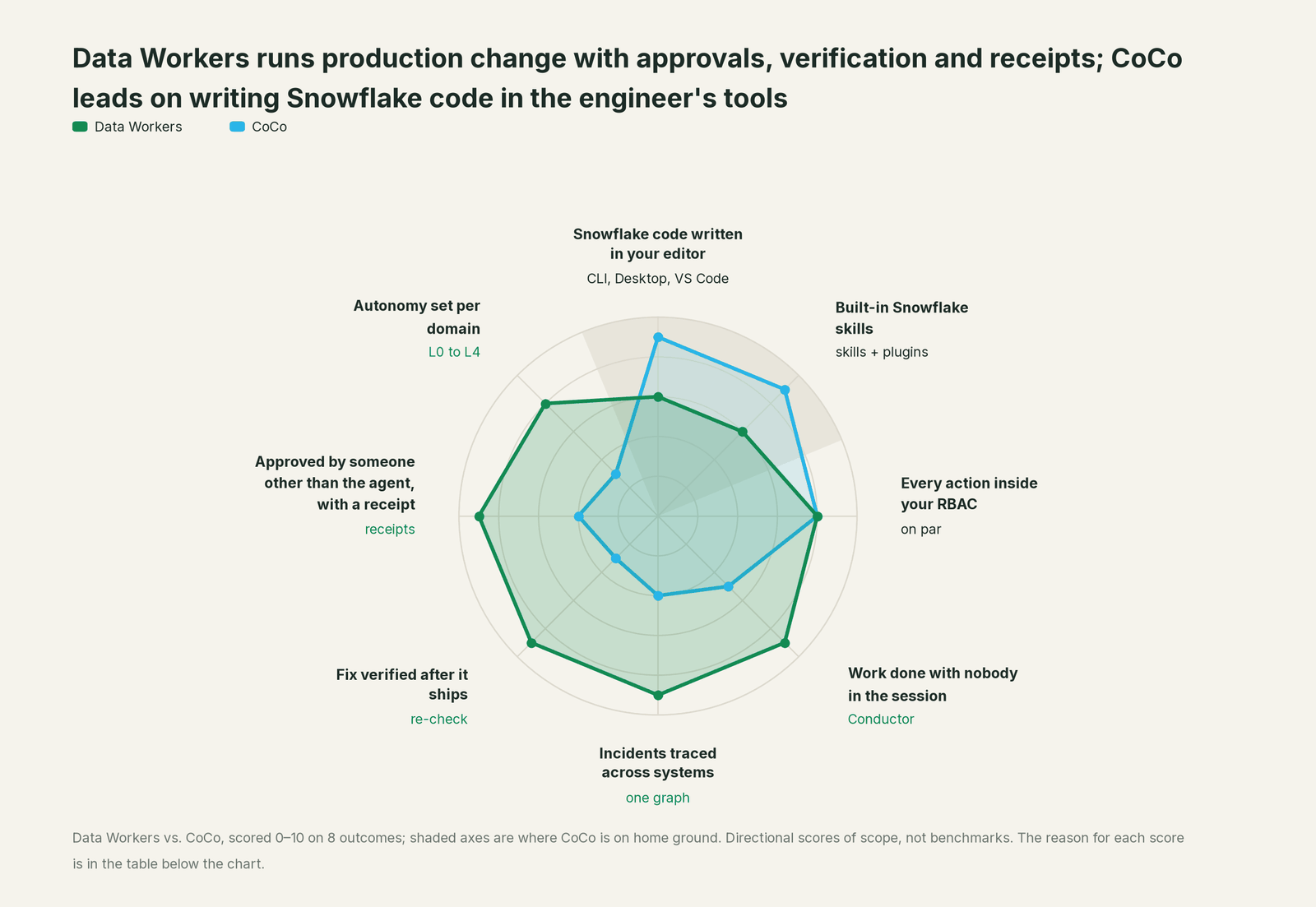
This view scores eight outcomes a data leader pays for when agents start touching production. CoCo leads on two, both on its own ground: writing Snowflake code in the engineer's tools, and built-in Snowflake skills. We're even on working inside RBAC. Data Workers leads on everything that decides whether production change is safe and finished.
| Outcome | Data Workers | CoCo | Why we scored it this way |
|---|---|---|---|
| Snowflake code written in your editor | 6 | 9 | CoCo leads. It writes and runs SQL, dbt and Python in the CLI, Desktop, Snowsight and VS Code. Data Workers' agents are MCP servers your coding agent calls; they don't replace the editor. |
| Built-in Snowflake skills | 6 | 9 | CoCo leads. It ships skills for Dynamic Tables, Openflow, Snowpipe Streaming, DCM and Spark migration. Data Workers works through the Snowflake APIs and your dbt project. |
| Every action inside your RBAC | 8 | 8 | Even. CoCo runs as the signed-in user under Snowflake RBAC. Data Workers acts with scoped, least-privilege grants and Snowflake enforces them. |
| Work done with nobody in the session | 9 | 5 | CoCo automations (preview) run a saved prompt on a schedule with approval prompts turned off. The Conductor runs continuously, and each domain's autonomy level decides what waits for a person. |
| Incidents traced across systems | 9 | 4 | CoCo can debug an Airflow failure when asked, one tool at a time. Data Workers joins Snowflake, dbt, Airflow, Fivetran and BI context in one graph. |
| Fix verified after it ships | 9 | 3 | CoCo stops when the session ends. Data Workers re-runs the failed check after the fix lands and only then closes the incident. |
| Approved by someone other than the agent, with a receipt | 9 | 4 | CoCo asks the person who prompted it and logs spans to an event table. Every Data Workers change has a named approver, a blast radius, a rollback path and a tamper-evident receipt. |
| Autonomy set per domain | 8 | 3 | CoCo's approval mode is confirm, plan or bypass, and on Desktop it is machine-wide. Data Workers sets autonomy per domain and per operation. |
These are directional scores of scope, not benchmarks. The reasoning is shown so you can argue with any line.
Where CoCo stops
Every limit below comes from Snowflake's own docs. None is a flaw. CoCo is built to make an engineer on Snowflake faster, and an agent that acts as that engineer, under that engineer's role, approved by that engineer, is the right design for that job.
It acts as one person. CoCo runs under the signed-in user's RBAC. Automations run "as the user who created the automation," under that user's default role, and the docs warn that a prompt that works interactively "can fail or return incomplete results when it runs on a schedule."
The approver is the actor. In the CLI, the default mode "prompts for permission before potentially dangerous actions"; Bypass means "all tool calls are approved." On Desktop, "the approval mode is a machine-wide setting." Either way, the person approving is the person who asked.
Unattended runs skip approval. The automations docs say: "Automation runs are unattended, so interactive tool permission prompts are disabled. Tools that are available to the run can execute without waiting for approval. Do not schedule destructive or irreversible actions."
Snowflake itself says production needs more. Snowflake's September 4 blog on CoCo for data engineering: "AI coding agents can help data engineers design, build and monitor data pipelines, but in production, they should use the tools built for them." And: "Using agents to execute activities directly in production without established tooling introduces fragility."
Verification ends with the session. CoCo can re-run a dbt test if asked. Nothing documented re-checks the downstream table after a change ships or closes an incident.
The record is a trace. Spans in AI_OBSERVABILITY_EVENTS show prompts, tool calls and SQL. There's no documented blast-radius report, rollback path or approval record per change.
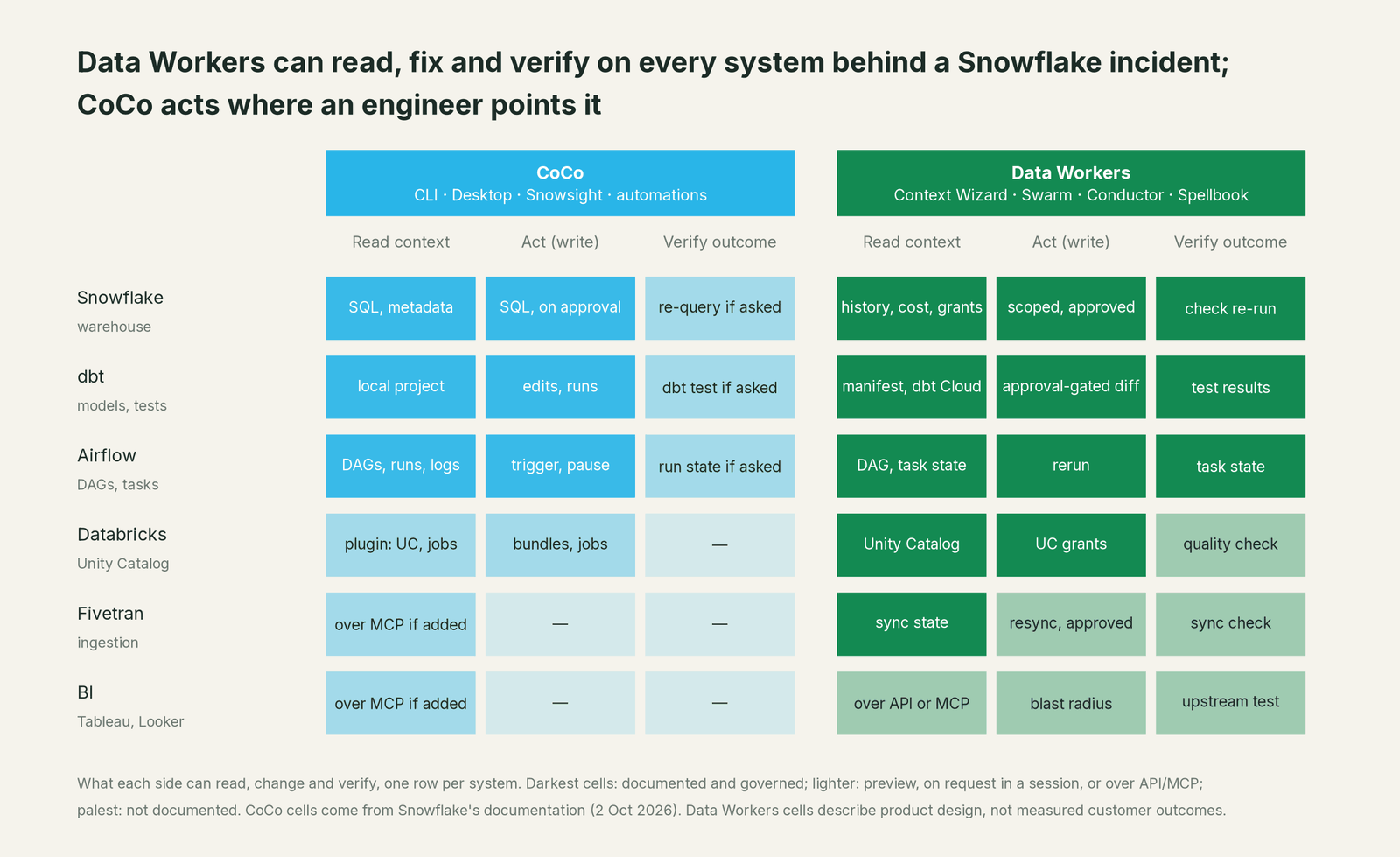
Other systems come one plugin at a time. Airflow, Glue and Databricks are built in, and MCP (preview) adds more. There's no shared graph joining them, so cross-system root cause depends on the engineer's prompt.
Why doesn't CoCo just do this itself?
Focus and risk. Snowflake built a great coding agent for people who work in Snowflake, and its design follows from that: it acts in a session, as a user, under that user's role. Running production change across an estate is a different product. It needs per-domain policy, approvals separated from the agent, blast radius across systems Snowflake doesn't own, rollback, receipts, and the liability for changes in dbt, Airflow, Fivetran and Tableau. A warehouse vendor taking on that liability for other vendors' tools would be an odd business decision. That product is Data Workers.
Use CoCo, Data Workers, or both
| Job to be done | CoCo | Data Workers | What we recommend |
|---|---|---|---|
| Writing a new dbt model or Dynamic Table | Built-in skills, in the editor | Pipeline Building agent, approval-gated diff | CoCo for authoring; both if the change ships to production |
| Explaining a query or a credit spike | Snowsight and CLI answers | Cost agent across every warehouse | Both |
| Detecting a quality break at 3 a.m. | Automations (preview) report it | Quality and Observability agents open an incident | Data Workers |
| Root cause across Postgres, Fivetran, dbt and Airflow | One tool per prompt | One context graph | Data Workers |
| Shipping the fix to production | Runs as the engineer, approved by the engineer | Named approver, blast radius, rollback | Data Workers |
| Confirming the fix held | Re-run if asked | Failed check re-run after it ships | Data Workers |
| Access requests and audit evidence | Answers about permissions | Request queue, scoped grants, receipts | Data Workers |
Cost
CoCo is "billed based on token consumption," with its own table in Snowflake's Service Consumption Table. CLI and Desktop also sell as a standalone subscription with a monthly usage allowance, and when it runs out the CLI "is unavailable until the next billing period." Warehouse compute is billed separately. Snowflake's per-user quotas and notifications help keep it in check.
Data Workers is a flat platform fee. The Apache 2.0 core is free. A pilot is $7,500 one-time. Scale starts at $1,000 a month and Enterprise at $3,000 a month (billed annually). Seats are unlimited, there's no usage meter, and there's no markup on model spend because you bring your own model. Details are on the pricing page. On cost outcomes, our design target is a 25 to 40% cut in warehouse spend from the Cost agent's cleanup; it's a target, not a measured result.
The fastest first win
Connect Data Workers to Snowflake, your dbt project, Airflow and Fivetran. The Context Wizard builds the graph, and every agent starts at L1, observe-only. In the first week you get a list of recent Snowflake incidents, each with its traced cause, the fix Data Workers would have proposed, where it would have landed and its blast radius. Then turn on L2 (propose) for dbt fixes and L3 (act, reversibly) for Airflow reruns of late loads, and let the receipts earn the next step.
The case for your CFO
The outcome is fewer bad numbers reaching the people who make decisions, and less engineering time spent on toil. Incidents get caught and fixed at the source before the morning review, access requests close without a ticket queue, and Snowflake credits are traced to the dbt model behind them, with the fix drafted for its owner. Our design target for warehouse spend is a 25 to 40% cut; it's a target, not a measured result.
The risk story is concrete. Every agent starts at L1, observe-only. You open L2 (propose) or L3 (act, reversibly) one domain at a time, and anything irreversible waits for a named approver. No agent approves its own work. Every change leaves a receipt with the diff, approver, timestamp, blast radius and rollback path. Nothing migrates: Data Workers stores metadata and scrubbed facts, not copies of your tables.
Why now: coding agents like CoCo already write to production, and they now run on schedules. Snowflake's own guidance is that agents acting directly in production without established tooling "introduces fragility." The approvals and audit trail need to exist before the agents scale, not after.
The first win comes in the first week: every recent Snowflake incident with its traced cause, the fix Data Workers would have proposed and its blast radius.
What stays the same: Snowflake, CoCo, dbt, Airflow, Fivetran and Tableau, and the engineers who use them.
The pilot path: start with a pilot on one domain. See pricing; the pilot is credited in full against the first year.
The sentence to repeat upstairs: CoCo makes each engineer faster on Snowflake; Data Workers runs the estate, with approvals, rollback and a receipt on every change.
Product by product
Data-Agents Swarm. 20+ specialist agents, each an MCP server: Pipeline Building, Schema Evolution, Quality Monitoring, Observability, Incident Debugging, Orchestration, Cost Savings & Cleanup, Governance, Identity, Security, Data Migration and Data Change Review. This is the direct counterpart to CoCo's skills: where a skill teaches CoCo how to do a task in a session, an agent owns that task for the estate.
Autonomous Data-Conductor. Owns outcomes. It runs detect, diagnose, fix, review, verify and remember, and directs the Swarm across systems.
Data Context Wizard. One governed context graph across Snowflake, Databricks, BigQuery, dbt, Airflow, Fivetran and BI, with provenance on every fact. It reads Snowflake metadata and query history and joins them with everything around the warehouse.
Spellbook Data Catalog. The agentic catalog and control plane where people review, approve, roll back and audit every agent action. It's the business user's view, and approval requests also reach the team in Slack or email.
Guardrails
CoCo manages risk with session approvals, risk classes and sandboxing. Those are good controls for one engineer. Data Workers manages risk for the estate.
- •Autonomy is set per domain and per operation. Airflow reruns of late loads can run at L3 while dbt model changes stay at L2 (propose).
- •New deployments start at L1, observe-only. You open the next level one domain at a time as the receipts earn trust.
- •Every write is scoped before it runs, with a blast radius computed across platforms.
- •Every action is approved or reversible and leaves a tamper-evident receipt: the diff, the approver, the timestamp, the blast radius and the rollback path.
- •No agent can approve its own work. An authority guard enforced in code sits in the write path.
- •Least privilege. On Snowflake, Data Workers acts through scoped grants and Snowflake's RBAC applies.
- •Zero migration. Data Workers stores metadata and scrubbed facts about your data, not copies of your tables.
"CoCo has MCP now. Can't it just do all this?"
CoCo's MCP support (preview) makes it a client: add a server once and its tools appear in every session. That's useful, and it's how CoCo and Data Workers work together. It doesn't change who acts or who approves. A tool called from a CoCo session still runs as that engineer, approved by that engineer, and leaves a trace in Snowflake's event table. When CoCo calls a Data Workers agent, the agent's own guardrails apply: the domain's autonomy level, a named approver for anything irreversible, and a receipt. MCP connects agents. It doesn't supply the policy, the approvals or the audit trail. Data Workers does.
The same goes for the CoCo Agent SDK (preview). You could build per-domain autonomy, separated approvals, cross-system blast radius, rollback and receipts on top of it. That's the product we've already built.
How it fits together
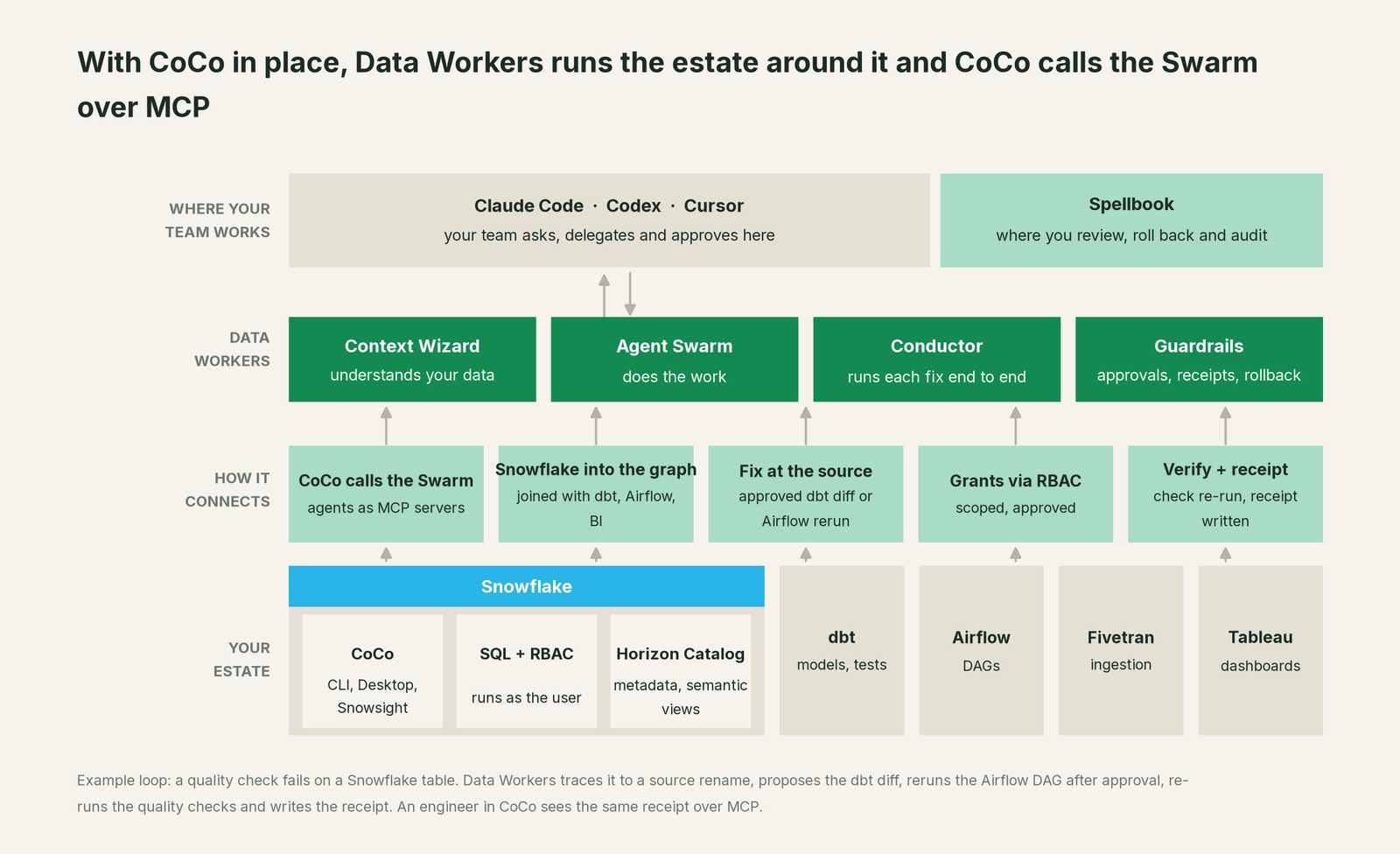
Engineers keep CoCo for writing code in their tools. Register Data Workers' agents as MCP servers with cortex mcp add or through a plugin your admin approves, and an engineer can ask CoCo "what changed upstream of fct_orders?" and get the answer from the context graph, or ask for a fix and get a proposed diff that goes through Data Workers' approvals. Data Workers connects over MCP today. Snowflake, dbt, Airflow, Fivetran and Tableau stay where they are, and the Conductor runs the loop around them.
When CoCo alone is enough
CoCo can be enough if Snowflake is your whole estate, every production change goes through your own CI and DCM tooling as Snowflake recommends, and your team is happy to notice incidents, fix them and write up the record by hand. Teams with a dbt project, Airflow, Fivetran and BI in the critical path, and on-call engineers who'd rather approve a fix than write one at 3 a.m., add Data Workers.
FAQ
What is Snowflake CoCo? CoCo is Snowflake's AI coding agent for data work, formerly called Cortex Code. It runs in a CLI, a desktop IDE, Snowsight and VS Code, reads and writes your repos, runs SQL against Snowflake and ships with Snowflake skills. Data Workers is the platform that runs the estate around it.
Is Data Workers a Cortex Code alternative? For engineers writing Snowflake code, keep CoCo. For running production change across the estate, with approvals, verification and receipts, Data Workers is the better choice, and the two work together over MCP.
Can CoCo run on a schedule without a person? Yes, in preview. Automations run a saved prompt as the user who created it, with interactive approval prompts disabled, and Snowflake advises against scheduling destructive or irreversible actions. Data Workers runs continuously under per-domain autonomy, and irreversible changes wait for a named approver.
Does CoCo work outside Snowflake? Partly. It has built-in Airflow, AWS Glue and Databricks support and connects to other tools through MCP servers you add. Each runs on the engineer's credentials. Data Workers joins Snowflake, dbt, Airflow, Fivetran, Databricks and BI in one context graph.
Can CoCo call Data Workers? Yes. CoCo is an MCP client and every Data Workers agent is an MCP server, so an engineer can register them and use them in any CoCo session.
How is CoCo priced compared with Data Workers? CoCo bills on tokens, or as a subscription with a monthly allowance for CLI and Desktop. Data Workers is a flat platform fee with unlimited seats and no usage meter; see pricing.
What happens if a Data Workers agent gets a fix wrong? Every write is scoped before it runs and goes to review at the autonomy level set for that domain. Every action is approved or reversible, with a rollback path and a tamper-evident receipt, and no agent can approve its own work.
Sources
Snowflake documentation and announcements checked October 2, 2026: the CoCo overview (surfaces, statuses, billing), CLI MCP support, CLI security and permission modes, Desktop permission modes, automations (preview, Aug 21, 2026), the Airflow integration, other data platforms (Glue, Databricks), the cloud sandbox, observability, the CLI changelog, Snowflake release notes for GA and preview dates, the CoCo product page (rename, trial and subscription), the September 4, 2026 blog Snowflake's AI coding agent for data engineers, and the Service Consumption Table effective October 2, 2026. Data Workers capabilities are from the Data Workers agent repository as of September 24, 2026. Product names and statuses change quickly; if we've got something wrong, tell us and we'll fix it.