Agent Bricks Supervisor Agent MCP: Add Data Workers Agents as Supervisor Tools
How to register Data Workers agents as MCP tools in an Agent Bricks Supervisor Agent through a Unity Catalog connection, with approvals kept in Data Workers.
Your Supervisor Agent already routes questions. A sales leader asks why a number moved, and it sends the question to the right Genie Agent, a Knowledge Assistant endpoint or a Unity Catalog function. The Supervisor Agent is the front desk. Data Workers agents are the specialists it can hand data-operations work to: find why the number is wrong, propose the fix, and verify it after a named engineer approves it in Data Workers.
This how-to shows how to connect the two over MCP today. Data Workers agents are MCP servers that run over streamable HTTP, and the Supervisor Agent can call external MCP servers through a Unity Catalog connection. You register the endpoint, choose which tools to expose, describe them so the Supervisor routes well, and keep every approval on the Data Workers side.
Key takeaways
- •The Supervisor routes; Data Workers does the data work. Questions about broken or missing data go to Data Workers agents as MCP tools.
- •One Unity Catalog HTTP connection per agent endpoint. End users need USE CONNECTION on it, so access follows your grants.
- •Expose diagnosis tools first. Leave approval tools out of the allowlist; the Supervisor can see that a fix is waiting, never approve it.
- •Approval stays in Data Workers. A change returns
approval_requiredand waits for a named engineer in Spellbook Data Catalog. - •Every run leaves a receipt. Cause, blast radius, approver, checks, before and after values, and the rollback path.
What it connects
On the Databricks side: a Supervisor Agent in Agent Bricks (GA since February 10, 2026, formerly Multi-Agent Supervisor), which can coordinate up to 50 subagents and tools, including external MCP servers reached through Unity Catalog HTTP connections. Databricks requires those servers to use the streamable HTTP transport.
On the Data Workers side: the agents of the Data-Agents Swarm, each an MCP server that serves streamable HTTP at /mcp and checks a bearer token. The Incident Debugging agent is the natural first tool. The Autonomous Data-Conductor sequences multi-step fixes, and Data Context Wizard gives every agent one governed context across Databricks, dbt, Airflow and the rest of the estate. For the broader wiring of Data Workers on the lakehouse, see Data Workers on Databricks. If you are still deciding whether to build these agents on Agent Bricks yourself, read Agent Bricks vs the Data-Agents Swarm first; this page is about the wiring.
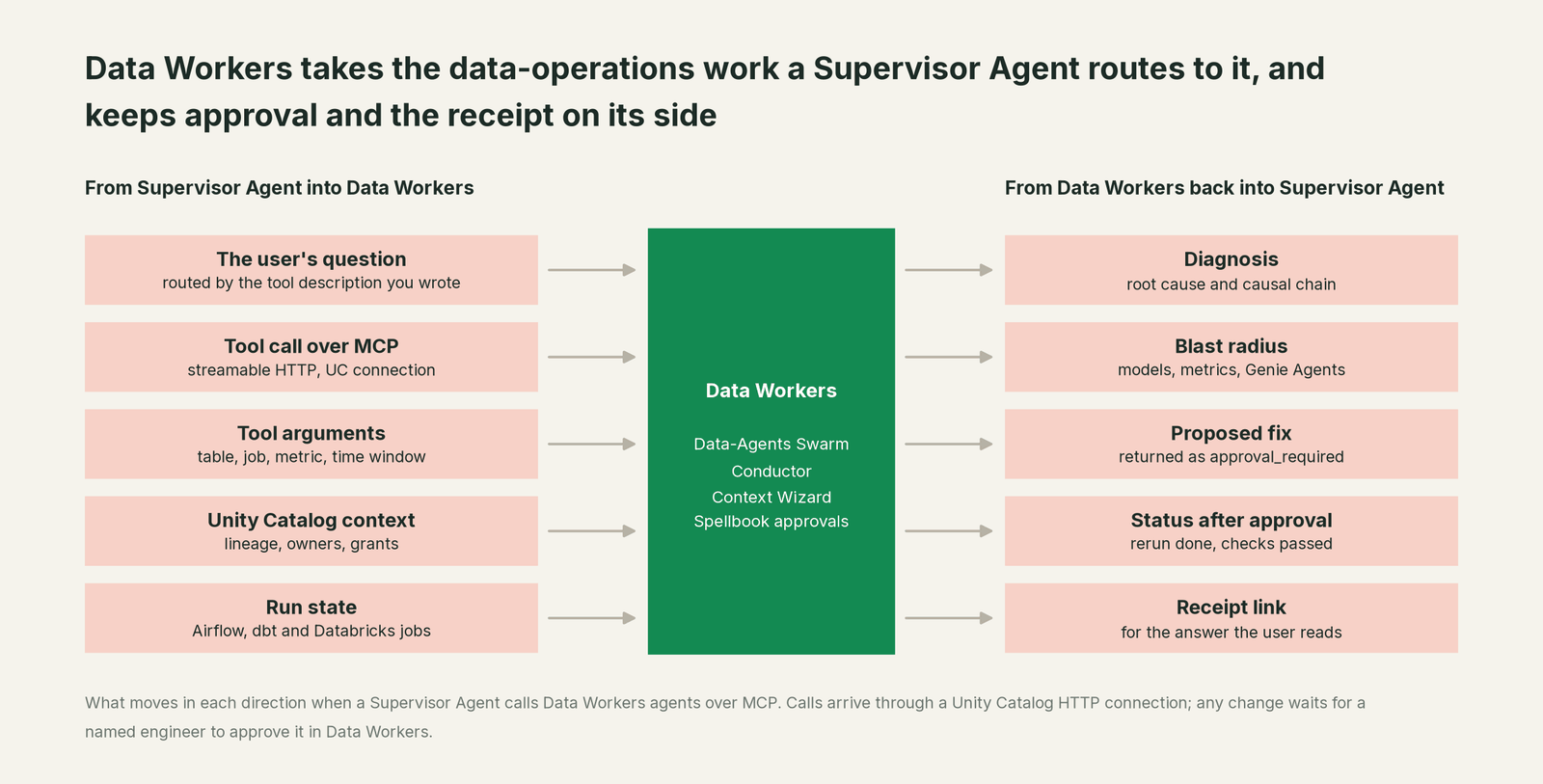
What moves in each direction
| From the Supervisor Agent into Data Workers | From Data Workers back to the Supervisor Agent |
|---|---|
| The user's question, routed by the tool description you wrote | A diagnosis: root cause and causal chain |
| An MCP tool call over streamable HTTP, through a UC connection | The blast radius: models, metrics, Genie Agents, dashboards |
| Tool arguments: table, job, metric, time window | A proposed fix, returned as approval_required with an approval id |
| Unity Catalog context Data Workers already holds: grants and imported metric views | Status after approval: rerun done, checks passed |
| Run state from Airflow, dbt and Databricks jobs | A receipt link the Supervisor can cite in its answer |
Prerequisites
- •A Supervisor Agent workspace. Databricks lists serverless compute, Unity Catalog, Model Serving access, a serverless usage policy with a nonzero budget, and a supported region.
- •Data Workers running with HTTP transport, reachable from your workspace over HTTPS, with a bearer token for the Supervisor's connection.
- •Data Workers connected to Databricks through its Unity Catalog connector, plus the systems your incidents cross (Airflow, dbt, your landing storage), each read-only to start.
- •Grants planned. Who gets USE CONNECTION on the connection, and who may approve changes in Data Workers. Keep those two lists separate.
- •Optional: Unity Gateway service policies (Beta) if you want Databricks to allow, block or require approval on individual tool calls as an extra layer.
Setup
Three steps: serve the agent, create the connection, add it to the Supervisor. Hostnames, paths, scopes and secret names below are placeholders.
-- Example: registering a Data Workers MCP endpoint for a Supervisor Agent

-- 1. Serve the Incident Debugging agent over streamable HTTP (on your Data Workers host)
--    DW_TRANSPORT=http  ->  POST https://dw.internal.example.com/incidents/mcp

-- 2. Create a Unity Catalog HTTP connection (Databricks SQL)
CREATE CONNECTION dw_incidents TYPE HTTP
OPTIONS (
  host 'https://dw.internal.example.com',
  port '443',
  base_path '/incidents/mcp',
  bearer_token secret('data-workers', 'incidents-token')
);
GRANT USE CONNECTION ON CONNECTION dw_incidents TO `data-oncall`;

-- 3. In the Supervisor Agent: Tools and sub-agents > MCP server > dw_incidents
--    Tools to expose: diagnose_incident, get_root_cause, get_incident_timeline,
--                     plan_cross_domain_remediation, remediate
--    Do not expose approval tools.
--    Description (the Supervisor routes on this text):
--    "Use when a metric, table or dashboard looks wrong, late or incomplete.
--     Finds the cause across Airflow, dbt and Databricks, returns the blast radius,
--     and proposes a fix that waits for engineer approval in Data Workers."
If you prefer to govern the endpoint as a Unity Catalog MCP Service, register the same connection through the UI or the REST API and select the tools there; an allowlist limits what the Supervisor can see. Repeat for each agent you add. The pipeline, quality and schema agents follow the same pattern on their own endpoints.
The description matters more than anything else on this page. The Supervisor decides when to call a tool from that text, so name the symptoms users describe ("looks wrong", "late", "missing rows"), not the internal tool names.
A worked run, end to end
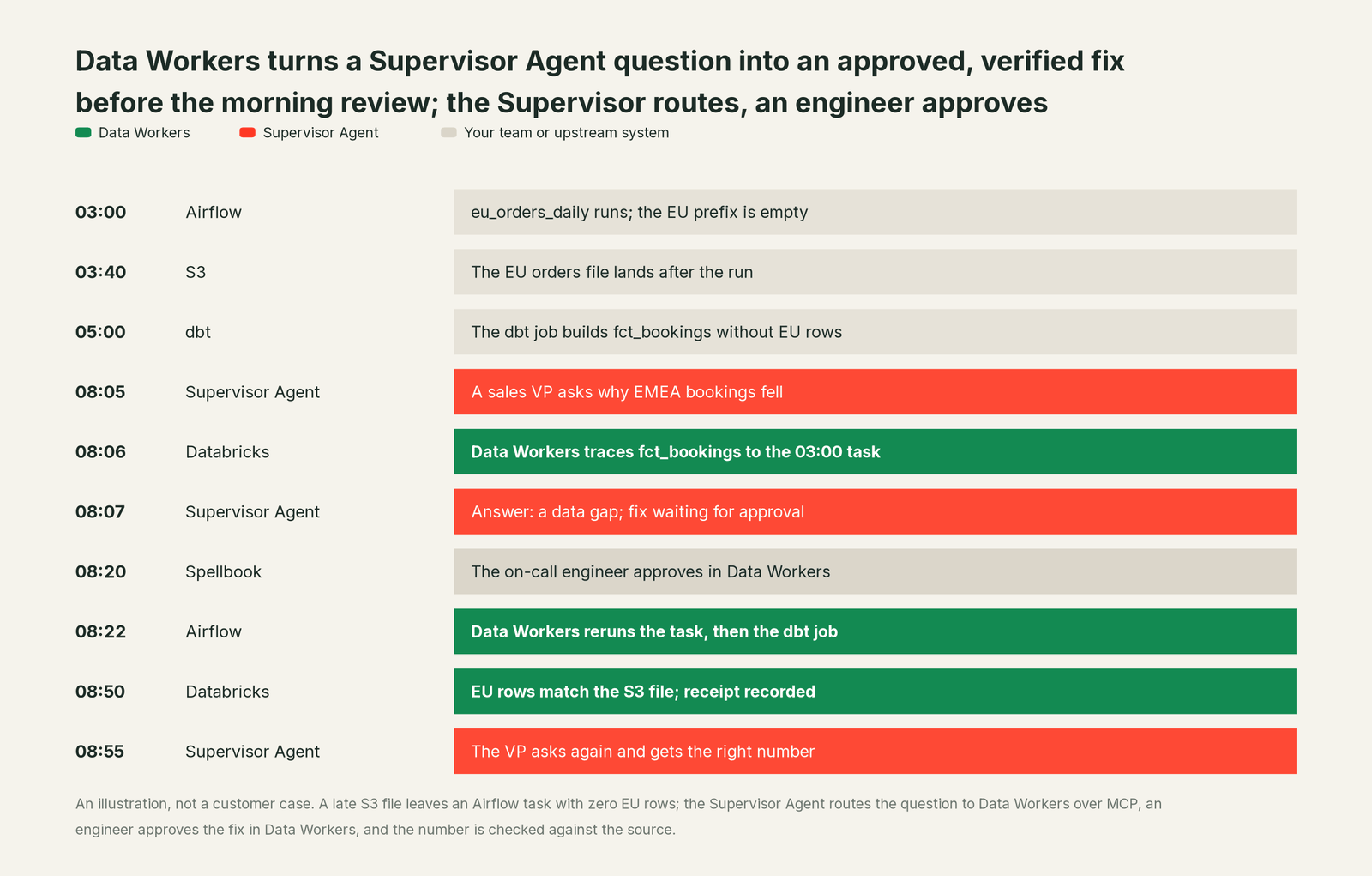
This is an illustration, not a customer case. An EU orders file lands in S3 after the 03:00 Airflow DAG run eu_orders_daily has already loaded an empty prefix. The task succeeds with zero rows. At 05:00 the dbt job builds fct_bookings in Databricks without EU orders, and the bookings Genie Agent reports what the table says.
| Time | System | What happens | Who decides |
|---|---|---|---|
| 03:00 | Airflow | eu_orders_daily loads an empty EU prefix and succeeds | Upstream |
| 03:40 | S3 | The EU file lands after the run | Upstream |
| 05:00 | dbt, Databricks | fct_bookings builds without EU rows | Upstream |
| 08:05 | Supervisor Agent | A sales VP asks why EMEA bookings fell; the Supervisor calls the Genie Agent for the number and diagnose_incident for the cause | Supervisor routes |
| 08:06 | Data Workers | Traces fct_bookings to stg_orders to the 03:00 task, and finds the file that arrived later | Read-only |
| 08:07 | Supervisor Agent | Answers: the drop is a data gap, not a sales drop; remediate returned approval_required | Waiting |
| 08:20 | Spellbook | The on-call data engineer reviews the plan and approves | A named engineer |
| 08:22 | Airflow, dbt | Data Workers clears and reruns the task, then reruns the dbt job | Approved at 08:20 |
| 08:50 | Databricks | EU row count matches the S3 file; bookings back in range | Read-only checks |
| 08:55 | Supervisor Agent | The VP asks again and gets the right number | Supervisor routes |
The Supervisor never held the approval. When remediate ran without permission to act, it returned approval_required with an approval id, and the Supervisor passed that status to the VP. The approval happened in Spellbook Data Catalog (in preview), where a guard rejects any approver that is an agent, including the agent that proposed the change.
The receipt this run leaves. One tamper-evident record, hash-chained with the rest of the audit log:
- •Request: arrived over MCP through the
dw_incidentsconnection; tools called and their arguments. - •Cause: the causal chain from
fct_bookingsback to the 03:00 task and the late S3 file. - •Blast radius: one dbt model, one metric, one Genie Agent, two dashboards.
- •Action: Airflow task cleared and rerun, then the dbt job rerun.
- •Approver: the named engineer, with the time of approval.
- •Checks: EU row count against the S3 file; bookings against the prior four weeks.
- •Before and after values, and the rollback path.
Databricks keeps its own record of the same call in system tables, so your platform team sees the tool invocation and Data Workers holds the change.
Why doesn't Agent Bricks just do this itself?
Agent Bricks is built as a place to build and run agents, and that is the right design for Databricks. A Supervisor Agent routes to whatever tools you register; what those tools can change is up to you. Its governance sits at the tool call: Unity Catalog grants, on-behalf-of-user access, service policies (Beta) and system-table logs.
Fixing production data across Airflow, dbt and Databricks is a different product category. It needs blast-radius scoping across tools Databricks doesn't run, approvals tied to the change itself, rollback for each step, receipts an auditor can read, and accountability for changes in systems Databricks doesn't own. Keeping that out of a general agent framework is a sensible business decision. It is the product Data Workers is, and the Supervisor can call it like any other tool.
The next autonomy step
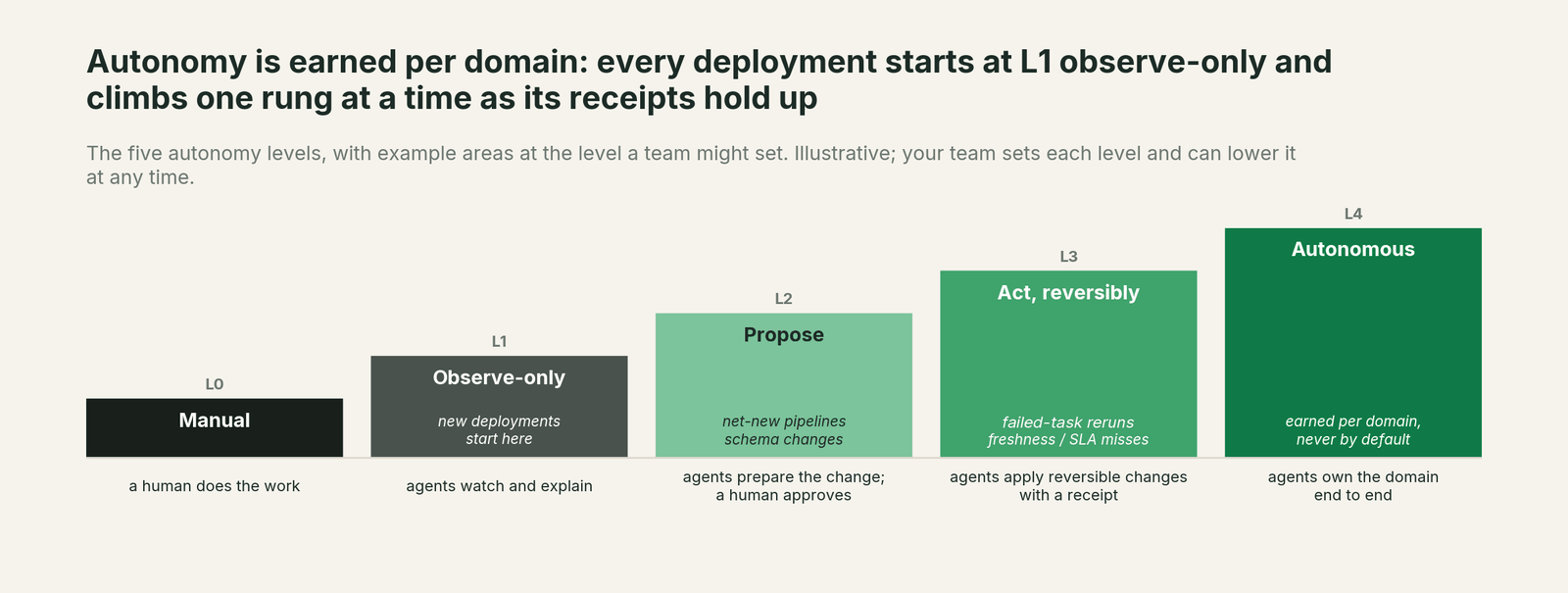
Start at observe: expose only diagnose_incident, get_root_cause and get_incident_timeline, so the Supervisor can explain broken numbers and changes nothing. Move to propose by adding remediate and plan_cross_domain_remediation; every change waits for a named engineer, as in the run above. Once a domain's receipts show the same fix approved again and again (late-file reruns are a common first candidate), allow that one playbook to act reversibly with verification on, while schema and access changes stay at propose. Autonomy is set per domain in Data Workers, so the Supervisor's tool list doesn't need to change as you climb.
The case for your CFO
The outcome. When a leader asks the Supervisor Agent why a number moved, they get the cause and a fix in progress, instead of a ticket that waits for the morning standup. Fewer wrong numbers reach a forecast or a board pack.
The risk story. At observe, agents read and explain; they change nothing. At propose, every change waits for a named engineer, and no agent can approve its own work or another agent's. Acting levels are reversible and limited to domains you pick. Every change carries a receipt and a rollback path, and nothing migrates.
Why now. The Supervisor Agent is GA and business users are already asking it questions about data. The questions will come either way; the answers should come with a fix and an audit trail.
The first win. Late and missing data. Register the Incident Debugging agent in observe mode for one domain and watch which answers it would have turned into fixes.
What stays the same. Agent Bricks, Unity Catalog grants, Genie Agents, Airflow, dbt, and the people who approve changes.
The pilot path. Start with a pilot on one Supervisor Agent and one domain, observe first, then propose. The pilot is credited in full against the first year.
One sentence for upstairs: "Our Supervisor Agent answers the question; Data Workers fixes the data under it, and nothing changes until one of our engineers approves it."
Sources
Databricks capabilities and statuses, current as of October 2, 2026: Supervisor Agent (GA, MCP subagents, USE CONNECTION, 50-agent limit, requirements; updated Sep 11, 2026), the February 2026 release notes (Supervisor Agent GA and rename), HTTP connections (CREATE CONNECTION TYPE HTTP and auth methods; updated Sep 30, 2026), registering an external MCP server (streamable HTTP, tool selection; updated Sep 30, 2026), MCP Services (EXECUTE grants, system tables; updated Sep 11, 2026) and governing MCP Services (service policies in Beta, usage tables; updated Oct 1, 2026). Product names and statuses change quickly; if we've got something wrong, tell us and we'll fix it.