You're on incident.io: Run the Response There, Fix the Data With Data Workers
incident.io runs the response, from page to post-mortem. Data Workers diagnoses the data incident, carries the approved fix and posts the receipt in the incident channel.
Your engineering org runs incidents in incident.io. An alert hits an alert source, the alert route finds the right escalation path, someone gets paged, and an incident channel like #inc-2291 opens in Slack or Microsoft Teams with roles, severity and a timeline. Catalog knows which team owns which service. Workflows post updates, Scribe takes notes on the incident call, status pages keep customers informed, and post-mortems draft from the timeline. Since August 5, 2026, Investigations, incident.io's AI SRE powered by Nexus and sold as an add-on, can start the moment an incident is declared and posts a root cause with evidence into the channel. incident.io is where the response runs, from page to post-mortem. Data Workers is the first responder for data: it diagnoses, fixes and verifies data incidents.
Your data team is on the same pager. A failed dbt test, a Monte Carlo alert or a stale table routes to a Data escalation path and opens an incident like any other. Then the work leaves incident.io: someone traces lineage, works out which models and dashboards are wrong, writes the backfill and checks the numbers. Data Workers does that part and posts each step back into the channel.
Key takeaways
- •incident.io keeps its job. Alerts, on-call, incident channels, Investigations, Scribe, status pages and post-mortems stay as they are.
- •Data Workers fixes the data. It diagnoses the break across lineage, proposes the fix with its blast radius, applies it after a named owner approves, and verifies the numbers downstream.
- •The receipt lands in the channel. What changed, who approved it, how it was verified and how to undo it, ready for the post-mortem.
- •Connected today. Data Workers connects to incident.io over its API or its remote MCP server, and posts into incident channels in Slack natively.
- •Autonomy per domain. Each data domain sits on the ladder from L0 manual to L4 autonomous, and your team moves it up when the record earns it.
incident.io is where the response runs. Data Workers is the first responder for data.
incident.io built a great place to run an incident: one channel, the right people, a clear timeline and an AI SRE that names the likely cause before most responders have joined. A data incident needs one more thing: someone to change the data, prove it is right and record what happened. Here is a Thursday night with both in place. This is an illustration, not a customer case.
| Time | System | What happens |
|---|---|---|
| Wed 22:40 | Postgres + Debezium | The orders service ships a migration that stores discount as integer cents instead of decimal dollars; Debezium captures the new type |
| 22:41 | Kafka | A new schema version lands on the orders.public.orders topic and events keep flowing |
| Thu 02:15 | BigQuery + dbt | The nightly build loads the new rows; 31,400 orders now show discounts 100 times too large and the discount <= gross_amount test fails |
| 02:16 | incident.io | The test failure arrives through a custom HTTP alert source, routes to the Data escalation path, pages the on-call analytics engineer and opens INC-2291 with #inc-2291 |
| 02:19 | incident.io | Investigations links the failure to the orders-service deploy and its pull request, with sources, and posts the hypothesis in the channel |
| 02:22 | Data Workers | Reads INC-2291, confirms the type change in Schema Registry and in the orders-service pull request, and traces the blast radius: stg_orders, fct_orders, the net revenue mart, the Hex weekly growth notebook and the finance export |
| 02:28 | Data Workers | Posts the plan in #inc-2291: convert cents to dollars for the new schema version in stg_orders as a diff, then backfill the two affected days |
| 02:41 | Spellbook | The on-call analytics engineer, who owns the orders models, reviews the diff and approves |
| 03:04 | BigQuery + dbt | The owner merges the approved diff; Data Workers starts the two-day backfill through the orchestrator, with the undo recorded first, and re-runs the quality assertions; the owner confirms the dbt tests pass |
| 03:10 | incident.io | Data Workers posts the receipt, creates a follow-up for a schema contract on the topic, and the incident lead resolves INC-2291 |
| 08:30 | Hex | The weekly growth review opens on correct numbers |
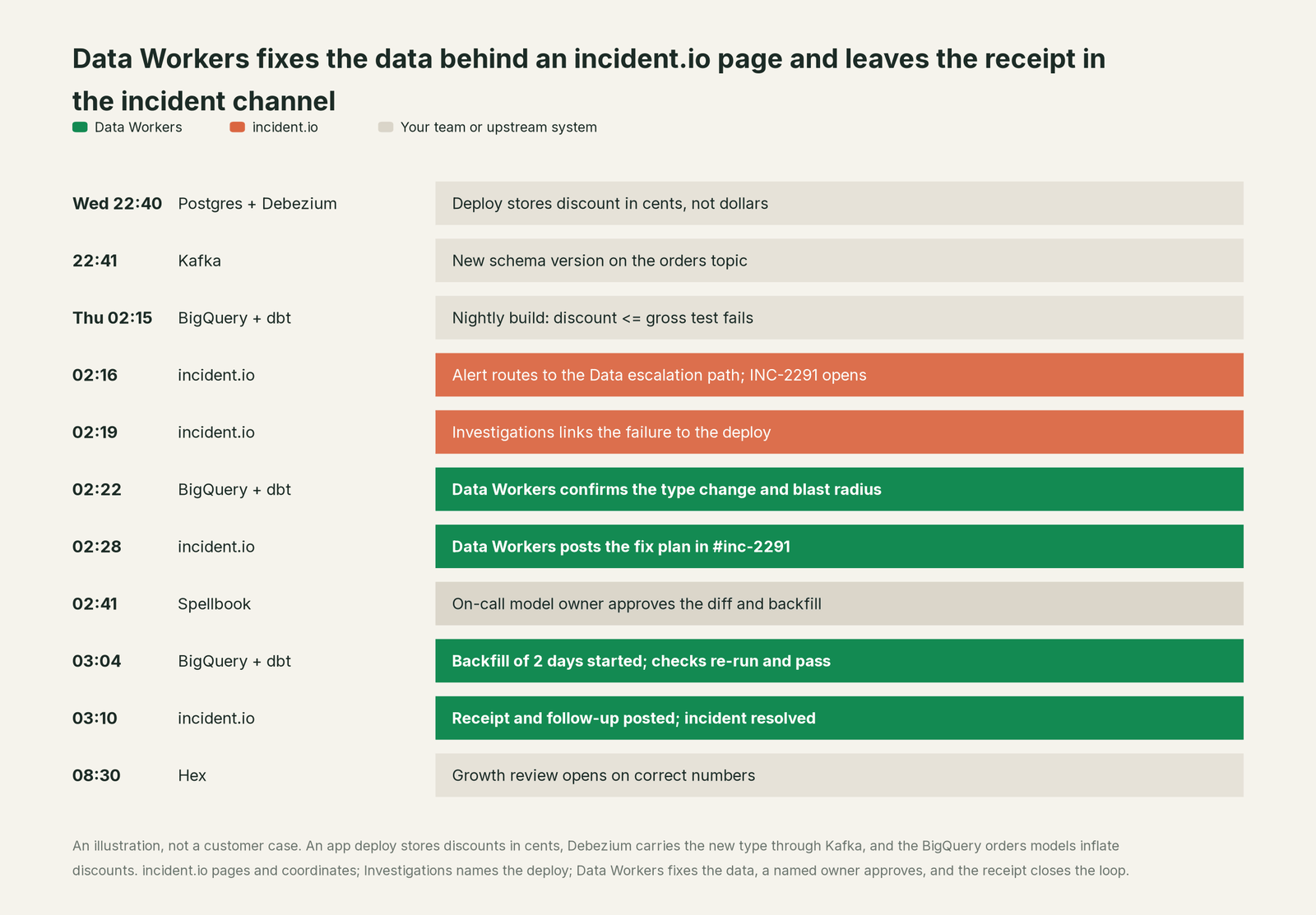
Investigations did its job well: by 02:19 the channel knew which deploy caused the break. Reverting the app change would not have fixed the rows already in BigQuery. What changed is the rest of the night: the data fix had a blast radius, one approval and a verification, and the post-mortem had a receipt to link.
| Job | What incident.io does | What Data Workers does |
|---|---|---|
| The alert | Ingests alerts from your monitoring tools, groups and deduplicates them, and routes them by team and priority | Watches freshness and volume itself and reads schema changes from the dbt manifest, so many data breaks are caught before an alert fires |
| The page | Pages the right person on the Data escalation path, with live call routing and cover requests | Picks up incidents routed to the Data team and starts the data diagnosis |
| The context | Nexus and Catalog know services, owners, deploys and past incidents | Keeps one governed context graph of tables, models, metrics, owners and lineage |
| The diagnosis | Investigations names the likely cause in code, deploys and telemetry, with a confidence score | Traces the break through Kafka, BigQuery, dbt and Hex and names every affected table and report |
| The fix | Opens a pull request a human reviews and merges, for code | Proposes the data change with its blast radius, routes it to a named owner, applies it reversibly and backfills |
| The proof | Keeps the timeline, Scribe notes and the post-mortem | Verifies the numbers downstream and writes a receipt the post-mortem can link |
Why doesn't incident.io just do this itself?
Because incident.io made a careful choice about what its AI may touch, and it is the right choice for a product that sits in every incident across engineering. Its trust and safety page says it plainly: an investigation's job is "to do the legwork and recommend, not to change your systems behind your back." The one write path is code, and only as "a pull request you review and merge yourself." Proposing a fix unprompted is off by default, opt-in, and still arrives as a draft pull request. Status page updates over MCP only draft; a person publishes.
A data fix is a different kind of change. Backfilling two days of fct_orders touches a warehouse, a dbt project and every report downstream, and it cannot be reviewed like a code diff. It needs lineage across systems incident.io doesn't run, a scoped blast radius, the model owner's approval, row and value checks after the run, a rollback path and a receipt tied to the cause. Whoever performs it carries the liability for a change inside BigQuery, dbt and Kafka. That is a separate product with its own guardrails, and it is the product Data Workers is.
Focus matters too. incident.io serves every team that gets paged, and its strength is that the response looks the same everywhere. Data Workers goes deep on one domain, the data estate, and plugs into that shared response.
Every tool owns a slice. Data Workers covers the whole lifecycle
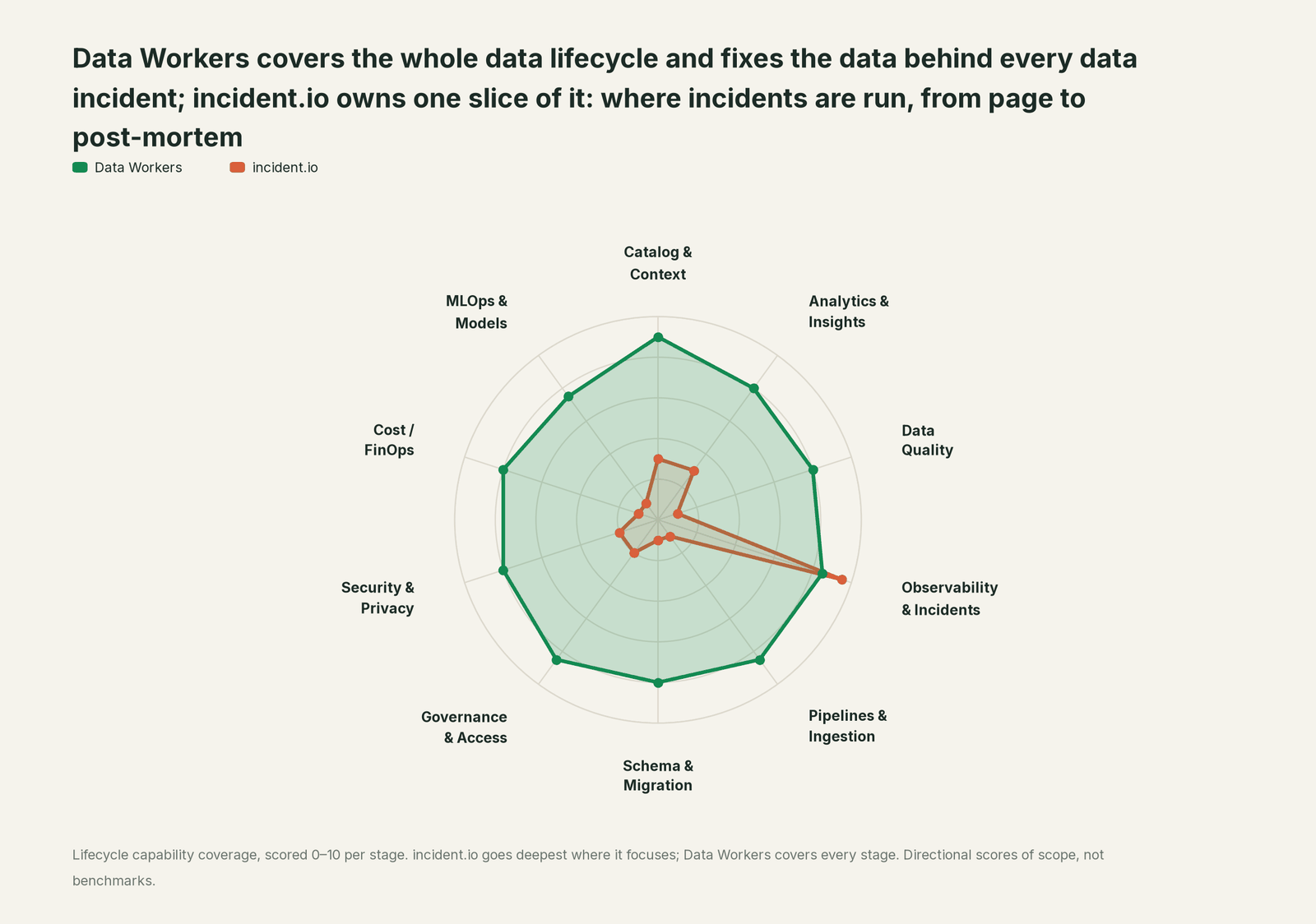
incident.io owns one slice, and owns it well: it is where incidents are run, from page to post-mortem. Each point tool adds another console, another contract and another handoff. Data Workers covers the whole lifecycle with one context, one approval flow and one audit trail, and builds on incident.io where your responders already work.
| Stage | Data Workers | incident.io | Why we scored it this way |
|---|---|---|---|
| Catalog & Context | 9 | 3 | Catalog maps services, teams and owners, and Nexus builds a model of how your systems break. Data Workers keeps one governed context graph of tables, models, metrics, owners and lineage across the data estate. |
| Analytics & Insights | 8 | 3 | Insights and incident_stats report on the response itself: workload, time to resolve, alert noise. Data Workers answers data questions from governed definitions with lineage behind every number. |
| Data Quality | 8 | 1 | Not incident.io's job: it routes a failed dbt test or a Monte Carlo alert, and the check lives elsewhere. Data Workers writes, runs and repairs quality checks and dbt tests. |
| Observability & Incidents | 8.5 | 9.5 | incident.io's home stage: alerts, on-call, incident channels, status pages, post-mortems, and Investigations as its AI SRE. Data Workers diagnoses the data incident across lineage, fixes it with approval and verifies it. |
| Pipelines & Ingestion | 8.5 | 1 | Not incident.io's job: pipelines run in your orchestrator and warehouse. Data Workers builds, reruns and backfills pipelines, with approvals. |
| Schema & Migration | 8 | 1 | Not incident.io's job: warehouse schemas and CDC topics sit with the data team. Data Workers catches the schema change and plans the migration with rollback SQL. |
| Governance & Access | 8.5 | 2 | Incident roles, role restrictions and private incidents control who sees and runs what. Data Workers proposes least-privilege, time-bound data grants for owners to approve. |
| Security & Privacy | 8 | 2 | AI data redaction, zero data retention with model providers and an audit log protect the response. Data Workers leaves a receipt on every data change. |
| Cost / FinOps | 8 | 1 | Not incident.io's job: it measures responder hours, not warehouse spend. Data Workers traces Snowflake credits to the dbt model behind them and drafts the fix for its owner. |
| MLOps & Models | 7.5 | 1 | Not incident.io's job: models and features sit with the ML team. Data Workers keeps the data under your models healthy. |
How incident.io and Data Workers work together
incident.io stays on top: the page, the channel, Investigations, Scribe and the post-mortem. Spellbook Data Catalog (in preview) is where the data team looks: each proposed change, who approved it, what it touched and how to roll it back. Between them, Data Context Wizard keeps one governed context graph across Postgres, Kafka, BigQuery, dbt and Hex, the Data-Agents Swarm does the work with more than 20 specialist agents, the Autonomous Data-Conductor runs each fix end to end (detect, diagnose, fix, review, verify, remember), and per-domain guardrails hold approvals, receipts and rollback.
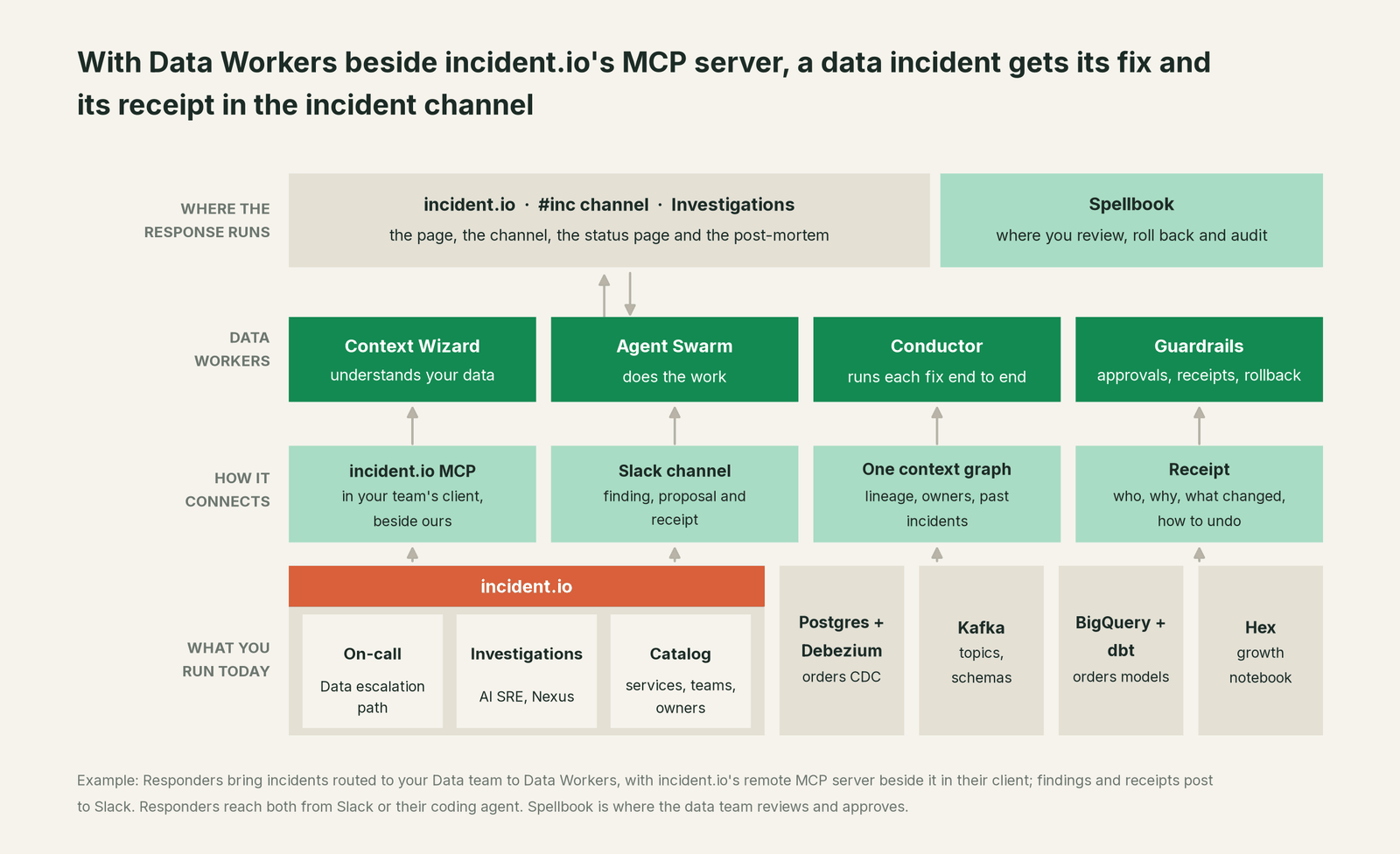
How they connect today. Data Workers connects to incident.io over its API or its remote MCP server at mcp.incident.io/mcp. With an incident.io API key, which authenticates as a service actor, Data Workers reads the incidents routed to your Data team and writes back through incident.io's own tools: incident_message posts a finding into the incident channel, follow_up_create records the prevention work and incident_update updates incident fields. In Slack, Data Workers also posts into the incident channel through its native Slack connector. Data alerts keep arriving as they do now: a Monte Carlo alert source, or a custom HTTP alert source for dbt and Airflow.
Setup for responders. Many on-call engineers work incidents from a coding agent. incident.io ships a plugin and its remote MCP server (Team, Pro and Enterprise plans) for Claude Code, Cursor and Codex, and every Data Workers agent is an MCP server, documented in the client setup guide (clone the repo, one start-agent.sh entry per agent). One session can then read INC-2291 and its investigation from incident.io and ask Data Workers for lineage, blast radius and the fix.
# Example: incident.io and Data Workers in one Claude Code session
# incident.io remote MCP server (OAuth in the browser on first use)
claude mcp add incident-io --transport http https://mcp.incident.io/mcp

# Data Workers agents over stdio, from a clone of the open-source repo
claude mcp add --scope user dw-catalog -- "$(pwd)/start-agent.sh" dw-context-catalog
claude mcp add --scope user dw-incidents -- "$(pwd)/start-agent.sh" dw-incidents
claude mcp add --scope user dw-schema -- "$(pwd)/start-agent.sh" dw-schema
claude mcp add --scope user dw-quality -- "$(pwd)/start-agent.sh" dw-quality
Start with the read tools: search_across_platforms, trace_cross_platform_lineage, blast_radius_analysis, run_quality_check and get_incident_history. Add diagnose_incident, get_root_cause and assess_impact next, and remediate one domain at a time. For the wider pattern of MCP in incident response, see MCP for incident response agents.
One incident, L0 to L4. The alert, as the on-call engineer sees it: "discount <= gross_amount test failed on stg_orders." The autonomy ladder is set per domain.

- •L0 manual. INC-2291 opens and the on-call engineer traces Kafka, BigQuery and dbt by hand while Investigations works the code side.
- •L1 observe. Data Workers posts the diagnosis in #inc-2291: the type change, 31,400 affected rows and every model and report downstream. Nothing changes.
- •L2 propose. Data Workers posts the
stg_ordersdiff and the backfill plan with its blast radius. Nothing reaches production until the model owner approves in Spellbook. - •L3 act reversibly. For change classes with a proven record, such as backfilling affected partitions after an approved model change, Data Workers applies the change with the undo recorded first and verifies it; a failed check goes to a named person.
- •L4 autonomous. For a scoped class like CDC type changes in the orders domain, Data Workers catches the new schema version on the topic before the nightly build, routes the model change to its owner, runs the backfill once it lands and records its own incident with the receipt. Nobody gets paged.
Approvals go to a named person, and an unanswered request expires and escalates rather than granting itself. No agent can promote its own work. For the full model, read how approvals work for AI data agents, the autonomy levels L0 to L4 explained and is it safe to let AI agents change production data. The same pattern runs on other incident stacks: see you're on PagerDuty, you're on Datadog and you're on Slack.
What changes for your team
incident.io made the response calm and consistent. Data Workers gives the data team a first responder inside it.
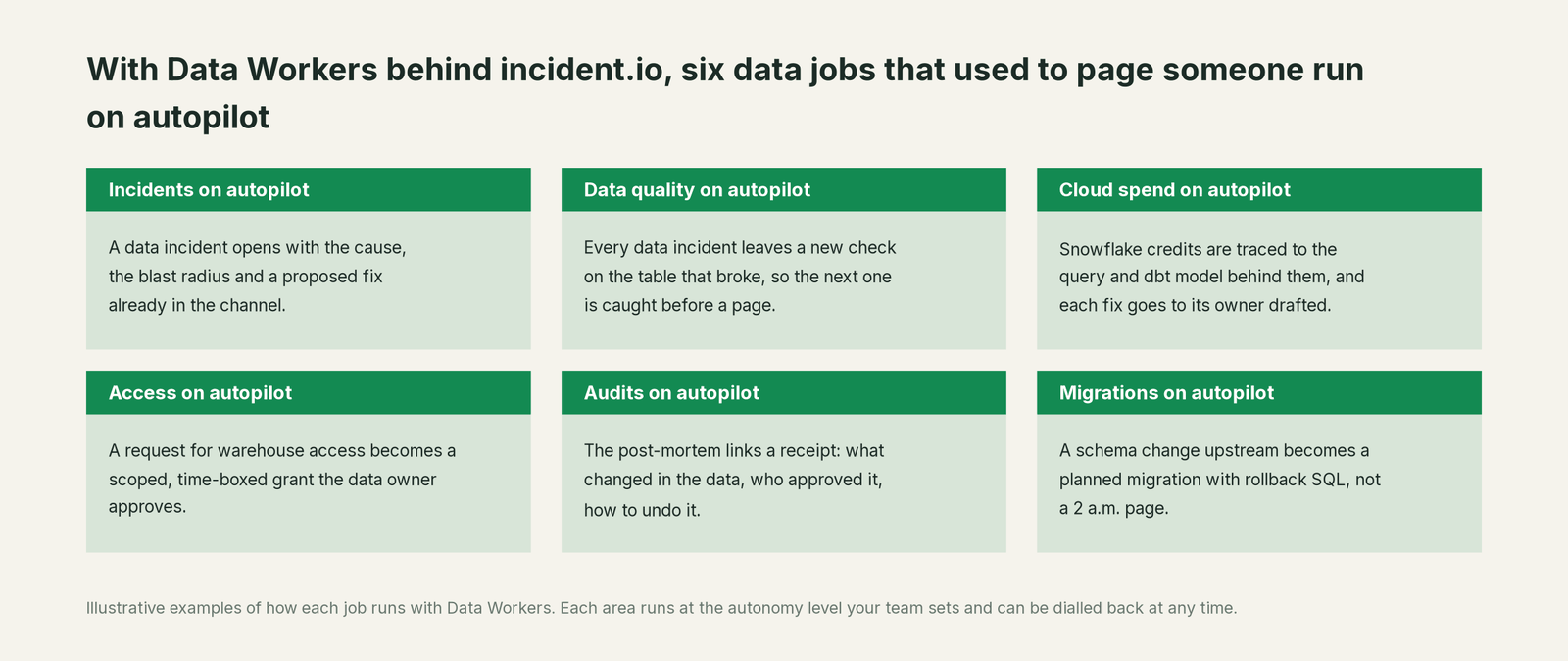
- •Incidents. A data incident opens with the cause, the blast radius and a proposed fix already in the channel.
- •Data quality. Every data incident leaves a new check on the table that broke, so the next break is caught before anyone is paged.
- •Cloud spend. Snowflake credits are traced to the query and dbt model behind them, and each fix goes to its owner drafted.
- •Access. A request for warehouse access becomes a scoped, time-boxed grant proposal the data owner approves.
- •Audits. The post-mortem links a receipt: what changed in the data, who approved it, why, and how to undo it.
- •Migrations. A schema change upstream becomes a planned migration with rollback SQL for the owner to apply, instead of a 2 a.m. page.
The on-call rotation changes most. Today the analytics engineer paged at 02:16 spends the first half hour on archaeology: the runbook, the lineage, the last similar incident. With Data Workers, they arrive to a diagnosis and a plan, approve one change and go back to sleep. Our data incident response playbook shows the steps this replaces.
Keep incident.io, or consolidate?
Keep incident.io if you love it; Data Workers works with it from day one. Many teams consolidate once Data Workers runs that slice too.
For almost every incident.io customer the answer is to keep it: your whole engineering org responds there, and the data team should too. What teams consolidate is the data tooling around the warehouse: a separate data observability tool, a data-quality tool, a catalog nobody keeps current and the scripts each team wrote to watch its tables. Our comparison of Data Workers and data observability tools covers that choice, and Data Workers integrations lists what connects natively. Tempted to build this layer yourself on incident.io's MCP server? Read build it ourselves with Claude Code and MCP servers: the MCP calls are the easy part; the context graph, approvals and rollback are the work.
The case for your CFO
The outcome: you already pay for a fast, consistent incident response. Data Workers makes data incidents resolve at the same speed, because the data fix stops being a manual project that starts after the page. Wrong revenue and growth numbers get corrected before the morning review, with a record of why.
The risk story is plain. Data Workers changes data only inside the guardrails you set: autonomy per domain from L0 manual to L4 autonomous, each change routed to a named approver, applied reversibly, verified and recorded in a receipt with who approved it, what it touched and how to undo it. Your data stays in your systems; the hosted Conductor sees workflow metadata only, as described in where does our data go. The org-wide stop halts all autonomous dispatch. Zero migration: incident.io, Kafka, BigQuery, dbt and Hex stay where they are; who owns the agents explains who sets each level.
Why now: AI SREs name the cause early, so the slow part of a data incident is the fix and the proof, at 2 a.m., by hand. The first win: Data Workers read tools on incidents routed to the Data team, so every data incident opens with a diagnosis in the channel. What stays the same: escalation paths, incident roles, post-mortems, warehouse permissions and dbt review. For the numbers, see the ROI of agentic data operations. Start with a pilot (pricing); the pilot is credited in full against the first year.
The sentence to repeat upstairs: "incident.io runs our response; Data Workers fixes the data inside it, with an approval and a receipt on every incident."
Getting started
Start with a pilot. Pick the Data escalation path, give Data Workers an incident.io API key with the scopes it needs to read incidents and post findings, connect it to the warehouse and dbt project behind your noisiest alerts, and let every data incident open with a diagnosis in the channel. Then turn on the first write class in one domain, such as backfills for the orders models. The pilot path and plans are on the pricing page, and the pilot is credited in full against the first year.
FAQ
Does Data Workers have an incident.io integration? Data Workers connects to incident.io over its API or its remote MCP server today, reading incidents routed to your Data team and posting findings, receipts and follow-ups through incident.io's own tools.
Doesn't Investigations already find the root cause? For code, deploys and telemetry, it does, with evidence and a confidence score. Data Workers adds the data side: which tables, models and reports are wrong, the fix, and proof the numbers are right. Both findings sit in the same channel.
Can incident.io's own coding agent fix data incidents? Investigations opens code pull requests a human merges, and you can delegate that step to Cursor, GitLab Duo or your own agent platform. A backfill or a reconciliation is a change to data, not a code diff, so it runs through Data Workers' approvals and verification.
What does the receipt contain? The cause, the diff, who approved it and when, what it touched downstream, how it was verified and how to undo it, written for the post-mortem.
How do we keep data alerts from paging people for nothing? Data Workers traces related failures to one root cause, so five failed tests become one finding, and at the level you set it fixes known patterns before anyone is paged. incident.io's alert grouping and maintenance windows keep doing their part.
Sources
- •incident.io, What's incident.io (help center index), https://docs.incident.io/llms.txt (checked Oct 2, 2026)
- •incident.io, Introducing Investigations, powered by Nexus (Aug 5, 2026), https://incident.io/blog/introducing-investigations-powered-by-nexus (checked Oct 2, 2026)
- •incident.io, AI SRE (Investigations), https://incident.io/ai-sre (checked Oct 2, 2026)
- •incident.io Docs, Investigations: Trust and safety, https://docs.incident.io/investigations/trust-and-safety (checked Oct 2, 2026)
- •incident.io Docs, Triggering investigations, https://docs.incident.io/investigations/triggering (checked Oct 2, 2026)
- •incident.io Docs, Making code changes, https://docs.incident.io/nexus/code/making-code-changes (checked Oct 2, 2026)
- •incident.io Docs, Delegating agents, https://docs.incident.io/nexus/code/delegating-agents (checked Oct 2, 2026)
- •incident.io Docs, Nexus, https://docs.incident.io/nexus/overview (checked Oct 2, 2026)
- •incident.io Docs, Scribe, https://docs.incident.io/ai/scribe (checked Oct 2, 2026)
- •incident.io Docs, Remote MCP server (tools, authentication, plans), https://docs.incident.io/ai/remote-mcp (checked Oct 2, 2026)
- •incident.io Docs, Adding Monte Carlo as an alert source, https://docs.incident.io/alerts/monte-carlo (checked Oct 2, 2026)
- •incident.io Docs, Custom HTTP alert sources, https://docs.incident.io/alerts/custom-http-sources (checked Oct 2, 2026)
- •incident.io, Pricing (plans; Investigations add-on), https://incident.io/pricing (checked Oct 2, 2026)
- •incident.io, Changelog (MCP Server, Mar 31, 2026; Investigations now available, Aug 5, 2026; private incidents for teams, Jul 14, 2026; incident role restrictions, Apr 8, 2026), https://incident.io/changelog (checked Oct 2, 2026)
- •Data Workers open-source repository (tool registrations in dw-context-catalog, dw-incidents, dw-schema, dw-quality, dw-observability), https://github.com/DataWorkersProject/dataworkers-claw-community (checked Oct 2, 2026)
- •Data Workers client setup guide, https://dataworkers.io/opensource-docs/client-setup/ (checked Oct 2, 2026)