You're on Slack: Keep Deciding in the Channel, Let Data Workers Do the Data Work
Slack is where the data team talks, gets paged and decides. Data Workers brings the diagnosis, the proposed fix and the approval request into the channel, does the work and posts the outcome.
Your data team lives in Slack. Failed DAG runs and broken checks land in #data-alerts, the on-call engineer picks one up in a thread, someone starts a huddle, a canvas holds the runbook, and the head of growth asks in the same thread whether Monday's numbers are safe to present. AI in Slack summarizes the long thread. Slack is also an agent platform now: Slackbot works as an MCP client with more than 40 Marketplace partners plugged in, the Slack MCP server lets assistants search and post, the Real-Time Search API grounds agents in your conversations, and Agentforce agents work natively in Slack. Slack is where the data team talks, gets paged and decides. Data Workers is the responder that brings the diagnosis, the proposed fix and the approval request into the channel, does the work and posts the outcome, with the receipt in Spellbook.
What Slack does not do is change data. Someone still leaves the thread for Airflow, BigQuery, dbt and the dashboard, fixes the break and comes back to say "should be good now". Data Workers does that part, and every step shows up in the channel.
Key takeaways
- •Slack keeps its job. Channels, threads, huddles, Slackbot and your incident apps stay where they are.
- •Data Workers posts what the channel needs to decide. An alert routed by severity, then the cause, the blast radius, the proposed fix and the named approver, in #data-alerts.
- •One person decides, everyone sees it. The approver opens the proposal in Spellbook from the post, approves, and the channel sees the outcome.
- •The receipt closes the loop. The resolution lands in the channel; the receipt in Spellbook shows what changed, who approved it, how it was verified and how to undo it.
- •Autonomy per domain. Each data domain sits on the ladder from L0 manual to L4 autonomous, and your team moves it up when the record earns it.
Slack is the war room. Data Workers is the responder in it.
Slack is very good at the human side of an incident: the right people in one place, the conversation visible. A data incident also needs a responder in that room who can read the warehouse, trace lineage, carry the fix and prove the numbers. Here is a Monday morning with both in place, across Managed Service for Apache Airflow (formerly Cloud Composer), BigQuery, dbt, Soda, Slack and Looker. This is an illustration, not a customer case.
| Time | System | What happens |
|---|---|---|
| Mon 05:50 | Managed Airflow | The marketing_daily DAG's sensor waits for Sunday's Google Ads transfer, times out with soft fail on, skips the load task, and the DAG run is marked success |
| 06:05 | BigQuery + dbt | Sunday's transfer lands late; dbt has already built fct_paid_acquisition without it, so Sunday shows zero paid spend |
| 06:14 | Soda | Data Workers triggers the team's Soda checks through Soda's API after the DAG; the row count check on Sunday's partition of fct_paid_acquisition fails |
| 06:15 | Slack | Data Workers posts a critical alert to #data-alerts: zero paid spend for Sunday, CAC on the Looker "Paid acquisition" dashboard is wrong |
| 06:21 | Slack | Data Workers posts the diagnosis: the sensor soft-failed at 05:50, the transfer landed at 06:05. Blast radius: three dbt models, the Looker dashboard and the weekly budget pacing export. Proposal: rerun marketing_daily for Sunday, plus a DAG diff that makes a late transfer fail loudly and retry. Approver: the marketing data owner. Link: the proposal in Spellbook |
| 06:52 | Slack | The head of growth asks in the thread whether to move the 09:00 budget review; the marketing data owner replies that she is reviewing it now |
| 07:04 | Spellbook | The marketing data owner opens the proposal from the post, checks the blast radius and approves the rerun |
| 07:05 | Managed Airflow | Data Workers queues a rerun of marketing_daily for Sunday's date through the orchestrator |
| 07:31 | BigQuery + Soda | The build completes; Data Workers re-runs the Soda checks on Sunday's partition: all pass |
| 07:33 | Slack | Data Workers posts the resolution in #data-alerts; the receipt sits in Spellbook, and the DAG diff goes to the DAG's owner to merge |
| 09:00 | Looker | The budget review opens on Sunday's real spend |
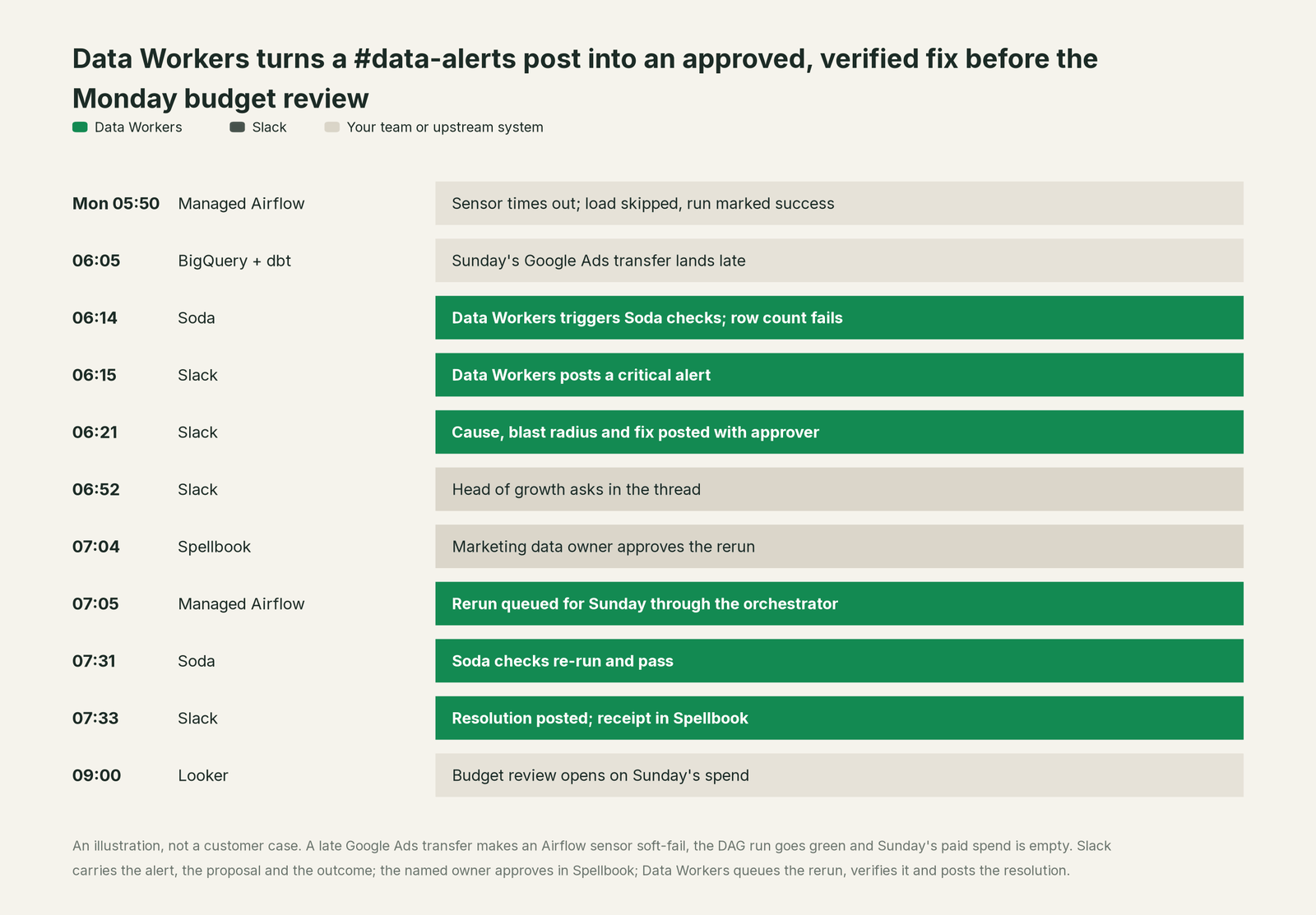
Two things made this morning different. Nobody asked "who owns this?": the post named the approver. Nobody took anyone's word for the fix: the checks passed, and the receipt in Spellbook shows what changed and who approved it. The decision stayed human and visible; the work did not wait.
| Job | What Slack does | What Data Workers does |
|---|---|---|
| The alert | Hosts #data-alerts, threads and notifications; Workflow Builder routes and escalates | Posts the alert itself, routed by severity to the channels you choose, with a cooldown so a repeat does not post twice |
| The context | AI in Slack summarizes the thread; enterprise search finds past messages and files | Keeps one governed context graph of tables, models, owners, lineage and past incidents |
| The diagnosis | Hosts the discussion and the huddle | Traces the break through Airflow, BigQuery, dbt and Looker and names every affected table and report |
| The decision | Makes the conversation visible; admins approve apps and Slackbot asks before any third-party write | Posts the proposal with its blast radius and the named approver, who decides in Spellbook |
| The fix | Not Slack's job: the change happens in your data systems | Queues the approved rerun through the orchestrator; other changes go to their owner as a diff |
| The proof | Keeps the thread as the history | Verifies the numbers downstream, posts the resolution and writes the receipt |
Why doesn't Slack just do this itself?
Because Slack hosts every team's conversation, and its agent platform is built as a careful host. Slack's MCP server acts on behalf of the signed-in user, admins approve each MCP integration and see which server domains it requests, and Slackbot asks the user to authorize each third-party tool call. Slack's security post is plain about writes: "That friction is deliberate." That is the right design for a product between thousands of people and hundreds of apps. Slack brings the agents to the conversation and leaves the systems they change to their owners.
Fixing Sunday's paid spend is a change to data: lineage across Airflow, BigQuery, dbt and Looker, a scoped blast radius, the owner's approval, checks after the rerun, a rollback path and a receipt tied to the cause, inside systems Slack does not run. That is a separate product with its own guardrails, and it is the product Data Workers is. Focus matters too: Slack is horizontal by design and its AI serves sales, support and finance alike. Data Workers goes deep on the data estate and reports into the channel.
Every tool owns a slice. Data Workers covers the whole lifecycle
Slack owns the conversation, and owns it very well. That job sits outside the ten stages of the data lifecycle, so Slack wins none of them here, and that says nothing against it: Slack is where Data Workers reports, not a stage it competes on. Each point tool adds another console, another contract and another handoff. Data Workers covers the whole lifecycle with one context, one approval flow and one audit trail, and posts into Slack where your team already works.
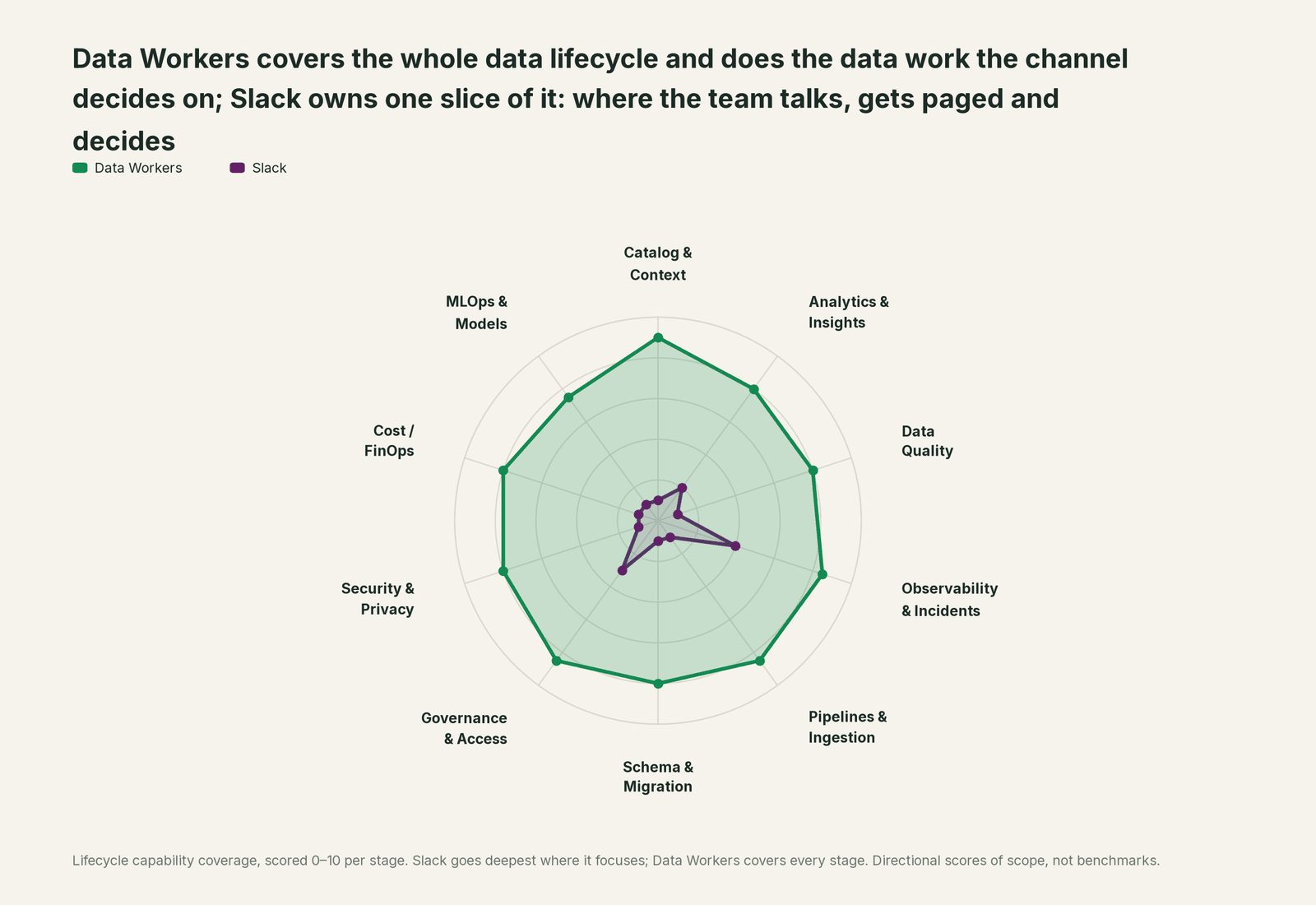
| Stage | Data Workers | Slack | Why we scored it this way |
|---|---|---|---|
| Catalog & Context | 9 | 1 | Slack's job, hosting the conversation, sits outside the data lifecycle; enterprise search finds messages and files, not tables. Data Workers keeps one governed context graph of tables, models, owners and lineage. |
| Analytics & Insights | 8 | 2 | Slackbot helps analyze reports and AI in Slack summarizes threads; Agentforce agents work natively in Slack. Data Workers answers data questions from governed definitions with lineage behind every number. |
| Data Quality | 8 | 1 | Not Slack's job: a failed check arrives as a message. Data Workers runs the checks, reruns them after a fix and adds one after every incident. |
| Observability & Incidents | 8.5 | 4 | Where data incidents are coordinated: alert channels, threads, huddles and workflows. Detection and diagnosis happen elsewhere. Data Workers diagnoses, fixes and verifies the incident and posts each step in the channel. |
| Pipelines & Ingestion | 8.5 | 1 | Not Slack's job: pipelines run in your orchestrator and warehouse. Data Workers queues reruns through the orchestrator and proposes pipeline fixes for approval. |
| Schema & Migration | 8 | 1 | Not Slack's job: schemas live in the warehouse and the dbt project. Data Workers catches schema changes and plans migrations with rollback SQL. |
| Governance & Access | 8.5 | 3 | Admins approve every MCP integration, and Slackbot asks the user to authorize each third-party tool call. Data Workers routes every data change to a named owner with its blast radius and rollback. |
| Security & Privacy | 8 | 1 | Slack secures its own workspace and messages; warehouse privacy is not its job. Data Workers leaves a receipt on every data change and proposes masking for the owner to apply. |
| Cost / FinOps | 8 | 1 | Not Slack's job. Data Workers attributes Snowflake spend to the dbt model, totals BigQuery spend from the Jobs API and drafts warehouse settings for the owner. |
| MLOps & Models | 7.5 | 1 | Not Slack's job. Data Workers keeps the data under your models healthy. |
How Slack and Data Workers work together
Slack stays on top: channels, threads, Slackbot and your assistant. Spellbook Data Catalog (in preview) is where the data team looks: each proposed change, its approver, what it touched and how to roll it back. Between them, Data Context Wizard keeps one governed context graph across Airflow, BigQuery, dbt, Soda and Looker, the Data-Agents Swarm does the work with more than 20 specialist agents, the Autonomous Data-Conductor runs each fix end to end (detect, diagnose, fix, review, verify, remember), and per-domain guardrails hold approvals, receipts and rollback.
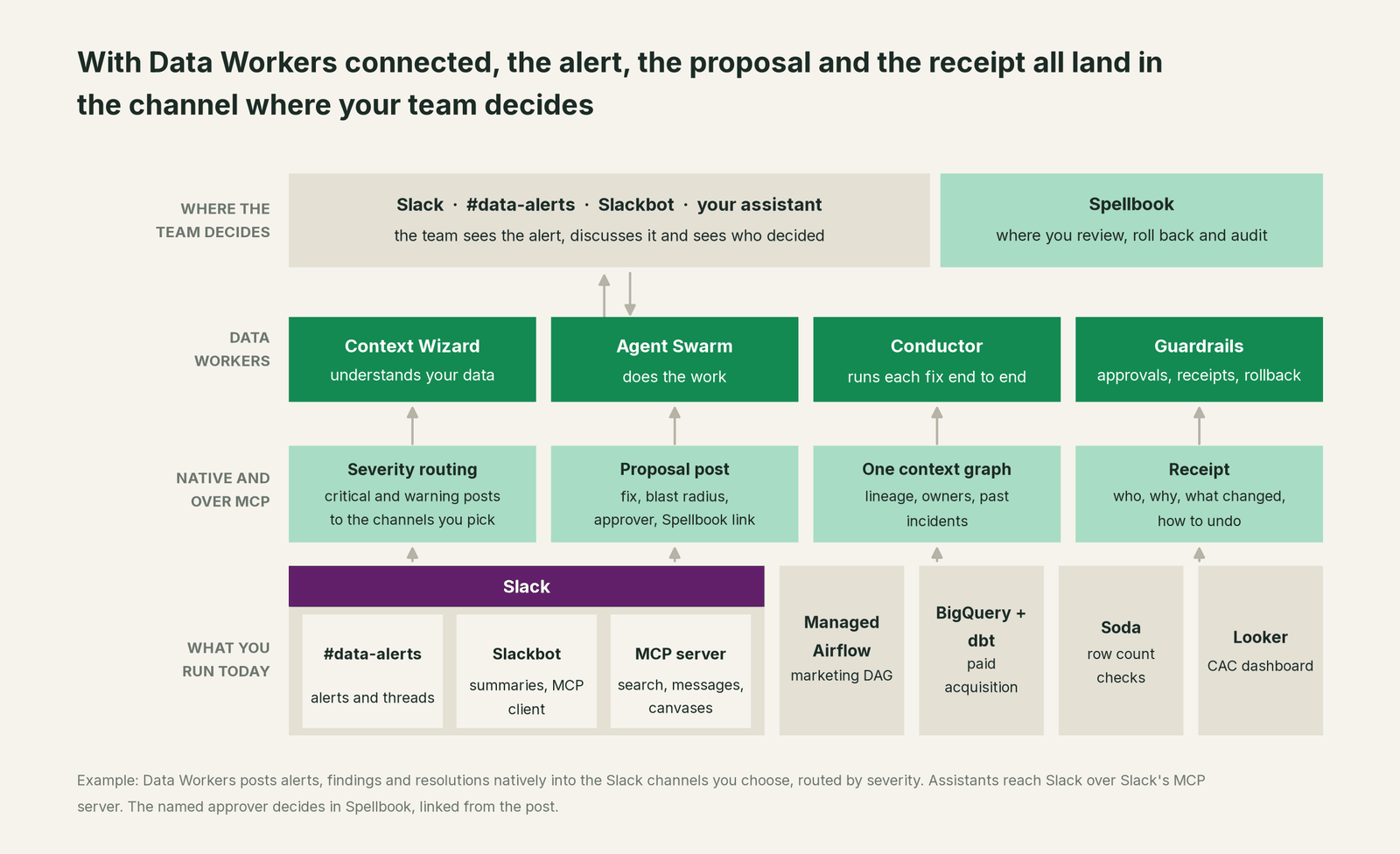
What Data Workers does in Slack. Slack is a native Data Workers connector, set up with a bot token from an internal Slack app your admin approves. Data Workers posts alerts to the channel you configure, #data-alerts by default, each with its severity, title, source and message. Its quality alert sweep routes critical alerts and warnings to the channels you pick, keeps a cooldown across runs so a failing check does not post twice, and can post a digest. When Data Workers finds the cause, it posts the diagnosis, the blast radius, the proposal and the named approver, with a link to the proposal in Spellbook. When the fix is verified, it posts the resolution to the channel, and the receipt sits in Spellbook. The public tools are send_slack_alert and resolve_slack_alert.
Where the decision happens. The approver decides in Spellbook, signed in through your identity provider, by design: the diff, blast radius, follow-up checks and rollback path need more room than a chat message, and the approval is recorded against a named person. The Slack post shows the channel the request, who decides and the outcome.
Asking from Slack. Your team can also reach Data Workers through Slack's agent surfaces. An assistant connected to Slack's MCP server and to the Data Workers agents can read a #data-alerts thread, ask for lineage and the blast radius, and reply in the thread as the signed-in user. For Slackbot, an internal Slack app can register your Data Workers remote endpoint in Slackbot's MCP client with Manual OAuth, using your identity provider (Okta or Entra ID) as the authorization server while Data Workers verifies the tokens. Slackbot then asks each user to authorize every call.
# Example: Slack and Data Workers in one Claude Code session
# Slack: Slack's MCP server via your assistant's Slack connector (admin-approved)

# Data Workers agents over stdio, from a clone of the open-source repo
claude mcp add --scope user dw-catalog -- "$(pwd)/start-agent.sh" dw-context-catalog
claude mcp add --scope user dw-incidents -- "$(pwd)/start-agent.sh" dw-incidents
claude mcp add --scope user dw-quality -- "$(pwd)/start-agent.sh" dw-quality
claude mcp add --scope user dw-connectors -- "$(pwd)/start-agent.sh" dw-connectors
The Data Workers lines follow the client setup guide. Start with the read tools: search_across_platforms, trace_cross_platform_lineage, blast_radius_analysis and get_incident_history. Add diagnose_incident, get_root_cause and run_quality_check next, and remediate one domain at a time. List each agent's tools with your client's own command, such as /mcp. For the wider pattern, see MCP for incident response agents.
One alert, L0 to L4. "Row count check failed on fct_paid_acquisition, Sunday." The ladder is set per domain.

- •L0 manual. The alert lands in #data-alerts and the on-call engineer works it by hand across Airflow, BigQuery and Looker.
- •L1 observe. Data Workers posts the diagnosis: the soft-failed sensor, the late transfer, the three models and the dashboard. Nothing changes.
- •L2 propose. Data Workers posts the rerun and the DAG diff with the blast radius and names the approver. Nothing runs until the marketing data owner approves in Spellbook.
- •L3 act reversibly. For change classes with a proven record, such as rerunning a partition after a late source, Data Workers queues the rerun, verifies it and posts the resolution; a failed check goes to a named person.
- •L4 autonomous. For a scoped class like late transfers in the marketing domain, Data Workers spots the late source, queues the rerun once the transfer lands, verifies it and posts one resolution line. Nobody is paged.
Approvals go to a named person; an unanswered request expires and escalates, never granting itself. No agent can promote its own work. For the full model, read how approvals work for AI data agents, the autonomy levels L0 to L4 explained and is it safe to let AI agents change production data. The same pattern runs on other incident stacks: see you're on PagerDuty, you're on incident.io and, for Microsoft shops, you're on Microsoft Teams.
What changes for your team
Slack made the data team easy to reach. Data Workers makes the channel where data problems get finished.
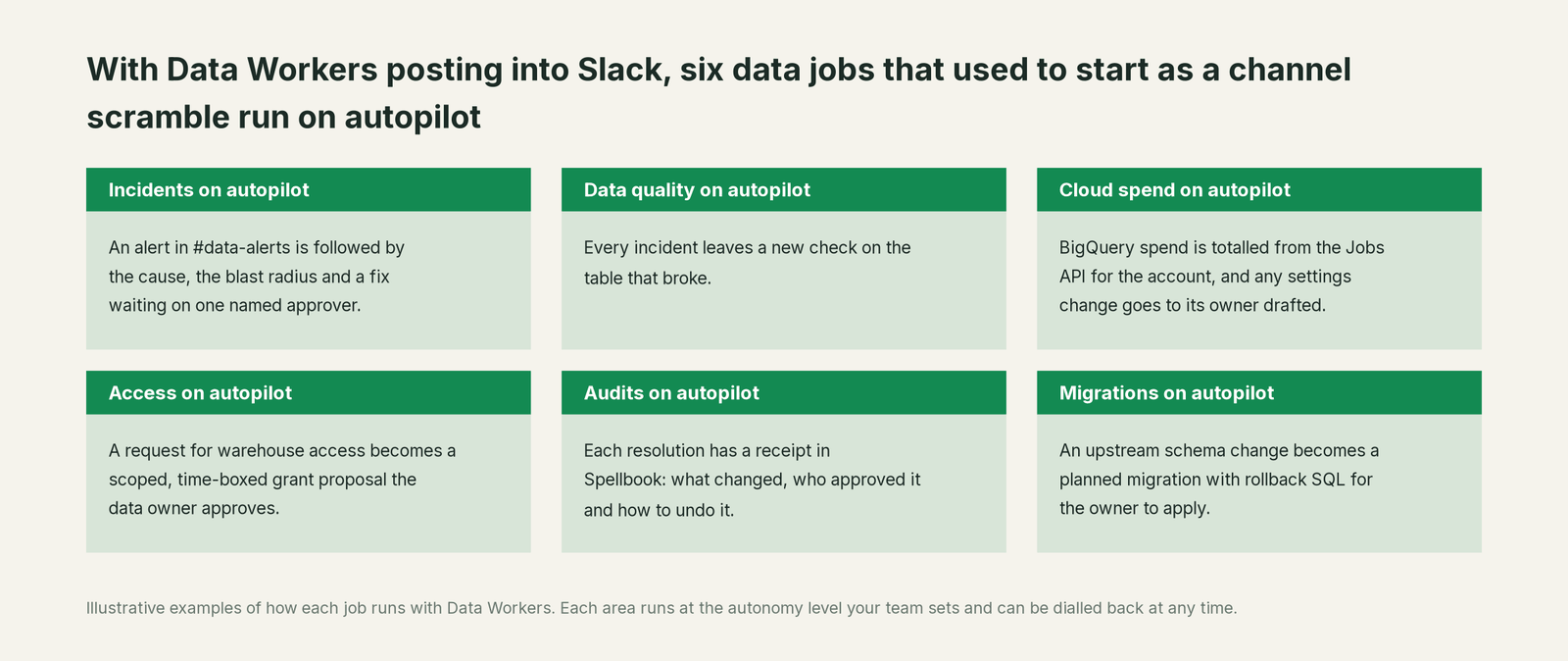
- •Incidents. An alert in #data-alerts is followed by the cause, the blast radius and a fix waiting on one named approver.
- •Data quality. Every incident leaves a new check on the table that broke.
- •Cloud spend. BigQuery spend is totalled from the Jobs API for the account, and any warehouse settings change goes to its owner drafted.
- •Access. A request for warehouse access becomes a scoped, time-boxed grant proposal the data owner approves.
- •Audits. Each resolution has a receipt in Spellbook: what changed, who approved it and how to undo it.
- •Migrations. An upstream schema change becomes a planned migration with rollback SQL for the owner to apply.
The biggest change is in #data-alerts itself. Today it is a stream of red posts people learn to mute, and "is the number right?" gets "I think so". With Data Workers, related failures arrive as one finding with a cause, each post says who decides, and each incident ends with a resolution and a receipt. Our guide to reducing data on-call burden with AI agents covers the rotation side.
Keep Slack, or consolidate?
Keep Slack if you love it; Data Workers works with it from day one. Many teams consolidate once Data Workers runs that slice too.
For Slack the answer is simple: keep it. It is where your company talks, and the data team belongs in the same room. What teams consolidate is what posts into #data-alerts: a separate observability tool, a data-quality tool, a stale catalog and the scripts each team wrote to watch its tables. See Data Workers vs data observability and Data Workers integrations. Tempted to wire it up yourself? Read build it ourselves with Claude Code and MCP servers: posting to a channel is the easy part; the context graph, approvals and rollback are the work.
The case for your CFO
The outcome: your company runs on Slack, and that is where wrong numbers get noticed. Data Workers makes sure they get fixed from there too: the alert, the decision and the outcome show up in the channel, so a bad dashboard is corrected before the meeting that relies on it, with a receipt that says why.
The risk story is plain. Data Workers changes data only inside the guardrails you set: autonomy per domain from L0 manual to L4 autonomous, each change routed to a named approver, applied reversibly, verified and recorded in a receipt. Your data stays in your systems; the hosted Conductor sees workflow metadata only, as described in where does our data go. The org-wide stop halts all autonomous dispatch. Zero migration: Slack, Airflow, BigQuery, dbt, Soda and Looker stay where they are; who owns the agents explains who sets each level.
Why now: every vendor's agent is arriving in Slack, which makes "who may change production data, and who approved it?" a board-level question. Data Workers answers it with one approval flow and one audit trail. The first win: diagnoses in #data-alerts for one domain, so every alert arrives with its cause and owner. What stays the same: your channels, on-call rotation, warehouse permissions and dbt review. For the numbers, see the ROI of agentic data operations. Start with a pilot (pricing); the pilot is credited in full against the first year.
The sentence to repeat upstairs: "Our team decides in Slack; Data Workers does the data work, with a named approver and a receipt on every change."
Getting started
Start with a pilot. Pick the domain behind your noisiest alerts, create an internal Slack app your admin approves so Data Workers can post to #data-alerts, connect the orchestrator, warehouse and dbt project behind those alerts, and let every alert arrive with its cause, blast radius and owner. Then turn on the first write class in one domain, such as reruns after a late source. The pilot path and plans are on the pricing page, and the pilot is credited in full against the first year.
FAQ
Does Data Workers integrate with Slack? Yes, natively. Data Workers posts alerts, diagnoses, proposals and resolutions into the channels you choose, through an internal Slack app your admin approves.
Can we approve a Data Workers change from Slack? The request reaches the approver in Slack, and the decision happens in Spellbook, linked from the post. That keeps the diff, blast radius and rollback plan in front of the approver and records the approval against a named person.
What happens if nobody approves? The request expires and escalates to the next person you named. It never grants itself.
Can we ask Data Workers questions from Slack? Yes, through Slack's own agent surfaces: an assistant connected to Slack's MCP server and to Data Workers, or Slackbot's MCP client registered against your Data Workers remote endpoint in an internal app. Slackbot asks each user to authorize every call.
How does this cut #data-alerts noise? Data Workers traces related failures to one root cause, routes quality alerts by severity and keeps a cooldown so a failing check does not post twice. At the level you set, it fixes known patterns and posts one resolution line.
Does Data Workers read our Slack messages? No. Its native connector only posts; it does not need channel history. If you connect an assistant to Slack's MCP server, that assistant reads as the signed-in user, under your admin's approval.
Sources
- •Slack, AI in Slack (Slackbot, Slack AI, Agentforce in Slack, agent apps), https://slack.com/ai (checked Oct 2, 2026)
- •Slack, Dreamforce 2026: Slackbot in channels, MCP client, MCP server, Real-time Search API (Oct 1, 2026), https://slack.com/blog/news/scalable-agentic-work-os (checked Oct 2, 2026)
- •Slack, Feature Drop: MCP server Lists support (Sep 30, 2026), https://slack.com/blog/news/slack-feature-drop-september2026 (checked Oct 2, 2026)
- •Slack, Introducing Add to Slack (Aug 20, 2026), https://slack.com/blog/news/add-to-slack (checked Oct 2, 2026)
- •Slack, How Slack Keeps MCP Secure (Jun 17, 2026), https://slack.com/blog/news/slackbot-mcp-security (checked Oct 2, 2026)
- •Slack, Real-Time Search API and MCP server for agentic collaboration (Mar 13, 2026), https://slack.com/blog/news/powering-agentic-collaboration (checked Oct 2, 2026)
- •Slack Developer Docs, Slack MCP server, https://docs.slack.dev/ai/mcp-server (checked Oct 2, 2026)
- •Slack Developer Docs, Slackbot MCP client, https://docs.slack.dev/ai/slackbot-mcp-client (checked Oct 2, 2026)
- •Slack Developer Docs, Real-time Search API, https://docs.slack.dev/apis/web-api/real-time-search-api (checked Oct 2, 2026)
- •Google Cloud, Managed Service for Apache Airflow documentation (formerly Cloud Composer), https://docs.cloud.google.com/composer/docs (checked Oct 2, 2026)
- •Data Workers open-source repository (tool registrations in dw-context-catalog, dw-incidents, dw-quality, dw-connectors, dw-observability), https://github.com/DataWorkersProject/dataworkers-claw-community (checked Oct 2, 2026)
- •Data Workers client setup guide, https://dataworkers.io/opensource-docs/client-setup/ (checked Oct 2, 2026)