Approvals in Slack, alerts in Teams
Data incidents get discussed in chat, but the fix still waits on a person hunting for context. Data Workers posts alerts to your Slack and Teams channels and sends each approval request to the owner in Slack with what will change, why and how to undo it.
Before and after
| Today | With Data Workers |
|---|---|
| An alert in a channel with no cause attached | An alert that arrives with the diagnosis |
| A fix described in a thread, then pasted into a terminal | A request that shows what will change, why and how to undo it |
| Approval by whoever replies first | A named owner decides, and the highest-risk changes need a second person |
| "Looks good" in a thread as the only record | A signed record of each approved change in a tamper-evident audit trail |
| One process for the Slack team, another for the Teams team | The same alerts and incident updates in Slack and Microsoft Teams channels |
Most data incidents are discussed in a chat channel and fixed somewhere else, so the decision and the evidence live in two places. This page is the operating model for putting them together: the channel gets the alert, the owner gets the request, and nothing runs until the owner says yes. The Slack and Microsoft Teams guides walk through a full incident morning on each.
How it works
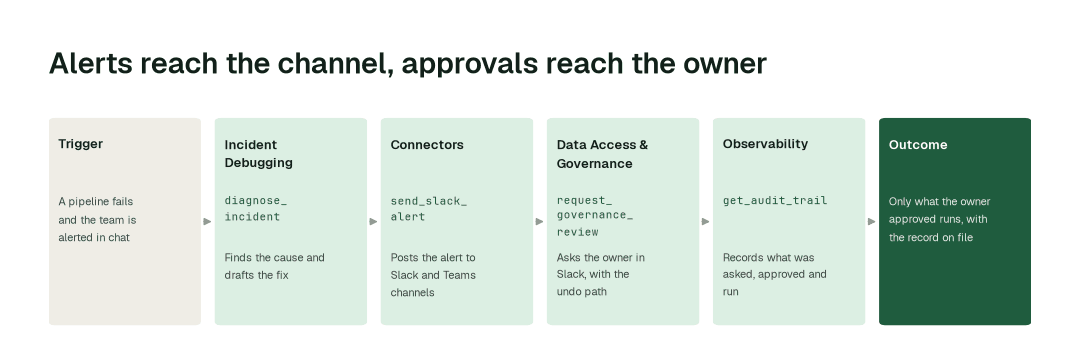
1. Tell the channel what happened
When a run fails or a table goes wrong, the Incident Debugging Agent finds the cause with diagnose_incident. The Connectors Agent posts the alert and every incident update to the Slack and Teams channels you choose, with send_slack_alert and send_teams_alert. Everyone sees the cause, not just a red status.
2. Ask the owner, with the full picture
The Data Access & Governance Agent sends the proposed fix to the owner of that data with request_governance_review. The owner receives it in Slack, showing what will change, why and how to undo it. Nothing runs until the owner approves. The highest-risk changes need a second approver, and the person who asked can never be one of them.
3. Run what was approved, then close it out
The agent that owns the work runs only what was approved. The Connectors Agent closes the alert in both channels with resolve_slack_alert and resolve_teams_alert, and the Observability Agent reads back the record of what was asked, approved and run with get_audit_trail.
The impact metrics we move
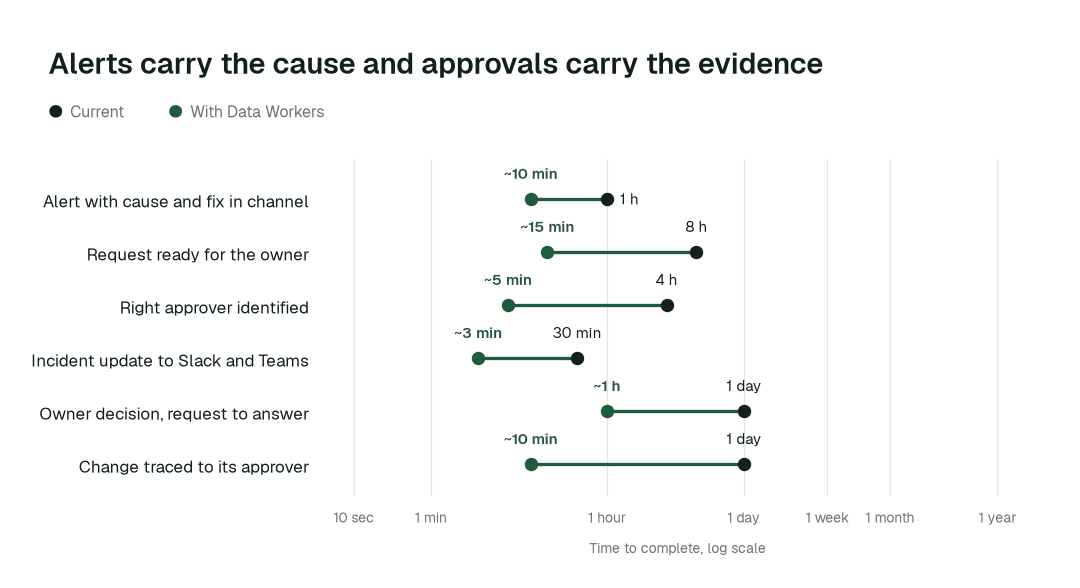
- •Alert with cause and proposed fix in the channel: from about 1 h to ~10 min
- •Approval request ready for the owner to decide: from about 8 h to ~15 min
- •A change traced to who approved it: from about a day to ~10 min
Where teams start
- •Pipeline failures in the alerts channel. Airflow and dbt failures arrive with the cause and a proposed fix instead of a stack trace.
- •Schema changes. The Schema Evolution Agent proposes the change with its rollback plan, and the table owner decides.
- •Access requests. Requests for Snowflake, Databricks or BigQuery data arrive with the policy check attached, for the data owner to approve.
- •Microsoft Teams shops. Alerts and incident updates go to your Teams channels; approval requests reach owners in Slack or email.
- •On-call rotations. PagerDuty or Opsgenie keeps paging as it does today, and the page arrives with the diagnosis.
What powers it
This runs on the Data-Agents Swarm: the Incident Debugging Agent, Connectors Agent, Data Access & Governance Agent and Observability Agent. The Autonomous Data-Conductor decides which agents should act and keeps the work inside the autonomy each domain allows, Autopilot Routines keep recurring upkeep flowing to the same channels, and the Spellbook Data Catalog supplies the owners that make a named approver possible. How approvals work for AI data agents shows what the owner sees, and approval gates for data agents explains the pattern.
Where this shows up: Self-healing pipelines, Let AI agents change production data, safely and Agent governance and audit.
The climb: from assisted to autonomous to agentic
Every transformation runs on the same ladder from our thesis: agents first watch and suggest, then act after approval, and a domain moves up only on its own review record. L0 to L2 run today, and only a domain's owner can raise its level. L3 and L4 are where a domain can go on evidence; the autonomy levels explained lay out the scale.
The pilot
- •Scope. One alerts channel in Slack, optionally one in Teams, and one data domain with a named owner.
- •First week. Agents start by watching and suggesting. We post the alerts and show the requests they would have sent, each with its impact, its undo path and the approver it would go to.
- •By week two. Routine proposals reach named owners in Slack; anything irreversible stays with a person, and the highest-risk changes need two.
- •At day 30. We review the impact metrics against your baseline:
- •Alert with cause and proposed fix in the channel: from about 1 h to ~10 min
- •Approval request ready for the owner to decide: from about 8 h to ~15 min
- •A change traced to who approved it: from about a day to ~10 min
- •Cost. Start with a pilot ($7,500 one-time, credited in full against the first year). Scale is from $1,000 a month and Enterprise from $3,000 a month, billed annually, with unlimited seats, no usage meter and no markup on model spend. See pricing.
FAQ
Can we approve in Microsoft Teams? Teams channels get alerts and incident updates. Approval requests reach owners in Slack or email, so a Teams-first team keeps its channels and adds Slack for the people who approve.
What happens when someone approves? The change goes through the same approval path as any other. The agent that owns the work runs only what was approved, and the result is recorded with how to undo it.
Who can approve, and can the requester approve their own change? The owner of the data approves. The highest-risk changes need two different people, and the person who asked cannot be one of them.
What if an approved change is wrong? Every change records how to undo it before it runs, and supported changes can be reverted from that record. Code changes are reverted the normal way, through a pull request.
Which stacks? Snowflake, Databricks and BigQuery, with dbt, Airflow, PagerDuty and Opsgenie, among 50+ connectors.