You're on Microsoft Teams: Keep the Data Platform Channel, Add the Responder That Fixes the Data
Teams is where your data team talks, meets and gets paged. Data Workers posts the diagnosis and proposed fix into the channel, routes the approval to a named owner and does the work across ADF, Fabric and Power BI.
Your data team lives in Microsoft Teams. There is a Data Platform team with a channel for alerts, a channel for each domain and a private channel for the on-call rotation. Azure Data Factory failures, Power BI refresh errors and Fabric notifications land there through Workflows. When something breaks, someone starts a meeting from the channel, Copilot recaps who said what, Facilitator keeps the notes, and the sales director asks in her own channel why the EMEA number is blank. Teams is the war room. Data Workers is the responder in it: it brings the diagnosis and the proposed fix into the channel, gets the owner's approval and does the work.
The work behind the conversation still happens by hand: someone opens Data Factory, someone queries the Fabric Warehouse, someone works out which Power BI reports read the broken table. This guide shows how Data Workers takes that work on in a Microsoft estate (Fabric or Azure Databricks, Azure Data Factory, Purview, Power BI and Entra ID) and reports back into the channel.
Key takeaways
- •Teams keeps its job. Channels, meetings, Copilot in Teams, Facilitator and the agents your makers publish all stay as they are.
- •Data Workers posts into the channel natively. It sends alert, finding and resolution cards to the Teams channel you choose, through a Workflows webhook.
- •The fix goes through a named owner. Data Workers proposes the change with its blast radius, the approval request reaches the owner in Slack or email, the owner approves in Spellbook signed in with Entra ID, and Data Workers carries the change out and verifies it.
- •Built for a Microsoft estate. Native connectors for Azure Data Factory, Azure Databricks, Azure Blob and ADLS and Entra ID; Purview, Fabric and Power BI connect over their APIs or MCP servers today.
- •Autonomy per domain. Each data domain sits on the ladder from L0 manual to L4 autonomous, and your team moves it up when the record earns it.
Microsoft Teams is the war room. Data Workers is the responder in it.
Teams is where a data incident gets talked about. Data Workers is where it gets diagnosed, fixed and verified, with the result posted back to the channel. Here is a Thursday morning with both in place. This is an illustration, not a customer case.
| Time | System | What happens |
|---|---|---|
| Wed 18:30 | Azure SQL Database | A CRM release renames region_code to sales_region in dbo.accounts |
| Thu 01:00 | Azure Data Factory | pl_crm_to_fabric runs green; the copy activity maps columns by name, so region_code lands empty for 4,812 accounts changed since the release |
| 01:20 | Fabric Warehouse | The nightly merge writes NULL regions into dim_account; fct_bookings joins on region |
| 05:00 | Power BI | The Sales Performance semantic model refreshes on schedule; the Regional bookings page shows EUR 3.4M under (Blank) |
| 05:05 | Data Workers | Its null-rate check on dim_account.region_code fails; it traces lineage back through the Data Factory pipeline to the renamed source column, and the steward's Purview glossary term and classification for the column come with the proposal |
| 05:09 | Microsoft Teams | Data Workers posts a critical card to the Data Platform channel: the cause, the 4,812 accounts, the blast radius (two tables, one semantic model, four reports) and the proposed fix |
| 05:10 | Spellbook | The approval request goes to the named owner of the sales models by email |
| 07:45 | Microsoft Teams | The EMEA sales director asks in Sales Ops why EMEA is blank; the data lead replies with the Data Workers card: cause found, fix waiting on one approval |
| 07:52 | Spellbook | The model owner signs in with Entra ID, reviews the mapping diff and the backfill plan, and approves |
| 08:05 | Azure Data Factory | The owner merges the mapping change in the factory's Git repo and publishes; Data Workers queues a rerun of pl_crm_to_fabric for the window since Wednesday 18:30, with the undo written into the playbook first |
| 08:30 | Fabric Warehouse | Data Workers re-runs its checks: no NULL regions; all 4,812 accounts carry a region again |
| 08:35 | Microsoft Teams | Data Workers posts the resolution card; the full receipt sits in Spellbook |
| 09:00 | Power BI | The scheduled refresh runs; regional bookings are right before the 09:30 forecast call |
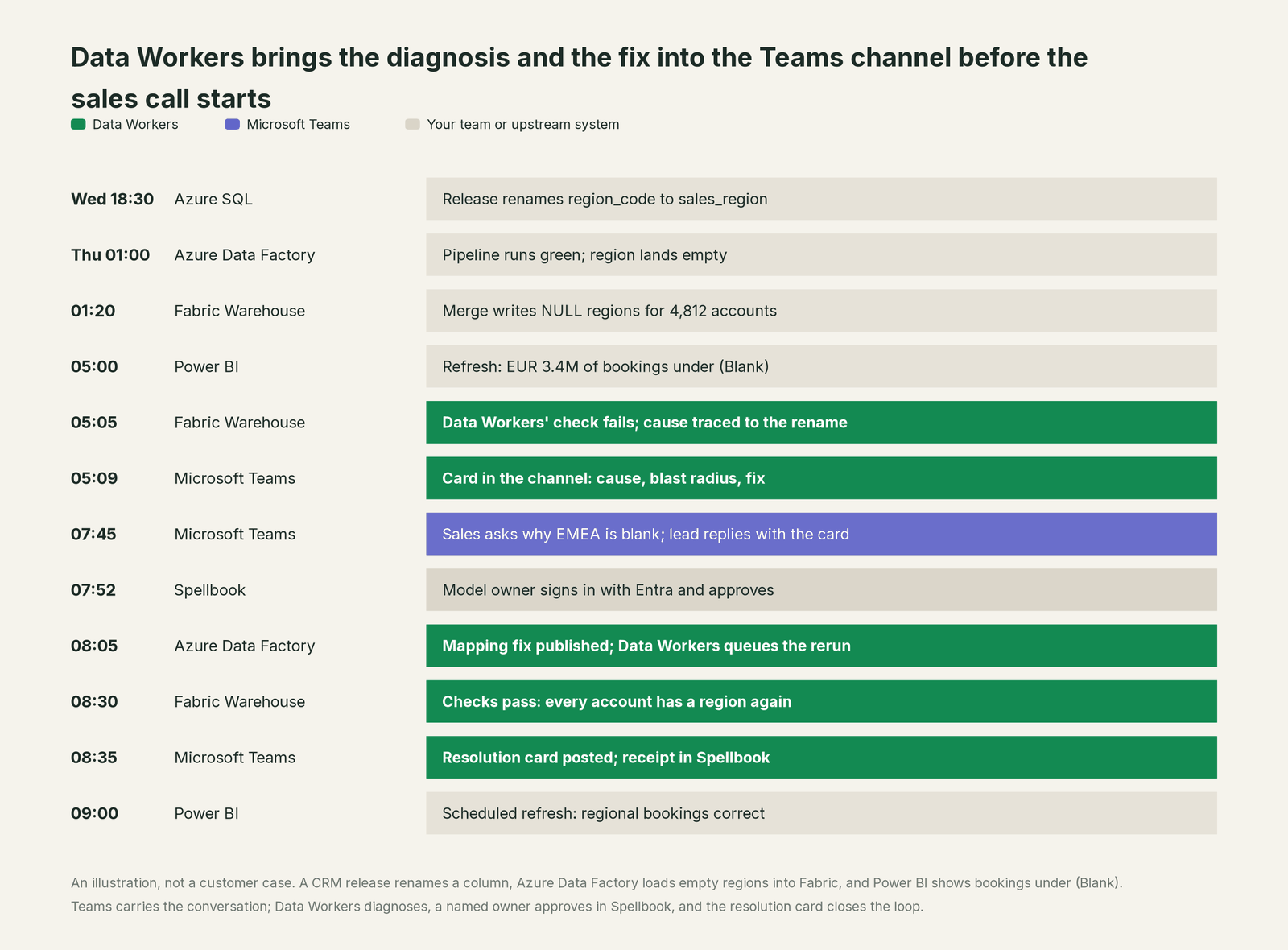
Teams did its job: the right people saw the problem. The first message in the channel already carried the cause and the fix, so the 07:45 question got an answer in one reply, not a bridge call.
| Job | What Microsoft Teams does | What Data Workers does |
|---|---|---|
| The alert | Receives alerts from Data Factory, Power BI and other tools in a channel through Workflows | Runs its own freshness, volume and schema checks, so breaks like this one are caught before a report is wrong |
| The conversation | Hosts the channel, the thread, the meeting and the people | Posts the finding into the channel as a card everyone can read |
| The recap | Copilot summarizes the thread and the meeting; Facilitator keeps shared notes | Keeps one governed context graph of tables, pipelines, owners and lineage, and the record of past incidents |
| The diagnosis | Shows what people know and say | Traces the break from Azure SQL through Data Factory to Fabric and Power BI, and names every affected report |
| The fix | Lets people coordinate who does what | Proposes the change with its blast radius, routes it to a named owner, reruns the pipeline and verifies the data |
| The proof | Keeps the conversation, with Purview retention | Writes a receipt: what changed, who approved it, how it was verified, how to undo it |
Why doesn't Microsoft Teams just do this itself?
Because Teams is a collaboration product for every department, and Microsoft is careful about what its agents in Teams may do. Microsoft 365 Copilot in Teams meetings answers prompts that are "only visible to them" and can "recommend follow-up tasks." Facilitator, generally available for shared notes, Q&A and timeline markers, with Planner task tracking in public preview, keeps meetings "focused, organized, and action-oriented." Agents your makers build in Copilot Studio publish to Teams. Teams MCP tools for agents are in preview, post plain-text messages to chats and channels and are kept for backward compatibility; Microsoft points new projects to Work IQ (preview), which is "read-only unless an administrator explicitly turns on write operations." Microsoft Agent 365, generally available since May 1, 2026, governs the agents themselves. Every one of these choices is right for a product that holds the whole company's conversations.
Fixing the data is a different product. Changing a column mapping, rerunning a Data Factory pipeline and confirming the Power BI numbers takes lineage across systems Teams does not run, a blast radius, the owner's approval, checks after the run, a rollback path and a receipt. That is the product Data Workers is. Teams stays the place where people talk; Data Workers joins the conversation with the work done.
Every tool owns a slice. Data Workers covers the whole lifecycle
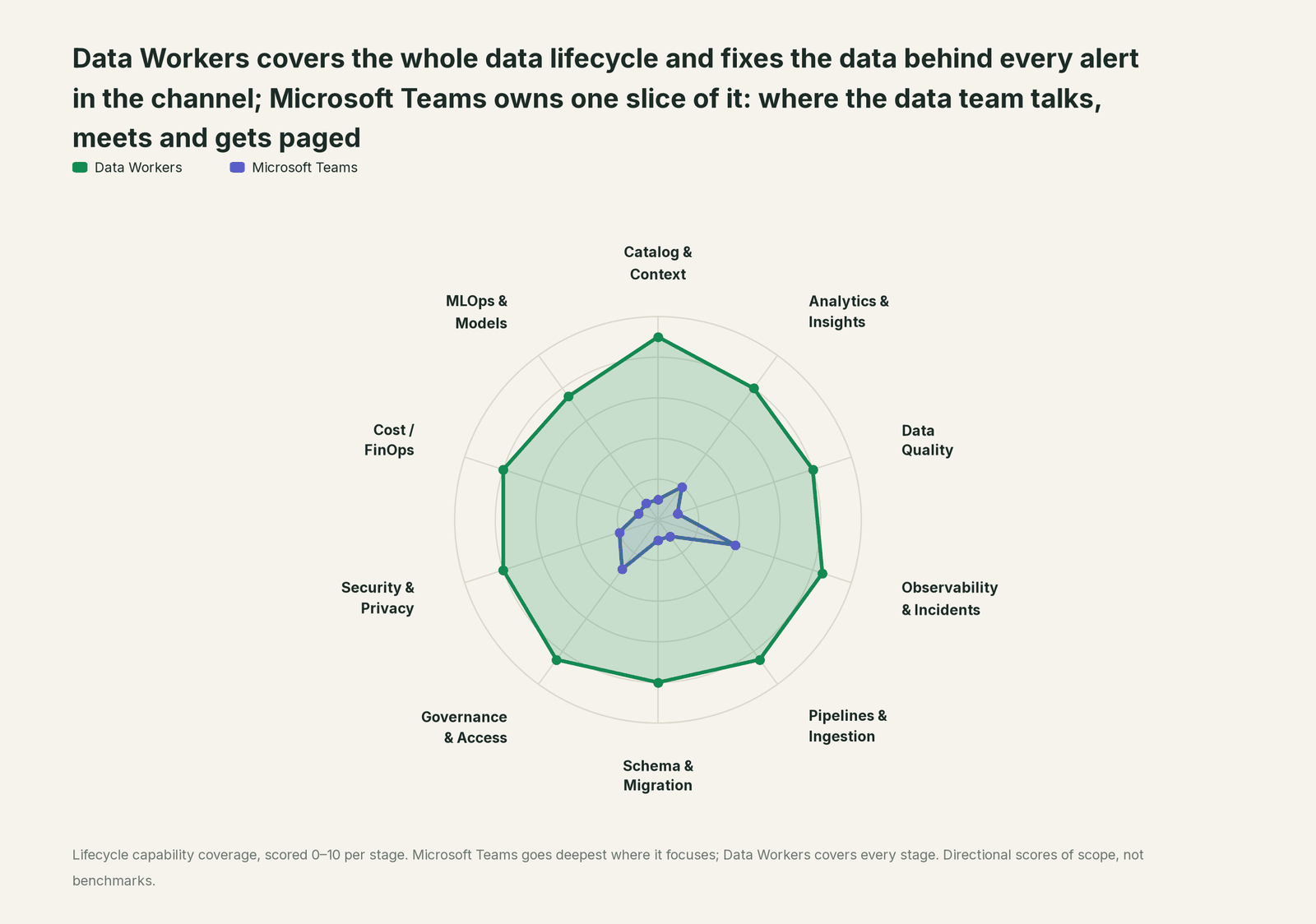
Teams owns a slice outside the data lifecycle: hosting the conversation. It is where Data Workers reports, not a stage it competes on, and we scored it that way. Each point tool adds another console, another contract and another handoff. Data Workers covers the whole lifecycle with one context, one approval flow and one audit trail, and reports into Teams where your people already are.
| Stage | Data Workers | Microsoft Teams | Why we scored it this way |
|---|---|---|---|
| Catalog & Context | 9 | 1 | Teams' job (hosting the conversation) sits outside the data lifecycle. It keeps who said what; Data Workers keeps one governed context graph of tables, models, owners and lineage. |
| Analytics & Insights | 8 | 2 | Copilot summarizes chats, channel threads and meetings, and Power BI reports pin as tabs. Data Workers answers data questions from governed definitions with lineage behind every number. |
| Data Quality | 8 | 1 | Not Teams' job: a failed check arrives in a channel from another tool. Data Workers drafts the quality checks and holds tables to baselines the team records. |
| Observability & Incidents | 8.5 | 4 | Where incidents are coordinated: the channel, the bridge call, Copilot recaps and Facilitator notes. Detection and the fix happen elsewhere; Data Workers diagnoses, fixes with approval and verifies. |
| Pipelines & Ingestion | 8.5 | 1 | Not Teams' job: pipelines run in Azure Data Factory and Fabric. Data Workers reruns and backfills pipelines through the orchestrator, with approvals. |
| Schema & Migration | 8 | 1 | Not Teams' job: schemas live in your sources and warehouse. Data Workers catches the schema change and plans the migration with rollback SQL. |
| Governance & Access | 8.5 | 3 | Admin policies govern apps, agents and Workflows, and Agent 365 governs agents. Data Workers routes each data change to a named owner for approval. |
| Security & Privacy | 8 | 2 | Purview DLP, sensitivity labels and retention protect the conversation. Data Workers leaves a receipt on every data change. |
| Cost / FinOps | 8 | 1 | Not Teams' job: it does not see Fabric capacity or warehouse spend. Data Workers drafts cheaper warehouse and pipeline settings for the owner, after a dependency check. |
| MLOps & Models | 7.5 | 1 | Not Teams' job: models and features sit with the ML team. Data Workers keeps the data under your models healthy. |
How Microsoft Teams and Data Workers work together
Teams stays on top: the channel, the meeting, Copilot and your makers' agents. Spellbook Data Catalog (in preview) is where the data team looks: each proposed change, who approved it, what it touched and how to roll it back. Between them, Data Context Wizard keeps one governed context graph across Azure SQL, Data Factory, Fabric, Azure Databricks and Power BI, the Data-Agents Swarm does the work with more than 20 specialist agents, the Autonomous Data-Conductor runs each fix end to end (detect, diagnose, fix, review, verify, remember), and per-domain guardrails hold approvals, receipts and rollback.
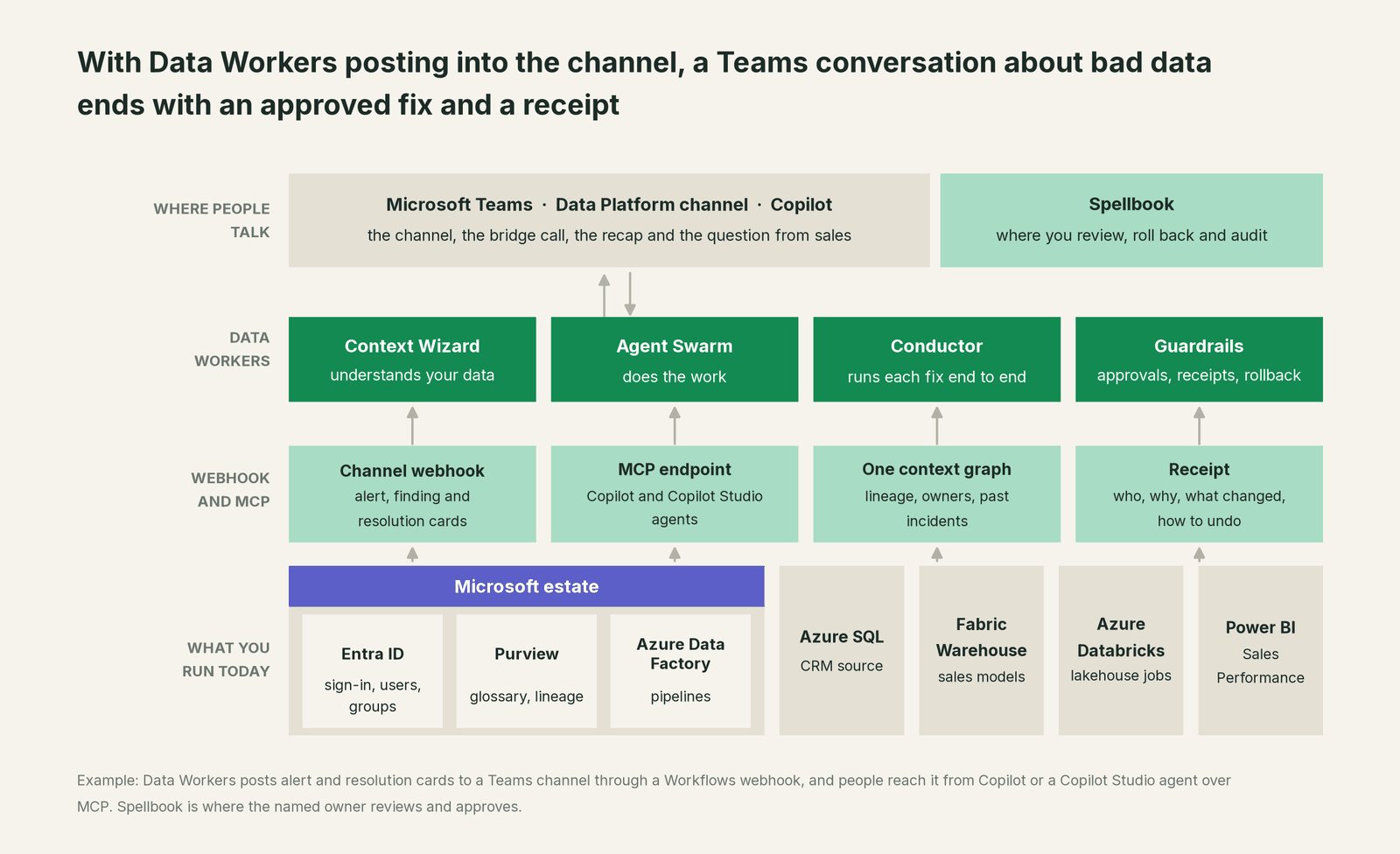
What Data Workers does in Teams today. Microsoft Teams is a native Data Workers connector. Data Workers posts a card to the channel you choose for each alert or finding, with a severity colour, a title, the source and the message, and posts a resolution card when the incident is closed. The channel sees what happened and what is proposed; the decision belongs to one named person. The approval request reaches that owner in Slack or by email, and the owner opens it in Spellbook, signed in with Entra ID, reviews the diff and its blast radius, and approves or rejects it. An unanswered request expires and escalates; it never approves itself.
Setup. Microsoft 365 Connectors in Teams are nearing deprecation in favour of the Workflows app, so create the channel webhook with Workflows: in the Data Platform channel, open Workflows, pick the "Send webhook alerts to a channel" template, save it and copy the webhook link. Add a co-owner to the workflow so it outlives any one person. Give that link to Data Workers as its Teams webhook. Workflows accept the Message Card format Data Workers sends:
// Example: the card Data Workers posts through a Teams Workflows webhook
{
  "@type": "MessageCard",
  "@context": "http://schema.org/extensions",
  "themeColor": "FF0000",
  "summary": "dim_account: NULL region for 4,812 accounts",
  "sections": [{
    "activityTitle": "[CRITICAL] dim_account: NULL region for 4,812 accounts",
    "activitySubtitle": "Source: Fabric Warehouse via pl_crm_to_fabric",
    "text": "Cause: region_code renamed to sales_region in the CRM source. Blast radius: 2 tables, 1 semantic model, 4 reports. Proposed fix: mapping change plus rerun since Wed 18:30, waiting for the owner's approval."
  }]
}
The posting tools are send_teams_alert and resolve_teams_alert. Behind the card, Data Workers uses trace_cross_platform_lineage, blast_radius_analysis, monitor_metrics, diagnose_incident, get_root_cause and remediate, and get_audit_trail for the record. It reads Azure Data Factory, Azure Databricks and Entra ID through native connectors; Purview, Fabric and Power BI connect over their APIs or MCP servers today.
Asking from Teams. Every Data Workers agent is an MCP server, so Microsoft 365 Copilot or a Copilot Studio agent published to Teams can call it, with each person signed in as themselves. The setup is in you're on Microsoft 365 Copilot and you're on Microsoft Copilot Studio. For the Fabric side, read Data Workers on Microsoft Fabric.
One alert, L0 to L4. The autonomy ladder is set per domain.

- •L0 manual. Someone starts a call, and an engineer traces Data Factory and Fabric by hand.
- •L1 observe. Data Workers posts the diagnosis card: the renamed column, the 4,812 accounts and every report downstream. Nothing changes.
- •L2 propose. The card carries the mapping diff and the rerun plan with its blast radius. Nothing reaches production until the owner approves in Spellbook.
- •L3 act reversibly. For proven change classes, such as rerunning an approved pipeline window, Data Workers queues the rerun with the undo written first, verifies the result and posts the resolution card; a failed check goes to a named person.
- •L4 autonomous. For a scoped class like source column renames in the sales domain, Data Workers catches the empty region on the first load, routes the mapping change to its owner, queues the rerun once the change is published, and posts one card when it is done. Nobody starts a call.
Approvals go to a named person, and no agent can promote its own work. For the full model, read how approvals work for AI data agents, the autonomy levels L0 to L4 explained and is it safe to let AI agents change production data. The same pattern runs in other war rooms and incident stacks: see you're on Slack, you're on ServiceNow and you're on PagerDuty.
What changes for your team
Teams made the data team reachable. Data Workers makes the channel the place where the answer shows up first.
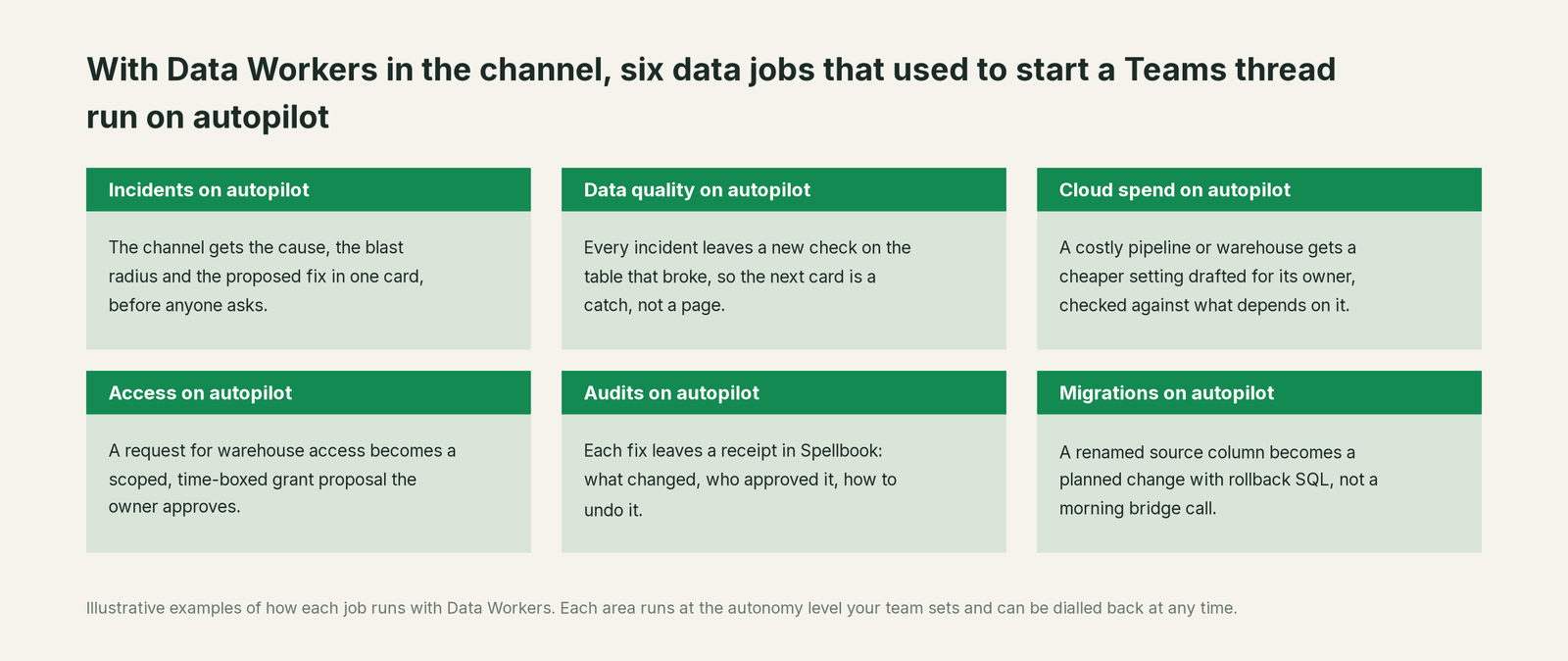
- •Incidents. The channel gets the cause, the blast radius and the proposed fix in one card, before anyone asks.
- •Data quality. Every incident leaves a new check on the table that broke, so the next card is a catch, not a page.
- •Cloud spend. A costly pipeline or warehouse gets a cheaper setting drafted for its owner, checked against what depends on it.
- •Access. A request for warehouse access becomes a scoped, time-boxed grant proposal the owner approves.
- •Audits. Each fix leaves a receipt in Spellbook: what changed, who approved it, how to undo it.
- •Migrations. A renamed source column becomes a planned change with rollback SQL, not a morning bridge call.
The people who change most are the ones answering questions in the channel. Today the data lead reads the sales director's message and starts digging. With Data Workers, the reply is a card that already holds the cause and the status of the fix, and fewer questions turn into meetings. Our data incident response playbook lists the steps this replaces.
Keep Microsoft Teams, or consolidate?
Keep Microsoft Teams if you love it; Data Workers works with it from day one. Many teams consolidate once Data Workers runs that slice too.
For Teams the answer is plain: keep it. What teams consolidate is the data tooling around the channel: a separate data observability tool, a data-quality tool, alert scripts each engineer wrote in Workflows, and a catalog nobody keeps current. Our comparison of Data Workers and data observability tools covers that choice, Data Workers vs a data catalog covers the catalog, and Data Workers integrations lists what connects natively. Building it yourself on the Teams MCP tools? Read build it ourselves with Claude Code and MCP servers: posting a message is the easy part; the context graph, approvals and rollback are the work.
The case for your CFO
The outcome: your business already asks its data questions in Teams. Data Workers makes the answers in that channel correct, current and backed by evidence, because the fix starts before the question is asked. Wrong numbers get corrected before the forecast call, with a record of why.
The risk story is plain. Data Workers changes data only inside the guardrails you set: autonomy per domain from L0 manual to L4 autonomous, each change approved by a named owner signed in with your identity provider, applied reversibly, verified and recorded in a receipt. Your data stays in your systems; the hosted Conductor sees workflow metadata only, as described in where does our data go. The org-wide stop halts all autonomous dispatch. Zero migration: Teams, Data Factory, Fabric, Purview, Power BI and Entra ID stay where they are; who owns the agents explains who sets each level.
Why now: Copilot and agents in Teams put data questions in front of more people every week. The first win: Data Workers posting diagnosis cards for one domain at L1 observe, so every alert arrives with its cause. What stays the same: channels, meeting policies, Workflows, warehouse permissions and your release process. For the numbers, see the ROI of agentic data operations. Start with a pilot (pricing); the pilot is credited in full against the first year.
The sentence to repeat upstairs: "Teams is where we talk about the data; Data Workers fixes it, with an owner's approval and a receipt, and tells the channel when it's done."
Getting started
Start with a pilot. Pick the domain whose alerts fill your Data Platform channel, create a Workflows webhook there, connect Data Workers to the Data Factory pipelines, tables, Purview and Entra ID behind it, and let every alert arrive with a diagnosis. Then turn on the first write class, such as approved pipeline reruns. The pilot path and plans are on the pricing page, and the pilot is credited in full against the first year.
FAQ
Does Data Workers have a Microsoft Teams integration? Yes. Teams is a native connector: Data Workers posts alert, finding and resolution cards to the channel you choose through a Teams Workflows webhook.
Can an approver approve a fix from Teams? The card tells the channel what is proposed and who owns the decision. The approval request reaches the owner in Slack or by email; the owner reviews the diff and its blast radius and approves in Spellbook, signed in with Entra ID. The resolution card then tells the channel it is done.
We still use an Office 365 incoming webhook. Does that work? Data Workers posts to a channel webhook URL either way. Microsoft 365 Connectors are nearing deprecation, so create new webhooks with the Workflows app, which accepts the Message Card format Data Workers sends.
Can people ask Data Workers questions in Teams? Yes, through Microsoft 365 Copilot or a Copilot Studio agent published to Teams, which call Data Workers over MCP with each person signed in as themselves.
How is this different from Copilot in Teams or Facilitator? Copilot and Facilitator help people follow and run the conversation. Data Workers works on the data the conversation is about: it diagnoses the break, fixes it with the owner's approval and verifies the result.
Does Data Workers read our Teams messages? No. Its Teams connector only posts to the channel you give it a webhook for. Questions reach it when someone asks through an agent that calls it.
What does the receipt contain? The cause, the diff, who approved it and when, what it touched downstream, how it was verified and how to undo it.
Sources
- •Microsoft Learn, Create an Incoming Webhook (Microsoft 365 Connectors deprecation; Workflows webhooks accept Adaptive Cards and Message Card format; updated Aug 3, 2026), https://learn.microsoft.com/en-us/microsoftteams/platform/webhooks-and-connectors/how-to/add-incoming-webhook (checked Oct 2, 2026)
- •Microsoft Learn, Manage Microsoft Copilot in Teams meetings and events (updated Aug 28, 2026), https://learn.microsoft.com/en-us/microsoftteams/copilot-teams-transcription (checked Oct 2, 2026)
- •Microsoft Support, How to use Microsoft Copilot in Teams chats and channels, https://support.microsoft.com/en-us/office/use-microsoft-365-copilot-in-microsoft-teams-chat-and-channels-cccccca2-9dc8-49a9-ab76-b1a8ee21486c (checked Oct 2, 2026)
- •Microsoft Learn, Set up Facilitator in Microsoft Teams (GA capabilities; Planner task tracking in public preview; updated Aug 18, 2026), https://learn.microsoft.com/en-us/microsoftteams/facilitator-teams (checked Oct 2, 2026)
- •Microsoft Learn, Teams reference (preview), Copilot Studio MCP tools (plain-text posting; backward compatibility only, new projects use Work IQ; updated Sep 30, 2026), https://learn.microsoft.com/en-us/microsoft-copilot-studio/mcp-teams-tools (checked Oct 2, 2026)
- •Microsoft Learn, Work IQ in Microsoft Copilot Studio (preview; updated Oct 1, 2026), https://learn.microsoft.com/en-us/microsoft-copilot-studio/agents-experience/add-work-iq (checked Oct 2, 2026)
- •Microsoft Learn, Microsoft Agent 365 overview (generally available May 1, 2026), https://learn.microsoft.com/en-us/microsoft-agent-365/overview (checked Oct 2, 2026)
- •Microsoft Learn, Connect and configure an agent for Teams and Microsoft Copilot (updated Oct 1, 2026), https://learn.microsoft.com/en-us/microsoft-copilot-studio/publication-add-bot-to-microsoft-teams (checked Oct 2, 2026)
- •Data Workers open-source repository (tool registrations in dw-connectors, dw-context-catalog, dw-incidents, dw-schema, dw-quality, dw-observability), https://github.com/DataWorkersProject/dataworkers-claw-community (checked Oct 2, 2026)
- •Data Workers, Spellbook Data Catalog (preview), https://dataworkers.io/product/spellbook-data-catalog/ (checked Oct 2, 2026)