Autonomous data operations for Azure teams
Azure data teams spend their week rerunning Data Factory pipelines, chasing owners and answering the same alerts in Teams. Data Workers works with the Purview catalog, Entra ID groups and Azure OpenAI you already run, and handles the operations work with a named approver in charge.
Before and after
| Today | With Data Workers |
|---|---|
| A failed Data Factory run is found by a business user, then rerun by whoever has portal access | A rerun is proposed with its cause and run only after a named owner approves |
| Purview glossary and lineage curated by one team, ignored by every other tool | Agents read the context you already curated instead of rebuilding it |
| New ADLS Gen2 folders that nobody has catalogued | New data found in the lake and listed for its owner |
| A second user list for each data tool | Sign-in and groups come from Entra ID |
| Alerts that land in a Teams channel with no cause attached | Alerts posted to the channel with the likely cause from the agent that diagnosed it |
Azure data estates tend to grow one service at a time: Data Factory for movement, ADLS Gen2 for the lake, Purview for the catalog, Databricks for heavy compute. Each works, and the operations between them still run on people. The deep dives on running Azure Data Factory and working alongside Microsoft Purview cover those two services; this page is the operating model across them.
How it works
1. Start from the context you already curated
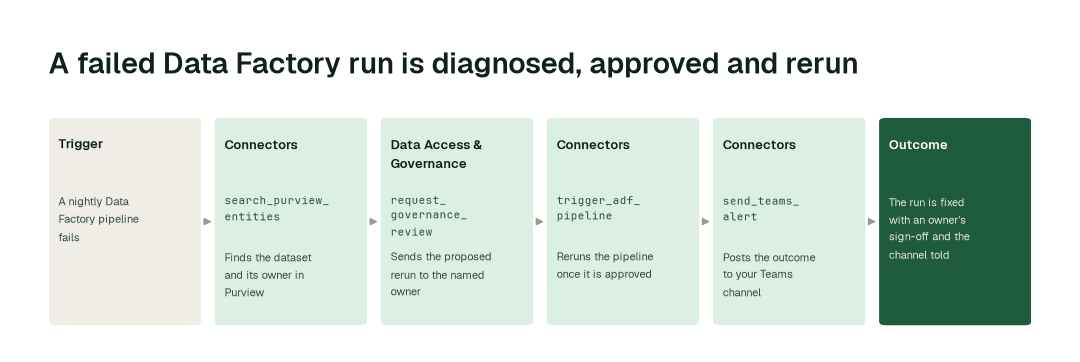
The Connectors Agent reads your Purview catalog and lineage with search_purview_entities and get_purview_lineage, and the glossary with list_purview_glossary. Your owners, definitions and lineage are used as they are. Data in ADLS Gen2 is discovered the same way, so new datasets show up with an owner to ask.
2. Propose the fix and get it approved
When a pipeline fails, the Incident Debugging Agent finds the cause with diagnose_incident. If the fix is a rerun, the Data Access & Governance Agent sends it to the named owner with request_governance_review. Nothing runs until that person approves.
3. Run it and tell the channel
After approval the Connectors Agent triggers the Data Factory pipeline with trigger_adf_pipeline. The result goes to your Teams channel with send_teams_alert, and the alert is closed with resolve_teams_alert when the run is healthy.
The impact metrics we move
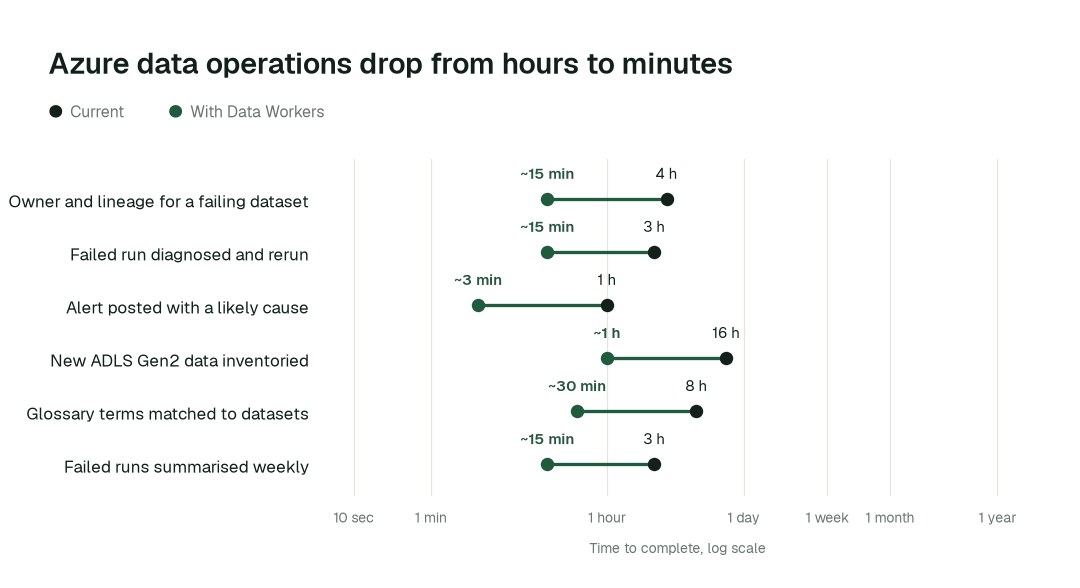
- •Owner and lineage for a failing dataset: from about 4 h to ~15 min
- •A failed Data Factory run, diagnosed and rerun after sign-off: from about 3 h to ~15 min
- •New ADLS Gen2 data inventoried: from about 2 days to ~1 h
Where teams start
- •Data Factory reruns. Failed nightly runs get a diagnosis and a proposed rerun for the pipeline owner.
- •Purview-backed ownership. Every alert and question is routed using the owners and glossary already in Purview.
- •ADLS Gen2 discovery. A first inventory of what has landed in the lake, with an owner next to each dataset.
- •Azure Databricks. The same agents read tables and query history through the Databricks connector, with
list_databricks_tablesandget_databricks_query_history. - •Entra ID sign-in. Your people sign in with the identity and groups they already have, and Azure OpenAI can serve as the model provider.
What powers it
The Data-Agents Swarm does the work and the Autonomous Data-Conductor coordinates it across your services. Autopilot Routines watch your pipelines on a schedule, Autopilot Missions take on a goal such as clearing last week's failed runs, and Autopilot Standards hold every domain to the rules you set once. The Data Context Wizard builds on the Purview context you already have, and the Spellbook Data Catalog keeps the owners current. The Connectors Agent, Incident Debugging Agent, Data Access & Governance Agent and Identity Agent apply here.
Where this shows up: agentic governance in the catalog you already use, self-healing pipelines and zero-ticket data access. The Teams side of this and the Entra side have their own write-ups.
The climb: from assisted to autonomous to agentic
Every transformation runs on the same ladder from our thesis: agents first watch and suggest with receipts, then act after approval, and a domain moves up only on its own review record. L0 to L2 run today, and only a domain's owner can raise its level. L3 and L4 are where a domain can go on evidence.
The pilot
- •Scope. One Azure data domain: its Data Factory pipelines, its ADLS Gen2 zone and its Purview collection.
- •First week. Agents start by watching and suggesting. We show the reruns and alerts they would have raised, each with its cause and the owner it would go to.
- •By week two. Routine reruns flow to named owners for approval; anything sensitive stays with a person.
- •At day 30. We review the impact metrics against your baseline:
- •Owner and lineage for a failing dataset: from about 4 h to ~15 min
- •A failed Data Factory run, diagnosed and rerun after sign-off: from about 3 h to ~15 min
- •New ADLS Gen2 data inventoried: from about 2 days to ~1 h
- •Cost. Start with a pilot ($7,500 one-time, credited in full against the first year). Scale is from $1,000 a month and Enterprise from $3,000 a month, billed annually, with unlimited seats, no usage meter and no markup on model spend. See pricing.
FAQ
Can an agent rerun a Data Factory pipeline on its own? Not without sign-off. Each rerun goes to a named owner first, and you set how much a domain may do on its own.
Does it change what is in Purview? No. Agents read your Purview catalog and lineage and use them; they do not edit it.
Can we keep our identity setup? Yes. People sign in with Entra ID and keep the groups they already have.
Can we use Azure OpenAI? Yes. Azure OpenAI can be the model provider, and there is no markup on model spend.
What if the agent diagnoses the wrong cause? The owner sees the proposal and its cause before anything runs, and can reject it. Nothing is rerun on a guess.