You're on Microsoft Purview: Purview Classifies and Governs Your Microsoft Estate. Data Workers Fixes What Its Rules Flag
On Microsoft Purview? Keep it where your estate is classified, governed and cataloged. Data Workers works next to Purview and turns each failed rule into an approved, verified fix.
Your Microsoft estate is governed in Purview. Unified Catalog organizes data into governance domains with data products, glossary terms, critical data elements and owners. The Data Map scans Fabric, Azure SQL, Databricks and Snowflake and draws the lineage. Data quality stewards write rules, from Unique values to custom Spark SQL, and get alerts when a score drops below its threshold. Sensitivity labels follow Fabric items and Microsoft 365 files, DLP watches lakehouses and semantic models, and Data Security Posture Management watches what AI apps and agents touch. Purview is where your estate is classified, governed and cataloged. Data Workers does the operations work behind it: when a rule fails, it finds the cause, fixes it through the person who owns it, hands every Purview change to your steward and leaves a receipt.
A Purview alert tells you a score fell. Somebody still has to find out why, change the notebook, rerun the pipeline and prove the report is right. That work is this guide's subject.
Key takeaways
- •Purview keeps its job. Governance domains, data products, glossary terms, data quality rules, labels, DLP and DSPM stay where they are. Data Workers works next to them from day one.
- •Purview stays the governance record. Purview's Data Map and Unified Catalog connect over their REST APIs today, and the steward reads assets, lineage and glossary terms there. Changes to Purview are proposed for the steward, who applies them.
- •Purview's AI agents serve security teams. The Triage Agents and the Data Security Posture Agent (preview) triage alerts and find sensitive data. Data Workers works in Fabric, Dataverse, dbt and your pipelines.
- •A failed rule becomes a fix. Data Workers traces the failure through lineage, proposes the change where the cause lives and queues the rerun after a named person approves.
- •Every change leaves a receipt: trigger, diff, blast radius, checks before and after, approver and undo path, ready to link from the data product.
- •Start with a pilot on one governance domain, read-only first, from L0 manual toward L4 autonomous.
Microsoft Purview is the tenant's record of governance and protection. Data Workers is the operations crew that answers its alerts.
Purview records what your data is, what it means, who owns it and how it must be protected. The estate under it changes every day, and when a change breaks what Purview says, Data Workers does the repair.
Here is a morning at a manufacturer that sells through distributors. Dynamics 365 Sales runs on Dataverse. Link to Microsoft Fabric makes the Dataverse tables available in a Fabric lakehouse through shortcuts. A Fabric Data Factory pipeline runs a notebook that builds gold.dim_customer and gold.fact_opportunity in the lh_sales lakehouse, and the Pipeline & Forecast semantic model in Power BI reads them in Direct Lake mode. In Purview, both tables belong to the Customer 360 data product in the Sales governance domain, the glossary term "Customer account" says there is one record per ERP customer number, and a Unique values rule on accountnumber runs every morning at 06:00 with an alert at a threshold of 100. This is an illustration, not a customer case.
| Time | System | What happens |
|---|---|---|
| Mon 16:10 | Dataverse | Sales ops imports 2,340 trade-show accounts with the import wizard, duplicate detection off. 412 already exist under the same ERP customer number |
| Mon 16:30 | Link to Fabric | The new rows appear in the Dataverse tables in OneLake, as Link to Fabric is designed to do |
| Tue 02:00 | Fabric | The nightly pipeline runs the notebook. dim_customer now holds 412 customer numbers twice, and the join counts their 1,180 open deals twice. The run succeeds |
| 06:00 | Microsoft Purview | The scheduled data quality scan runs. The Unique values rule scores below its threshold and alerts the recipients, including the steward |
| 06:05 | Spellbook | The steward asks Data Workers why the Customer 360 rule failed |
| 06:07 | Microsoft Purview | The steward opens the data product, the glossary term and the asset's lineage in Purview; Data Workers reads the pipeline run and the notebook behind both tables. blast_radius_analysis shows two tables, the Pipeline & Forecast model and three reports |
| 06:12 | Fabric and Dataverse | Over their APIs, Data Workers confirms 412 duplicate customer numbers, all created by Monday's import. Open pipeline reads $6.8M high |
| 06:20 | Spellbook and email | Data Workers drafts one change set: a notebook diff that keeps one row per customer number and fails the run before writing if duplicates remain; a merge list of the 412 pairs for the Dynamics 365 admin; and, for the steward, a Unique values rule on the Dataverse account table and a note on the glossary term. Approval requests go to the named owners |
| 07:40 | Spellbook and Git | The analytics engineer reviews the diff and blast radius, approves and merges it in the workspace's Git repository |
| 07:45 | Fabric | Data Workers queues a rerun of the pipeline through Fabric's API and reads its status until it succeeds |
| 08:20 | Power BI | Data Workers verifies: customer numbers are unique, open pipeline matches the source to the dollar and the Direct Lake model reads the corrected tables. It writes the receipt |
| 09:15 | Microsoft Purview | The steward reruns the scan, which passes, adds the proposed rule and links the receipt to the data product |
| 10:30 | Dataverse | The Dynamics 365 admin merges the 412 duplicate accounts. The 11:00 forecast call runs on the right numbers |
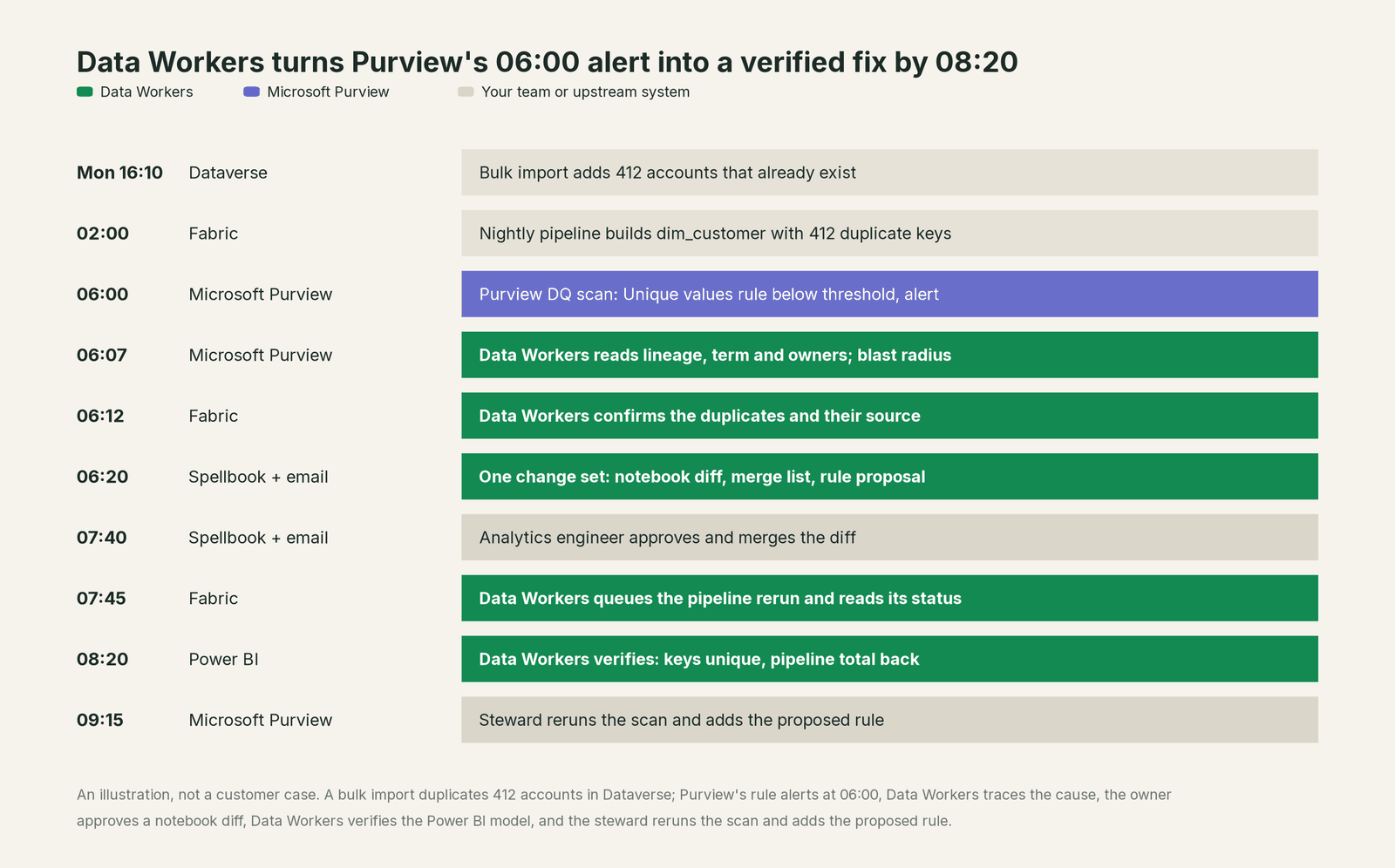
Purview did its job: the term defined a customer, the rule measured it and the alert fired on schedule. The cause sat in a Dataverse import and a notebook, and the fix belonged to three owners. Each approved their own part, and the forecast call never saw the $6.8M.
| Job | What Microsoft Purview does | What Data Workers does |
|---|---|---|
| The record | Governance domains, data products, glossary terms and critical data elements, with owners | Reads that record as governed context and measures the running estate against it |
| The inventory | The Data Map scans sources and draws lineage across Fabric, Azure and other clouds | Joins Purview's assets and lineage to runs, schema changes, usage and quality results |
| The rule | Data quality rules, thresholds and alerts on a schedule | Picks up the failed rule and finds the rows and the change behind it |
| The fix | Shows the failing score and the lineage around it | Proposes the change where the cause lives, such as a notebook diff, and queues the rerun after approval |
| The Purview change | The steward edits rules, terms and data products | Drafts them as proposals for the steward, with the evidence attached |
| The protection | Labels, DLP, Insider Risk and DSPM protect sensitive data | Scans new columns by value and proposes classifications for the steward |
| The proof | Rescans and scores | Verifies downstream in the semantic model and writes a receipt the steward links to the data product |
Why doesn't Microsoft Purview just do this itself?
Because Purview is the neutral record and protection layer for an entire Microsoft tenant, and its writes follow that job. Stewards edit terms, rules, data products and access policies. Security teams apply labels and DLP policies, and DSPM's AI agents can remove public sharing links, apply DLP policies or revoke permissions, with you reviewing and approving each automated action. Even inside Fabric, Microsoft's guidance names the OneLake catalog as the primary place to govern Fabric data, with Purview adding protection, audit, risk and compliance. Custom data quality rules can't run DML or DCL. That is the right design for a governance and compliance system.
Changing a notebook, rerunning a pipeline or merging records in Dynamics 365 is a different product with a different liability: blast radius across every system, scoped credentials in each, a named owner's approval, a rollback path and downstream proof. A compliance system that rewrote those systems would be auditing its own changes. Data Workers is the product on the other side of that line, and it hands every Purview change back to the steward.
Every tool owns a slice. Data Workers covers the whole lifecycle
Purview owns its slice: classification, protection and the governance record for a Microsoft estate. Each point tool adds another console, contract and handoff. Data Workers covers the whole lifecycle with one context, one approval flow and one audit trail, and builds on the governance you run in Purview.
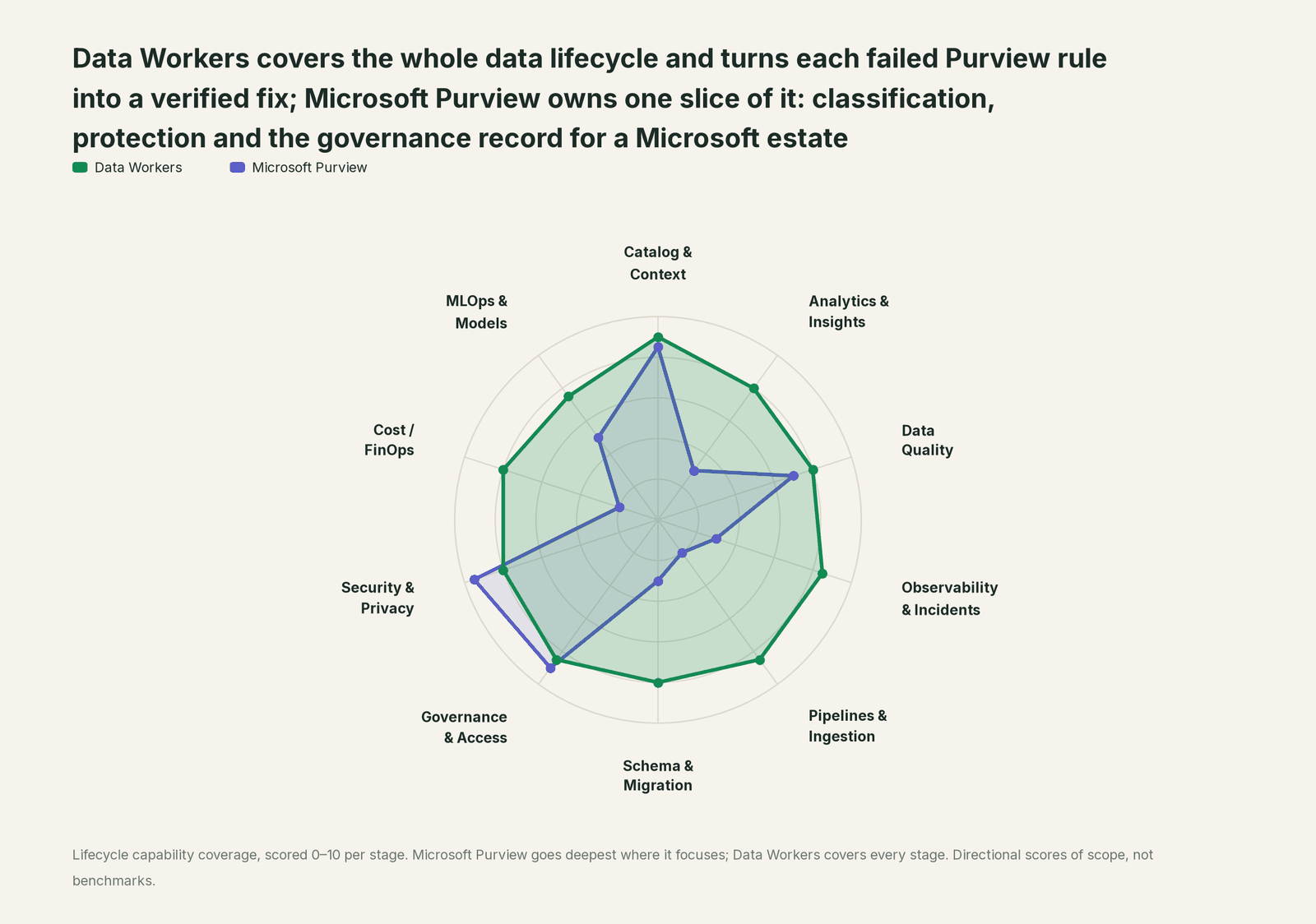
| Stage | Data Workers | Microsoft Purview | Why we scored it this way |
|---|---|---|---|
| Catalog & Context | 9 | 8.5 | Unified Catalog organizes assets into governance domains and data products with glossary terms, critical data elements and lineage from the Data Map. Data Workers reads that record and joins it to runs, schema changes, usage and quality results. |
| Analytics & Insights | 8 | 3 | Purview helps people find, understand and request data; analysis happens in Power BI and Fabric. Data Workers answers questions from governed context and checks the numbers behind them. |
| Data Quality | 8 | 7 | Purview Data Quality profiles assets, runs out-of-the-box and custom SQL rules (GA March 2026), suggests rules with AI and alerts below a threshold (GA May 2026). Data Workers fixes what fails in the system that caused it and proves the fix. |
| Observability & Incidents | 8.5 | 3 | Purview scores quality and shows lineage for impact; incident response happens elsewhere. Data Workers detects, diagnoses, fixes and verifies across systems, with a receipt for every incident. |
| Pipelines & Ingestion | 8.5 | 2 | Purview scans pipelines for metadata and lineage; it does not run them. Data Workers queues reruns through your pipelines and catches source changes before they spread. |
| Schema & Migration | 8 | 3 | Purview records schemas as assets in the Data Map. Data Workers detects schema changes, assesses their impact and plans migrations in approved waves. |
| Governance & Access | 8.5 | 9 | Purview's home stage: governance domains, glossary terms that carry policies, self-service access requests and data product owners, with Entra as the identity system. Data Workers runs the request queue, dry-runs grants and keeps the estate matched to the policy. |
| Security & Privacy | 8 | 9.5 | Purview's other home stage: sensitivity labels, DLP across Microsoft 365 and Fabric, Insider Risk, audit and the new DSPM (GA May 2026) with AI observability. Data Workers flags new sensitive column names in pull request review for the steward. |
| Cost / FinOps | 8 | 2 | Purview does not manage cloud or capacity spend. Data Workers traces Snowflake credits to the dbt model behind them and reads AWS Cost Explorer, then drafts the fix for its owner. |
| MLOps & Models | 7.5 | 5 | Purview governs AI apps and agents: prompts, responses and agent activity in DSPM, and protections for Agent 365 (GA May 2026). Data Workers keeps the data under models healthy. |
How Microsoft Purview and Data Workers work together
Your people stay where they are: Microsoft 365 Copilot, Claude or GitHub Copilot for questions and code, Purview for stewardship, Power BI for reports. Spellbook Data Catalog (in preview) is where the data team looks: each finding, proposed change, blast radius, approver and rollback, with approval requests reaching people in Slack or email. Underneath, Data Context Wizard keeps one governed context graph, the Data-Agents Swarm does the work with more than 20 specialist agents, and the Autonomous Data-Conductor runs each fix end to end (detect, diagnose, fix, review, verify, remember) behind per-domain guardrails.
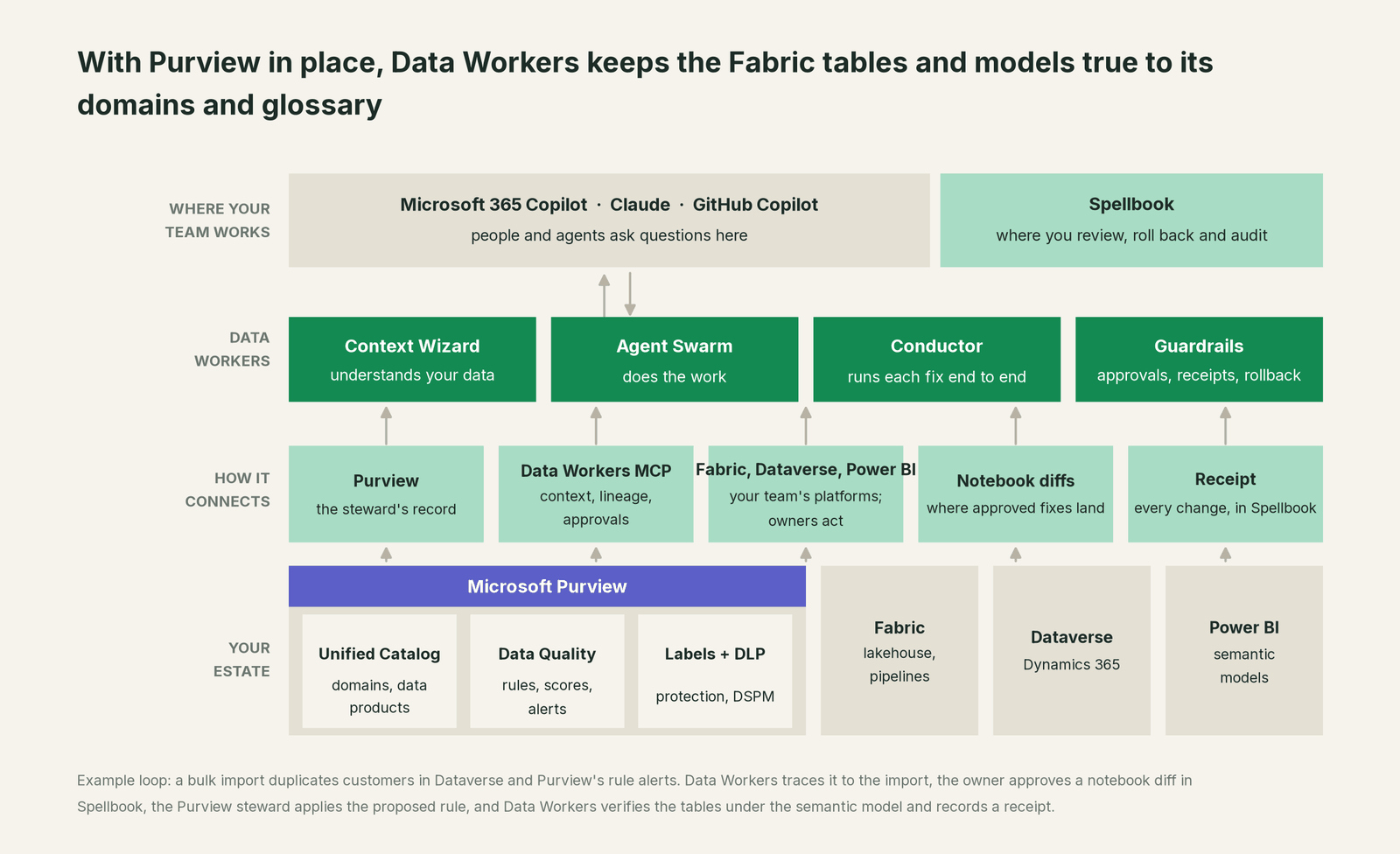
Where Purview fits. Purview's Data Map and Unified Catalog connect over their REST APIs today, and they stay the steward's record of assets, classifications, lineage, glossary terms, data products and governance domains. Context Wizard keeps each fact it reads with its provenance, from Snowflake, BigQuery, dbt, Azure Data Factory and ADLS, among 50+ connectors. Fabric, Dataverse and Power BI connect over their APIs or MCP servers today, in your team's client beside Data Workers. Agents get one governed view through explain_table, trace_cross_platform_lineage and blast_radius_analysis; for quality, get_quality_score.
What Data Workers writes, and where. To Purview, nothing directly: new rules, glossary notes, classifications and data product changes go to the steward as proposals with the evidence attached, and approved facts land in the Context Wizard graph. Notebook and dbt fixes go to the owner as a diff to merge. Reruns are queued through the pipeline and read until they finish. Record cleanups, such as merging duplicate accounts in Dataverse, are proposed for the owner to apply. Labels, DLP and masking stay with Purview and the platforms, by design: pull request review flags new column names that look personal (it reads no values), request_governance_review opens a trackable review and any masking change arrives as a dry run for the owner. Entra stays the identity system.
Setup today. Purview has no MCP server of its own; it connects over its REST APIs today, and the steward keeps working in Purview. For your assistant, Data Workers' agents come from the open-source repository: clone it and add start-agent.sh entries to your client config, as the client setup docs show.
// Example: .mcp.json for Claude Code
{
  "mcpServers": {
    "dw-context-catalog": {
      "command": "/path/to/dataworkers-claw-community/start-agent.sh",
      "args": ["dw-context-catalog"]
    },
    "dw-quality": {
      "command": "/path/to/dataworkers-claw-community/start-agent.sh",
      "args": ["dw-quality"]
    },
    "dw-governance": {
      "command": "/path/to/dataworkers-claw-community/start-agent.sh",
      "args": ["dw-governance"]
    }
  }
}
List the tools with your client's own command (/mcp in Claude Code), then ask "what feeds the tables in the Customer 360 data product, and who owns them?"
One request, L0 to L4. The autonomy ladder is set per domain, so the Sales governance domain can sit at a different level from Finance.

- •L0 manual. Connected, not acting. Stewards work Purview alerts by hand.
- •L1 observe. Data Workers reports each failure with its cause, lineage and owners and logs what each action would have needed. Nothing changes.
- •L2 propose. Data Workers drafts the notebook diff, the cleanup list and the Purview proposals with their blast radius. Owners and the steward approve before anything runs.
- •L3 act reversibly. For proven change classes, such as queuing the rerun after a fix merges, Data Workers acts, verifies and records it. Code still arrives as diffs.
- •L4 autonomous. For a scoped, trusted class in one domain, Data Workers runs the loop end to end and posts the receipt for review. Purview changes still go to the steward.
Read more on safety, how approvals work and where your data goes. On Fabric, see Data Workers on Microsoft Fabric, the Fabric data leaders guide and the Fabric IQ guide; the same pattern holds for Collibra and Microsoft Teams, and the data catalog question ties them together.
What changes for your team
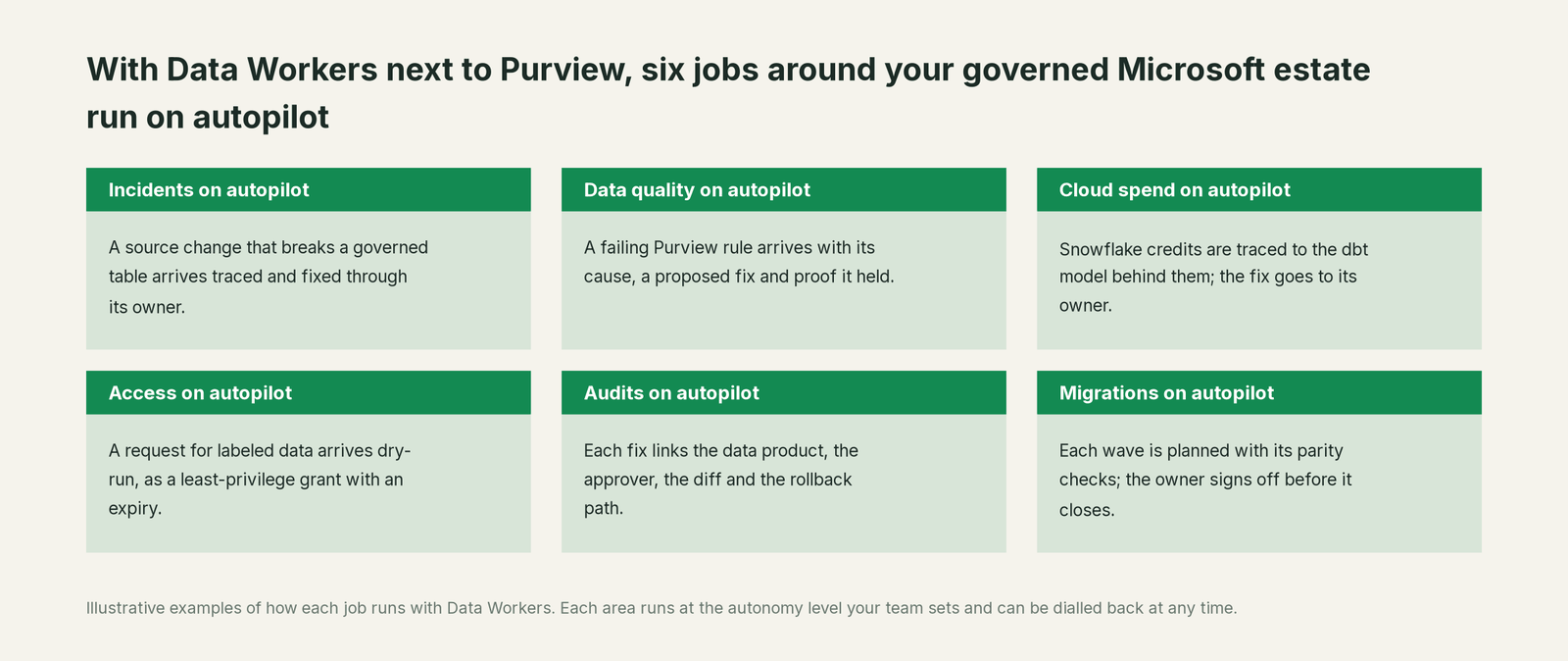
Purview programs spend much of their week after the rule fires: finding which notebook broke a governed table, chasing the owner, rescanning. With Data Workers, those jobs run on autopilot at the level you set.
- •Incidents. A source change that breaks a governed table arrives traced, fixed through its owner and recorded.
- •Data quality. A failing Purview rule arrives with its cause, a proposed fix in the system that owns it and a downstream check that it held.
- •Cloud spend. Snowflake credits are traced to the dbt model behind them, and the fix is drafted for that model's owner.
- •Access. A request for labeled data arrives dry-run: effective privileges, the sensitive columns it reaches and a least-privilege grant with an expiry for the owner.
- •Audits. Each fix links the data product it serves, the approver, the diff and the rollback path, ready for the steward to attach.
- •Migrations. When a platform moves, each wave is planned with its parity checks, and the owner signs off before it closes.
Stewards keep their week for what only people decide: what a term means and who owns a domain.
Keep Microsoft Purview, or consolidate?
Keep Microsoft Purview if you love it; Data Workers works with it from day one. Many teams consolidate once Data Workers runs that slice too.
On a Microsoft tenant, labels, DLP, Insider Risk, audit and DSPM belong in Purview, and most teams keep Unified Catalog as the governance record. What they consolidate is the tooling around it: scripts that compare rule results with pipeline logs, spreadsheets of which notebook feeds which data product, and tickets asking an engineer to fix a table the steward found. Building this layer yourself on Purview's REST APIs? Read build it ourselves with Claude Code and MCP servers: reading Purview is the easy part; approvals and rollback are the work.
The case for your CFO
The outcome: what your governance domains define is what the reports show. A failed rule becomes a fixed table before the meeting it would have spoiled.
The risk story is plain. Data Workers changes nothing in Purview and proposes every Purview change to the steward. Every other change shows its blast radius, goes to a named approver, lands through your Git review, is verified downstream and leaves a receipt with the trigger, diff, approver, checks and undo path. Unanswered requests expire and escalate; they never auto-grant. No agent can promote its own work. Autonomy is set per domain from L0 manual to L4 autonomous, and an org-wide stop halts all autonomous dispatch. The agents run in your infrastructure; your data stays in your systems, and the hosted Conductor sees workflow metadata only. Zero migration.
Why now: Microsoft 365 Copilot, Fabric data agents and Power BI all answer from the same tables, so a wrong row reaches more people, faster. The first win is one governance domain, read-only, with a report of every rule failure and its cause. What stays the same: your Purview licence, stewards, rules, labels and policies. Start with a pilot; the path is on the pricing page, and the pilot is credited in full against the first year. For the numbers, see the ROI of agentic data operations.
The sentence to repeat upstairs: "Purview is where we classify and govern our data; Data Workers fixes what its rules flag, and every fix comes with an approval and a receipt."
Getting started
Start with a pilot. Pick the governance domain your Purview program cares about most, such as the data products behind the sales forecast, connect Data Workers read-only to the pipelines and tables behind them, and let it report failures and their causes for a few weeks before turning on the first fix class. The pilot path and plans are on the pricing page, and the pilot is credited in full against the first year.
FAQ
Does Data Workers write to Microsoft Purview? No. Purview connects over its REST APIs today, and Data Workers changes nothing in it. Rules, glossary notes, classifications and data product changes go to the steward as proposals, and the steward applies them in Purview.
Is there a Purview MCP server for Data Workers to use? Microsoft documents no Purview MCP server as of October 2026; Purview offers REST APIs for the Data Map and Unified Catalog, and Purview connects to Data Workers over them today; your assistant reaches Data Workers over MCP.
How is this different from the Data Security Posture Agent and the Triage Agents? Those Security Copilot agents serve security teams: the Triage Agents prioritize DLP and Insider Risk alerts, and the Data Security Posture Agent (preview) finds sensitive data across Microsoft 365. Data Workers works on data operations underneath: Fabric pipelines, notebooks, dbt and the tables your governance domains describe.
Does Data Workers replace Purview Data Quality? No. Keep your rules and thresholds in Purview. Data Workers takes a failed rule to its cause, proposes the fix and verifies it, so the next scan passes, and it drafts new rules for the steward to add. On Snowflake and BigQuery it also runs its own checks after each pipeline run.
What about personal data and sensitivity labels? Purview's labels and DLP stay in charge. When a pull request adds a column, Data Workers' review flags names and annotations that look personal (it reads no values), and the steward classifies the column in Purview. Masking changes arrive as dry runs for the owner to apply.
Sources
- •Microsoft Learn, What's new in Microsoft Purview (ms.date Sep 21, 2026; updated Oct 2, 2026), https://learn.microsoft.com/en-us/purview/whats-new (checked Oct 3, 2026)
- •Microsoft Learn, Learn about Microsoft Purview Unified Catalog (updated Mar 16, 2026), https://learn.microsoft.com/en-us/purview/unified-catalog (checked Oct 3, 2026)
- •Microsoft Learn, Create data quality rules in Unified Catalog (ms.date Jul 17, 2026), https://learn.microsoft.com/en-us/purview/unified-catalog-data-quality-rules (checked Oct 3, 2026)
- •Microsoft Learn, Data quality thresholds (ms.date May 10, 2026), https://learn.microsoft.com/en-us/purview/unified-catalog-data-quality-threshold (checked Oct 3, 2026)
- •Microsoft Learn, Data quality supported sources and file types (ms.date Apr 9, 2026), https://learn.microsoft.com/en-us/purview/unified-catalog-data-quality-supported-sources-file-formats (checked Oct 3, 2026)
- •Microsoft Learn, Use Microsoft Purview with Microsoft Fabric (ms.date Aug 26, 2026), https://learn.microsoft.com/en-us/fabric/governance/microsoft-purview-fabric (checked Oct 3, 2026)
- •Microsoft Learn, Learn about Data Security Posture Management (ms.date May 1, 2026), https://learn.microsoft.com/en-us/purview/data-security-posture-management-learn-about (checked Oct 3, 2026)
- •Microsoft Learn, Security Copilot agents in Microsoft Purview overview (ms.date Mar 23, 2026), https://learn.microsoft.com/en-us/purview/copilot-in-purview-agents-overview (checked Oct 3, 2026)
- •Microsoft Learn, Link your Dataverse environment to Microsoft Fabric (ms.date Jul 6, 2026), https://learn.microsoft.com/en-us/power-apps/maker/data-platform/azure-synapse-link-view-in-fabric (checked Oct 3, 2026)
- •Microsoft Learn, Overview of the Power BI MCP servers (ms.date Sep 24, 2026), https://learn.microsoft.com/en-us/power-bi/developer/mcp/mcp-servers-overview (checked Oct 3, 2026)
- •Data Workers, Client setup (open-source docs), https://dataworkers.io/opensource-docs/client-setup/ (checked Oct 3, 2026)
- •Data Workers open-source repository, agent tools and start-agent.sh, https://github.com/DataWorkersProject/dataworkers-claw-community (checked Oct 3, 2026)
- •Data Workers, Spellbook Data Catalog product page, https://dataworkers.io/product/spellbook-data-catalog/ (checked Oct 3, 2026)