You're on Azure Data Factory: Keep Moving the Data, and Let Data Workers Run the Operations When a Pipeline Run Delivers It Wrong
ADF moves and orchestrates data across Azure and on-prem. Data Workers catches a succeeded pipeline run with wrong data, finds the cause, queues the approved rerun through ADF and verifies it.
Your team moves its data with Azure Data Factory. Pipelines copy from your data center through a self-hosted integration runtime, land Parquet in ADLS Gen2 and load the warehouse. Schedule, tumbling window and storage event triggers start them, linked services hold the connections, the factory is backed by Git, and the Monitor tab holds every pipeline run and activity run. Data Workers does the operations work when a pipeline's output goes wrong: it finds the cause, proposes the fix, queues the rerun through ADF and verifies the result, all behind your approvals.
The failed run is the easy one: it turns red, an alert fires, someone reruns from the failed activity. The expensive run reports Succeeded on wrong data, and every number downstream drifts while the Monitor tab stays green.
Key takeaways
- •ADF keeps moving and orchestrating the data. Pipelines, triggers, integration runtimes and run history stay in ADF and your Git repository.
- •A Succeeded run gets checked against the data. Volume, freshness and null checks on the tables your pipelines load, plus the business ratios your team records as metrics, catch a green run that dropped a column.
- •The cause gets found where it lives. Data Workers ties pipeline and activity runs to the source, warehouse, dbt models and dashboards.
- •The rerun is queued through ADF, behind an approval. After a named person approves, Data Workers queues a new pipeline run; ADF runs and records it like any other.
- •Fixes arrive as diffs. A copy mapping change goes to the pipeline owner to merge in the factory's Git repository, with the blast radius attached.
- •Moving to Fabric later changes nothing here. The same loop runs on classic ADF today and on Fabric Data Factory over its API or MCP server.
Azure Data Factory is the bridge between your data center and Azure. Data Workers is the operations team for what crosses it.
ADF reports on the run: status, duration, rows read and rows copied. That is the right contract for a data movement service. Whether the rows still mean what the business reads is a question about the data.
Here is a night at a hotel group with 31 properties, its property management system (PMS) on Oracle Database in the company's data center. This is an illustration, not a customer case. The pipeline pl_pms_nightly runs at 01:00 with a business_date parameter. A copy activity reads FOLIO_TRANS through the self-hosted integration runtime shir-dc-east into Parquet on ADLS Gen2, with an explicit mapping of 14 named columns. A second copy loads the day's folder into RAW.PMS.FOLIO_TRANS in Snowflake, replacing that business date, and a Web activity starts the dbt Cloud job that builds fct_daily_revenue. Revenue managers set rates at 07:30 from the Tableau "Daily Pickup" workbook. At 22:00 a PMS vendor upgrade moves package charges (breakfast and parking bundles) out of RM_REV_AMT into a new PKG_AMT column.
| Time (Thu Oct 1, ET) | System | What happens |
|---|---|---|
| Wed 22:04 | Oracle (PMS) | The upgrade finishes; FOLIO_TRANS has a new PKG_AMT column, and RM_REV_AMT no longer includes package charges |
| 01:00 | Azure Data Factory | The schedule trigger starts pl_pms_nightly with business_date 2026-09-30 |
| 01:09 | Azure Data Factory | The copy activity runs through shir-dc-east: 48,212 rows read, 48,212 rows copied. The explicit mapping copies its 14 columns, and PKG_AMT stays behind. Succeeded |
| 01:14 | ADLS Gen2 + Snowflake | The second copy loads the Parquet folder into RAW.PMS.FOLIO_TRANS. Succeeded |
| 01:31 | dbt Cloud + Snowflake | The dbt Cloud job builds stg_folio_trans, int_folio_by_property and fct_daily_revenue; every not_null, unique and accepted_values test passes. The pipeline run is Succeeded |
| 01:40 | Data Workers | monitor_metrics flags guest revenue per occupied room, a metric the revenue team records, 9.6% below its baseline at every property, while occupied rooms and row counts sit in range. It opens an incident |
| 01:52 | Data Workers | It reads the pipeline run and its activity runs through the ADF REST API (all Succeeded), follows lineage from the Tableau data source back through dbt and Snowflake to the copy activity, and reads FOLIO_TRANS's column list over Oracle's API: PKG_AMT exists at the source and in none of the downstream tables |
| 02:05 | Data Workers + Teams | It names the cause (a new source column and a mapping that copies only the columns it knows), maps the blast radius (the raw table, three dbt models, two Tableau workbooks, the 07:30 rate meeting) and proposes four changes: a diff to the pipeline JSON adding PKG_AMT to the mapping, a migration adding the column to the raw table with its rollback SQL, a dbt diff that sums both columns, and a rerun for Sept 30 once they land. An alert card posts to the data platform channel in Teams; the approval request goes by email to the on-call data engineer, the pipeline's named owner |
| 05:40 | Spellbook + Git + Snowflake | The on-call reviews the plan in Spellbook, merges the pipeline diff to the collaboration branch and publishes the factory, applies the migration, merges the dbt diff, and approves the rerun |
| 05:52 | Data Workers + ADF | Data Workers queues the run through the REST API with {"business_date": "2026-09-30"}. The undo (restore the previous load for that date) is written into the plan before it starts |
| 06:24 | ADF + dbt Cloud | The run replaces Sept 30 in the raw table, as it does every night, and the dbt job rebuilds. Succeeded |
| 06:31 | Data Workers | It verifies: monitor_metrics shows the ratio back inside its baseline at all 31 hotels, run_quality_check finds the new column populated with volume inside the SLA, and the owner's reconciliation test against the PMS night-audit totals passes. The receipt lands in Spellbook and a resolution card posts to Teams |
| 07:00 | Tableau | The scheduled extract refresh reads the verified tables; rates are set at 07:30 on the right numbers |
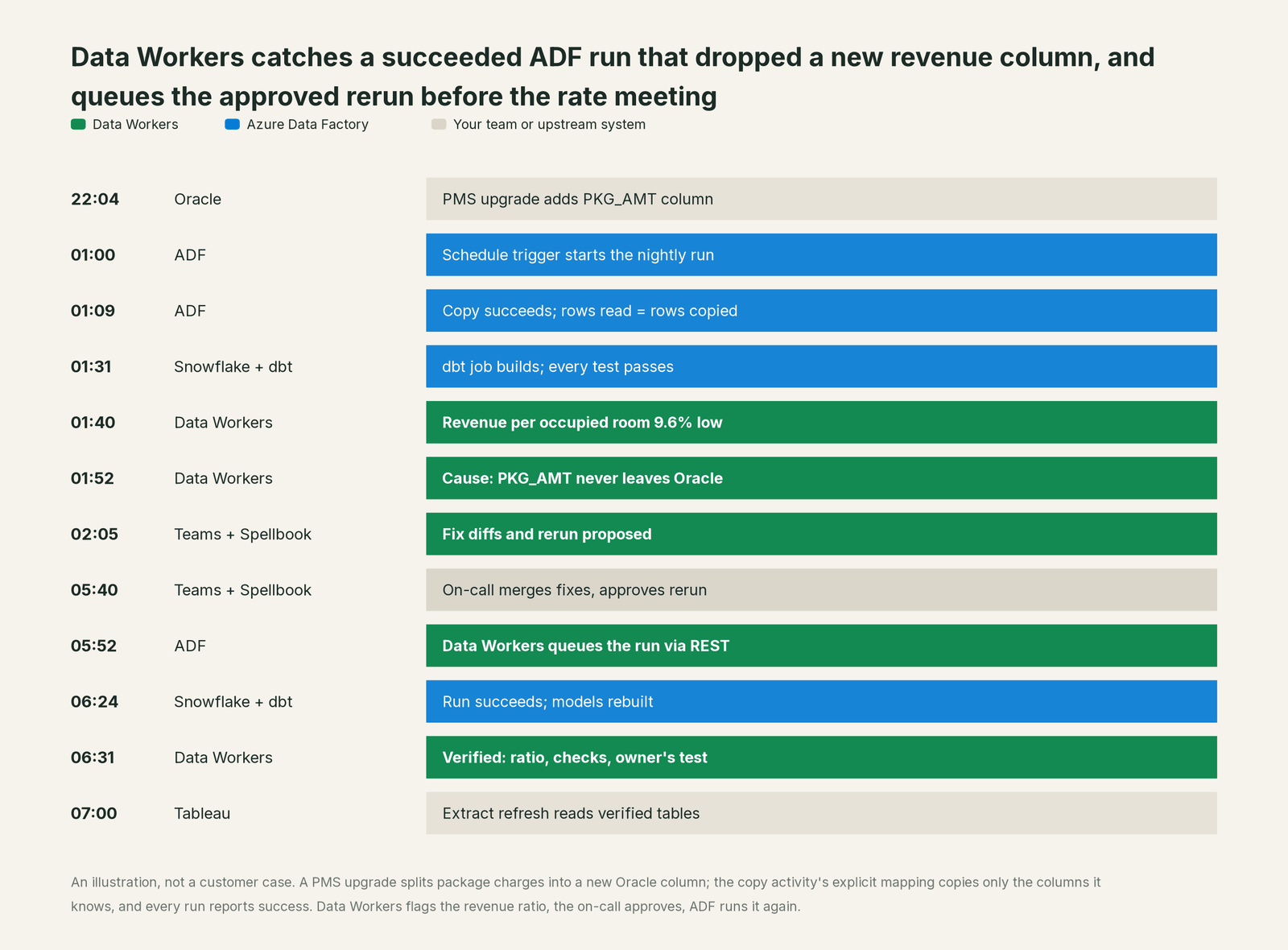
Every component did its job. The night needed someone to check the data behind a Succeeded run and ask ADF to run again once a person said yes. The rerun waited for the 05:40 approval because this domain runs at L2 propose.
| Job | What Azure Data Factory does | What Data Workers does |
|---|---|---|
| Moving the data | Copies between on-prem and cloud stores through the right integration runtime, with mapping, type conversion and compression | Checks what landed in the tables it loads against their history and the metrics your team records |
| Starting the work | Runs pipelines on schedule, tumbling window and event triggers, with parameters | Reads each pipeline run and its activity runs and ties them to the tables they build |
| Noticing a problem | Marks failed activities, sends Azure Monitor alerts, lets you rerun from the failed activity | Opens an incident when a Succeeded run's output is wrong, with the cause traced across systems |
| Fixing it | Runs whatever is published from the collaboration branch | Proposes pipeline, warehouse and dbt changes as diffs and migrations for their owners, with the blast radius |
| Running it again | Executes the new pipeline run and keeps its record | Queues the approved run through the REST API, with the undo written into the plan for the owner |
| Proving it | Shows the run as Succeeded with rows read and copied | Verifies the numbers downstream and leaves a receipt: cause, approver, run, checks, undo |
Why doesn't Azure Data Factory just do this itself?
Because ADF is built to move data reliably between hundreds of stores, and its choices are the right ones for that job. An explicit mapping is a deliberate instruction: Microsoft's documentation says that with it "you can copy only part of the source data to the sink". A movement service that judged whether RM_REV_AMT still means what the revenue team thinks would be tied to business rules it can't know. So ADF gives you tools to build checks (data preview and validation, the Assert transformation and schema drift options in mapping data flows) and keeps its contract clean.
Microsoft's AI investment lands in Fabric Data Factory, which its ADF documentation calls "the next generation of Azure Data Factory". Copilot there generates pipelines, explains error messages, summarizes pipelines and builds expressions. In preview, the Operations Agent for Pipelines watches pipeline runs and notifies you in Teams about failures or anomalies such as runs that exceed expected durations, and the Approval activity pauses a pipeline until a reviewer approves in Outlook or Teams. All are sensibly scoped to the pipeline, and a Succeeded run with normal duration and row counts looks healthy to anything that reads runs.
Fixing that night needs the data side, the blast radius, a named approver, a pipeline diff in Git, a migration with rollback SQL, a recorded rerun, an undo and a receipt an auditor can read. That cross-system operations work, with approvals and rollback built in, is what Data Workers, the agentic data platform, is built to run.
Every tool owns a slice. Data Workers covers the whole lifecycle
ADF owns its slice deeply: moving and orchestrating data across Azure and on-prem. Each point tool adds another console, contract and handoff. Data Workers covers the whole lifecycle with one context, one approval flow and one audit trail, and builds on the ADF already moving your data.
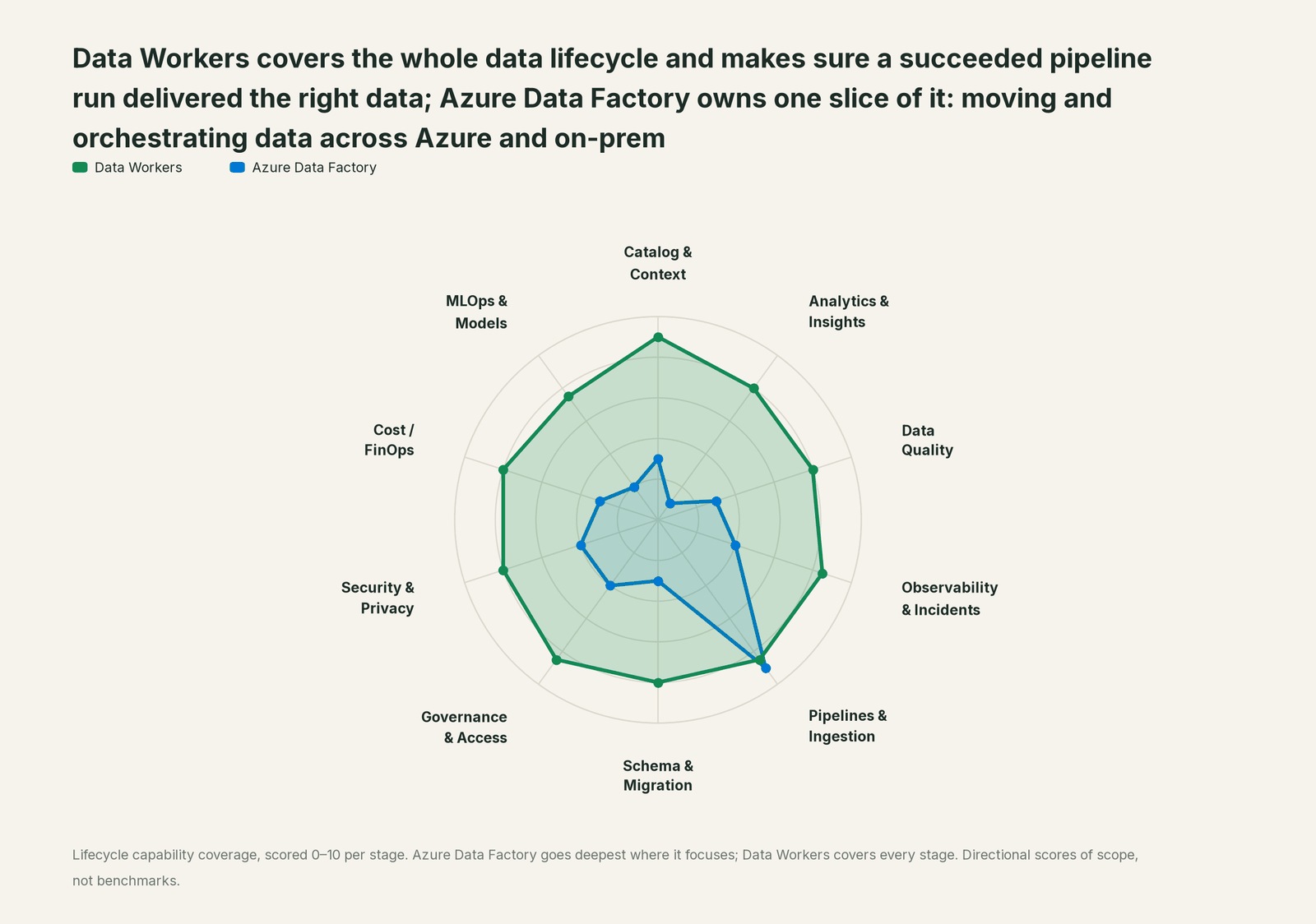
| Stage | Data Workers | Azure Data Factory | Why we scored it this way |
|---|---|---|---|
| Catalog & Context | 9 | 3 | Pipelines, datasets and linked services describe what moves where, and lineage can be pushed to Microsoft Purview. Data Workers keeps one governed context graph of tables, models, owners and lineage across every system. |
| Analytics & Insights | 8 | 1 | Not ADF's job: its monitoring reports on pipeline and activity runs, not the business numbers they feed. Data Workers answers data questions from governed definitions with lineage behind every number. |
| Data Quality | 8 | 3 | Data preview in the copy activity and the Assert transformation in mapping data flows check rows you configure. Data Workers runs null, uniqueness and volume checks on the tables ADF loads, tracks lateness against a baseline your team records and flags recorded metrics that leave their baseline. |
| Observability & Incidents | 8.5 | 4 | Pipeline and activity run history, Azure Monitor metrics and alerts, and rerun from a failed activity. Data Workers diagnoses why a succeeded run delivered the wrong data across systems and verifies the fix. |
| Pipelines & Ingestion | 8.5 | 9 | ADF's home stage: copy activity, mapping data flows, self-hosted integration runtimes, and schedule, tumbling window and event triggers across hybrid estates. Data Workers queues approved reruns through ADF and keeps what they deliver right. |
| Schema & Migration | 8 | 3 | Schema drift handling in mapping data flows; the copy activity maps columns by name or by an explicit mapping you set. Data Workers takes schema changes from pull request review of dbt and migration diffs, or from the owner, and assesses a change's blast radius through lineage. |
| Governance & Access | 8.5 | 4 | Microsoft Entra ID, Azure roles and managed identities control who can author, publish and run pipelines. Data Workers routes every data change to a named approver with a receipt. |
| Security & Privacy | 8 | 4 | Key Vault for secrets, managed virtual networks, private endpoints, and a self-hosted runtime that only connects outbound. Data Workers flags sensitive column names in pull request review for the tables ADF loads. |
| Cost / FinOps | 8 | 3 | Activity runs and data integration units are billed and visible in Azure Cost Management; the warehouse bill a rerun creates is not ADF's view. Data Workers attributes Snowflake spend to the dbt model behind it through query tags. |
| MLOps & Models | 7.5 | 2 | Pipelines can call Azure Machine Learning and Databricks activities, so ADF schedules the steps. Data Workers keeps the data under your models healthy. |
Running more than ADF? See you're on Airflow, you're on Managed Service for Apache Airflow, you're on dbt and Data Workers vs data observability.
How Azure Data Factory and Data Workers work together
Engineers ask from a coding agent such as GitHub Copilot or Claude Code; approvers decide in Spellbook Data Catalog (in preview). Underneath, Data Context Wizard keeps one governed context graph across ADF, Oracle, ADLS, Snowflake, dbt and Tableau, the Data-Agents Swarm does the work, and the Autonomous Data-Conductor runs each incident end to end.
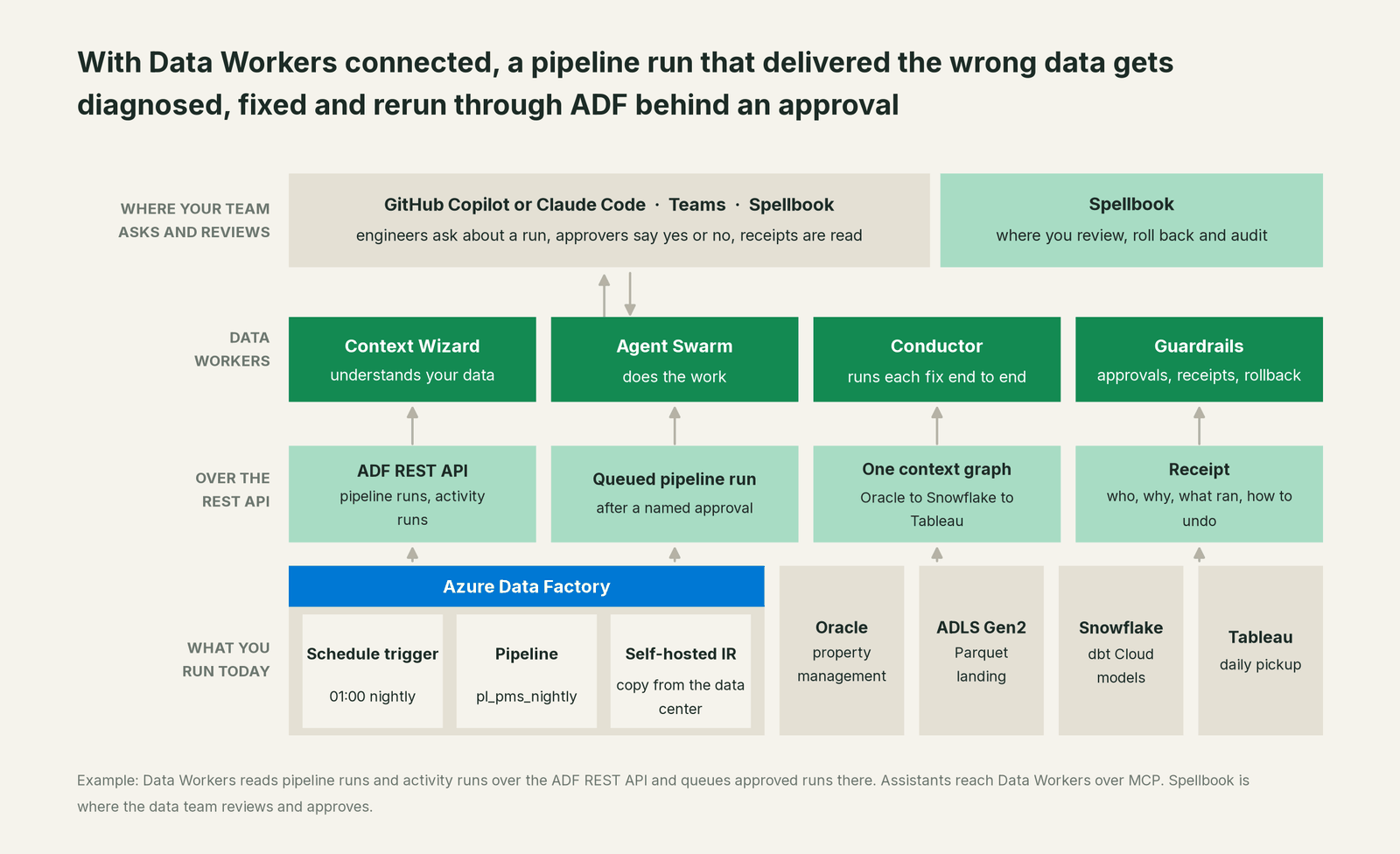
What Data Workers reads and triggers in ADF. The native ADF connector calls the Azure Resource Manager REST API with an Azure identity you grant. It reads pipeline runs (status, start, end, duration) and the activity runs inside each one (name, type, status, timings). The one thing it writes is a new pipeline run with its parameters, queued through trigger_adf_pipeline after a named approval; ADF acknowledges it as queued, then runs and records it. Authoring, publishing, triggers, linked services and integration runtimes stay with your team; grant the identity read access only and every run request is refused. Snowflake, dbt Cloud, ADLS Gen2, Teams and Tableau (read, through its data sources) are native connectors, and Oracle connects over its API or MCP server today.
Backfills, precisely. The backfill playbook starts a reload as an orchestrator rerun and reads its status; remediate re-checks the quality assertions and escalates failures to a person. The undo is written in first, and the owner runs it if needed.
Setup over MCP today. Every Data Workers agent is an MCP server. Per the client setup guide, clone the repo and add one start-agent.sh entry per agent.
# Example: Data Workers agents in Claude Code, from a clone of the open-source repo
claude mcp add --scope user dw-incidents -- "$(pwd)/start-agent.sh" dw-incidents
claude mcp add --scope user dw-catalog -- "$(pwd)/start-agent.sh" dw-context-catalog
claude mcp add --scope user dw-schema -- "$(pwd)/start-agent.sh" dw-schema
claude mcp add --scope user dw-quality -- "$(pwd)/start-agent.sh" dw-quality
claude mcp add --scope user dw-connectors -- "$(pwd)/start-agent.sh" dw-connectors
List tools with your client's own command, such as /mcp. In this story: monitor_metrics and diagnose_incident catch and explain the break; trace_cross_platform_lineage and blast_radius_analysis map the path to Tableau; assess_impact on dw-schema scores the migration's downstream effect; run_quality_check verifies the reload; trigger_adf_pipeline queues approved runs. Microsoft's Data Factory MCP server targets Fabric (pipeline tools in preview) and can sit in the same client after you move.
Where things run. The agents run in your infrastructure on every tier and hold the Azure, Snowflake and model credentials. Your data stays in your systems; the hosted Conductor sees workflow metadata only. The remote endpoint takes an API key or OAuth tokens from your identity provider, such as Microsoft Entra ID, verified through JWKS.
Upgrading to Fabric Data Factory. Microsoft's upgrade guidance (updated Sept 29) offers three paths: an Azure Data Factory item in a Fabric workspace as a live view, a built-in assessment that labels each pipeline and activity Ready, Needs review, Coming soon or Not compatible, and manual rebuilds. Data Workers works with Fabric Data Factory over the Fabric REST APIs or the Data Factory MCP server today, so receipts and approval history carry across. See Data Workers on Microsoft Fabric and the Microsoft Fabric guide for data leaders.
One incident, L0 to L4, set per domain:

- •L0 manual. A revenue manager questions the pickup numbers at 07:30.
- •L1 observe. The incident opens at 01:40 with cause and blast radius. Nothing changes.
- •L2 propose. Nothing runs until a named person approves; an unanswered request expires and escalates, never auto-grants.
- •L3 act reversibly. For a class with a clean record, such as reloading one business date after an approved fix, the rerun is queued as soon as the fix lands, with the undo written first.
- •L4 autonomous. A scoped domain handles that class end to end; people read receipts.
More in how approvals work, is it safe to let AI agents change production data, where does our data go and Data Workers integrations.
What changes for your team
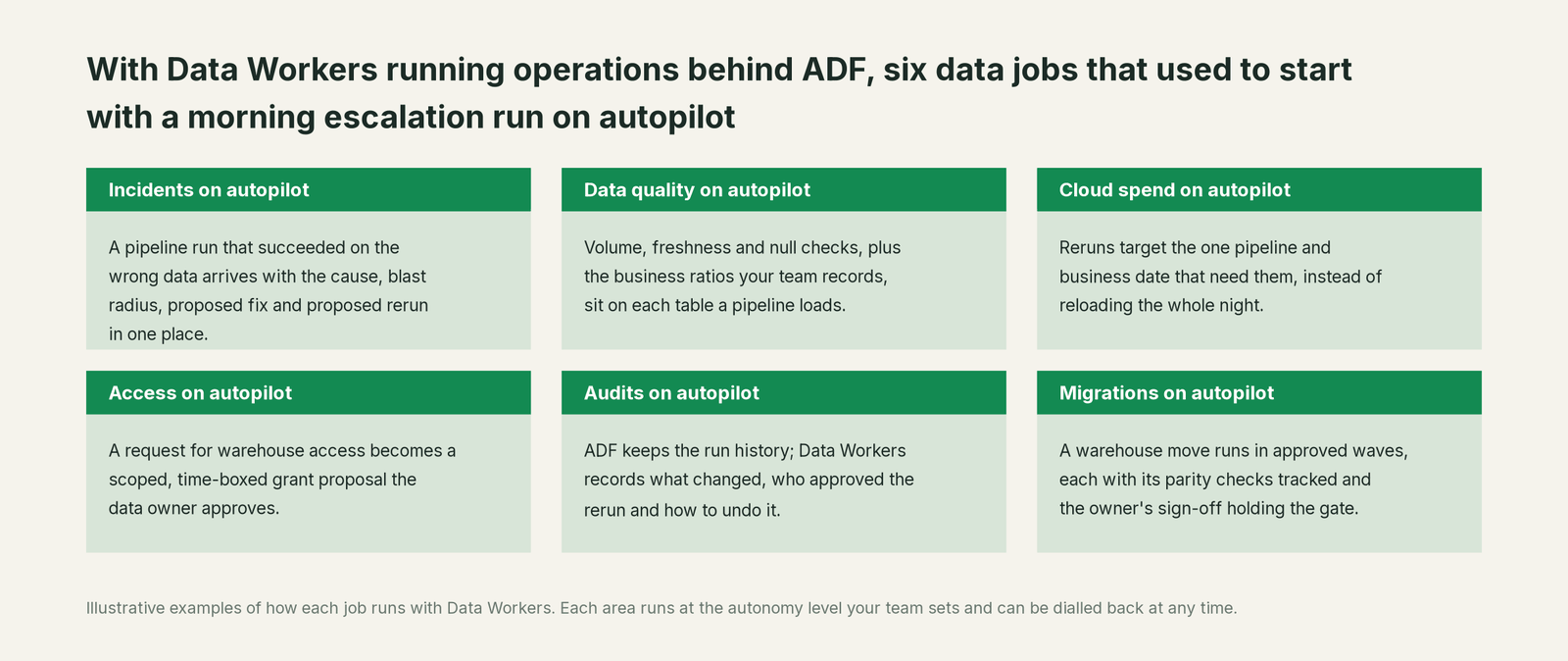
Your pipeline authors keep authoring in ADF Studio. What changes is the overnight operations work: the 07:30 "why are the numbers low?" escalation becomes a diagnosed incident with diffs and a rerun waiting for one approval, and the audit trail records who said yes.
Go deeper with the Orchestration agent, the Incident Debugging agent, data engineering on Azure and reducing data on-call burden.
Keep Azure Data Factory, or consolidate?
Keep Azure Data Factory if you love it; Data Workers works with it from day one. Many teams consolidate once Data Workers runs that slice too.
For nearly every ADF team the answer is keep it, on your own Fabric timetable. What consolidates is the scaffolding: Lookup activities that count rows after every copy, a separate freshness monitor, Logic Apps that email on failure, runbooks that say "rerun, check the report, tell finance". Weighing a build on MCP servers instead? Read build it ourselves with Claude Code and MCP servers.
The case for your CFO
The outcome: the numbers your pipelines feed arrive right more often. A Succeeded run on wrong data is caught overnight, fixed behind one approval and verified before the business reads it. In the illustration above, that is the difference between setting room rates on revenue that read 9.6% low and setting them on the real number.
The risk story is plain. Autonomy is set per domain from L0 manual to L4 autonomous. At L2 a named person approves every rerun and fix, and no agent can promote its own work. In ADF, Data Workers writes one thing, a new pipeline run, and only for the domains you open. Pipeline changes go to their owner as diffs. Every change carries a receipt, and an org-wide stop halts all autonomous dispatch. Zero migration: ADF, your pipelines, Snowflake, dbt and Tableau stay as they are.
Why now: Microsoft is steering ADF teams toward Fabric Data Factory, and an upgrade is when pipelines get re-mapped and rebuilt. An operations layer above both keeps the numbers checked through the move. The first win is L1 on one critical pipeline; your factories, publish process, Azure roles and on-call rota stay the same. For the numbers, see the ROI of agentic data operations.
The sentence to repeat upstairs: "ADF keeps moving our data; Data Workers makes sure a Succeeded run means right numbers, and fixes it behind an approval when it doesn't."
Getting started
Start with a pilot. Pick one pipeline whose numbers someone acts on every morning, connect Data Workers read-only to that factory, warehouse and dbt project, and run at L1. Then turn on L2 for that domain with an Azure identity allowed to run only the pipelines it covers. Plans are on the pricing page, and the pilot is credited in full against the first year.
FAQ
What exactly does Data Workers read from ADF, and what does it trigger? It reads pipeline runs and the activity runs inside them through the Azure Resource Manager REST API. It triggers one thing: a new pipeline run with its parameters, after a named approval. Pipeline changes arrive as diffs for the owner to merge and publish.
The run said Succeeded and rows read matched rows copied. How does Data Workers know the data is wrong? It watches the tables the pipeline loads (volume, freshness, nulls) and the business ratios your team records as metrics, each against its baseline. When one moves, it traces lineage back to the source, where a column that never left shows up.
Does it work with self-hosted integration runtimes and on-prem sources? Yes. The integration runtime keeps copying inside your network; Data Workers reads the runs through the ADF API and the source through its native connectors, with credentials held by agents in your infrastructure.
We are planning the move to Fabric Data Factory. Should we wait? No. Data Workers runs on classic ADF today; Fabric Data Factory connects over its API or MCP server, and the warehouse checks keep running on the tables either one writes, so receipts carry across and the checks keep running while pipelines are rebuilt.
Do we still need Copilot, the Operations Agent or the Approval activity in Fabric? Keep them for authoring, watching runs and gating steps inside Fabric. Data Workers takes the incidents whose cause or impact sits outside the pipeline and fixes them across systems behind an approval.
Sources
- •Microsoft Learn, Introduction to Azure Data Factory (Fabric Data Factory "the next generation"), updated Aug 5, 2026, https://learn.microsoft.com/en-us/azure/data-factory/introduction (checked Oct 3, 2026)
- •Microsoft Learn, What's new in Azure Data Factory, updated Sept 22, 2026, https://learn.microsoft.com/en-us/azure/data-factory/whats-new (checked Oct 3, 2026)
- •Microsoft Learn, Upgrade planning for Azure Data Factory to Fabric Data Factory (three paths, assessment labels), updated Sept 29, 2026, https://learn.microsoft.com/en-us/fabric/data-factory/upgrade-planning-azure-data-factory (checked Oct 3, 2026)
- •Microsoft Learn, Copilot in Fabric in the Data Factory workload, updated Sept 16, 2026, https://learn.microsoft.com/en-us/fabric/data-factory/copilot-fabric-data-factory (checked Oct 3, 2026)
- •Microsoft Learn, What's new in Microsoft Fabric (Operations Agent, Approval activity, Data Factory MCP: Preview), updated Oct 3, 2026, https://learn.microsoft.com/en-us/fabric/fundamentals/whats-new (checked Oct 3, 2026)
- •Microsoft Learn, Integration runtime in Azure Data Factory, updated July 29, 2026, https://learn.microsoft.com/en-us/azure/data-factory/concepts-integration-runtime (checked Oct 3, 2026)
- •Microsoft Learn, Pipeline execution and triggers, https://learn.microsoft.com/en-us/azure/data-factory/concepts-pipeline-execution-triggers (checked Oct 3, 2026)
- •Microsoft Learn, Schema and data type mapping in copy activity, updated Aug 12, 2026, https://learn.microsoft.com/en-us/azure/data-factory/copy-activity-schema-and-type-mapping (checked Oct 3, 2026)
- •Microsoft Learn, Copy activity monitoring, updated Feb 27, 2026, https://learn.microsoft.com/en-us/azure/data-factory/copy-activity-monitoring (checked Oct 3, 2026)
- •Microsoft Learn, Oracle connector, updated Apr 9, 2026, https://learn.microsoft.com/en-us/azure/data-factory/connector-oracle (checked Oct 3, 2026)
- •Microsoft Learn, Source control in Azure Data Factory, updated July 29, 2026, https://learn.microsoft.com/en-us/azure/data-factory/source-control (checked Oct 3, 2026)
- •Microsoft Learn, REST API Pipelines - Create Run (api-version 2018-06-01), https://learn.microsoft.com/en-us/rest/api/datafactory/pipelines/create-run (checked Oct 3, 2026)
- •Microsoft, DataFactory.MCP on GitHub (targets Fabric; pipeline tools in preview), https://github.com/microsoft/DataFactory.MCP (checked Oct 3, 2026)
- •Data Workers open-source repository (tool registrations), https://github.com/DataWorkersProject/dataworkers-claw-community (checked Oct 3, 2026)
- •Data Workers client setup guide, https://dataworkers.io/opensource-docs/client-setup/ (checked Oct 3, 2026)