You're on ServiceNow: Keep the Incident and the Change Record, Let Data Workers Fix the Data Behind the Ticket
ServiceNow is the system of record for incidents, problems and changes. Data Workers diagnoses, fixes and verifies the data incident, keeps the ticket current and links the receipt.
Your company runs IT on ServiceNow. A broken report becomes an incident with a priority, an assignment group, an SLA clock and a configuration item from the CMDB. A break that keeps coming back becomes a problem record with a known error. Any fix to a production system goes through change management: a normal, standard or emergency change request, a risk assessment, approvals and a backout plan. ServiceNow Otto for ITSM (formerly Now Assist for ITSM) summarizes incidents, writes resolution notes and explains change risk, and its AI agents draft change requests and plans. (Current docs are tagged Brazil, in feature early availability since September 24, 2026; Australia is the latest generally available family.) ServiceNow is the system of record for the ticket. Data Workers fixes the data behind it, with a receipt.
Data incidents land there every week: "the daily flash is wrong". ServiceNow routes them to the Data Platform group in seconds. Then an engineer spends the morning tracing lineage across SAP, Azure Data Factory, Databricks and Power BI, types "fixed, I think" into the close notes, and the break returns next quarter. Data Workers picks up the incident, finds the cause, proposes the fix with its blast radius, applies it after a named owner approves, verifies it, and keeps the ticket current with the diagnosis and a receipt link, so your agent resolves it with evidence an auditor can read. This page is about ServiceNow as your ITSM platform; for ServiceNow's own AI agents calling Data Workers over MCP, read you're on ServiceNow AI Agents.
Key takeaways
- •ServiceNow stays the system of record. Incidents, problems, changes, the CMDB and your approvals stay where they are.
- •Data tickets arrive diagnosed. Data Workers takes the incident from your assignment flow, puts the cause in the incident summary and sets the right priority.
- •The change record gets real content. Every data fix comes with its diff, downstream impact, backout plan and test evidence.
- •Resolved means verified. The service agent resolves the incident with the receipt in hand: what changed, who approved it, how it was checked and how to undo it.
- •A native connector, today. Data Workers opens and updates ServiceNow incidents (summary and priority) over the REST API, with autonomy per domain from L0 manual to L4 autonomous.
ServiceNow is the record. Data Workers is the first responder.
ServiceNow makes IT work controlled and visible: who owns a ticket, how long it has been open, what changed and who approved it. A data incident needs that control around it, while the diagnosis and repair happen in the systems your data team runs, where Data Workers works. Here is a Monday with both in place. This is an illustration, not a customer case.
| Time | System | What happens |
|---|---|---|
| Fri 18:00 | ServiceNow | The SAP team's change request for a new company code, 4100, for a Polish subsidiary is implemented and closed successful |
| Sat 01:00 | SAP | The nightly general ledger extract includes the first 4100 journal lines, in PLN |
| Sat 01:40 | Azure Data Factory | The copy pipeline lands the extract in the lake; the run succeeds |
| Sat 02:15 | Databricks | The gl_daily job inner-joins to an FX rates table that has no PLN rate, so 3,212 lines drop out; the job succeeds |
| Mon 07:30 | Power BI | The EMEA controller opens the daily flash: revenue reads 6% low |
| 07:34 | ServiceNow | The controller raises an incident from the portal; it lands as P2 for the Data Platform assignment group, with the Finance Lakehouse service as the configuration item |
| 07:36 | Data Workers | Takes the incident from the Data Platform group's flow, traces Power BI back through gl_daily and the FX table to the ADF run and the SAP extract, and updates the incident summary with the cause |
| 07:44 | Data Workers | Proposes the fix: add PLN to the FX mapping, change the join so unmapped currencies are flagged instead of dropped, add a quality check, and backfill three days. Blast radius: two Databricks tables, the daily flash and the consolidation export. Backout plan included |
| 08:10 | Spellbook | The finance data owner reviews the diff and approves; the change manager records the change in ServiceNow with the evidence Data Workers supplied |
| 08:40 | Databricks | Data Workers starts the backfill through the orchestrator, with the undo recorded first, and re-checks the quality assertions on the finance tables: all pass |
| 08:50 | ServiceNow | Data Workers updates the incident summary: fixed and verified, with links to the receipt in Spellbook and the audit trail |
| 09:00 | ServiceNow | The Data Platform agent checks the evidence and resolves the incident; Otto's resolution notes can draw on the summary |
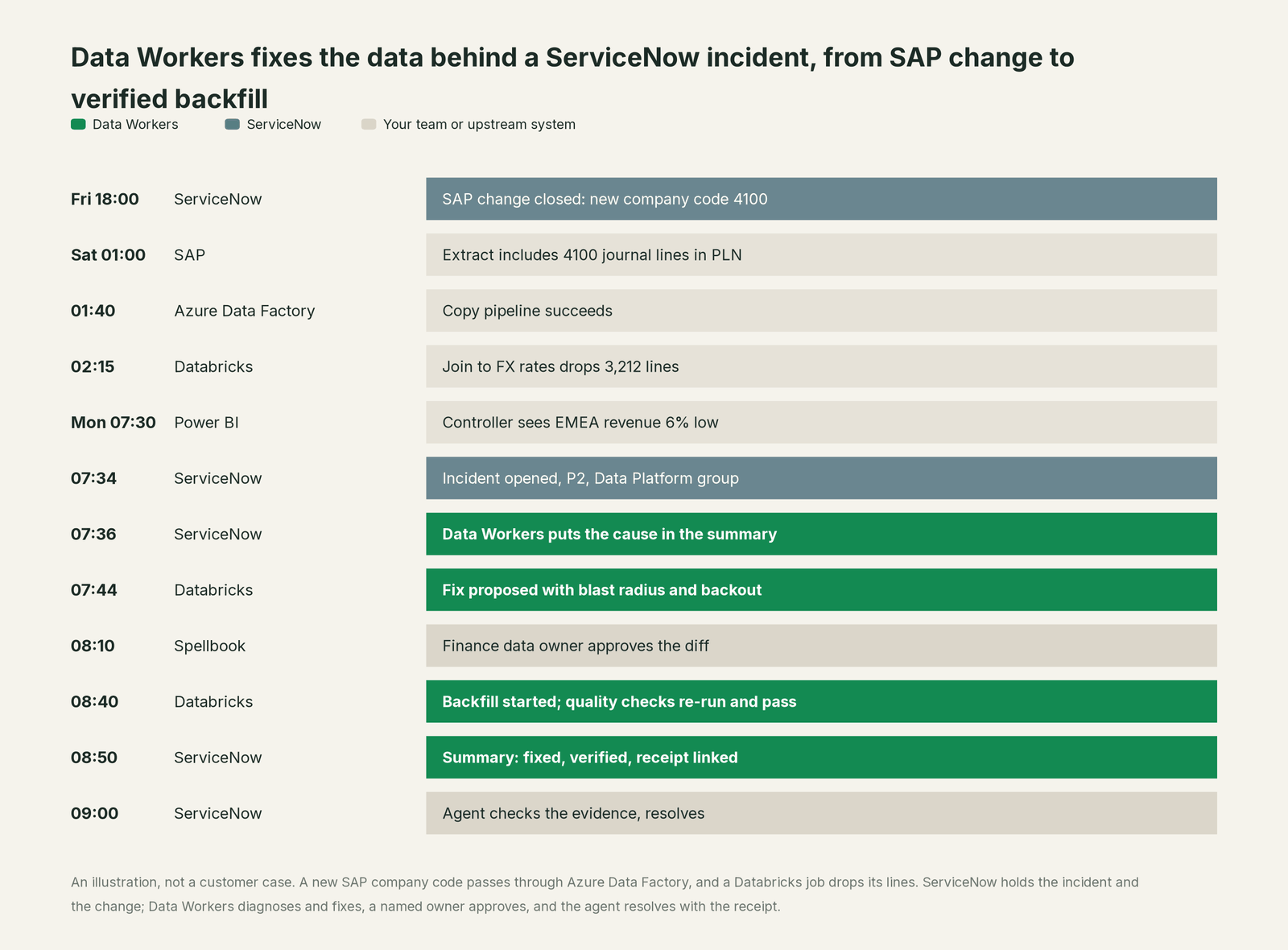
Everyone did their job well. The SAP change was implemented cleanly, the ADF pipeline and the Databricks job both succeeded (which is why no monitor fired), and ServiceNow routed the ticket to the right group on the first try. The gap was the hour after routing: the cause sat four systems away, and the fix had to touch the lakehouse under change control. With Data Workers, the cause was in the incident summary one step after the ticket arrived, the fix went through one approval, and the agent resolved the incident with proof in hand. The problem manager's review starts from the incident history, which already shows the pattern: a new company code with no FX mapping. The new quality check catches the next one at 02:15 on Saturday, before anyone opens the flash.
| Job | What ServiceNow does | What Data Workers does |
|---|---|---|
| The incident | Logs it from portal, email or chat with priority, SLA and assignment group | Takes it from your assignment flow, or opens it when it catches the break first, and starts the diagnosis on the data behind it |
| The context | The CMDB maps business services, configuration items and their relationships | Keeps one governed context graph of tables, jobs, pipelines, owners and lineage, and joins the CI to it |
| The diagnosis | Holds the work notes, and Otto summarizes the incident from its record | Traces the break across SAP, Azure Data Factory, Databricks and Power BI, puts the cause in the summary and sets the priority |
| The change | Runs change requests, risk, approvals and the CAB; Otto's AI agents can draft the change plan | Supplies the change content: the diff, blast radius, backout plan and test evidence |
| The fix | Records who approved the change and when it was implemented | Applies the approved data change reversibly and verifies it |
| The close | The service agent resolves the incident, Otto drafts resolution notes, and ServiceNow tracks the SLA and the problem link | Links the receipt in Spellbook and the audit trail, and remembers the cause for the next one |
Why doesn't ServiceNow just do this itself?
Because ServiceNow is built to govern work across all of IT, and that focus is right. Its incident, problem and change applications decide who owns a ticket, how risky a change is, who approves it and whether it met its SLA. Change management controls the life cycle of a change so it lands with minimum disruption; the engineer who owns the target system performs it and records the result. That separation is the backbone of IT control, and sound design.
ServiceNow's AI follows the same line, and does it well. Otto's agentic workflows can wrap up and resolve an incident with resolution notes and a resolution code, and its change agents draft change requests and plans from the records, templates and history on the platform. They work from the ServiceNow record. A data incident's cause and fix live in the lakehouse, the pipelines and the transformation code: every job and report that reads the broken table, which rows are wrong and why, how to backfill without double-counting, how to roll back, and who owns the data. The fix also carries the liability for a write to Databricks or Snowflake, systems ServiceNow does not run. Writing to production data across systems, with blast-radius scoping, approvals, rollback and receipts, is a different product category. That is the product Data Workers is, and it hands ServiceNow exactly what its records need.
Every tool owns a slice. Data Workers covers the whole lifecycle
ServiceNow owns one slice deeply: the record of every incident, problem and change, with strong change control around it. Each point tool adds another console, contract and handoff. Data Workers covers the whole lifecycle with one context, one approval flow and one audit trail, and builds on ServiceNow where your IT process lives.
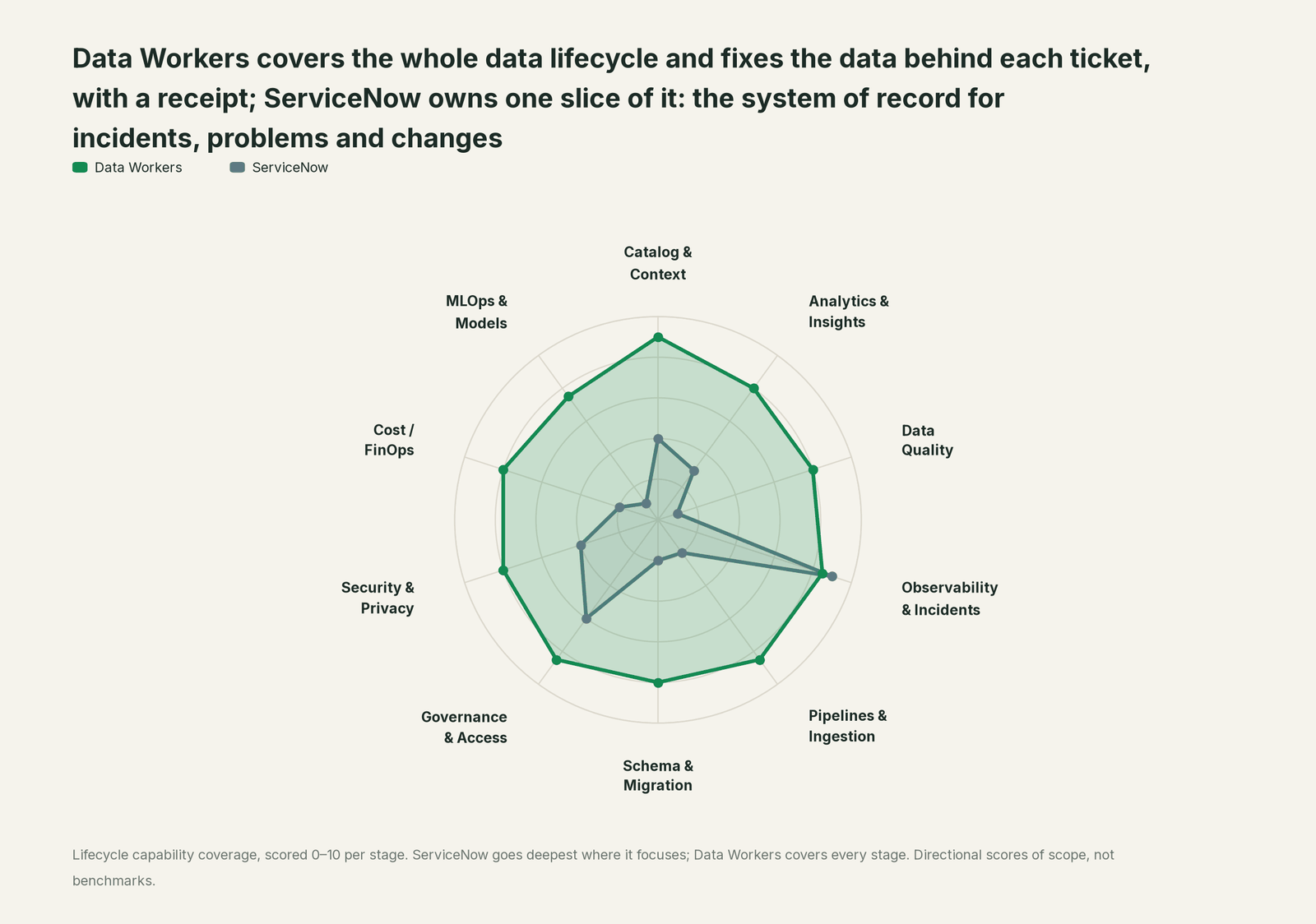
| Stage | Data Workers | ServiceNow | Why we scored it this way |
|---|---|---|---|
| Catalog & Context | 9 | 4 | The CMDB maps services, configuration items and their relationships. Data Workers keeps one governed context graph of tables, models, pipelines, owners and lineage. |
| Analytics & Insights | 8 | 3 | Reports on incidents, SLAs and changes describe the work. Data Workers answers data questions from governed definitions with lineage behind every number. |
| Data Quality | 8 | 1 | Outside ITSM by design: checks on lakehouse tables run where the data lives. Data Workers drafts the owner's check after every incident and holds the table to a baseline the team records. |
| Observability & Incidents | 8.5 | 9 | ServiceNow's home stage: incidents, major incidents, problems, assignment groups, SLAs and Otto for ITSM. Data Workers diagnoses and fixes the data behind the data tickets. |
| Pipelines & Ingestion | 8.5 | 2 | Integrations move records into and out of the platform. Data Workers reruns and backfills lakehouse pipelines with approvals. |
| Schema & Migration | 8 | 2 | Not an ITSM job: table schemas and models sit with the data team. Data Workers catches schema changes and plans migrations with rollback. |
| Governance & Access | 8.5 | 6 | Strong change control: normal, standard and emergency changes, approval policies and change risk. Data Workers adds data-level blast radius and a named data owner. |
| Security & Privacy | 8 | 4 | Security operations run as separate ServiceNow products. Data Workers leaves a receipt on every data change and proposes masking for the owner to apply. |
| Cost / FinOps | 8 | 2 | IT asset management covers licences and hardware. Data Workers traces Snowflake credits to the dbt model behind them and drafts the fix for its owner. |
| MLOps & Models | 7.5 | 1 | Not an ITSM job. Data Workers keeps the data under your models healthy. |
How ServiceNow and Data Workers work together
ServiceNow stays on top, where incidents, changes and problems are tracked. Spellbook Data Catalog (in preview) is where the data team looks: each proposed change, who approved it, what it touched and how to roll it back. Between them, Data Context Wizard keeps one governed context graph across the SAP extracts, Azure Data Factory, Databricks and the reports, the Data-Agents Swarm does the work with more than 20 specialist agents, and the Autonomous Data-Conductor runs each incident end to end (detect, diagnose, fix, review, verify, remember).
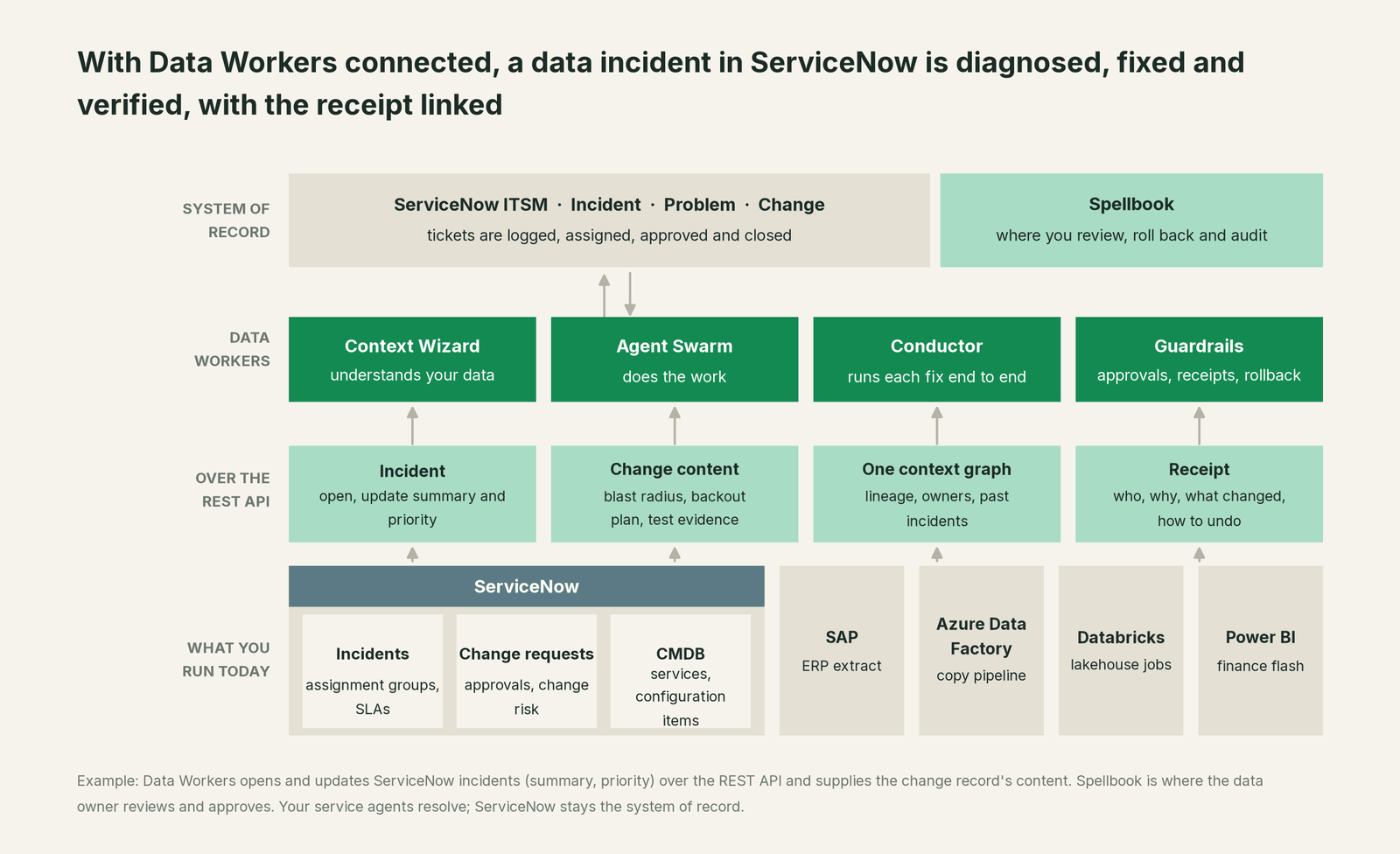
The incident, both directions. ServiceNow is a native Data Workers connector over the REST API. Your assignment flow hands each new data incident to Data Workers, for example through a ServiceNow AI agent calling it over MCP. When it catches a break first, it opens the incident itself with create_servicenow_ticket, so the record exists before anyone notices the number. Either way it keeps the summary and priority current with update_servicenow_ticket, and the summary links the receipt in Spellbook and the audit trail. State, work notes and resolution stay with your agents. The diagnosis runs on diagnose_incident, get_root_cause, trace_cross_platform_lineage and blast_radius_analysis; verification on the monitor_metrics baseline and the owner's test; and get_incident_history means the next similar break starts from the last cause.
The change record. ServiceNow stays the system of record for changes, by design. Data Workers produces what a change request needs: the diff, downstream blast radius, implementation steps, backout plan and test evidence, in Spellbook, linked from the incident. Your change manager, Otto's change agents or an existing flow raises the change from that content, and the CAB reviews real lineage instead of a guess. For recurring fixes, many teams define a standard change so the Spellbook approval and the pre-approved change line up.
The CMDB. The configuration item on the incident, such as the Finance Lakehouse, maps to the tables, jobs and reports in the context graph, so the trace starts in the right place.
Setup. Every Data Workers agent is an MCP server; the client setup guide documents running them from the open-source repository. For ServiceNow, setup is one connector configuration; your service desk works as it does today:
- •Create a ServiceNow integration user with access to the incident table.
- •Add the instance and credentials to the Data Workers connector configuration, and choose the services whose data it watches.
- •Start at L1 observe: diagnoses go to the incident summary and nothing else changes.
- •Move one domain to L2 propose: fixes arrive as diffs with blast radius and backout plans for the owner to approve.
- •Later, at L3 act reversibly, let Data Workers apply and verify proven fixes in that domain, so the agent only confirms and resolves.
Example: Data Workers connected to ServiceNow ITSM
Connector:      ServiceNow (REST API, incident table)
Instance:       <your-instance>.service-now.com
Auth:           integration user with incident table access
Watches:        services Finance Lakehouse, Daily Flash
Receives:       incident number and description from your assignment flow
Writes:         summary (cause, fix status, receipt link), priority
Opens:          create_servicenow_ticket when Data Workers detects first
Change content: diff, blast radius, backout plan, test evidence
Autonomy:       finance domain at L2 propose; others at L1 observe
One incident, L0 to L4. The ticket: "EMEA revenue on the daily flash is 6% low." The ladder is set per domain.

- •L0 manual. An engineer traces Power BI back through Databricks, ADF and SAP by hand.
- •L1 observe. Data Workers puts the cause in the incident summary: 3,212 lines for company code 4100 dropped by the FX join.
- •L2 propose. Data Workers proposes the mapping, join and check changes plus the backfill, with blast radius and backout plan. Nothing changes until the finance data owner approves and your change process records it.
- •L3 act reversibly. For change classes with a proven record, such as a backfill after an approved mapping fix, Data Workers starts it through the orchestrator with the undo recorded first, re-checks the quality assertions and updates the incident summary to fixed and verified for the agent to resolve; a failed check goes to a named person.
- •L4 autonomous. For a scoped domain like FX mappings, Data Workers catches the unmapped currency at the Saturday run, fixes it inside the approved standard change, and opens its own incident with the receipt linked for the agent to close. The controller never opens a ticket.
Approvals go to a named person; a request nobody answers expires and escalates, and never grants itself. For the full safety model, read is it safe to let AI agents change production data and how approvals work for AI data agents. Other incident stacks follow the same pattern: you're on PagerDuty, you're on Jira Service Management and you're on Datadog. Our data incident response playbook is a good template for the data side.
What changes for your team
Data tickets arrive diagnosed and leave with proof.
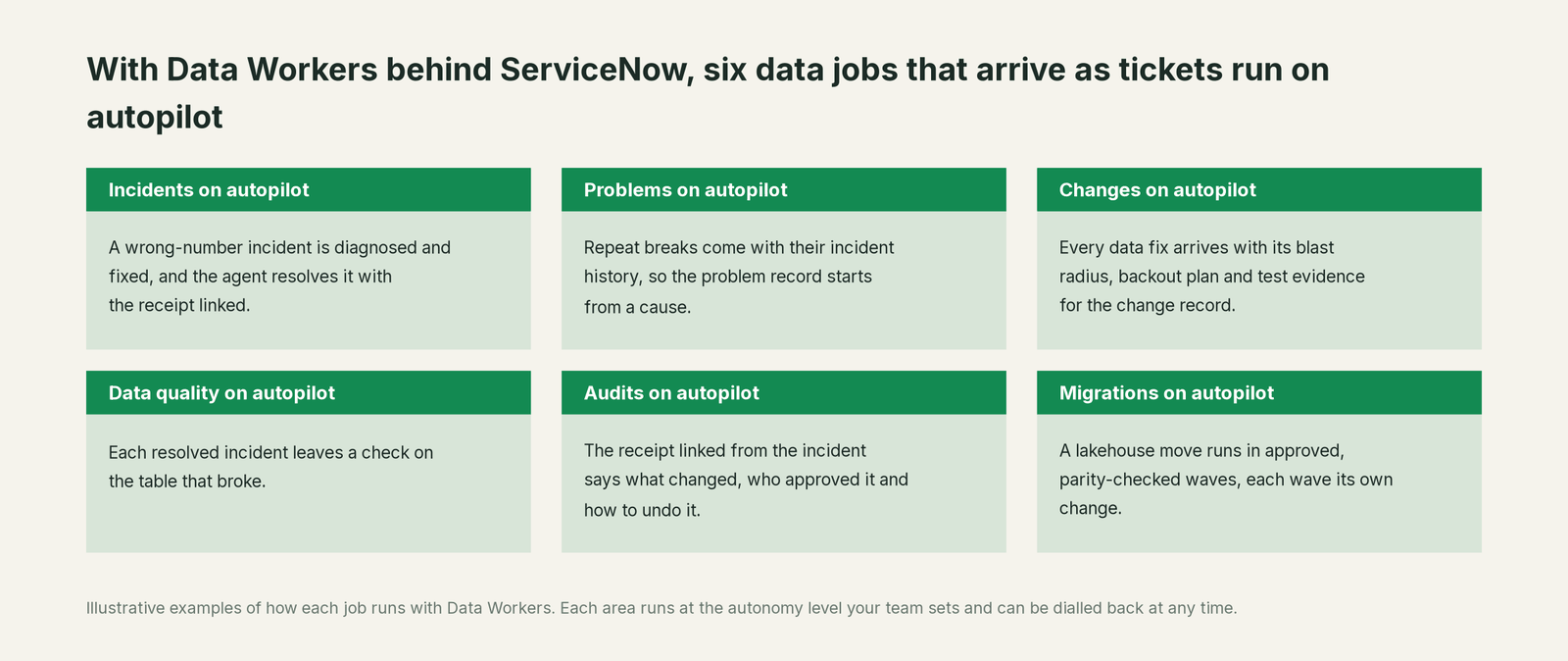
- •Incidents. A wrong-number incident is diagnosed and fixed, and the agent resolves it with the proof linked.
- •Problems. Repeat breaks come with their incident history, so the problem record starts from a cause and a known error.
- •Changes. Every data fix arrives with its blast radius, backout plan and test evidence for the change record.
- •Data quality. Each resolved incident leaves a check on the table that broke.
- •Audits. The receipt linked from the incident says what changed, who approved it, how it was verified and how to undo it.
- •Migrations. A lakehouse move runs in approved, parity-checked waves, each wave its own change.
Keep ServiceNow, or consolidate?
Keep ServiceNow if you love it; Data Workers works with it from day one. Many teams consolidate once Data Workers runs that slice too.
For almost every ServiceNow customer, the answer is keep it: it is the record of IT work, change control and audit across the company, and the data team's incidents belong where everyone else's are. What teams consolidate is the stack around the lakehouse: a separate data observability tool, a quality tool, a stale catalog and the scripts each team wrote to watch its tables. Those signals feed one loop that ends on the ServiceNow incident; see Data Workers vs data observability. Tempted to build this layer with ServiceNow flows and a few scripts? Read build it ourselves with Claude Code and MCP servers first: the API call is the easy part, and the context graph, approvals and rollback are where the work is.
The case for your CFO
The outcome: data incidents stop being the slowest tickets in the queue. A wrong number on the daily flash is diagnosed when it arrives and corrected the same morning, under the change control you already run, with a record of why. Finance, sales and operations stop making calls on numbers nobody can vouch for.
The risk story is plain. ServiceNow keeps governing the work: incidents, change approvals, the CAB. Data Workers governs changes to the data: autonomy per domain from L0 manual to L4 autonomous, every change routed to a named approver, applied reversibly, verified and recorded in a receipt with who approved it, what it touched and how to undo it. Your data stays in your systems; the hosted Conductor sees workflow metadata only. Zero migration: ServiceNow, SAP, Azure Data Factory, Databricks and Power BI stay where they are.
Why now: ServiceNow already routes data tickets well, so the cost sits in resolution, where the cause is several systems away. The first win is L1 on one service: every data incident gets a diagnosis in its summary. What stays the same: your ITSM process, SLAs, change models, CAB, lakehouse permissions and code review. For the numbers, see the ROI of agentic data operations. Start with a pilot (pricing); the pilot is credited in full against the first year.
The sentence to repeat upstairs: "ServiceNow keeps the record; Data Workers fixes the data behind our tickets, with an approval and a receipt in every one."
Getting started
Start with a pilot. Pick one service, such as the Finance Lakehouse, connect Data Workers with an integration user, and let every data incident on that service get a diagnosis in its summary. Then move that domain to L2 propose, so fixes arrive with the content your change process needs. Plans are on the pricing page, and the pilot is credited in full against the first year.
FAQ
Does Data Workers have a ServiceNow connector? Yes, natively over the REST API. Data Workers opens incidents when it detects a break first, takes the ones your assignment flow hands it, and keeps each one's summary and priority current, with the receipt linked. Your service agents change state, write work notes and resolve. The repair happens where the data breaks, in Databricks, Snowflake, BigQuery, dbt, Azure Data Factory or Airflow, all native connectors.
Does Data Workers create change requests in ServiceNow? ServiceNow stays the system of record for changes, and your change process raises them, by hand, through a flow or with Otto's change agents. Data Workers supplies the content a change request needs: the diff, the blast radius, the backout plan and the test evidence. For recurring data fixes, many teams map that to a standard change.
How is this different from the ServiceNow AI Agents guide? That guide covers ServiceNow AI Agents calling Data Workers over MCP, approved in AI Control Tower. This one covers ITSM as the record of incidents, problems and changes. Many teams use both: you're on ServiceNow AI Agents.
Who resolves the incident? Your service agent, as today. Data Workers marks it fixed and verified in the summary and links the receipt: the cause, the diff, who approved it, what it touched, how it was verified and how to undo it.
Can Data Workers change our lakehouse without a change record? Only as far as the autonomy level you set for that domain. At L1 it changes nothing; at L2 every fix waits for a named owner's approval and your change process records it. Higher levels apply only to change classes you approve, often mapped to a standard change.
Where does our data go? Your data stays in your systems; the hosted Conductor sees workflow metadata only, and Data Workers writes only an incident's summary and priority to ServiceNow. See where does our data go.
Sources
- •ServiceNow Docs, ServiceNow Otto for IT Service Management (ITSM) (Brazil, updated Sept 10, 2026), https://www.servicenow.com/docs/r/it-service-management/now-assist-for-it-service-management-itsm/now-assist-itsm.html (checked Oct 2, 2026)
- •ServiceNow Docs, Agentic AI in ServiceNow Otto for Incident Management (Brazil, updated Sept 10, 2026), https://www.servicenow.com/docs/r/it-service-management/now-assist-for-it-service-management-itsm/using-agentic-ai-workflow-im.html (checked Oct 2, 2026)
- •ServiceNow Docs, Combined ServiceNow Otto for ITSM release notes, Australia to Brazil (change AI agents; updated Sept 28, 2026), https://www.servicenow.com/docs/r/delta-australia-brazil/brazil-australia-servicenowottoforitservicemanagementitsm-release-notes.html (checked Oct 2, 2026)
- •ServiceNow Docs, Available patches and hotfixes (Brazil Feature Early Availability released 2026/09/24; updated Oct 1, 2026), https://www.servicenow.com/docs/r/release-notes/available-versions.html (checked Oct 2, 2026)
- •ServiceNow Docs, Incident Management (Brazil, updated Sept 10, 2026), https://www.servicenow.com/docs/r/it-service-management/incident-management/c_IncidentManagement.html (checked Oct 2, 2026)
- •ServiceNow Docs, Change types (Brazil, updated Sept 10, 2026), https://www.servicenow.com/docs/r/it-service-management/change-management/change-types.html (checked Oct 2, 2026)
- •ServiceNow Docs, Problem Management (Brazil, updated Sept 10, 2026), https://www.servicenow.com/docs/r/it-service-management/problem-management/c_ProblemManagement.html (checked Oct 2, 2026)
- •ServiceNow Docs, Configuration Management Database (Brazil, updated Sept 10, 2026), https://www.servicenow.com/docs/r/servicenow-platform/configuration-management-database-cmdb/c_ITILConfigurationManagement.html (checked Oct 2, 2026)
- •Data Workers open-source repository (ServiceNow tools in dw-connectors; incident, context, quality and audit tools), https://github.com/DataWorkersProject/dataworkers-claw-community (checked Oct 2, 2026)
- •Data Workers client setup guide, https://dataworkers.io/opensource-docs/client-setup/ (checked Oct 2, 2026)