You're on ServiceNow AI Agents: Route the Data Incident, Then Close It With a Receipt
ServiceNow tracks and routes the ticket. Data Workers diagnoses the data incident, carries the approved fix, keeps the incident current and links the receipt.
Your service desk runs on ServiceNow. Every incident and request is a record with an assignment group, priority and SLA, tied to configuration items in the CMDB. On the current releases (Zurich and Australia, with Brazil in feature early availability since September 24, 2026), AI agents built in AI Agent Studio triage and categorize incidents, the AI Agent Orchestrator coordinates teams of agents, AI specialists in the Autonomous Workforce such as the L1 Service Desk AI Specialist self-assign and resolve service desk work, ServiceNow Otto takes requests from anyone through chat, voice, mobile or web, and AI Control Tower inventories every agent, model and MCP server you run. ServiceNow is where work and incidents are tracked and routed. Data Workers is the data team that diagnoses and fixes the data incidents.
Data incidents arrive in ServiceNow every week: "the revenue dashboard is wrong", "the nightly load failed". ServiceNow routes them to the Data Platform assignment group in seconds. Then a person traces lineage across Snowflake, dbt, Fivetran and Tableau by hand. Data Workers picks up that ticket, diagnoses the cause, proposes the fix with its blast radius, carries the approved change, keeps the incident's summary and priority current and links the receipt from Spellbook and the audit trail. Your service agent resolves the incident with the proof in front of them.
Key takeaways
- •ServiceNow keeps its job. Incidents, SLAs, AI agents, Otto and AI Control Tower stay as they are. Data Workers fixes the data behind the tickets; your service agents resolve them.
- •The ticket arrives diagnosed. Soon after a data incident reaches the queue, your ServiceNow triage agent posts Data Workers' cause, blast radius and proposed fix to the work notes.
- •Every fix has an owner and a receipt. A named model owner approves in Spellbook, Data Workers applies the change reversibly and verifies it, and the receipt sits in Spellbook and the audit trail, linked from the incident, before your service agent resolves it.
- •Connected today, both ways. Data Workers connects to ServiceNow over its REST API to open incidents and keep their summary and priority current, and ServiceNow AI Agents call Data Workers over MCP once an AI Steward approves the server in AI Control Tower.
- •One request, five levels. Autonomy is set per domain, from L0 manual to L4 autonomous.
ServiceNow is where work and incidents are tracked and routed. Data Workers is the data team that diagnoses and fixes the data incidents.
ServiceNow built its AI agents to move work. An agentic workflow triages the incident, categorizes it and routes it to the right group; agents use flow actions, subflows, scripts and skills to act on the platform. That is exactly what you want at the front of a data incident. The diagnosis and the repair live in systems your data team runs, and that is where Data Workers works. Here is a Monday with both in place. This is an illustration, not a customer case.
| Time | System | What happens |
|---|---|---|
| Fri 16:30 | Salesforce | Sales ops adds a new opportunity stage, "Closed Won - Partner", for the partner program |
| Sat 02:00 | Fivetran | The nightly sync lands 41 opportunities in the new stage in Snowflake |
| Sat 03:10 | Snowflake + dbt | The fct_bookings model filters on the old closed-won stages, so the 41 deals drop out without an error |
| Mon 08:05 | Tableau | Finance opens the weekly bookings dashboard: partner bookings read 18% below plan |
| 08:07 | ServiceNow | A finance analyst opens an incident; a ServiceNow AI agent categorizes it as a data issue and routes it to the Data Platform assignment group |
| 08:09 | Data Workers | Called by the triage agent, traces the dashboard to fct_bookings and the Salesforce stage field and finds the new stage value; the agent posts the diagnosis to the work notes, and Data Workers sets the incident summary to the cause |
| 08:15 | Data Workers | Proposes a change to the stage mapping plus an accepted-values test, with the blast radius: two dbt models, the bookings dashboard and the commissions export |
| 08:32 | Spellbook | The analytics engineer who owns the model reviews the diff and approves |
| 08:50 | Snowflake + dbt | Data Workers runs the rebuild for the affected days and verifies: 41 deals back, totals match Salesforce |
| 09:05 | ServiceNow | The receipt is in Spellbook and the audit trail; the triage agent posts its link to the work notes, and the service agent resolves the incident |
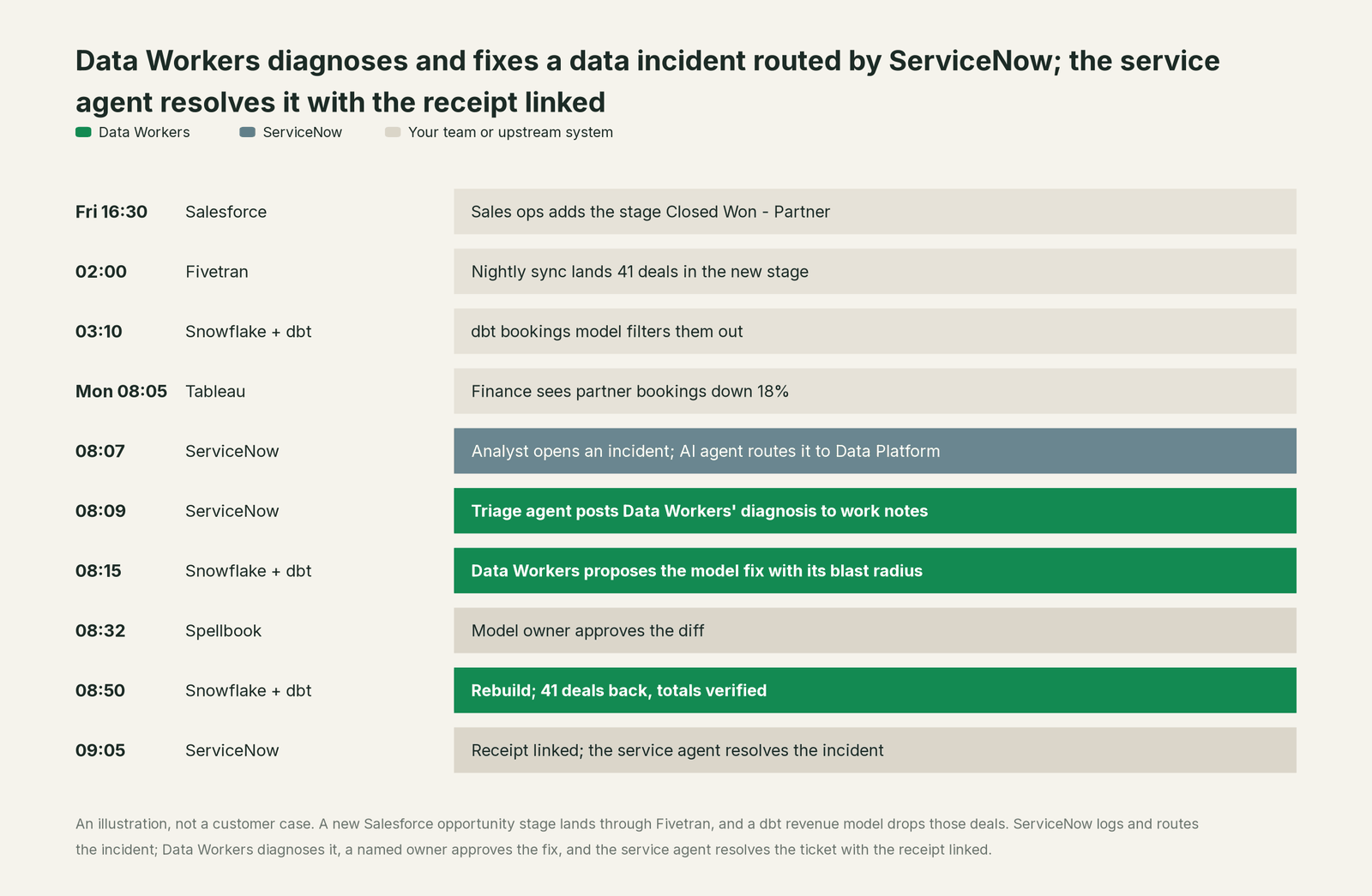
The ServiceNow agent did its job well: the ticket reached the right queue the moment it was opened. What changed is the next hour: the cause was in the work notes at 08:09, the fix went through one approval, and the incident closed with a receipt finance can read.
| Job | What ServiceNow does | What Data Workers does |
|---|---|---|
| The intake | Logs the incident from portal, chat, voice or email, with priority and SLA | Watches the data so many breaks are caught before anyone files a ticket |
| The routing | AI agents triage, categorize and route to the Data Platform group | Picks up data incidents from that queue and starts the diagnosis |
| The context | The CMDB maps services and configuration items | Keeps one governed context graph of tables, models, metrics, owners and lineage |
| The diagnosis | Records what people and agents write in the work notes | Traces the break across Salesforce, Fivetran, Snowflake, dbt and Tableau and returns the cause your triage agent posts |
| The fix | Runs the flows and approvals your admins configured on the platform | Proposes the data change with its blast radius, routes it to a named owner, applies it reversibly |
| The proof | Keeps the incident history and the AI Control Tower record of each agent | Keeps a receipt in Spellbook and the audit trail, linked from the ticket: what changed, who approved it, how it was verified, how to undo it |
Why doesn't ServiceNow just do this itself?
Because ServiceNow built its AI agents to run work on its platform, and that focus is the right one. Its agents act through flow actions, subflows, scripts and skills on platform records. When they need something outside, they reach it through the MCP client, and AI Control Tower governs each connection: a new MCP server enters the inventory "In review" until an AI Steward approves it. That is careful design for a platform at the center of IT, HR and customer service.
Repairing a dbt model or a Snowflake table is a different product category. The fix needs to know every model, dashboard and export that reads the table, the model owner's approval, a rollback path, checks after the change, and a receipt tied to the cause. And someone has to own the liability for a change inside systems ServiceNow doesn't run. ServiceNow governs the work, the agents and the connections, and leaves writes to the data platform to the team that owns it. That is the product Data Workers is.
Focus matters too. The admin building a triage agent in AI Agent Studio should think about categories, assignment rules and SLAs, not about a Salesforce picklist value that silently empties a dbt model. Data Workers carries that knowledge, the change control and the evidence.
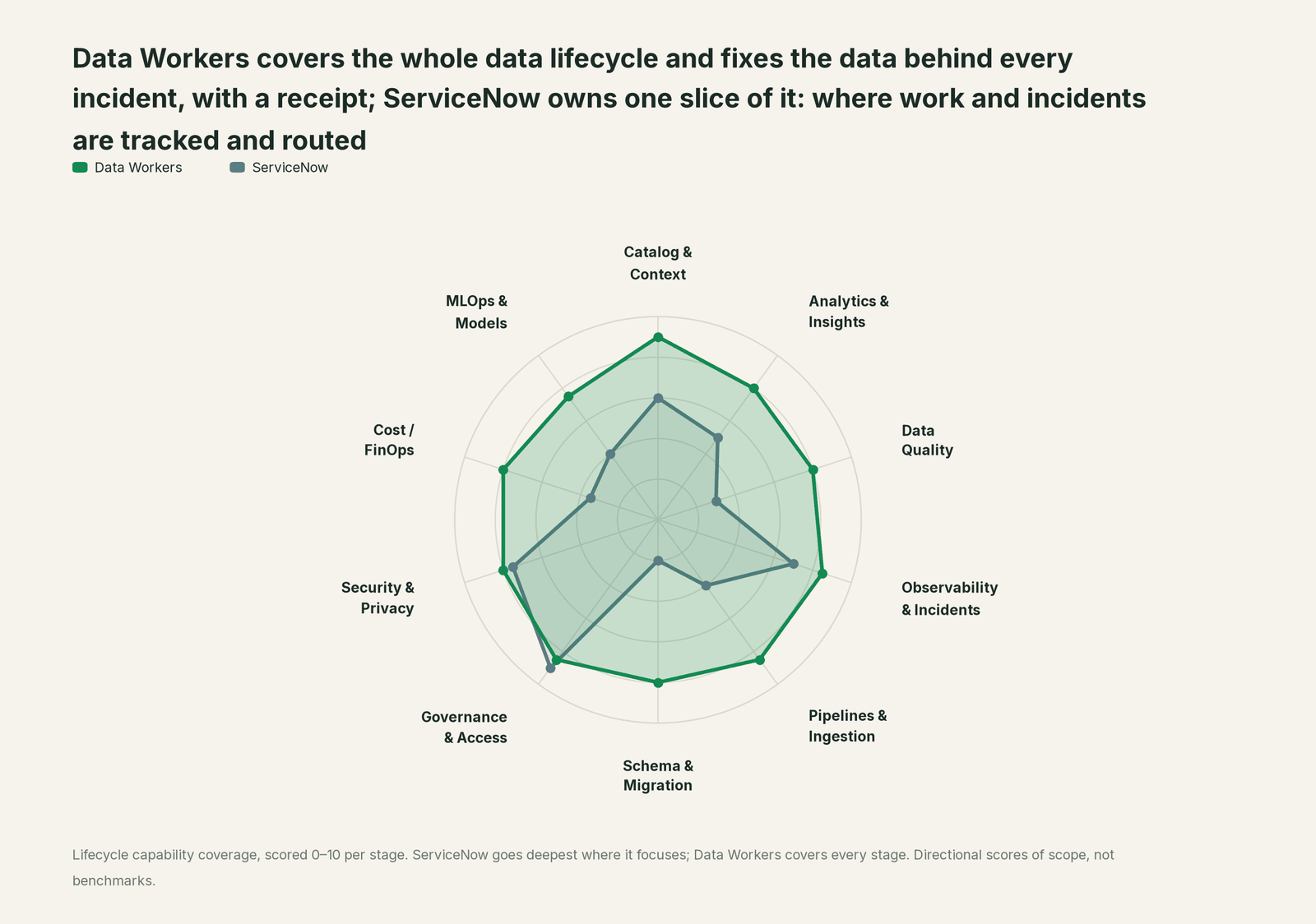
Every tool owns a slice. Data Workers covers the whole lifecycle
ServiceNow owns one slice, and owns it well: work and incidents are tracked and routed there, with strong governance over approvals, access and every AI agent you run. Each point tool adds another console, another contract and another handoff. Data Workers covers the whole lifecycle with one context, one approval flow and one audit trail, and builds on ServiceNow where your teams already work.
| Stage | Data Workers | ServiceNow | Why we scored it this way |
|---|---|---|---|
| Catalog & Context | 9 | 6 | The CMDB maps services and configuration items, and the platform reaches 450+ systems through one data model. Data Workers keeps one governed context graph of tables, models, metrics, owners and lineage across the data estate. |
| Analytics & Insights | 8 | 5 | Reports and dashboards on platform records answer questions about the work itself. Data Workers answers data questions from governed definitions with lineage behind every number. |
| Data Quality | 8 | 3 | Not ServiceNow's job: data quality checks on warehouse tables live outside the platform. Data Workers writes, runs and repairs quality checks and dbt tests. |
| Observability & Incidents | 8.5 | 7 | Strong at the work: ITSM incidents, assignment groups and AI agents that triage and categorize them. Data Workers diagnoses the data incident itself, traces it across systems, fixes and verifies it. |
| Pipelines & Ingestion | 8.5 | 4 | Flows and integrations move records between ServiceNow and other systems. Data Workers builds, reruns and backfills warehouse pipelines, with approvals. |
| Schema & Migration | 8 | 2 | Not ServiceNow's job: warehouse schemas and dbt models sit with the data team. Data Workers catches schema changes, assesses blast radius and plans migrations in parity-checked waves. |
| Governance & Access | 8.5 | 9 | ServiceNow's home stage: approvals, access requests and AI Control Tower governance of every agent, model and MCP server, with an AI Steward review. Data Workers proposes least-privilege grants on the data side. |
| Security & Privacy | 8 | 7.5 | AI Control Tower tracks AI identity and access, blocks prompt injections and has a kill switch. Data Workers leaves a receipt on every data change. |
| Cost / FinOps | 8 | 3.5 | IT asset management and AI value tracking cover licences and AI spend. Data Workers traces Snowflake credits to the dbt model behind them and drafts the fix for its owner. |
| MLOps & Models | 7.5 | 4 | AI Control Tower inventories models and agents as configuration items. Data Workers keeps the data under your own models healthy and connects to MLflow and W&B. |
How ServiceNow and Data Workers work together
ServiceNow stays on top, where incidents are logged and routed and people ask Otto and follow their ticket. Spellbook Data Catalog (in preview) is where the data team looks: each proposed change, who approved it, what it touched and how to roll it back. Between them, Data Context Wizard keeps one governed context graph across Snowflake, dbt, Fivetran and Tableau, the Data-Agents Swarm does the work with more than 20 specialist agents, the Autonomous Data-Conductor runs each fix end to end (detect, diagnose, fix, review, verify, remember), and per-domain guardrails hold approvals, receipts and rollback.
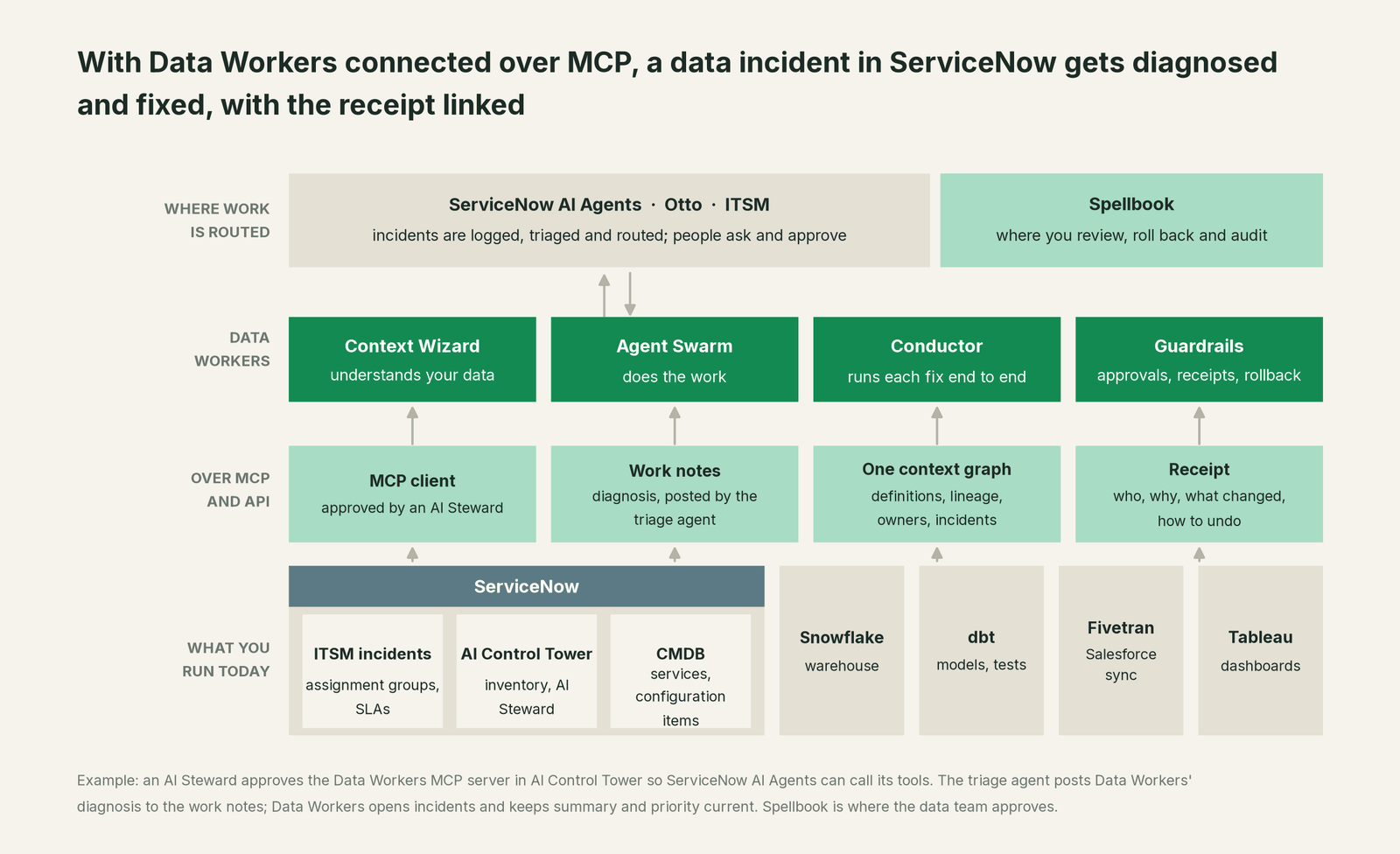
Two directions, both today. Data Workers connects to ServiceNow over its REST API: its ServiceNow connector opens incidents with create_servicenow_ticket and keeps their summary and priority current with update_servicenow_ticket, so a break Data Workers catches first becomes a ticket in the right queue with the cause in its description, and the receipt is linked from Spellbook and the audit trail. Your service agents resolve the incident. In the other direction, ServiceNow AI Agents call Data Workers through ServiceNow's MCP client. ServiceNow runs an MCP server of its own too, and Data Workers offers an opt-in A2A endpoint on the Conductor for teams that connect peer agents through Action Fabric.
Setup. Every Data Workers agent is an MCP server; the client setup guide documents running them from the open-source repository (clone the repo, one start-agent.sh entry per agent). ServiceNow connects to remote servers over HTTPS, so point it at your Data Workers remote endpoint, which serves Streamable HTTP at /mcp and takes an API key (bearer) or OAuth tokens from your identity provider, verified through JWKS. Then connect ServiceNow:
- •An AI Steward adds the Data Workers server in AI Control Tower (AI assets > AI asset inventory > MCP servers > Add), with the server URL, API key authentication and the HTTPS transport. It enters as "In review" until approved.
- •Expose the read tools first:
search_across_platforms,trace_cross_platform_lineage,get_quality_scoreandget_incident_history. - •In AI Agent Studio, add those tools to the incident triage agent for the Data Platform assignment group, with instructions to call them on data incidents and post the result to the work notes.
- •Give Data Workers a ServiceNow integration user scoped to the incident table, so its ServiceNow connector can open incidents and keep their summary and priority current.
- •Later, add the proposal tools (
diagnose_incident,blast_radius_analysis,assess_impact) and, one domain at a time,remediate.
Example: connecting Data Workers to ServiceNow AI Agents
Agents:        dw-context-catalog, dw-incidents, dw-schema, dw-quality,
               dw-connectors
Endpoint:      https://<your-data-workers-host>/mcp   (Streamable HTTP)
Auth:          API key (bearer) configured on the Data Workers endpoint
Approved in:   AI Control Tower > AI asset inventory > MCP servers (AI Steward)
Used by:       the Data Platform triage agent in AI Agent Studio
First tools:   search_across_platforms, trace_cross_platform_lineage,
               get_quality_score, get_incident_history
Write-back:    create_servicenow_ticket; update_servicenow_ticket
               (summary, priority) over the ServiceNow REST API
Later:         diagnose_incident, blast_radius_analysis, assess_impact,
               remediate (one domain at a time)
One request end to end, L0 to L4. The request, as finance types it: "Partner bookings on the weekly dashboard look 18% low." The autonomy ladder is set per domain.

- •L0 manual. The incident lands in the Data Platform queue; an analytics engineer traces Tableau back through dbt to Salesforce by hand.
- •L1 observe. The triage agent calls Data Workers read tools. The work notes show the answer: 41 opportunities in a new stage, dropped by
fct_bookings, with lineage to the dashboard and the commissions export. - •L2 propose. Data Workers proposes the mapping change and a test with the blast radius. Nothing reaches production until the model owner approves in Spellbook and CI passes.
- •L3 act reversibly. For change classes with a proven record, such as rebuilding affected days after an approved mapping change, Data Workers applies the change, re-runs the checks on the changed tables and records the undo for the owner.
- •L4 autonomous. For a scoped domain like stage mappings on the bookings models, Data Workers catches the new value at the sync, fixes it, opens its own incident with
create_servicenow_ticketand links the receipt; your service agent resolves it, and finance never files a ticket.
For the full safety model, read is it safe to let AI agents change production data; for where data and credentials live, read where does our data go. For ServiceNow as your ITSM and incident tool beyond its agents, read you're on ServiceNow. The same server serves every assistant and agent platform your company runs: see you're on Salesforce Agentforce, you're on Microsoft Copilot Studio, you're on Jira Service Management and the hub, AI assistants are rolled out, now what.
What changes for your team
ServiceNow made the work visible and routed. Data Workers gives the data team a crew: data tickets arrive diagnosed and leave with a receipt.
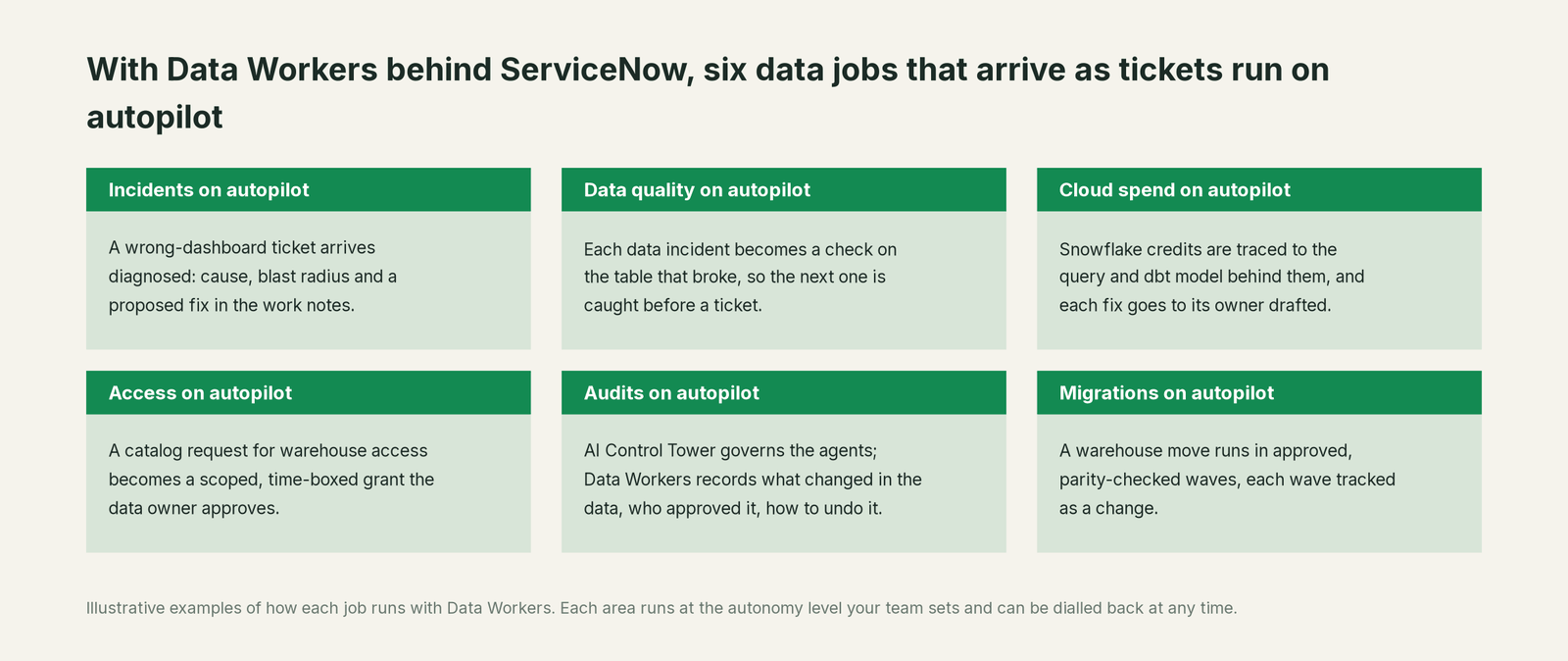
- •Incidents. A wrong-dashboard ticket arrives with the cause, blast radius and proposed fix in the work notes.
- •Data quality. Every data incident becomes a check or dbt test on the table that broke, so the next break is caught first.
- •Cloud spend. Snowflake credits are traced to the query and dbt model behind them, and each fix goes to its owner drafted.
- •Access. A catalog request for warehouse access becomes a scoped, time-boxed grant proposal the data owner approves.
- •Audits. AI Control Tower governs the agents. Data Workers records the other half: what changed in the data, who approved it, why, and how to undo it.
- •Migrations. A warehouse move runs in approved, parity-checked waves, each wave tracked as a change.
Keep ServiceNow, or consolidate?
Keep ServiceNow if you love it; Data Workers works with it from day one. Many teams consolidate once Data Workers runs that slice too.
For nearly every ServiceNow customer the answer is to keep it: your IT, HR and customer work is tracked, routed and audited there. What teams consolidate is the stack around the warehouse: a separate observability tool, a data-quality tool, a catalog nobody keeps current, and the scripts each team wrote to watch its own tables. Those signals now feed one loop that ends on the ServiceNow incident. If you are weighing building this layer yourself on ServiceNow's MCP client, read build it ourselves with Claude Code and MCP servers first; the MCP endpoint is the easy part, and the context graph, approvals and rollback are where the work is.
The case for your CFO
The outcome: you have invested in ServiceNow AI agents to move tickets faster. Data Workers turns the data tickets in that queue from hours of tracing into a diagnosis on arrival and a fix with one approval. Wrong numbers in finance, sales and HR reports get corrected the same morning, with a record of why.
The risk story is plain. AI Control Tower governs which agents run and what they may reach; an AI Steward approves the Data Workers server first. Data Workers governs changes to the data: autonomy per domain from L0 manual to L4 autonomous, each change routed to a named approver, applied reversibly, verified and recorded in a receipt with who approved it, what it touched and how to undo it. Zero migration: ServiceNow, Snowflake, dbt, Fivetran and Tableau stay where they are.
Why now: AI agents route tickets in seconds, so the bottleneck has moved to resolution, and data tickets resolve slowly because the cause sits several systems away. The first win is read tools on the Data Platform triage agent, with every data incident getting a diagnosis in its work notes. What stays the same: your ITSM process, SLAs, change approvals, warehouse permissions and dbt review. For the numbers, see the ROI of agentic data operations. Start with a pilot (pricing); the pilot is credited in full against the first year.
The sentence to repeat upstairs: "ServiceNow routes our data tickets; Data Workers fixes the data behind them, with an approval and a receipt linked from every ticket."
Getting started
Start with a pilot. Pick the Data Platform assignment group, have an AI Steward approve the Data Workers server in AI Control Tower, add the read tools to that group's triage agent, and let every data incident get a diagnosis in its work notes. Then enable the first write class in one domain, such as dbt rebuilds for the finance models. The pilot path and plans are on the pricing page, and the pilot is credited in full against the first year.
FAQ
Does Data Workers have a ServiceNow connector? Yes. Data Workers connects to ServiceNow over its REST API to open incidents and keep their summary and priority current, and ServiceNow AI Agents call Data Workers tools over MCP. The repair happens where the data breaks, in Snowflake, Databricks or BigQuery, dbt, Fivetran and Airflow, which Data Workers connects to directly.
Who approves the Data Workers MCP server in ServiceNow? An AI Steward in AI Control Tower. A new MCP server enters the AI asset inventory "In review" until approved. On the Data Workers side, every write has its own named approver.
Can a ServiceNow AI agent trigger a change to our warehouse? Only through the tools you expose to that agent in AI Agent Studio. Start with read tools. When you add remediate for a domain, each change still has a blast radius, a named approver, a rollback path and a receipt, so two locks guard every write: ServiceNow's governance of the agent and Data Workers' guardrail on the data.
What does the receipt contain? It lives in Spellbook and the audit trail, linked from the incident. It holds the cause, the diff, who approved it and when, what it touched downstream, how it was verified and how to undo it. An auditor can read it without a data background.
Does this replace our incident or observability tools? ServiceNow stays the system of record for the ticket. Data Workers detects and fixes data breaks itself, and many teams retire separate data observability and data-quality tools once that loop runs.
Where does our data go? Data Workers acts on your warehouse and pipelines through the connections you configure, scoped per domain, and writes back only the incident's summary and priority. For details, read where does our data go.
Sources
- •ServiceNow, AI Agents (AI Agent Studio, AI Agent Orchestrator, agentic workflows, Action Fabric, A2A, MCP client, ServiceNow Otto), https://www.servicenow.com/products/ai-agents.html (checked Oct 2, 2026)
- •ServiceNow, ServiceNow AI Platform (Otto, 450+ systems, RaptorDB, CMDB, Autonomous Workforce and the L1 Service Desk AI Specialist), https://www.servicenow.com/platform.html (checked Oct 2, 2026)
- •ServiceNow Docs, available versions and patches (Zurich, Australia; Brazil feature early availability Sept 24, 2026), https://www.servicenow.com/docs/r/release-notes/available-versions.html (checked Oct 2, 2026)
- •ServiceNow, AI Control Tower (inventory of agents, models and MCP servers, kill switch, prompt-injection blocking), https://www.servicenow.com/products/ai-control-tower.html (checked Oct 2, 2026)
- •ServiceNow Docs, Add an MCP server from MCP Catalog (Zurich, updated Sept 3, 2026), https://www.servicenow.com/docs/r/zurich/intelligent-experiences/aict-add-an-mcp-server-from-mcp-catalog.html (checked Oct 2, 2026)
- •ServiceNow Docs, Add a Global MCP client (AI Control Tower > Configurations > AI Gateway; Brazil, Sept 10, 2026), https://www.servicenow.com/docs/r/intelligent-experiences/ai-control-tower/add-a-global-mcp-client.html (checked Oct 2, 2026)
- •ServiceNow Docs, Now Assist skill support in MCP Server Console (Brazil, Sept 10, 2026), https://www.servicenow.com/docs/r/intelligent-experiences/now-assist-skill-support-mcp.html (checked Oct 2, 2026)
- •ServiceNow Community, Try the Now Assist AI Agent MCP client (MCP client authentication options), https://www.servicenow.com/community/servicenow-otto-articles/try-the-now-assist-ai-agent-mcp-client-with-these-official-mcp/ta-p/3391677 (checked Oct 2, 2026)
- •Data Workers open-source repository (ServiceNow tools in dw-connectors; tool registrations in dw-context-catalog, dw-incidents, dw-schema, dw-quality), https://github.com/DataWorkersProject/dataworkers-claw-community (checked Oct 2, 2026)
- •Data Workers client setup guide, https://dataworkers.io/opensource-docs/client-setup/ (checked Oct 2, 2026)