You're on Datadog: It Sees the Data Incident. Data Workers Fixes It and Proves the Fix
Datadog Data Observability and Bits Investigation see the broken pipeline. Data Workers diagnoses the data incident, fixes it with approval and verifies it.
Your engineering org lives in Datadog. Services have monitors, on-call rotations run through Datadog On-Call, incidents are declared in Incident Management, and since Datadog acquired Metaplane (announced April 23, 2025) your data team has its own corner too: Data Observability, with Quality Monitoring on Snowflake, Databricks, BigQuery and Redshift tables, Data Observability: Jobs Monitoring on Airflow, dbt, Databricks and Spark runs, column-level lineage and a Data Catalog. When a monitor set to Auto-Investigate fires at 2 a.m., Bits Investigation (announced as Bits AI SRE in June 2025, generally available since December 2, 2025, renamed in 2026) starts forming hypotheses before anyone opens a laptop. Datadog is where incidents are seen and coordinated. Data Workers is where data incidents get diagnosed, fixed and verified.
Datadog will tell you the dbt Cloud run failed and fct_daily_revenue is stale. Somebody still has to find the duplicate rows in Snowflake, get them out safely, rerun the job and check the numbers finance reads at 9 a.m. Data Workers does that work, with a named approver and a receipt, and hands the incident back to Datadog resolved.
Key takeaways
- •Datadog keeps its job. Monitors, Data Observability, Bits Investigation, On-Call and Incident Management stay where they are.
- •The alert arrives with a fix attached. Data Workers reads Datadog monitors and metrics over its API, traces the break across Airflow, dbt Cloud, Snowflake and Looker, and proposes the repair with its blast radius.
- •Every data change has an owner and a receipt. A named data owner approves in Spellbook, Data Workers runs the reruns and backfills through your orchestrator and verifies the numbers, and the on-call resolves the Datadog incident with the receipt linked.
- •Two MCP servers, one client. Run Data Workers beside the Datadog MCP Server in Claude Code, Cursor or Codex: Datadog answers what fired, Data Workers fixes what broke in the data.
- •Autonomy per domain. Each data domain climbs from L0 manual to L4 autonomous at the pace your team sets.
Datadog is where incidents are seen and coordinated. Data Workers is where data incidents get diagnosed, fixed and verified.
Datadog is the smoke alarm, and a very good one: it sees the job, the table and the service at once. Data Workers is the crew that goes into the warehouse. Here is a Tuesday with both in place, across Airflow, dbt Cloud, Datadog, Snowflake and Looker. This is an illustration, not a customer case.
| Time | System | What happens |
|---|---|---|
| Tue 01:40 | Airflow | The load_payments DAG's insert task times out halfway through a batch; the automatic retry reloads the whole batch, and the DAG run ends green |
| 02:30 | dbt Cloud | The nightly job fails the unique test on stg_payments, so fct_daily_revenue is not rebuilt |
| 02:31 | Datadog Jobs Monitoring | Alerts on the failed dbt Cloud run; the notification lands in #data-alerts |
| 06:00 | Datadog Quality Monitoring | The freshness monitor on fct_daily_revenue alerts; the on-call declares a Datadog incident |
| 06:04 | Datadog Bits Investigation | The on-call asks Bits in the Slack thread; it links the dbt failure to the Airflow retry using job traces and logs |
| 06:06 | Data Workers | Reads the alerting monitor, finds 18,240 payment rows inserted twice by the retry, and maps the blast radius: three dbt models, the finance Explore in Looker and the daily revenue dashboard |
| 06:12 | Data Workers | Proposes the fix: a cleanup that removes the duplicate batch with the removed rows kept for rollback, a dbt Cloud rerun, and a diff that makes the load task idempotent for the DAG owner to merge |
| 06:40 | Spellbook | The finance data owner reviews the proposed cleanup and the rows it touches, approves it and applies it in Snowflake |
| 07:05 | dbt Cloud | The owner reruns the approved dbt Cloud job; the unique test passes and fct_daily_revenue rebuilds |
| 07:20 | Looker | Data Workers verifies daily revenue against the payments source and the load against its monitor_metrics baseline; both pass |
| 07:25 | Datadog | The freshness monitor recovers; the on-call resolves the incident with the receipt linked |
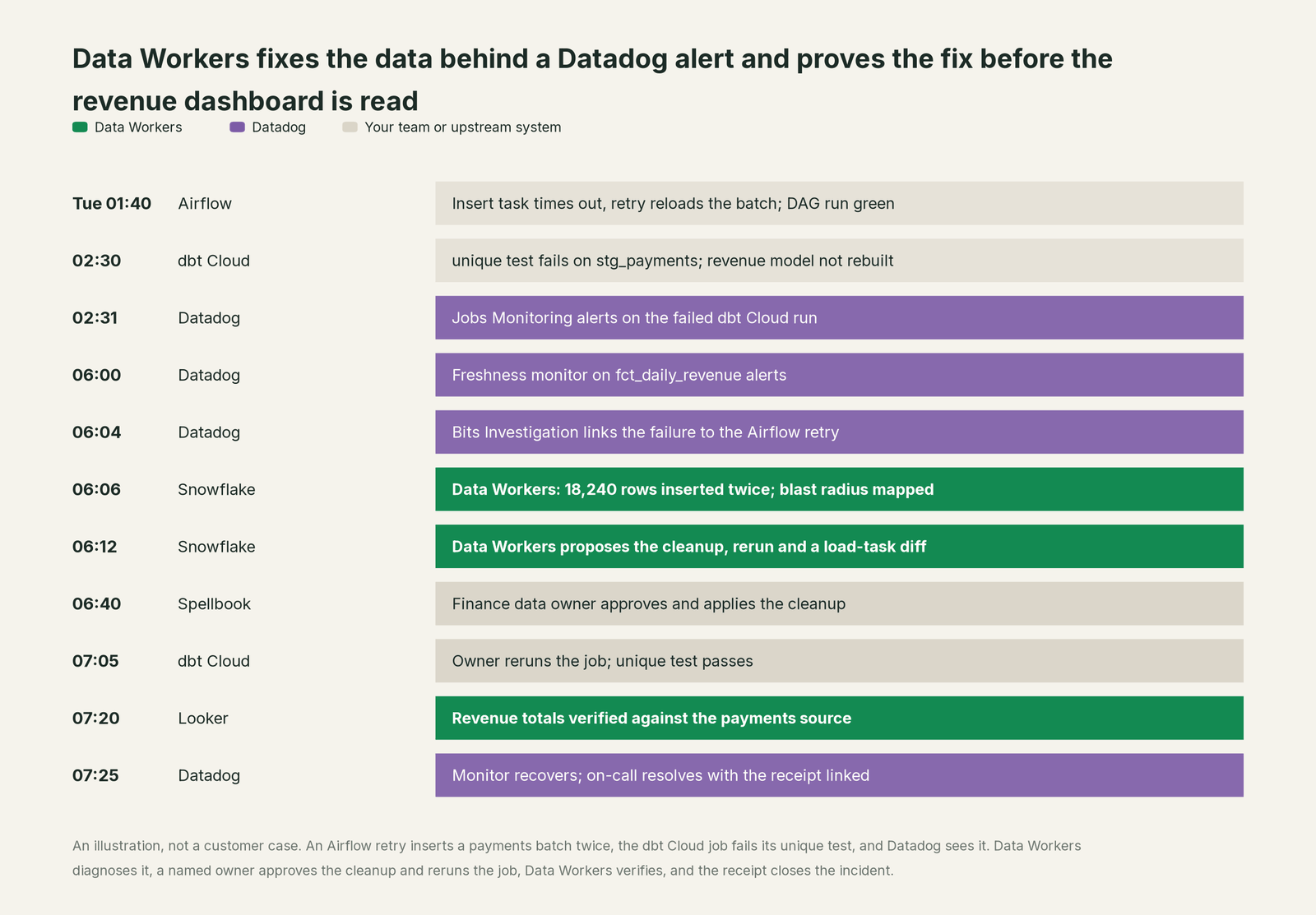
Datadog did everything it was built to do: it caught the failed run within a minute, flagged the stale table and pointed Bits at the right upstream job. What changed is the next step: the cause was down to the row by 06:06, the repair went through one approval, and finance opened a correct dashboard with a record of what changed.
| Job | What Datadog does | What Data Workers does |
|---|---|---|
| Detection | Quality and Jobs Monitoring alert on freshness, row counts, column metrics and failed runs | Watches freshness, volume and schema itself, so many breaks are caught before a monitor fires |
| Coordination | On-Call pages the right person; Incident Management holds the timeline | Joins the incident with a diagnosis instead of another question |
| Investigation | Bits Investigation correlates telemetry, traces and logs into a root-cause hypothesis | Traces the break into the data itself: which rows, which models, which dashboards, which owners |
| The fix | Bits Remediation prepares code fixes as pull requests and, in Preview, Kubernetes actions | Proposes the data change (cleanup with its rollback, backfill, rerun, schema change) with blast radius, routes it to a named owner and runs reruns and backfills through your orchestrator |
| Verification | Monitors recover; Verify Resolution checks that a Bits action applied and the issue cleared | Checks the numbers: duplicates gone, load on its baseline, totals match the source |
| The record | Audit Trail and the incident timeline | A receipt for the data change: who approved it, what it touched, how it was verified, how to undo it |
Why doesn't Datadog just do this itself?
Because Datadog built its AI around the systems it observes, the right focus for a platform that watches every service you run, and its remediation path is well guarded. Bits Remediation, which includes capabilities in Preview, hands code-related root causes to Bits Code, and you create the pull request "for review and merge". Infrastructure actions such as restarting a pod or scaling a deployment run in Preview through a Private Action Runner, and Bits Guardrails (also Preview) let admins set each action to Ask, with chosen approvers, or Deny. The Datadog MCP Server checks write permissions such as monitors_write on every call and rejects a read-only user's write.
On the data side, Datadog connects to your warehouse to monitor it. In the MCP Server's data-observability toolset, the only write tools set tags and descriptions on data entities; the rest read lineage, monitor status, query history, Spark job health and recommendations. That is a sensible line. A data fix is a different job with a different liability: the duplicate rows come out of a production payments table with a saved undo, the owner of that table approves, lineage shows every model and dashboard that reads it, the dbt Cloud job reruns, and someone checks the numbers and writes a receipt an auditor can read. Data Workers is built for that job.
Every tool owns a slice. Data Workers covers the whole lifecycle
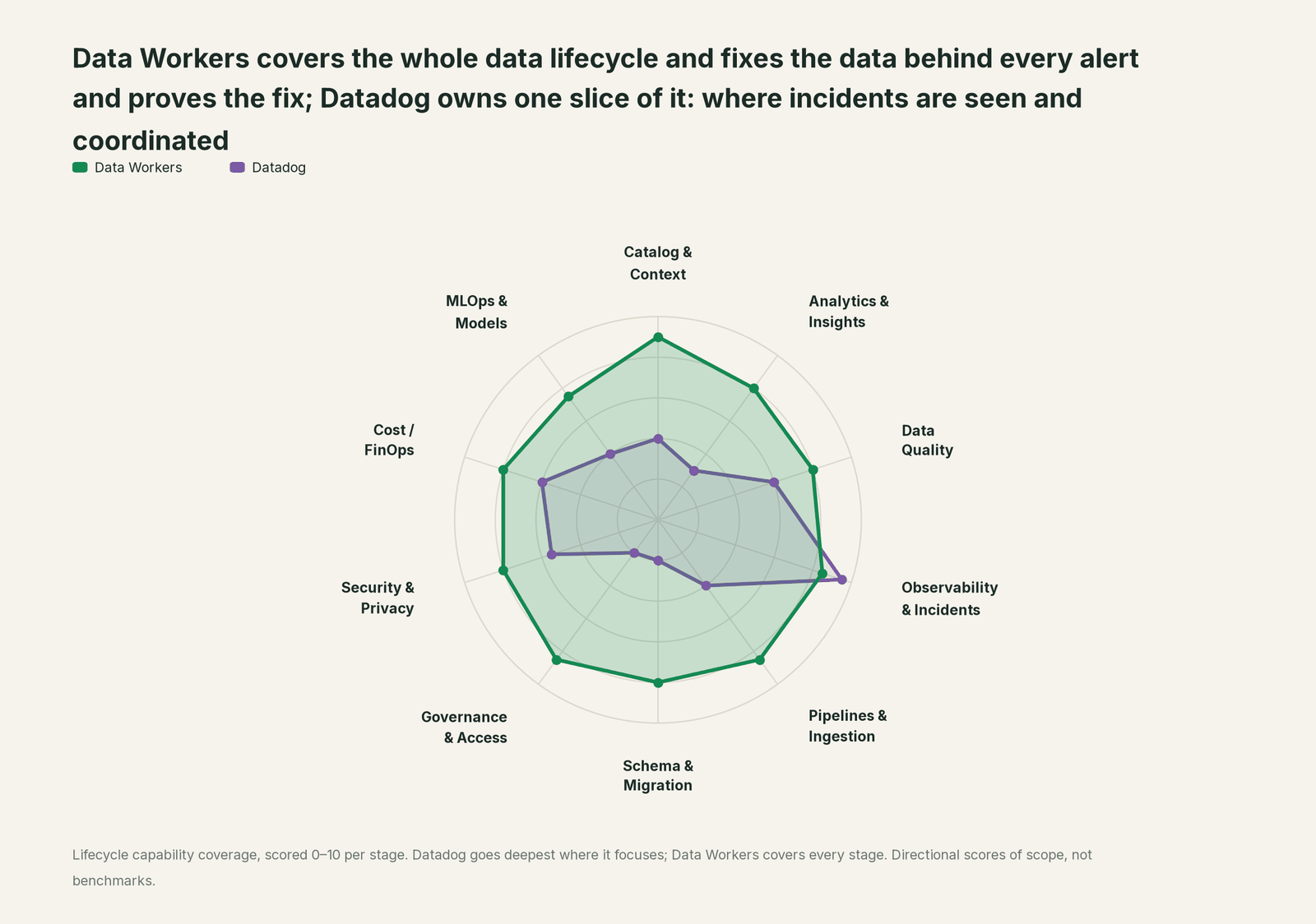
Datadog owns one slice and owns it well: incidents are seen and coordinated there, data incidents included. Each point tool adds another console, another contract and another handoff. Data Workers covers the whole lifecycle with one context, one approval flow and one audit trail, and builds on Datadog where your engineers already look.
| Stage | Data Workers | Datadog | Why we scored it this way |
|---|---|---|---|
| Catalog & Context | 9 | 4 | Data Observability includes a Data Catalog and column-level lineage for warehouse tables and jobs. Data Workers keeps one governed context graph of definitions, owners, lineage, quality and usage across every platform. |
| Analytics & Insights | 8 | 3 | Dashboards and notebooks answer questions about systems, and Bits Data Analysis queries business data in natural language. Data Workers answers data questions from governed definitions with lineage behind every number. |
| Data Quality | 8 | 6 | Quality Monitoring watches freshness, row counts and column metrics on Snowflake, Databricks, BigQuery and Redshift tables. Data Workers also writes, runs and repairs the checks and the dbt tests behind them. |
| Observability & Incidents | 8.5 | 9.5 | Datadog's home stage: monitors, Incident Management, On-Call, Jobs Monitoring and Bits Investigation, which investigates alerts on its own. Data Workers diagnoses the data incident across lineage, fixes it with approval and verifies it. |
| Pipelines & Ingestion | 8.5 | 4 | Jobs Monitoring sees Airflow, dbt, Databricks, Glue and Spark runs fail or slow down. Data Workers reruns, backfills and repairs the pipeline, with approvals. |
| Schema & Migration | 8 | 2 | Lineage shows what a dropped table would break, and DO CI/CD checks changes before merge. Data Workers catches schema changes, scores their blast radius and plans migrations in waves. |
| Governance & Access | 8.5 | 2 | Role-based access governs who sees what in Datadog. Data Workers runs the warehouse access request queue with time-bound, approved grants. |
| Security & Privacy | 8 | 5.5 | Cloud SIEM and Bits Security Analyst cover threats across your cloud. Data Workers' pull request review flags new columns whose names or annotations look sensitive, and leaves a receipt on every data change. |
| Cost / FinOps | 8 | 6 | Cloud Cost Management and DO recommendations cover Spark, Databricks, Snowflake and BigQuery jobs. Data Workers traces Snowflake credits to the dbt model behind them and drafts the fix for its owner. |
| MLOps & Models | 7.5 | 4 | LLM and agent observability watch AI applications in production. Data Workers keeps the data under your models fresh and correct. |
Datadog leads where it should. For the general comparison with data observability tools, read Data Workers vs data observability; for the Monte Carlo view, read Monte Carlo vs Data Workers.
How Datadog and Data Workers work together
Datadog stays on top, where monitors alert and Bits investigates. Spellbook Data Catalog (in preview) is where the data team looks: each proposed change, who approved it and how to roll it back. Between them, Data Context Wizard keeps one governed context graph across Snowflake, dbt Cloud, Airflow and Looker, the Data-Agents Swarm does the work with 20 specialist agents, the Autonomous Data-Conductor runs each fix end to end (detect, diagnose, fix, review, verify, remember), and per-domain guardrails hold approvals, receipts and rollback.
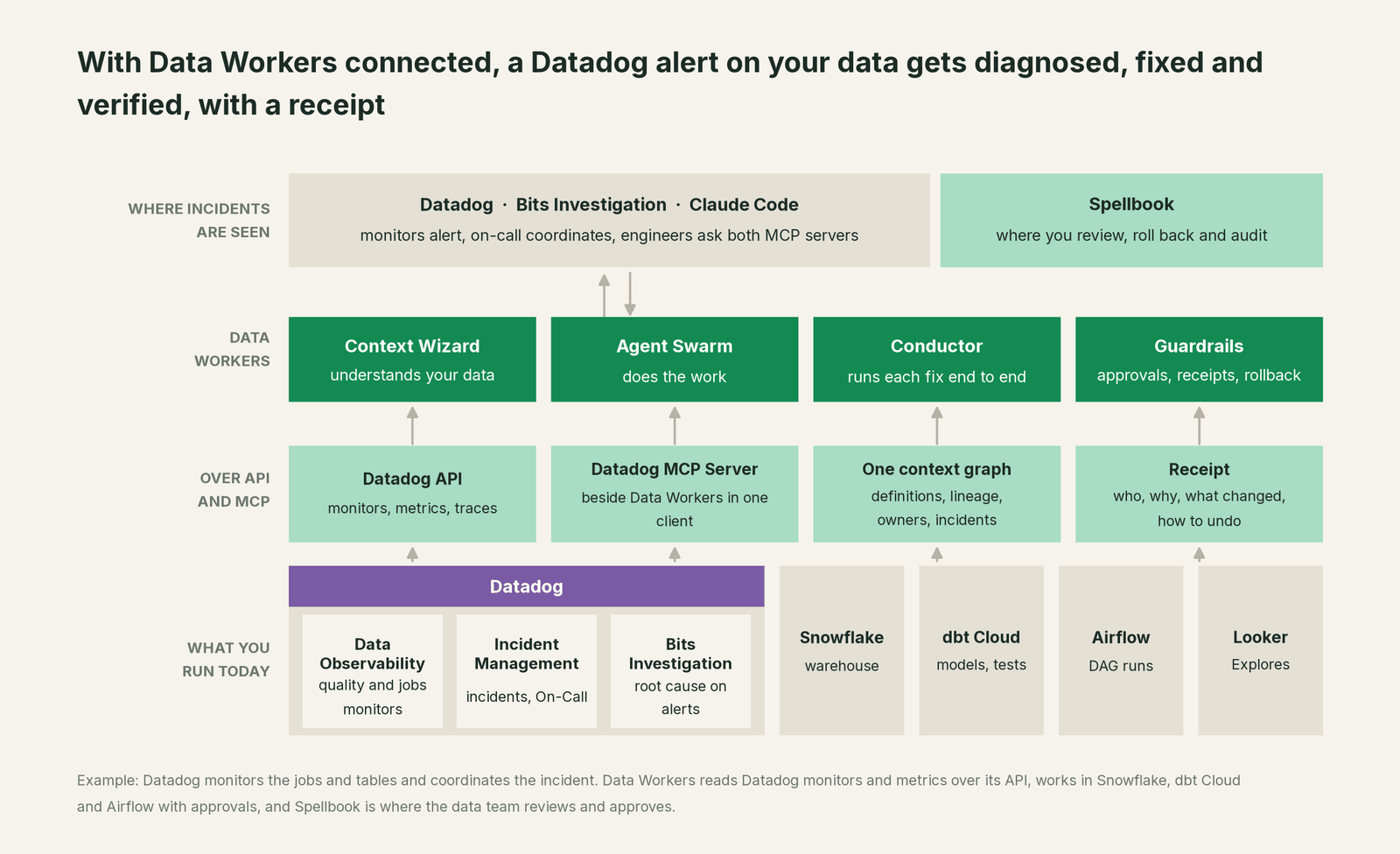
Datadog to Data Workers, natively. Data Workers connects natively to Datadog over its API and reads monitors, metrics and traces. An alerting monitor on a data job or table starts a diagnosis: diagnose_incident and get_root_cause work through the evidence, trace_cross_platform_lineage and blast_radius_analysis map everything downstream, and get_incident_history checks for repeats. Fixes run through remediate (playbooks such as restart_task and backfill_data), verification uses run_quality_check and monitor_metrics, and every step lands in get_audit_trail.
Data Workers to Datadog. Point Data Workers at an OpenTelemetry (OTLP) endpoint and it emits a span for every agent tool call, which Datadog ingests like any other trace, so SREs watch the data agents where they watch every other service.
Side by side in one client. Add Data Workers beside the Datadog MCP Server. Every Data Workers agent is an MCP server; the client setup guide documents the path: clone the open-source repo and add one start-agent.sh entry per agent.
# Example: Datadog MCP Server plus Data Workers in Claude Code
# Use the Datadog MCP endpoint for your Datadog site, from Datadog's setup docs
claude mcp add --transport http datadog-mcp "<YOUR_DATADOG_MCP_ENDPOINT>?toolsets=core,data-observability"

# Data Workers agents over stdio, from a clone of the open-source repo
claude mcp add --scope user dw-catalog -- "$(pwd)/start-agent.sh" dw-context-catalog
claude mcp add --scope user dw-incidents -- "$(pwd)/start-agent.sh" dw-incidents
claude mcp add --scope user dw-quality -- "$(pwd)/start-agent.sh" dw-quality
Ask "why is fct_daily_revenue stale?" and the client calls both: Datadog returns the failed run and the alerting monitor, Data Workers returns the duplicate rows, the blast radius and a proposed fix. Datadog checks its own permissions on its own tools, and Data Workers' guardrail decides whether a data change may run in that domain, with a named approver. For a shared endpoint, the Data Workers remote server serves /mcp with an API key (bearer) or OAuth tokens from your identity provider, verified through JWKS.
One alert, L0 to L4. The same freshness alert on fct_daily_revenue, at each level of the autonomy ladder, set per domain.

- •L0 manual. The on-call reads Bits Investigation and fixes Snowflake by hand.
- •L1 observe. Data Workers posts the diagnosis to the thread: the duplicate batch, the affected models and dashboards. Nothing changes.
- •L2 propose. Data Workers proposes the cleanup, the rerun and the load-task diff. Nothing runs until the finance data owner approves in Spellbook.
- •L3 act reversibly. For change classes with a proven record, such as restarting a failed load task or backfilling a partition, Data Workers applies the fix through the orchestrator, verifies it and records the receipt.
- •L4 autonomous. For a scoped domain such as failed raw payment loads, Data Workers restarts, backfills and verifies before the dbt run, then posts the receipt. The Datadog monitor never fires.
For the safety model, read is it safe to let AI agents change production data, how approvals work and autonomy levels L0 to L4. On where data lives: the agents run in your infrastructure, your data stays in your systems, and the hosted Conductor sees workflow metadata only.
What changes for your team
Datadog made every incident visible. Data Workers gives the data team a crew.
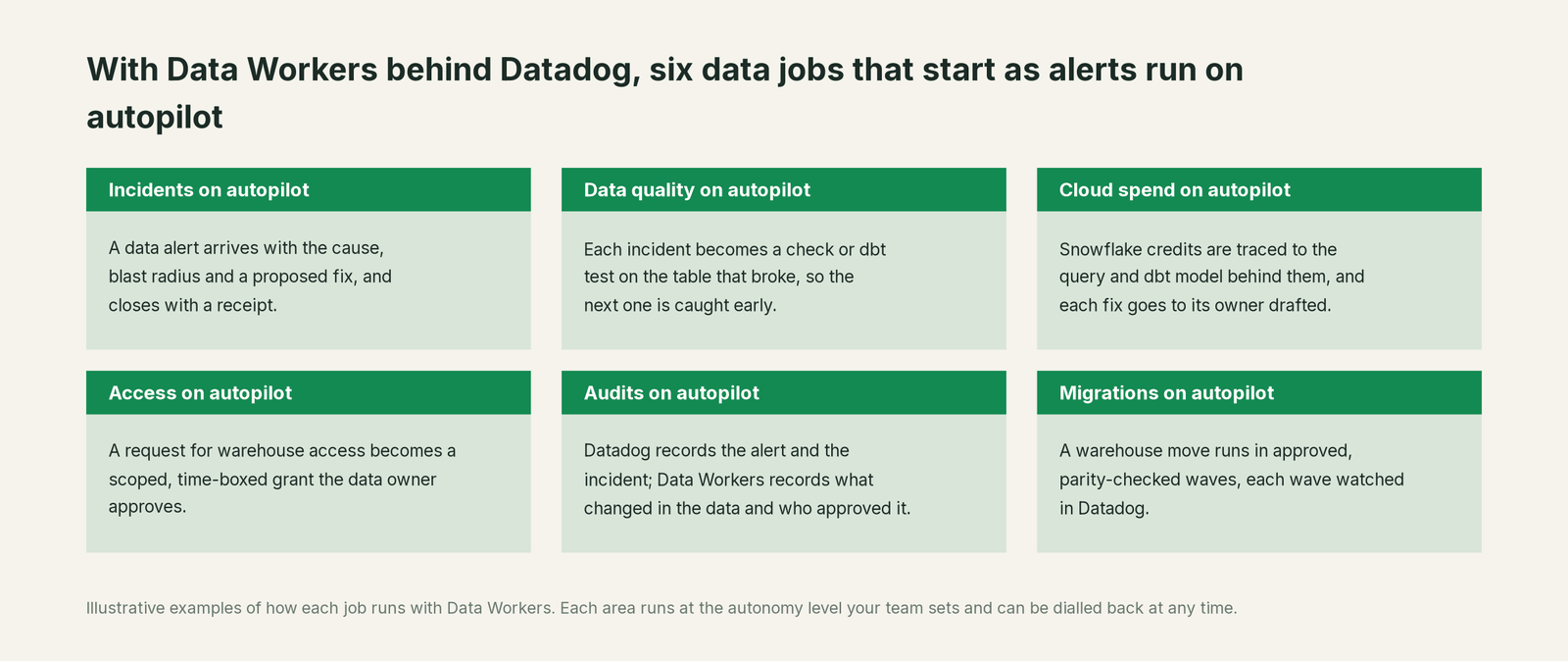
- •Incidents. A data alert arrives in the Datadog incident thread with the cause, the blast radius and a proposed fix, and closes with a receipt.
- •Data quality. Each incident becomes a check or dbt test on the table that broke, so the next one is caught before a monitor fires.
- •Cloud spend. Snowflake credits are traced to the query and dbt model behind them, and each fix goes to its owner drafted.
- •Access. A request for warehouse access becomes a scoped, time-boxed grant the data owner approves.
- •Audits. Datadog's Audit Trail records who did what in Datadog; Data Workers records what changed in the data, who approved it and how to undo it.
- •Migrations. A warehouse move runs in approved, parity-checked waves, with each wave watched in Datadog.
The on-call rotation changes most. See the data incident response playbook, automated Airflow task failure analysis and who owns the agents.
Keep Datadog, or consolidate?
Keep Datadog if you love it; Data Workers works with it from day one. Many teams consolidate once Data Workers runs that slice too.
For almost every Datadog customer the answer is to keep it: services, on-call and incidents run there. What teams consolidate is the stack around the warehouse: a second data observability contract, a data-quality tool, a catalog nobody keeps current and per-team scripts that watch tables. If you are weighing building this layer on the Datadog MCP Server and a coding agent, read build it ourselves with Claude Code and MCP servers: the MCP calls are the easy part; the context graph, approvals and rollback are the work. For the leader's version of this page, read Datadog for data leaders. The same pattern holds across the incident stack: see you're on PagerDuty, you're on ServiceNow and you're on incident.io, and the full list in Data Workers integrations.
The case for your CFO
The outcome: you already pay Datadog to see incidents early, including data incidents. Data Workers turns those alerts from a morning of tracing and hand-written SQL into a diagnosis on arrival and a fix with one approval, so the revenue and payments numbers the business reads are right before anyone opens them.
The risk story is plain. Autonomy is set per domain: at L1 Data Workers only reads; at L2 it changes nothing until a named person approves; at L3 it applies changes it can undo. An unanswered approval request expires and escalates, never auto-grants. No agent can promote its own work. Every change carries a receipt: the cause, the diff, who approved it, what it touched downstream, how it was verified and how to undo it. An org-wide stop halts all autonomous dispatch. Zero migration: Datadog, Snowflake, dbt Cloud, Airflow and Looker stay where they are.
Why now: Bits Investigation starts on the root cause as soon as a monitor alerts, so the bottleneck has moved to the fix, and data fixes are slow because they touch production tables several systems away. The first win is read-only: every data alert in one domain, such as finance, gets a diagnosis and a blast radius in the incident thread. What stays the same: your monitors, on-call rotations, incident process, warehouse permissions and dbt review. For the numbers, see the ROI of agentic data operations.
The sentence to repeat upstairs: "Datadog tells us the data broke; Data Workers fixes it, with an approval and a receipt for every change."
Getting started
Start with a pilot. Pick one domain whose alerts already live in Datadog, such as the finance tables behind the revenue dashboard, connect Data Workers to Datadog, Snowflake, dbt Cloud and Airflow, and run at L1 so every data alert gets a diagnosis and a blast radius in the incident thread. Then turn on the first write class at L2, such as reruns and backfills with owner approval. The pilot path and plans are on the pricing page, and the pilot is credited in full against the first year.
FAQ
Does Data Workers have a Datadog connector? Yes. Data Workers connects natively to Datadog over its API and reads monitors, metrics and traces. It also emits OpenTelemetry spans for its own agent activity that Datadog ingests, and it runs beside the Datadog MCP Server in clients such as Claude Code, Cursor and Codex.
We already have Datadog Data Observability. Why add Data Workers? Data Observability tells you a table is stale or a job failed, with lineage to route it to the right owner. Data Workers takes it from there: it diagnoses the break, proposes the fix with its blast radius, runs it after a named owner approves, and verifies the numbers.
How is this different from Bits Investigation and Bits Remediation? Bits Investigation finds the root cause across your telemetry, and Bits Remediation turns it into a code pull request or, in Preview, an infrastructure action such as restarting a pod, governed by Bits Guardrails. Data Workers works on the data itself: cleaning up a duplicate batch, backfilling a partition, rerunning a dbt job, proposing a schema change, each with approval, rollback and a receipt. The two fit together in the same incident.
Does Data Workers change anything in our Datadog account? No. Data Workers reads Datadog monitors, metrics and traces, and its changes happen in your data systems. The on-call resolves the Datadog incident with the Data Workers receipt linked. Writes through the Datadog MCP Server stay under Datadog's own permission checks, and every MCP tool call is recorded in Datadog's Audit Trail.
Where does Metaplane fit now? Datadog announced its acquisition of Metaplane on April 23, 2025, and Data Observability is where Metaplane's ML-powered monitoring and column-level lineage now live. The split on this page holds: Datadog detects and routes, Data Workers diagnoses, fixes and verifies.
Sources
- •Datadog Docs, Data Observability overview, https://docs.datadoghq.com/data_observability/ (checked Oct 2, 2026)
- •Datadog Docs, Quality Monitoring, https://docs.datadoghq.com/data_observability/quality_monitoring/ (checked Oct 2, 2026)
- •Datadog Docs, Data Observability: Jobs Monitoring, https://docs.datadoghq.com/data_jobs/ (checked Oct 2, 2026)
- •Datadog Docs, Jobs Monitoring for dbt, https://docs.datadoghq.com/data_observability/jobs_monitoring/dbt/ (checked Oct 2, 2026)
- •Datadog press release, Datadog Brings Observability to Data Teams by Acquiring Metaplane (April 23, 2025), https://www.datadoghq.com/about/latest-news/press-releases/datadog-metaplane-aquistion/ (checked Oct 2, 2026)
- •Datadog Docs, Bits AI, https://docs.datadoghq.com/bits_ai/ (checked Oct 2, 2026)
- •Datadog Docs, Bits Investigation: Investigate Issues, https://docs.datadoghq.com/bits_ai/bits_investigation/investigate_issues/ (checked Oct 2, 2026)
- •Datadog blog, Introducing Bits Investigation, your AI on-call teammate (Jun 10, 2025; GA Dec 2, 2025; titled "Bits AI SRE" until mid-2026 per Internet Archive captures), https://www.datadoghq.com/blog/bits-ai-sre/ (checked Oct 2, 2026)
- •Datadog blog, Meet the new Bits Investigation: Deeper reasoning, twice as fast (Mar 5, 2026), https://www.datadoghq.com/blog/bits-ai-sre-deeper-reasoning/ (checked Oct 2, 2026)
- •Datadog Docs, Bits Remediation (Preview capabilities, Guardrails, Verify Resolution), https://docs.datadoghq.com/bits_ai/bits_remediation/ (checked Oct 2, 2026)
- •Datadog Docs, Datadog MCP Server, https://docs.datadoghq.com/bits_ai/mcp_server/ (checked Oct 2, 2026)
- •Datadog Docs, Datadog MCP Server Tools (
data-observabilityandinvestigatortoolsets), https://docs.datadoghq.com/mcp_server/tools/ (checked Oct 2, 2026) - •Datadog Docs, Set Up the Datadog MCP Server, https://docs.datadoghq.com/mcp_server/setup/ (checked Oct 2, 2026)
- •Data Workers open-source repository, https://github.com/DataWorkersProject/dataworkers-claw-community (checked Oct 2, 2026)
- •Data Workers client setup guide, https://dataworkers.io/opensource-docs/client-setup/ (checked Oct 2, 2026)
- •Data Workers, Data-Agents Swarm (20 specialised agents), https://dataworkers.io/product/data-agents-swarm/ (checked Oct 2, 2026)