Run the data back office from one chat box
Asking for data work, approving it and checking what the agents did usually takes five tools and a ticket queue. Data Workers puts the ask, the approval and the record in one conversation, in Slack or the browser, with a named approver on every change. The chat box is in preview.
Before and after
| Today | With Data Workers |
|---|---|
| The catalog, the pipeline tool, the ticket queue, Slack alerts and the audit export are five separate places | One conversation reaches the catalog, the pipelines and the approvals |
| A request for data work becomes a ticket that someone has to translate | Ask in plain language, in Slack or the browser |
| Approvals are scattered across email, tickets and direct messages | The owner gets the request with what will change, why, and how to undo it |
| "What did the automation change last night?" means digging through logs | Ask, and see what the agents did and who approved it |
| Autonomy is decided tool by tool, or not at all | The owner of each domain sets how much the agents do, in the same place |
A chat-with-data tool answers questions about the warehouse and stops there. Much of the data back office is not questions: it is requests, approvals and records, spread across the tools your team already runs. The chat box is in preview, and it is built to be the one place where work is asked for, approved and checked, sitting on a governed semantic layer so the answers start from the right tables. For the Slack side on its own, see keeping decisions in the channel.
How it works
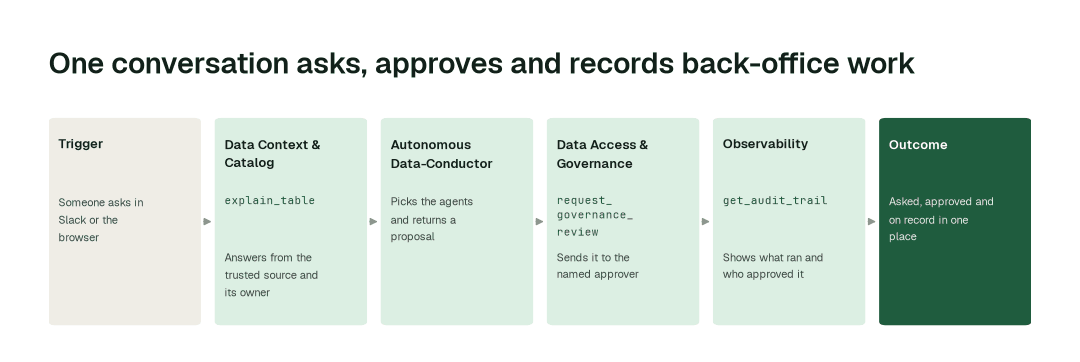
1. Ask in plain language
In Slack or in the browser, someone asks about the data ("which table is the source of truth for revenue, and who owns it?") or asks for work ("retire the unused tables in the sandbox schema"). The Data Context & Catalog agent answers questions with explain_table and get_context, from the shared understanding of your estate: what each table means, where it comes from, who owns it and which copy is trusted. Any of the agents in the swarm can be reached from the same conversation.
2. See the proposal first
The Autonomous Data-Conductor decides which agents should act and keeps the work inside the autonomy that domain allows. A request for work comes back as a proposal, not as a change. Every proposal shows the full change, what it would affect and how to undo it.
3. Approve, then check the record
request_governance_review sends the proposal to the named owner, who approves in the flow of work instead of a ticket queue. Every approved change carries a signed record in the tamper-evident audit trail, and the highest-risk changes need a second approver. Anyone can later ask what the agents did and who approved it, and get_audit_trail answers from the same record.
The impact metrics we move
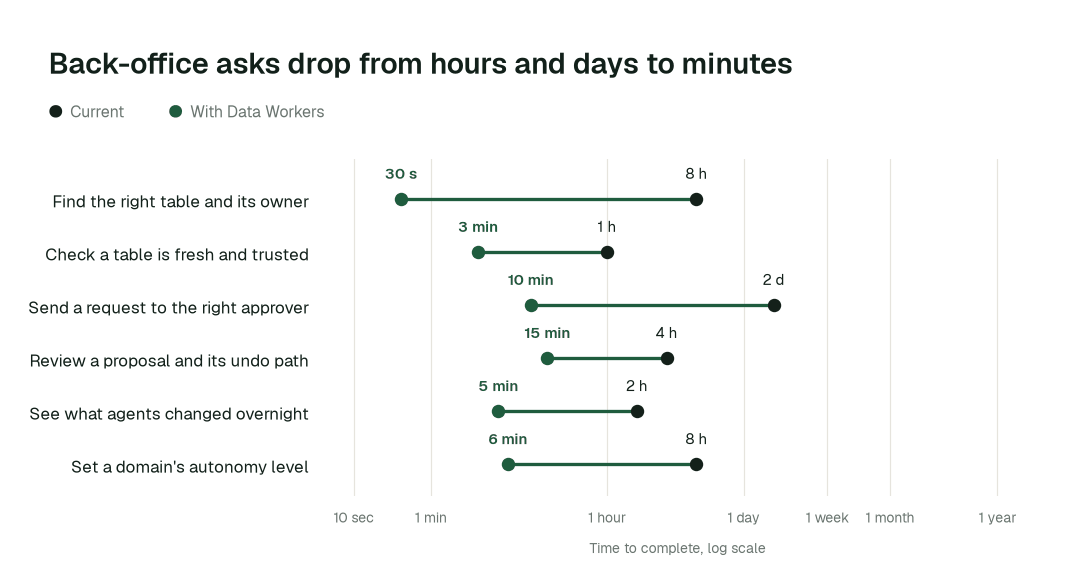
- •Finding the right table and its owner: from about 8 h to 30 s
- •A request reaching its approver: from about 2 days to 10 min
- •"What did the agents change, and who approved it?": from about 2 h to 5 min
Where teams start
- •A channel for the platform team. Ask about tables, owners and freshness in the Slack channel where the team already talks.
- •Source-of-truth questions. "Which table do we use for churn?" answered with the owner, not a thread.
- •The morning review. Ask what the agents did overnight and who approved it, before standup.
- •Analyst requests. Asks for access or a new definition that today go to the ticket queue, routed to the owner (see zero-ticket data access).
- •One domain's autonomy. The domain owner sets it to suggest, reads the proposals for a few weeks, then decides whether to raise it.
What powers it
The chat box sits on the Spellbook Data Catalog and the Autonomous Data-Conductor, and it runs on the model you choose. The Data Context Wizard supplies the shared context behind every answer, and the Data Context & Catalog, Data Access & Governance and Observability agents do the work; any other agent in the Data-Agents Swarm can be reached from the same conversation. Autopilot Routines, Missions and Standards send their proposals through the same approvals and audit trail. Assistants your company already runs can reach the same governed context, as in your company just rolled out AI assistants, now what. See how it shows up in approvals in Slack, data discovery and how data platform and fleet data teams go agentic. For the agent that searches across your sources, read inside the Search & Research agent.
The climb: from assisted to autonomous to agentic
Every transformation runs on the same ladder from our thesis. L0 to L2 run today: agents answer, propose, and act after a person approves, domain by domain. L3 and L4 are where a domain can go on evidence, once its own record of approved changes earns it.
The pilot
- •Scope. One Slack channel and one domain, covering catalog questions and the approvals for that domain. The chat box is in preview, so we start small.
- •First week. Agents start by watching and suggesting. People ask questions and make requests, and the agents show the answer and the proposal they would have made, with receipts.
- •By week two. Questions about tables, owners and freshness are answered on their own for the whole domain; every change still goes to a named approver.
- •At day 30. We review the impact metrics against your baseline:
- •Finding the right table and its owner: from about 8 h to 30 s
- •A request reaching its approver: from about 2 days to 10 min
- •"What did the agents change, and who approved it?": from about 2 h to 5 min
- •Cost. Start with a pilot ($7,500 one-time, credited in full against the first year). Scale is from $1,000 a month and Enterprise from $3,000 a month, billed annually, with unlimited seats, no usage meter and no markup on model spend. See pricing.
FAQ
Is this ChatGPT pointed at our warehouse? No. Answers come from the shared context layer (definitions, lineage, ownership), and anything that changes data comes back as a proposal for a named approver. For plain question-answering, natural language to SQL needs a semantic layer first.
Can an agent change something without approval? Every domain starts at watch or suggest, and only the domain owner can raise it. Changes go to a named approver, and the highest-risk ones need a second.
Which chat surfaces does it work in? Slack and the browser. Microsoft Teams channels receive alerts and incident updates.
What if the agent proposes the wrong thing? The approver rejects it, and every proposal shows how to undo it. If people start reverting a domain's changes, that domain pauses itself.
Which model does it use? The one you choose.