You're on Opsgenie: Plan the Move to Jira Service Management Without Breaking Your Data Runbooks
Opsgenie routes the alert to the right person until April 5, 2027. Data Workers diagnoses, fixes and verifies the data incident behind it, on Opsgenie today and Jira Service Management after the move.
Your data team has an Opsgenie team, something like data-platform, with a weekly on-call schedule, an escalation policy from the on-call engineer to the data lead, and routing rules that decide which alerts wake someone. Alerts arrive from Airflow, dbt runs, CloudWatch and heartbeats, at P1 to P5. Atlassian has set the next chapter. Opsgenie reached end of sale on June 4, 2025, and on April 5, 2027 it shuts down; data that has not been moved is deleted. Its alerting and on-call features are now available in Jira Service Management, Atlassian automatically syncs most of your Opsgenie data and configuration to the JSM site you pick on the date you select, and you get 120 days of parallel access to validate the setup. It is a sensible platform decision.
This page is about one split. Opsgenie routes the alert to the right person. Data Workers is the first responder that diagnoses, fixes and verifies the data incident behind it, with a receipt. It connects natively to Opsgenie today and to Jira Service Management after the move, so your data runbooks don't break when the pager changes.
Key takeaways
- •Opsgenie keeps its job until the move. Teams, schedules, escalation policies and routing rules stay as they are; Data Workers works the data incidents they route.
- •The alert arrives diagnosed. Data Workers raises the Opsgenie alert with the cause, the blast radius and the proposed fix in its description, so the on-call starts from the answer.
- •Every fix leaves a receipt. A named person approves each change you haven't delegated; Data Workers verifies the result downstream, records the receipt and closes the alert.
- •Same first responder after the move. Data Workers connects natively to both Opsgenie and Jira Service Management, so the migration changes where people are paged and nothing about how data incidents get fixed.
- •Use the migration to page less. Autonomy is set per domain from L0 manual to L4 autonomous, so the schedules you rebuild in JSM page people only for what still needs a human.
Opsgenie is the pager. Data Workers is the first responder.
Opsgenie gets the right human engaged: the routing rule picks the team, the schedule picks the person, the escalation policy makes sure someone answers. A data incident needs one more role: someone who goes into the warehouse, the dbt project and the orchestrator, finds the break, fixes it with approval and proves the numbers are right. Here is one night on an AWS data stack with both in place. This is an illustration, not a customer case.
| Time | System | What happens |
|---|---|---|
| Sun 18:00 | WMS export | The warehouse-management vendor ships an upgrade; its nightly shipments file now reports weight in grams instead of kilograms, with a new weight_unit column |
| Mon 01:45 | Airflow (MWAA) | The wms_shipments_daily DAG run copies the file from S3 into raw.wms_shipments in Redshift; the COPY succeeds |
| 02:12 | Redshift + dbt Core | The dbt build task fails: the accepted_range test on stg_shipments.weight_kg flags 41,870 rows, and fct_freight_cost is not rebuilt |
| 02:13 | Data Workers | Catches the failed task, compares today's rows with last week's, finds weights 1,000 times larger and the new weight_unit column, and maps the blast radius: stg_shipments, fct_shipments, fct_freight_cost and the QuickSight "Freight cost per order" dashboard |
| 02:16 | Opsgenie | Data Workers raises a P3 alert for the data-platform team with the diagnosis in the description; the routing rule and schedule page this week's data on-call |
| 02:24 | Spellbook | The on-call, the named approver for the shipping models this week, opens the proposal: a stg_shipments diff that converts by weight_unit, then a rerun for Monday's partition. Approved |
| 02:31 | Redshift + dbt Core | The owner merges the diff; Data Workers queues the rerun of the dbt task through Airflow |
| 02:58 | Redshift + dbt Core | Tests pass; Data Workers verifies: no weights out of range, row counts match the file, freight cost per order back in its usual band |
| 03:00 | Opsgenie | Data Workers closes the alert; the receipt sits in Spellbook and the audit trail |
| 06:00 | QuickSight | The SPICE refresh reads verified tables; the 8:00 carrier review opens on the right numbers |
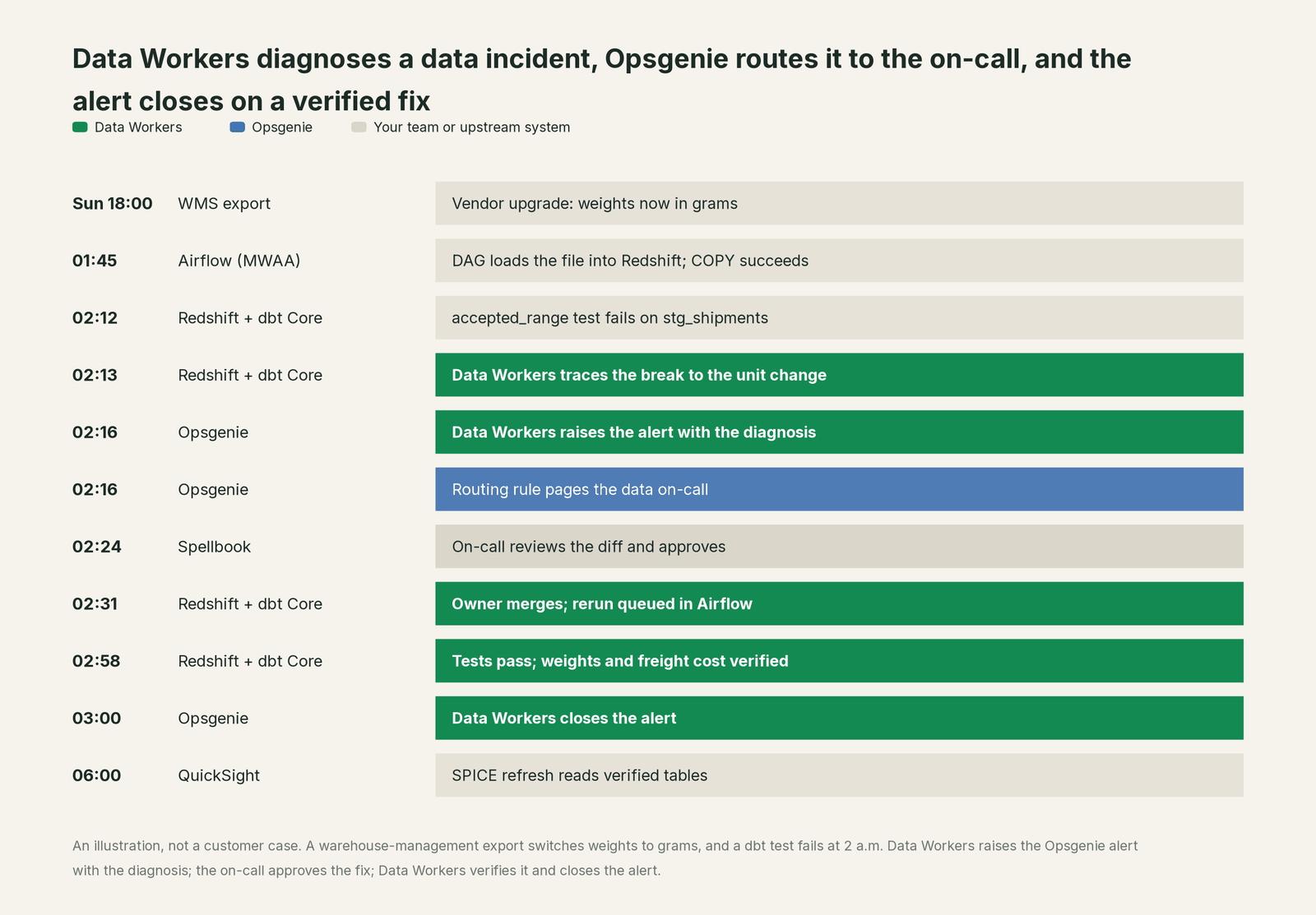
Without a first responder, the on-call spends an hour in Airflow logs, Redshift and vendor release notes, and a plain rerun fails the same test again. With Data Workers, the page carried the cause and the alert closed on evidence.
| Job | What Opsgenie does | What Data Workers does |
|---|---|---|
| The signal | Takes alerts from Airflow, dbt runs, CloudWatch and heartbeats through its integrations | Watches freshness, volume, schema and DAG runs itself, so many breaks are caught and explained before anyone is paged |
| The page | Routes by team and rule, pages the on-call from the schedule, escalates if nobody acknowledges | Raises the alert with the diagnosis and blast radius already written, at a priority set by severity |
| The investigation | Shows the alert, its source, tags and history | Traces the break through Redshift, dbt and QuickSight lineage to the vendor file, and names the cause |
| The fix | Runs the alert actions and integrations you configured | Proposes the model change as a diff for the owner, routes it to a named approver, then queues the rerun and backfill through Airflow |
| The proof | Keeps the alert log and who acknowledged it | Verifies downstream tables and writes a receipt: what changed, who approved it, how it was checked, how to undo it |
| The close | Closes the alert and feeds reports | Closes the Opsgenie alert once verified and remembers the pattern for next time |
Why doesn't Opsgenie just do this itself?
Because Opsgenie was built to make sure the right person hears about a problem, for every engineering team at once, and it does that job well. Its design is deliberately about routing, schedules and escalations. Atlassian now invests in incidents inside Jira Service Management, where Opsgenie's alerting and on-call sit next to requests, changes and Atlassian's AI for incidents.
Fixing a data incident is a different product category in any case. The fix lives in a dbt model, a Redshift table and an Airflow DAG, in tools neither Opsgenie nor JSM runs. It needs lineage from the failed test to every model and dashboard that reads it, the owner's approval, a rollback path, checks after the change, a receipt, and someone who carries the liability for a write to production data. Carrying that, with blast-radius scoping, approvals and receipts, is the product Data Workers is. And during a migration, that knowledge belongs in one governed context graph outside the pager, so the person rebuilding schedules in JSM can think about rotations.
Every tool owns a slice. Data Workers covers the whole lifecycle
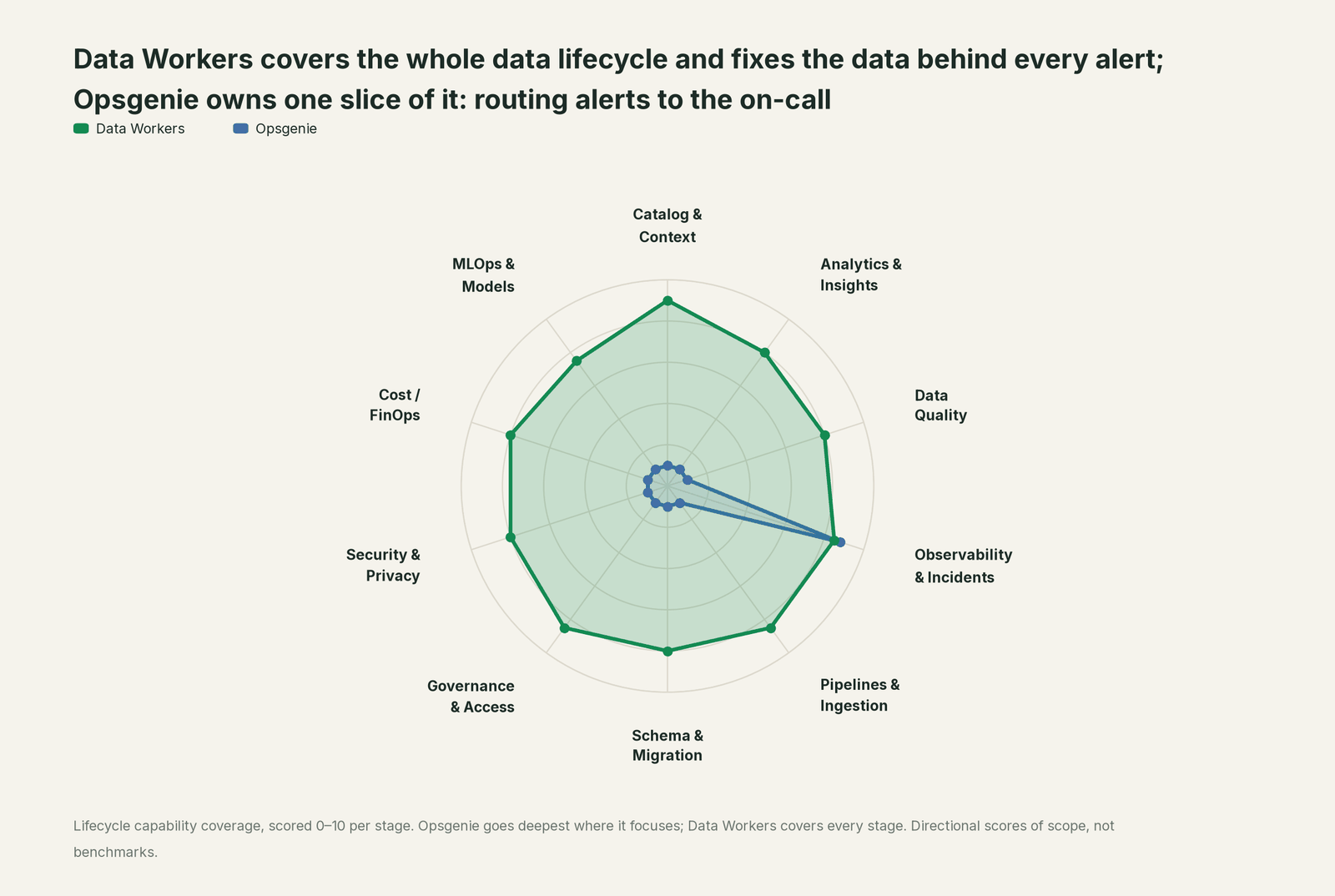
Opsgenie owns one slice: who gets alerted, when, and who is next if they don't answer. Each point tool adds another console, contract and handoff. Data Workers covers the whole lifecycle with one context, one approval flow and one audit trail, and builds on Opsgenie today and Jira Service Management tomorrow.
| Stage | Data Workers | Opsgenie | Why we scored it this way |
|---|---|---|---|
| Catalog & Context | 9 | 1 | Not Opsgenie's job: teams and services describe who owns an alert, not which tables or models exist. Data Workers keeps one governed context graph of tables, models, metrics, owners and lineage. |
| Analytics & Insights | 8 | 1 | Not Opsgenie's job: its reports cover alert volume and on-call response. Data Workers answers data questions from governed definitions with lineage behind every number. |
| Data Quality | 8 | 1 | Not Opsgenie's job: it receives a failed dbt test as an alert. Data Workers drafts the quality checks and dbt tests and holds Redshift tables to baselines the team records. |
| Observability & Incidents | 8.5 | 8.8 | Opsgenie's home stage: alerts, routing rules, on-call schedules, escalation policies, heartbeats and the mobile app that reaches the right person. Data Workers diagnoses the data incident, fixes it and verifies it. |
| Pipelines & Ingestion | 8.5 | 1 | Not Opsgenie's job: pipelines run in Airflow and dbt; Opsgenie hears when they fail. Data Workers queues reruns through the orchestrator and backfills with approvals. |
| Schema & Migration | 8 | 1 | Not Opsgenie's job: an alert says a task failed, not that a vendor changed a unit or a column. Data Workers catches schema and content changes and assesses blast radius. |
| Governance & Access | 8.5 | 1 | Team roles govern who edits schedules and policies. Data Workers routes every data change to a named approver. |
| Security & Privacy | 8 | 1 | Not Opsgenie's job: it pages for security alerts but holds no data classification. Data Workers leaves a receipt on every data change. |
| Cost / FinOps | 8 | 1 | Not Opsgenie's job: it is priced for alerting and on-call. Data Workers traces Snowflake credits to the dbt model behind them and drafts the fix for its owner. |
| MLOps & Models | 7.5 | 1 | Not Opsgenie's job: model infrastructure can alert through it, but the data under models sits elsewhere. Data Workers keeps the data under your models healthy. |
The same pattern holds across the response tools: you're on PagerDuty and you're on incident.io cover two common destinations for teams leaving Opsgenie, and Data Workers vs data observability covers the detection side.
How Opsgenie and Data Workers work together
Opsgenie stays on top: alerts are routed, the on-call is paged, escalations run. Spellbook Data Catalog (in preview) is where the data team looks: each proposed change, who approved it, what it touched and how to roll it back. Between them, Data Context Wizard keeps one governed context graph across Airflow, dbt, Redshift and QuickSight, the Data-Agents Swarm does the work with more than 20 specialist agents, and the Autonomous Data-Conductor runs each fix end to end: detect, diagnose, fix, review, verify, remember.
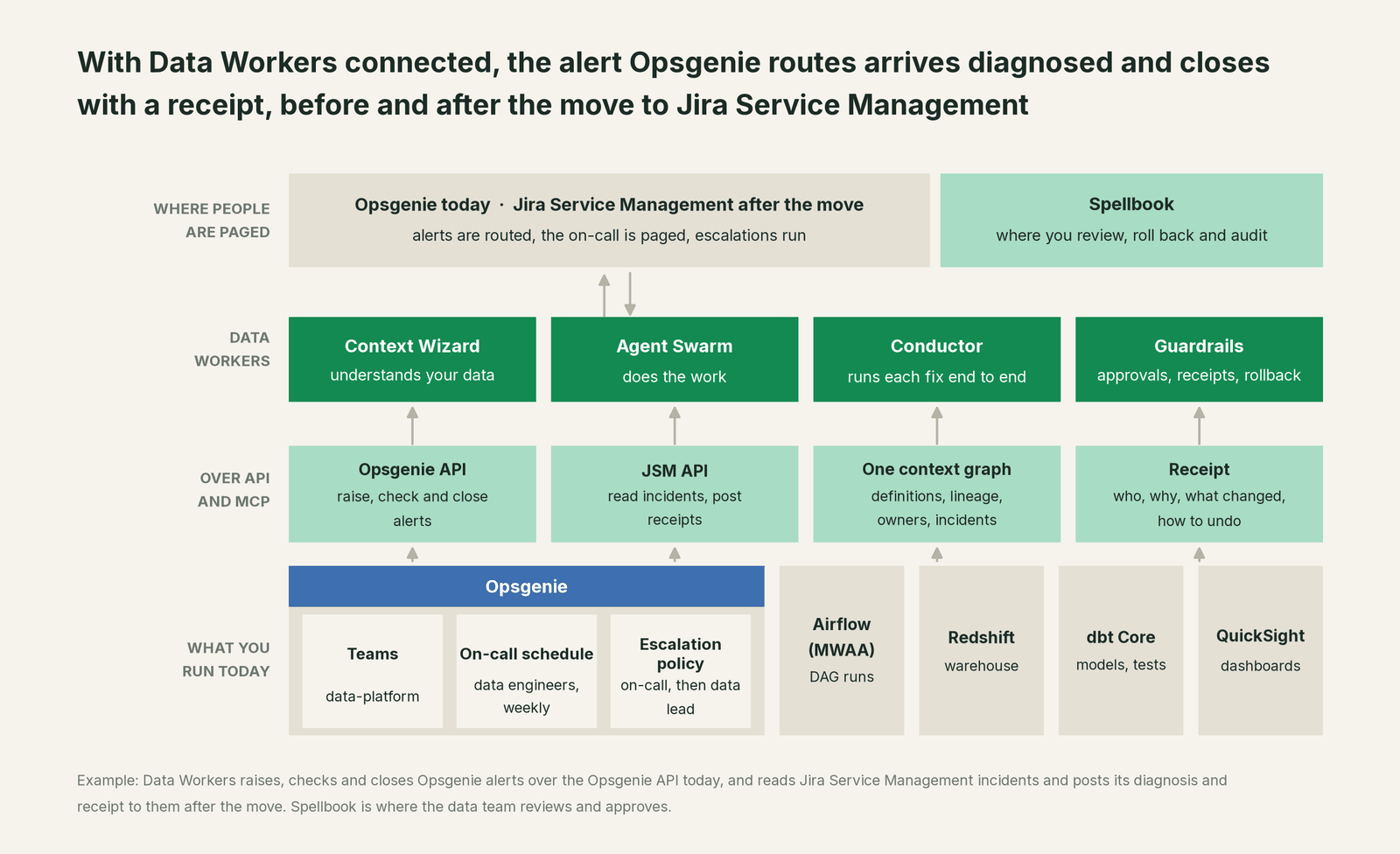
Native with Opsgenie today. Data Workers connects over the Opsgenie Alert API with an API key and does three things there: it raises alerts with a message, description, priority, source and tags; it reads their status; and it closes them when the fix is verified. Schedules, routing rules and escalation policies stay entirely in Opsgenie. In the open-source build, these are the send_opsgenie_alert and resolve_opsgenie_alert tools on the dw-connectors agent.
Native with Jira Service Management after the move. Data Workers reads open JSM incidents over the Jira REST API and posts its acknowledgement, diagnosis, receipt and resolution to them as comments, so the record sits on the incident itself; create_jira_sm_ticket opens follow-up tickets and update_jira_sm_ticket keeps their summaries current; your service agents resolve them. Our Jira Service Management page covers that side in depth.
The rest of the stack. Airflow is a native connection, and Amazon MWAA is managed Airflow, so Data Workers sees DAG runs directly and queues reruns through the orchestrator; dbt is native too, so it reads the models and lineage from the manifest. Redshift and QuickSight connect over their APIs or MCP servers today. The COPY, the dbt build task and the SPICE refresh stay yours.
Setup for your assistant. Opsgenie is reached through its REST API; after the move, Atlassian's Rovo MCP server covers Jira and Jira Service Management. Every Data Workers agent is an MCP server; the client setup guide documents the path (clone the repo, one start-agent.sh entry per agent). In Claude Code:
# Example: Atlassian's MCP server (JSM after the move) plus Data Workers agents in Claude Code
claude mcp add --transport http atlassian https://mcp.atlassian.com/v2/mcp

# Data Workers agents, from a clone of the open-source repo
claude mcp add --scope user dw-incidents -- "$(pwd)/start-agent.sh" dw-incidents
claude mcp add --scope user dw-catalog -- "$(pwd)/start-agent.sh" dw-context-catalog
claude mcp add --scope user dw-schema -- "$(pwd)/start-agent.sh" dw-schema
claude mcp add --scope user dw-quality -- "$(pwd)/start-agent.sh" dw-quality
claude mcp add --scope user dw-connectors -- "$(pwd)/start-agent.sh" dw-connectors
Atlassian's MCP server reads and writes with the user's existing permissions, and an organization admin can govern those reads and writes in Atlassian's Data Security Policy. For the always-on first responder, Data Workers holds its own Opsgenie key now and its own JSM credentials later; in production its remote endpoint takes an API key (bearer) or OAuth tokens from your identity provider, verified through JWKS. The agents run in your infrastructure and hold the warehouse credentials; your data stays in your systems, and the hosted Conductor sees workflow metadata only.
The tools in the loop. diagnose_incident and get_root_cause find the cause; trace_cross_platform_lineage and blast_radius_analysis map what the break touches; the monitor_metrics baseline verifies the fix; remediate runs playbooks such as backfill_data, on its own only for known patterns above 95% confidence; get_audit_trail keeps the record.
One incident, L0 to L4, set per domain. The alert: "dbt build failed: accepted_range on stg_shipments.weight_kg."

- •L0 manual. The on-call finds the unit change after an hour of tracing.
- •L1 observe. Data Workers raises the alert with the diagnosis and blast radius. Nothing changes; the on-call starts from the answer.
- •L2 propose. Data Workers adds the model diff and the rerun plan. Nothing reaches production until the named approver says yes.
- •L3 act reversibly. For change classes with a clean record, such as rerunning and backfilling a partition after an approved mapping change, Data Workers acts with the undo recorded first and verifies; a failed check goes to a named person. The alert drops to low priority; a person reads the receipt in the morning.
- •L4 autonomous. For a scoped domain such as the shipping models, Data Workers catches the unit change on the new rows before the dbt test fails and records the fix with its receipt. Nobody is paged.
A data team's checklist for the move. Inventory every data alert source that posts to Opsgenie and decide which ones Data Workers should raise with a diagnosis instead. Rebuild the data schedule and escalation policy in JSM during the 120-day parallel window, point Data Workers at the JSM site at the same time, and compare a week of alerts in both before cutover. The runbook steps that used to live in alert descriptions and wiki pages live in Data Workers, so they move by not moving. The data incident response playbook is a template for the inventory.
More on who owns the agents, is it safe to let AI agents change production data and where does our data go.
What changes for your team
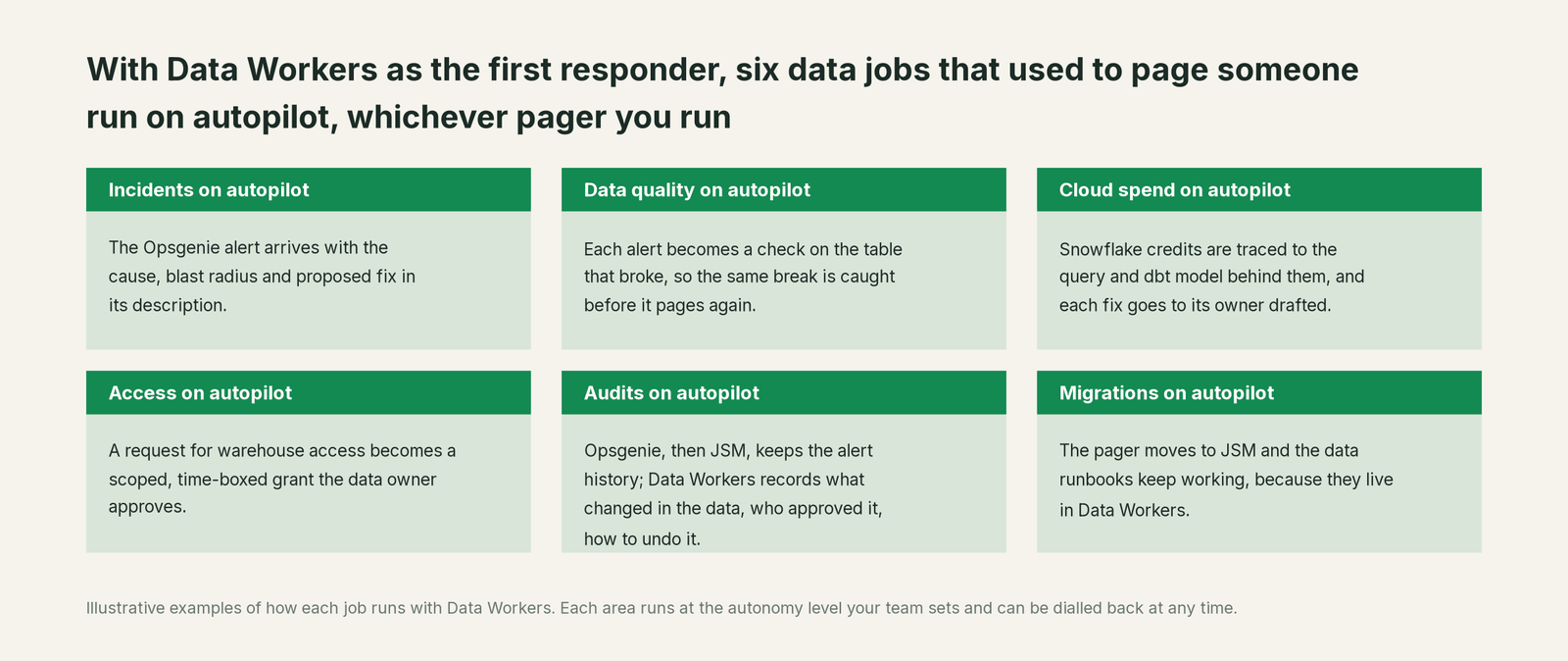
Opsgenie makes sure the right person hears about the break, and JSM will too. Data Workers gives that person a first responder that has already done the tracing, and pages them less over time. Each alert becomes a check on the table that broke, warehouse access requests become scoped grant proposals the owner approves, and the data runbooks keep working through the pager move because they live in Data Workers.
For the practice behind this, see data reliability engineering: SRE for data and automated Airflow task failure analysis.
Keep Opsgenie, or consolidate?
Keep Opsgenie if you love it; Data Workers works with it from day one. Many teams consolidate once Data Workers runs that slice too.
For Opsgenie the timing is set: keep it until your cutover, then keep whatever replaces it. Most teams follow Atlassian's path to Jira Service Management; some move to PagerDuty, incident.io or Grafana IRM. Data Workers connects to Jira Service Management and PagerDuty natively and to the others over their APIs or MCP servers, so the choice of pager doesn't decide how data incidents get fixed. What data teams consolidate is the stack behind the alert: single-table watch scripts and runbooks that say "rerun and check the dashboard". Tempted to build this layer yourself on Atlassian's MCP server and a coding agent? Read build it ourselves with Claude Code and MCP servers.
The case for your CFO
The company has to move off Opsgenie before April 5, 2027 either way. Data Workers turns the data alerts in that stream from an hour of tracing into a diagnosis on arrival and a fix with one approval. Numbers get corrected before the business opens, with a record of why they were wrong and how they were checked.
The risk story is plain. Autonomy is set per domain from L0 manual to L4 autonomous, and Data Workers does nothing alone that you have not delegated. Every other change goes to a named approver, unanswered requests expire and escalate, and no agent can promote its own work. Each change is verified and recorded in a receipt: who approved it, what it touched, how to undo it. An org-wide stop halts all autonomous dispatch. Zero migration for the data stack: Airflow, Redshift, dbt and QuickSight stay where they are.
Why now: the pager migration is already on the plan, and every alert you rebuild in JSM is a chance to stop paging people for data problems a first responder can fix. The first win is L1 on the data alerts during the parallel window. What stays the same: Atlassian's migration path, your schedules and escalation policies, warehouse permissions and dbt review. For the numbers, see the ROI of agentic data operations. Start with a pilot (pricing); the pilot is credited in full against the first year.
The sentence to repeat upstairs: "The pager is changing anyway; Data Workers fixes the data before anyone is paged, on Opsgenie now and Jira Service Management after, and every fix comes with a receipt."
Getting started
Start with a pilot. Give Data Workers an Opsgenie API key and your Airflow and dbt connections, route the data team's alerts through it at L1 so every alert arrives with a diagnosis, and add your JSM site when you schedule the migration so both run through the parallel window. Then turn on L2 for one domain, such as the shipping models, and move rerun-and-backfill to L3 once the receipts show the agents were right. Plans are on the pricing page; the pilot is credited in full against the first year.
FAQ
When does Opsgenie shut down, and what happens to our data? Opsgenie reached end of sale on June 4, 2025. On April 5, 2027 it shuts down, and any data that has not been moved is deleted. Atlassian syncs most Opsgenie data and configuration to the Jira Service Management site you choose and gives you 120 days of parallel access.
What does Data Workers do in Opsgenie? Over the Opsgenie Alert API it raises alerts with the diagnosis in the description, reads their status and closes them once the fix is verified. Schedules, routing and escalations stay in Opsgenie; the fix happens where the data breaks, in the warehouse, dbt and Airflow.
Will our data runbooks survive the move to Jira Service Management? Yes, if they live in Data Workers. It connects natively to JSM, reads incidents and writes the diagnosis and receipt to them as comments. The approvals and receipts don't depend on which pager routes the alert.
We are moving to PagerDuty or incident.io instead. Does that change anything? No. Data Workers connects to PagerDuty natively and to incident.io over its MCP server or API today.
Who approves a fix at 2 a.m.? The named approver for that domain, usually the week's on-call. If they don't answer, the request expires and escalates; it never auto-grants. At L3, change classes with a clean record run without waking anyone and leave a receipt.
Should we migrate the data alerts as they are? Use the parallel window to sort them. Alerts a first responder can diagnose come through Data Workers with the cause attached; alerts that truly need a person keep their schedule and escalation in JSM.
Sources
- •Atlassian, Opsgenie migration: end of sale Jun 4, 2025; shutdown and deletion of unmoved data on April 5, 2027; alerting and on-call features in Jira Service Management; automatic sync on the date you select; 120 days of parallel access, https://www.atlassian.com/software/opsgenie/migration (checked Oct 2, 2026)
- •Atlassian Support, What are my options for migrating from Opsgenie: Jira Service Management destination, plan mapping, alerts, schedules and policies migrated automatically, https://support.atlassian.com/opsgenie/docs/what-are-my-options-for-migrating-from-opsgenie/ (checked Oct 2, 2026)
- •Opsgenie Alert API: create, get, close, acknowledge and add-note endpoints; message, description, priority P1 to P5, source, tags, https://docs.opsgenie.com/docs/alert-api (checked Oct 2, 2026)
- •Atlassian, Jira Service Management product page: part of Service Collection; AI to group alerts and resolve incidents, https://www.atlassian.com/software/jira/service-management (checked Oct 2, 2026)
- •Atlassian Support, Getting started with the Atlassian Rovo MCP Server: v2 endpoint, Jira and Jira Service Management coverage, read and write with existing permissions, OAuth 2.1 or API token, https://support.atlassian.com/atlassian-rovo-mcp-server/docs/getting-started-with-the-atlassian-remote-mcp-server/ (checked Oct 2, 2026)
- •Atlassian Cloud changes Sep 21 to Sep 28, 2026: Rovo MCP server control in Data Security Policy for reads and writes of Jira and Confluence data, https://confluence.atlassian.com/cloud/blog/2026/09/atlassian-cloud-changes-sep-21-to-sep-28-2026 (checked Oct 2, 2026)
- •Data Workers open-source repository (
send_opsgenie_alert,resolve_opsgenie_alert,create_jira_sm_ticket,update_jira_sm_ticketin dw-connectors; tool registrations in dw-incidents, dw-context-catalog, dw-schema, dw-quality, dw-observability), https://github.com/DataWorkersProject/dataworkers-claw-community (checked Oct 2, 2026) - •Data Workers client setup guide, https://dataworkers.io/opensource-docs/client-setup/ (checked Oct 2, 2026)