You're on GitHub Copilot: Copilot for data pipelines, with Data Workers carrying every data change into production
Your engineers already work in GitHub Copilot. Connect Data Workers over MCP and Copilot Chat, agent mode and Copilot cloud agent answer from governed context, with every data change approved and recorded.
Your engineering org standardized on GitHub Copilot. Business or Enterprise seats are assigned, an organization owner has set the Copilot policies, and your analytics engineers spend their day in Copilot Chat and agent mode in VS Code, or in PyCharm and DataGrip. Routine work goes to Copilot cloud agent (formerly Copilot coding agent): someone opens an issue, assigns it to Copilot, and a pull request shows up on a branch with its session log. Automations run the cloud agent on a schedule or when an issue opens. Custom instructions carry your team's conventions, and many teams are trying Copilot Memory and the GitHub MCP Registry, both in public preview. The question data leaders hear next is always the same: "Copilot wrote the dbt change. What else in the warehouse does it break, and who approves it?"
That question is about your data estate, not your repository. GitHub Copilot is where your engineers write and ship the change. Data Workers is the agentic data platform underneath: it knows what every change touches across your warehouses, pipelines and dashboards, and it carries the change into production behind approvals, with a receipt. Your engineers keep Copilot, its policies and every permission you've set. Data Workers connects over MCP and adds the part a coding agent is right not to own.
Key takeaways
- •The role swap. Your engineers already work in Copilot. Connected to Data Workers over MCP, Copilot answers from governed context, and every data change goes through Data Workers' approvals and receipts.
- •Two places to connect. Add Data Workers to
.vscode/mcp.jsonfor Copilot Chat and agent mode in the IDE, and to the repository's MCP settings for Copilot cloud agent. Both start the same Data Workers agents as standard MCP stdio servers. - •Two locks on every write. GitHub's MCP policy, the enterprise allowlist and the cloud agent's
toolslist decide which Data Workers tools Copilot can call. Data Workers' per-domain guardrail, on the ladder from L0 manual to L4 autonomous, decides whether a change may run. Nothing writes without both agreeing. - •The whole lifecycle, one audit trail. Copilot goes deepest on writing pipeline code. Data Workers covers catalog, quality, incidents, pipelines, schema, access, security, cost and models with one context, one approval flow and one audit trail.
- •Keep Copilot exactly as it is. Seats, policies, rulesets, branch protection and your warehouse permissions stay the same. Zero migration.
GitHub Copilot is the engineer's agent. Data Workers is the data platform underneath.
Here is a Tuesday most analytics engineering teams will recognize. It's an illustration, not a customer case.
| Time | System | What happens |
|---|---|---|
| 09:14 | GitHub Issues | An analytics lead files an issue: rename customer_id to account_id in the stg_accounts dbt model to match the new CRM. She assigns it to Copilot. |
| 09:15 | Copilot cloud agent | Copilot researches the repository and plans the change on a branch. |
| 09:17 | Copilot, via Data Workers | Following the repository's custom instructions, Copilot calls the Data Workers assess_impact tool before editing. |
| 09:18 | dbt, Tableau | Data Workers reports that fct_renewals and a snapshot still read the old name, and so does the Renewals workbook extract in Tableau. |
| 09:19 | Airflow | It also finds the crm_sync reverse-ETL task in an Airflow DAG that selects customer_id by name. None of these live in this repository. |
| 09:41 | GitHub | Copilot opens one pull request with the rename and the dbt fixes, and lists the Tableau and Airflow changes as linked follow-ups. |
| 09:43 | GitHub | Data Workers posts the blast radius on the PR: two models, one workbook, one DAG task, and the order to ship them in. |
| 10:05 | GitHub Actions | dbt CI passes. The analytics lead reviews and approves the PR. |
| 10:12 | Spellbook | The platform owner approves the Snowflake change and the downstream updates in Spellbook. |
| 10:16 | Snowflake | The owner applies the drafted change in the approved order, with its rollback SQL on file. |
| 10:40 | Tableau, Airflow | The workbook refreshes, the sync runs, row counts match. The receipt lands on the PR. |
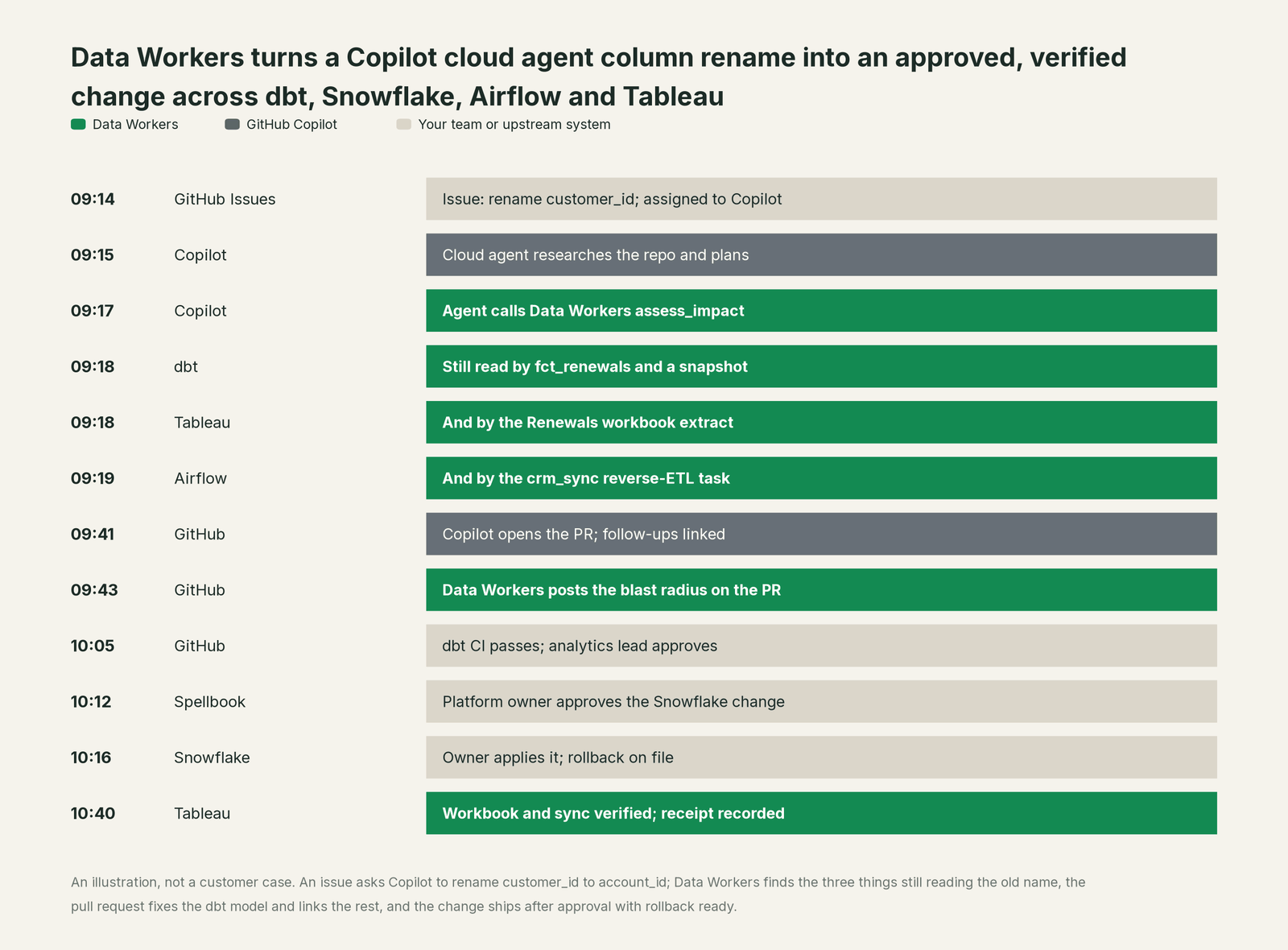
Copilot did exactly what it's built for. It took an issue, planned, edited the code, ran CI and opened a clean pull request. Data Workers did the parts that need to know your estate and change it safely: impact across four systems outside the repo, a scoped plan, an approved apply with rollback, verification and the receipt.
| Step | What GitHub Copilot does | What Data Workers does |
|---|---|---|
| The ask | Picks up the issue and plans the change on a branch | Supplies governed context: owners, lineage, usage for every object the change touches |
| The impact | Calls the Data Workers tool the repository allowlists | Traces the column across dbt, Snowflake, Airflow and Tableau and returns the blast radius |
| The fix | Writes the code changes and opens the pull request | Posts the blast radius and the safe order of changes on the PR |
| The review | Runs CI in its Actions environment and iterates on feedback | Holds the warehouse change until a person approves; no agent approves its own work |
| The apply | Stays in its lane: code on a branch | Applies the change reversibly, then verifies downstream rows, extracts and syncs |
| The record | Keeps the session log and commits | Writes a receipt: who asked, who approved, what changed, how to undo it |
Why doesn't GitHub Copilot just do this itself?
Because Copilot is a coding agent for every kind of software, and GitHub made sensible choices about focus and risk.
Copilot cloud agent works in one repository per run, on one branch, and opens one pull request per task. That's a clean, reviewable unit of work, and it's the right design for code. A data change rarely stays inside one repository. The column lives in dbt, the table in Snowflake, the reader in an Airflow DAG and the chart in Tableau.
GitHub is also explicit about MCP. Once a repository configures an MCP server, the cloud agent "will be able to use the tools provided by the server autonomously, and will not ask for your approval before using them," and GitHub "strongly recommend[s]" allowlisting specific read-only tools. That's the right line for a general agent to draw. It hands the hard question back to the server: which changes are safe to run, in which domain, with what rollback.
Writing to production data across systems is a different product. It needs blast-radius checks before anything runs, approvals that differ by domain, rollback, verification against the source and a receipt an auditor can read. It also carries liability for changes inside systems GitHub doesn't run. Data Workers is built for exactly that job, and it plugs into the controls GitHub already built.
Every tool owns a slice. Data Workers covers the whole lifecycle
A data team's work runs across ten stages: keeping context current, answering business questions, quality checks, incidents, pipelines, schema changes, access, security, cost and models. Each point tool adds another console, another contract and another handoff. Data Workers covers the whole lifecycle with one context, one approval flow and one audit trail.
We score the same ten stages on every Build On page, so you can compare across pages. Copilot leads on Pipelines & Ingestion, its home stage, because writing and refactoring pipeline code and shipping it as a pull request is the core product. Data Workers covers all ten.
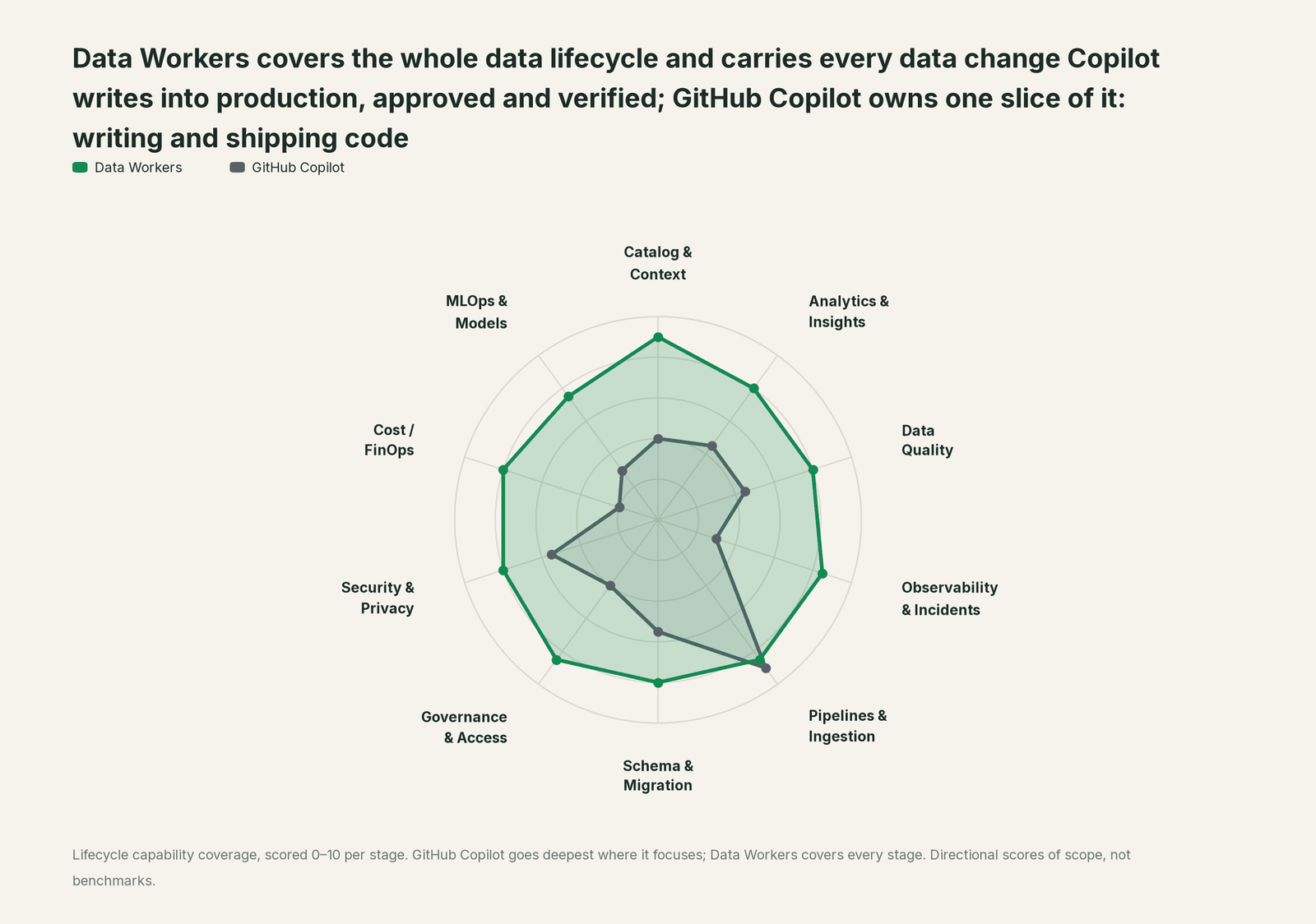
| Stage | Data Workers | GitHub Copilot | Why we scored it this way |
|---|---|---|---|
| Catalog & Context | 9 | 4 | Copilot reads the repository, custom instructions and Copilot Memory. Data Workers keeps one governed graph of tables, owners, lineage and usage across platforms. |
| Analytics & Insights | 8 | 4.5 | Copilot writes a query or notebook cell when asked in chat. Data Workers answers business questions from governed metric definitions with lineage behind each number. |
| Data Quality | 8 | 4.5 | Copilot writes dbt tests and improves coverage on request. Data Workers runs quality checks across the estate, writes the missing tests and repairs failing ones. |
| Observability & Incidents | 8.5 | 3 | Copilot fixes the bug in an issue it is assigned. Data Workers detects data incidents, traces the cause across systems and closes them with a receipt. |
| Pipelines & Ingestion | 8.5 | 9 | Copilot's home stage: agent mode and the cloud agent write, test and refactor pipeline code and open the pull request. Data Workers builds and reruns pipelines behind approval. |
| Schema & Migration | 8 | 5.5 | Copilot writes migration code and DDL in one repository. Data Workers assesses impact across every system, drafts each migration with its rollback SQL for the owner to apply in approved waves. |
| Governance & Access | 8.5 | 4 | Copilot's MCP policy, managed settings and repository opt-outs govern Copilot. Data Workers proposes least-privilege grants on your data platforms behind approvals. |
| Security & Privacy | 8 | 5.5 | Copilot brings push protection and secret scanning to AI-written code. Data Workers' pull request review flags new columns whose names or annotations look sensitive, and leaves a receipt on every data change. |
| Cost / FinOps | 8 | 2 | Copilot reports seats, usage and AI credits for Copilot. Data Workers traces Snowflake credits to the query and dbt model behind them and drafts the fix for the model's owner. |
| MLOps & Models | 7.5 | 3 | Copilot writes training and feature code. Data Workers keeps the data under models healthy and connects to MLflow and W&B. |
How GitHub Copilot and Data Workers work together
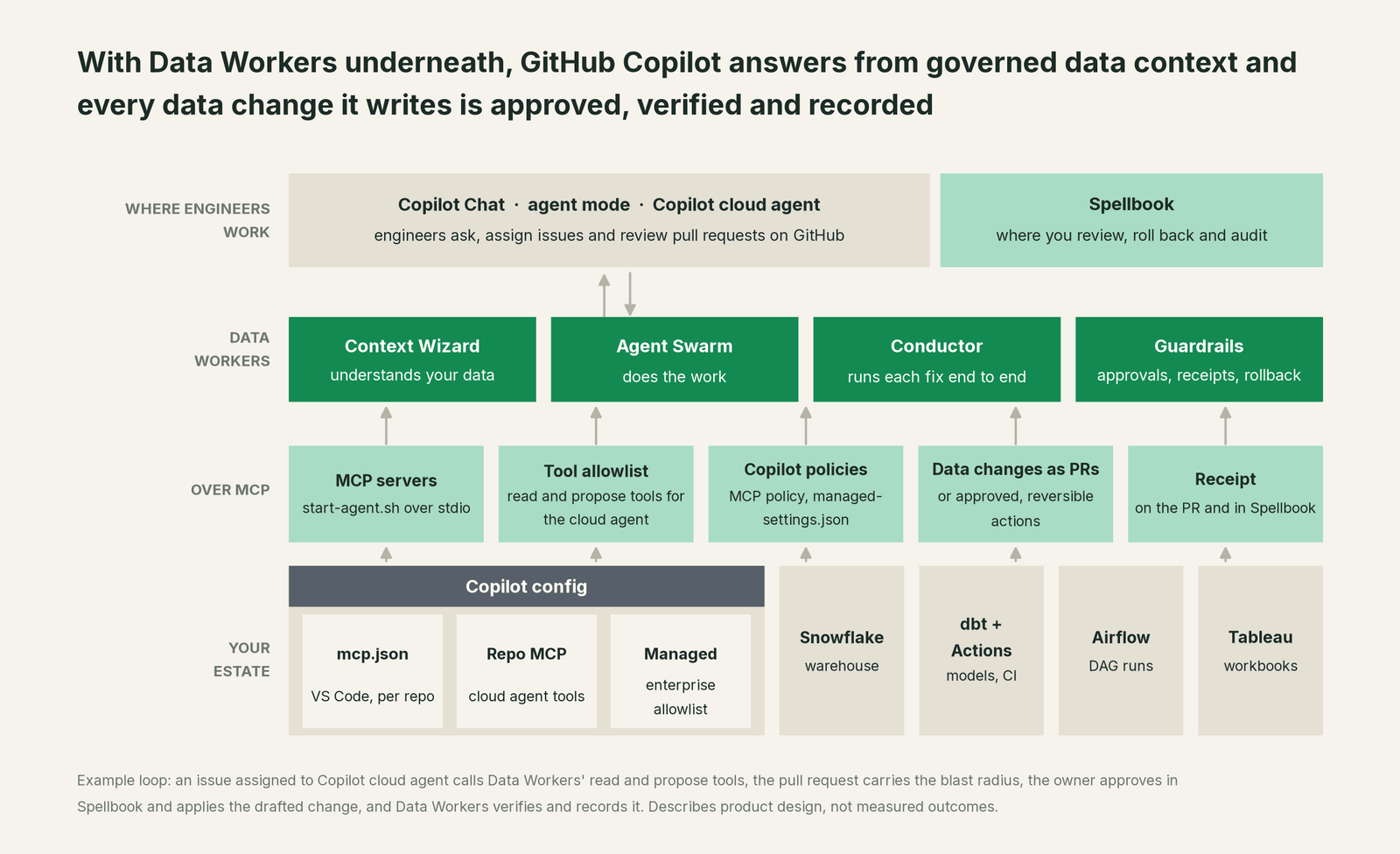
Copilot stays where engineers ask, assign issues and review pull requests. Spellbook Data Catalog (in preview) is where your data team reviews proposals, rolls changes back and reads the audit trail. Underneath, Data Context Wizard builds one governed graph across your warehouses, dbt, orchestration and BI. The Data-Agents Swarm does the work, and the Autonomous Data-Conductor runs each fix end to end: detect, diagnose, fix, review, verify, remember. Every Data Workers agent is a standard MCP server over stdio: clone the open-source repository, run npm install, and start-agent.sh <agent> starts it, so every Copilot surface can run it. The client setup guide has the pattern.
Setup in the IDE. For Copilot Chat and agent mode in VS Code, add Data Workers to .vscode/mcp.json in the repository so everyone who opens the project shares it. Start the servers from the file, switch Copilot Chat to Agent, and the Data Workers tools appear in the tools picker. VS Code asks you to confirm tool calls unless you've auto-approved them, so a person sees each call before it runs. Visual Studio and the JetBrains IDEs, including DataGrip and PyCharm, run the same agents through their own MCP settings.
Example .vscode/mcp.json for Copilot Chat and agent mode in VS Code, with the repository cloned to /opt/dataworkers-claw-community:
{
  "servers": {
    "dw-context-catalog": {
      "type": "stdio",
      "command": "/opt/dataworkers-claw-community/start-agent.sh",
      "args": ["dw-context-catalog"]
    },
    "dw-schema": {
      "type": "stdio",
      "command": "/opt/dataworkers-claw-community/start-agent.sh",
      "args": ["dw-schema"]
    }
  }
}
Setup for Copilot cloud agent. The cloud agent works in its own GitHub Actions environment, so add a step to the repository's .github/workflows/copilot-setup-steps.yml that clones the Data Workers repository and runs npm install. Then a repository administrator opens Settings > Copilot > MCP servers and pastes a configuration. The cloud agent runs allowlisted tools without asking, so give it Data Workers' read and propose tools and leave the apply tools to Spellbook. Credentials go in Agents secrets prefixed COPILOT_MCP_. The same configuration is shared with Copilot code review.
Example repository MCP configuration for Copilot cloud agent:
{
  "mcpServers": {
    "dw-context-catalog": {
      "type": "local",
      "command": "/home/runner/dataworkers-claw-community/start-agent.sh",
      "args": ["dw-context-catalog"],
      "tools": ["search_across_platforms", "trace_cross_platform_lineage", "explain_table"]
    },
    "dw-schema": {
      "type": "local",
      "command": "/home/runner/dataworkers-claw-community/start-agent.sh",
      "args": ["dw-schema"],
      "tools": ["assess_impact", "check_compatibility", "generate_migration"],
      "env": {
        "SNOWFLAKE_ACCOUNT": "$COPILOT_MCP_SNOWFLAKE_ACCOUNT",
        "SNOWFLAKE_USERNAME": "$COPILOT_MCP_SNOWFLAKE_USERNAME",
        "SNOWFLAKE_PASSWORD": "$COPILOT_MCP_SNOWFLAKE_PASSWORD"
      }
    },
    "dw-quality": {
      "type": "local",
      "command": "/home/runner/dataworkers-claw-community/start-agent.sh",
      "args": ["dw-quality"],
      "tools": ["run_quality_check"]
    },
    "dw-incidents": {
      "type": "local",
      "command": "/home/runner/dataworkers-claw-community/start-agent.sh",
      "args": ["dw-incidents"],
      "tools": ["diagnose_incident", "get_root_cause"]
    }
  }
}
Tools such as apply_migration, rollback_migration and remediate stay off the cloud agent's list by design. Data Workers keeps them behind a person's approval in Spellbook. Add a line to your repository's custom instructions, such as "call assess_impact before changing any dbt model", so Copilot checks the blast radius before it edits.
For your Copilot admin. On Business and Enterprise, the "MCP servers in Copilot" policy is off by default; an organization or enterprise owner turns it on. To make Data Workers part of an approved set, add it to the enterprise managed-settings.json with allowedMcpServers, matched on its stdio command. GitHub recommends this method: it is generally available, matches servers securely by name, URL or stdio command, and applies to VS Code, JetBrains IDEs, Copilot CLI, the GitHub Copilot app and Copilot cloud agent. A custom MCP registry with "Registry only" also works, and GitHub marks it public preview.
One request, L0 to L4. Take one ask, the issue above: "Rename customer_id to account_id." Here is how the same request runs at each autonomy level, set per domain.

- •L0 manual. Data Workers is connected but not acting. Your engineer traces the downstream readers by hand and Copilot writes the code.
- •L1 observe. Copilot answers from Data Workers: the lineage, the owners and every model, workbook and DAG task that reads the column. Nothing changes.
- •L2 propose. Data Workers drafts the migration and posts the blast radius on the pull request. A person approves the PR and the warehouse change in Spellbook.
- •L3 act reversibly. For this domain, Data Workers drafts changes it can undo, such as the rename with its rollback migration, queues the follow-on runs once the owner applies them, then verifies and records the receipt.
- •L4 autonomous. For a trusted, scoped class, like additive columns in one domain, the owner's pipeline applies the drafted migration and Data Workers verifies on its own and posts the receipt on the PR for review.
The two locks hold at every level. Copilot's policy and tool list decide whether Copilot may call a tool. Data Workers' guardrail decides whether a change may run in that domain, and no agent approves its own work. For the deeper wiring across coding agents, read Data Workers with Claude Code, Cursor and Codex. Our earlier guides cover GitHub Copilot for data engineering with MCP and GitHub Copilot Enterprise with Data Workers.
What changes for your team
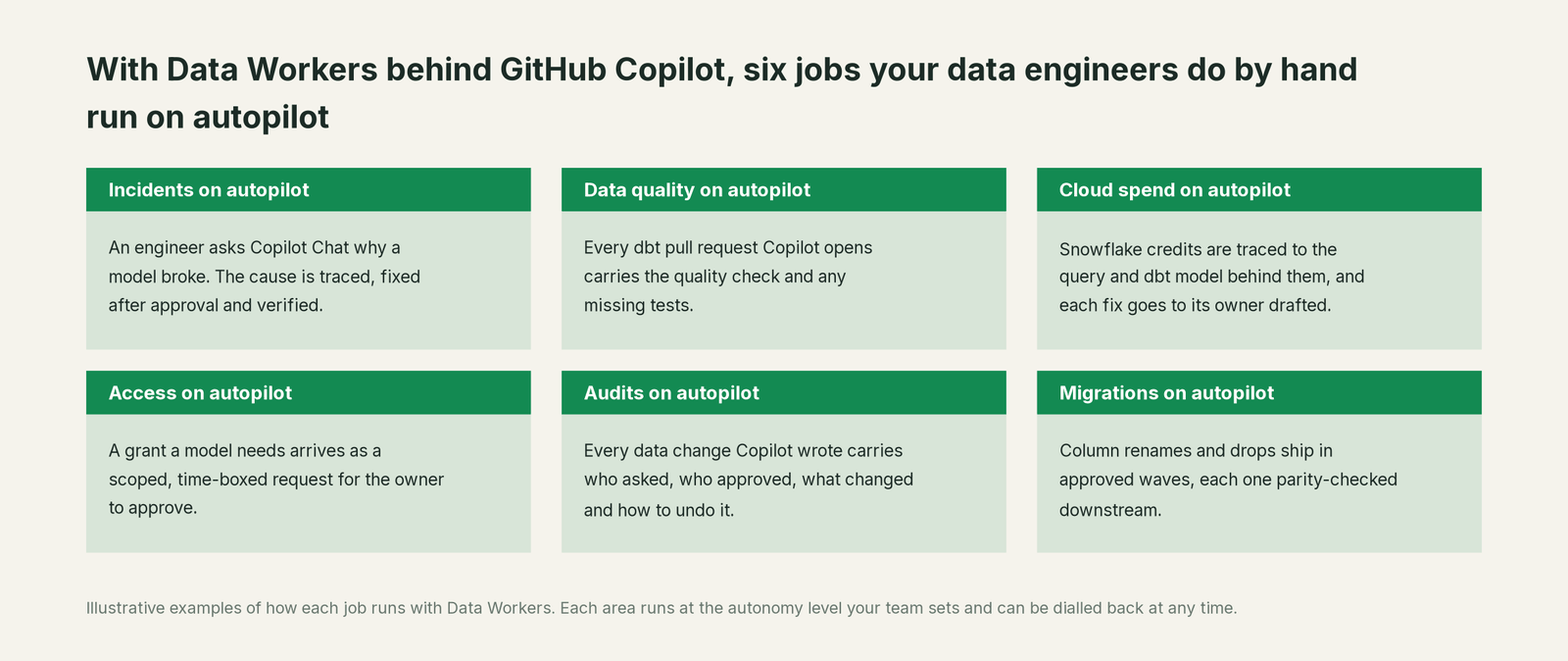
Your engineers don't change their habits. They still ask Copilot Chat, still assign issues to Copilot, still review pull requests on GitHub. What changes is what a data pull request carries. Today a Copilot PR that renames a column is correct for the repo and silent about the warehouse, so a reviewer either goes hunting through lineage or approves and hopes. With Data Workers behind Copilot, the PR arrives with its blast radius, the downstream fixes and a plan to apply and roll back. Your data team spends its time on the work only it can do: modeling the business, setting guardrails and deciding which domains move up the ladder.
Keep GitHub Copilot, or consolidate?
Keep GitHub Copilot if you love it; Data Workers works with it from day one. Many teams consolidate once Data Workers runs that slice too.
For Copilot, keeping it is the natural answer. It's your engineers' coding agent, wired into your issues, pull requests and Actions, and Data Workers is built to sit behind it. What teams consolidate is the tool sprawl around it: the separate catalog, the quality tool, the incident runbooks and the access queue that Copilot would otherwise need a server for, one by one. Data Workers covers that lifecycle with one set of MCP agents on one context graph. If engineers also use other agents, the same Data Workers agents sit behind each of them; see the sibling guides for Cursor, Codex and Claude, and the section overview, Your company just rolled out AI assistants. Now what?
The case for your CFO
The outcome. The company already pays for Copilot seats, and engineers ship more code with them. More code means more changes to the tables, models and dashboards the business runs on. With Data Workers underneath, every data change Copilot writes arrives with its impact checked, its approval recorded and its rollback ready, so revenue and renewal numbers stay right while engineering moves faster.
The risk story. Data Workers starts at observe. At propose, every change is a draft a person approves. At act reversibly, it runs only changes it can undo, and only in domains you've moved up. Autonomous is a per-domain choice, never a default. The cloud agent only gets the read and propose tools you allowlist, and no agent approves its own work. Every receipt records who or what acted, why, what it touched and how to undo it. Zero migration: your data stays where it is. The safety guide and the security and deployment guide go deeper.
Why now. GitHub ships the controls for this today: the MCP policy, the enterprise allowlist in managed-settings.json and per-repository tool lists for the cloud agent. The choice is between every engineer wiring their own database servers and one governed set of Data Workers agents across the org.
The first win. Impact reports on every dbt pull request Copilot opens, at observe, then reversible schema changes in one domain at act reversibly.
What stays the same. Copilot, its policies, your rulesets and branch protection, your warehouse permissions, dbt, Airflow and Tableau.
The path. Start with a pilot. See pricing; the pilot is credited in full against the first year. The ROI guide shows how to size it, and build it ourselves with Claude Code and MCP servers? covers the build-vs-buy question your engineers will raise.
The sentence to repeat upstairs: "We already pay for Copilot; Data Workers makes every data change it writes checked, approved and recorded before it reaches our numbers."
Getting started
Start with a pilot. Add Data Workers to one dbt repository, in .vscode/mcp.json and in the repository's MCP settings with read and propose tools only, and start every domain at observe, so the first thing your team sees is a blast radius on each Copilot pull request. Pick one domain, usually finance or revenue, move it to propose, and watch the receipts. See pricing; the pilot is credited in full against the first year.
FAQ
Does this need Copilot Business or Enterprise? It works on any plan with MCP. On Business and Enterprise, an owner must turn on the "MCP servers in Copilot" policy, which is off by default, and can restrict servers to an approved list. Copilot cloud agent also needs its policy enabled on those plans.
Copilot cloud agent runs MCP tools without asking. Is that safe? Yes, with the setup above. You choose the exact tools in the repository's tools list, and we recommend read and propose tools only. Changes to your warehouse run through Data Workers after a person approves, at the autonomy level you set for that domain.
Does the cloud agent support remote MCP servers? It supports local and remote servers, but not remote servers that use OAuth. Data Workers agents run as local stdio servers in the agent's own environment, with credentials in COPILOT_MCP_ secrets, so that limit never comes into play.
Can our enterprise allowlist Data Workers centrally? Yes. Add it to allowedMcpServers in your enterprise managed-settings.json, matched on its stdio command. Copilot clients evaluate denies first, then the allowlist, and a malformed file blocks every non-default server, so the policy fails closed.
Does Data Workers work in JetBrains IDEs and Visual Studio? Yes. Copilot Chat supports MCP servers in VS Code, Visual Studio, the JetBrains IDEs (including DataGrip and PyCharm), Xcode and other editors. Each one runs the same Data Workers agents through its own MCP settings.
Does our data leave our environment? Data Workers stores metadata and scrubbed facts about your data, not copies of your tables, and applies PII middleware before results reach Copilot. The security and deployment guide covers deployment options.
Why not point Copilot straight at the warehouse? Many engineers do, for exploration. A direct connection runs with one engineer's credentials and sees one system. Data Workers adds the shared context graph across systems, blast-radius checks, per-domain approvals, rollback and one audit trail, governed the same way for every engineer and every agent.
Sources
GitHub Copilot capabilities, names and policies are current as of October 2, 2026, from GitHub's own documentation, all checked October 2, 2026: About GitHub Copilot cloud agent, Managing access to GitHub Copilot cloud agent, Model Context Protocol and GitHub Copilot cloud agent, Configure MCP servers for your repository, Extending GitHub Copilot Chat with MCP servers, About Model Context Protocol, MCP server usage in your company, Configuring an MCP server allowlist for your enterprise, Restrict MCP server access to a custom registry, Getting started with enterprise-managed settings and Plans for GitHub Copilot. VS Code trust and confirmation behavior is from Use MCP servers in VS Code, checked October 2, 2026. Data Workers setup and tool names are from the client setup guide and the open-source dataworkers-claw-community repository (start-agent.sh and each agent's registered tools), checked October 2, 2026. Copilot cloud agent environment setup is from Configure the development environment, automations from About Copilot automations and Copilot Memory status from About Copilot Memory, all checked October 2, 2026. Product names and settings change quickly; if we've got something wrong, tell us and we'll fix it.