You're on Claude: Claude for data teams, with Data Workers as the connector that does the work
Your company bought Claude Team or Enterprise seats. Add Data Workers as a Claude connector and in Claude Code, and Claude answers from governed context and does approved data work with a receipt.
Your company rolled out Claude. IT bought Team or Enterprise seats, turned on SSO, and an Owner now manages the list under Organization settings > Connectors. Finance, sales ops and product managers chat with Claude every day. They upload spreadsheets, ask Claude to explain a variance, and use Cowork to pull a weekly summary together. Your analytics and data engineers live in Claude Code, where they write dbt models, debug a failed DAG run and review pull requests from the terminal. The question data leaders hear next is always the same: "Can Claude answer from our real numbers, and can it fix things when they're wrong?"
It can, once Claude has a connector that knows your data estate and is allowed to change it safely. Data Workers is that connector. Claude is where your people ask. Data Workers is the agentic data platform underneath: it answers from one governed context graph and does the data work behind approvals, with a receipt on every change. You keep Claude, its admin console and every permission you've set. Data Workers adds the part a general assistant is right not to own.
Key takeaways
- •The role swap. Your company bought Claude seats and people chat. Connected to Data Workers over MCP, the same Claude answers from governed context and does real data work through approvals and receipts.
- •Two surfaces, one connector. An Owner adds Data Workers once as a custom connector for the organization. Members sign in with their own account, and the same connector shows up in Claude Code. Engineers can also add it per repo in
.mcp.json. - •Two locks on every write. Claude's own tool permissions (Always allow, Needs approval, Blocked) and Claude Code's organization
asksetting sit in front. Data Workers' per-domain guardrail, set on the ladder from L0 manual to L4 autonomous, sits behind. Nothing writes without both agreeing. - •The whole lifecycle, one audit trail. Claude goes deepest on analysis and code. Data Workers covers catalog, quality, incidents, pipelines, schema, access, security, cost and models with one context, one approval flow and one audit trail.
- •Keep Claude exactly as it is. SSO, SCIM, roles, managed MCP policy and your warehouse permissions stay the same. Zero migration.
Claude is the assistant. Data Workers is the agentic data platform that does the data work.
Here is a morning most finance and data teams will recognize. It's an illustration, not a customer case.
| Time | System | What happens |
|---|---|---|
| 00:30 | Stripe | Finance ops starts marking wire payments with a new invoice status, paid_out_of_band. |
| 02:10 | Fivetran | The nightly sync lands the new status in Snowflake. Nothing fails. |
| 03:00 | Airflow + dbt | The DAG run builds fct_revenue. Its filter keeps status = 'paid', so the wire invoices drop out. Every test passes. |
| 08:05 | Claude | A controller asks Claude why yesterday's net revenue in Looker is lower than the Stripe payout report. |
| 08:06 | Looker, via Data Workers | Claude calls the Data Workers connector. Data Workers traces the Looker tile to fct_revenue, then to the Stripe source, and finds 214 invoices with the new status excluded. |
| 08:08 | Claude | Claude answers with the cause, the lineage and the three tiles that read the same model. |
| 08:20 | Airflow + dbt | Data Workers proposes a dbt diff that adds the status and a test, with its blast radius: three models, two dashboards. |
| 08:45 | Claude Code | An analytics engineer reviews the diff in Claude Code, runs the build in dev and approves the change in Spellbook. |
| 08:55 | Snowflake | Data Workers queues the rebuild of the affected partitions. Totals are back on their baseline and the owner confirms them against Stripe. |
| 09:00 | Looker, Claude | The tile is right before the close meeting. The receipt lands in the controller's Claude thread. |
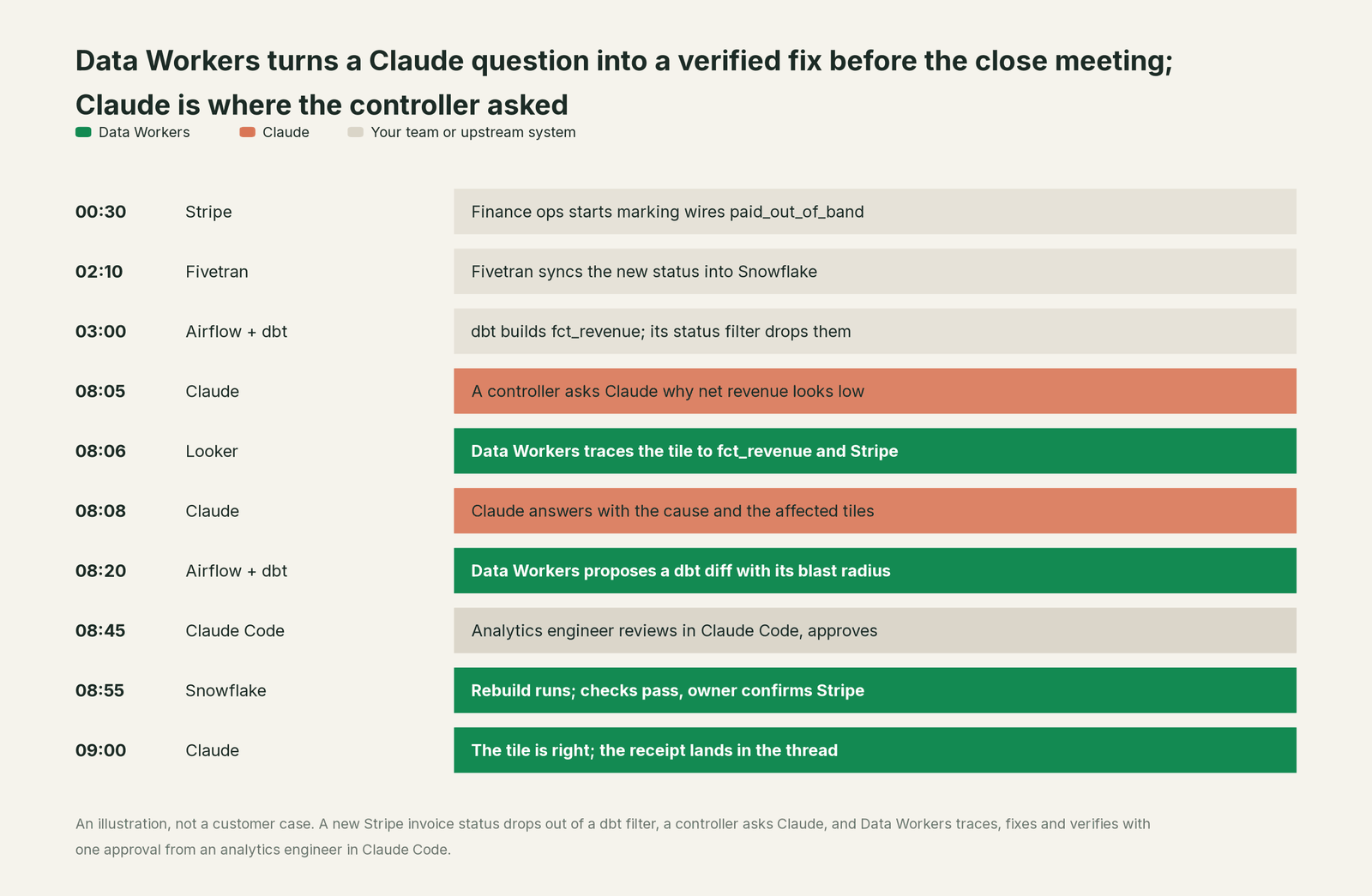
Claude did exactly what it's built for. It understood a plain-English question, called the right tool, explained the answer well and kept a person in the loop. Data Workers did the parts that need to know your estate and to change it safely: lineage across five systems, a scoped fix, a verified rebuild and the receipt.
| Step | What Claude does | What Data Workers does |
|---|---|---|
| The question | Understands the controller's question and decides to call the connector | Supplies governed definitions and lineage from the Looker tile back to Stripe |
| The cause | Explains the cause in the conversation, in plain language | Finds the excluded status by comparing the source, the model and the tile |
| The fix | Asks before calling a write tool, per your tool permissions | Writes the dbt change as a diff with its blast radius and waits for approval |
| The review | Gives the engineer Claude Code to read the diff and run the build | Holds the change until a person approves; no agent approves its own work |
| Verification | Reports what Data Workers returns | Queues the rebuild, re-checks the tables against their baselines, re-checks the tiles |
| The record | Keeps the conversation | Writes a tamper-evident receipt: who asked, why, what changed, how to undo it |
Why doesn't Claude just do this itself?
Because Claude is a general assistant, and Anthropic made sensible choices about focus and risk.
Claude is built to reach every system a company runs through connectors: calendars, documents, issue trackers, CRMs and data tools. Anthropic built the client side and the admin gate around it. On Team and Enterprise, only Owners (and on Enterprise, a custom role with library access) can add a connector; members then sign in with their own account. Each connector has tool permissions (Always allow, Needs approval or Blocked), and the organization can set per-tool controls that apply across Claude and Claude Code. Claude Code adds managed MCP policy, allowlists and an organization ask setting that prompts on every call. Anthropic's own docs say plainly that it reviews directory listings but "doesn't security-audit or manage any MCP server." That's the right line for a general assistant to draw.
Writing to production data across systems is a different product. It needs to know which models, dashboards and consumers a change touches before it runs. It needs approvals that differ by domain, rollback, verification against the source, and a receipt an auditor can read. It also carries liability for changes inside systems Anthropic doesn't run: your dbt repo, your Airflow deployment, your warehouse grants. Taking that on would change what Claude is and who it's for. Data Workers is built for exactly that job, and it plugs into the gate Anthropic already built.
Every tool owns a slice. Data Workers covers the whole lifecycle
A data team's work runs across ten stages: keeping context current, answering business questions, quality checks, incidents, pipelines, schema changes, access, security, cost and models. Each point tool adds another console, another contract and another handoff. Data Workers covers the whole lifecycle with one context, one approval flow and one audit trail.
We score the same ten stages on every Build On page, so you can compare across pages. Claude leads on Analytics & Insights, its home stage, where its reasoning over files and connector results and the code it writes in Claude Code are the core product. Data Workers covers all ten.
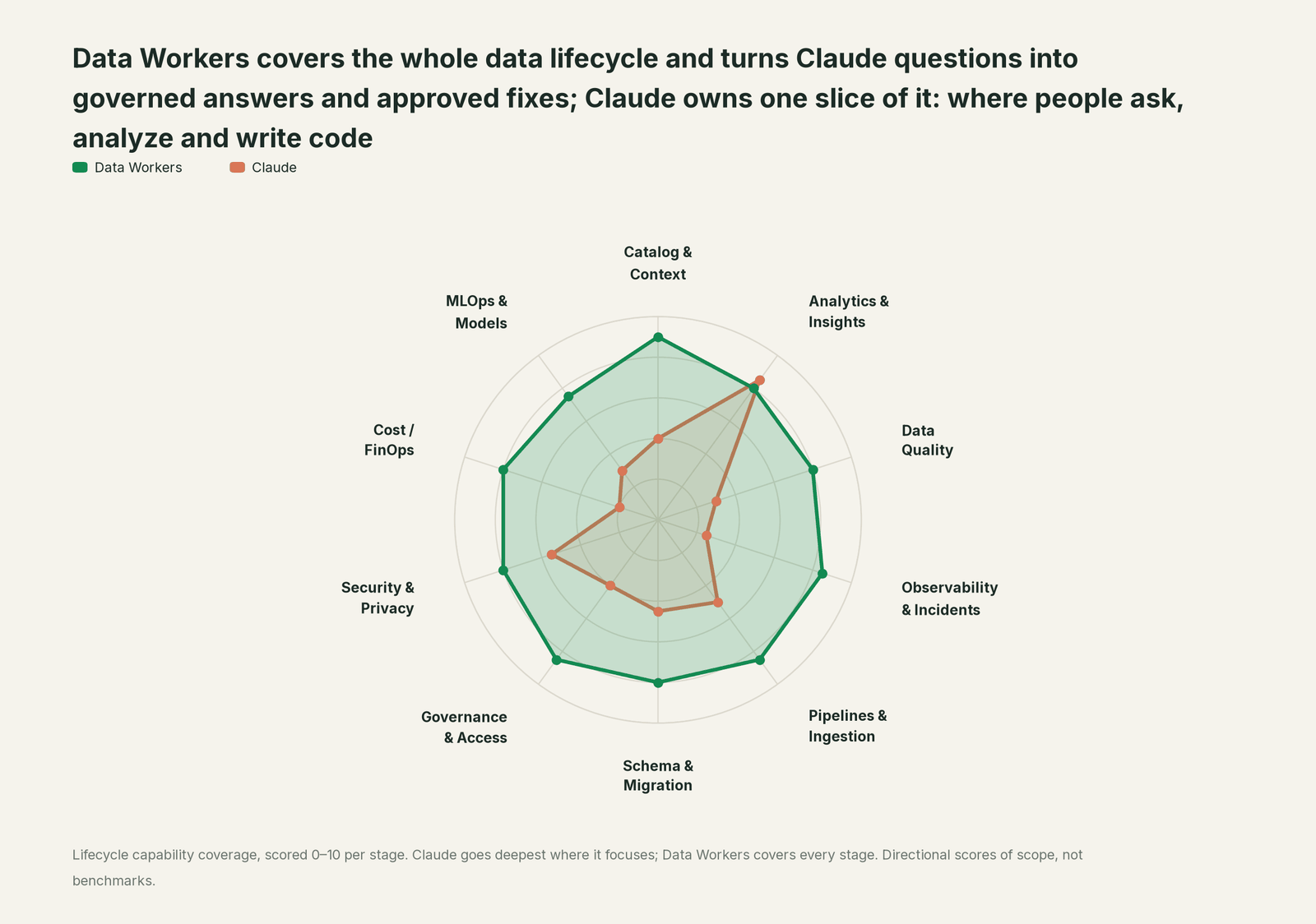
| Stage | Data Workers | Claude | Why we scored it this way |
|---|---|---|---|
| Catalog & Context | 9 | 4 | Claude finds documents through enterprise search and whatever its connectors return. Data Workers keeps one governed context graph across warehouses, dbt, orchestration and BI. |
| Analytics & Insights | 8 | 8.5 | Claude's home stage: analysis over files and connector results, and SQL or Python written in Claude Code. Data Workers answers from governed definitions with lineage behind every number. |
| Data Quality | 8 | 3 | Claude can write a test when asked in a session. Data Workers writes, runs and repairs checks and dbt tests across the estate. |
| Observability & Incidents | 8.5 | 2.5 | Claude explains an incident it is shown. Data Workers detects, traces, fixes and verifies, and closes the incident with a receipt. |
| Pipelines & Ingestion | 8.5 | 5 | Claude Code writes pipeline code in one engineer's session. Data Workers changes the pipeline behind approval and confirms the rerun. |
| Schema & Migration | 8 | 4.5 | Claude Code drafts migration code for a repo. Data Workers assesses blast radius and plans platform moves in parity-checked waves. |
| Governance & Access | 8.5 | 4 | Claude governs access to Claude: SSO, SCIM, roles and Owner-managed connectors. Data Workers proposes least-privilege grants on your data platforms. |
| Security & Privacy | 8 | 5.5 | Claude secures Claude: audit logs, Compliance API, retention controls, no training on content by default. Data Workers leaves a tamper-evident receipt on every data change. |
| Cost / FinOps | 8 | 2 | Claude admins set spend limits on Claude usage. Data Workers traces Snowflake credits to the dbt model behind them and drafts the fix for its owner. |
| MLOps & Models | 7.5 | 3 | Claude can explain an experiment it is given. Data Workers keeps the data under models healthy and connects to MLflow and W&B. |
How Claude and Data Workers work together
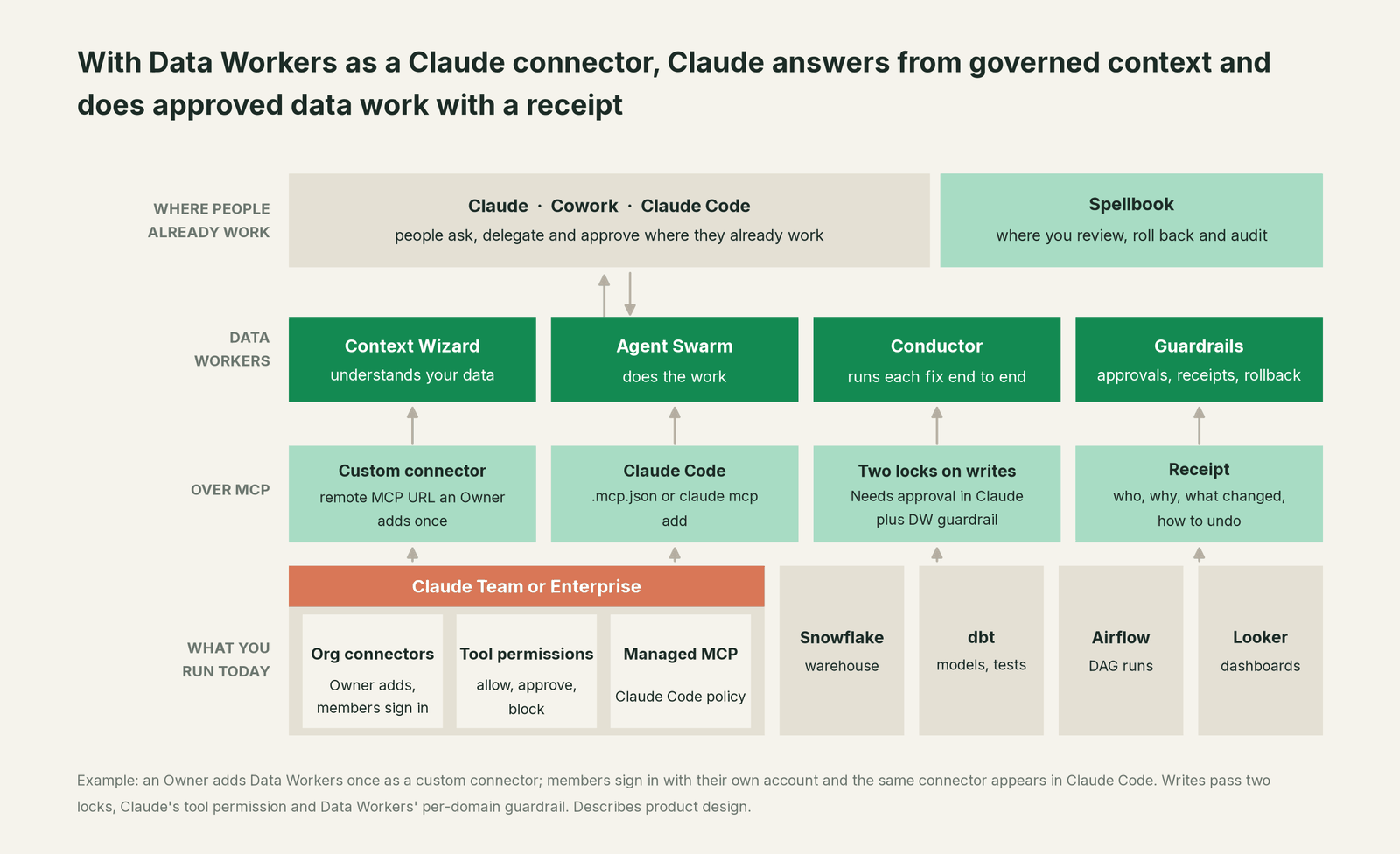
Claude stays where people ask, delegate and approve. Spellbook Data Catalog (in preview) is where your data team reviews proposals, rolls changes back and reads the audit trail. Underneath, Data Context Wizard builds one governed graph across your warehouses, dbt, orchestration and BI. The Data-Agents Swarm does the work, and the Autonomous Data-Conductor runs each fix end to end: detect, diagnose, fix, review, verify, remember. Every Data Workers agent is an MCP server, reachable over stdio for Claude Code and over Streamable HTTP for Claude's custom connectors.
Setup in Claude (Team or Enterprise). An Owner opens Organization settings > Connectors, selects Add, then Custom, then Web, names the connector Data Workers and enters your Data Workers MCP server URL. Under Authentication, choose "Sign in when needed" so each member connects with their own account. Then set tool permissions: read tools (search, lineage, explain a metric) on Always allow, and every tool that proposes or applies a change on Needs approval, or ask in the organization's per-tool controls. Each member selects Connect under Customize > Connectors, then turns the connector on from the + menu in a conversation. The same connector works in Cowork and the desktop app, and it appears in Claude Code for anyone signed in with their Claude account.
Setup in Claude Code. Engineers get the organization connector automatically. To pin Data Workers to a repo so the whole team shares it, add it at project scope. Claude Code asks each person to approve project-scoped servers before first use.
# Example: remote Data Workers server, shared with the repo (.mcp.json)
# data-workers.example.com is an example host; use your own Data Workers URL
claude mcp add --transport http --scope project data-workers https://data-workers.example.com/mcp

# Example: run the agents locally over stdio instead (from a clone of the open-source repo)
claude mcp add --scope user dw-catalog -- "$(pwd)/start-agent.sh" dw-context-catalog
claude mcp add --scope user dw-incidents -- "$(pwd)/start-agent.sh" dw-incidents
The project-scoped entry it writes to .mcp.json (example host):
{
  "mcpServers": {
    "data-workers": { "type": "http", "url": "https://data-workers.example.com/mcp" }
  }
}
For your Claude admin. Claude Code's managed MCP settings let you make Data Workers part of the approved set. Allow it by URL with allowedMcpServers and allowManagedMcpServersOnly, or provide it to every engineer with managedMcpServers. If you deploy a fixed managed-mcp.json, set allowAllClaudeAiMcps so the organization connector keeps loading alongside it. Setting Data Workers' write tools to ask in your connector tool controls means Claude Code prompts on every call in terminal and IDE sessions, even in auto mode. With OpenTelemetry export on and OTEL_LOG_TOOL_DETAILS=1, you can see which Data Workers tools people call.
One request, L0 to L4. Take one ask: "Why is net revenue low, and fix it." Here is how the same request runs at each autonomy level, set per domain.

- •L0 manual. Data Workers is connected but not acting. Your engineer investigates by hand, with Claude Code for the SQL.
- •L1 observe. Claude answers from Data Workers: the cause, the lineage from Looker to Stripe, and the affected tiles. Nothing changes.
- •L2 propose. Data Workers drafts the dbt diff with its blast radius. Claude shows it, and a person approves in Spellbook or through Claude's Needs approval prompt.
- •L3 act reversibly. For this domain, Data Workers applies changes it can undo, such as the rebuild of affected partitions, then verifies and records the receipt.
- •L4 autonomous. For a trusted, scoped class like late loads in one domain, Data Workers fixes and verifies on its own and posts the receipt for review.
The two locks hold at every level. Claude's tool permission decides whether Claude may call the tool. Data Workers' guardrail decides whether the change may run in that domain, and no agent approves its own work. For engineers who want the deeper wiring across coding agents, read Data Workers with Claude Code, Cursor and Codex and our Data Workers on Claude Code page. For the architecture view, see Claude-native data infrastructure.
What changes for your team
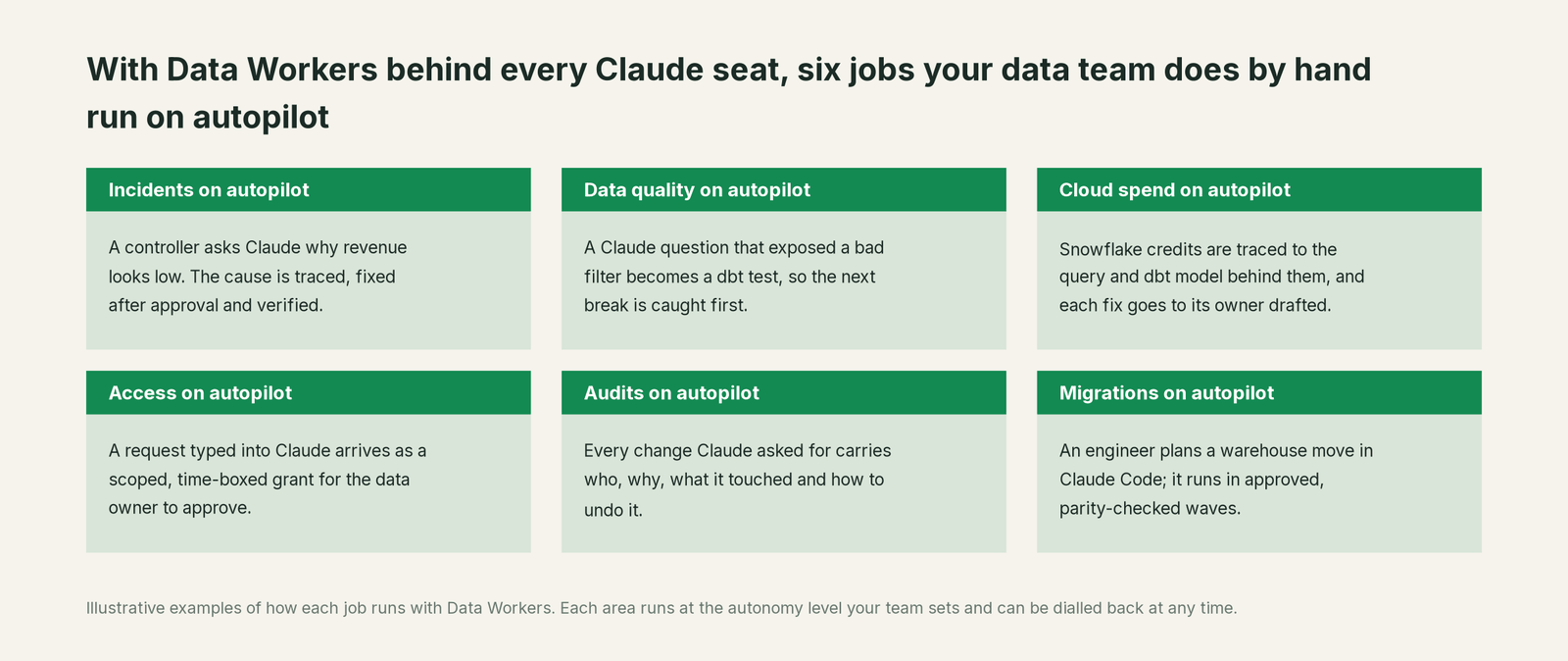
The people asking questions don't change their habits. The controller still asks Claude. The analytics engineer still works in Claude Code. What changes is where the questions end. Today a good Claude answer often ends in a Slack message to the data team and a ticket. With Data Workers behind the connector, the same question ends in a governed answer, or in a proposed fix that one person approves. Your data team spends its time on the work only it can do: modeling the business, setting the guardrails and deciding which domains move up the ladder.
Sensitive data stays governed the whole way. Data Workers runs its PII middleware before results reach the conversation; our guide to giving Claude access to Snowflake without exposing PII walks through it.
Keep Claude, or consolidate?
Keep Claude if you love it; Data Workers works with it from day one. Many teams consolidate once Data Workers runs that slice too.
For Claude, keeping it is the natural answer. Claude is your company's assistant and your engineers' coding agent, and Data Workers is built to sit behind it. What teams consolidate is the tool sprawl around it: the separate catalog, the quality tool, the incident runbooks and the access queue that Claude would otherwise need a connector for, one by one. Data Workers covers that lifecycle as one connector. If you run more than one assistant, the same Data Workers server sits behind each of them; see the sibling guides for ChatGPT Enterprise, Codex and Cursor, and the section overview, Your company just rolled out AI assistants. Now what?
The case for your CFO
The outcome. The company already pays for Claude seats. Today those seats produce good answers that often end in a ticket for the data team. With Data Workers as the connector, the same seats produce answers from governed numbers and approved fixes, so revenue, pipeline and cost figures are right before finance and the board read them.
The risk story. Data Workers starts at observe. At propose, every change is a draft a person approves. At act reversibly, it runs only changes it can undo, and only in domains you've moved up. Autonomous is a per-domain choice, never a default. Claude's own tool permissions sit in front of every write, and no agent approves its own work. Every receipt records who or what acted, why, what it touched and how to undo it. Zero migration: your data stays where it is. The safety guide and the security and deployment guide go deeper.
Why now. Claude Team and Enterprise ship the admin surface for this today: Owner-managed connectors, per-tool permissions and managed MCP for Claude Code. The choice is between every engineer wiring their own servers and one governed connector across the company.
The first win. "Where does this number come from?" questions in finance, answered at observe, then late-load fixes in one domain at act reversibly.
What stays the same. Claude, its admin console, SSO and SCIM, your roles, your warehouse permissions, dbt, Airflow and Looker.
The path. Start with a pilot. See pricing; the pilot is credited in full against the first year. The ROI guide shows how to size it, and build it ourselves with Claude Code and MCP servers? covers the build-vs-buy question your engineers will raise.
The sentence to repeat upstairs: "We already pay for Claude; Data Workers is the connector that lets it answer from our governed numbers and fix data behind an approval, with a receipt on every change."
Getting started
Start with a pilot. An Owner adds Data Workers as a custom connector, your engineers add it in Claude Code, and every domain starts at observe, so the first thing your team sees is Claude answering from governed context with lineage behind each number. Pick one domain, usually finance or revenue, move it to propose, and watch the receipts. See pricing; the pilot is credited in full against the first year. Data leaders who want the executive version can read the Claude data leader's guide.
FAQ
Do we need Claude Enterprise, or does Team work? Both work. Custom connectors over remote MCP are available on every Claude plan, including Team and Enterprise. On Team, Owners and Primary Owners add connectors. Enterprise adds a custom role that can manage connectors, SCIM, audit logs and the Compliance API, which many data and security teams want around a connector that can change data.
Who can add the Data Workers connector? On Team, an Owner or Primary Owner. On Enterprise, also anyone with a custom role that includes Manage access to Libraries. Members then connect with their own account, so every call is tied to a named person.
Does the same connector work in Claude Code? Yes. Connectors added in your Claude organization appear in Claude Code for anyone signed in with their Claude account. Engineers can also add Data Workers per repo in .mcp.json, and admins can provide or allowlist it through managed MCP settings.
Can Claude write to our production data? Only through Data Workers, and only behind two locks. Set Data Workers' write tools to Needs approval in Claude (or ask in Claude Code), and Data Workers holds each change at the autonomy level you set for that domain. Every change is approved or reversible, verified and recorded with a receipt.
Does our data leave our environment? Data Workers stores metadata and scrubbed facts about your data, not copies of your tables, and applies PII middleware before results reach Claude. What Claude keeps follows your Claude plan's retention settings. The security and deployment guide covers deployment options.
Why not let engineers point Claude Code straight at the warehouse? Many do, for exploration. A direct connection runs in one engineer's session with that engineer's credentials. Data Workers adds the shared context graph, blast-radius checks, per-domain approvals, rollback and one audit trail, so the work is governed the same way for every person and every assistant.
What does the controller see when a fix is proposed? In the Claude conversation: the cause, the lineage, the proposed change and its blast radius, then the receipt once it runs. Your data team sees the same proposal in Spellbook to approve, roll back or audit.
Sources
Claude capabilities and plan features are current as of October 2, 2026, from Anthropic's own pages: Claude plans and pricing, Getting started with custom connectors using remote MCP, Get started with connectors, Connectors directory, Connect Claude Code to tools via MCP and Control MCP server access for your organization, all checked October 2, 2026. Data Workers transports and install commands are from the Data Workers repository README, checked October 2, 2026. Product names and settings change quickly; if we've got something wrong, tell us and we'll fix it.