Fabric Data Agent vs Data Workers: an Agent That Answers, or Agents That Fix What the Answer Depends On
A Fabric data agent answers questions over OneLake, read-only, as the asking user. Data Workers makes sure those answers are right and fixes the tables, pipelines and dbt models behind them, with approvals and receipts.
If your company runs on Microsoft Fabric, someone on your BI team has probably built a Fabric data agent by now. They picked a warehouse, a lakehouse and a Power BI semantic model as sources, selected the tables that matter, wrote data agent instructions ("route bookings questions to the Warehouse, use fiscal quarters") and added example queries so the agent learns how your team writes SQL. They published it, and now a sales VP asks "what were EMEA bookings last quarter?" in Teams or Microsoft 365 Copilot and gets an answer in plain English, with only the rows that VP is allowed to see.
That's a good product, and the reason it works is the reason it stops where it does. A Fabric data agent reads. Microsoft's documentation says it "only generates SQL, DAX, and KQL 'read' queries" and "strictly enforces read-only access". It answers from whatever the fct_bookings table holds at 8:10 on Monday morning. If a Salesforce admin added a new opportunity stage on Friday and a dbt filter quietly dropped those deals overnight, the data agent gives the VP a confident, well-formatted, wrong number. Nothing in its design lets it notice that, trace it or fix it.
The Fabric data agent answers the question. Data Workers makes sure the answer is right, and fixes it when it isn't. Data Workers is the agentic data platform: 20+ specialist agents, one governed context graph and one approval flow that run the whole data lifecycle across Fabric and the systems around it. Microsoft Fabric is where your data and analytics run, and the data agent is a fine way for people to ask questions of it. Keep both. This page is about the job that sits underneath every answer: keeping the tables, pipelines and models right, and fixing them when they break.
This is the choosing page for the data agent itself. For wiring Data Workers into a Fabric estate, read Data Workers on Microsoft Fabric. For the step-by-step climb, read From Microsoft Fabric to an autonomous data platform, and for the leadership view, the Microsoft Fabric data leader's guide. Our earlier overview, Data Workers vs Microsoft Fabric Data Agents, covers the first version of this comparison. If your team also builds agents in Copilot Studio, see You're on Microsoft Copilot Studio.
Key takeaways
- •A Fabric data agent is a read-only Q&A agent. It turns questions into SQL, DAX and KQL over up to five OneLake sources, runs them with the asking user's credentials and returns up to 25 rows. It doesn't create, update or delete data, and it doesn't trigger pipelines or notebooks.
- •Data Workers owns what the answer depends on. Its agents check that the tables behind your data agents are right, trace a wrong number to its cause in Salesforce, Data Factory, dbt or the semantic model, fix it behind your approval and verify it downstream.
- •Data Workers checks the answer too. After a fix, it checks the table against the source, and your team's assistant re-asks the data agent over its MCP endpoint to confirm the number matches. It also flags data agent instructions and example queries that still encode the old logic.
- •Every Data Workers change is approved or reversible and leaves a tamper-evident receipt: what changed, why, who approved it and how to undo it.
- •Microsoft is moving the data agent outward: Copilot Studio integration went GA in August 2026, a published data agent now works as an MCP server, and service principals and Foundry observability are in preview. More people will ask it more questions, so the tables under it matter more.
- •Use both. The data agent for questions. Data Workers for making sure the answers are right. Nothing migrates.
Six things Data Workers adds on top of Fabric data agents
1. Answers checked against their source. The Quality Monitoring agent and the Data Change Review agent watch the tables your data agents read: row-count and total baselines the team records with monitor_metrics, and change review on the dbt pull requests that touch them. A bookings table that falls off its baseline is caught at 01:40, not when a VP notices at 08:10.
2. A wrong number traced to its cause. The Autonomous Data-Conductor walks the lineage under an answer: the semantic model, the Warehouse table, the dbt model, the Data Factory copy job and the source system. The Incident Debugging agent tests each hypothesis and names the change that caused the gap.
3. The fix made where the problem started. The Data-Agents Swarm proposes the dbt change as an approval-gated diff for the owner to merge, the pipeline mapping fix and the backfill, and runs the rerun after your approval. A data agent reads the table. Data Workers repairs it.
4. Data agent configuration kept in step with the data. Microsoft advises teams to review data agent instructions and example queries as data sources or business requirements change. Fabric Git integration versions data agent items, so Data Workers reads their instructions, example queries and source selections from the repository your workspace syncs to, treats each data agent as a downstream consumer in the lineage graph, and flags the instructions and example queries that still use the old logic, with the proposed text for the agent's owner to apply.
5. One context across Fabric and everything around it. Data Context Wizard builds one governed graph from the OneLake catalog, your dbt manifest, and the Snowflake and on-premises sources beside Fabric. Every fact carries its source, author and the time it was observed.
6. A receipt for every change. Purview can audit the prompts and responses of data agents (in preview). Data Workers records the other half: every change to the data the agents read, with why, what it touched downstream, who approved it and how to undo it, in Spellbook Data Catalog (in preview).
Behind all six is the coding agent your team already uses as the way in, such as Claude Code, GitHub Copilot, Codex or Cursor. Every Data Workers agent is an MCP server, and Data Workers connects to Fabric over Fabric's MCP servers and REST APIs today.
One wrong answer, six systems
Here's a scenario most Fabric teams will recognize. It's an illustration, not a customer case.
- •Friday 16:30. A Salesforce admin adds a new opportunity stage,
Closed Won - Expansion, so the sales team can track upsells separately. - •23:00. The Data Factory copy job lands opportunities into the bronze lakehouse table. The run succeeds. The new stage value is just another string.
- •01:15 Monday. The dbt job builds
fct_bookingsin the Fabric Warehouse. Its filter isstage = 'Closed Won', so every expansion deal drops out. Not-null and unique tests pass. - •05:00. The Power BI semantic model on that table reframes in Direct Lake mode. The bookings report now shows the lower number.
- •06:00. A Databricks forecast job reads
fct_bookingsthrough a OneLake shortcut for the quarterly forecast. - •08:10. The sales VP asks the Fabric data agent in Teams: "What were EMEA bookings last quarter?" One of the agent's example queries also filters on
stage = 'Closed Won'.
| Step | What the data agent sees | What Data Workers does |
|---|---|---|
| Salesforce stage added | Nothing; Salesforce is outside OneLake | Nothing yet. Salesforce connects over its API or MCP server today, Data Workers reads the landed table in the warehouse, and a new picklist value isn't a break on its own. |
| Copy job lands the data | A table with a new value in stage, if anyone asks | Nothing to fix yet. The run succeeded and the data is complete in bronze. |
dbt builds fct_bookings | The finished table, which now under-counts | At 01:40 the bookings baseline the team records with monitor_metrics flags Warehouse bookings well below their expected level. At 01:45 the Conductor traces the gap to the new stage and the dbt filter. At 02:00 the Swarm proposes a dbt diff that keys on Salesforce's won flag, with its blast radius, and flags the data agent example query that hard-codes the old stage. |
| Databricks forecast job | Not visible | At 02:05 Data Workers holds the forecast job off the bad table, a reversible action the team set to L3 for this domain. |
| Approval | Not part of its loop | At 07:30 the analytics engineer on call approves the dbt change in Spellbook. |
| Rerun and Power BI | The table as it is when asked | At 07:45 dbt reruns, the semantic model reframes, and bookings are back on their baseline. The forecast job is released. |
| The VP's question | Answers the question it's asked, correctly now | At 07:55 the on-call's assistant asks the data agent the standard bookings question over its MCP endpoint, and the answer matches the table Data Workers re-checked. At 08:10 the VP gets the right number. The receipt records the change, the approver, the hold and release, and the rollback path. |
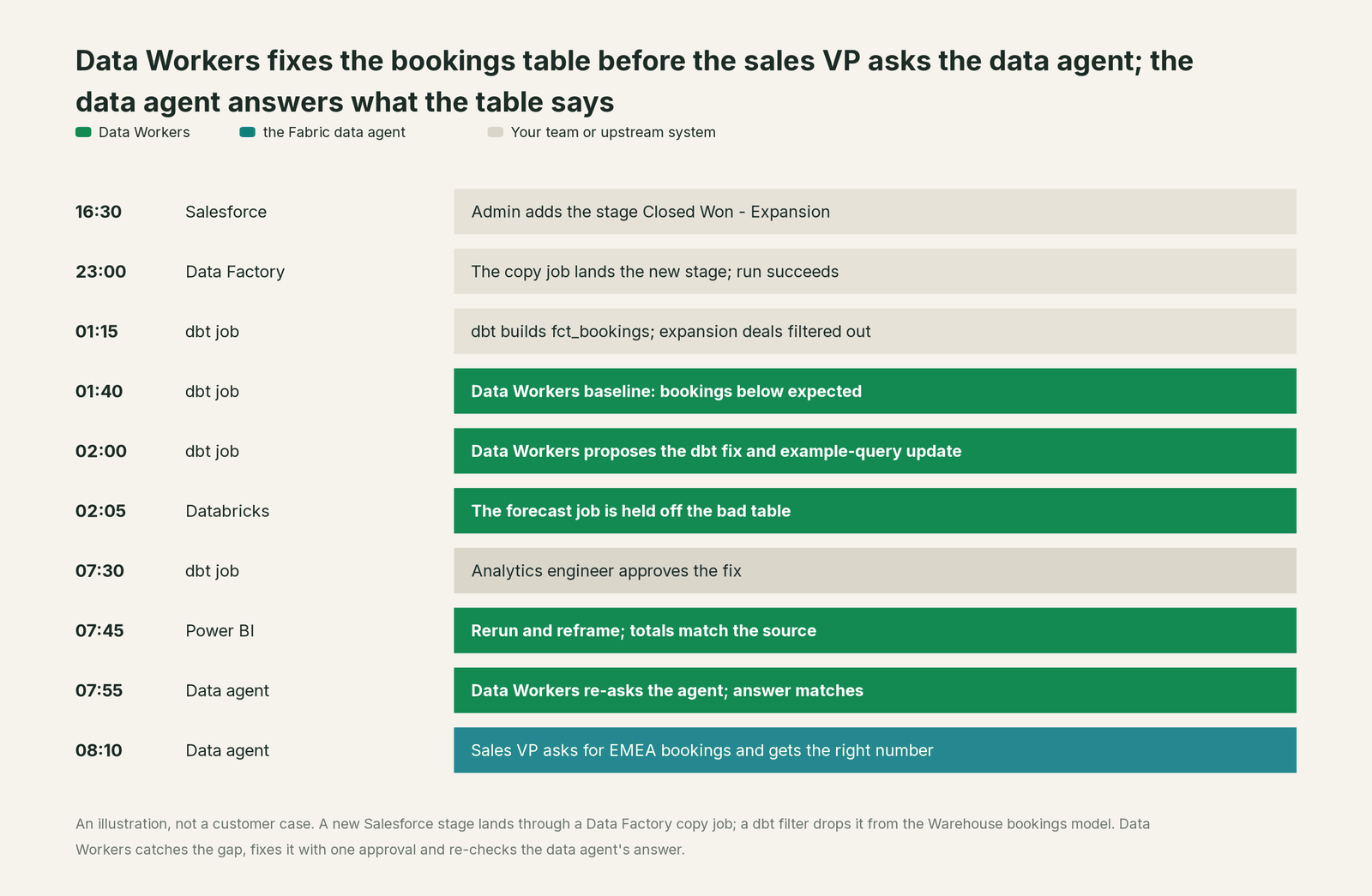
The data agent did its job well. It generated a correct query against the table it was given, with the VP's permissions. The problem was never the query. It was three systems upstream that nobody in that chat could see.
What Fabric data agents cover, as of October 2026
Microsoft has shipped steadily on data agents this year. Its pages differ on the status of the feature as a whole: the concept page (updated September 29, 2026) calls it generally available, while the AI release-status table (updated July 12, 2026) still lists it as preview. Here's what each piece does, with the dated status where Microsoft gives one.
| Area | What the data agent ships | Status (Oct 2026) |
|---|---|---|
| Core Q&A | Natural language to SQL, DAX and KQL, plus Microsoft Graph queries; formats results into a readable answer | Described as generally available on the concept page (Sept 29, 2026); preview in the older release table (Jul 12, 2026) |
| Sources | Up to five per agent: lakehouses, warehouses, Power BI semantic models, KQL databases including Eventhouse, mirrored databases, ontologies | Documented |
| Configuration | Data agent instructions, data source instructions, up to 100 example queries per source (not for semantic model sources) | Documented |
| Access model | Read-only connections; runs with the requesting user's credentials; RLS, CLS and Purview DLP apply | Documented |
| Output limits | Answers capped at 25 rows and 25 columns; English only; the model can't be changed | Documented limitations |
| Copilot Studio | Adds a data agent to a Copilot Studio agent as a Fabric IQ Data MCP tool | GA, August 2026 |
| MCP server | A published data agent exposes one MCP tool to any MCP client with a Fabric token (user or service principal) | Documented (how-to updated Sept 4, 2026) |
| Service principals; Foundry integration and observability | Unattended callers and Foundry agents | Preview |
| Evaluation and quality | Python SDK evaluation, advanced DAX generation, improved NL2SQL engine, "Build agent with AI" | Preview |
| Governance | Purview risk discovery, DSPM, Insider Risk and Audit for agent prompts and responses | Preview |
| ALM | Diagnostics, Git integration for instructions, example queries and source selections, deployment pipelines | Documented; data agents listed as a Git-supported item (Sept 29, 2026) |
| Billing | Tokens billed as Fabric capacity units ("AI Query" in the Capacity Metrics app); generated queries billed to the engine | Documented (updated Jul 22, 2026) |
Every row describes a better way to ask a question of data that's already right. None of them describes checking that the data is right, or fixing it when it isn't. That's the job Data Workers does.
One platform, not one more tool
Answering questions is one job on a data team's list. The same team also keeps the catalog honest, runs quality checks, closes incidents, ships pipeline changes, handles schema changes and migrations, works the access queue, protects sensitive data, cuts spend and keeps models fed with good data. Each point tool covers one or two of those, and each one adds another console, another contract and another handoff.
Data Workers covers the whole data lifecycle with one context graph, one approval flow and one audit trail. We score the same ten stages on every comparison page, so you can compare tools across pages. The Fabric data agent leads on one stage, its home ground: analytics and insights.
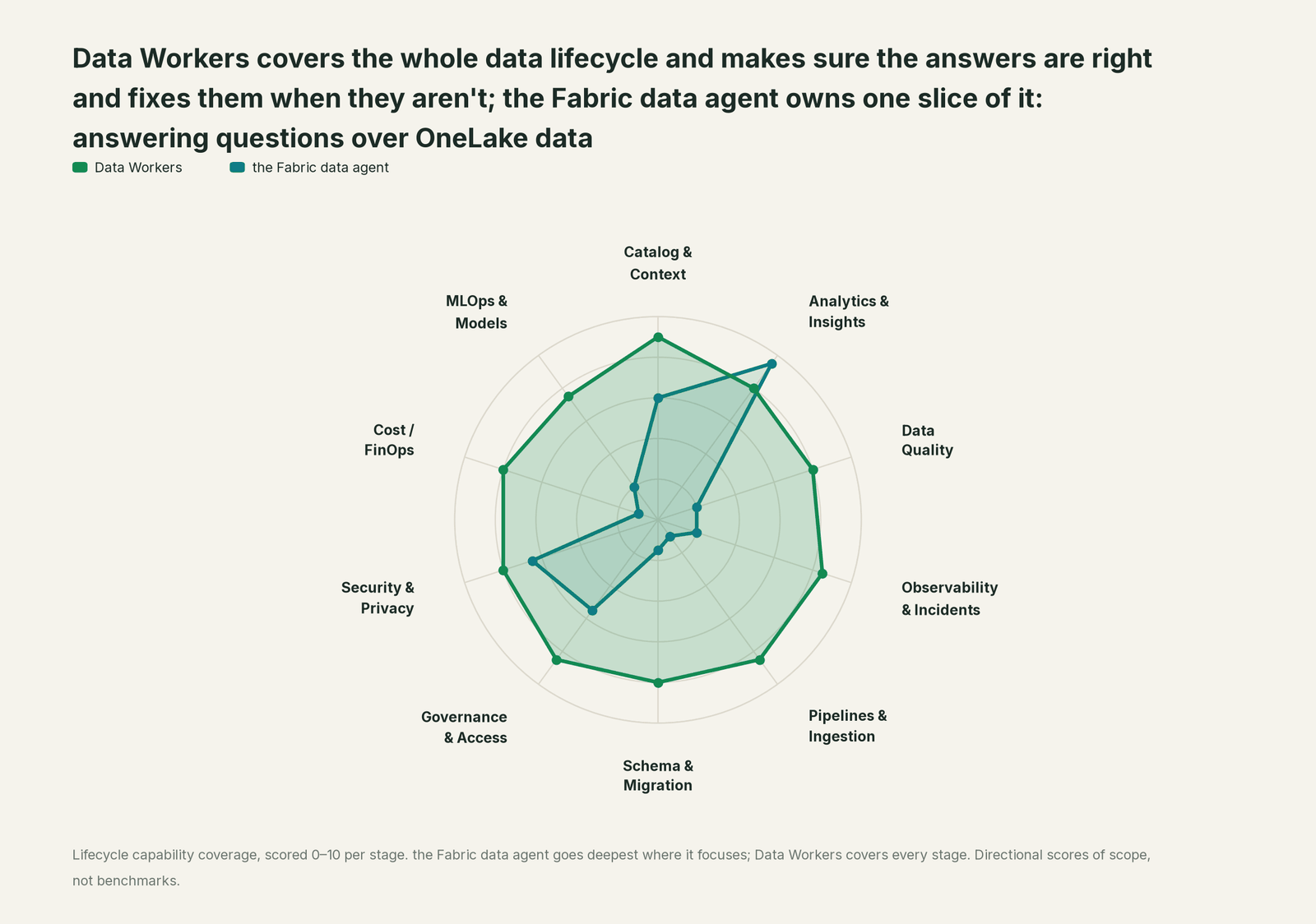
| Stage | Data Workers | Fabric data agents | Why we scored it this way |
|---|---|---|---|
| Catalog & Context | 9 | 6 | A data agent reads table schemas, its instructions, example queries and, optionally, a Fabric IQ ontology. Data Workers keeps one context graph across Fabric, dbt and the platforms beside it. |
| Analytics & Insights | 8 | 9.5 | The data agent's home stage: plain-language answers over lakehouses, warehouses, semantic models and KQL databases, in Teams and Microsoft 365 Copilot. |
| Data Quality | 8 | 2 | A data agent answers from whatever the table holds. Data Workers holds Fabric tables to baselines the team records, drafts the owner's tests and traces a bad number to its upstream cause. |
| Observability & Incidents | 8.5 | 2 | Diagnostics show how the agent handled a question. Data Workers owns the loop when the data is wrong: diagnose, fix, verify, record. |
| Pipelines & Ingestion | 8.5 | 1 | A data agent doesn't trigger pipelines, notebooks or other write workflows, by design. Data Workers proposes the pipeline fix and runs the rerun behind approval. |
| Schema & Migration | 8 | 1.5 | A data agent reads the schema as it is now. Data Workers catches an upstream change, maps its blast radius and proposes the fix before the next run. |
| Governance & Access | 8.5 | 5.5 | It answers with the asking user's permissions, and RLS, CLS and Purview policies apply. Data Workers works the access request queue behind approvals. |
| Security & Privacy | 8 | 6.5 | Read-only connections, user credentials and Purview auditing of prompts (preview) keep it safe. Data Workers acts with the identity you grant and leaves a receipt on every change. |
| Cost / FinOps | 8 | 1 | Its own usage shows in the Capacity Metrics app as AI Query. Data Workers traces Snowflake credits next to Fabric to the dbt model behind them and drafts the fix for its owner. |
| MLOps & Models | 7.5 | 2 | Not its job. Data Workers keeps the data under models healthy and connects to MLflow and W&B. |
Fabric data agents vs Data Workers on the outcomes you buy
The ten-stage view shows breadth. This view scores eight outcomes a data leader pays for. The data agent leads on three, all on its own surface: answers inside Microsoft 365, answers within each user's permissions, and Q&A an analyst can tune for a domain. Data Workers leads on the five that decide whether those answers are right.
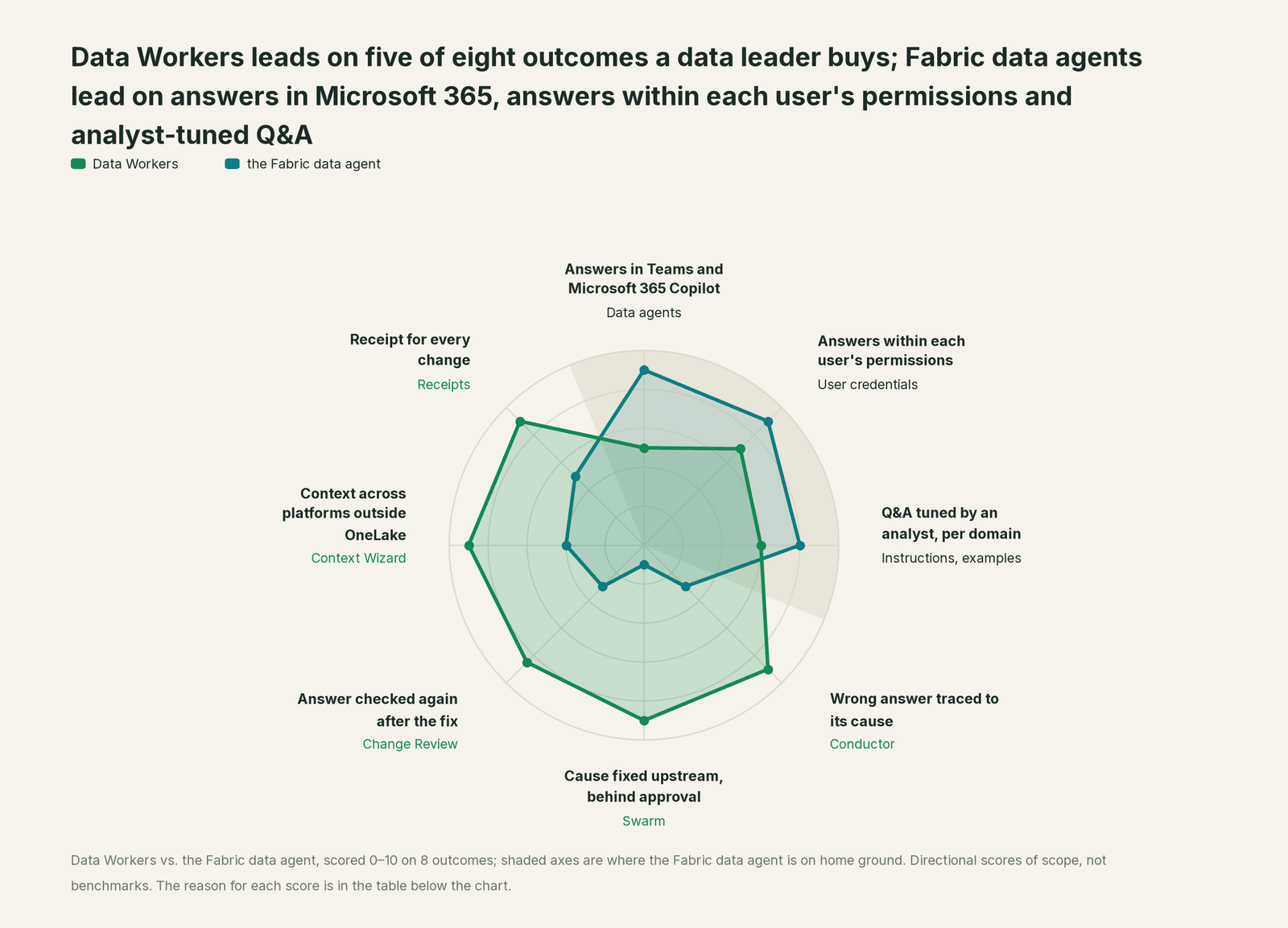
| Outcome | Data Workers | Fabric data agents | Why we scored it this way |
|---|---|---|---|
| Answers in Teams and Microsoft 365 Copilot | 5 | 9 | Data agents publish into Microsoft 365 Copilot, Teams and Copilot Studio (GA since August 2026). Data Workers' business-user app is Spellbook Data Catalog (preview), with Teams and Slack access coming. |
| Answers within each user's permissions | 7 | 9 | A data agent runs every query with the asking user's credentials, and RLS, CLS and Purview DLP apply. Data Workers acts with the scoped identity you grant it. |
| Q&A tuned by an analyst, per domain | 6 | 8 | An analyst picks up to five sources, writes instructions and adds up to 100 example queries per source. Data Workers reads that configuration as context and proposes updates when the data under it changes. |
| Wrong answer traced to its cause | 9 | 3 | A data agent reports what the table says. Data Workers traces a bad number through the semantic model, dbt, the pipeline and the source. |
| Cause fixed upstream, behind approval | 9 | 1 | Microsoft's docs say data agents only generate read queries and don't trigger write workflows. Data Workers proposes the dbt or pipeline fix and runs it after approval. |
| Answer checked again after the fix | 8.5 | 3 | Diagnostics and SDK evaluation (preview) test the agent itself. Data Workers re-checks the tables against their baselines after the rerun, and the answer people rely on is re-asked. |
| Context across platforms outside OneLake | 9 | 4 | Data agents read mirrored databases and shortcuts once data is in OneLake. Data Workers keeps one governed graph across Fabric, dbt, Snowflake, Databricks and the sources where they run. |
| Receipt for every change | 9 | 5 | Purview can audit data agent prompts and responses (preview). Every Data Workers change records why, what it touched, who approved it and how to undo it. |
These are directional scores of scope, not benchmarks. We've shown the reasoning so you can check every line against the Microsoft Learn pages linked below.
Why doesn't the Fabric data agent just do this itself?
Because Microsoft built it for a different job, and built it carefully for that job.
A data agent is something a business analyst configures and then hands to hundreds of people who don't write SQL. For that to be safe, it has to be impossible for a question to change data. So Microsoft made it read-only at every layer: read-only connections, read queries only, no triggering of notebooks or anomaly jobs, the asking user's credentials on every query, and a precedence model where tenant and workspace policy always override the analyst's instructions and the user's prompt. That's the right design for a tool anyone in the company can talk to. A data agent that could rewrite a dbt model because a VP phrased a question badly would be a liability.
Fixing the data underneath is a different product category. It needs standing, scoped identities instead of a user's session. It needs blast radius computed across systems Microsoft doesn't run (the Salesforce org, the dbt repo, the Databricks job, the Snowflake share), named approvals per domain, rollback paths and a receipt an auditor can read. And it means taking responsibility for changes in code and systems that belong to other vendors and other teams. Microsoft keeps write actions in separate, narrower places: operations agents run an action you configured after a Teams approval, Copilot proposes a fix inside one notebook, and the Core MCP server writes Fabric resources with the caller's permissions. Owning the fix across the whole estate is the product Data Workers is.
Where the Fabric data agent stops
Each limit below comes from Microsoft's own documentation. None of them is a flaw. They follow from building a safe Q&A agent for everyone.
It reads, and only reads. "It doesn't generate SQL, DAX, or KQL queries that create, update, or delete data," and it doesn't "trigger anomaly detection jobs, notebooks, or other write or action workflows." When the answer is wrong because the data is wrong, the data agent has no path to fixing it.
It trusts the table. The agent validates that its query is well formed and within policy. Nothing in its loop compares the table to the source it came from, so a silent filter, a missed late-arriving file or a duplicated join produces a fluent, wrong answer.
Its world is OneLake. Sources are lakehouses, warehouses, semantic models, KQL databases, mirrored databases and ontologies, up to five per agent. Salesforce, the dbt project, an on-premises SQL Server and the Databricks job are outside its view until their data lands in Fabric.
Its configuration drifts. Instructions and example queries encode business rules ("bookings means Closed Won"). Microsoft advises periodic review as data and requirements change, which in practice means someone has to remember.
It's built for conversation. Answers cap at 25 rows and 25 columns, the agent works in English, and the model can't be changed. That suits a question in Teams. It isn't how you'd check a table.
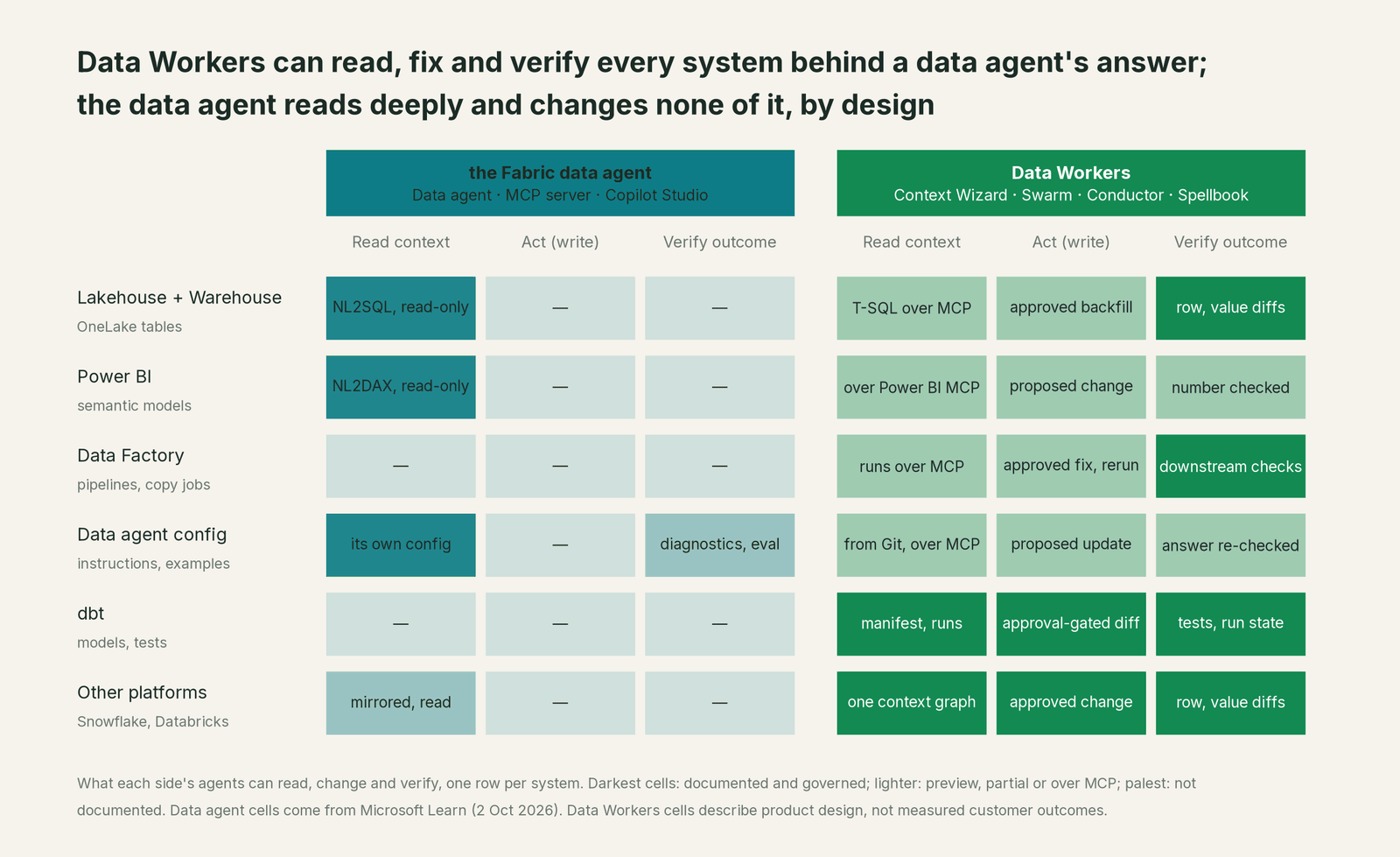
Where the two overlap
"Both" means business users keep asking the data agent, and Data Workers owns whether the answer is right.
| Job to be done | Fabric data agent | Data Workers | What we recommend |
|---|---|---|---|
| Plain-language Q&A for business users | Core feature, in Teams and Microsoft 365 Copilot | Spellbook (preview); Teams and Slack access coming | Fabric data agent |
| Q&A inside Copilot Studio and Foundry agents | Copilot Studio GA; Foundry in preview | Every agent is an MCP server | Fabric data agent for answers; Data Workers as a tool for operations |
| Answers within each user's permissions | User credentials, RLS, CLS, Purview DLP | Acts with the scoped identity you grant | Fabric data agent |
| Checking the tables behind the answers | Not its job | Quality checks and baselines kept running | Data Workers |
| Tracing a wrong number to its cause | Diagnostics on its own query | Conductor and Incident Debugging agent across systems | Data Workers |
| Fixing the cause | Read-only by design | Approval-gated dbt diff, pipeline fix, backfill | Data Workers |
| Keeping instructions and examples current | Owner edits, Git, deployment pipelines | Flags drift and proposes the update to the owner | Both: the owner applies, Data Workers notices |
| Schema changes upstream | Reads the schema as it is | Schema Evolution agent with blast radius | Data Workers |
| Audit evidence | Purview audit of prompts and responses (preview) | Receipt on every change to the data | Both, for different halves of the story |
What it costs
Microsoft bills data agent usage as Fabric capacity. Usage "is measured by the number of tokens processed", and the instructions, example queries and chat history count toward those tokens. The queries the agent generates are billed separately to the Warehouse, lakehouse or KQL engine that runs them. Everything draws on the same capacity as your nightly loads and refreshes. For a Q&A feature that's a sensible model, and it grows with the number of people asking.
Data Workers is priced the other way round. The Apache 2.0 core is free. A pilot is $7,500 one-time. Scale starts at $1,000 a month and Enterprise at $3,000 a month (billed annually). Seats are unlimited, there's no usage meter, and there's no markup on model spend because you bring your own model key, including the models you already run in Azure OpenAI. See pricing.
You don't trade one for the other. The data agent stays the way people ask questions. Data Workers is the flat-fee platform that keeps the data under it right, so the hours your analytics engineers spend on reconciliations, reruns and "why is this number different" threads go back to building.
The fastest first win: baseline the tables behind your busiest data agent
Pick the data agent that gets the most questions, usually sales bookings, revenue or pipeline. List its sources and the tables it selects. Point Data Workers at those tables, their dbt models, the Data Factory pipelines that feed them and the source systems, in observe mode.
Within the first week you get a daily baseline check on each table, the lineage from source to semantic model to data agent, and a list of instructions and example queries that reference columns, filters or values that have changed. Nothing is written yet. When the reports have matched what your team would have found by hand for a few weeks, move that domain to propose: the agents propose the fix as a diff and wait for an approval. Business users keep asking the data agent exactly as they do today.
What each Data Workers product does
Data-Agents Swarm. 20+ specialist agents that own classes of work: Quality Monitoring, Data Change Review, Schema Evolution, Incident Debugging, Pipeline Building, Access & Governance, Identity, Security, Cost Savings & Data Cleanup, Data Migration, Streaming, MLOps and more. Each is an MCP server.
Autonomous Data-Conductor. The orchestrator that owns an outcome. It runs detect, diagnose, fix, review, verify and remember across the estate, routes work to the right agents and scopes the blast radius before anything changes. In the example above, the outcome was "the bookings answer matches Salesforce".
Data Context Wizard. One governed graph across the OneLake catalog, dbt, Snowflake, on-premises sources and BI, with 50+ connectors. Data agents, semantic models and Fabric IQ definitions come in as first-class nodes, so a change upstream shows which answers it touches.
Spellbook Data Catalog. The control plane for agent work, in preview. Every proposed change lands in one inbox to approve, steer, send back or roll back, and an authority guard in code stops any agent approving its own work.
Autonomy guardrails and security
The data agent manages risk by never writing. Data Workers manages risk for work that does write, with graded, reversible control.
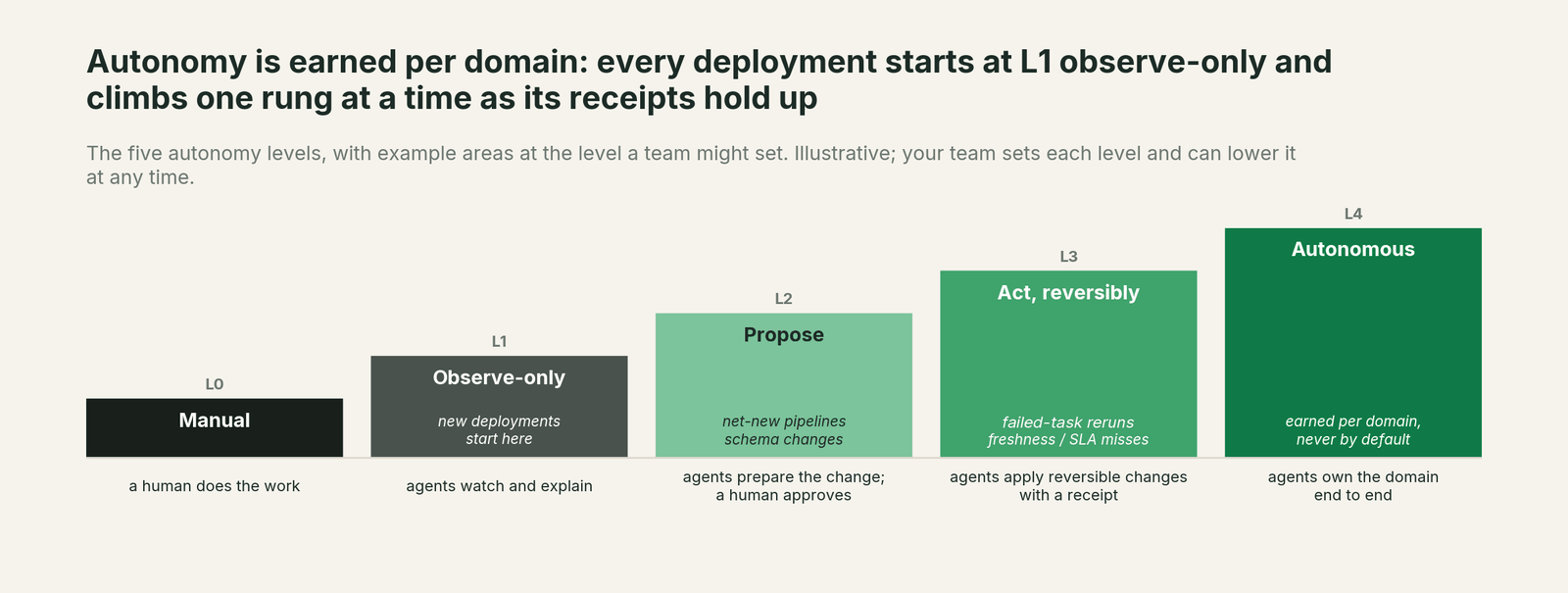
- •New deployments start observe-only. You raise autonomy one domain at a time, as the receipts earn trust.
- •Autonomy is set per domain on the ladder: L0 manual, L1 observe, L2 propose, L3 act reversibly, L4 autonomous. Bookings checks can propose fixes while access grants stay at observe.
- •Every write is scoped before it runs, with blast radius computed across Fabric and the systems around it.
- •Every change is approved or reversible and leaves a tamper-evident receipt: what changed, why, who approved it and how to undo it.
- •No agent can approve or promote its own work. This is enforced in code.
- •Least privilege. Data Workers acts with the Entra identity, workspace roles and OneLake security roles you grant it, and its actions show up in the Fabric audit log and Purview Audit like any other identity's.
- •Zero migration. Data Workers stores metadata and scrubbed facts about your data, not copies of your tables. OneLake stays where it is.
For the deeper version of the safety question, read Is it safe to let AI agents change production data? and How approvals work for AI data agents.
"The data agent is an MCP server now. Can't Claude Code just fix things with it?"
It can ask good questions with it. A published data agent exposes a single MCP tool: a client sends a question and gets back a grounded answer. That's useful for any coding agent that needs a business number. It's still a read-only tool, and Microsoft notes that responses consumed over MCP "might be sent outside of Fabric's compliance boundary" according to the client's own data handling terms.
To change things, a coding agent would reach for other servers, such as the Fabric Core MCP Server, which can create and delete workspaces and items and grant roles. Microsoft's own caution there is to review agent-generated tool calls and your client's approval settings. MCP gives an agent one more tool. It doesn't give your team an owner for a class of work, a blast radius across Salesforce, dbt and Databricks, a named approver per domain, a rollback path or a shared record of what happened. Data Workers gives you that operating model, and it uses the data agent's MCP endpoint the way it should be used: to confirm the answer is right after a fix.
How it fits together
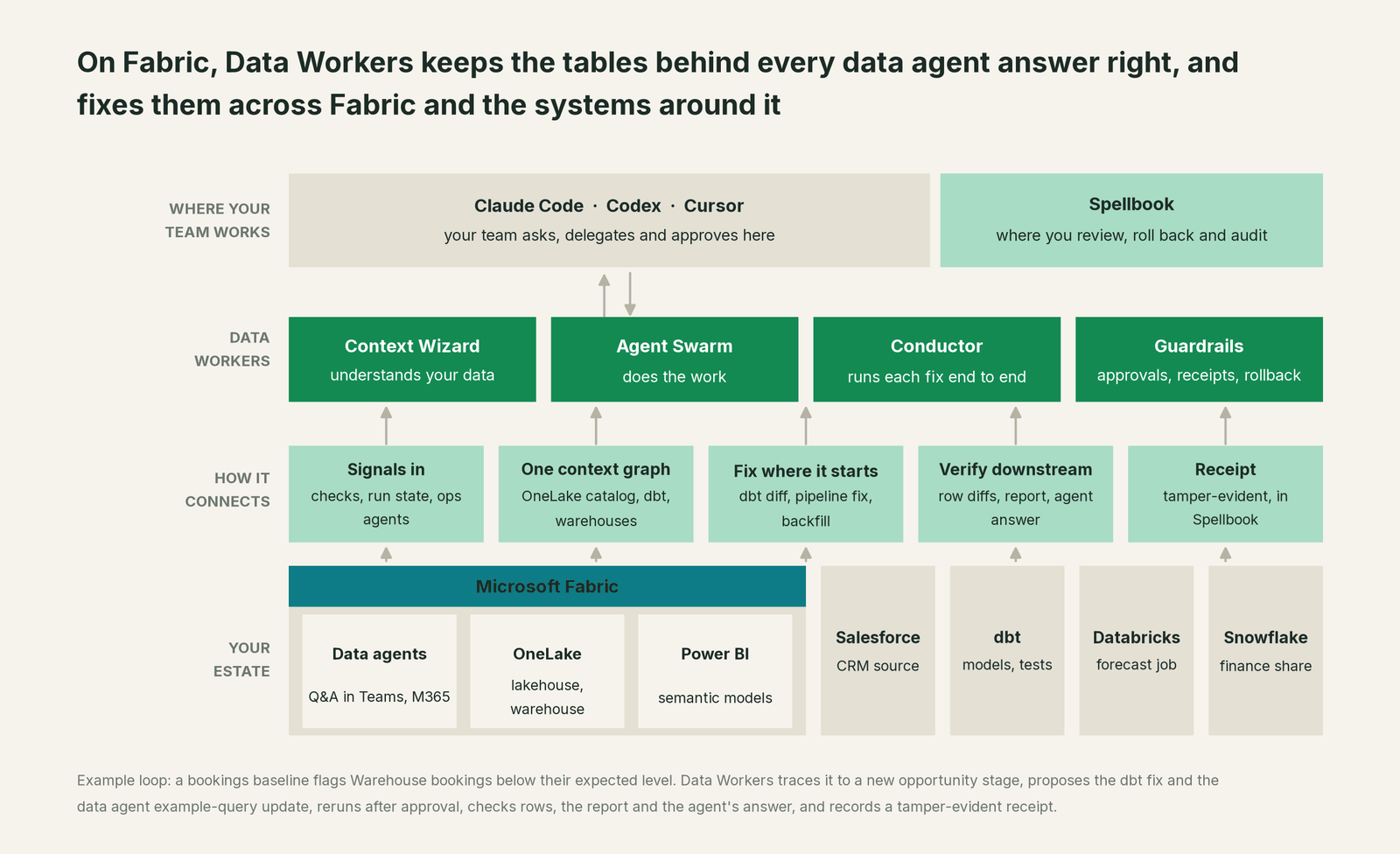
Getting started takes no migration. Connect Data Workers to your Fabric workspaces over Fabric's MCP servers and REST APIs, and to your dbt project, source systems and other platforms, with Purview over its REST APIs. Context Wizard builds the graph, including which data agents read which tables. Every agent starts observe-only, and the first thing you see is whether the tables behind your most-used data agent match their sources.
The case for your CFO
The outcome. The numbers people get from your Fabric data agents in Teams and Microsoft 365 Copilot are right, and when they aren't, they're fixed before anyone asks. Fewer wrong numbers reach sales and finance meetings, and fewer analytics engineer hours go to reconciling by hand.
The risk story. The data agent stays read-only, as Microsoft designed it. Data Workers' agents start observe-only and earn autonomy one domain at a time: observe, then propose, then act reversibly. Every write is scoped before it runs, every change is approved or reversible, and each one leaves a tamper-evident receipt with what changed, why, who approved it and how to undo it. No agent can approve its own work. Nothing migrates: Data Workers stores metadata and scrubbed facts, not copies of your tables.
Why now. Microsoft is putting data agents everywhere people work: Copilot Studio integration has been GA since August 2026, a published data agent works as an MCP server for any MCP client, and Foundry integration is in preview. Every new surface multiplies the number of people who trust the number without seeing the table. Data quality ownership has to scale with question volume.
The first win. Daily baseline checks on the tables behind your busiest data agent, with lineage and drifted example queries flagged, in observe mode from the first week.
What stays the same. Fabric stays where your data and analytics run. OneLake, Purview, Entra, workspace roles and Power BI stay authoritative. The data agents, their owners and their instructions stay as they are, and business users ask questions exactly as they do today.
The pilot path. Start with a pilot on one domain, usually the tables behind one data agent. The pilot is credited in full against the first year. See pricing.
The sentence to repeat upstairs: "Our Fabric data agents answer questions in Teams; Data Workers makes sure the tables behind those answers are right, fixes them when they aren't, and leaves a receipt for every change."
When the Fabric data agent alone is enough
The data agent alone can be enough if the data under it is simple and stable: a few curated tables or a well-governed semantic model, loaded from sources inside Fabric, owned by a small team who would notice a wrong number the same day. Many departmental agents look like that, and they're a good way to start.
Most enterprise agents don't. If your bookings, revenue or pipeline agent reads tables built from Salesforce, an ERP, dbt and a Databricks job, and if the people asking are executives who won't check the SQL, the answer is only as good as every step upstream. Owning those steps is the job of Data Workers.
FAQ
What is a Fabric data agent? A Fabric data agent (formerly AI skill) is a configurable Q&A item in Microsoft Fabric. An analyst selects up to five OneLake sources, adds instructions and example queries, and publishes it. Users ask questions in plain English in Fabric, Teams, Microsoft 365 Copilot, Copilot Studio or any MCP client, and the agent answers with read-only SQL, DAX or KQL queries run with their own permissions.
Is the Fabric data agent generally available? Microsoft's pages differ. The concept page (updated September 29, 2026) calls it generally available; the AI release-status table (updated July 12, 2026) still lists it as preview. The Copilot Studio integration went GA in August 2026; service principal support and Foundry integration are in preview. The MCP server how-to (updated September 4, 2026) carries no preview label.
Can a Fabric data agent write or fix data? No, by design. Microsoft documents that it only generates read queries and doesn't trigger notebooks or other write workflows. Data Workers is the layer that fixes the data behind its answers, with approvals and receipts.
Fabric data agent vs Data Workers: which should I choose? Both, for different jobs. Use the data agent so people can ask questions of OneLake data. Use Data Workers to make sure the tables, pipelines and models behind those answers are right, and to fix them across Fabric and the systems around it when they aren't.
Why does my Fabric data agent give a wrong answer? Usually for one of two reasons: the question was mapped to the wrong source or query, which better instructions and example queries help with, or the data in the table is wrong because something changed upstream. Data Workers handles the second kind: its checks and baselines catch the table going wrong, and it traces the change and fixes it.
Does Data Workers replace Fabric data agents or Copilot? No. Business users keep the data agent and Copilot. Data Workers works underneath them and alongside the operations agents and Fabric IQ you already run. For building on the business-meaning layer, see You're on Fabric IQ.
How does Data Workers connect to Fabric? Over Fabric's MCP servers and REST APIs today, with Purview over its REST APIs and the dbt and Snowflake connectors for the platforms beside Fabric. It reads data agent configurations from the Git repository your Fabric workspace syncs to, and your team's assistant calls published data agents over their MCP endpoint today, side by side with Data Workers.
How much does Data Workers cost? A free Apache 2.0 core, a $7,500 one-time pilot, Scale from $1,000 a month and Enterprise from $3,000 a month (billed annually), with unlimited seats and no usage meter. See pricing.
Sources
Sources for Fabric data agent capabilities and statuses: Microsoft Learn and Microsoft announcements current as of October 2, 2026, including Fabric data agent concepts (updated September 29, 2026), Data agent as Model Context Protocol server (updated September 4, 2026), What's new in Microsoft Fabric (updated October 1, 2026), the AI feature release status table (updated July 12, 2026), Data agent consumption (updated July 22, 2026), the Fabric MCP server directory (updated September 23, 2026), the Fabric Core MCP Server overview (updated September 29, 2026), operations agents (checked October 2, 2026), the Fabric IQ overview (updated September 29, 2026), the Fabric Git integration overview with its supported-items list (updated September 29, 2026) and the FabCon 2026 announcements (September 28, 2026). Product names and statuses change quickly; if we've got something wrong, tell us and we'll fix it.