You're on Replit Agent: Make Every Internal App and Dashboard Your Teams Build Read Governed, Correct Data
Teams across your company build dashboards and internal apps with Replit Agent. Add Data Workers over MCP so every app reads governed definitions and the data stays right.
Your company builds on Replit. Sales ops has a bookings dashboard, finance a reporting app on warehouse data, operations an internal request tool, each started as a prompt to Agent 4 in a shared Workspace. An admin set up the Snowflake or Databricks warehouse connector once (Enterprise connectors also cover BigQuery, with Microsoft Fabric in private preview), builders signed in with their own identity, and Agent wrote the SQL, the back end and the charts, then published the app as a private deployment behind SSO. Replit Agent is where your teams build the app. Data Workers is the data team behind every number the app shows: connected over MCP, it gives Agent governed definitions, routes access through the right grants and keeps the data underneath correct, with approvals and receipts.
Replit Enterprise has no per-seat costs, so anyone can become a builder, and every new app is a new place where a metric gets computed. One governed layer under all of them keeps fifty apps showing one number.
Key takeaways
- •Replit keeps its job. Your Workspace, connectors, SSO, groups, private deployments and security scans stay as they are. Data Workers is one more workspace MCP server an admin adds by URL.
- •Every app reads governed definitions. Before Agent writes a query, it can ask Data Workers which table is canonical, how
bookingsis defined, who owns it and whether last night's load finished. - •Access goes through the right grants. Builders keep their own warehouse identity; a request for a table they can't see becomes a scoped, time-boxed grant proposal for the data owner.
- •The numbers stay right. Data Workers detects breaks before a builder notices, traces them across Salesforce, Fivetran, dbt and Airflow, fixes them after approval and verifies the result.
- •Fixes pass two locks. Replit asks the builder to confirm a tool that requires it, and Data Workers routes each change to a named approver in Spellbook, applies it reversibly and writes a receipt.
- •Start with a pilot. Read tools on one high-traffic dashboard, then one write class in one domain, on the autonomy ladder from L0 manual to L4 autonomous.
Replit Agent is where your teams build. Data Workers is the data team behind every number.
Replit's docs describe the job well. Warehouse connectors let Agent "securely query your organization's data warehouses," builders "use natural language to create dashboards, reporting tools, and data applications," and Agent "writes and executes SQL against it." Replit's dashboard guide even teaches the right habit: ask Agent to "explain the fields and calculations you used so I can verify the dashboard," and check the numbers against the source before sharing.
That habit is the work Data Workers takes off the builder. A builder can check that a chart matches the table, but can't easily tell that the table itself dropped a whole class of deals at 2 a.m. Here is a Tuesday morning with Data Workers connected. This is an illustration, not a customer case.
| Time | System | What happens |
|---|---|---|
| Mon 17:30 | Salesforce | RevOps adds a new opportunity stage, "Verbal Commit" |
| 01:00 | Fivetran | The nightly sync lands opportunities in Snowflake |
| 02:00 | Airflow + dbt | The DAG run succeeds; fct_bookings maps stages through a CASE statement, so deals in the new stage drop out |
| 03:10 | Data Workers | The deal-count baseline the team records with monitor_metrics flags 212 deals missing; Data Workers traces the gap through lineage to the stage mapping and opens an incident |
| 08:40 | Replit app | The EMEA sales ops lead opens the bookings dashboard she built with Agent and asks Agent why EMEA bookings fell 18% |
| 08:41 | Data Workers | Agent calls the Data Workers server. The answer comes from governed context: bookings are flat; 212 deals in a new stage are missing since 02:00; here is the incident, the bookings definition and the model owner |
| 08:44 | Replit Agent | She asks for the fix; Replit shows the proposal tool and asks her to confirm |
| 08:45 | Data Workers | Data Workers proposes a dbt diff adding the stage to the mapping, with its blast radius: two models, four Replit apps and one finance report |
| 09:10 | Spellbook | The analytics engineer who owns fct_bookings reviews the diff and approves; dbt CI passes |
| 09:30 | Snowflake + dbt | Data Workers reruns the affected models; bookings match Salesforce to the deal |
| 09:35 | Replit app | The dashboard refreshes before the 10:00 forecast call; the next answer links the receipt |
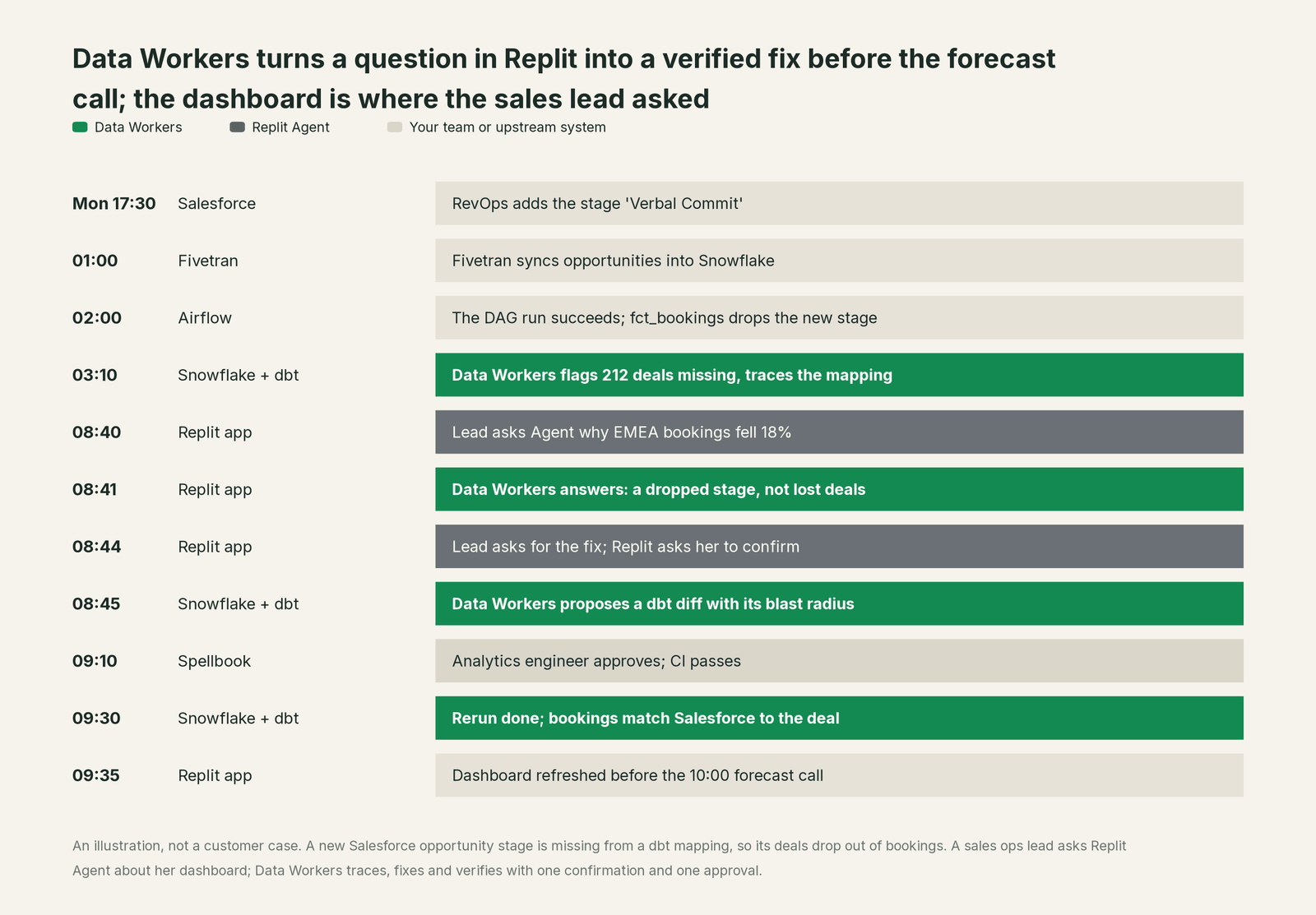
The dashboard showed what the table said. Data Workers was on the break at 03:10, explained the cause in the Replit chat where the question came up, and fixed it with one confirmation, one approval and one receipt. The same rerun corrected the three other apps on fct_bookings.
| Job | What Replit Agent does | What Data Workers does |
|---|---|---|
| The app | Turns a prompt into a working, published dashboard or internal tool | Gives every app one governed data tool to build on |
| The query | Writes and runs SQL through the warehouse connector | Supplies the canonical table, metric definition, owner and freshness behind it |
| The context | Explains the schema the connector exposes; follows Workspace instructions and Skills | Keeps one context graph across Salesforce, Fivetran, Snowflake, dbt, Airflow and BI, with provenance |
| The access | Signs builders in with their own warehouse identity; scopes connectors by group | Turns access needs into least-privilege grant proposals for the data owner |
| The break | Shows what the data says | Detects the break, traces it across systems and opens an incident |
| The fix | Asks the builder to confirm a tool that requires it | Proposes the change with its blast radius, routes it to a named approver, applies it reversibly and verifies it |
| The proof | Audit logs of who built and published what, streamed to your SIEM | A receipt for every data change: who approved it, what it touched, how to undo it |
Why doesn't Replit Agent just do this itself?
Because Replit built Agent to turn an idea into a working app for anyone in the company, and made sensible choices for that job. Replit owns the build, the hosting and the platform governance: SSO and SCIM, groups, private deployments, required security scans, a Security Center and a scanner that checks MCP tools before they run. The warehouse, the dbt project, the Airflow DAGs and the Salesforce source belong to your data team, and Replit's docs keep them there by design. Warehouse permissions stay in the warehouse: the Databricks U2M connector runs each query with "each builder's Unity Catalog permissions," and the Snowflake connector signs each builder in through your own OAuth integration.
That is the right design for an app builder used by finance, sales ops and operations alike. Deciding which of three revenue tables is canonical, noticing that a new CRM stage broke a dbt model, and changing production data across Snowflake, dbt and Airflow is a different product category. It needs a governed context graph across systems Replit doesn't run, blast-radius scoping, approvals routed to each model's owner, rollback, receipts that tie a change to its cause, and liability for tools Replit doesn't own. That is the product Data Workers is, and it lets a sales ops lead who builds a dashboard stay a sales ops lead.
Every tool owns a slice. Data Workers covers the whole lifecycle
Replit Agent owns one slice of the data lifecycle, and owns it well: putting company data in front of people as apps they built themselves. Each point tool adds another console, another contract and another handoff. Data Workers covers the whole lifecycle with one context, one approval flow and one audit trail, and builds on Replit where your teams already build.
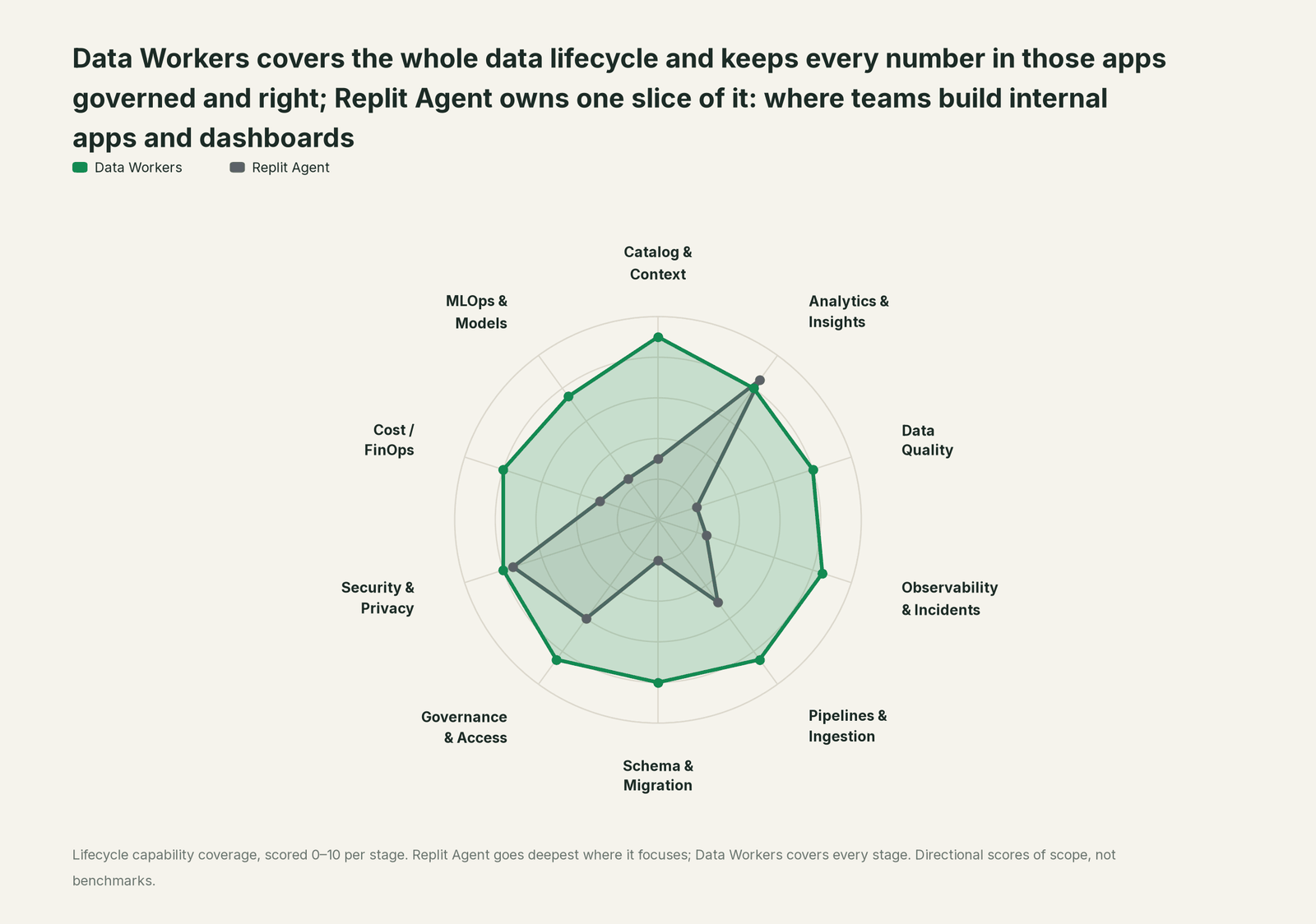
| Stage | Data Workers | Replit Agent | Why we scored it this way |
|---|---|---|---|
| Catalog & Context | 9 | 3 | Agent explains the schema and tables a connector exposes and follows Workspace instructions and Skills. Data Workers keeps one governed context graph of definitions, lineage, owners and freshness across every platform. |
| Analytics & Insights | 8 | 8.5 | Replit's home stage: anyone can turn warehouse data into a dashboard, reporting tool or internal data app and publish it. Data Workers answers from governed definitions with lineage behind every number. |
| Data Quality | 8 | 2 | Replit's dashboard guide asks builders to check calculations against the source by hand. Data Workers writes, runs and repairs checks and dbt tests across the estate. |
| Observability & Incidents | 8.5 | 2.5 | Replit monitors the apps it hosts and scans their dependencies. Data Workers detects data breaks, traces them across systems, fixes and verifies them. |
| Pipelines & Ingestion | 8.5 | 5 | Agent writes the SQL and back end for each app and can schedule Routines. Data Workers builds, reruns and backfills the shared pipelines behind approvals and verifies the output. |
| Schema & Migration | 8 | 2 | An app reads whatever schema the warehouse returns today. Data Workers detects upstream schema changes, assesses blast radius and plans migrations in parity-checked waves. |
| Governance & Access | 8.5 | 6 | Strong over its own platform: SSO, SCIM, groups, connector access by group, per-builder warehouse identity. Data Workers proposes and applies least-privilege grants on your data platforms. |
| Security & Privacy | 8 | 7.5 | Strong for apps: private deployments, required security scans, Security Center, audit logs to your SIEM and a scanner on all MCP traffic. Data Workers leaves a receipt on every data change. |
| Cost / FinOps | 8 | 3 | Usage views break credit spend down by user, project and resource. Data Workers traces Snowflake credits to the dbt model behind them and drafts the fix for its owner. |
| MLOps & Models | 7.5 | 2.5 | Replit lets admins choose approved models for Agent. Data Workers keeps the data under your own models healthy and connects to MLflow and W&B. |
How Replit Agent and Data Workers work together
Replit stays on top, where builders prompt, publish and ask why a number moved. Spellbook Data Catalog (in preview) is where the data team reviews each change, its approver, what it touched and how to roll it back. Between them, Data Context Wizard keeps one governed context graph, the Data-Agents Swarm does the work with more than 20 specialist agents, the Autonomous Data-Conductor runs each fix end to end (detect, diagnose, fix, review, verify, remember), and per-domain guardrails hold approvals, receipts and rollback.
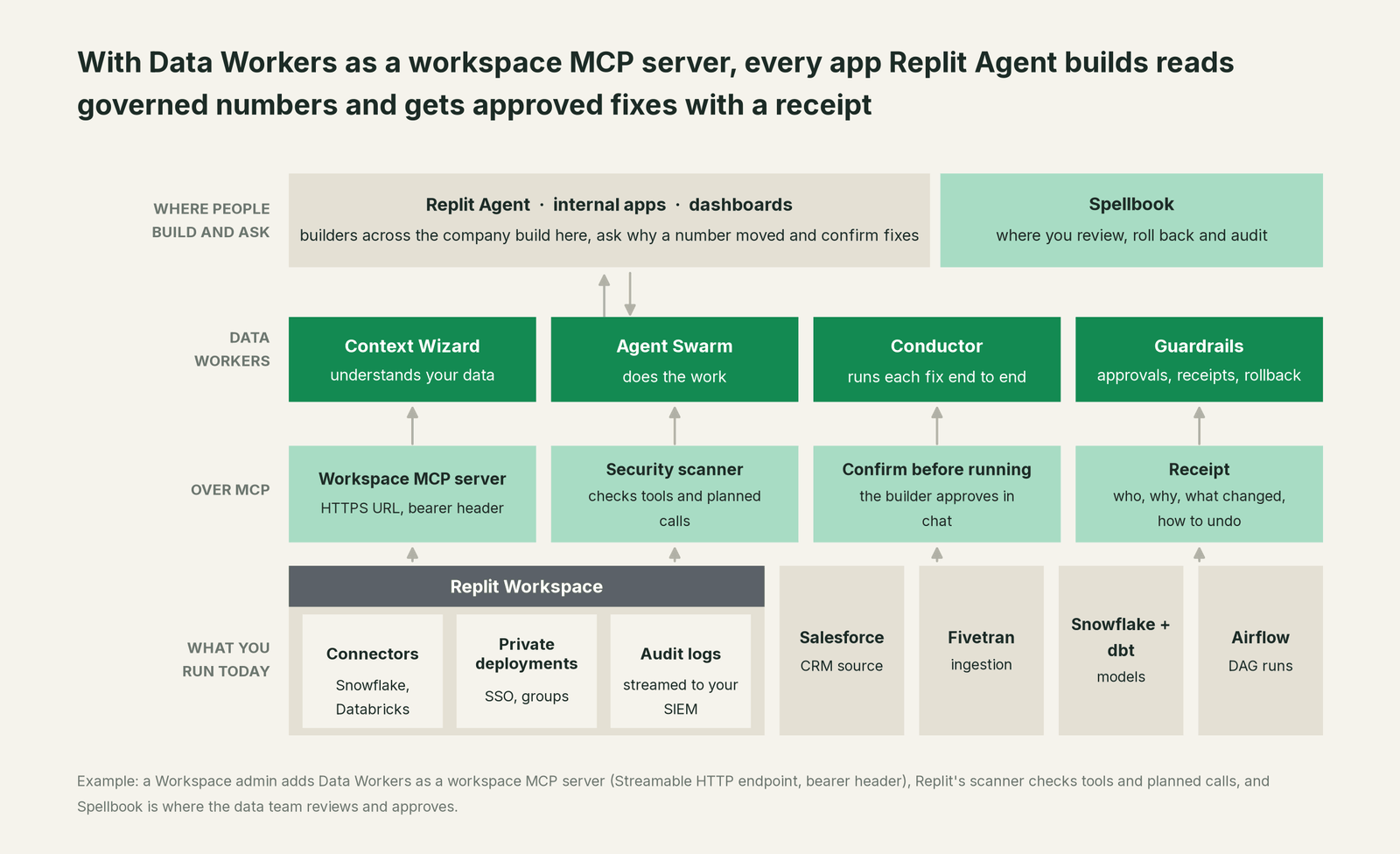
Setup in Replit. Every Data Workers agent is an MCP server. Our client setup docs cover local clients: clone dataworkers-claw-community (Apache 2.0) and point the client at start-agent.sh <agent>. Replit connects to MCP servers by HTTPS URL, so for Replit you run Data Workers on its Streamable HTTP endpoint (/mcp) on a host you control, behind your HTTPS gateway, and Replit authenticates with a bearer token in a request header. The admin steps, using Replit's labels this month:
- •From the Workspace home, open Integrations. In Your integrations, choose Add custom, then Add workspace MCP server, with one shared connection for the Workspace.
- •Set the display name to Data Workers. Agent uses it to reference the server in chat, so builders can say "use Data Workers" in prompts.
- •Paste the HTTPS endpoint, open Advanced settings and add an
Authorizationheader with the bearer token. Replit sends it with every MCP request. - •Select Test & save. Agent fetches the tool list, and Replit's security scanner checks tool definitions and planned calls.
- •On Enterprise, open Manage on the connection and grant it to the groups that build data apps first, such as RevOps and FP&A.
- •Add a Workspace-wide instruction so Agent checks Data Workers before it writes warehouse SQL: resolve the metric, trace lineage, check load lag against its baseline.
Example: Data Workers as a workspace MCP server in Replit
Display name:   Data Workers
Server URL:     https://<your-data-workers-host>/mcp      (Streamable HTTP)
Advanced:       Header  Authorization: Bearer <token from your secret store>
Connection:     workspace server, shared; grant to RevOps and FP&A first
Tools at start: search_across_platforms, resolve_metric, explain_table,
                trace_cross_platform_lineage, get_incident_history,
                blast_radius_analysis, diagnose_incident
Instruction:    "Before writing SQL on warehouse data, ask Data Workers which
                table and definition to use and whether it has an open incident."
Replit install links can share the same server URL internally; keep the token out of the link.
One request end to end, L0 to L4. The autonomy ladder is set per domain, and each rung maps onto a control you already have in Replit.

- •L0 manual. Agent builds from the warehouse connector alone; the builder checks numbers by hand and files tickets.
- •L1 observe. Read tools only. Ask "why did EMEA bookings fall?" and Agent calls
resolve_metric,trace_cross_platform_lineageanddiagnose_incident, then answers with the definition, the lineage path and the open incident. - •L2 propose. The admin enables proposal tools for one group. The builder asks for the fix, Replit asks her to confirm, and Data Workers proposes a dbt diff with its blast radius. Nothing reaches production until the model owner approves in Spellbook and CI passes.
- •L3 act reversibly. For change classes with a proven record, such as reruns and backfills of failed models, Data Workers applies the change, re-runs the checks on the changed tables, with the undo recorded before it runs.
- •L4 autonomous. For a scoped domain like freshness failures in the sales marts, Data Workers fixes overnight, and every app on those marts shows the right number by morning, with a receipt.
Each step up is a per-domain decision backed by receipts, reversible any time. For the safety model, read is it safe to let AI agents change production data; for where data and credentials live, read where does our data go.
The same server serves every assistant and coding agent in the company. See you're on ChatGPT Enterprise, you're on Cursor, you're on Microsoft Copilot Studio and the section hub, AI assistants are rolled out, now what.
What changes for your team
Replit gave every team its own data apps. Data Workers gives the data team a crew, so those apps don't become a queue of "is this number right?" tickets.
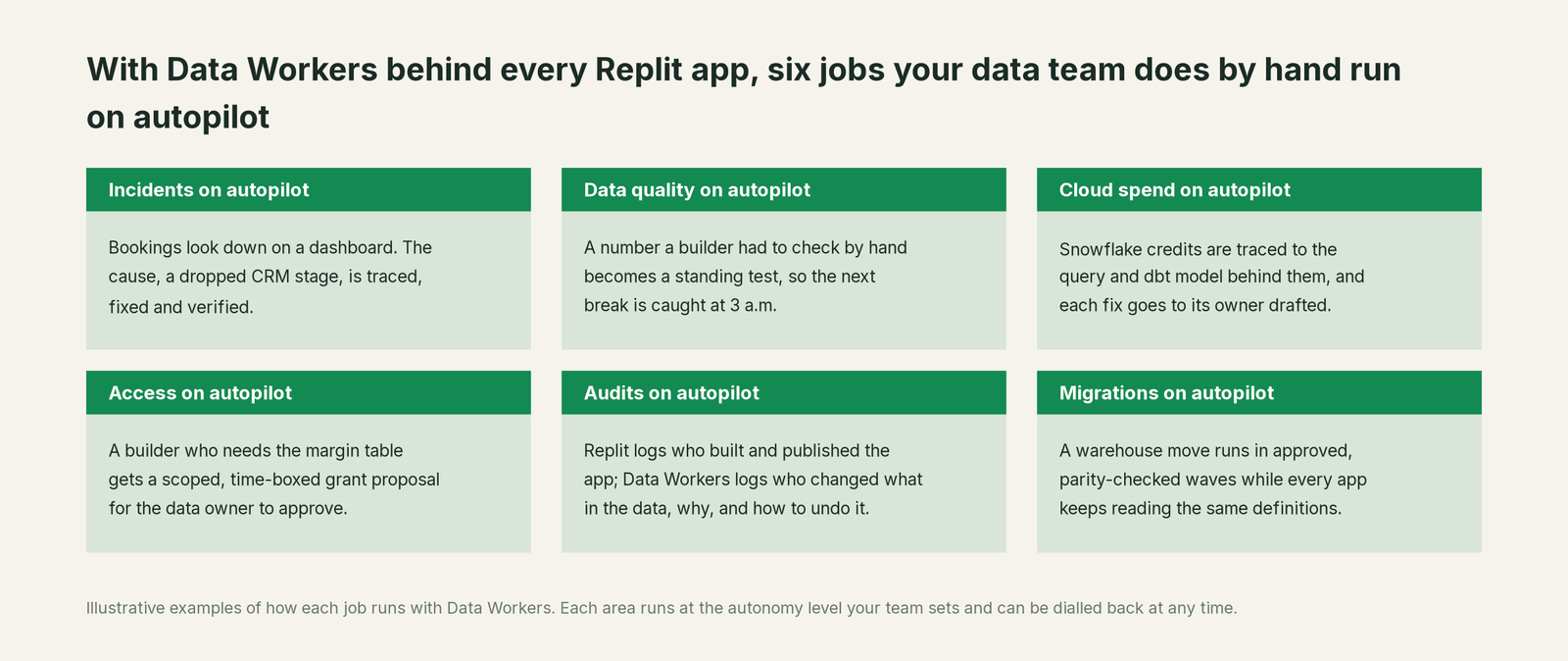
- •Incidents. Breaks are traced, fixed and verified overnight, before anyone opens a dashboard.
- •Data quality. Every number a builder once checked by hand becomes a standing check or dbt test.
- •Cloud spend. Snowflake credits are traced to the query and dbt model behind them, and each fix goes to its owner drafted.
- •Access. "I need the margin table" becomes a scoped, time-boxed grant proposal to the data owner. The warehouse stays the permission system.
- •Audits. Replit logs who built and published each app. Data Workers logs who changed what in the data, why, and how to undo it.
- •Migrations. A warehouse move runs in approved, parity-checked waves while every app keeps reading the same definitions.
Keep Replit Agent, or consolidate?
Keep Replit Agent if you love it; Data Workers works with it from day one. Many teams consolidate once Data Workers runs that slice too.
For most companies the answer is to keep it: Replit is where your teams build, and its admin controls are ones your IT team chose. What teams consolidate is what grew up around the apps: metric logic pasted into each app's SQL, one-off validation scripts, and often a separate data-quality and observability stack, now that Data Workers runs those jobs. If you are weighing building this layer yourself, read build it ourselves with Claude Code and MCP servers first: the MCP endpoint is the easy part, and the context graph, the approvals and the rollback are where the work is.
The case for your CFO
The outcome: the company invested in Replit so every team can build its own tools, and Data Workers makes the numbers in those tools correct, current and auditable. A dashboard built on Monday drives a forecast call on Tuesday, so its data carries the weight of any finance report.
The risk story has two locks. Replit admins decide which groups can use the Data Workers server, and Replit asks the builder to confirm a tool that requires it. Data Workers sets autonomy per domain from L0 manual to L4 autonomous, routes each change to a named approver, applies it reversibly, verifies it and writes a receipt: who approved, what it touched, how to undo it. There is zero migration: Salesforce, Fivetran, Snowflake, dbt, Airflow and every Replit app stay where they are.
Why now: with unlimited seats, the number of builders grows every month, and a wrong number in a shared table reaches every app that reads it. The first win is one high-traffic dashboard answering "where does this number come from?" with definition, lineage, owner and freshness, then one write class in one domain. What stays the same: your Workspace, SSO, publishing policies, warehouse grants and dbt review. For the numbers, see the ROI of agentic data operations. Start with a pilot; the plans are on the pricing page, and the pilot is credited in full against the first year.
The sentence to repeat upstairs: "Our teams build their own apps on Replit; Data Workers makes sure every one of them shows the governed number, and fixes the data when it isn't right, with an approval and a receipt."
Getting started
Start with a pilot. Pick one domain where Replit apps already read warehouse data, such as sales bookings, add Data Workers as a workspace MCP server with read tools for the groups that build there, and enable the first write class once the reads have earned trust. The plans are on the pricing page, and the pilot is credited in full against the first year.
FAQ
We already have Replit's Snowflake connector. What does Data Workers add? The connector runs SQL with the builder's identity, as it should. Data Workers tells Agent which table and definition to use, whether the data is fresh and what is broken upstream, and fixes breaks across Fivetran, dbt and Airflow with approvals.
Is it safe to let non-engineers trigger changes to our data platform? Changes pass two locks. In Replit, admins grant the server to specific groups, and tools that require confirmation prompt the builder first. In Data Workers, each change has a blast radius, a named approver in Spellbook, a rollback path and a receipt, and autonomy is set per domain. Most teams start read-only and add one write class at a time.
Whose credentials does Data Workers use? Replit authenticates to the Data Workers endpoint with the bearer token your admin stores in the connection's header. Data Workers then acts on Snowflake, dbt and Airflow with the connections you configure, scoped per domain. Warehouse grants stay the system of record, by design, and each builder's warehouse connector keeps its own identity.
Can several apps built on the same table be fixed at once? Yes. Data Workers tracks lineage from the source to every model and downstream reader, so a fix to one dbt model reaches every app that reads it, and the proposal lists those apps before anyone approves.
Does Replit's MCP security scanner affect Data Workers? Data Workers tools pass through it like any MCP server's: one more check on top of Data Workers' own guardrails.
Can we stop builders from writing their own versions of a metric? Add a Workspace-wide instruction telling Agent to resolve metrics through Data Workers before writing SQL, and grant the server to every group that builds data apps. Agent then starts from the governed definition, and the data team changes it in one place.
Sources
- •Replit, Agent 4 product page, https://replit.com/agent (checked Oct 2, 2026)
- •Replit, Enterprise page, https://replit.com/enterprise (checked Oct 2, 2026)
- •Replit Docs, Replit Enterprise plan, https://docs.replit.com/billing/plans/replit-enterprise (checked Oct 2, 2026)
- •Replit Docs, Enterprise getting started, https://docs.replit.com/teams/welcome (checked Oct 2, 2026)
- •Replit Docs, Warehouse Connectors (Enterprise; Fabric in private preview), https://docs.replit.com/connectors/warehouses/overview (checked Oct 2, 2026)
- •Replit Docs, Snowflake Connectors, https://docs.replit.com/connectors/warehouses/snowflake (checked Oct 2, 2026)
- •Replit Docs, Databricks Connectors, https://docs.replit.com/connectors/warehouses/databricks (checked Oct 2, 2026)
- •Replit Docs, Connect via MCP, https://docs.replit.com/build/connect-via-mcp (checked Oct 2, 2026)
- •Replit Docs, MCP servers and security protections, https://docs.replit.com/replitai/mcp/overview (checked Oct 2, 2026)
- •Replit Docs, Manage connectors, https://docs.replit.com/replitai/managing-connectors (checked Oct 2, 2026)
- •Replit Docs, Create a dashboard from data, https://docs.replit.com/build/dashboard (checked Oct 2, 2026)
- •Replit Docs, Agent modes and models; Observability, https://docs.replit.com/llms.txt (index checked Oct 2, 2026)
- •Data Workers, Client Setup, https://dataworkers.io/opensource-docs/client-setup/ (checked Oct 2, 2026)
- •Data Workers open-source core, https://github.com/DataWorkersProject/dataworkers-claw-community: Streamable HTTP endpoint in
core/mcp-framework/src/http-adapter.ts(dw-claw --http); tool registrations in agents/dw-context-catalog and dw-incidents (checked Oct 2, 2026) - •Data Workers agent swarm repository:
packages/mcp-remote-transport(Streamable HTTP with bearer API-key authentication), MLflow and W&B connectors (checked Oct 2, 2026)