You're on Perplexity Enterprise: Connect Data Workers So Internal Numbers Come From Governed Data
Already on Perplexity Enterprise? Add Data Workers as a custom connector so questions about company metrics get governed definitions, lineage and owners, and breaks get fixed with approvals.
Your company rolled out Perplexity Enterprise, and research got faster for everyone. Seats mix Enterprise Pro and Enterprise Max, SSO and SCIM handle who gets in, and admins decide in Enterprise settings which connectors members may use. People pick sources with Choose sources, keep ongoing work in Projects, and hand multi-step jobs to Computer, which can query Snowflake or Databricks and build the report. Comet brings the assistant into the browser. Perplexity is where your people research. Data Workers is the data team behind the internal numbers: connected as a custom connector over MCP, it answers questions about company metrics from governed definitions, lineage and owners, and when the number is wrong it fixes the data through a named approver and a receipt.
That split follows the strengths. Cited research is what Perplexity does best. A question like "what was our net revenue retention last quarter?" is different: the right answer depends on which definition finance signed off, which model computes it, whether last night's load was healthy and who owns the number. Data Workers, the agentic data platform, keeps those facts current across every system and acts on what it finds, on top of the Perplexity rollout you already have.
Key takeaways
- •Perplexity Enterprise keeps its job. Seats, Projects, Computer, Comet and audit logs stay as they are. Data Workers joins as one more connector your admins share.
- •Internal numbers come with their receipts. A metric question returns the governed definition, owner, lineage and freshness, so finance and sales get the same number.
- •Fixes run through approvals. When a number is wrong, Data Workers proposes the change with its blast radius, routes it to the owner in Spellbook, applies it reversibly and verifies it downstream.
- •Setup is short. A local connector in the Perplexity Mac app for a pilot, then an organization-wide custom remote connector, reachable privately through Cloudflare Access or AWS PrivateLink.
- •Start with a pilot. Read-only in one domain first, then one change class, on the ladder from L0 manual to L4 autonomous.
Perplexity is where your people research. Data Workers is the data team behind the internal numbers.
Perplexity Enterprise has grown well past web answers. Internal Knowledge Search covers files and connected apps. The Snowflake and Databricks connectors let people ask for numbers in plain language, under their own warehouse identity when they sign in with OAuth. When an admin generates a Data Map, Computer explores the warehouse and captures key tables, relationships, business definitions and query guidance, which can be saved as an organization-wide Skill. That is a strong research surface over company data, and it raises the stakes on the data underneath: when a dbt model miscounts renewals, every board-prep task that reads it inherits the error.
Here is a Tuesday before a board meeting with Data Workers connected. This is an illustration, not a customer case.
| Time | System | What happens |
|---|---|---|
| 23:40 | Stripe | Billing ops moves annual plans to new price IDs as part of a pricing change |
| 00:15 | Fivetran | The sync lands the new subscription items in Snowflake |
| 01:00 | Airflow + dbt | The nightly DAG run succeeds; fct_mrr matches renewals on the old price ID, so migrated renewals land as churn plus new business |
| 01:20 | Data Workers | Metric monitoring flags a drop in net revenue retention from 112% to 97%; Data Workers traces it through lineage to the Stripe price change and opens an incident |
| 08:30 | Perplexity Enterprise | The finance lead asks Computer for board prep: competitor pricing moves from the web, plus last quarter's net revenue retention |
| 08:32 | Data Workers | Through the Data Workers connector, the NRR answer arrives with the governed definition, the revenue analytics owner, lineage to Stripe and the open incident: retention is 112%; the 97% is a mapping break |
| 08:35 | Perplexity Enterprise | The finance lead asks for the fix in the same session |
| 08:36 | Data Workers | Data Workers proposes a dbt diff that maps new price IDs to the existing subscriptions, with its blast radius: four models and two Looker dashboards |
| 09:10 | Spellbook | The revenue analytics owner reviews the diff and approves; dbt CI passes |
| 09:15 | Airflow | Data Workers reruns the affected models |
| 09:40 | Snowflake | Checks pass and revenue is back on its baseline; NRR is back at 112% |
| 09:45 | Looker | The board dashboard refreshes, and the brief Perplexity assembles cites the receipt |
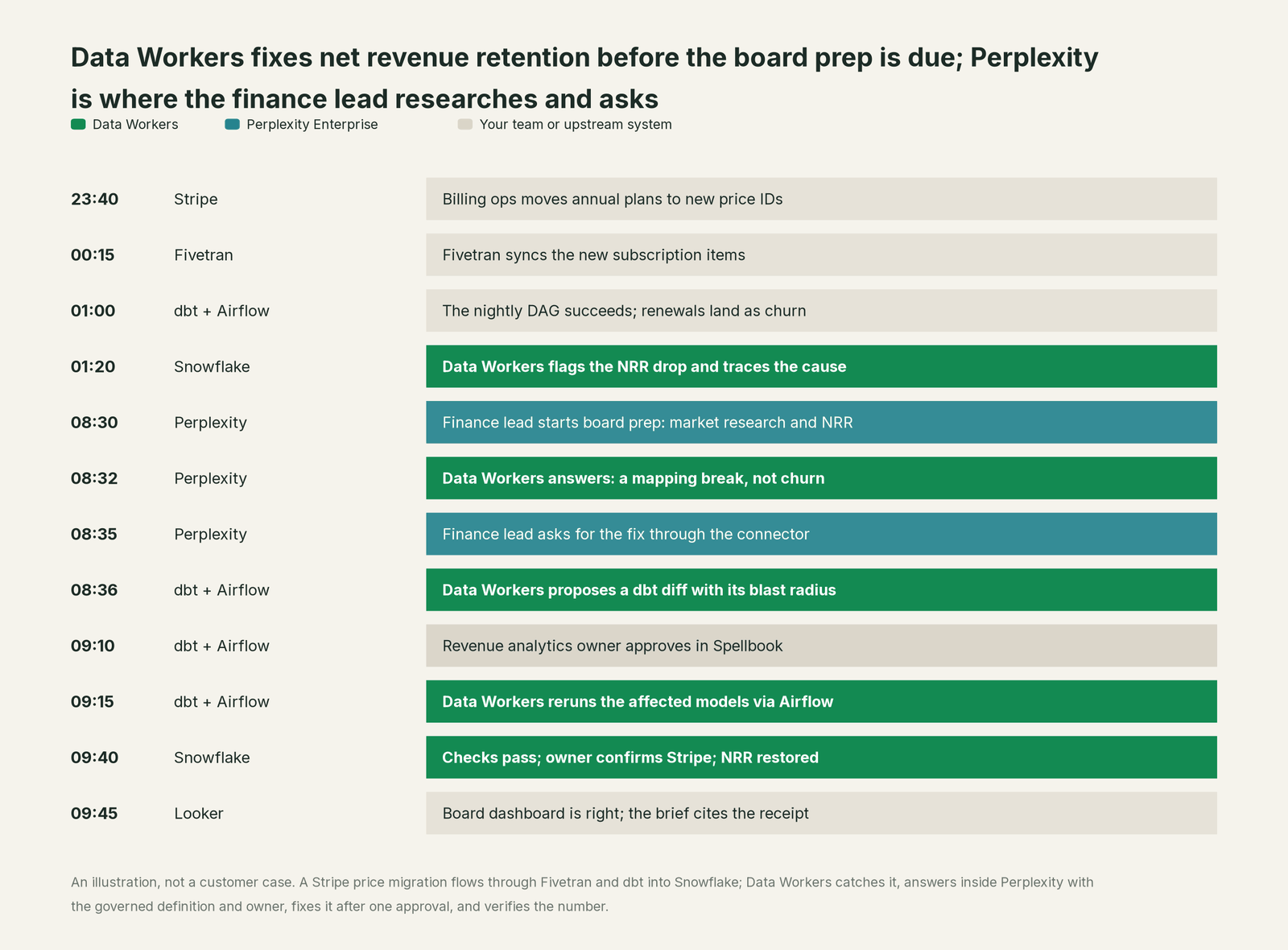
Perplexity did its job well: the competitor research was cited and current, and everything landed in one brief. What changed is that the crew was on the break at 01:20, the internal number arrived with its definition and owner, and the fix took one approval and left one receipt.
| Job | What Perplexity Enterprise does | What Data Workers does |
|---|---|---|
| The question | Takes it in plain language, from search, a Project, Computer or Comet | Supplies the governed definition, owner, lineage and freshness behind internal numbers |
| Research | Cited answers across the web, files and connected apps | Keeps the internal half of the answer correct and current |
| Warehouse context | Data Map records tables, joins, business definitions and query guidance as a Skill | Keeps one context graph across every platform current, with provenance and owners |
| The break | Reports what the data says | Detects the break, traces the cause across Stripe, Fivetran, dbt and Snowflake |
| The fix | Runs the request through a connector the admin approved | Proposes the change with its blast radius, routes it to a named approver, applies it reversibly |
| The proof | Audit logs record user activity, connector events and Computer actions | Verifies downstream with checks and baselines on the changed tables and writes a receipt for the change |
| Access | SSO, SCIM, roles and connector permissions for the workspace | Proposes and applies grants on the data platforms by policy |
Why doesn't Perplexity Enterprise just do this itself?
Because Perplexity built a research and task product for every team, and made sensible choices for that job. Its documentation draws the line clearly. For Snowflake, it tells admins to grant the connector's role read access only, because "Snowflake privileges are the enforcement boundary". For Databricks, it says the only reliable way to keep usage read-only is at the Unity Catalog level. For custom connectors, it notes that Perplexity "cannot verify third-party MCP servers or guarantee answer quality".
That is the right design for a product sold to analysts, sales teams and executives alike. Changing production data is a different product category: blast-radius scoping across systems Perplexity doesn't run, approvals routed to each model's owner, rollback for every change class, receipts that tie a change to its cause, and liability for what happens in your dbt project, Airflow deployment and warehouse grants. Perplexity keeps the warehouse role as the gate and the admin as the reviewer. Data Workers is the trusted server on the other side of that gate: it knows what a change touches and how to undo it, so Perplexity stays a fast, cited front door.
Every tool owns a slice. Data Workers covers the whole lifecycle
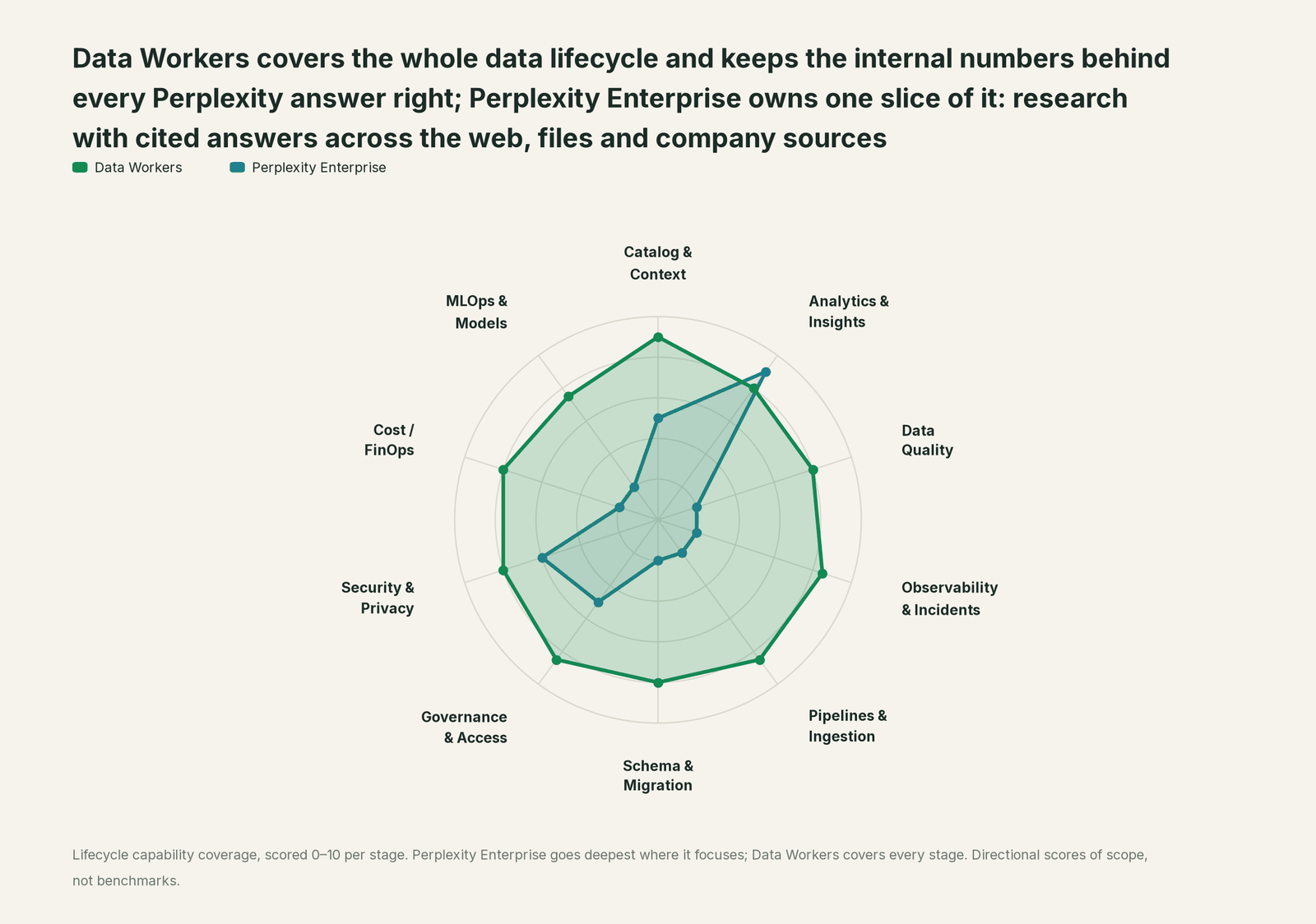
Perplexity Enterprise owns one slice of the data lifecycle, and owns it well: research with cited answers across the web, files and company sources. Each point tool adds another console, contract and handoff. Data Workers covers the whole lifecycle with one context, one approval flow and one audit trail.
| Stage | Data Workers | Perplexity Enterprise | Why we scored it this way |
|---|---|---|---|
| Catalog & Context | 9 | 5 | Internal Knowledge Search covers files and connected apps, and the Data Map captures tables, business definitions and query guidance as a Skill. Data Workers keeps one governed context graph with lineage, owners and freshness across every platform. |
| Analytics & Insights | 8 | 9 | Perplexity's home stage: cited research across the web, files and connected sources, with Computer querying Snowflake or Databricks and building reports. Data Workers answers metric questions through governed definitions. |
| Data Quality | 8 | 2 | Perplexity reads the data it is given and leaves checks to the source systems. Data Workers writes, runs and repairs the quality checks behind the numbers. |
| Observability & Incidents | 8.5 | 2 | Perplexity can read an alert through a connector. Data Workers detects the break, traces it across systems, fixes it and verifies the result. |
| Pipelines & Ingestion | 8.5 | 2 | Computer can write code in its sandbox; pipelines live in your stack. Data Workers builds, reruns and backfills pipelines behind approvals and verifies the output. |
| Schema & Migration | 8 | 2 | Schema work is outside a research product's job. Data Workers catches upstream schema changes in the dbt manifest and in review, assesses impact and drafts each migration with rollback SQL for the owner to apply. |
| Governance & Access | 8.5 | 5 | Strong over its own workspace: SSO, SCIM, roles, connector permissions, and warehouse queries that can run under each user's own identity. Data Workers proposes and applies grants on your data platforms by policy. |
| Security & Privacy | 8 | 6 | Strong for its own content: no training on enterprise data, SSO and SCIM, configurable retention and audit logs. Data Workers flags sensitive column names in pull request review and proposes masking for the owner. |
| Cost / FinOps | 8 | 2 | Perplexity manages its own Computer credits and usage limits. Data Workers traces Snowflake credits to the dbt model behind them and drafts the fix for its owner. |
| MLOps & Models | 7.5 | 2 | Perplexity orchestrates frontier models; training and monitoring your own models is a different job. Data Workers keeps the data under your models healthy and connects to MLflow and W&B. |
How Perplexity Enterprise and Data Workers work together
Perplexity stays on top, where people research and run tasks. Spellbook Data Catalog (in preview) is where the data team looks: each proposed change, who approved it, what it touched and how to roll it back. Between them run four layers. Data Context Wizard keeps one governed context graph across your warehouse, dbt, orchestration and BI. The Data-Agents Swarm does the work with more than 20 specialist agents. The Autonomous Data-Conductor runs each fix end to end: detect, diagnose, fix, review, verify, remember. Per-domain guardrails hold approvals, receipts and rollback.
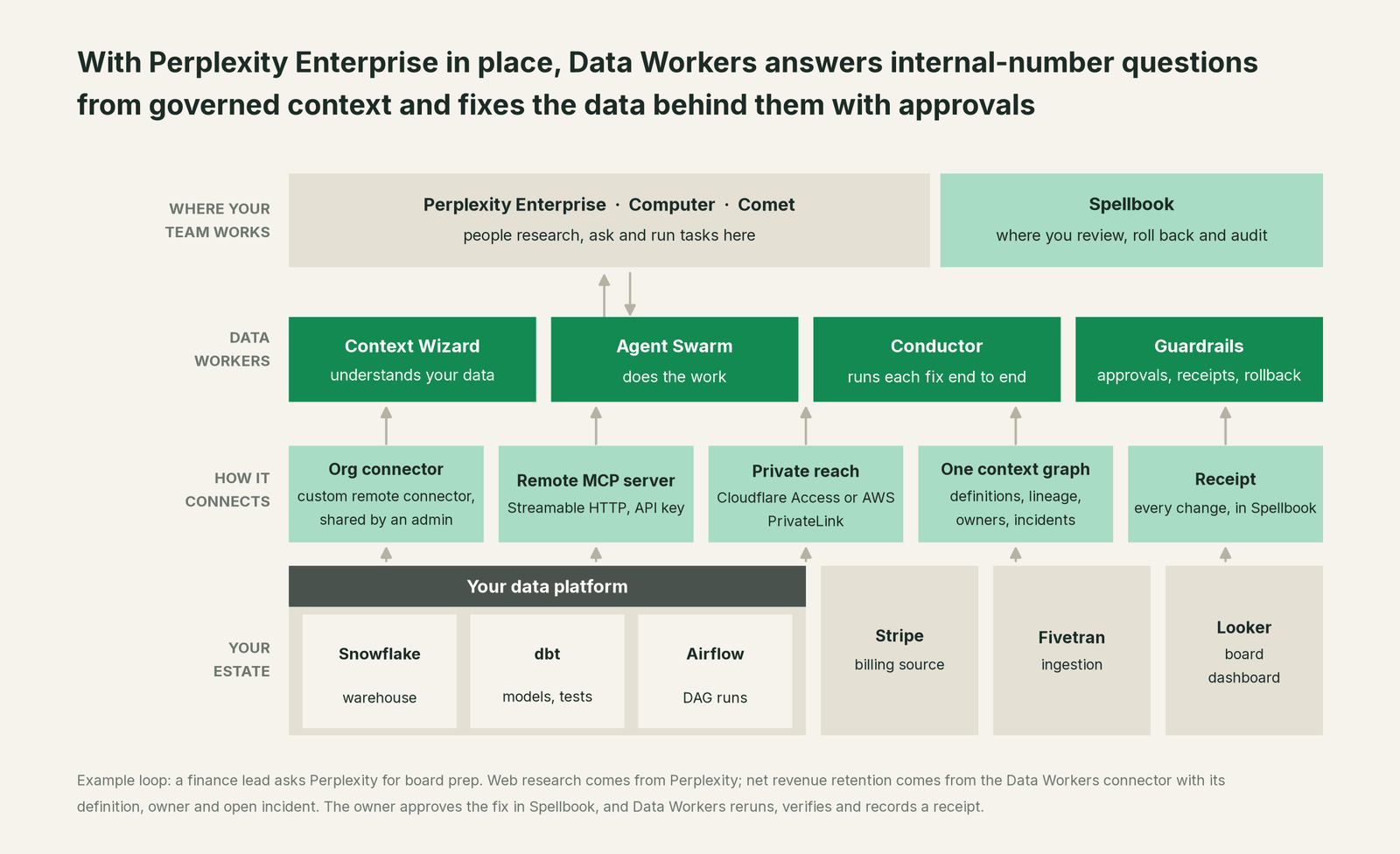
Setup for a pilot: the Perplexity Mac app. Every Data Workers agent is a standard MCP server, and Perplexity's Mac app runs local MCP servers from a command. Clone the open-source repository as described in our client setup docs, install the helper the app asks for, then open Settings > Connectors > Add Connector and fill in the Simple tab with one entry per agent. Wait for each connector to show Running and toggle it on under Sources.
Example: Perplexity Mac app, Settings > Connectors > Add Connector > Simple
Server Name:  dw-context-catalog
Command:      /path/to/dataworkers-claw-community/start-agent.sh dw-context-catalog

Server Name:  dw-incidents
Command:      /path/to/dataworkers-claw-community/start-agent.sh dw-incidents
Ask "what is our definition of net revenue retention, who owns it, and is anything open against it?" and Perplexity calls resolve_metric and trace_cross_platform_lineage on the context catalog agent and get_incident_history on the incidents agent. The Mac app asks you to confirm before it runs an MCP tool, so the first session doubles as a tour of the tools.
Setup for the organization: a custom remote connector. For everyone else, the Data Workers platform serves the same tools over Streamable HTTP at an /mcp endpoint. An admin adds it from the + Custom connector form, points the MCP Server URL at your Data Workers host (HTTPS is required), picks API Key authentication with a key configured on your Data Workers endpoint, and shares it from Enterprise settings > Permissions. Only admins can share a connector organization-wide, and "Allow members to add custom connectors" is off by default, so the data team decides which Data Workers server people reach. If Data Workers runs in your private network, Perplexity reaches it through Cloudflare Access service-token headers (the Network access dropdown) or through AWS PrivateLink arranged with your Perplexity account team, so the server needs no public endpoint.
One request end to end, L0 to L4. Take one ask: "Why does NRR look low, and fix it." Autonomy is set per domain, and the same request runs differently at each level.

- •L0 manual. Data Workers is connected but not acting. Your analyst investigates and fixes by hand.
- •L1 observe. Read tools only. Perplexity answers with the governed definition, owner, lineage from Looker back to Stripe, freshness and the open incident. Nothing changes.
- •L2 propose. Data Workers drafts the dbt diff with its blast radius from
blast_radius_analysis. Nothing reaches production until the owner approves in Spellbook and CI passes. - •L3 act reversibly. For proven change classes, such as reruns of failed models and partition backfills, Data Workers applies the change, re-runs the checks on the changed tables, with the undo recorded before it runs.
- •L4 autonomous. For a scoped domain like late loads in the revenue marts, Data Workers detects with
monitor_metrics, fixes withremediateand verifies overnight, and the morning's Perplexity answers cite the receipt.
Two locks hold at every level: Perplexity's admin controls decide which connectors exist and who may use them, and Data Workers' guardrails decide whether a change may run in that domain. No agent approves its own work. For the safety model, read is it safe to let AI agents change production data, and for where data and credentials live, read where does our data go.
The same Data Workers server answers every assistant you run. See you're on ChatGPT Enterprise, you're on Claude, you're on Glean and the hub, AI assistants are rolled out, now what.
What changes for your team
Perplexity Enterprise gave every employee a research analyst. Data Workers gives the data team a crew, so internal numbers don't turn into "which number is right?" threads.
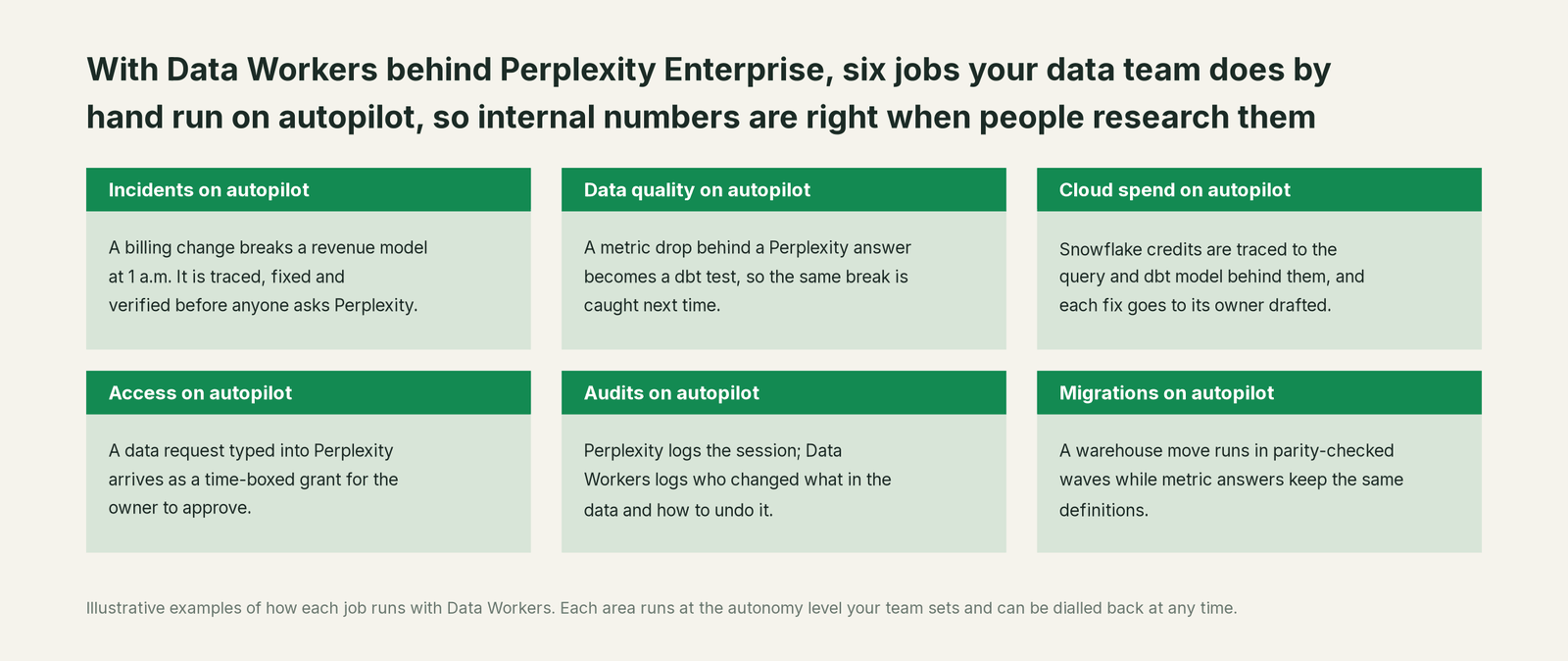
- •Incidents. Breaks are traced, fixed and verified overnight, so the morning's board prep reads the right number.
- •Data quality. Every break that reached a Perplexity answer becomes a dbt test, so it is caught upstream next time.
- •Cloud spend. Snowflake credits are traced to the query and dbt model behind them, and each fix goes to its owner drafted.
- •Access. "Can I see the bookings table?" becomes a time-boxed grant proposal to the data owner, with the policy behind it.
- •Audits. Perplexity's audit logs hold user activity, connector events and Computer actions. Data Workers holds the other half: who changed what in the data, why, and how to undo it.
- •Migrations. Warehouse moves run in approved, parity-checked waves, and metric answers keep the same governed definitions throughout.
Analytics engineers stop reconciling the same metric for three departments and spend the week on work only they can do.
Keep Perplexity Enterprise, or consolidate?
Keep Perplexity Enterprise if you love it; Data Workers works with it from day one. Many teams consolidate once Data Workers runs that slice too.
For most companies the answer is to keep it. Perplexity is where your people research, its cited web answers are hard to replace, and your admin model is in place. Data Workers adds the slice a research product leaves to the systems it reads: governed context, quality, incident repair, change control and evidence. Where teams consolidate, it is usually a separate data-quality or observability stack, or a homegrown metrics bot, since Data Workers runs those jobs and answers through Perplexity. If you are weighing building this layer yourself, read build it ourselves with Claude Code and MCP servers: the connector is the easy part; the context graph, approvals and rollback are where the work is.
The case for your CFO
The outcome: the company already pays for Perplexity Enterprise seats, and Data Workers makes the internal numbers those seats research correct, current and auditable.
The risk story has two locks. Perplexity's admins decide which connectors exist, and warehouse roles stay the enforcement boundary. Data Workers sets autonomy per domain from L0 manual to L4 autonomous: at observe it only reads, at propose a person approves every change, at act reversibly it runs only changes it can undo, and autonomous is a per-domain choice, never a default. Every receipt records who or what acted, why, what it touched, how it was verified and how to undo it. There is zero migration: your warehouse, dbt project, orchestration and BI stay where they are.
Why now: Computer and the warehouse connectors put company data in every research task, so a wrong number reaches every brief that cites it. The first win is a read-only connector for one domain, such as revenue, that answers "is this number right?" with definition, owner, lineage and freshness, then one change class. What stays the same: Perplexity seats, Projects, admin settings, warehouse permissions and your dbt review process. For the numbers, see the ROI of agentic data operations.
The sentence to repeat upstairs: "Perplexity makes everyone a better researcher; Data Workers makes sure the internal numbers they research are right, and fixes them with an approval and a receipt when they aren't."
Getting started
Start with a pilot. Pick one domain where Perplexity questions already reach the warehouse, such as revenue, connect Data Workers read-only through the Mac app, then add the organization-wide connector and run it for a few weeks before enabling the first change class. The pilot path and plans are on the pricing page, and the pilot is credited in full against the first year.
FAQ
Perplexity already connects to Snowflake and Databricks. Why add Data Workers? Those connectors query the warehouse under the permissions you grant, and the Data Map helps Computer write accurate queries. Data Workers adds what sits around the query: the governed definition, owner, lineage, freshness, open incidents, and an approved fix when the data is wrong.
Does Data Workers replace the Data Map? No. The Data Map stays Computer's query guidance. Data Workers keeps the definitions behind it governed and current across every platform, so the admin who maintains the Skill has one source to check it against.
Can Perplexity change our production data through Data Workers? Only through Data Workers' guardrails. Changes start as proposals with a blast radius, go to a named approver in Spellbook, run reversibly and leave a receipt. Autonomy is set per domain and can be stepped down at any time.
Whose credentials does Data Workers use? Perplexity reaches Data Workers with an API key your admin sets on the connector, checked by your Data Workers endpoint. Data Workers then acts with the credentials you configure per connection, and its guardrails decide what each agent may change. Warehouse permissions stay the system of record, by design.
Our data platform is in a private network. How does Perplexity reach Data Workers? Run Data Workers inside your network and connect it through Cloudflare Access with a service token, or through AWS PrivateLink set up with your Perplexity account team. Either way the endpoint needs no public exposure; HTTPS is still required.
What shows up in the audit trail? Two complementary records. Perplexity's audit logs capture user activity, connector events and Computer actions, delivered to your webhook. Data Workers' receipts capture the change itself: the cause, the diff, the approver, the verification and the rollback path.
Sources
- •Perplexity, Perplexity Enterprise, https://www.perplexity.ai/enterprise (checked Oct 2, 2026)
- •Perplexity Help Center, What is Enterprise Pro?, https://www.perplexity.ai/help-center/en/articles/10352973-what-is-enterprise-pro (checked Oct 2, 2026)
- •Perplexity Help Center, What is Enterprise Max?, https://www.perplexity.ai/help-center/en/articles/12310544-what-is-enterprise-max (checked Oct 2, 2026)
- •Perplexity Help Center, What is Internal Knowledge Search for Enterprise?, https://www.perplexity.ai/help-center/en/articles/10352958-what-is-internal-knowledge-search-for-enterprise (checked Oct 2, 2026)
- •Perplexity Help Center, What is a Project?, https://www.perplexity.ai/help-center/en/articles/10352961-what-are-projects (checked Oct 2, 2026)
- •Perplexity Help Center, Computer for Enterprise, https://www.perplexity.ai/help-center/en/articles/13901210-computer-for-enterprise (checked Oct 2, 2026)
- •Perplexity Help Center, Connecting Perplexity with Snowflake, https://www.perplexity.ai/help-center/en/articles/14017006-connecting-perplexity-with-snowflake (checked Oct 2, 2026)
- •Perplexity Help Center, Connecting Perplexity with Databricks, https://www.perplexity.ai/help-center/en/articles/14810342-connecting-perplexity-with-databricks (checked Oct 2, 2026)
- •Perplexity Help Center, Understanding the Data Map, https://www.perplexity.ai/help-center/en/articles/14017067-understanding-the-data-map (checked Oct 2, 2026)
- •Perplexity Help Center, Adding Custom Remote Connectors, https://www.perplexity.ai/help-center/en/articles/13915507-adding-custom-remote-connectors (checked Oct 2, 2026)
- •Perplexity Help Center, Local and Remote MCPs for Perplexity, https://www.perplexity.ai/help-center/en/articles/11502712-local-and-remote-mcps-for-perplexity (checked Oct 2, 2026)
- •Perplexity Help Center, Comet for Enterprise, https://www.perplexity.ai/help-center/en/articles/12781449-comet-for-enterprise (checked Oct 2, 2026)
- •Perplexity Help Center, Audit Logs, https://www.perplexity.ai/help-center/en/articles/11652747-audit-logs (checked Oct 2, 2026)
- •Data Workers, Client Setup documentation, https://dataworkers.io/opensource-docs/client-setup/ (checked Oct 2, 2026)
- •Data Workers open-source repository, https://github.com/DataWorkersProject/dataworkers-claw-community: start-agent.sh, Streamable HTTP adapter and tool registrations (checked Oct 2, 2026)