You're on Glean: Add the Data Estate's Context So Every Agent Answers With the Thread and the Pipeline
Already on Glean? Connect Data Workers as an MCP server so Glean agents answer from documents, people and the data estate, and fix broken pipelines with approvals.
Your company runs on Glean. IT connected Slack, Confluence, Google Drive, Jira, Salesforce and dozens more, and the Knowledge Graph now ties every document, person and conversation together with item-level permissions intact. People search, ask Glean Assistant, and build agents in Agent Builder; admins manage tools under Platform > Tools, decide which write tools need a confirmation, and since October 1 can give agents their own identity on scoped service credentials. Glean also reaches the warehouse: Assistant runs read-only queries against Snowflake, BigQuery through Google's MCP server, and Databricks Genie (in beta). Glean is where your company's knowledge lives. Data Context Wizard is where every agent reads the data estate, next to lineage, quality and usage, with owners and provenance attached.
That split matters the first time someone asks Glean "why did revenue drop?" Glean finds the Slack thread where billing announced a price change. The answer to whether the number is right, which definition it used, which pipeline produced it and how to fix it lives in the data estate. Data Workers is the agentic data platform that holds that context and does that work. Connected to Glean over MCP, it puts the pipeline next to the thread in the same answer, and it fixes the pipeline through Glean's own approval card, a named approver and a receipt.
Key takeaways
- •Glean keeps its job. Search, Assistant, Agents, the Knowledge Graph and your admin model stay as they are. Data Workers joins as one more MCP server your admins add and govern.
- •Two graphs, one answer. Glean knows the documents, people and conversations. Data Context Wizard knows the data estate: lineage, definitions, owners, quality and freshness. An agent that reads both explains a number and the reason behind it.
- •Fixes pass two locks. Glean asks before a write tool runs, and Data Workers routes each change to a named approver in Spellbook with its blast radius. Every change is reversible and leaves a receipt.
- •Decisions found in Glean become governed facts. A definition agreed in a Slack thread is recorded in Context Wizard with its author and source, so every agent reads the same rule.
- •Start with a pilot. Read tools first, one domain, then one write class, on the ladder from L0 manual to L4 autonomous.
Glean is the work knowledge graph. Data Workers is the data estate's context and crew.
Glean's Knowledge Graph is built on three pillars: content (documents, messages, tickets), people (identities, roles, teams) and activity (who worked on what). It answers "who owns the pricing change?" and "where did we decide this?" better than anything else in the building. Data Context Wizard holds a different graph: tables, columns, models, metrics, dashboards, the lineage between them, the definition each metric uses, its owner, its quality score and its freshness. Glean owns where the meaning was discussed. Data Workers owns whether the data still matches it.
Here is a Tuesday morning with both connected. This is an illustration, not a customer case.
| Time | System | What happens |
|---|---|---|
| 23:40 | Stripe | Billing ops moves annual plans to new price IDs |
| 23:45 | Slack | The change is announced in a #billing-ops thread, with a Confluence change doc linked |
| 00:30 | Fivetran | The sync lands the new subscription items in Snowflake |
| 01:15 | dbt + Airflow | The nightly DAG run succeeds; fct_revenue maps price IDs to product lines from a fixed list, so subscriptions on the new IDs drop out |
| 01:35 | Data Workers | The volume and value checks on fct_revenue fail; Data Workers traces lineage to the new Stripe price IDs and opens an incident with the owner |
| 08:10 | Glean | The chief of staff asks Glean Assistant why revenue dropped last week |
| 08:11 | Glean + Data Workers | Glean returns the #billing-ops thread and the change doc; the Data Workers tools return the revenue definition, its owner, the lineage break and the open incident: a mapping break, not a sales drop |
| 08:14 | Glean | She asks for the fix; Glean shows its approval card for the write tool |
| 08:15 | Data Workers | Data Workers proposes a dbt diff adding the new price IDs to the mapping, with its blast radius: four models and two Looker Explores |
| 08:50 | Spellbook | The analytics engineer who owns fct_revenue reviews the diff and approves; dbt CI passes |
| 08:55 | Airflow | Data Workers reruns the DAG for the affected partitions |
| 09:15 | Snowflake | Revenue is back on its monitor_metrics baseline and the finance owner confirms it against Stripe |
| 09:20 | Looker | The revenue Explore is right before the 10:00 exec staff meeting; Glean's next answer cites the thread and the receipt |
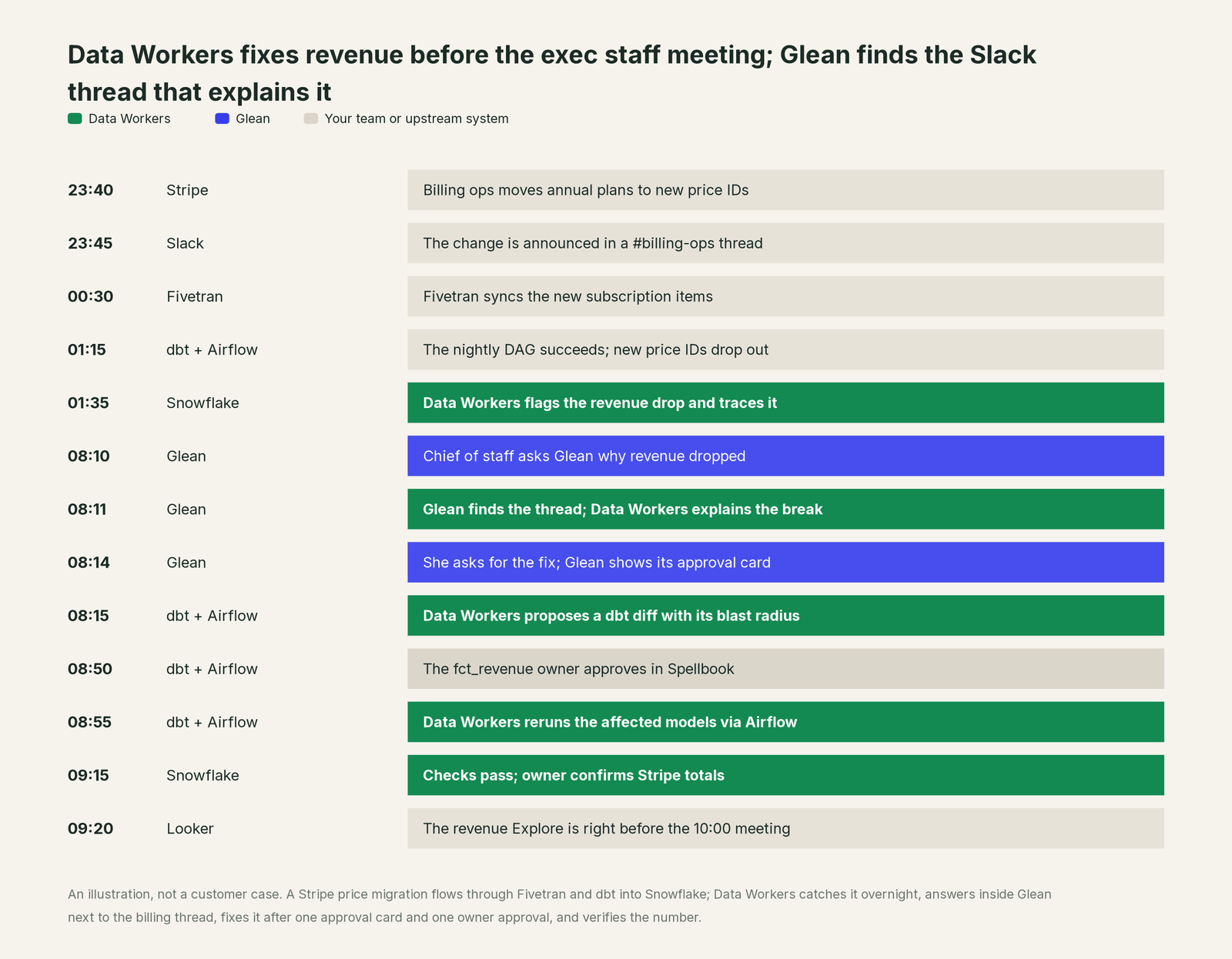
Glean did its job: it found the conversation that explains the change, in seconds, with the right permissions. The data team's crew was already on the break at 01:35, and the fix ran through the same Glean chat the question came from, with one approval card, one owner approval and one receipt.
| Job | What Glean does | What Data Workers does |
|---|---|---|
| The question | Takes it in plain language from any seat, in Assistant or an agent | Supplies the governed definition, lineage, owner and freshness behind the number |
| The why | Finds the Slack thread, change doc, ticket and people behind a change | Finds the pipeline, model and column where the change broke the data |
| The context | Keeps the Knowledge Graph of content, people and activity current | Keeps one context graph of the data estate current across every platform, with provenance |
| The definition | Surfaces where a definition was discussed or documented | Records the approved definition with a named owner and serves it to every agent |
| The fix | Shows an approval card before a write tool runs | Proposes the change with its blast radius, routes it to the owner, applies it reversibly |
| The proof | Records the agent run and exports traces to your observability stack | Verifies downstream with checks and baselines on the changed tables and writes a receipt for the change |
Why doesn't Glean just do this itself?
Because Glean built the best way to find and act on company knowledge, and it made sensible choices for that job. Its graph indexes content, people and activity from more than 100 connectors and keeps each item's permissions. Its warehouse access is query access: Glean's Snowflake setup has Assistant "run read-only queries" under a least-privilege role. Its write tools come from the apps they act on, and they ask for confirmation by default; Glean's own docs warn that when a tool runs without confirmation it "might update the system of record" from AI-predicted values, so admins and agent builders must both opt in. That is the right design for a product every employee uses every day.
Owning the data estate is a different product. It needs lineage across Stripe, Fivetran, dbt, Airflow, Snowflake and Looker; metric definitions reconciled across dbt, semantic layers and BI tools; quality checks and freshness on every table; blast-radius scoping before a change; approvals routed to the people who own each model; rollback for every change class; and liability for changes inside systems Glean doesn't run. Glean gives you the gate: admin-gated MCP servers, separate read and write tools, approval cards and agent identity. Data Workers is the server on the other side of that gate. It knows what a fix will touch and how to undo it, so Glean can stay the fast, trusted front door to company knowledge.
Every tool owns a slice. Data Workers covers the whole lifecycle
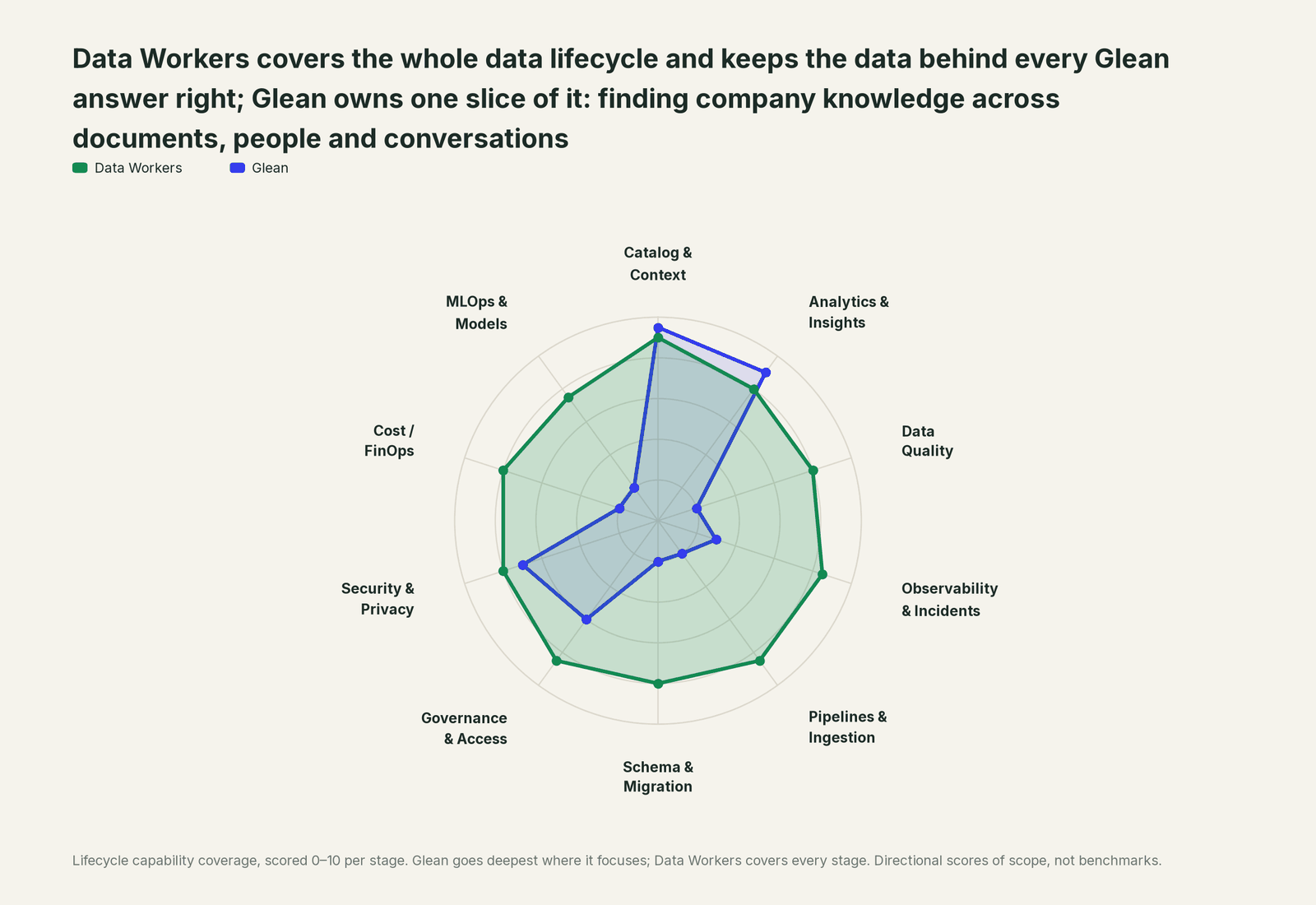
Glean owns one slice of the data lifecycle, and owns it well: finding company knowledge across documents, people and conversations, and answering questions from it. Each point tool adds another console, contract and handoff. Data Workers covers the whole lifecycle with one context, one approval flow and one audit trail, and builds on Glean where your people already search and ask.
| Stage | Data Workers | Glean | Why we scored it this way |
|---|---|---|---|
| Catalog & Context | 9 | 9.5 | Glean's home stage for work knowledge: its Knowledge Graph connects content, people and activity across 100+ connectors with item-level permissions. Data Workers' context covers the data estate: lineage, definitions, owners, quality and freshness. |
| Analytics & Insights | 8 | 9 | Glean's second home stage: Assistant answers questions across company knowledge and queries Snowflake, BigQuery and Databricks Genie. Data Workers answers metric questions through governed definitions. |
| Data Quality | 8 | 2 | Glean reads the data a role can see and leaves checks to the data team. Data Workers writes, runs and repairs the quality checks behind the numbers. |
| Observability & Incidents | 8.5 | 3 | Glean agents can read Datadog, Grafana or PagerDuty through MCP and summarise an incident. Data Workers detects the data break, traces it across systems, fixes it and verifies the result. |
| Pipelines & Ingestion | 8.5 | 2 | Pipelines live in your stack, outside a knowledge product's job. Data Workers builds, reruns and backfills pipelines behind approvals and verifies the output. |
| Schema & Migration | 8 | 2 | Schema work is outside Glean's job. Data Workers catches upstream schema changes in the dbt manifest and in review, assesses impact and drafts each migration with rollback SQL for the owner to apply. |
| Governance & Access | 8.5 | 6 | Strong over its own surface: permission-aware retrieval, admin-gated tools, per-tool approvals and agent identity on scoped service credentials. Data Workers proposes and applies grants on your data platforms by policy. |
| Security & Privacy | 8 | 7 | Strong for the content it indexes: item-level permissions, content restrictions that keep chosen items out of AI answers, tool visibility scoping and AI Security Insights. Data Workers flags sensitive column names in pull request review and proposes masking for the owner. |
| Cost / FinOps | 8 | 2 | Glean sets usage limits and alerts for its own users, teams and agents. Data Workers traces Snowflake credits to the dbt model behind them and drafts the fix for its owner. |
| MLOps & Models | 7.5 | 2 | Glean lets admins choose and restrict the models behind Assistant and agents; training and monitoring your own models is a different job. Data Workers keeps the data under your models healthy and connects to MLflow and W&B. |
How Glean and Data Workers work together
Glean stays on top, where people search, ask and approve. Spellbook Data Catalog (in preview) is where the data team looks: each proposed change, who approved it, what it touched and how to roll it back. Between them run four layers: Context Wizard keeps one governed context graph of the data estate, the Data-Agents Swarm does the work with more than 20 specialist agents, the Autonomous Data-Conductor runs each fix end to end (detect, diagnose, fix, review, verify, remember), and per-domain guardrails hold approvals, receipts and rollback.
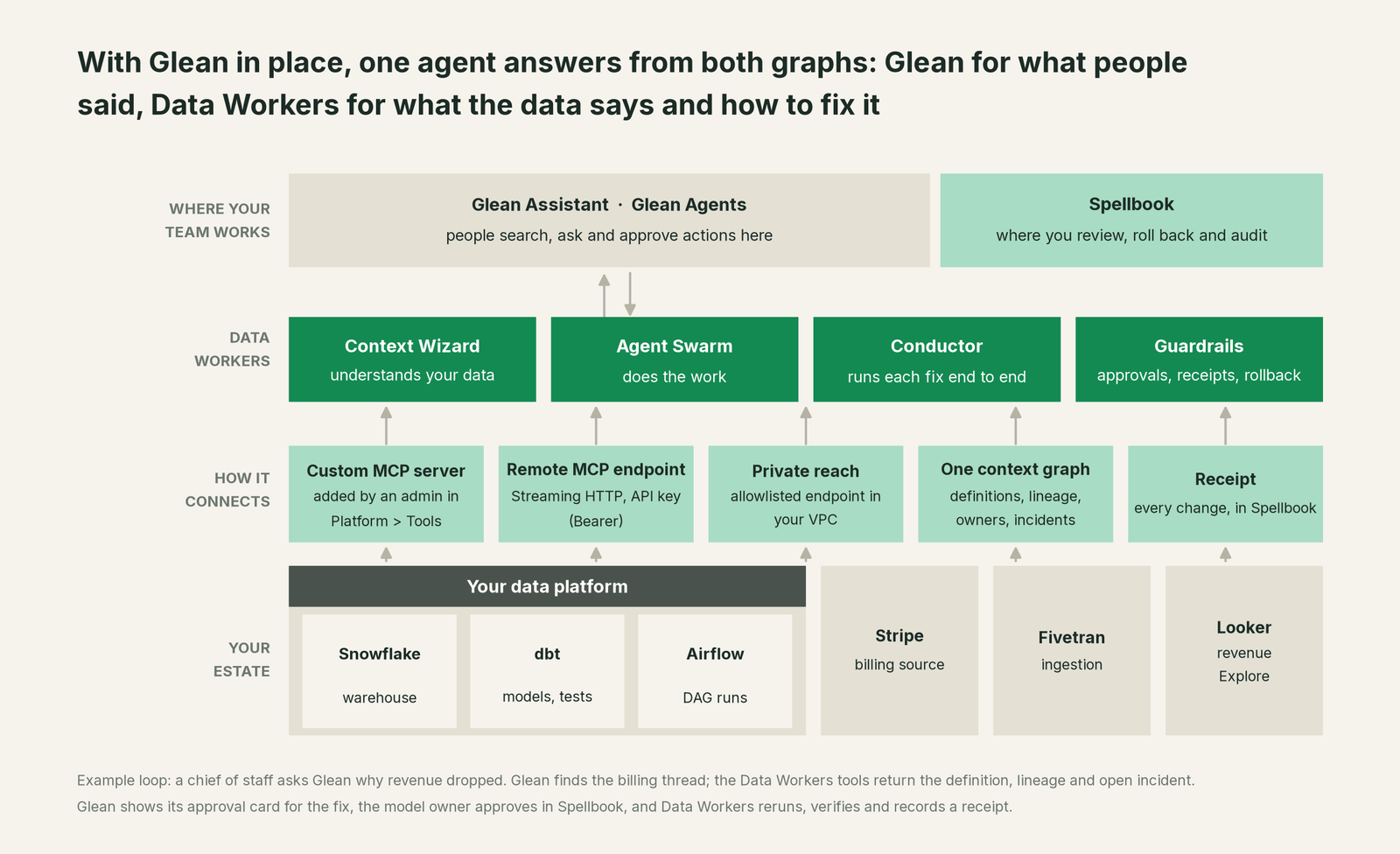
Bring your own context, both ways. Glean's graph is the best record of what people decided; Context Wizard makes those decisions governable for data. When a definition is settled in a Slack thread or a Confluence page that Glean surfaces, the data team records it in Context Wizard with import_tribal_knowledge, which turns each entry into a structured business rule with its author and the assets it applies to. An owner can mark the canonical table for a metric with mark_authoritative. From then on, every agent that asks, in Glean or anywhere else, reads the same approved rule next to its lineage, quality score and freshness. The knowledge stays yours, in your graph, with its provenance attached. For the full pattern across semantic layers, ontologies and search, see the hub, bring your own context.
Setup in Glean. Glean is an MCP host: admins connect remote MCP servers so Assistant and agents can discover and call their tools, with human-in-the-loop prompts for write tools. Glean's docs list full support for remote MCP servers in Glean and beta support for them in agents. Every Data Workers agent is an MCP server, and the product's remote endpoint serves the same tools over Streamable HTTP with API-key (Bearer) authentication, which is the default header Glean's API Key method sends. The admin steps, using Glean's names this month:
- •In the Admin console, go to Platform > Tools and open the Vendor Provided Tools (via MCP) tab. (Deployments created on or after September 22, 2026 set up catalog-backed MCP integrations in Connectors; a custom or unlisted server still uses this Platform > Tools flow.)
- •Choose Add, then Import tools from MCP server.
- •Enter the server name, a description, the Data Workers endpoint URL, Streaming HTTP as the transport and API Key as the authentication method.
- •If Data Workers runs in your VPC, work with your Glean account team to allowlist the endpoint so Glean can reach it.
- •Connect to server, then Edit settings: enable the read tools for Glean and for Agents first. Keep write tools off, or on with the default approval card, and leave Run without user confirmation off.
- •Test from Assistant ("Use the Data Workers tools to explain
fct_revenue") and from a Plan and execute step in Agent Builder.
Example: Data Workers as a custom MCP server in Glean
MCP server name:  Data Workers
Description:      Data estate context: definitions, lineage, owners, quality, incidents
MCP server URL:   https://<your-data-workers-host>/mcp
Transport type:   Streaming HTTP
Authentication:   API Key (sent as Authorization: Bearer <key>)
Private network:  endpoint allowlisted with your Glean account team
Tools:            read tools for Glean and Agents first; write tools with approval
Engineers who already use Glean's own remote MCP server (generally available) in a coding host can run both side by side. Data Workers' documented local path is the open-source repo's start-agent.sh, listed next to Glean's server in the same client config:
Example: .cursor/mcp.json with Glean and Data Workers
{
  "mcpServers": {
    "glean": { "url": "<your Glean MCP server URL from the MCP Configurator>" },
    "dw-context-catalog": {
      "command": "/path/to/dataworkers-claw-community/start-agent.sh",
      "args": ["dw-context-catalog"]
    },
    "dw-quality": {
      "command": "/path/to/dataworkers-claw-community/start-agent.sh",
      "args": ["dw-quality"]
    },
    "dw-incidents": {
      "command": "/path/to/dataworkers-claw-community/start-agent.sh",
      "args": ["dw-incidents"]
    }
  }
}
List the tools with the client's own command (for example /mcp). The ones this guide uses are resolve_metric, explain_table, trace_cross_platform_lineage and blast_radius_analysis on dw-context-catalog, run_quality_check and get_quality_score on dw-quality, and get_incident_history, diagnose_incident and remediate on dw-incidents.
One request end to end, L0 to L4. The autonomy ladder is set per domain, and it maps onto Glean's own controls.

- •L0 manual. Glean finds the thread and the docs; your team investigates and fixes the data by hand.
- •L1 observe. Read tools only. Ask "why did revenue drop?" and Glean returns the conversation while Data Workers resolves the metric, walks lineage, checks quality and lists the open incident.
- •L2 propose. Enable the proposal tools as write tools with Glean's approval card. Ask for the fix and Data Workers proposes a dbt diff with its blast radius. Nothing reaches production until the owner approves in Spellbook and CI passes.
- •L3 act reversibly. For change classes with a proven record, such as reruns and backfills of failed partitions, Data Workers applies the change after the approval card, re-runs the checks on the changed tables, with the undo recorded before it runs.
- •L4 autonomous. For a scoped domain like freshness failures in the revenue marts, Data Workers fixes overnight without waiting for a question, and a scheduled Glean agent can post the morning summary with the receipt.
Each step up is a per-domain decision backed by receipts, and you can step back down any time. For the safety model, read is it safe to let AI agents change production data, and for where data and credentials live, read where does our data go.
The same Data Workers server serves every other assistant your company uses, so there is no second integration. See you're on Perplexity Enterprise, you're on ChatGPT Enterprise and you're on Notion AI. For the warehouse and modelling side, read Data Workers on Snowflake and Data Workers + dbt.
What changes for your team
Glean gave every employee a way to find what the company knows. Data Workers gives the data team a crew, so the questions Glean now routes to data don't turn into a queue of "is this number right?" tickets.
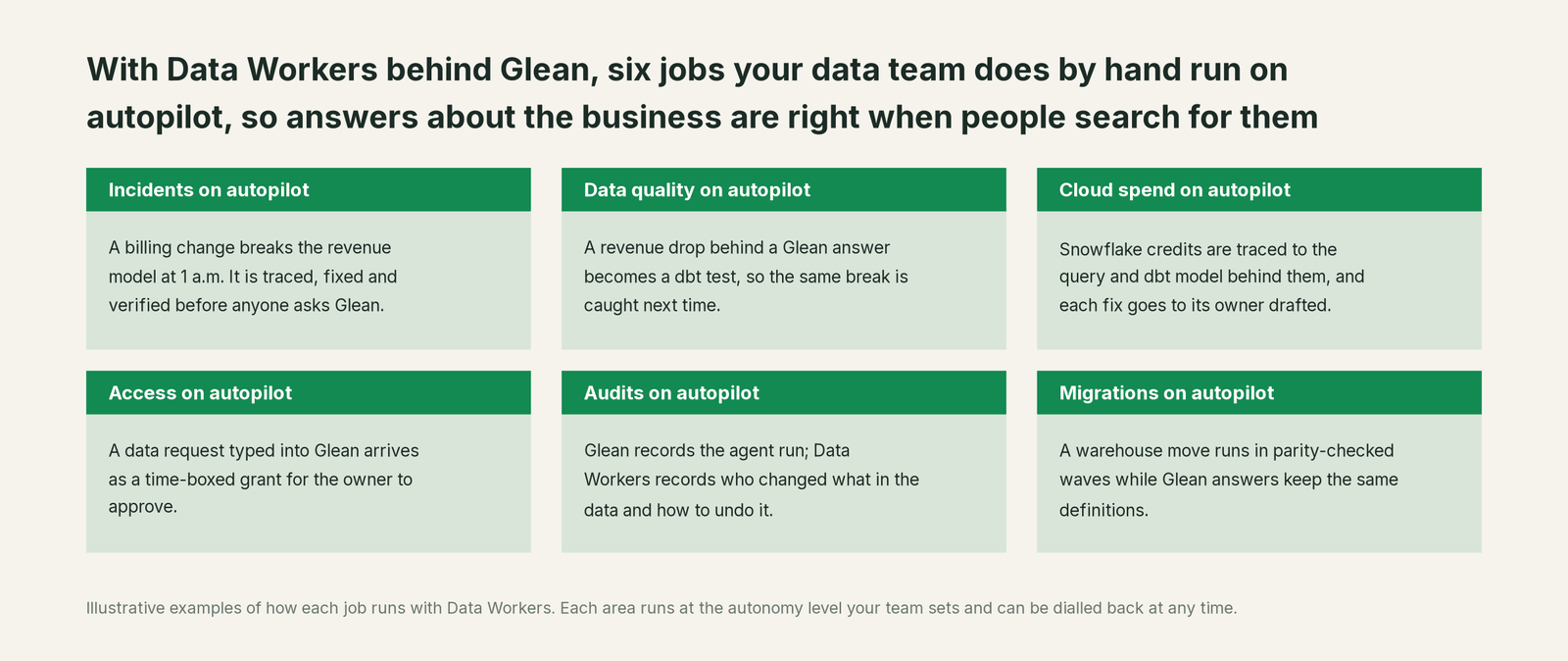
- •Incidents. Breaks are traced, fixed and verified overnight, so the first person to ask Glean in the morning gets the right number and the thread that explains it.
- •Data quality. Every break that reached a Glean answer becomes a check or a dbt test, so the same failure is caught upstream next time.
- •Cloud spend. Snowflake credits are traced to the query and dbt model behind them, and each fix goes to its owner drafted.
- •Access. "Can I see the bookings table?" asked in Glean becomes a time-boxed grant proposal to the data owner, with the policy that justifies it.
- •Audits. Glean records the agent run and can export its traces. Data Workers records the other half: who changed what in the data, why, and how to undo it.
- •Migrations. Platform moves run in approved, parity-checked waves while Glean answers keep working against the same governed definitions.
Analytics engineers stop answering the same reconciliation question in five Slack threads, and the decisions those threads reach finally land somewhere every agent reads.
Keep Glean, or consolidate?
Keep Glean if you love it; Data Workers works with it from day one. Many teams consolidate once Data Workers runs that slice too.
For most companies the answer is to keep Glean: it is where your people already search, its graph of documents, people and conversations is the company's memory, and your admin model is in place. Data Workers adds the slice Glean leaves to the servers it calls: governed data context, quality, incident repair, change control and evidence across the estate. Where teams consolidate, it is usually a separate data catalog, a duplicate metric glossary or an observability stack, now that Data Workers runs those jobs and answers through Glean anyway. If you are weighing building this layer yourself, read build it ourselves with Claude Code and MCP servers: an MCP endpoint is the easy part; the context graph, approvals and rollback are where the work is.
The case for your CFO
The outcome: the company already pays for Glean so people find answers fast. Data Workers makes the answers about the business correct, current and auditable, and repairs the data when it isn't. Every decision made from a Glean answer about revenue, pipeline or margin rests on the data under it.
The risk story has two locks. Glean's admins decide which Data Workers tools exist in Glean, who can add them to agents, and whether a write tool asks first. Data Workers sets autonomy per domain from L0 manual to L4 autonomous, routes each change to a named approver, applies it reversibly, verifies it downstream and writes a receipt: who approved it, what it touched, how to undo it. There is zero migration: your warehouse, dbt project, orchestration, BI and Glean stay where they are.
Why now: Glean's agents and warehouse queries put data questions in front of every employee, and agents now take actions. A wrong number no longer reaches one analyst; it reaches everyone who asks, and an agent may act on it. The first win is a read-only Data Workers server in Glean for one domain, answering "why does this number look wrong?" with the thread, the lineage, the owner, the definition and the open incident, then one write class behind approvals. What stays the same: Glean seats, connectors, permissions, the admin console, warehouse grants and your dbt review process. For the numbers, see the ROI of agentic data operations.
The sentence to repeat upstairs: "Glean tells us what people said about the number; Data Workers makes sure the number is right, and fixes it with an approval and a receipt when it isn't."
Getting started
Start with a pilot. Pick one domain where Glean questions already hit the warehouse, such as revenue or pipeline, add Data Workers as a custom MCP server with read tools only, record the definitions your teams already agreed in Slack and Confluence, and run it for a few weeks before enabling the first write class. The pilot path and plans are on the pricing page, and the pilot is credited in full against the first year.
FAQ
Doesn't Glean already answer data questions? Yes, and well: Assistant queries Snowflake, BigQuery and Databricks Genie under the permissions you grant, and finds every document about a metric. It works from the data and definitions it is given. Data Workers keeps those correct: it maintains the data estate's context, catches and fixes breaks, and verifies the result.
Is Data Workers a replacement for Glean's Knowledge Graph? No. Glean's graph covers content, people and activity across your apps. Context Wizard covers the data estate: tables, metrics, lineage, owners, quality and freshness. Agents read both, and decisions found in Glean become governed rules in Context Wizard with their author and source.
Is it safe to let a Glean agent trigger writes to our data platform? Writes pass two locks. In Glean, admins enable each write tool deliberately and Glean shows an approval card before it runs unless an admin and the agent builder both opt out. In Data Workers, each change has a blast radius, a named approver in Spellbook, a rollback path and a receipt, with autonomy set per domain.
Whose credentials does Data Workers use? Glean authenticates to the Data Workers endpoint with the key your admin configures. Data Workers then acts on the warehouse, dbt and orchestration with the credentials you set per connection, scoped to each domain, and its guardrails decide what each agent may change. Warehouse permissions stay the system of record, by design.
Our data platform runs in a private network. Can Glean reach Data Workers? Yes. Run Data Workers in your VPC and expose its endpoint to Glean through an allowlisted path; Glean's docs ask you to confirm proxy endpoints, IP ranges and TLS with your Glean account team.
What shows up in the audit trail? Two complementary records. Glean records agent runs and can export traces over OTLP to your observability stack. Data Workers' receipts cover the change itself: the cause, the diff, the approver, the verification and the rollback path.
Sources
- •Glean, homepage, https://www.glean.com/ (checked Oct 2, 2026)
- •Glean docs, Knowledge Graph, https://docs.glean.com/security/knowledge-graph (checked Oct 2, 2026)
- •Glean developer docs, Remote MCP server, https://developers.glean.com/guides/mcp (checked Oct 2, 2026)
- •Glean docs, About Glean MCP server (updated Sep 11, 2026), https://docs.glean.com/administration/platform/mcp/about (checked Oct 2, 2026)
- •Glean docs, Built-in Glean tools, https://docs.glean.com/administration/platform/mcp/built-in-glean-tools (checked Oct 2, 2026)
- •Glean docs, Connect remote MCP servers to Glean, https://docs.glean.com/administration/tools/connect-remote-mcp-servers-to-glean (checked Oct 2, 2026)
- •Glean docs, Supported remote MCP servers, https://docs.glean.com/administration/tools/supported-mcp-servers (checked Oct 2, 2026)
- •Glean docs, Run tools without user confirmation, https://docs.glean.com/administration/tools/managing-tools/run-without-user-confirmation (checked Oct 2, 2026)
- •Glean docs, Allowing in-line execution of write tools, https://docs.glean.com/administration/tools/managing-tools/allowing-in-line-execution-of-write-tools (checked Oct 2, 2026)
- •Glean docs, Restrict LLM access to content, https://docs.glean.com/administration/assistant/configuration/content-restrictions (checked Oct 2, 2026)
- •Glean docs, Manage tool access (visibility scoping), https://docs.glean.com/administration/tools/managing-tools/tool-visibility-scoping (checked Oct 2, 2026)
- •Glean docs, AI Security Insights, https://docs.glean.com/administration/protect/ai-security/insights (checked Oct 2, 2026)
- •Glean docs, Set usage limits and alerts, https://docs.glean.com/administration/management/usage/set-usage-limits-and-alerts (checked Oct 2, 2026)
- •Glean docs, Model choice, https://docs.glean.com/get-started/golive/model-choice (checked Oct 2, 2026)
- •Glean docs, Connect Snowflake to Glean, https://docs.glean.com/administration/assistant/warehouse-data/connect-snowflake-to-glean-assistant (checked Oct 2, 2026)
- •Glean docs, Agent identity, https://docs.glean.com/administration/agent-identity/overview (checked Oct 2, 2026)
- •Glean release notes, July 29, 2026 (BigQuery MCP, A2A), https://docs.glean.com/release-notes/releases/2026-07-29-july-release (checked Oct 2, 2026)
- •Glean release notes, August 13, 2026 (read and write tools for MCP servers), https://docs.glean.com/release-notes/releases/2026-08-13-august-release (checked Oct 2, 2026)
- •Glean release notes, September 24, 2026 (Databricks Genie beta, tool approvals, trace export), https://docs.glean.com/release-notes/releases/2026-09-24-september-release (checked Oct 2, 2026)
- •Glean release notes, October 1, 2026 (Agent Identity GA), https://docs.glean.com/release-notes/releases/2026-10-01-october-release (checked Oct 2, 2026)
- •Data Workers, client setup, https://dataworkers.io/opensource-docs/client-setup/ (checked Oct 2, 2026)
- •Data Workers open-source repository, tool registrations, https://github.com/DataWorkersProject/dataworkers-claw-community (checked Oct 2, 2026)