You're on Notion AI: Keep Every Metric Definition and Runbook in Notion True to the Data
Your metric definitions and runbooks live in Notion. Connect Data Workers to Notion Custom Agents over MCP to catch drift against the SQL and write receipts back.
Your data team already writes everything down in Notion: a teamspace for the data platform, a database of metric definitions with an owner property on every row, a runbook page for each pipeline, and a postmortem template duplicated after every bad week. Notion AI made that wiki active. Notion Agent answers questions from it, Enterprise Search reaches into Slack, Google Drive, GitHub and Jira, and Custom Agents run in the background on a schedule, a database change or a Slack message. Notion is where your team writes things down. Data Workers is the data team that keeps what's written true: it reads those pages as context, checks them against the SQL and lineage that actually run in your warehouse, fixes the data or proposes the page edit when they disagree, and hands Notion the receipt to write down.
A dbt refactor merges on a Friday, the model changes, and the definition page the whole company trusts stays as it was. Notion AI then answers faithfully from a page that is no longer true. Data Workers is the agentic data platform that closes that gap, across every system, on top of the Notion workspace you already run.
Key takeaways
- •Notion keeps its job. Pages, databases, teamspaces, permissions, Notion Agent and Custom Agents stay as they are. Data Workers joins as one more Custom MCP server your admins approve.
- •Definitions get checked against the data. Data Workers resolves each metric page against the dbt model, the SQL and the lineage behind it, and flags drift the night it happens.
- •Fixes run through two locks. Write tools on Notion's MCP connections default to Always ask, and Data Workers routes each data change to a named approver in Spellbook with its blast radius. Every change is reversible and leaves a receipt.
- •Receipts land where people read. A Custom Agent turns each Data Workers receipt into a proposed changelog edit or postmortem draft, and the page owner accepts it line by line.
- •Start with a pilot. Read tools first, one metric definitions database, then one write class in one domain, on the ladder from L0 manual to L4 autonomous.
Notion is where your team writes things down. Data Workers is the data team that keeps what's written true.
Notion holds the data team's shared memory: what "active customer" means, which table is authoritative for revenue, who owns the orders pipeline, and what went wrong last quarter. Notion AI turns that memory into answers and automations, and it honors existing permissions. The stakes rise with it: when a page drifts from the warehouse, every answer and every Custom Agent built on it inherits the drift.
Here is one weekend with Data Workers connected. This is an illustration, not a customer case.
| Time | System | What happens |
|---|---|---|
| Fri 16:40 | GitHub + dbt | A refactor of fct_subscriptions merges; the trial filter moves into a CTE and is dropped, so trials now count as active customers |
| Fri 18:00 | Snowflake | The nightly build lands; active customers jump 9% |
| Sat 02:15 | Data Workers | Data Workers resolves the "Active customers" row in the Notion metric definitions database against the new SQL and its lineage |
| Sat 02:16 | Notion | Drift flagged: the page excludes trials, the model no longer does; the page and the model are linked in the context graph |
| Sat 02:20 | GitHub + dbt | Data Workers proposes a dbt diff that restores the trial filter, with its blast radius: four models, two Looker Explores, one board dashboard |
| Mon 07:55 | Slack | The team's Custom Agent posts the drift and the blast radius to #data-oncall |
| Mon 08:00 | Spellbook | The metric owner reviews the diff and approves; dbt CI passes and the model rebuilds |
| Mon 08:30 | Snowflake | Checks on the rebuilt table pass; the owner's count shows active customers back on the documented definition |
| Mon 08:35 | Looker | The KPI dashboard shows the right count before the 10:00 business review |
| Mon 08:40 | Notion | The Custom Agent proposes a changelog entry on the definition page and a postmortem draft from the receipt |
| Mon 09:00 | Notion | The metric owner accepts the edits line by line |
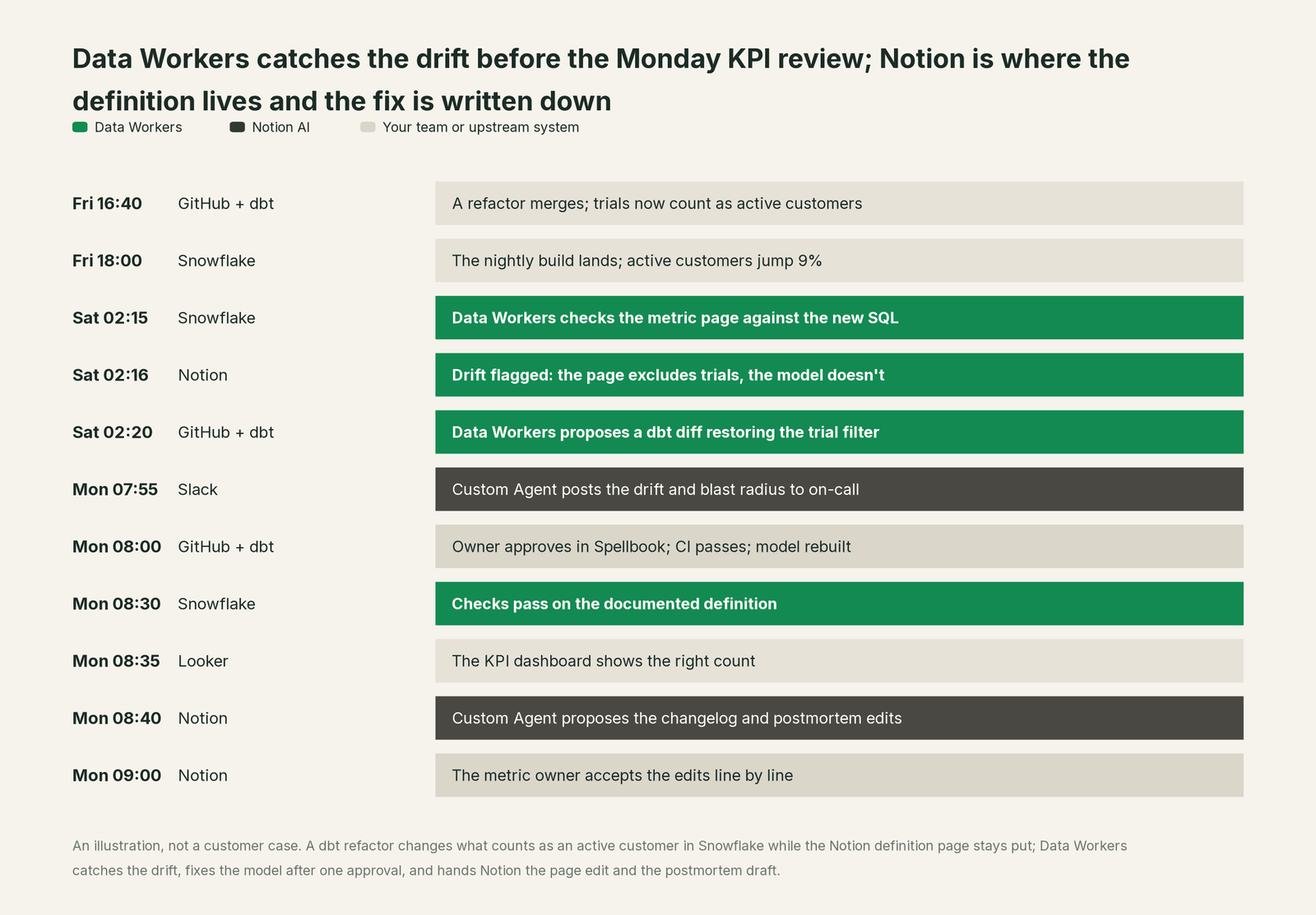
Notion did its job: the definition was written down, owned and findable. What changed is that the page became a contract the data is checked against every night, and the fix and its record went back where people read the definition.
| Job | What Notion AI does | What Data Workers does |
|---|---|---|
| The definition | Holds the page, the owner property and the history; answers questions from it | Resolves the page against the dbt model, SQL and semantic layer behind it |
| The question | Notion Agent and Enterprise Search answer from pages and connected apps | Supplies the governed definition, lineage, owner and freshness behind the number |
| The drift | Shows the page as last written | Detects when the SQL and the page disagree and says which changed |
| The fix | Proposes page edits behind Always ask | Proposes the data change with its blast radius, routes it to a named approver, applies it reversibly |
| The runbook | Stores the steps and runs Custom Agents on triggers | Runs the steps across Snowflake, dbt and Airflow, and verifies the result |
| The record | Keeps page history and postmortem pages | Writes the receipt: cause, diff, approver, verification, rollback path |
| Access | Enforces page permissions and admin allowlists for MCP connections | Proposes and applies grants on the data platforms by policy |
Why doesn't Notion AI just do this itself?
Because Notion built a workspace for every team in the company, and it made sensible choices for that job. Notion AI reads and writes Notion and the apps you connect to it, under Notion's permissions, and Custom Agents act only on the pages, databases and external apps you explicitly grant them. Notion's own guidance for MCP connections is to begin with read tools, leave write tools on Always ask, and expose the smallest set of actions and fields a workflow needs. Notion keeps widening what agents can reach, with pre-configured MCP connections such as GitHub, Amplitude and ClickHouse, and agent skills (Sept 15, 2026) for reusable team instructions. That is the right design for a product sold to marketing, sales, HR and engineering at once.
Checking a definition against warehouse SQL, tracing lineage from a Looker Explore back to a Fivetran sync, and changing a dbt model in production is a different product category. It needs a context graph across systems Notion doesn't run, blast-radius scoping, approvals routed to the people who own each model, rollback for every change class, and liability for what happens inside Snowflake and dbt. Notion gives you the gate and the page. Data Workers is the trusted server on the other side of that gate: it knows what the page should say because it knows what the data does.
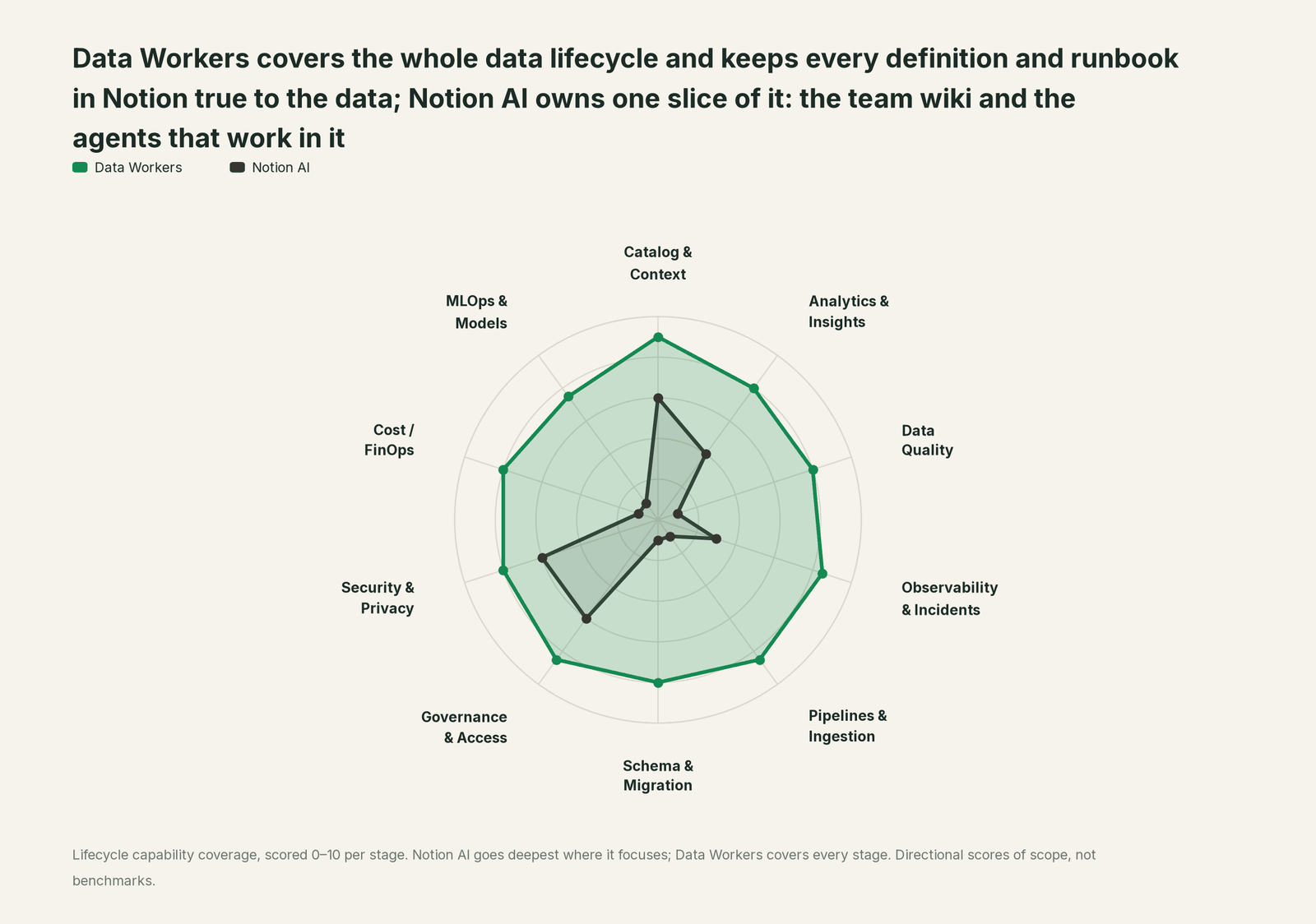
Every tool owns a slice. Data Workers covers the whole lifecycle
Notion AI owns one slice of the data lifecycle, and owns it well: the team wiki and the agents that work in it. Each point tool adds another console, contract and handoff. Data Workers covers the whole lifecycle with one context, one approval flow and one audit trail, and builds on Notion where your team already writes.
| Stage | Data Workers | Notion AI | Why we scored it this way |
|---|---|---|---|
| Catalog & Context | 9 | 6 | Notion's home stage: the wiki where definitions, runbooks and postmortems live, plus Enterprise Search across Slack, Google Drive, GitHub, Jira and more. Data Workers joins those pages to lineage, SQL and quality in one governed context graph. |
| Analytics & Insights | 8 | 4 | Notion databases, views and SQL queries over data sources, and Custom Agents post reports from connected apps. Data Workers answers through governed metric definitions resolved against the warehouse. |
| Data Quality | 8 | 1 | Notion pages can document a check. Data Workers writes, runs and repairs the checks behind every documented metric. |
| Observability & Incidents | 8.5 | 3 | Runbooks, postmortem templates and Custom Agents triggered from Slack. Data Workers detects the break, traces it across systems, fixes it and drafts the postmortem. |
| Pipelines & Ingestion | 8.5 | 1 | Notion links to pipeline repos through connectors. Data Workers builds, reruns and backfills pipelines behind approvals. |
| Schema & Migration | 8 | 1 | Notion holds the design doc for a schema change. Data Workers catches upstream schema changes in the dbt manifest and in review, assesses impact and drafts each migration with rollback SQL for the owner to apply. |
| Governance & Access | 8.5 | 6 | Notion's other home stage: page permissions, agent access levels, and admin allowlists for MCP connections and Notion MCP clients. Data Workers proposes and applies grants on your data platforms by policy. |
| Security & Privacy | 8 | 6 | Notion AI honors existing permissions, and Enterprise admins approve which AI apps connect. Data Workers flags sensitive column names in pull request review and proposes masking for the owner. |
| Cost / FinOps | 8 | 1 | Notion's credits dashboard tracks agent usage. Data Workers traces Snowflake credits to the dbt model behind them and drafts the fix for its owner. |
| MLOps & Models | 7.5 | 1 | Model choice for Notion's own agents is an admin setting. Data Workers keeps the data under your models healthy and connects to MLflow and W&B. |
How Notion AI and Data Workers work together
Notion stays on top, where people write, ask and accept page edits. Spellbook Data Catalog (in preview) is where the data team reviews each data change, its approver and its rollback. Between them run four layers: Context Wizard keeps one governed context graph that includes your Notion definition pages, the Data-Agents Swarm does the work with more than 20 specialist agents, the Autonomous Data-Conductor runs each fix end to end (detect, diagnose, fix, review, verify, remember), and per-domain guardrails hold approvals, receipts and rollback.
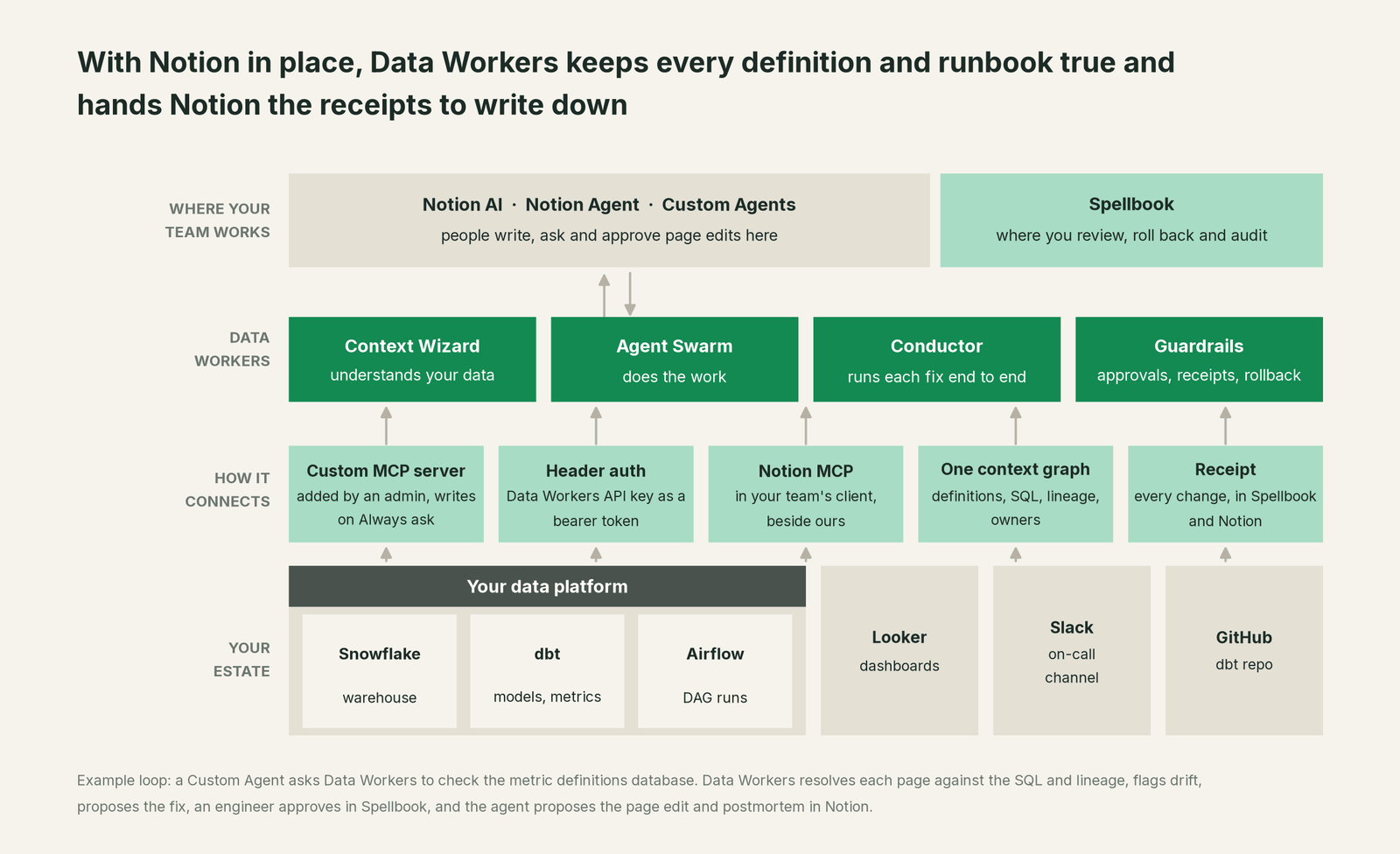
The connection runs both ways. Data Workers connects to Notion over its API or MCP server today, so definition pages, runbooks and past postmortems become first-class context with provenance, joined to the tables and models they describe. In the other direction, a Notion Custom Agent calls Data Workers as a Custom MCP server, and the agent writes the results into Notion with its own Notion actions, behind the approvals your workspace already uses. For teams that keep context in several places, bring your own context covers how Context Wizard treats Notion, ontologies and semantic layers as sources the customer keeps.
Setup in Notion. MCP connections for Custom Agents are on Business and Enterprise plans. Data Workers serves its agents over Streamable HTTP at an HTTPS endpoint, and that endpoint accepts a Data Workers API key sent as a bearer token, which fits Notion's header-based authentication. Each key maps to a named owner, so every call in a receipt carries who it came from. The steps, in Notion's words this month:
- •A workspace owner opens Settings > Connections, turns on Enable custom MCP servers, and under Limit which connections members can install picks Approved only for the pilot.
- •In the Custom Agent's Settings, open Tools & Access, choose Add connection > Custom MCP server, enter the Data Workers URL and a display name, add the API key as a header, and click Connect.
- •Enable read tools only. Leave every write tool on Always ask.
- •Grant the agent the metric definitions database, the runbooks teamspace and the postmortems database, and nothing else.
- •Set the trigger: a weekly schedule for definition checks, and the #data-oncall Slack channel for incident follow-up.
Example: Data Workers as a Custom MCP server for a Notion Custom Agent
Agent:          Definition checker (Can View and Interact for the data team)
Server URL:     https://<your-data-workers-host>/mcp   (Streamable HTTP)
Display name:   Data Workers
Auth:           Header: Authorization: Bearer <data-workers-api-key>
Run automatically (read): resolve_metric, list_semantic_definitions,
                trace_cross_platform_lineage, search_across_platforms,
                get_quality_score, get_incident_history
Always ask (write):       flag_stale_context, import_tribal_knowledge,
                remediate
Notion access:  Metric definitions database, Runbooks, Postmortems
Trigger:        Weekly, Saturday 02:00; Slack #data-oncall mentions
Those tools are registered today on the context catalog, incidents and quality agents. Engineers in Claude Code, Cursor or Codex run the same Data Workers agents from the documented client setup (clone the repository and add start-agent.sh entries to the client's MCP config), next to Notion's hosted MCP server, so a coding agent can read the runbook and check it against the warehouse in one session.
One request end to end, L0 to L4. Take one ask in Notion: "Is the Active customers definition still right, and fix it if it isn't." The autonomy ladder is set per domain, and it maps onto Notion's own controls.

- •L0 manual. An analyst compares the page and the SQL by hand.
- •L1 observe. Read tools only. The Custom Agent asks Data Workers to resolve the metric; it returns the model, the SQL, the lineage and the open incidents, and notes that trials are now counted. Nothing changes.
- •L2 propose. Data Workers proposes a dbt diff with its blast radius. The metric owner approves in Spellbook, and the Custom Agent proposes the page changelog, which the owner accepts in Notion.
- •L3 act reversibly. For change classes with a proven record, such as reruns and backfills of failed partitions in the subscriptions domain, Data Workers applies the change after approval, re-runs the checks on the changed tables, with the undo recorded before it runs.
- •L4 autonomous. For a scoped domain like freshness failures in the finance marts, Data Workers fixes overnight without waiting for a question, and the Custom Agent writes the receipt into the runbook's history by morning.
Each step up is a per-domain decision backed by receipts. For the safety model, read is it safe to let AI agents change production data, and for where data and credentials live, read where does our data go. The same Data Workers server serves every assistant your company uses, so there is no second integration when another team works in ChatGPT Enterprise or Claude. The section hub, AI assistants are rolled out, now what, maps the rest.
What changes for your team
Notion gave the data team one place to write things down. Data Workers gives it a crew that keeps those pages honest and does the work they describe.
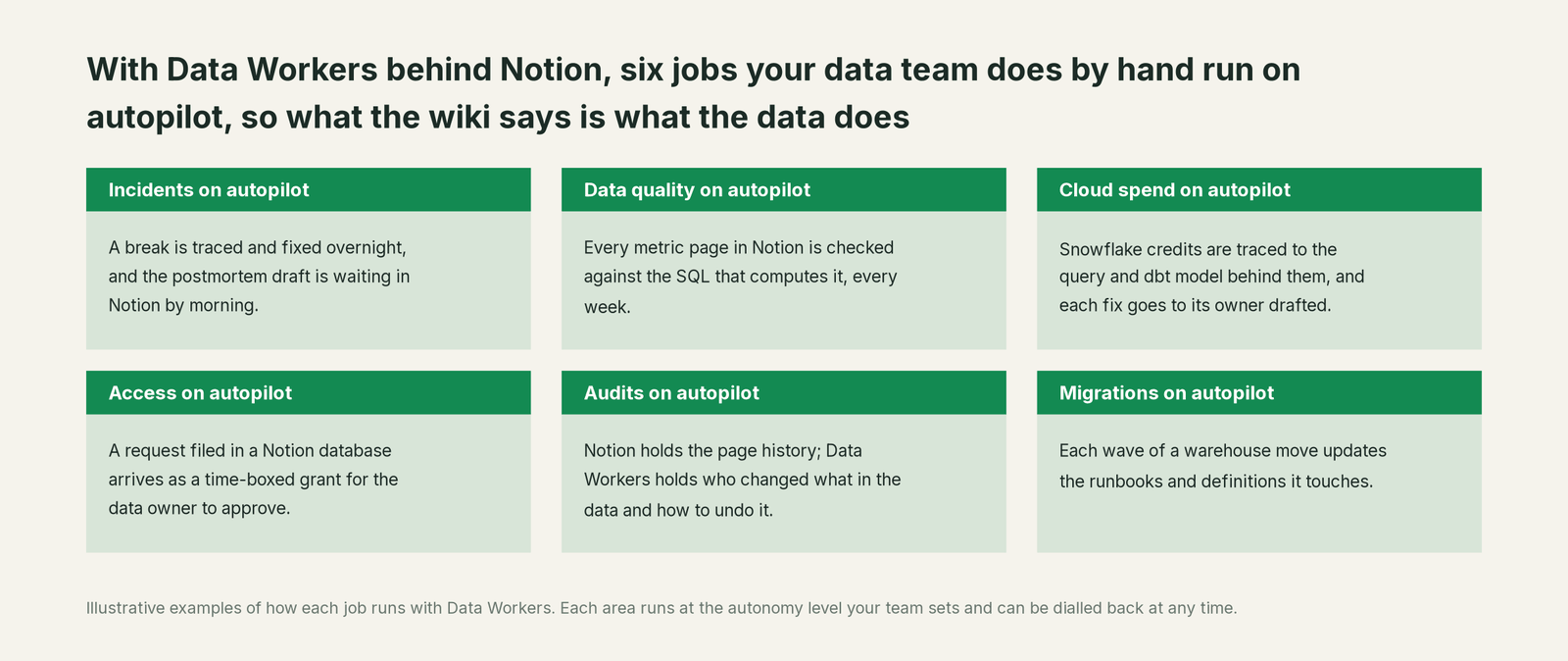
- •Incidents. Breaks are traced, fixed and verified overnight, and the postmortem draft, built from the receipt, is waiting in Notion by morning.
- •Data quality. Every metric page in the definitions database is checked against the SQL that computes it, and drift becomes a dbt test so the same break is caught upstream next time.
- •Cloud spend. Snowflake credits are traced to the query and dbt model behind them, and each fix goes to its owner drafted.
- •Access. A request filed in a Notion access database arrives as a time-boxed grant proposal for the data owner, with the policy that justifies it.
- •Audits. Notion holds the page history. Data Workers holds the other half: who changed what in the data, why, and how to undo it.
- •Migrations. Platform moves run in approved, parity-checked waves, and each wave proposes edits to the runbooks and definitions it touches.
Analytics engineers stop spending Monday reconciling pages against models.
Keep Notion AI, or consolidate?
Keep Notion AI if you love it; Data Workers works with it from day one. Many teams consolidate once Data Workers runs that slice too.
For most data teams the answer is to keep it: Notion is where the company already reads, and Custom Agents give you a clean place to run recurring work. Data Workers adds governed context joined to the warehouse, quality, incident repair, change control and evidence across the estate. Where teams consolidate, it is usually a separate data dictionary tool or a homegrown script that diffed docs against dbt, now that Data Workers does that job and writes back through Notion anyway. If you are weighing building this yourself, read build it ourselves with Claude Code and MCP servers: connecting to Notion is the easy part; the context graph, approvals and rollback are where the work is.
The case for your CFO
The outcome: the business already writes down how it measures itself in Notion. Data Workers makes those definitions match the numbers in the warehouse, every night, and keeps the record of every fix. Board metrics, forecasts and compensation plans all point back to a definition page; Data Workers makes that page a contract instead of a hope.
The risk story has two locks. Notion's admins decide which MCP servers are approved, which Custom Agents exist, and which tools run automatically or always ask. Data Workers sets autonomy per domain from L0 manual to L4 autonomous, routes each change to a named approver, applies it reversibly, verifies it downstream and writes a receipt: who approved it, what it touched, how to undo it. There is zero migration: your Notion workspace, warehouse, dbt project, orchestration and BI stay where they are.
Why now: Custom Agents act on the wiki on a schedule, so a stale page no longer misleads one reader; it misleads every agent built on it. The first win is a read-only Definition checker over one metric definitions database that reports drift weekly, then one write class in one domain. What stays the same: Notion seats, admin settings, page permissions, warehouse permissions and your dbt review process. For the numbers, see the ROI of agentic data operations.
The sentence to repeat upstairs: "We already write everything down in Notion; Data Workers makes sure what's written matches the data, and fixes it when it doesn't, with an approval and a receipt."
Getting started
Start with a pilot. Pick the metric definitions database your business reviews depend on, connect Data Workers to one Custom Agent with read tools only, and let it check every definition against the warehouse for a few weeks before enabling the first write class. The pilot path and plans are on the pricing page, and the pilot is credited in full against the first year.
FAQ
Doesn't Notion AI already answer data questions from our wiki? It does, and it answers faithfully from the pages and connected sources you can access. Data Workers makes sure those pages are still true: it resolves each definition against the model and SQL that compute it and flags or fixes drift.
Will Data Workers edit our Notion pages directly? The Custom Agent writes in Notion with its own Notion actions, so your workspace's rules apply: write tools on Always ask, and agents can propose edits for line-level approval. Data Workers supplies the content, the evidence and the receipt.
Is it safe to let a Notion Custom Agent trigger changes to our data platform? Writes pass two locks. In Notion, admins approve the server and each write tool asks before it runs. In Data Workers, each change has a blast radius, a named approver in Spellbook, a rollback path and a receipt, with autonomy set per domain.
Which Notion plan do we need? MCP connections and Custom Agents are on Notion's Business and Enterprise plans. Enterprise adds controls over which AI apps and MCP clients may connect to Notion MCP.
Whose credentials does Data Workers use? Notion sends a Data Workers API key tied to a named owner. Data Workers acts on the warehouse, dbt and orchestration with the credentials you configure per connection. Warehouse permissions stay the system of record, by design.
Does this replace our semantic layer or data catalog? No. Your semantic layer or catalog stays the source of computed definitions, and Notion stays where people read them. Context Wizard joins both into one governed graph for every assistant you use.
Sources
- •Notion, Notion AI product page, https://www.notion.com/product/ai (checked Oct 2, 2026)
- •Notion Help Center, Custom Agents, https://www.notion.com/help/custom-agents (checked Oct 2, 2026)
- •Notion Help Center, MCP connections for Custom Agents, https://www.notion.com/help/mcp-connections-for-custom-agents (checked Oct 2, 2026)
- •Notion Help Center, Connect Custom Agents to MCP integrations, https://www.notion.com/help/guides/connect-custom-agents-to-mcp-integrations (checked Oct 2, 2026)
- •Notion Help Center, Notion AI connectors, https://www.notion.com/help/notion-ai-connectors (checked Oct 2, 2026)
- •Notion Help Center, Notion MCP, https://www.notion.com/help/notion-mcp (checked Oct 2, 2026)
- •Notion developer docs, Notion MCP and supported tools, https://developers.notion.com/docs/mcp and https://developers.notion.com/guides/mcp/mcp-supported-tools (checked Oct 2, 2026)
- •Notion, Releases (suggest edits, Aug 28, 2026; model controls, Sept 9, 2026; agent skills, Sept 15, 2026), https://www.notion.com/releases (checked Oct 2, 2026)
- •Data Workers, client setup, https://dataworkers.io/opensource-docs/client-setup/ (checked Oct 2, 2026)
- •Data Workers community repository, tool registrations, https://github.com/DataWorkersProject/dataworkers-claw-community (checked Oct 2, 2026)