You're on Augment Code. Here's how Data Workers builds on it
Augment's Context Engine understands your codebase. Data Workers' Context Wizard understands your data estate. Connect them over MCP and every data change Augment writes is approved, verified and recorded.
Your engineers picked Augment Code for its Context Engine: a live, semantic index of repos, commits, docs and tickets that lets the Agent in VS Code or JetBrains see how a change in one service ripples into another. They run Agent for interactive work and Agent Auto when they trust the task, use Auggie in the terminal and in CI with --print, and hand longer work to Cosmos, where Experts wake on a GitHub pull request, a Linear status change or a PagerDuty alert and run in sandboxed cloud VMs. Rules in .augment/rules encode how the team writes code, and toolPermissions in .augment/settings.json decides what an agent may run. For understanding and changing code, that setup is hard to beat. The open question for a data team is what happens when that code changes a table that a dashboard, a finance export and three other models depend on, none of which live in the repo.
That's where Data Workers comes in. Augment's Context Engine understands your codebase. Data Workers' Context Wizard understands your data estate: lineage, definitions, owners and quality across every platform. Data Workers, the agentic data platform, joins the two and carries each data change into production: scoped, approved, verified and recorded. Your engineers keep the tool they chose.
Key takeaways
- •Two contexts, one change. Augment knows every line of code that references a column. Data Workers knows every model, DAG run, dashboard and owner that reads it in production. Together the agent sees the whole blast radius before it edits.
- •One config block and one rule to start. Add Data Workers under
mcpServersin Augment's settings, and add anagent_requestedrule in.augment/rules/that tells the agent when to check lineage, impact, freshness, quality and PII. - •Two locks on every write. Augment's Agent pauses before external tool calls by default, and
toolPermissionsgates Auggie and Cosmos agents; Data Workers' per-domain guardrail gates the change to the warehouse. No agent approves its own work. - •Cosmos Experts get the same context. Share the Data Workers server in the Cosmos MCP registry and pin it to an Expert, and a ticket picked up from Linear carries the same impact checks as a change typed in the IDE.
- •Climb one domain at a time. Start at L1 observe (answers, lineage, impact reports on pull requests), move to L2 propose, then L3 act reversibly where the record earns it.
Augment is the codebase expert. Data Workers is the data-estate expert.
Augment's Context Engine covers the code. What lives outside the repo is the running estate: which Snowflake objects a dbt model really feeds, which Tableau workbook selects a column with custom SQL, which Airflow task exports it to finance, how fresh each table is, and who owns each one. Data Workers keeps that in one governed context graph and does the data side of the work through 20+ specialist agents.
Here is one change, end to end. This is an illustration, not a customer case.
| Time | System | What happens |
|---|---|---|
| 09:14 | Linear | A ticket asks to rename cust_id to customer_id in the orders models. It moves to "Ready for agent". |
| 09:15 | Augment | A Cosmos Expert wakes on the Linear trigger. The Context Engine finds 14 references across two repos. |
| 09:17 | Augment | The Data Workers rule applies to the DDL change, so the Expert calls assess_impact on the Data Workers MCP server. |
| 09:18 | dbt | Data Workers reports a snapshot model and two marts that read cust_id, ranked by query usage. |
| 09:19 | Airflow | It also finds the finance_close DAG's export task selecting the column. |
| 09:19 | Tableau | And a Revenue workbook data source built on custom SQL that no repo search would reach. |
| 09:41 | GitHub | Augment opens the pull request: the code change plus a fix for every reader, with a view alias for the old name. |
| 09:43 | GitHub | The pull request carries Data Workers' blast radius report: three models, one DAG task, one workbook, with the rollback plan. |
| 10:05 | GitHub | dbt CI passes and the analytics lead approves the pull request. |
| 10:12 | Spellbook | The data owner approves the Snowflake change. |
| 10:16 | Snowflake | The owner applies the migration Data Workers drafted, with its rollback SQL on file; Data Workers queues the rerun of the affected models. |
| 10:48 | Tableau | Workbook totals match the pre-change baseline, the next finance_close run succeeds, and the receipt is recorded. |
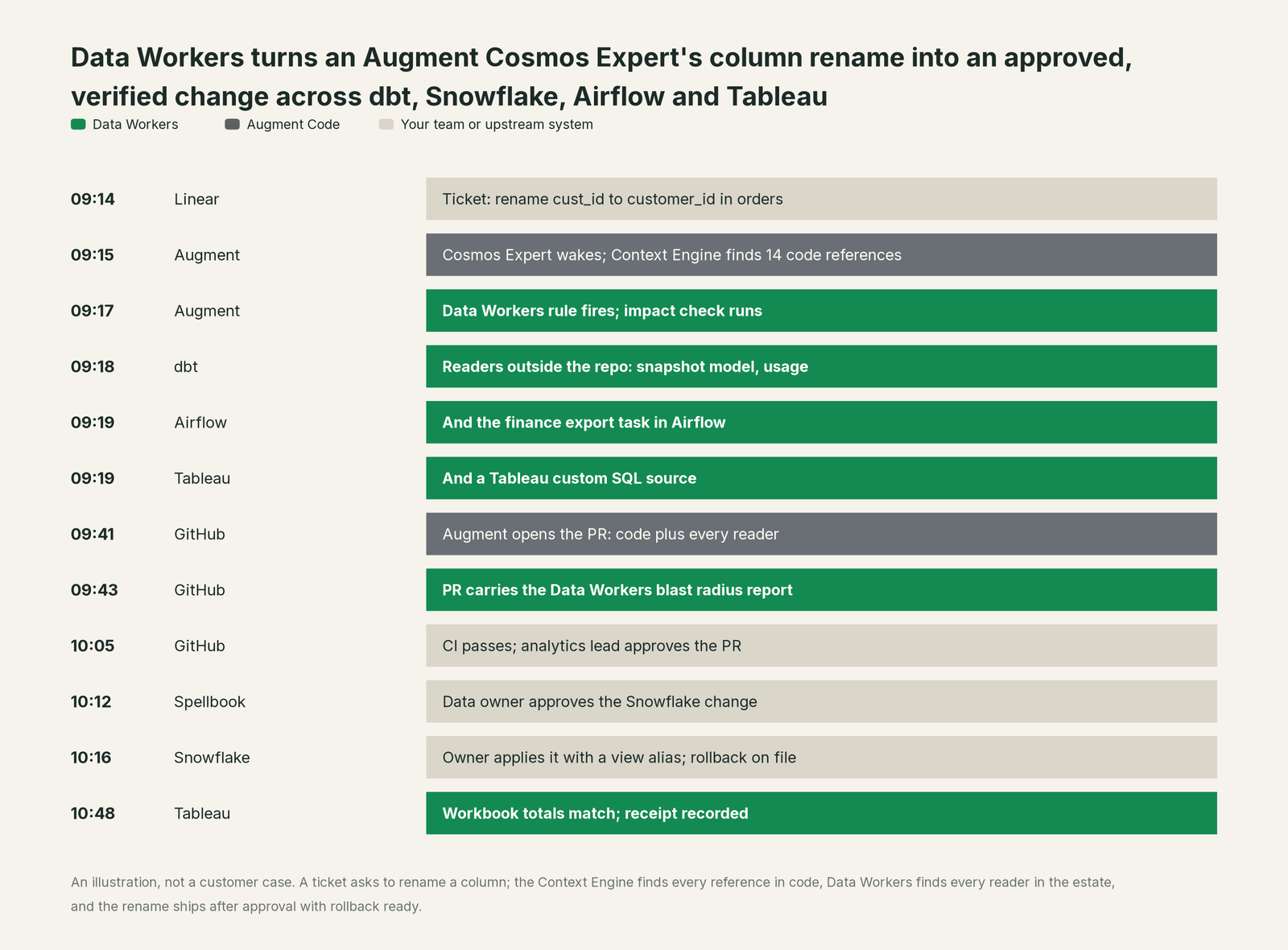
Without data context, the same ticket is a clean pull request that passes CI and then breaks a finance export and a workbook nobody searched. With both contexts, the engineer approved one pull request, the owner approved one change, and nobody chased anyone in Slack.
| Job | What Augment does | What Data Workers does |
|---|---|---|
| Understand the request | Reads the ticket and the codebase through the Context Engine: every reference, commit and related doc | Adds data-estate context: lineage across dbt, Snowflake, Airflow and Tableau, metric definitions, owners, freshness and usage |
| Write the change | Edits dbt models, SQL, DAGs and tests across repos | Supplies the impact report and the list of every reader the change must fix first |
| Gate the action | Agent pauses before external tools; toolPermissions allow, deny or delegate to a webhook policy | Routes data changes to the domain owner by policy, with blast radius attached |
| Apply to production | Pushes a branch and opens the pull request | Applies the approved migration or rerun in the warehouse, with rollback ready |
| Verify | Runs tests and commands; checkpoints let you revert code | Checks the changed tables against baselines, then dashboards and downstream runs |
| Record | Keeps the session, tool calls and checkpoints | Writes a receipt to the audit trail: who asked, who approved, what changed, how to undo it |
Why doesn't Augment just do this itself?
Focus and risk. Augment built an excellent product around one idea: context is what makes a coding agent good, and the codebase is the context. Its agents work on files, branches and pull requests, with checkpoints to revert code and permissions that gate what runs. Cosmos can also connect to Snowflake (added in August 2026), so an Expert can reach the warehouse. That is the right design for a coding platform.
Production data has a second context that never lands in a repo: query logs, runtime lineage across warehouses and BI tools, freshness, quality history, metric definitions and owners. Changing that data across systems is a different product. It needs a blast radius before anything runs, an approval routed to the owner of that domain rather than to whoever triggered the Expert, a rollback path inside Snowflake, a check that the dashboard is right afterwards, and a receipt an auditor can read. It also means taking responsibility for changes in systems Augment doesn't run. A coding platform sensibly leaves that to the server on the other end of the MCP connection. That server is Data Workers.
Every tool owns a slice. Data Workers covers the whole lifecycle
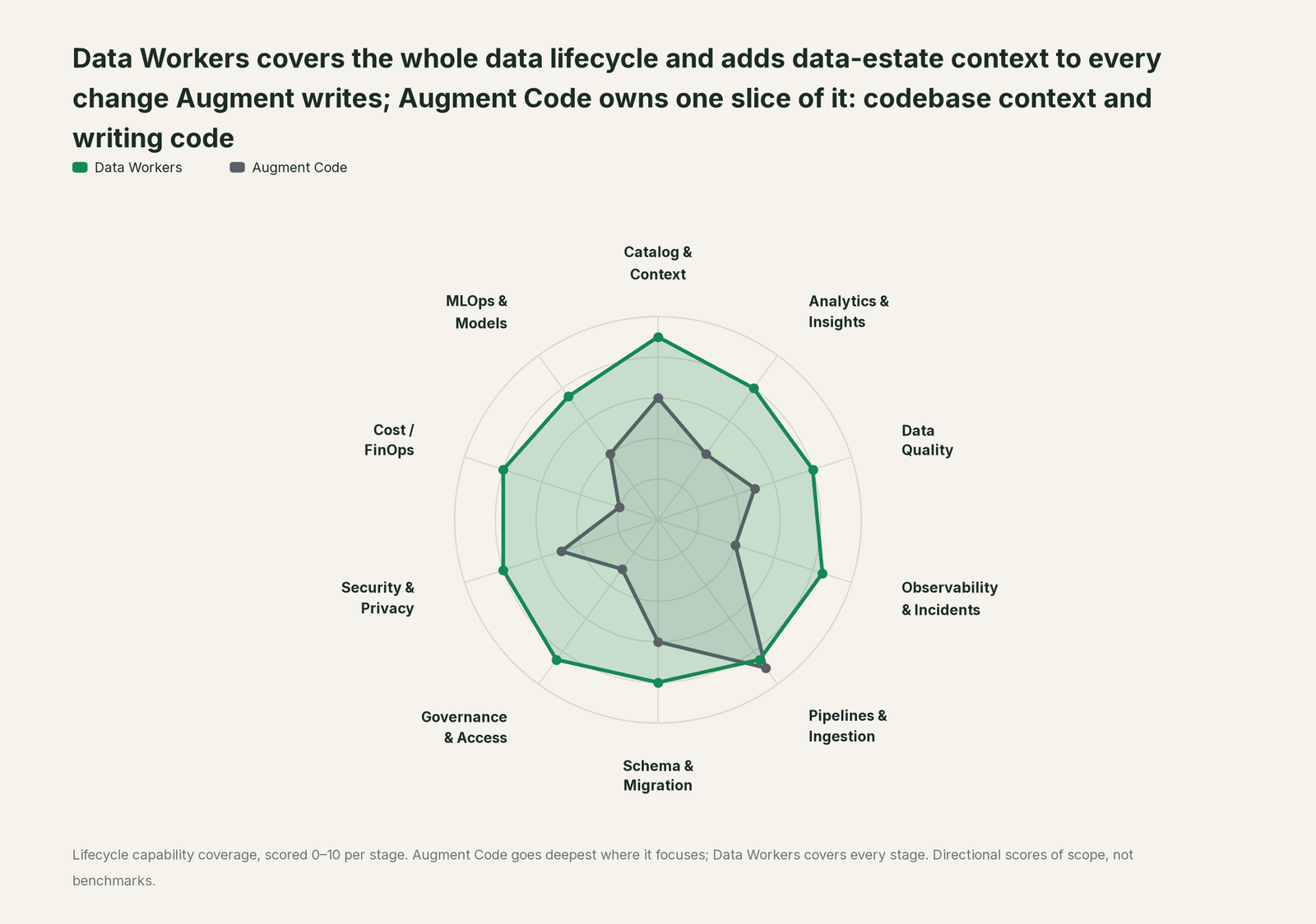
Augment goes deepest on understanding and writing pipeline code. Data Workers covers every stage of the data lifecycle around that code. Each point tool adds another console, contract and handoff; Data Workers covers the whole lifecycle with one context, one approval flow and one audit trail.
| Stage | Data Workers | Augment Code | Why we scored it this way |
|---|---|---|---|
| Catalog & Context | 9 | 6 | Augment's Context Engine indexes repos, commit history, docs and tickets across services. Data Workers' Context Wizard keeps one governed graph of tables, definitions, owners, lineage and quality across platforms. |
| Analytics & Insights | 8 | 4 | Augment Agent can write a query or explain analysis code on request. Data Workers answers business questions from governed metric definitions. |
| Data Quality | 8 | 5 | Augment writes dbt tests and checks when asked. Data Workers runs quality checks, writes the missing tests and repairs failing ones. |
| Observability & Incidents | 8.5 | 4 | Cosmos Experts wake on a PagerDuty alert and investigate software incidents; Code Review watches pull requests. Data Workers detects data incidents, traces the cause and closes them with a receipt. |
| Pipelines & Ingestion | 8.5 | 9 | Augment's home stage: Agent, Auggie and Cosmos Experts write and refactor pipeline code with full codebase context. Data Workers builds and reruns pipelines behind approval. |
| Schema & Migration | 8 | 6 | Augment writes migration code and DDL with the whole repo in view. Data Workers assesses impact in the warehouse, drafts each migration with its rollback SQL for the owner to apply in approved waves. |
| Governance & Access | 8.5 | 3 | Augment's tool permissions and Cosmos access controls govern its agents. Data Workers proposes least-privilege grants on your data platforms behind approvals. |
| Security & Privacy | 8 | 5 | Augment protects sensitive paths and secrets in its own agents. Data Workers' pull request review flags new columns whose names or annotations look sensitive, and leaves a receipt on every data change. |
| Cost / FinOps | 8 | 2 | Augment reports its own usage and cost analytics. Data Workers traces Snowflake credits to the query and dbt model behind them and drafts the fix for the model's owner. |
| MLOps & Models | 7.5 | 4 | Augment writes training and feature code. Data Workers keeps the data under models healthy and connects to MLflow and W&B. |
How Augment and Data Workers work together
Augment stays on top, where engineers ask, delegate and approve. Data Workers sits underneath over MCP: the Data Context Wizard answers from the governed graph, the Data-Agents Swarm does the work, the Autonomous Data-Conductor runs each fix end to end, and Spellbook Data Catalog (in preview) is where people review, roll back and audit.
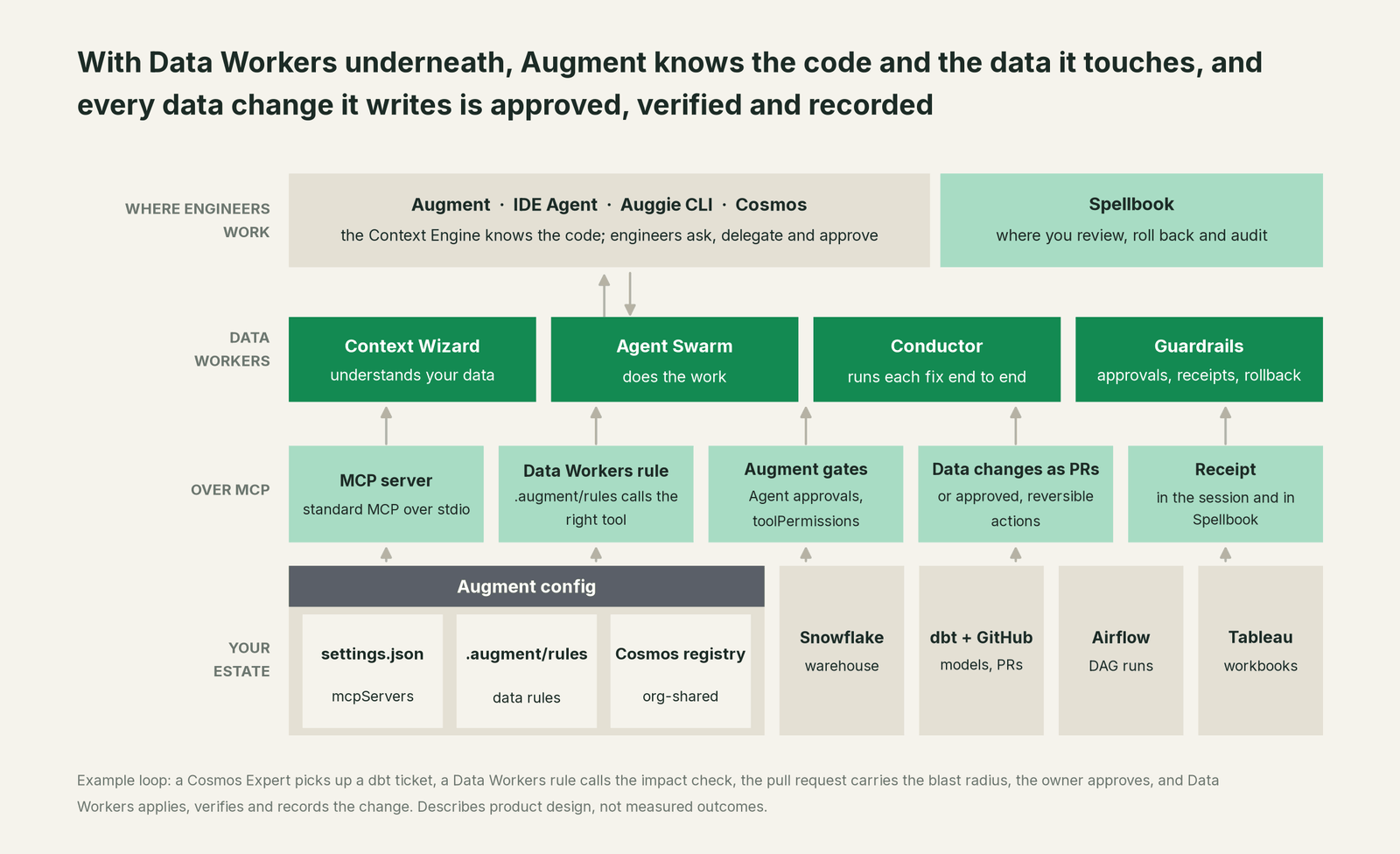
Connect the MCP server. Every Data Workers agent is a standard MCP stdio server, so the same server works in Augment, Cursor, Claude Code and Codex. Clone the open-source core (dataworkers-claw-community, Apache 2.0), run npm install && npm run build, and point each entry at start-agent.sh, as our client setup docs describe. In VS Code or JetBrains, open the Augment Settings Panel and use Import from JSON; for Auggie, put the same block in ~/.augment/settings.json (or run auggie mcp add) and check it with /mcp. Example:
{
  "mcpServers": {
    "dw-context-catalog": { "command": "/path/to/dataworkers-claw-community/start-agent.sh", "args": ["dw-context-catalog"] },
    "dw-schema": { "command": "/path/to/dataworkers-claw-community/start-agent.sh", "args": ["dw-schema"] },
    "dw-incidents": { "command": "/path/to/dataworkers-claw-community/start-agent.sh", "args": ["dw-incidents"] },
    "dw-quality": { "command": "/path/to/dataworkers-claw-community/start-agent.sh", "args": ["dw-quality"] },
    "dw-governance": { "command": "/path/to/dataworkers-claw-community/start-agent.sh", "args": ["dw-governance"] }
  }
}
In Cosmos, add Data Workers under Settings, Connectors with Add Connector, use Manage access to give your organization "Can use", and pin it to the Experts that touch data from the Tools section of the Expert editor. Augment's own guidance applies: validate in a fresh session with a harmless read-only call, such as explain_table on one table.
Add a Data Workers rule. Augment reads rules from .augment/rules/, versioned with the repo, and also from AGENTS.md and CLAUDE.md. An agent_requested rule attaches itself when its description is relevant, which keeps context lean on tasks that never touch data. Example:
---
type: agent_requested
description: Data Workers checks for any change to dbt models, SQL, DDL or DAGs
---
- Before editing a dbt model or DDL, call assess_impact and list every downstream reader.
- To find the right table or its lineage, call search_across_platforms and trace_cross_platform_lineage.
- Before trusting a query result, call explain_table on the tables it reads.
- Before merge, call run_quality_check on changed models.
- When something is described as broken, call diagnose_incident before patching.
- On code that adds a column holding personal data, annotate the column and ask the data owner before merge.
Set the gates. In the IDE, Agent pauses before external integrations by default; we recommend keeping data-changing tools there and saving Agent Auto for read work, or using Quick Ask Mode when someone only wants answers. For Auggie and Cosmos agents, commit a .augment/settings.json with toolPermissions: allow the read tools, and deny or route the write tools through a webhook-policy. MCP tools follow the pattern {tool-name}_{server-name}. Example:
{
  "toolPermissions": [
    { "toolName": "assess_impact_dw-schema", "permission": { "type": "allow" } },
    { "toolName": "explain_table_dw-context-catalog", "permission": { "type": "allow" } },
    { "toolName": "trace_cross_platform_lineage_dw-context-catalog", "permission": { "type": "allow" } },
    { "toolName": "apply_migration_dw-schema", "permission": { "type": "deny" } }
  ]
}
With that file, an Expert can read and propose freely, while the apply step runs only through Data Workers' approval flow, where the owner signs off in Spellbook. When rules come from more than one policy, Augment applies the most restrictive match, so a stricter policy is never overridden by a looser one.
One request, from L0 to L4. An engineer types into Augment: "the orders_daily freshness check failed again, fix it". Here is each level, set per domain.
| Level | What happens when the engineer asks |
|---|---|
| L0 manual | Augment helps the engineer read logs and write a patch by hand. Data Workers isn't in the loop. |
| L1 observe | Augment calls diagnose_incident. Data Workers answers in the session: the Airflow load task timed out after a source API change, two dashboards are stale, and the owner is the finance data team. |
| L2 propose | Data Workers drafts the fix (a retry and timeout change on the DAG plus a backfill plan) with its blast radius. Augment opens the pull request; the owner approves. |
| L3 act reversibly | For this pre-approved class of fix, Data Workers reruns the load and the backfill itself, with rollback ready, and records the receipt. The engineer sees the result in Augment. |
| L4 autonomous | Freshness incidents in this domain run end to end without waiting: detect, fix, verify, record. A Cosmos Expert can watch for the same alert, and the owner reviews receipts in Spellbook and can dial the domain back at any time. |
Our Claude Code, Cursor and Codex guide shows the same wiring for three other coding agents.
What changes for your team
Engineers keep Augment and their habits. What changes is the work around each data change: the hunt for who reads a column, the Slack thread to find an owner, the manual backfill, the evidence an auditor asks for later.
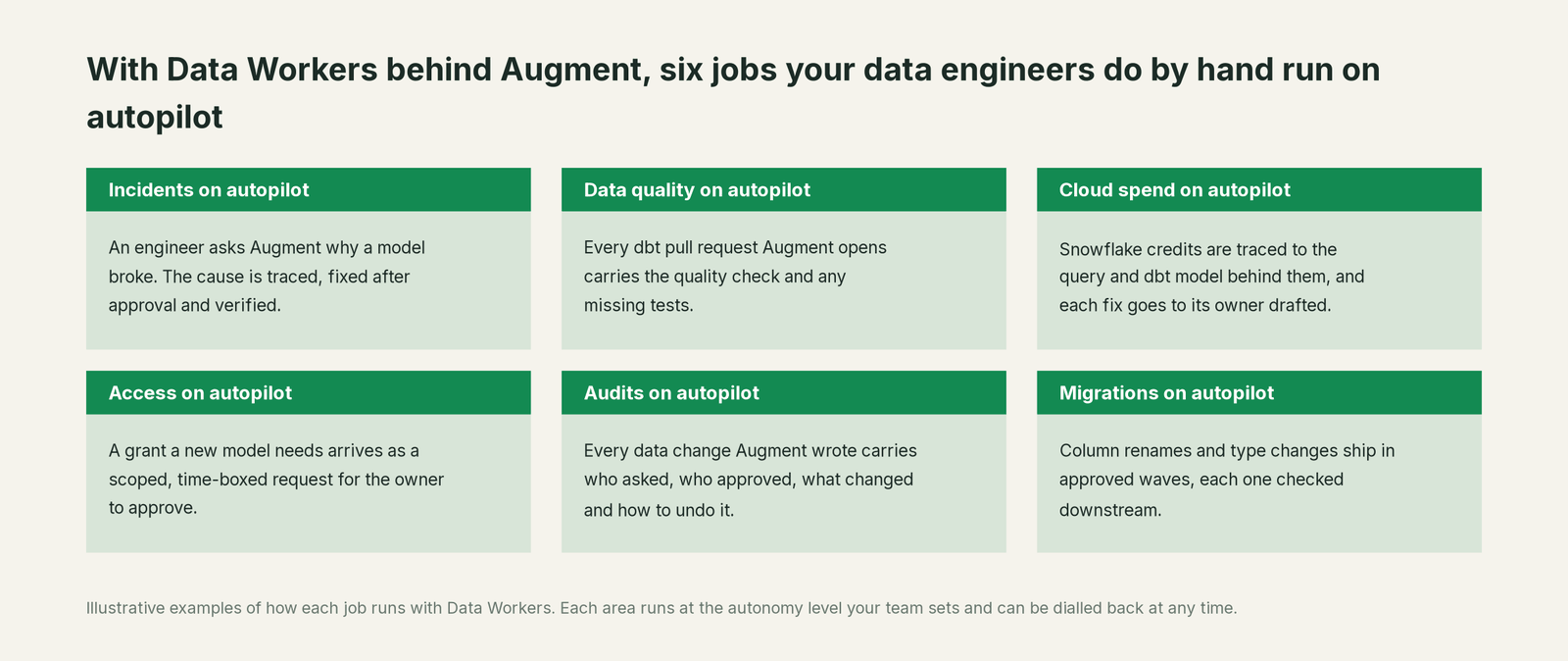
The data platform team stops being the human lookup service for lineage and ownership. Analytics engineers ship dbt changes with the impact already attached. Cosmos automations for data engineering, such as adding columns and running backfills, get an owner approval and a receipt on each run. The audit trail builds itself from receipts.
Keep Augment Code, or consolidate?
Keep Augment Code if you love it; Data Workers works with it from day one. Many teams consolidate once Data Workers runs that slice too.
For most data teams, Augment stays. It is the coding platform engineers chose, and its codebase context is the half of the picture Data Workers complements. What teams consolidate are the extra tools around data changes: the separate lineage lookup, the impact-analysis script someone maintains, the spreadsheet of who owns what, the manual backfill runbook. Data Workers runs that work with one context, one approval flow and one audit trail, and serves every other MCP client from the same agents. Augment also offers its Context Engine to other agents as Context Engine MCP (a local server through Auggie or a remote one through the Augment GitHub App), so the pairing holds when some engineers work in Claude Code or Cursor. If parts of your team work in other tools, read You're on Cursor, You're on Amp and You're on Claude, or start from the hub, Your company just rolled out AI assistants. Now what?.
The case for your CFO
You already pay for Augment seats, and your engineers ship code faster because the agent understands the codebase. Data Workers makes the data changes they ship right the first time: fewer broken dashboards, fewer month-end surprises in finance exports, and less senior engineering time spent tracing who reads what.
The risk story is plain. At L1, agents only read and explain. At L2, they propose and a named owner approves. At L3, they act only on pre-approved, reversible classes of change, with rollback ready. Every action leaves a receipt with who asked, who approved, what changed and how to undo it. Our safety guide covers what an agent can and can't do at each level, and the security and deployment guide covers where your data goes.
Why now: Cosmos puts agents on triggers and schedules, so more data changes will start without a person at the keyboard. They should land with data context and an approval trail. Building that layer in house is possible, and our build-vs-buy guide lays out what it takes.
The first win is an impact report on every dbt pull request Augment opens in one repo, at L1, with no change to how anyone works. What stays the same: Augment, Snowflake, dbt, Airflow, your BI tool and your permission systems. Nothing is migrated. Our ROI guide shows how to size the return.
The sentence to repeat upstairs: "Augment knows our code, Data Workers knows our data, and every data change our agents write is scoped, approved, verified and recorded."
Getting started
Start with a pilot: connect Data Workers to Augment in one repo, add the rule and the permissions file, and run one domain such as freshness incidents or schema changes from L1 to L2 with your own engineers and owners. See pricing for the pilot terms; the pilot is credited in full against the first year.
FAQ
Doesn't Augment's Context Engine already give the agent context? Yes, for code: repos, commit history, docs and tickets, and it is very good at it. Data Workers adds the context that lives in the running estate: warehouse lineage, BI usage, freshness, quality history, metric definitions and owners. The agent needs both to know what a change will break.
Does Data Workers replace Augment's Agent, Auggie or Cosmos Experts? No. Augment keeps writing the code and running the automations. Data Workers adds the data context and carries the approved data change into the warehouse, then verifies and records it.
Where do we configure Data Workers: the IDE, Auggie or Cosmos? All three. The IDE and Auggie read the same mcpServers shape: Import from JSON in the IDE for one engineer, ~/.augment/settings.json or auggie mcp add for the CLI and CI. For a team, add it in Cosmos under Settings, Connectors with Manage access, pinned to the Experts that touch data.
Can a Cosmos Expert change production data on its own? Only within the autonomy level you set for that domain. A committed .augment/settings.json gates which Data Workers tools the Expert may call, and Data Workers' guardrail gates the change itself. At L2 a named owner approves every change; at L3 only pre-approved, reversible classes run, each with rollback ready and a receipt.
How do we keep credentials out of the repo? Use the Settings Panel's environment section or env for local stdio servers. In Cosmos, reference a shared secret and grant its access separately. Data Workers uses its own scoped credentials to each platform, so engineers never paste warehouse keys into Augment.
Which data platforms does this work with? Data Workers runs control-plane connectors for Snowflake, Databricks and BigQuery, and reads dbt manifests and runs. For Airflow, Tableau and the rest of your stack, Data Workers connects over each tool's API or MCP server today.
Sources
Augment Code capabilities are current as of October 2, 2026, from Augment's own documentation: Introduction (checked 2026-10-02), Context Engine MCP (Context Engine, local and remote servers; checked 2026-10-02), Setup Model Context Protocol servers (Easy MCP, launched July 30, 2025; Settings Panel; Import from JSON; HTTP and SSE; MCP Tool Search; checked 2026-10-02), Using Agent (Agent vs Agent Auto, checkpoints, Quick Ask Mode; checked 2026-10-02), Introducing Auggie CLI (checked 2026-10-02), Integrations and MCP (~/.augment/settings.json, auggie mcp add; checked 2026-10-02), Tool Permissions (toolPermissions, MCP tool naming, precedence; checked 2026-10-02), Rules & Guidelines (checked 2026-10-02), Getting Started with Cosmos (checked 2026-10-02), Cosmos MCP Registry (Connectors, Manage access, referenced secrets, fresh-session validation, pinning to an Expert; checked 2026-10-02), Other Workflow Automations (data engineering pattern; checked 2026-10-02) and the changelog (Cosmos Week 32, Aug 5, 2026: ClickUp and Snowflake connections; Cosmos Week 33: Settings, Connectors and Add Connector; IntelliJ plugin v0.491.0, Sep 14, 2026; checked 2026-10-02). Data Workers setup follows the getting started and client setup docs and the open-source dataworkers-claw-community repository (start-agent.sh and the agent tool definitions for assess_impact, apply_migration, rollback_migration, check_freshness, search_across_platforms, trace_cross_platform_lineage, run_quality_check, diagnose_incident and scan_pii; checked 2026-10-02). Product names and statuses change quickly; if we've got something wrong, tell us and we'll fix it.