You're on Devin: keep it shipping code tickets, and give it governed data context and approved data changes
Your team assigns tickets to Devin. Add Data Workers as a custom MCP and Devin works from governed data context, while every production data change goes through approvals and receipts.
Your engineers already hand work to Devin. They assign a Linear ticket to Devin, add a playbook label like !plan or !implement, tag @Devin in a Slack thread about a bug, or start a session from the Devin CLI and /handoff the long part to cloud Devin. Each session gets its own workspace with a shell, an IDE and a browser, and comes back as a tested pull request. Your admins have installed plugins and MCP servers from the marketplace in Customize > MCPs, written org playbooks and Knowledge, and bound security profiles that decide which networks, MCP servers and git access a session gets. Cognition built Devin to be an autonomous software engineer, and it is very good at that job. Data Workers is the agentic data platform behind it. Connected over MCP, Devin works from your governed data context, and every change to production data goes through Data Workers' approvals and leaves a receipt.
Key takeaways
- •Devin is the autonomous software engineer. Data Workers is the data team it calls. Devin turns the ticket into a pull request; Data Workers brings the context, owns the change to production data and proves it worked.
- •One custom MCP at organization scope reaches every session. An admin adds Data Workers once in Customize > MCPs, and tickets from Linear, Slack, Jira and the web app all reach the same governed context.
- •Two locks on every write. Devin's security profile decides whether a session may use the Data Workers server at all; Data Workers applies its per-domain guardrail, keeps a rollback point and writes the receipt.
- •Playbooks carry the data procedure. A
!data-triageplaybook tells Devin to ask Data Workers for the cause and blast radius before it writes a line of code. - •Climb the ladder one domain at a time. Start read-only (L1), move to propose (L2), then act reversibly (L3), and let trusted domains run autonomously (L4). Nothing migrates.
Devin is the autonomous software engineer. Data Workers is the data team it calls.
Devin reads your dbt project, your Airflow DAGs and your SQL, takes the ticket and ships the change. What a ticket doesn't carry is the state of the data estate: which table is canonical, who owns it, what reads it downstream, what changed upstream overnight, and who must approve a fix to revenue data. That is what Data Workers holds. The Data Context Wizard keeps one governed context graph across warehouses, ingestion, dbt, orchestration and BI. The Data-Agents Swarm (20+ specialist agents) does the data work. The Autonomous Data-Conductor runs each fix end to end: detect, diagnose, fix, review, verify, remember. Spellbook Data Catalog (in preview) is where people review, approve, roll back and audit.
Here is one ticket, end to end. It is an illustration, not a customer case.
| Time | System | What happens |
|---|---|---|
| 02:10 | Salesforce | An admin renames the Region field on the Opportunity object |
| 03:00 | Fivetran | The Salesforce sync adds the new column; the old one stops filling |
| 03:02 | Snowflake | 1,912 new rows in raw.salesforce.opportunity land with region null |
| 06:20 | dbt | The not_null test on fct_pipeline.region fails and the job stops |
| 06:25 | Linear | On-call files a ticket with the !data-triage playbook label; Devin picks it up |
| 06:27 | Devin | Devin calls Data Workers over MCP (diagnose_incident, blast_radius_analysis) |
| 06:28 | Data Workers | Traces the failure to the 02:10 rename; blast radius is 4 dbt models and 3 Looker Explores |
| 06:52 | Devin | Opens a pull request that maps the new column in stg_salesforce__opportunities |
| 07:15 | Spellbook | The revenue ops data owner approves the backfill, as the sales domain requires |
| 07:17 | Snowflake | Data Workers starts the backfill of region on the 1,912 rows through the orchestrator, with the undo recorded first |
| 07:40 | dbt | The pull request is merged; dbt rebuilds; tests pass; receipt written |
| 08:00 | Looker | The Pipeline Explore is current before the forecast call |
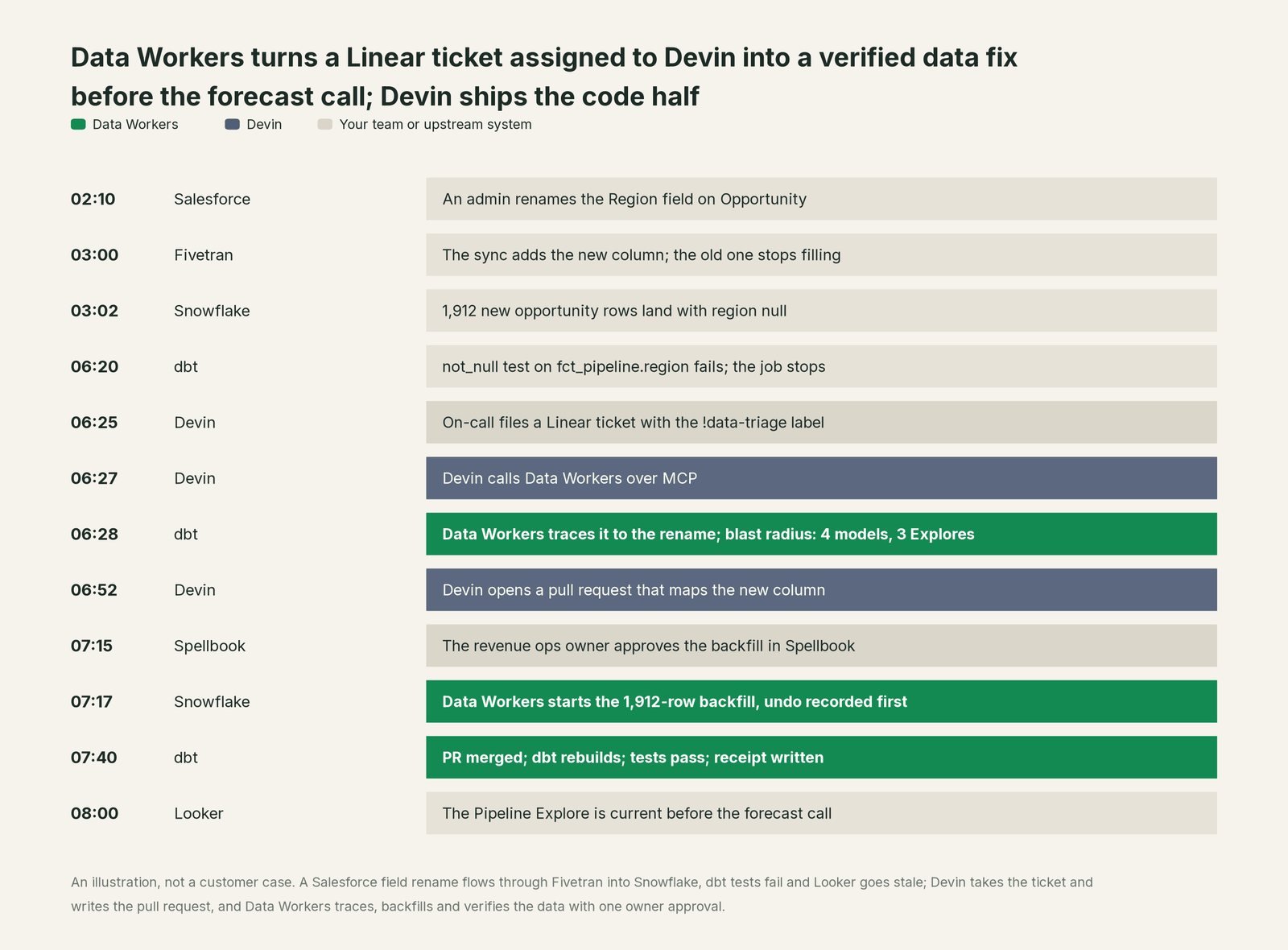
Nobody had to work out the cause from scratch. Devin did what it does best: took the ticket, ran the playbook, wrote the code fix, tested it and opened the pull request for review. Data Workers did the data work: it found the cause in Salesforce, measured the blast radius through Fivetran and dbt into Looker, routed the backfill to the person who owns sales data, made the change reversibly and proved it with row counts and tests. The ticket closes with two artifacts: Devin's pull request and Data Workers' receipt.
| What Devin does | What Data Workers does |
|---|---|
| Takes the ticket from Linear, Jira, Slack, Teams or the web app | Answers it from governed context: lineage, ownership, definitions, recent upstream changes |
| Writes, runs and tests code in its own workspace | Reads and changes Snowflake, Fivetran, dbt, Airflow and BI through each system's own API |
| Follows the playbook and the Knowledge your org wrote | Applies per-domain guardrails and routes the change to the data owner |
| Opens the pull request and answers review comments | Owns the production data change, keeps a rollback point and verifies downstream |
| Keeps a session log of what it did | Writes a receipt that outlives the session: who asked, who approved, what changed, how to undo |
Why doesn't Devin just do this itself?
Focus and risk. Cognition built Devin to do software engineering end to end, and its controls are right for that job. Security profiles restrict a session's network, its MCP servers, its git access level and its GitHub CLI token, and an enterprise can set them as a floor no one below can loosen. Admins choose which MCP servers exist and who may add them. Every one of those controls governs the session: what this Devin, on this ticket, may reach.
Devin's own docs are careful about production data: for production databases, they advise a read-only connection string or a database user with restricted permissions, because Devin executes queries based on user instructions. That is the right call for a coding agent. Changing production data safely is a different product. A backfill on raw.salesforce.opportunity touches systems Devin doesn't run, owned by people who aren't on the ticket, with downstream readers nobody in the repository can see. Doing it well takes context about every other system, a blast radius, an approver per domain, a rollback plan, verification after the fact and a receipt an auditor can read next quarter. It also means carrying the liability for changes in tools Cognition doesn't own. That is the product Data Workers is, and Devin is a great place for your engineers to ask for it.
Every tool owns a slice. Data Workers covers the whole lifecycle
Each point tool adds another console, another contract and another handoff. Data Workers covers the whole data lifecycle with one context, one approval flow and one audit trail. Devin owns a valuable slice of it: turning engineering tickets into tested pull requests. It leads where that is the work, in pipeline code, and it is strong at migrations and refactors.
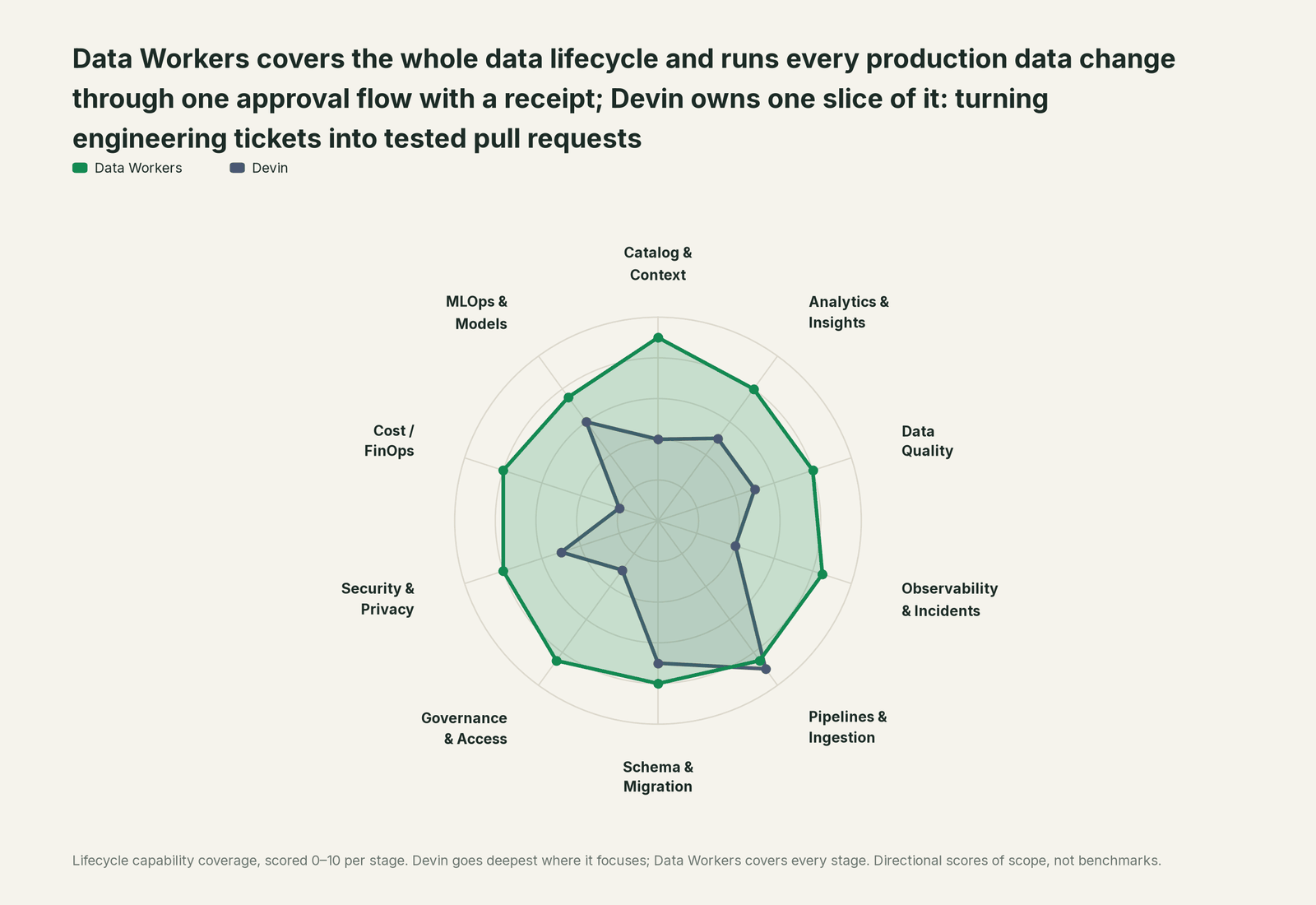
| Stage | Data Workers | Devin | Why we scored it this way |
|---|---|---|---|
| Catalog & Context | 9 | 4 | Devin indexes your repositories and recalls Knowledge across sessions; it doesn't keep a data catalog. Data Workers keeps one governed context graph across warehouses, dbt, orchestration and BI. |
| Analytics & Insights | 8 | 5 | The Data Analyst agent queries connected databases and charts the answer. Data Workers answers from governed definitions, lineage and ownership, so every seat gets the same number. |
| Data Quality | 8 | 5 | Devin writes dbt tests and checks when a ticket asks for them. Data Workers writes, runs and repairs checks across platforms and keeps them running. |
| Observability & Incidents | 8.5 | 4 | Devin can start from a PagerDuty incident or a Slack thread and investigate. Data Workers detects, traces and closes data incidents across systems with a receipt. |
| Pipelines & Ingestion | 8.5 | 9 | Devin leads. It takes the ticket, writes the pipeline code, dbt model or DAG, tests it in its own workspace and opens the pull request. Data Workers owns the run in production behind approval. |
| Schema & Migration | 8 | 7 | Migrations and refactors are a Devin strength. Data Workers checks the blast radius across every downstream system before a schema change lands. |
| Governance & Access | 8.5 | 3 | Devin governs Devin: security profiles, MCP allowlists, git access levels and roles. Data Workers proposes least-privilege grants on your data platforms behind approvals. |
| Security & Privacy | 8 | 5 | Security profiles restrict network, MCP and git access, and Security Swarm fixes code vulnerabilities. Data Workers flags sensitive column names in pull request review across the estate. |
| Cost / FinOps | 8 | 2 | Devin doesn't work on your warehouse bill. Data Workers traces Snowflake credits to the dbt model behind them and drafts the fix for its owner. |
| MLOps & Models | 7.5 | 6 | Devin writes and tests training, feature and evaluation code like any other ticket. Data Workers keeps the data under the models healthy. |
How Devin and Data Workers work together
Devin stays on top, where engineers assign tickets, attach playbooks and review pull requests. Data Workers sits underneath as MCP servers: the Context Wizard, the Swarm, the Conductor and the guardrails. Spellbook is where people look: data owners review and approve changes, roll them back and read the audit trail.
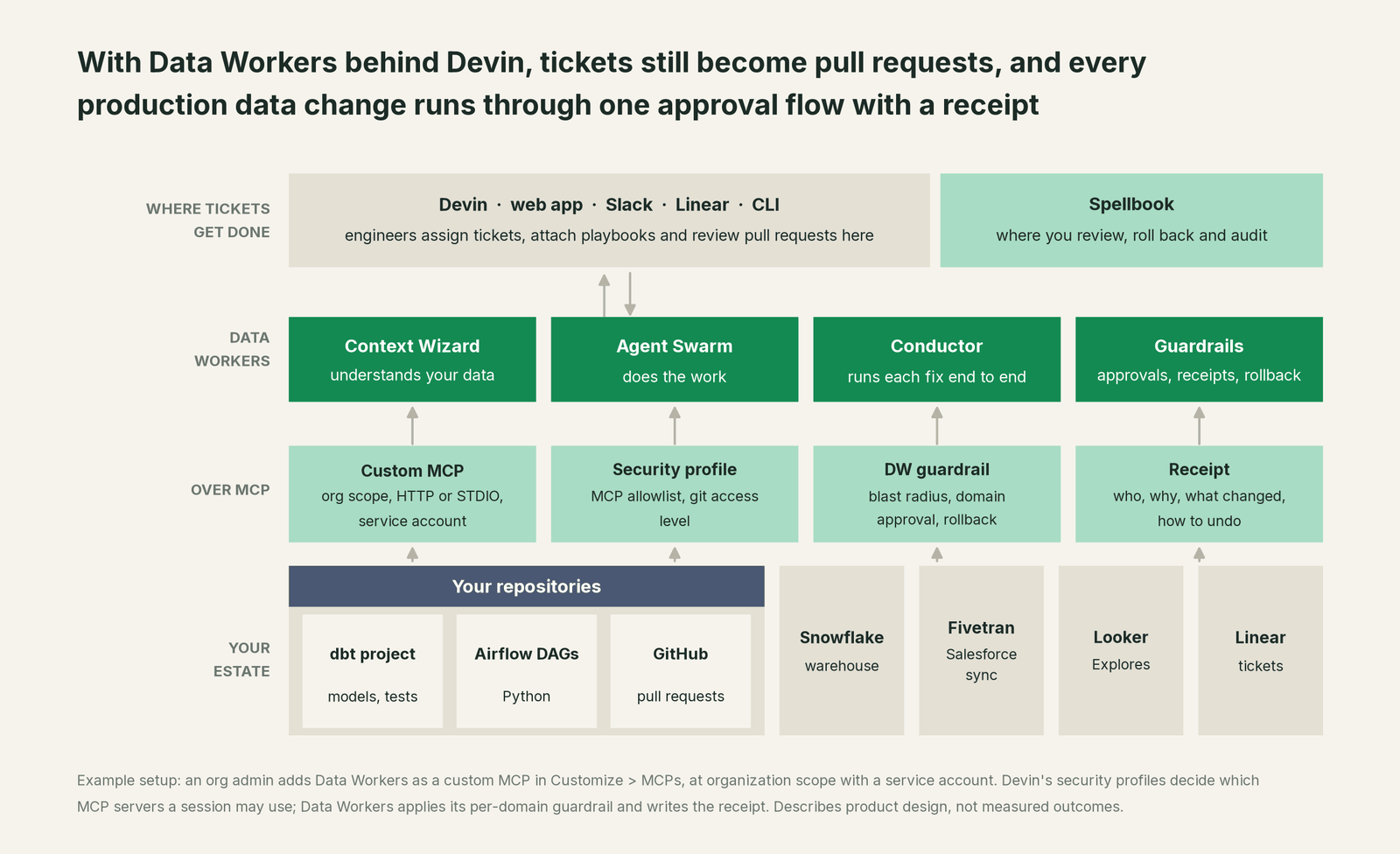
Setup over MCP today. Data Workers connects to Devin over MCP today. For cloud Devin, an org admin with the Manage MCP Servers permission opens Customize > MCPs, opens Add MCP, chooses Add custom MCP, and fills in the form. HTTP (Streamable HTTP) is Devin's recommended transport for remote servers. Devin's docs show the form fields as JSON; this is the equivalent for Data Workers, with a placeholder host. Example:
{
  "transport": "HTTP",
  "url": "https://<your-data-workers-host>/mcp",
  "auth_method": "auth_header",
  "headers": {
    "Authorization": "Bearer <token stored as a Devin secret>"
  }
}
Click Test tools to confirm Devin can list the Data Workers tools. If you use OAuth with Organization access, connect a service account, as Devin recommends, so every session acts as one auditable identity. To keep Data Workers to the sessions that need it, use security profiles: list it in the MCP allowlist of the profile bound to your data team's org or to the automations that handle data tickets.
For engineers on the Devin CLI, the Data Workers agents run as standard MCP stdio servers from the open-source core, as our client setup docs describe: clone dataworkers-claw-community, run npm install, and add the agents to the project's .devin/mcp_config.json. A permission rule in .devin/config.json lets the read tools run and makes the change tool ask first. Example:
// .devin/mcp_config.json
{
  "mcpServers": {
    "dw-incidents": { "command": "/path/to/dataworkers-claw-community/start-agent.sh", "args": ["dw-incidents"] },
    "dw-context-catalog": { "command": "/path/to/dataworkers-claw-community/start-agent.sh", "args": ["dw-context-catalog"] }
  }
}

// .devin/config.json (permissions)
{
  "permissions": {
    "allow": ["mcp__dw-incidents__diagnose_incident", "mcp__dw-context-catalog__blast_radius_analysis"],
    "ask": ["mcp__dw-incidents__remediate"]
  }
}
Then write the procedure once as a playbook with a macro, say !data-triage: "Before changing any model, call diagnose_incident and blast_radius_analysis in Data Workers. Write the code fix as a pull request. Never change production data directly; request it through remediate and link the Data Workers receipt in the PR description." Sync that playbook as a Linear label, and every data ticket starts the same way. For the wiring across agents, see Data Workers + Claude Code, Cursor and Codex.
The same ticket on the autonomy ladder. Autonomy is set per domain, on the ladder L0 manual, L1 observe, L2 propose, L3 act reversibly, L4 autonomous.

- •L0 manual. On-call queries Snowflake by hand and reads Fivetran logs. Devin fixes the staging model once someone tells it about the rename.
- •L1 observe. Devin calls Data Workers and gets the cause, the blast radius and the owner. Nothing in production changes; Devin writes the pull request.
- •L2 propose. Data Workers drafts the backfill with its blast radius and rollback plan. The revenue ops owner approves in Spellbook; Devin links the receipt in its PR.
- •L3 act reversibly. For the sales domain, Data Workers backfills renamed fields on its own with the undo recorded first and writes the receipt. Devin's ticket carries it.
- •L4 autonomous. The Conductor catches the rename at 03:00, when Fivetran syncs it, before dbt runs. It backfills, verifies and files the code change as a ticket for Devin. Engineers read the receipt in the morning.
Devin's security profiles and Data Workers' guardrails stack. Turning one up never turns the other down.
What changes for your team
Engineers keep assigning tickets to Devin. What changes is the work behind it: the jobs that used to wait for a person with the right access and the right context now run through Data Workers, at the autonomy level each domain sets.
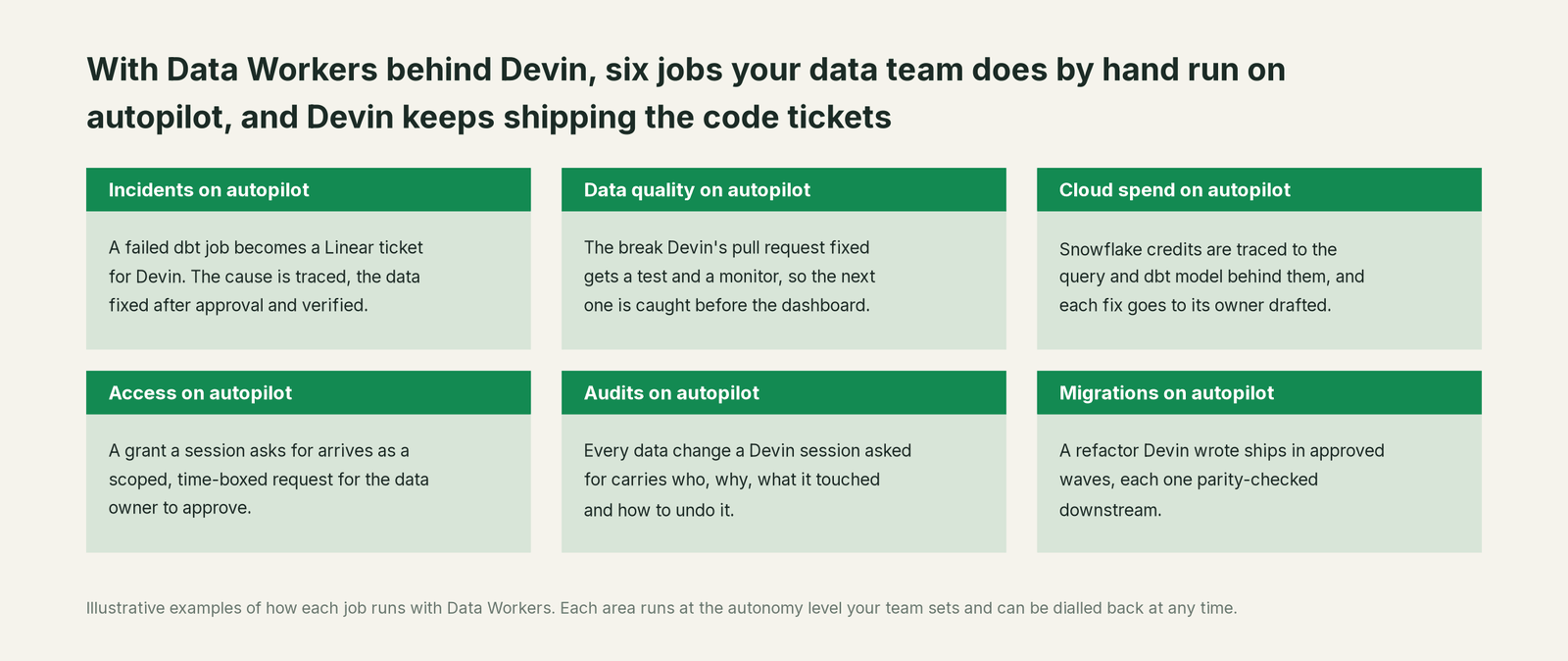
Data owners stop being pinged for "can someone fix these rows?" and start approving scoped changes in Spellbook. On-call stops starting from zero, because the ticket Devin picks up already returns the cause and the blast radius. Platform admins stop handing database credentials to agent sessions: Devin keeps read-only access where it needs it, and production writes go through one server, one approval flow and one audit trail.
Keep Devin, or consolidate?
Keep Devin if you love it; Data Workers works with it from day one. Many teams consolidate once Data Workers runs that slice too. With a coding agent, keeping it is the usual answer: Devin is where your engineering backlog gets done, and Data Workers makes every data question and data change it sends governed. Devin Desktop (formerly Windsurf) is Cognition's IDE and agent command center; its MCP setup is covered in You're on Windsurf. The same Data Workers server also answers in Factory and Codex, so teams that run more than one agent share one context and one audit trail. For the whole category, see Your company just rolled out AI assistants. Now what?.
The case for your CFO
You already pay for Devin, and it already closes engineering tickets. Data tickets are where it needs more than the repository. The outcome to buy now is that those tickets get fixed at the cause: fewer wrong numbers reaching leadership, data incidents closed the same morning, and an audit trail for every change to production data.
The risk story is plain. At L1, Data Workers only reads and explains. At L2, it proposes and a named owner approves. At L3, it acts only where a change is reversible, and keeps the rollback point. L4 is reserved for domains you've trusted on evidence. Every action leaves a receipt: who asked, who approved, what changed, what it touched, and how to undo it. Devin keeps its security profiles, so there are two locks on every write. Nothing migrates: Devin, Salesforce, Fivetran, Snowflake, dbt and Looker all stay. The cost case and how to model it are on the ROI page, and deployment and data-handling answers are on the security page.
Why now: autonomous agents are already taking data tickets. Every week without governed context is another week of sessions guessing which table is canonical, and of database credentials handed to agents with no receipt for what changed. The safety page walks through what agents can and can't do at each level, and the build-vs-buy page covers what it takes to wire this yourself.
The first win is small and visible: read-only Data Workers tools in Devin for one domain, plus a !data-triage playbook, so every failed-pipeline ticket starts with a traced cause. Start with a pilot; pricing has the details, and the pilot is credited in full against the first year.
The sentence to repeat upstairs: "Devin keeps shipping our code tickets; Data Workers gives it our governed data context and routes every production data change through one approval flow with a receipt."
Getting started
Start with a pilot. Pick one domain where data tickets already land on Devin, often revenue or product analytics. Add Data Workers as a custom MCP at organization scope, allow it in that team's security profile, write the !data-triage playbook, and run the domain at L1 for the first weeks. Move it to L2 when the answers hold up, and to L3 for the fixes your data owners approve every time. See pricing; the pilot is credited in full against the first year.
FAQ
Does Data Workers bypass Devin's security profiles? No. Data Workers is one more MCP server under Devin's controls: when a session's governing security profile has an MCP allowlist, Data Workers must be on it, and mandatory enterprise profiles still set the floor. Data Workers adds its own per-domain guardrail on top, so a production change needs both.
Should Devin still have database credentials? Keep them read-only, as Devin's docs advise for production. Data Workers uses its own credentials, scoped per domain, for changes that pass approval. The engineer and the Devin session are recorded on the receipt as who asked.
How does this fit Linear and Jira tickets? Sync a data playbook as a Linear label, so adding !data-triage to a ticket starts Devin on that playbook. For Jira, create a Devin automation with a Jira trigger (label added or assigned) and include the playbook in its prompt with @playbook-name. Either way, every data ticket starts by calling Data Workers for the cause and blast radius. Devin opens the pull request; Data Workers' receipt goes in the PR description.
Can Devin's automations start from a data incident? Yes. Devin automations fire on PagerDuty incidents, Slack messages, Linear and Jira events, schedules and webhooks. Point one at the incidents your data team owns, and attach the playbook that calls Data Workers first.
What about Devin's Data Analyst agent? Keep using it for quick questions. Connected to Data Workers, its answers come from governed definitions, lineage and ownership, so the number in Slack matches the number on the dashboard.
We could connect a Snowflake MCP to Devin ourselves. Why buy? You can connect a warehouse. The hard parts are the context across systems, the blast radius, the approvals by domain, the rollback and the receipts. The build-vs-buy page walks through it.
We moved from Windsurf to Devin Desktop. Does the setup change? Devin Desktop has its own MCP config, covered in You're on Windsurf, and Windsurf for data engineering covers the editor side. Point it at the same Data Workers server and you keep one context and one audit trail.
Sources
- •Cognition, Devin docs, "Introducing Devin" (what Devin is, tickets, strengths): https://docs.devin.ai/get-started/devin-intro (checked Oct 2, 2026)
- •Cognition, Devin docs, "Devin MCP servers and marketplace" (Customize > MCPs, custom STDIO/SSE/HTTP servers, scopes, service accounts, read-only production database advice): https://docs.devin.ai/work-with-devin/mcp (checked Oct 2, 2026)
- •Cognition, Devin docs, "Security Profiles" (network, MCP and git restrictions, mandatory enterprise floor): https://docs.devin.ai/product-guides/security-profiles (checked Oct 2, 2026)
- •Cognition, Devin docs, "Creating Playbooks" and "Using Playbooks" (reusable prompts, macros): https://docs.devin.ai/product-guides/creating-playbooks and https://docs.devin.ai/product-guides/using-playbooks (checked Oct 2, 2026)
- •Cognition, Devin docs, "Linear" (assign tickets, synced playbook labels): https://docs.devin.ai/integrations/linear (checked Oct 2, 2026)
- •Cognition, Devin docs, "Jira" (Rovo agent or service user, Jira triggers for automations): https://docs.devin.ai/integrations/jira (checked Oct 2, 2026)
- •Cognition, Devin docs, "Automations" and "PagerDuty integration": https://docs.devin.ai/product-guides/automations and https://docs.devin.ai/integrations/pagerduty (checked Oct 2, 2026)
- •Cognition, Devin docs, "Data Analyst Agent": https://docs.devin.ai/work-with-devin/data-analyst (checked Oct 2, 2026)
- •Cognition, Devin docs, "MCP Configuration" and "Devin CLI permissions": https://docs.devin.ai/cli/extensibility/mcp/configuration and https://docs.devin.ai/cli/reference/permissions (checked Oct 2, 2026)
- •Cognition, Devin release notes (57 new hosted MCPs in the Marketplace, Sep 25, 2026): https://docs.devin.ai/release-notes/overview (checked Oct 2, 2026)
- •Data Workers, open-source docs, "Client Setup" (agents as MCP stdio servers,
start-agent.sh): https://dataworkers.io/opensource-docs/client-setup/ (checked Oct 2, 2026) - •Cognition, "Windsurf is now Devin Desktop" (June 2, 2026): https://devin.ai/blog/windsurf-is-now-devin-desktop (checked Oct 2, 2026)