You're on Gemini Enterprise: what changes when your people can ask Data Workers
Your company rolled out Gemini Enterprise. Add Data Workers as a custom MCP data store, and employees get answers from governed data plus approved fixes with a receipt.
Your company rolled out Gemini Enterprise. IT picked an edition, connected Google Workspace, BigQuery and a list of third-party apps as data stores, and opened the Agent Gallery to everyone. Marketing asks the Core Assistant to pull a campaign recap together. Finance runs Deep Research on a vendor. Sales ops built a Workflow Builder agent that drafts the Monday pipeline note. Some of your people still call it Agentspace, which is now part of Gemini Enterprise. The next question lands on the data team: "Gemini Enterprise answers from our data now. Can it tell us when the number is wrong, and fix it?"
It can, once Gemini Enterprise has a data store that knows your data estate and is allowed to change it safely. Gemini Enterprise is where your people ask. Data Workers is the agentic data platform behind the answer: it answers from one governed context graph and does the data work behind approvals, with a receipt on every change. You keep Gemini Enterprise, its admin console, its connectors and every policy you've set. Data Workers adds the part an employee agent platform is right not to own.
Key takeaways
- •The role swap. Your company bought Gemini Enterprise seats and people ask. With Data Workers added as a custom MCP data store, the same assistant answers from governed context and does real data work through approvals and receipts.
- •One data store, every app. An admin adds Data Workers once over Streamable HTTP, and each employee signs in with their own OAuth identity. Custom MCP data stores are generally available since August 7, 2026.
- •Two locks on every write. Gemini Enterprise asks the user to confirm any action it can't treat as read-only. Data Workers' per-domain guardrail, set on the ladder from L0 manual to L4 autonomous, sits behind it. A change runs only when both agree.
- •The business gets one number. Every seat asks the same governed definitions, so marketing, finance and sales stop getting three answers for one metric.
- •The data team gets fewer tickets, not more. A question that used to end in a Slack thread ends in a governed answer or a proposed fix one engineer approves.
- •Nothing moves. Your BigQuery data, dbt project, Airflow and Looker stay where they are. Zero migration.
Gemini Enterprise is where people ask. Data Workers is the data crew behind the answer.
Here is a Tuesday morning a growth team will recognize. It's an illustration, not a customer case.
| Time | System | What happens |
|---|---|---|
| Mon 18:00 | Google Ads | Marketing opens a new account for Japan. It bills in yen. |
| 02:00 | BigQuery | The Google Ads transfer lands the new account's cost in ads_raw.campaign_stats, in JPY. Nothing fails. |
| 03:00 | Airflow + dbt | The DAG run builds fct_marketing_spend. The model sums cost across accounts with no currency step, so yen count as dollars. Every test passes. |
| 08:40 | Looker | The blended CAC tile on the growth dashboard jumps from $212 to $1,940. |
| 09:02 | Gemini Enterprise | The VP of marketing asks: "Why did blended CAC jump overnight? Do I need to pause spend before the 10:00 review?" |
| 09:03 | BigQuery, via Data Workers | Gemini Enterprise calls a Data Workers read action. Data Workers traces the tile to fct_marketing_spend, then to one new account with currency_code = 'JPY'. |
| 09:05 | Gemini Enterprise | The answer: spend didn't jump, a yen account was summed as dollars. Four Looker tiles and one connected Google Sheet read the same model. No need to pause spend. |
| 09:15 | Airflow + dbt | Data Workers proposes a dbt change that converts cost with the daily rate table and adds a test on currency_code, with its blast radius: two models, four tiles, one sheet. |
| 09:30 | Spellbook | The on-call analytics engineer reviews the diff and approves. |
| 09:45 | Looker, Gemini Enterprise | The rebuild runs, spend matches the Google Ads totals after conversion, the tile reads $214, and the receipt lands in the VP's conversation. |
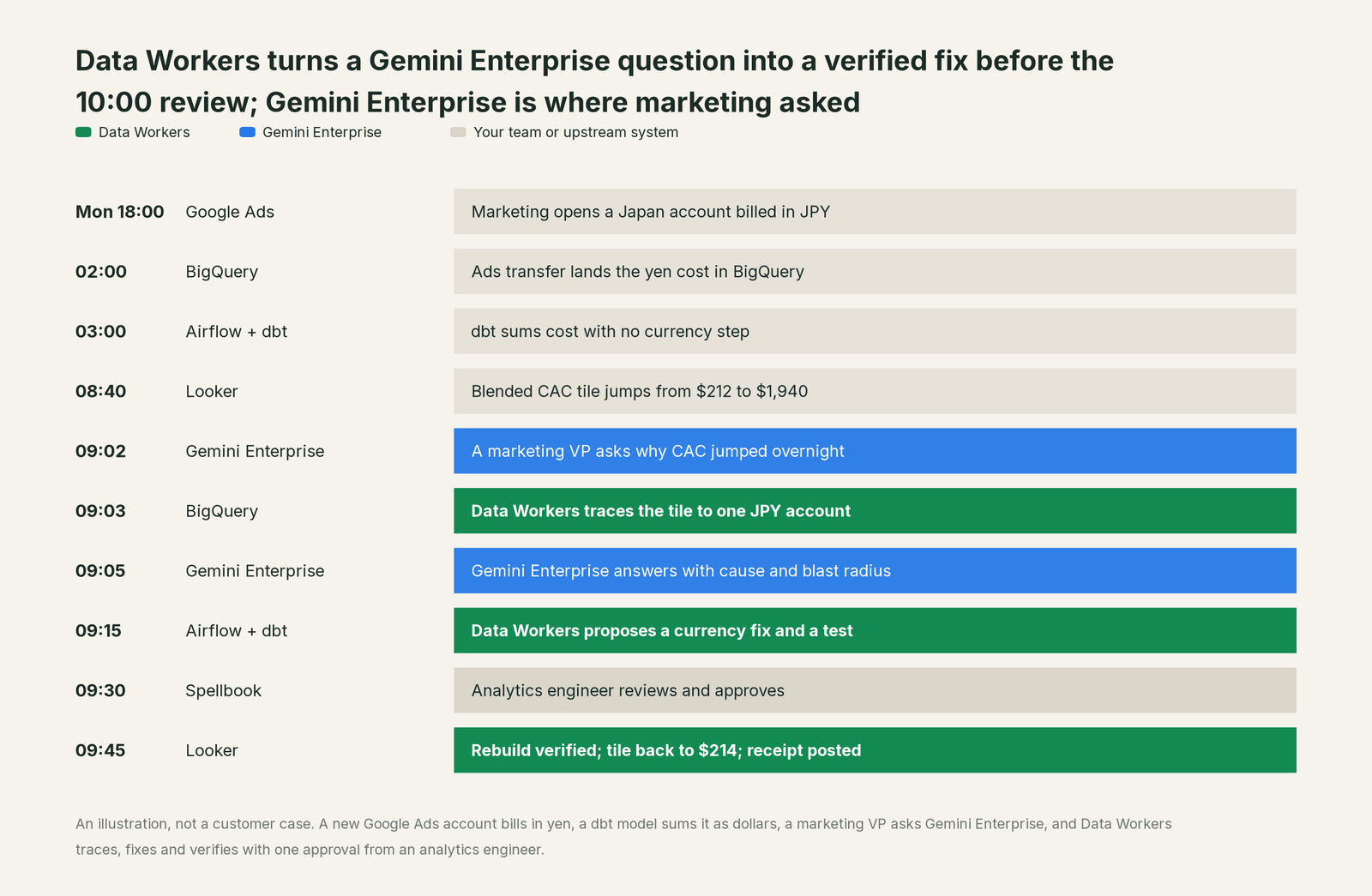
Gemini Enterprise did what it's built for. It understood a business question in plain language, picked the right action, asked before anything that could change data and gave a clear answer the VP could act on. Data Workers did the parts that need to know your estate and to change it safely: lineage across five systems, a scoped fix, a verified rebuild and a receipt. The marketing team kept its budget running. The data team spent one review on it.
| Step | What Gemini Enterprise does | What Data Workers does |
|---|---|---|
| The question | Understands the VP's question and chooses the Data Workers action | Supplies governed metric definitions and lineage from the Looker tile back to Google Ads |
| The cause | Explains the cause in the conversation | Finds the yen account by comparing the source, the model and the tile |
| The decision | Tells the VP spend is fine and the number is wrong | Lists every tile and sheet that reads the bad model, so nobody acts on it |
| The fix | Asks the user to confirm before any action that isn't read-only | Writes the dbt change with its blast radius and holds it for approval |
| Verification | Reports what Data Workers returns | Rebuilds, compares spend with the source totals, re-checks the tiles |
| The record | Keeps the conversation under your Gemini Enterprise settings | Writes a tamper-evident receipt: who asked, why, what changed, how to undo it |
Why doesn't Gemini Enterprise just do this itself?
Because Gemini Enterprise is an employee agent platform for the whole company, and Google Cloud made sensible choices about focus and risk.
Gemini Enterprise reaches every system a company runs: Workspace, BigQuery, more than a hundred third-party connectors, Google-made agents, Workflow Builder agents and custom agents. Google built the client side and the admin gate around all of it. An organization policy keeps custom MCP data stores off until an administrator allows them. Each employee authorizes with their own OAuth identity. And Google's design for actions is careful by default: every call to an action asks the user to confirm, because Gemini Enterprise "assumes that any operation is potentially destructive", unless the tool is marked read-only. That's the right line for a general assistant to draw. The user confirms the call; the system behind the call owns what the change does.
Changing production data is a different product. It needs to know which models, dashboards and sheets a change touches before it runs. It needs approvals that differ by domain, rollback, verification against the source and a receipt an auditor can read. It also carries responsibility for changes inside systems Gemini Enterprise doesn't run: your dbt repo, your Airflow deployment, your BigQuery datasets, your Looker models. Taking that on would change what Gemini Enterprise is and who it's for. Data Workers is built for that job, and it plugs into the gate Google already built.
Every tool owns a slice. Data Workers covers the whole lifecycle
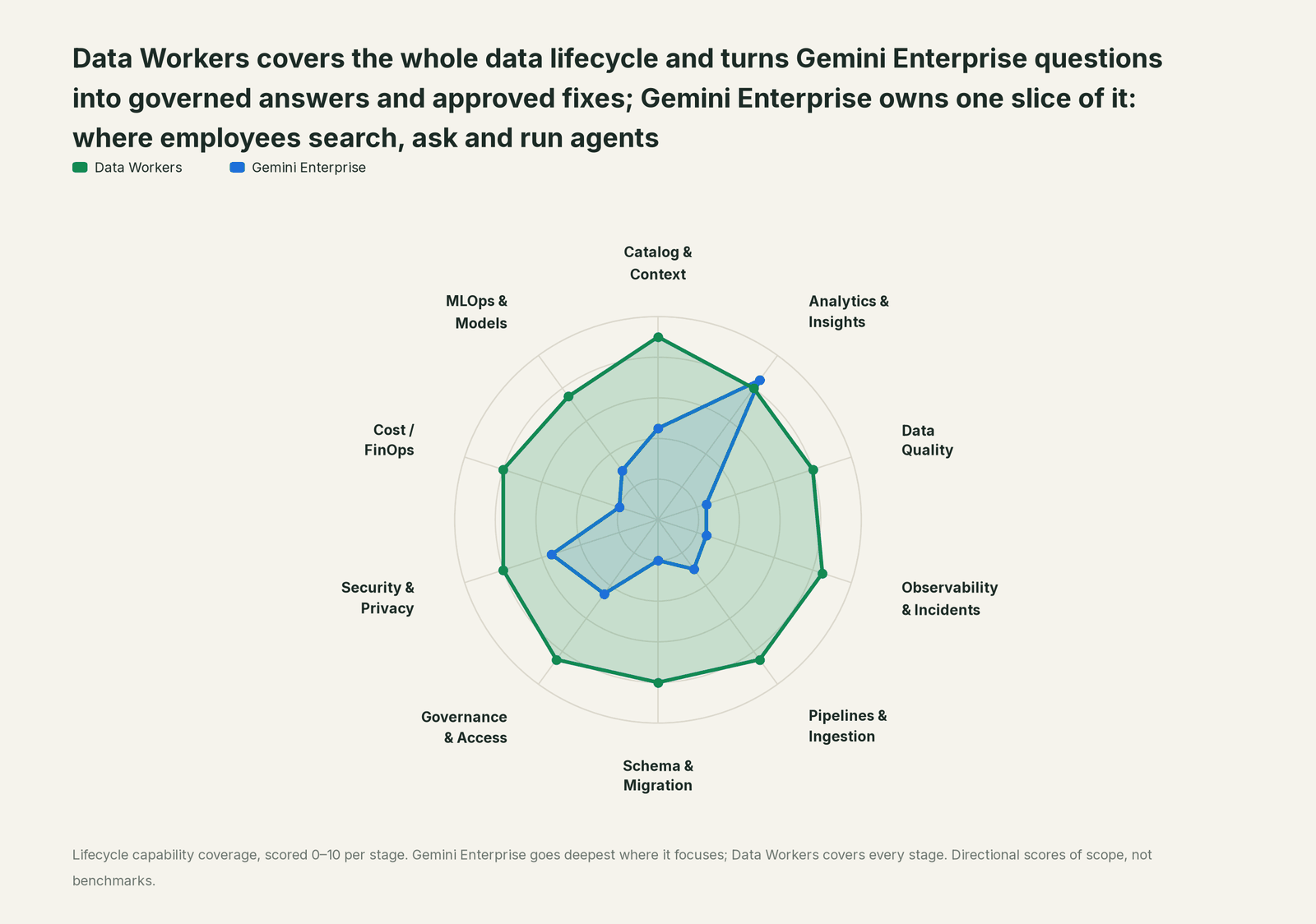
A data team's work runs across ten stages: keeping context current, answering business questions, quality checks, incidents, pipelines, schema changes, access, security, cost and models. Each point tool adds another console, another contract and another handoff. Data Workers covers the whole lifecycle with one context, one approval flow and one audit trail.
We score the same ten stages on every Build On page, so you can compare across pages. Gemini Enterprise leads on Analytics & Insights, its home stage, where agentic search, Deep Research and the agents your employees build are the core product. Data Workers covers all ten.
| Stage | Data Workers | Gemini Enterprise | Why we scored it this way |
|---|---|---|---|
| Catalog & Context | 9 | 4.5 | Gemini Enterprise searches Workspace, BigQuery and 100+ connected apps with their source permissions. Data Workers keeps one governed context graph of tables, models, lineage, owners and metric definitions. |
| Analytics & Insights | 8 | 8.5 | Gemini Enterprise's home stage: agentic search, Deep Research, Data Insights and Workflow Builder agents over company data. Data Workers answers from governed definitions with lineage behind every number. |
| Data Quality | 8 | 2.5 | Gemini Enterprise answers from connected data under source permissions; checks live in the data platform. Data Workers writes, runs and repairs checks and dbt tests across the estate. |
| Observability & Incidents | 8.5 | 2.5 | Gemini Enterprise explains an anomaly clearly when someone asks. Data Workers detects, traces, fixes and verifies, and closes the incident with a receipt. |
| Pipelines & Ingestion | 8.5 | 3 | Workflow Builder automates business workflows across apps. Data Workers changes the data pipeline behind approval and confirms the rerun. |
| Schema & Migration | 8 | 2 | Schema changes sit outside an employee agent platform by design. Data Workers assesses blast radius and plans platform moves in parity-checked waves. |
| Governance & Access | 8.5 | 4.5 | Gemini Enterprise governs access to Gemini Enterprise: source permissions, app and data store access controls, org policy. Data Workers proposes least-privilege grants on your data platforms. |
| Security & Privacy | 8 | 5.5 | Gemini Enterprise secures its own surface: VPC Service Controls, egress allowlists, OAuth per user, confirm-by-default actions. Data Workers leaves a tamper-evident receipt on every data change. |
| Cost / FinOps | 8 | 2 | Admins manage Gemini Enterprise seats and editions. Data Workers reads BigQuery spend from the Jobs API and drafts each fix for its owner. |
| MLOps & Models | 7.5 | 3 | Gemini Enterprise hosts and shares agents. Data Workers keeps the data under your models healthy and connects to MLflow and W&B. |
How Gemini Enterprise and Data Workers work together
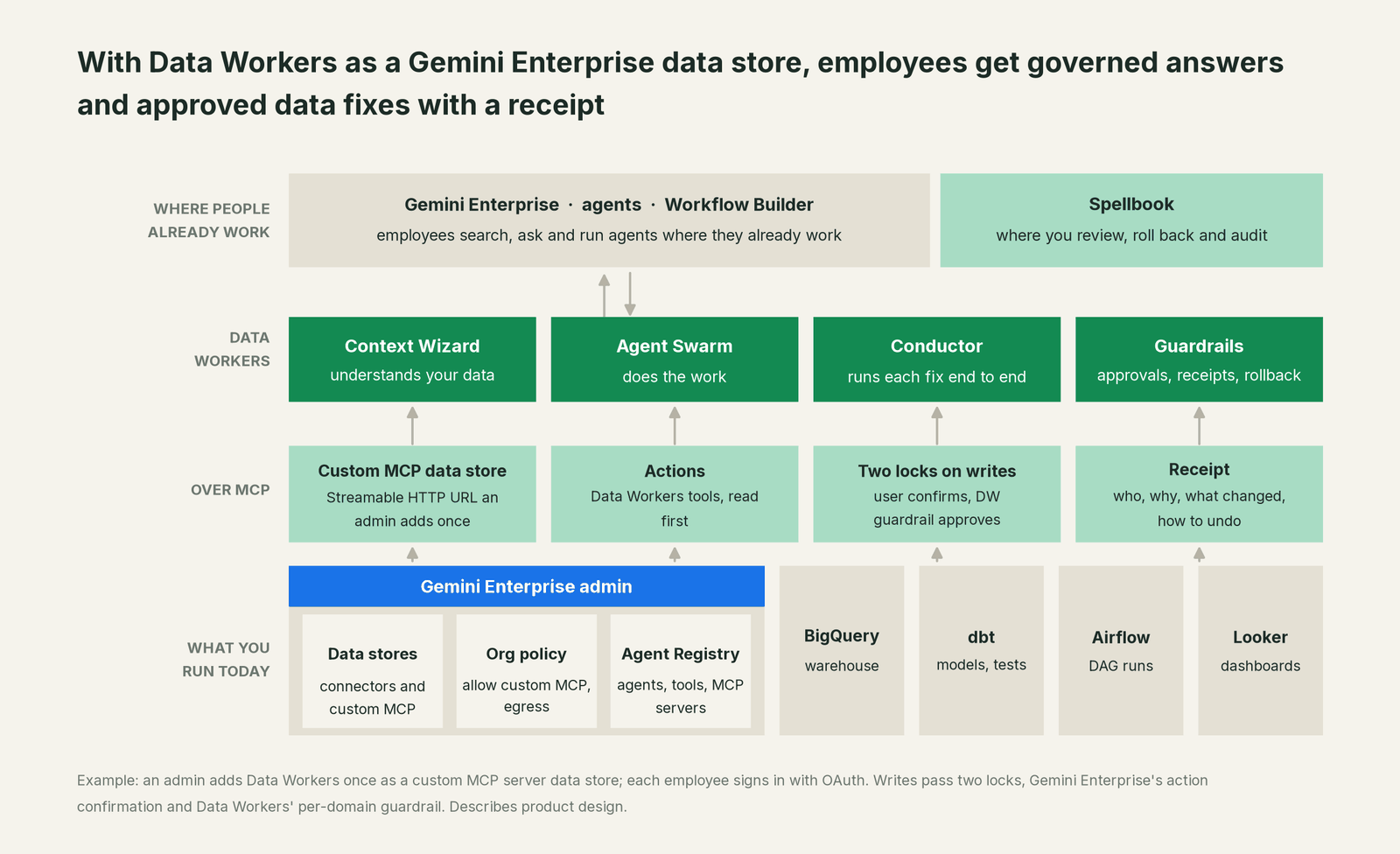
Gemini Enterprise stays where employees search, ask and run agents. Spellbook Data Catalog (in preview) is where your data team reviews proposals, rolls changes back and reads the audit trail. Underneath, Data Context Wizard builds one governed graph across BigQuery, dbt, Airflow and Looker, and the rest of your estate. The Data-Agents Swarm does the work, and the Autonomous Data-Conductor runs each fix end to end: detect, diagnose, fix, review, verify, remember. Every Data Workers agent is an MCP server, and each one serves Streamable HTTP, the transport Gemini Enterprise's custom MCP data store uses.
Setup in Gemini Enterprise. An Organization Policy Administrator allows custom MCP data stores and your Data Workers host as an egress destination. A Discovery Engine Editor then creates the data store and enables the actions, read tools first. The short version is below; the full wiring, including ADK agents and the OAuth fields, is in Data Workers in Gemini Enterprise and ADK.
# Example: add Data Workers as a custom MCP server data store
1. Org policy: allow custom MCP data stores; allow egress to <your-data-workers-host>
2. Gemini Enterprise > Data stores > Create data store > Custom MCP Server
3. MCP server URL: https://<your-data-workers-host>/mcp   (Streamable HTTP)
4. Authentication: OAuth 2.0 (your identity provider; each employee signs in)
5. Verify Auth, name it "Data Workers", Create
6. Actions: enable lineage, metric lookup and diagnosis first; add propose-a-fix
   actions when the domain moves to L2. Keep the total under 100 enabled actions.
7. Attach the data store to the Gemini Enterprise app your teams use
For your Gemini Enterprise admin. Use the granular access controls on apps and data stores to give the Data Workers data store to the teams in your pilot first. Register Data Workers in Agent Registry, Google's catalog of agents and custom MCP servers, so security sees it in the same inventory as everything else. Because every employee authorizes with their own identity, each call in the Data Workers receipt carries a named person. Workflow Builder has dedicated MCP step types and can add MCP tools to Gemini agent steps, so a team's Monday pipeline workflow can cite governed numbers too.
One request, L0 to L4. Take one ask: "Why did blended CAC jump, and fix it." Here is how the same request runs at each autonomy level, set per domain.

- •L0 manual. Data Workers is connected but not acting. Your analyst investigates by hand.
- •L1 observe. Gemini Enterprise answers from Data Workers: the cause, the lineage from Looker to Google Ads, and every tile and sheet affected. Nothing changes.
- •L2 propose. Data Workers drafts the dbt change with its blast radius. Gemini Enterprise shows it, the user confirms the call, and an engineer approves in Spellbook.
- •L3 act reversibly. For this domain, Data Workers applies changes it can undo, such as rebuilding the affected partitions, then verifies and records the receipt.
- •L4 autonomous. For a trusted, scoped class like late Ads transfers in marketing, Data Workers fixes and verifies on its own and posts the receipt for review.
The two locks hold at every level. Gemini Enterprise's confirmation decides whether the user's call goes ahead. Data Workers' guardrail decides whether the change may run in that domain, and no agent approves its own work. If your data estate runs on Google Cloud, our guide to Data Workers on Google Cloud covers BigQuery, Knowledge Catalog and Airflow in depth, and Google's Data Agent Kit and MCP Toolbox vs Data Workers covers the build-it-yourself route.
What changes for your team
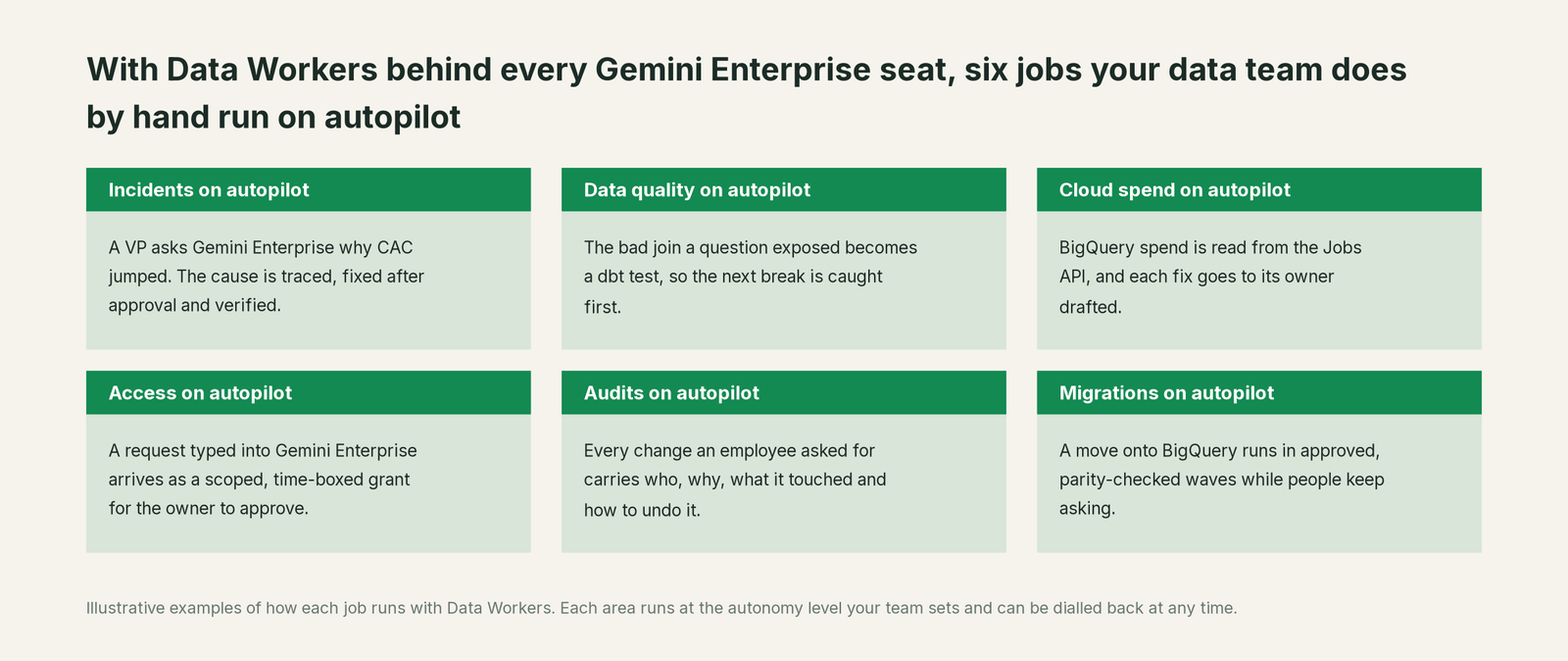
For the business, the habit stays the same and the answer gets better. The VP of marketing still asks Gemini Enterprise. The difference is that the answer comes from governed definitions, says where the number came from, and says when the number is wrong. Finance, sales and marketing ask the same Data Workers data store, so they get one blended CAC, one net revenue and one pipeline number.
For the data team, the change is where questions end. Today a good Gemini Enterprise answer about a strange number often ends in a message to the data team and a ticket. With Data Workers behind the data store, it ends in a governed answer or in a proposed fix that one person approves. The team spends its time on the work only it can do: modeling the business, setting guardrails per domain and deciding which domains move up the ladder. Access requests typed into Gemini Enterprise arrive as scoped, time-boxed grants for the data owner. Questions about the BigQuery bill end with spend read from the Jobs API and the fix drafted for its owner.
For security and IT, nothing new to govern sits outside the tools they already run. The data store is in Agent Registry, behind org policy and egress allowlists, and every write has a receipt with a named person on it.
Keep Gemini Enterprise, or consolidate?
Keep Gemini Enterprise if you love it; Data Workers works with it from day one. Many teams consolidate once Data Workers runs that slice too.
For Gemini Enterprise, keeping it is the natural answer. It's your company's assistant and agent platform, and Data Workers is built to sit behind it. What teams consolidate is the tool sprawl around it: the separate catalog, the quality tool, the incident runbooks and the access queue that Gemini Enterprise would otherwise need a data store for, one by one. Data Workers covers that lifecycle as one data store. If parts of the company run another assistant, the same Data Workers server sits behind each of them; see the sibling guides for Claude, ChatGPT Enterprise and Microsoft 365 Copilot, and the section overview, Your company just rolled out AI assistants. Now what?
The case for your CFO
The outcome. The company already pays for Gemini Enterprise seats. Today, when a number under one of those answers breaks upstream, the fix lands on the data team as a ticket. With Data Workers as the data store, the same seats give answers from governed numbers and approved fixes, so spend, revenue and pipeline figures are right before anyone moves budget on them.
The risk story. Data Workers starts at observe. At propose, every change is a draft a person approves. At act reversibly, it runs only changes it can undo, and only in domains you've moved up. Autonomous is a per-domain choice, never a default. Gemini Enterprise asks the user to confirm every action that isn't read-only, and no agent approves its own work. Every receipt records who or what acted, why, what it touched and how to undo it. Zero migration: your data stays in BigQuery and your other platforms. The safety guide and the security and deployment guide go deeper.
Why now. Custom MCP data stores became generally available on August 7, 2026, with org policy, per-user OAuth and confirm-by-default actions built in. Employees are already asking Gemini Enterprise about company numbers. Data Workers puts governed definitions and a fix path behind those answers.
The first win. "Where does this number come from?" questions from marketing and finance, answered at observe in one Gemini Enterprise app, then one domain at propose.
What stays the same. Gemini Enterprise, its edition, admin console, connectors and policies, your BigQuery permissions, dbt, Airflow and Looker.
The path. Start with a pilot. See pricing; the pilot is credited in full against the first year. The ROI guide shows how to size it, and build it ourselves with Claude Code and MCP servers? covers the build-vs-buy question your engineers will raise.
The sentence to repeat upstairs: "We already pay for Gemini Enterprise; Data Workers makes sure the numbers it gives our people are right, and fixes them behind an approval with a receipt on every change."
Getting started
Start with a pilot. Your Gemini Enterprise admin allows the custom MCP data store, adds Data Workers with read actions only and attaches it to one app for one or two teams, so the first thing people see is Gemini Enterprise answering from governed context with lineage behind each number. Pick one domain, usually marketing spend or revenue, move it to propose, and watch the receipts. See pricing; the pilot is credited in full against the first year.
FAQ
Which Gemini Enterprise editions support this? Google documents the custom MCP server data store for the Standard, Plus, Pay-as-you-go and Frontline editions, with separate documentation for Business. It is generally available since August 7, 2026, and off by default until an Organization Policy Administrator allows it.
Does Gemini Enterprise's confirmation replace Data Workers' approval? No, they do different jobs. Gemini Enterprise's confirmation means the person asking agrees to make the call. Data Workers' guardrail decides whether the change may run in that domain and who must approve it, then verifies the result and writes the receipt. Both locks hold on every write.
Whose permissions does Data Workers use? Each employee signs in through OAuth, so every call carries a named identity. Data Workers applies its own per-domain rules on top and acts on your platforms through the access you grant it, scoped per domain.
Can our Workflow Builder agents and custom agents use Data Workers too? Yes. Workflow Builder's MCP steps can call Data Workers tools once the custom MCP data store is set up, custom ADK agents on Agent Runtime can call Data Workers tools, and the adapter keeps them read-only unless you turn on write tools. The wiring guide shows both.
Does our data leave Google Cloud? Data Workers stores metadata and scrubbed facts about your data, not copies of your tables, and applies PII middleware before results reach the conversation. You choose where Data Workers runs, and Gemini Enterprise's egress allowlist names the host it may call. The security and deployment guide covers deployment options.
We already have BigQuery connected as a data store. Why add Data Workers? The BigQuery data store lets Gemini Enterprise find and read data. Data Workers adds what sits around the data: governed metric definitions, lineage to dashboards and sheets, quality checks, and the approved fix when a number is wrong.
How many actions should we enable? Start with a handful of read actions for one domain. Google recommends no more than 100 enabled actions per custom MCP data store, and a focused set gives the assistant clearer choices.
Sources
Gemini Enterprise capabilities are current as of October 2, 2026, from Google Cloud's own documentation, all checked October 2, 2026: Set up your custom MCP server data store (updated September 30, 2026), Gemini Enterprise release notes (custom MCP server data stores GA, August 7, 2026; Workflow Builder GA, September 3, 2026; Agent Registry in Gemini Enterprise, June 25, 2026; granular access controls for apps and data stores, September 28, 2026; Agentspace part of Gemini Enterprise, October 9, 2025), Gemini Enterprise editions (Deep Research and Data Insights, both Made by Google; updated September 30, 2026), Agents overview (updated September 30, 2026), Workflow Builder: Connect MCP servers (dedicated MCP step types; updated September 30, 2026) and Introduction to connectors and data stores (updated September 30, 2026). Data Workers transports and agents are from the Data Workers repository, checked October 2, 2026. Product names and settings change quickly; if we've got something wrong, tell us and we'll fix it.