Gemini Enterprise Custom MCP Server: Bring Data Workers into Gemini Enterprise and ADK
How to add Data Workers agents to Gemini Enterprise as a custom MCP server or A2A agent, and to ADK agents with McpToolset, with approvals and receipts kept in Data Workers.
Your company already rolled out Gemini Enterprise. People ask the assistant about accounts and pipeline, admins connect data stores, and your platform team builds custom agents with the Agent Development Kit on Agent Runtime. Sooner or later someone asks Gemini why a number moved, and the answer is that the data under it broke. Gemini Enterprise is where people ask and where your agents meet. Data Workers is the crew that fixes the data under the answer, and it keeps the approval and the receipt on its side.
This how-to wires the two together over MCP today, along two paths. In the first, a Gemini Enterprise user calls Data Workers' agents, registered as a custom MCP server data store or as an A2A agent. In the second, an agent you built with ADK uses Data Workers' agents as tools through McpToolset or the Data Workers ADK adapter. Either way, changes wait for a named engineer in Data Workers.
Key takeaways
- •Two paths, one control plane. Gemini Enterprise users reach Data Workers through a custom MCP server data store or an A2A agent; ADK agents load Data Workers tools with
McpToolsetor the ADK adapter. - •Bring your own MCP. Every Data Workers agent is an MCP server over streamable HTTP, the transport Gemini Enterprise requires.
- •Two gates, each in the right place. Gemini Enterprise asks the user to confirm an action call; Data Workers holds the change itself for a named engineer.
- •Read-only by default for ADK. The ADK adapter leaves write tools out unless you turn them on.
- •Every run leaves a receipt: who asked, cause, blast radius, approver, checks, before and after values, and the rollback path.
What it connects
On the Google side: a Gemini Enterprise app (the product that absorbed Google Agentspace in October 2025) and the custom agents you add to it. Gemini Enterprise takes custom agents three ways: ADK agents hosted on Agent Runtime (formerly Vertex AI Agent Engine), agents that speak the Agent2Agent (A2A) protocol, and Dialogflow agents; users find them in the Agent Gallery. Separately, a custom MCP server data store turns any MCP server's tools into Gemini Enterprise actions. That data store became generally available on August 7, 2026. A2A is now a Linux Foundation project with a v1.0 spec, and ADK agents you start from Agent Garden templates can call Data Workers like any other MCP server.
On the Data Workers side: the agents of the Data-Agents Swarm, each an MCP server. The Incident Debugging agent is the natural first tool. The Autonomous Data-Conductor and the Search agent also speak A2A, so Gemini Enterprise can treat them as peer agents. Data Context Wizard gives every agent one governed context across BigQuery, dbt, Fivetran, Managed Airflow and Looker. For the full estate on Google Cloud, see Data Workers on Google Cloud. If you are still deciding whether to build your own data agents from Google's parts, Data Agent Kit and MCP Toolbox vs Data Workers covers that choice; You're on Gemini Enterprise covers what your team builds on top once it is connected.
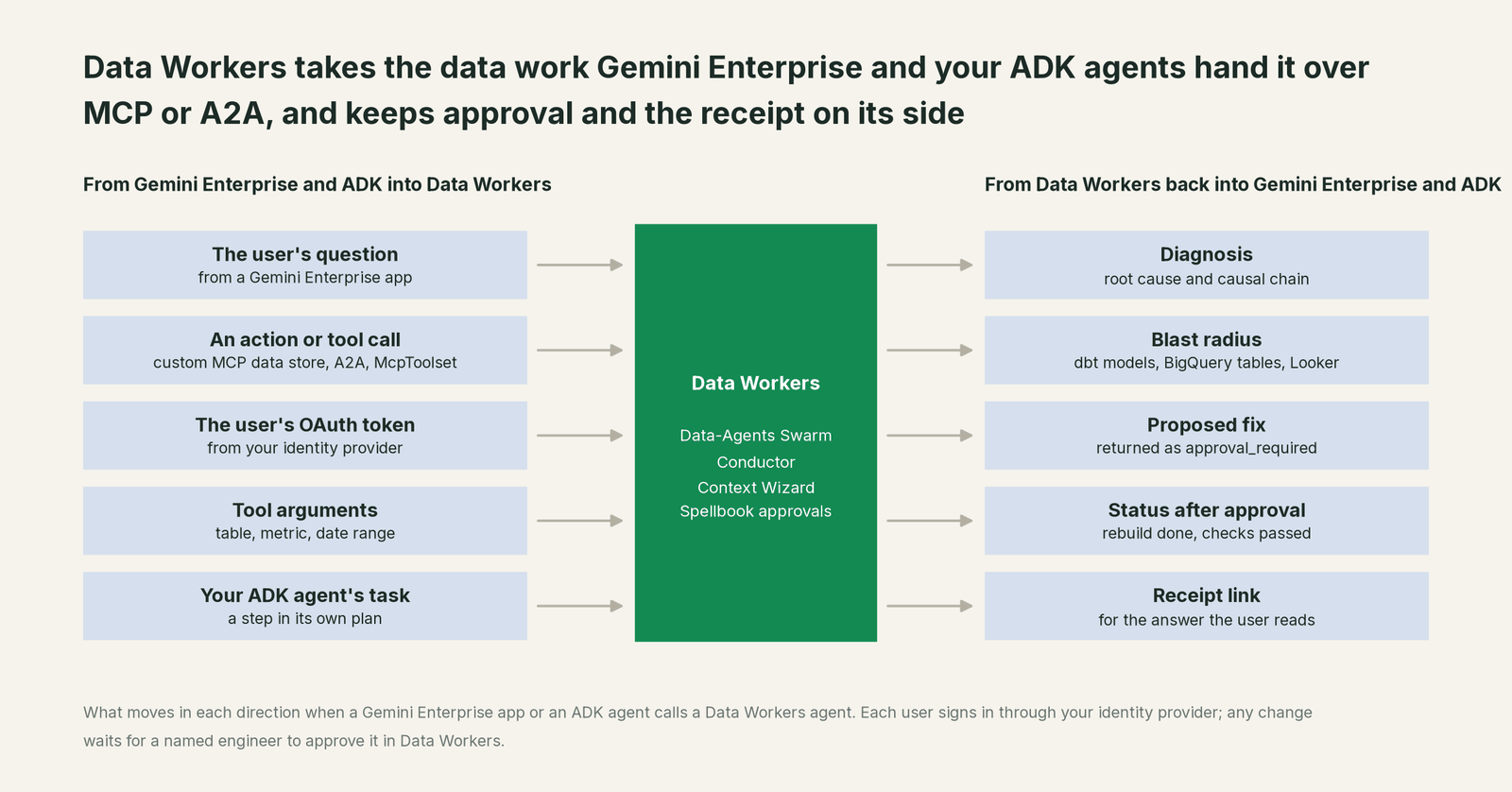
What moves in each direction
| From Gemini Enterprise or ADK into Data Workers | From Data Workers back |
|---|---|
| The user's question, from a Gemini Enterprise app | A diagnosis: root cause and causal chain |
An action call (MCP data store), a message (A2A) or a tool call (McpToolset) | The blast radius: dbt models, BigQuery tables, Looker tiles |
| The user's OAuth access token from your identity provider | A proposed fix, returned as approval_required with an approval id |
| Tool arguments: table, metric, date range | Status after approval: rebuild done, checks passed |
| An ADK agent's task, as one step in its own plan | A receipt link the agent can cite |
Prerequisites
- •Gemini Enterprise Standard, Plus, Frontline or pay-as-you-go, the editions that support custom MCP server data stores. The feature is off by default; an Organization Policy Administrator removes the constraint once.
- •Data Workers served over HTTPS with streamable HTTP at
/mcp(Gemini Enterprise doesn't accept SSE) and a certificate from a publicly trusted CA. Put the remote transport in OAuth mode: it checks each token's signature against your identity provider's keys, plus issuer and audience. - •An OAuth 2.0 client in your identity provider for the data store: authorization URL, token URL, client ID and secret, scopes, and PKCE if your provider supports it.
- •For the A2A path, the Conductor or Search agent started with
DW_A2A_PORTand its API keys set. The agent serves its card at/.well-known/agent.json; you paste that JSON into Gemini Enterprise's form withprotocolVersionset to "0.3", the value the form uses. - •Data Workers connected to the systems your incidents cross: BigQuery with a scoped service account, dbt, Fivetran and Managed Airflow, each read-only to start; Looker over its API or MCP.
- •Two lists kept apart: who may use the data store or agent in Gemini Enterprise, and who may approve changes in Data Workers.
Setup
Path one, Gemini Enterprise users. In the Google Cloud console open Gemini Enterprise, then Data stores, Create data store, Custom MCP Server, Add MCP server. Hostnames and IDs below are placeholders.
# Example: Data Workers' Incident Debugging agent as a Gemini Enterprise custom MCP server data store

# 1. On your Data Workers host: serve the agent over streamable HTTP
#    DW_TRANSPORT=http  ->  https://dw-incidents.example.com/mcp  (remote transport in OAuth mode)

# 2. Gemini Enterprise > Data stores > Create data store > Custom MCP Server > Add MCP server
MCP server URL:          https://dw-incidents.example.com/mcp
Authentication:          OAuth 2.0
Authorization URL:       https://login.example.com/oauth2/v1/authorize
Token URL:               https://login.example.com/oauth2/v1/token
Client ID / secret:      <from your identity provider>
Scopes:                  openid dw.incidents
Enable PKCE:             on
# Verify Auth, name the data store "Data Workers: data incidents", Create

# 3. Actions tab: enable diagnose_incident, get_root_cause, get_incident_timeline, remediate
#    Leave approval tools out; Data Workers holds approvals in Spellbook.
If you prefer the A2A path, open your app's Agents page, choose Add agents, then Custom agent via A2A, paste the Conductor's agent card (fetched from /.well-known/agent.json, with protocolVersion set to "0.3"), and add the same OAuth details so each request carries the user's identity. You host A2A agents yourself, which suits Data Workers: it runs where your data access already lives.
Path two, ADK agents. Give your agent a remote toolset pointed at the same endpoint, filtered to the tools it needs:
# Example: an ADK agent that uses Data Workers' Incident Debugging agent as tools over MCP
from google.adk.agents import LlmAgent
from google.adk.tools.mcp_tool import McpToolset
from google.adk.tools.mcp_tool.mcp_session_manager import StreamableHTTPConnectionParams

revenue_ops_agent = LlmAgent(
    model="gemini-flash-latest",
    name="revenue_ops_agent",
    instruction=(
        "When a renewals or pipeline number looks wrong, late or missing, call Data Workers "
        "to diagnose it. If a fix comes back as approval_required, tell the user it is waiting "
        "for an engineer and share the receipt link."
    ),
    tools=[
        McpToolset(
            connection_params=StreamableHTTPConnectionParams(
                url="https://dw-incidents.example.com/mcp",
                headers={"Authorization": "Bearer <user access token>"},
            ),
            tool_filter=["diagnose_incident", "get_root_cause", "get_incident_timeline", "remediate"],
        )
    ],
)
TypeScript teams can use the Data Workers ADK adapter instead: buildADKTools(definitions, client, { includeMutations: false }) turns Data Workers' MCP tools into ADK function declarations, and it leaves write tools out unless you set includeMutations to true. Deploy the agent to Agent Runtime and register it with Custom agent via Agent Runtime, and people reach it from the assistant.
Two details matter more than the configuration. First, Gemini Enterprise asks the user to confirm each action call by default, because it treats any tool as one that might change data. That is a sensible safety default and we keep it on, even for read-only diagnosis: the user sees which tool will run with which arguments before anything is sent. The confirmation says the user meant to send the request; Data Workers decides whether a change runs. Second, scope what an agent can do on the Data Workers side. The Incident Debugging agent has no approve tool at all, and the domain's autonomy level decides whether remediate runs, waits for approval or is refused.
A worked run, end to end
This is an illustration, not a customer case. At 22:10 a Salesforce admin renames the Account region value EMEA to "Europe & Middle East". The 01:00 Fivetran sync lands the new value in BigQuery. At 02:00 the Managed Airflow DAG run revenue_daily runs dbt, and the dim_region seed has no row for the new value, so 412 accounts in fct_renewals get a null region. The dbt tests pass, because nothing tests that column's values.
| Time | System | What happens | Who decides |
|---|---|---|---|
| 22:10 | Salesforce | Region value EMEA renamed | Upstream |
| 01:00 | Fivetran, BigQuery | Sync lands the new value in raw_salesforce.account | Upstream |
| 02:20 | Managed Airflow, dbt | fct_renewals builds; 412 accounts lose their region | Upstream |
| 08:45 | Looker | The EMEA renewals tile shows a 58% drop | Upstream |
| 09:05 | Gemini Enterprise | A sales ops lead asks why EMEA renewals fell; the assistant proposes a diagnose_incident call and the lead confirms it | The user confirms the call |
| 09:06 | Data Workers | Traces the tile to fct_renewals, to the dim_region seed, to the new value in the 01:00 sync | Read-only |
| 09:07 | Gemini Enterprise | Answers: a mapping gap, not lost renewals; remediate returned approval_required | Waiting |
| 09:25 | Spellbook | The on-call analytics engineer reviews the plan and approves | A named engineer |
| 09:31 | dbt, Managed Airflow | Seed row and an accepted_values test merged; fct_renewals rebuilt | Approved at 09:25 |
| 09:45 | BigQuery | Zero null regions; EMEA renewals within the range of the prior four weeks | Read-only checks |
| 09:50 | Gemini Enterprise | The sales ops lead asks again and gets the right number | The assistant routes |
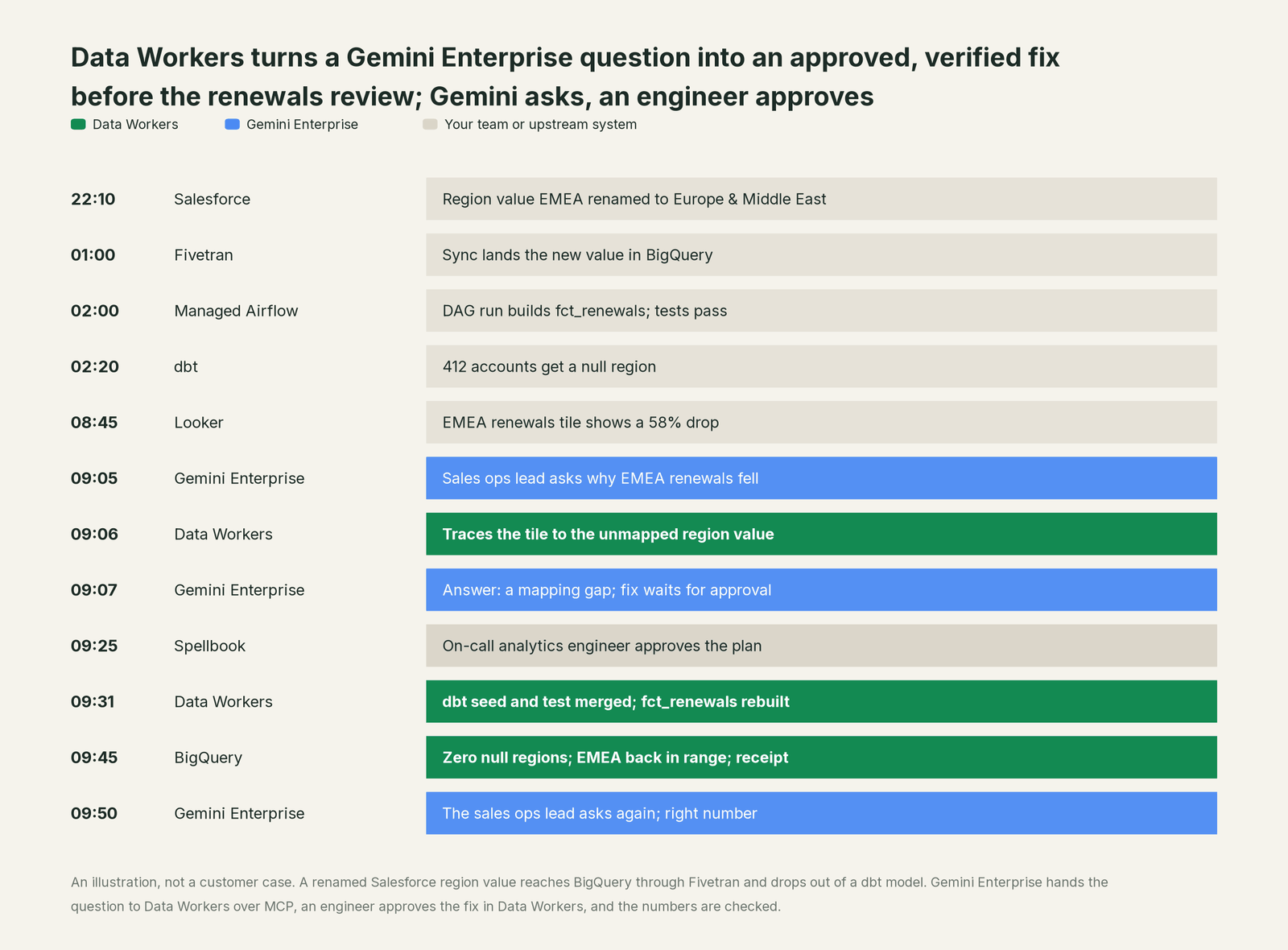
Gemini Enterprise never held the change approval. The request carried the sales ops lead's token, so Data Workers recorded who asked. When remediate ran with verification on, the domain's autonomy level required approval, so it returned approval_required with an approval id, and the assistant passed that status to the user. The approval happened in Spellbook Data Catalog (in preview), where a guard rejects any approver that is an agent, including the agent that proposed the change. The same run works from an ADK agent: the tool call comes from your agent instead of the assistant, and everything after 09:06 is identical.
The receipt this run leaves. One tamper-evident record, hash-chained with the rest of the audit log:
- •Request: arrived over MCP through the Gemini Enterprise data store; the user who asked; tools called and their arguments.
- •Cause: the chain from the Looker tile to
fct_renewals, thedim_regionseed and the 01:00 sync. - •Blast radius: one dbt model, one seed, two Looker tiles.
- •Action: a seed row for the new value, an
accepted_valuestest on region, and a rebuild offct_renewals. - •Approver: the named engineer, with the time of approval.
- •Checks: null regions in
fct_renewals; EMEA renewals against the prior four weeks. - •Before and after values, and the rollback path.
Why doesn't Gemini Enterprise just do this itself?
Gemini Enterprise is built to put agents in front of every employee and to call the tools and agents your company brings. That is the right design for Google. Its safety model sits at the call: per-user OAuth, a confirmation before any action that might change data, and Agent Gateway policy for registered servers. What sits behind the call is the job of the agent or server you host.
Fixing production data across Salesforce extracts, Fivetran, dbt, Managed Airflow and Looker is a different product category. It needs blast radius across systems Google doesn't run, approvals tied to the change itself, rollback for each step, receipts an auditor can read, and accountability for changes in tools Google doesn't own. A confirmation dialog says the user meant to ask; it can't say the change is safe for the dashboards downstream. Keeping that out of an employee assistant is a sound business decision. It is the product Data Workers is, and Gemini Enterprise can call it like any other MCP server or A2A agent. The CoWork version of this how-to shows the same split on Snowflake.
The next autonomy step
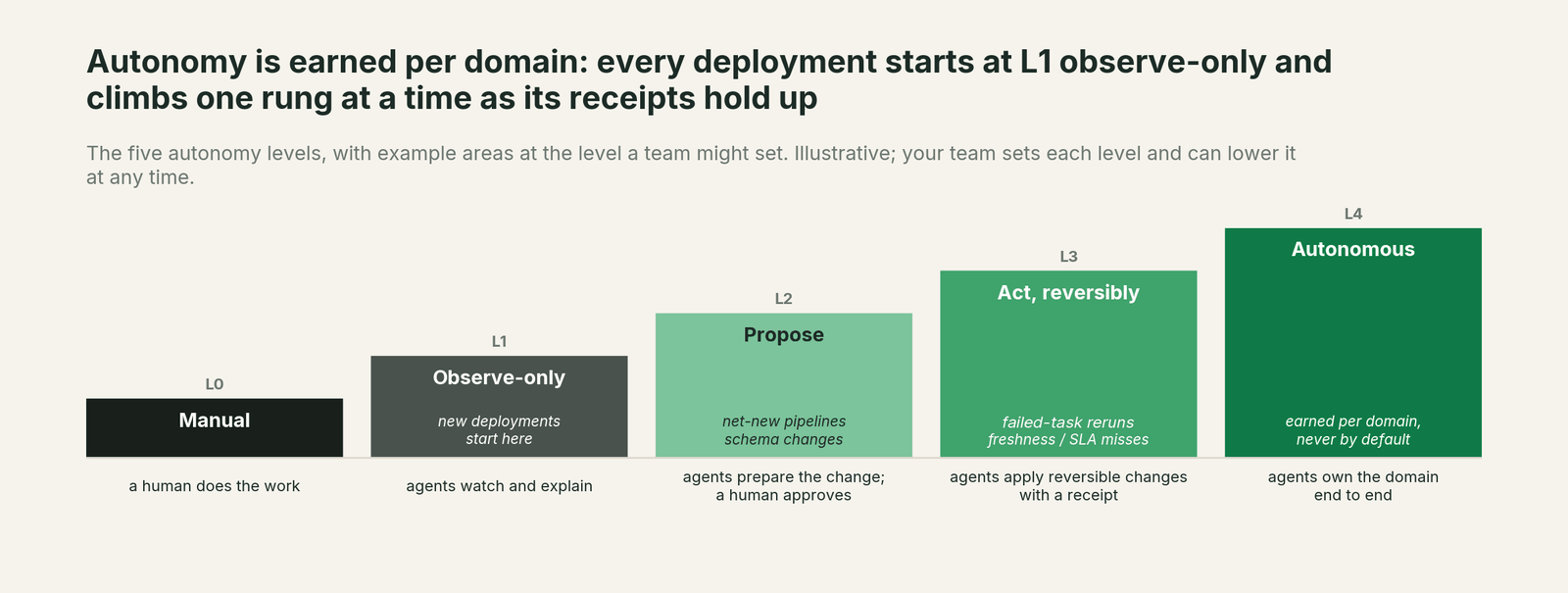
Start at L1 observe: enable only diagnose_incident, get_root_cause and get_incident_timeline, so Gemini users get the cause next to the chart and nothing changes. Move to L2 propose for one domain, as in the run above: every fix waits for a named engineer. Once that domain's receipts show the same fix approved again and again (mapping a renamed source value is a common first candidate), let that one playbook act reversibly at L3 with verification on, while schema and access changes stay at propose. Autonomy is set per domain in Data Workers, so the data store, the agent card, your ADK code and Gemini Enterprise's own confirmation setting don't change as you climb.
The case for your CFO
The outcome. When someone asks Gemini why a number moved, they get the cause and a fix in progress, not a ticket that waits for standup. Fewer wrong numbers reach a forecast or a board pack.
The risk story. At observe, agents read and explain; they change nothing. At propose, every change waits for a named engineer, and no agent can approve its own work or another agent's. Acting levels are reversible and limited to domains you pick. Each request carries the asker's identity, every change carries a receipt and a rollback path, and nothing migrates.
Why now. Custom MCP data stores are generally available, Gemini Enterprise registers ADK and A2A agents, and your platform team is already building on ADK. Employees are asking the assistant about data today. The answers should come with a fix and an audit trail.
The first win. Broken mappings and late loads behind revenue dashboards. Connect the Incident Debugging agent to one Gemini Enterprise app in observe mode for one domain, and see which answers it would have turned into fixes.
What stays the same. Gemini Enterprise, your ADK agents, Agent Runtime, BigQuery, dbt, Fivetran, Managed Airflow, Looker, and the people who approve changes.
The pilot path. Start with a pilot on one Gemini Enterprise app and one domain, observe first, then propose. The pilot is credited in full against the first year.
One sentence for upstairs: "Gemini Enterprise is where our people ask; Data Workers makes sure the data behind the answer is right, and nothing changes until one of our engineers approves it."
Sources
Google capabilities and statuses, current as of October 2, 2026: Set up your custom MCP server data store (StreamableHTTP only, public CA certificate, OAuth 2.0 fields, action confirmation by default, editions; updated September 30, 2026), Gemini Enterprise release notes (Google Agentspace part of Gemini Enterprise, October 9, 2025; custom MCP server data stores GA, August 7, 2026), Register and manage A2A agents (agent card JSON with protocolVersion "0.3", OAuth, hosting, Agent Gateway note; updated September 30, 2026), Register and manage ADK agents hosted on Agent Runtime (September 30, 2026), Agents overview (agent types, Agent Gallery; September 30, 2026), Agent Runtime overview (the former Vertex AI Agent Engine page, now Agent Runtime; October 1, 2026), Gemini Enterprise Agent Platform overview (Agent Garden, Agent Runtime, Agent Registry, Agent Gateway; October 1, 2026), ADK MCP tools and action confirmations (checked October 2, 2026), adk-python releases (v2.11.0, October 2, 2026), and the A2A protocol with its releases (v1.0.0, March 12, 2026). Product names and statuses change quickly; if we've got something wrong, tell us and we'll fix it.