You're on Power BI: It's How the Business Reads Its Numbers. Data Workers Owns Whether the Data in Its Semantic Models Is Right
Already on Power BI? Data Workers checks the tables under every semantic model, traces a wrong number to its cause, proposes the fix behind a named approval and tells the model owner exactly what to refresh.
Your business reads its numbers in Power BI. Semantic models hold the DAX measures finance signed off and the row-level security that decides who sees which region. Reports and apps are pinned in Teams, the Copilot pane sits beside every report, and Fabric data agents answer over the same models. Modelers keep PBIP projects in Git as TMDL, large fact tables run on incremental refresh, newer models read OneLake through Direct Lake, and the owner gets the email when a scheduled refresh fails. Power BI is how the business reads its numbers. Data Workers owns whether the data in its semantic models is right: it checks the warehouse tables each model reads, traces a wrong number to the load or model that caused it, proposes the fix behind a named approval, and tells the model owner exactly what to refresh.
Key takeaways
- •Power BI keeps its job. Semantic models, reports, apps, refresh schedules, Copilot and data agents stay with the people who own them today.
- •A refresh that succeeds can still load the wrong data. Power BI emails the owner when a refresh fails, not when it succeeds on incomplete tables. Data Workers checks the warehouse tables under each model after every load, against the baselines your team records.
- •Incremental refresh has a blind spot. Late rows for dates outside the refresh window never reach the model on their own. From the refresh policy your BI team records in the context graph, Data Workers names the exact days to refresh.
- •Power BI stays the model owner's, by design. Data Workers works from the warehouse, dbt and orchestrator under your models and changes nothing in Power BI. Your team's own client can run Microsoft's MCP servers side by side.
- •Start with one model. Pick the model behind the CFO's flash report and climb from L0 manual to L4 autonomous per domain.
Power BI is how the business reads its numbers. Data Workers owns whether the data in its semantic models is right.
Microsoft's documentation is precise: with each incremental refresh, rows "with a date/time no longer within the refresh period then become part of the historical period, which isn't refreshed." That keeps refreshes fast and cheap, and it is the right default. It also means the model trusts that history, once loaded, was complete.
Here is a week at a retailer running Power BI on Snowflake, with Data Workers next to it. This is an illustration, not a customer case.
| Time | System | What happens |
|---|---|---|
| Thu Sep 24, 21:10 | POS vendor, ADLS Gen2 | After a credential rotation on the vendor's side, the hourly sales export for the 63 Nordic stores stops arriving in the landing container. Files for the other 418 stores keep landing. |
| Fri 02:30 | Prefect, dbt Core, Snowflake | The nightly_sales flow runs dbt; fct_store_sales builds with no Nordic rows after 21:10. The run is green. |
| Fri 02:45 | Data Workers, Teams | monitor_metrics flags Nordic rows per store-day, a metric the retail data team records after each load, at zero against a baseline of about 1,900. Nothing reads the landing container: the recorded baseline is what shows the gap. blast_radius_analysis finds two downstream dbt models and, from a context-graph note the team recorded, the Store Performance semantic model, with its Nordic report and the CFO's weekly flash app. Data Workers opens an incident and posts an alert card to the data platform channel in Teams. |
| Fri 08:10 | Teams | The retail data engineer who owns the POS feed opens a ticket with the vendor. The report owner adds a "Nordic data delayed" note to the report page. |
| Tue Sep 29, 08:20 | Copilot in Power BI | The Nordic regional director asks the report's Copilot pane why last week fell. It answers that Nordic sales fell 96% week over week, faithful to the model. The data lead replies in Teams with the incident link. |
| Thu Oct 1, 13:40 | POS vendor | The vendor fixes the export and redelivers seven days of files with their original sale dates. |
| 14:05 | Prefect, Snowflake | The hourly pos_hourly copy loads them into the landing table. |
| 14:12 | Data Workers | monitor_metrics shows landing rows for Sept 24 to 30 back inside their baseline. The dbt manifest, read natively, marks fct_store_sales as incremental, and its SQL loads only rows with a sale_date later than the latest one in the table, so tonight's run would skip every late row. A context-graph note the BI team recorded from the TMDL holds the model's refresh policy: the Sales table refreshes a rolling three days on sale_date. Even with dbt fixed, Sept 24 to 29 sit in historical partitions the scheduled refresh will never reload. |
| 14:20 | Data Workers, Spellbook | Proposes the fix as a diff for the owner to merge: the incremental filter moves to the load timestamp _loaded_at, the model merges on sale_line_id, and a uniqueness test guards it. With it: the blast radius, a rerun of nightly_sales now, the undo, and a note for the model owner naming the six days to refresh. The approval request reaches the analytics engineering lead by email. |
| 15:05 | Spellbook, GitHub | The lead reviews the diff and blast radius and approves; the dbt owner merges. The undo (revert the merge and remove the rows this run adds, by load ID) is written into the plan for the owner to run if needed. |
| 15:08 | Prefect | Data Workers queues the approved nightly_sales run with trigger_prefect_flow and reads the flow run's status until it completes. |
| 15:41 | Snowflake | run_quality_check finds sale_line_id unique, and monitor_metrics shows Nordic rows per store-day in fct_store_sales back inside their baseline for all seven days. Data Workers records Nordic net sales for the week, EUR 4.82M, as the agreed source value. |
| 16:30 | Power BI | The model owner runs an enhanced refresh through the REST API on the Sales partitions holding Sept 24 to 29, with a transactional commit. |
| 16:45 | Claude Code, Power BI Authoring MCP server | An analyst runs a DAX query for Nordic net sales that week: EUR 4.82M, matching the recorded value. The Copilot pane now answers from the full week. Data Workers writes the receipt: cause, diff, approver, rerun, checks, the partitions refreshed, and a context-graph note that this model's refresh window is shorter than the POS feed's worst delay. |
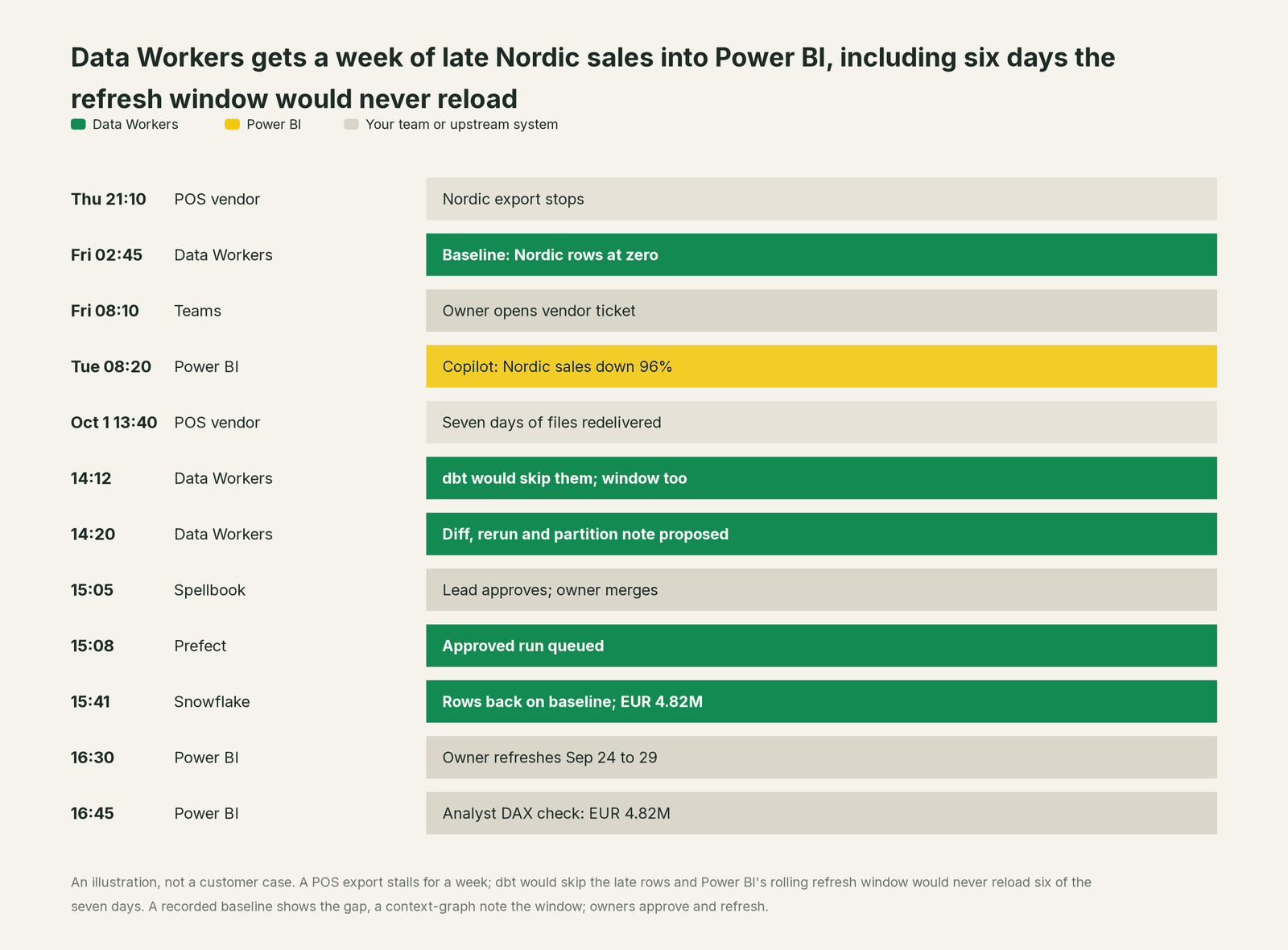
Every tool did its job. The vendor's export failed, the copy flow loaded what landed, dbt built what its filter said, Power BI refreshed exactly the window its policy defined, and Copilot answered faithfully from the model. Without Data Workers, the dbt filter would have skipped the late week, and even after someone fixed that, a scheduled refresh would have reloaded only Sept 30. Six days of Nordic sales would have stayed low in every report and every Copilot answer.
| Job | What Power BI does | What Data Workers does |
|---|---|---|
| The metric | Defines DAX measures, relationships, RLS and refresh policies in the semantic model, versioned as TMDL | Records the definitions and policies your team brings in as governed context, tied to the tables and dbt models they read |
| The answer | Serves reports, apps, the Copilot pane and Fabric data agents from one model | Checks the warehouse tables under each model after every load: keys, nulls, row counts and the metric baselines your team records |
| The break | Refreshes on schedule and emails the owner when a refresh fails | Catches the load that succeeded on bad data, traces it to the feed or model that caused it and lists every model and report it reaches |
| The fix | The model owner edits DAX, changes the policy and runs the refresh | Proposes the upstream fix as a diff for its owner, routes it to a named approver, queues the approved rerun and names the partitions to refresh |
| The proof | Answers again from the refreshed model | Re-checks the tables, records the agreed source value and writes a receipt with cause, diff, approver and undo |
Why doesn't Power BI just do this itself?
Microsoft built Power BI to turn governed data into answers people trust across a whole company, and its guardrails fit that job. Failure emails tell the owner when a refresh breaks. Incremental refresh, Direct Lake framing and enhanced refresh keep large models fast and cheap. The Authoring MCP server asks for confirmation before an edit, and with only Build permission it can only run DAX queries. Fabric data agents generate read queries only and respect RLS.
All of that protects the model. The week above never touched the model. It started at a POS vendor, passed through a landing container, a Prefect flow and a dbt model, and reached Power BI as a refresh that succeeded. Fixing it meant reading a dbt manifest, proposing a change to a dbt repository, holding an approval, queuing a flow run and checking the warehouse. Microsoft warns that an agent's changes to a model "might be irreversible"; changes across other vendors' systems carry more risk still. Cross-system context, blast-radius scoping, approvals, rollback and receipts is a different product with different liability. It is the product Data Workers is, and it builds on the Power BI estate your business already reads.
Every tool owns a slice. Data Workers covers the whole lifecycle
Power BI owns one slice outright: how the business reads its numbers, from the semantic model to the report, the app and the Copilot answer. Each point tool adds another console, contract and handoff. Data Workers covers the whole lifecycle with one context, one approval flow and one audit trail.
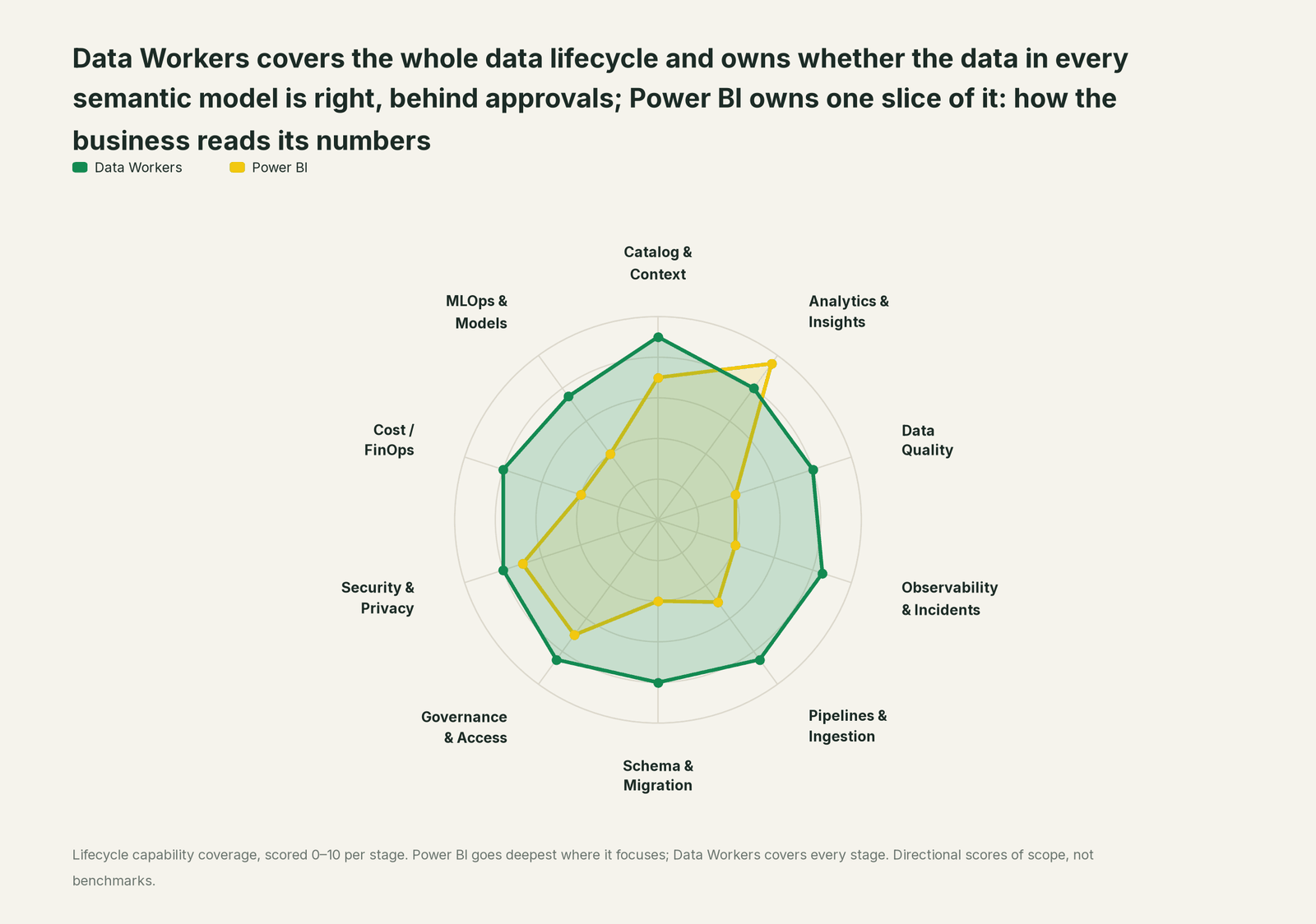
| Stage | Data Workers | Power BI | Why we scored it this way |
|---|---|---|---|
| Catalog & Context | 9 | 7 | Semantic models hold DAX measures, relationships and descriptions, versioned as TMDL in PBIP projects. Data Workers keeps one governed context graph across every platform, including the model notes your BI team records. |
| Analytics & Insights | 8 | 9.5 | Power BI's home stage: reports, apps, the Copilot report pane (GA) and Fabric data agents answer from the semantic model. Data Workers makes sure the tables under that model are right. |
| Data Quality | 8 | 4 | Power Query shapes data on the way in; refresh history shows success or failure. Data Workers checks the warehouse tables under each model after every load. |
| Observability & Incidents | 8.5 | 4 | Refresh failure emails reach the model owner when a refresh fails. Data Workers traces a wrong number that refreshed successfully back to the load or model that caused it, and verifies the fix. |
| Pipelines & Ingestion | 8.5 | 5 | Scheduled refresh, incremental refresh and Direct Lake framing bring data into the model. Data Workers queues approved dbt and orchestrator reruns for the pipelines that feed the warehouse. |
| Schema & Migration | 8 | 4 | PBIP and TMDL put model changes through Git review. Data Workers reviews dbt changes and scopes their blast radius to every model declared downstream. |
| Governance & Access | 8.5 | 7 | Workspace roles, Build and Read permissions, RLS and OLS govern who sees what in Power BI. Data Workers routes every data change to a named approver. |
| Security & Privacy | 8 | 7 | Sensitivity labels and Purview protection follow content out of Power BI. Data Workers leaves a receipt on every data change and proposes masking for the owner to apply. |
| Cost / FinOps | 8 | 4 | The Fabric Capacity Metrics app shows capacity use by item. Data Workers attributes Snowflake spend to each dbt model through query tags and totals BigQuery spend from the Jobs API. |
| MLOps & Models | 7.5 | 4 | Reports consume model outputs; data science lives elsewhere in Fabric. Data Workers keeps the data under models and agents healthy. |
How Power BI and Data Workers work together
Your people stay where they are: reports, apps and Copilot for the business, PBIP projects for modelers, Claude Code or VS Code for engineers, Teams for alerts. Spellbook Data Catalog (in preview) is where the data team looks: each proposed fix, its blast radius, approver and rollback. Underneath, Data Context Wizard keeps one governed context graph, the Data-Agents Swarm does the work with 20+ specialist agents, the Autonomous Data-Conductor runs each fix end to end (detect, diagnose, fix, review, verify, remember), and per-domain guardrails hold approvals, receipts and rollback.
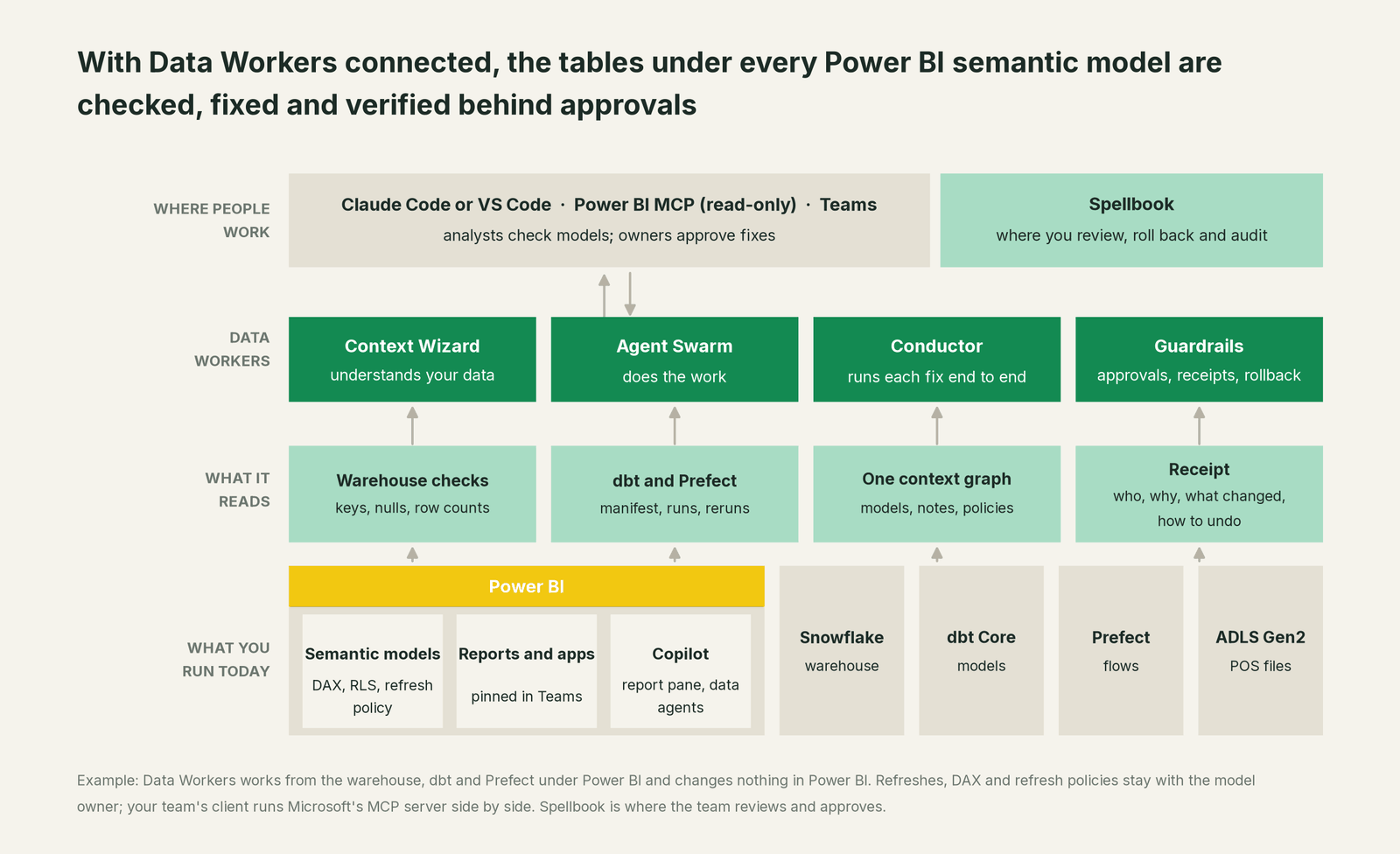
How Data Workers knows about your models. Data Workers works from the systems under Power BI: the warehouse, the dbt project and the orchestrator. Models enter the blast radius through context-graph notes your team records, as Store Performance did above; when a fix goes through a pull request, change review's lineage diff also reads the dbt exposures your project declares. Refresh policies, storage modes and the measures that matter come in as context-graph notes your BI team records from the TMDL, so a fix can say which partitions sit outside the refresh window. Data Workers runs no refresh, edits no DAX and changes no refresh policy: Power BI stays the model owner's, by design. For the three-tool wiring with Tableau and Looker, see Data Workers + Tableau, Power BI and Looker; for Direct Lake and data agents, see Data Workers on Microsoft Fabric.
What Data Workers checks under each model. run_quality_check runs nulls, uniqueness on id columns and minimum row counts on Snowflake tables; monitor_metrics records the values your team agrees on, such as rows per store-day or weekly net sales, and flags them against their baselines, which is where lateness and gaps show up. blast_radius_analysis follows a table forward to every model declared downstream, and diagnose_incident and get_incident_history run and record the incident. Your data stays in your systems; the agents, warehouse credentials and model key run in your infrastructure, and the hosted Conductor sees workflow metadata only.
Setup over MCP today. Clone the open-source repository and add start-agent.sh entries to your client's MCP config, as the client setup docs show. Microsoft's Power BI Authoring MCP server (local server generally available, hosted in preview; v1.0.0 of the local server shipped Sept 25, 2026) can sit next to Data Workers in the same client for your own DAX checks; Data Workers' agents never call it. Start it with --readonly and give the identity Build permission only: Microsoft documents that the server can then only run DAX queries. For business questions, Microsoft points consumers to Fabric IQ instead.
// Example: .mcp.json for Claude Code on Windows (the local Power BI server
// does not run on macOS). The powerbi entry is your team's own read-only
// connection to Microsoft's server; Data Workers does not call it.
{
  "mcpServers": {
    "powerbi-authoring": {
      "command": "npx",
      "args": ["-y", "@microsoft/powerbi-modeling-mcp@latest", "--start", "--readonly"]
    },
    "dw-context-catalog": {
      "command": "/path/to/dataworkers-claw-community/start-agent.sh",
      "args": ["dw-context-catalog"]
    },
    "dw-quality": {
      "command": "/path/to/dataworkers-claw-community/start-agent.sh",
      "args": ["dw-quality"]
    },
    "dw-incidents": {
      "command": "/path/to/dataworkers-claw-community/start-agent.sh",
      "args": ["dw-incidents"]
    }
  }
}
List the tools with your client's own command (for example /mcp in Claude Code). An analyst can then ask "is everything under Store Performance healthy this morning?" and get a DAX total from Microsoft's server and the lineage, quality results and open incidents from Data Workers in one answer. For how the BI servers compare, see the MCP servers for BI tools roundup.
Where fixes go. Data Workers proposes the change as a diff for the owner to merge, usually a dbt model or source mapping, with its blast radius and undo step; it opens the pull request itself when your team turns on the dbt GitHub pull-request target. After approval it queues the rerun through Prefect, Airflow, Dagster or Azure Data Factory. The model owner decides when and what to refresh, with the partitions named in the plan. For the dbt side of late rows, see the dbt incremental models guide.
Approvals and autonomy. Autonomy is set per domain: at L1 observe Data Workers checks every table under your models and records what it would do; at L2 propose a named owner approves each fix in Spellbook; at L3 act reversibly, proven classes such as rerunning a dbt model after an approved fix run, verify and can roll back. Approvals go to a named person; a request nobody answers expires and escalates, and never grants itself. No agent can promote its own work. Read is it safe to let AI agents change production data, how approvals work for AI data agents and where does our data go for the full safety model.
Around Power BI, see You're on Fabric IQ for the ontology layer, You're on SQL Server and You're on Microsoft Teams for the rest of a Microsoft estate, You're on Looker and You're on Tableau for the same job on other BI tools, and Fabric data agent vs Data Workers if you are weighing Fabric's own agents.
What changes for your team
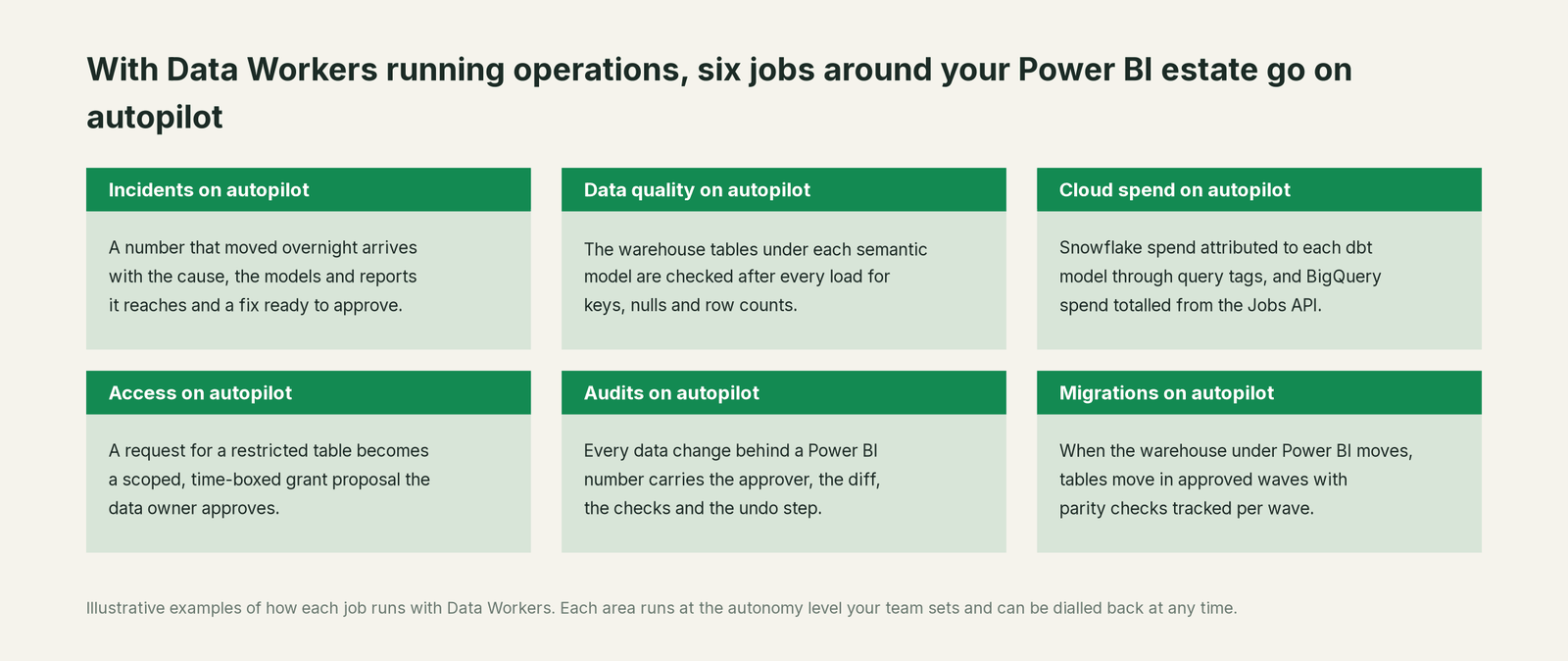
Power BI teams spend much of the week working out whether a moved number is the DAX, the refresh or the data, and answering "is this report right?" in Teams. With Data Workers next to Power BI, the six jobs above run on autopilot at the level you set. Your modelers get their week back for modeling, and your BI lead stops being the help desk for numbers.
Keep Power BI, or consolidate?
Keep Power BI if you love it; Data Workers works with it from day one. Many teams consolidate once Data Workers runs that slice too.
For most teams the answer is to keep Power BI: the semantic models finance signed off, the apps in Teams, Copilot and the data agents belong there. What teams consolidate is the tooling around it: a separate data-quality tool for the tables under the models, scripts that compare report totals with the warehouse, and a spreadsheet of which model depends on which pipeline. If you are weighing building this yourself on Microsoft's MCP servers, read build it ourselves with Claude Code and MCP servers: connecting servers is the easy part.
The case for your CFO
The outcome: the numbers Power BI shows the board, the regions and every Copilot answer stay right. When something upstream breaks, the fix arrives with a named approver, and the model owner knows exactly what to refresh.
The risk story: Data Workers changes nothing in Power BI. It checks the warehouse tables under each model, proposes upstream fixes as diffs, and nothing runs until the named owner approves. Every change is verified and leaves a receipt: what broke, what changed, who approved it and how to undo it. Autonomy is set per domain from L0 manual to L4 autonomous, and an org-wide stop halts all autonomous dispatch. There is zero migration.
Why now: Copilot and Fabric data agents turned every semantic model into an answer engine. A gap in last week's data now reaches a regional director as a confident sentence, and with incremental refresh it can stay there.
The first win: the model behind the CFO's flash report, with every table it imports checked after each load. What stays the same: your semantic models, workspaces and refresh schedules, your Snowflake, dbt and orchestrator, and your review process. The pilot path is on the pricing page, and the pilot is credited in full against the first year. For the numbers, see the ROI of agentic data operations.
The sentence to repeat upstairs: "Power BI keeps showing us the numbers; Data Workers makes sure the data in its models is right, and a named owner approves every fix with a receipt."
Getting started
Start with a pilot. Pick the semantic model behind a number people act on, connect Data Workers to the warehouse, dbt and orchestrator under it, record the model's refresh policy and the metrics that matter, and let it check every table for a few weeks before turning on the first fix class. Plans are on the pricing page, and the pilot is credited in full against the first year.
FAQ
Does Data Workers refresh our semantic models? No. The model owner or the refresh schedule does. Data Workers names what to refresh, such as the partitions holding late-arriving days, then re-checks the warehouse and records the result.
Does Data Workers change our DAX or refresh policies? No. They change through your modelers and your PBIP review. Data Workers may recommend one, such as a longer refresh window for a late feed, and the model owner decides.
Our refresh succeeded and the numbers are still wrong. Can Data Workers tell why? That is its main job. A successful refresh only means Power BI loaded what the tables held. Data Workers traces the tables back to the load, flow or dbt model behind the change, and its receipt records the cause and the fix.
Copilot gave a wrong answer from our report. Is that a Copilot problem? Usually not. Copilot answers from the semantic model, and the model held incomplete data. Fix the data, refresh the right partitions, and the next answer is right.
Do Data Workers' agents use the Power BI MCP servers? No. Your team can run Microsoft's servers side by side in the same client, ideally read-only. Data Workers relies on its own warehouse, dbt and orchestrator connections.
Does this work with Direct Lake models? Yes. A Direct Lake model picks up the latest Delta table version at its next framing (automatic updates or a reframe), so once the upstream fix lands there is no partition to reload. Data Workers works on the dbt models and pipelines that write those tables, with the metrics your team records through monitor_metrics.
Who approves a fix? The named owner of the affected domain, in Spellbook, after the request reaches them in Slack or email. What integrations Data Workers supports lists what each of its 50+ connectors reads and changes.
Sources
- •Microsoft Learn, Configure incremental refresh and real-time data for Power BI semantic models (rolling window; historical period not refreshed), https://learn.microsoft.com/power-bi/connect-data/incremental-refresh-overview (checked Oct 3, 2026)
- •Microsoft Learn, Enhanced refresh with the Power BI REST API (partition-level refresh, commitMode), https://learn.microsoft.com/power-bi/connect-data/asynchronous-refresh (checked Oct 3, 2026)
- •Microsoft Learn, Data refresh in Power BI (failure notifications), https://learn.microsoft.com/power-bi/connect-data/refresh-data (page dated Sep 18, 2026; checked Oct 3, 2026)
- •Microsoft Learn, Direct Lake overview (framing, automatic updates), https://learn.microsoft.com/fabric/fundamentals/direct-lake-overview (page dated Sep 2, 2026; checked Oct 3, 2026)
- •Microsoft Learn, Copilot for Power BI overview (report pane GA; standalone and app agents in preview), https://learn.microsoft.com/power-bi/create-reports/copilot-introduction (page dated Aug 24, 2026; checked Oct 3, 2026)
- •Microsoft Learn, Fabric data agent creation (GA; read-only queries; RLS applies), https://learn.microsoft.com/fabric/data-science/concept-data-agent (checked Oct 3, 2026)
- •Microsoft Learn, Power BI MCP servers overview (Authoring MCP server and Fabric IQ as the consumption layer; permissions and data handling), https://learn.microsoft.com/power-bi/developer/mcp/mcp-servers-overview (page dated Sep 24, 2026; checked Oct 3, 2026)
- •Microsoft Learn, Power BI Authoring MCP server (hosted preview, local GA; Build permission runs DAX only; changes "might be irreversible"; local server not on macOS), https://learn.microsoft.com/power-bi/developer/mcp/power-bi-authoring-mcp (page dated Sep 1, 2026; checked Oct 3, 2026)
- •Microsoft, powerbi-modeling-mcp repository and README (v1.0.0, Sep 25, 2026;
--readwritedefault with confirmation,--readonlysafe mode), https://github.com/microsoft/powerbi-modeling-mcp (checked Oct 3, 2026) - •Microsoft Learn, Power BI Desktop projects (PBIP, TMDL in source control), https://learn.microsoft.com/power-bi/developer/projects/projects-overview (page dated Sep 23, 2026; checked Oct 3, 2026)
- •Microsoft Learn, What is Microsoft Fabric (Power BI as a Fabric workload on OneLake), https://learn.microsoft.com/fabric/fundamentals/microsoft-fabric-overview (checked Oct 3, 2026)
- •Microsoft Learn, Sensitivity labels in Power BI, https://learn.microsoft.com/fabric/enterprise/powerbi/service-security-sensitivity-label-overview (checked Oct 3, 2026)
- •Microsoft Learn, Microsoft Fabric Capacity Metrics app, https://learn.microsoft.com/fabric/enterprise/metrics-app (checked Oct 3, 2026)
- •Data Workers, Client setup (open-source docs), https://dataworkers.io/opensource-docs/client-setup/ (checked Oct 3, 2026)
- •Data Workers open-source repository, agent tools and start-agent.sh, https://github.com/DataWorkersProject/dataworkers-claw-community (checked Oct 3, 2026)