You're on SQL Server: Keep Running the Business on It, and Let Data Workers Own What Flows Out of It into Analytics
SQL Server 2025 runs your apps and much of your reporting, with vectors, Copilot in SSMS and Fabric mirroring. Data Workers makes sure what flows out into analytics is right, behind approvals.
Your business runs on SQL Server. The order system, the ERP and a dozen line-of-business apps write to it all day; SQL Agent jobs run the overnight batch, stored procedures hold logic nobody has touched since it worked, and SSIS packages still feed the oldest data mart. SQL Server 2025, generally available since November 18, 2025, added a native vector type, external AI models and REST endpoint calls from T-SQL, GitHub Copilot in SSMS, and Mirroring in Fabric to copy whole databases into OneLake without a pipeline. Once a table leaves, other people build on it: dbt models, Power BI semantic models, the margin report the pricing committee reads at 08:30. SQL Server runs the business's applications and much of its reporting. Data Workers owns whether the data flowing out of it into analytics is right, behind approvals.
Key takeaways
- •SQL Server keeps running the business. Apps, stored procedures, SQL Agent jobs and mirroring stay with your DBAs.
- •What leaves SQL Server gets checked where it lands. Data Workers watches the metrics your team records downstream, such as a closed month's margin, and flags one that moves when nothing failed.
- •The cause is traced to the source. Lineage runs from Power BI through dbt and Fabric to the SQL Server table behind it.
- •Fixes go to their owners as diffs with the blast radius attached; rebuilds are queued through the orchestrator only after a named person approves.
- •SQL Server takes no writes from Data Workers. Your team's assistant reads the tables your DBA exposes through SQL MCP Server, under a read-only role.
- •Moving off SQL Server becomes a plan. Data Workers plans each wave with its parity checks, tracks them and holds the completion gate for the owner's sign-off.
SQL Server runs the business. Data Workers owns what flows out of it.
SQL Server's contract is the transaction: commit it, keep it, serve it fast. Mirroring's contract is faithful replication: what SQL Server holds, OneLake holds. Both contracts were kept in the night below, and the business still read the wrong number.
A night at a foodservice distributor with 14 branches (an illustration, not a customer case). The order system runs on SQL Server 2025 on-premises. dbo.ItemCost is a system-versioned temporal table: every cost change moves the old row into dbo.ItemCostHistory, which is how the old SSIS-fed mart priced each order at the cost on the day it shipped. In August margin reporting moved to Fabric: Mirroring in Fabric copies the order database into OneLake, a dbt Cloud job builds fct_order_margin on a Fabric Warehouse nightly, and the Power BI "Branch Margin" semantic model reads it in Direct Lake mode. Microsoft's mirroring limitations page lists temporal history tables among the tables it can't mirror. The current costs arrive; the history doesn't. Nobody noticed in August, because costs didn't change during the parallel run.
| Time (Thu Oct 1, ET) | System | What happens |
|---|---|---|
| Wed 18:00 | SQL Server 2025 | The SQL Agent job that applies supplier price files updates 2,140 rows in dbo.ItemCost for October. SQL Server moves the September costs into dbo.ItemCostHistory, as a temporal table should |
| 18:01 | Mirroring in Fabric | The updates reach the mirrored ItemCost table in OneLake within seconds. The mirrored database shows replication running. ItemCostHistory isn't in it, as documented |
| 02:00 | dbt Cloud + Fabric Warehouse | The nightly job rebuilds fct_order_margin as a full table, joining every order line since January to the mirrored ItemCost on item. Every September line now carries an October cost. All tests pass |
| 02:20 | Data Workers | monitor_metrics flags September gross margin, a closed month the finance team records after every load, at 29.1% against its close of 31.4%. August moved too. A closed month should never move. It opens an incident |
| 02:31 | Data Workers | diagnose_incident reads the dbt manifest natively, and trace_cross_platform_lineage follows dbt lineage from fct_order_margin to the mirrored ItemCost source. The SQL MCP Server entities your assistant reads show ItemCostHistory on the server with no copy in OneLake, and the model joins every order to the current cost. Cause: past orders priced at today's cost |
| 02:40 | Data Workers + Teams | blast_radius_analysis maps the reach from dbt lineage and the team's context-graph notes: fct_order_margin, two downstream models, the Branch Margin semantic model and three reports. It proposes three changes: a Fabric copy job that lands ItemCostHistory in the finance lakehouse each night; a dbt diff that unions current and historical costs and joins each order line to the cost valid on its order date, plus a test that fails if a closed month moves; and a rebuild once both land. An alert card posts to the data channel in Teams; approval requests go by email to the model owner and the Fabric workspace admin |
| 06:50 | SQL Server + Fabric | The workspace admin confirms the 18:00 cost change in SQL Server from Claude Code over SQL MCP Server, reviews the copy job in Spellbook, creates it in Fabric and runs it: 41,800 history rows land |
| 07:05 | Spellbook + GitHub | The analytics engineering lead, the model's named owner, reviews the diff and its blast radius, merges it and approves the rebuild. The undo (revert the merge and rebuild) is written into the plan |
| 07:08 | dbt Cloud | The team's scheduler queues the approved job, and Data Workers records the approval with the plan. dbt Cloud runs it and records it like any other |
| 07:31 | dbt Cloud | The job finishes; every test passes, including the new closed-month test |
| 07:40 | Data Workers | It verifies: monitor_metrics shows September at 31.4% and August at its close, and the owner's reconciliation test against finance's close file passes. The receipt lands in Spellbook and a resolution card posts to Teams |
| 08:00 | Power BI | The Direct Lake model reads the rebuilt tables. The pricing committee meets at 08:30 on the right margins |
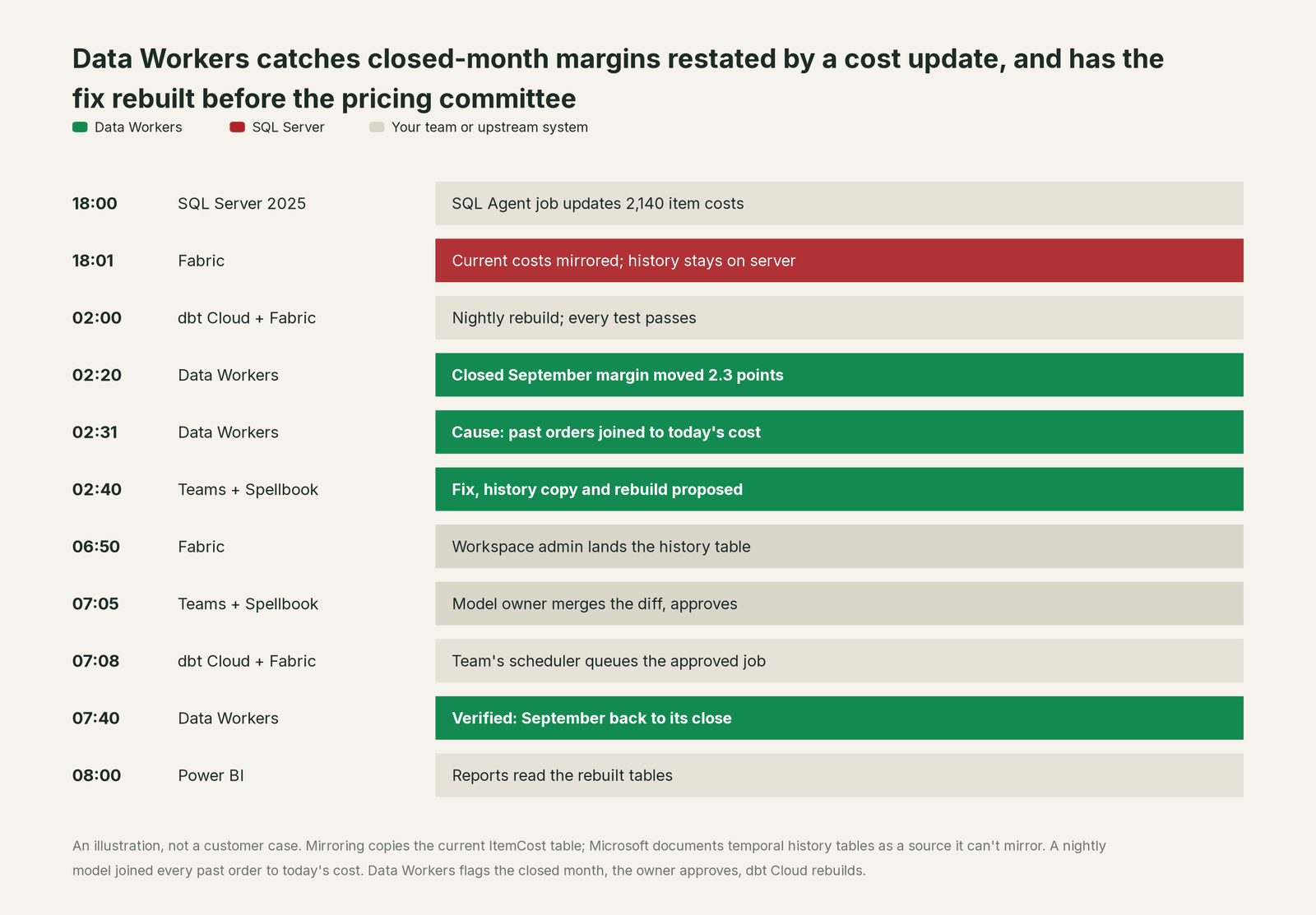
Every system did its job: SQL Server kept the history, mirroring copied what it supports, dbt built what it was told and Power BI showed what it read. The fix waited for two approvals because this domain runs at L2 propose, and the data stayed in SQL Server, OneLake and the warehouse throughout.
| Job | What SQL Server does | What Data Workers does |
|---|---|---|
| Running the apps | Commits every order and cost change, keeps temporal history, enforces constraints | Leaves the app database alone; never writes to it |
| Moving data out | Mirroring in Fabric, change event streaming (preview), SSIS and SQL Agent jobs | Checks what those copies turn into against the metrics your team records |
| Noticing a problem | Job history, Query Store and mirroring status show the engine and its jobs healthy | Opens an incident when a number moves without a failed job, with the cause traced across systems |
| Fixing it | Runs the T-SQL and jobs your team deploys | Proposes model, pipeline and copy changes as diffs for their owners, with the blast radius |
| Running it again | Not its job once data has left | Proposes the rebuild with the undo written first; ADF and Airflow runs are queued by Data Workers after approval, dbt Cloud jobs by the team's scheduler |
| Proving it | Keeps row history in temporal and ledger tables | Verifies the downstream number and leaves a receipt: cause, approver, run, checks, undo |
Why doesn't SQL Server just do this itself?
Because SQL Server is built to run the business safely, and its choices are right for that job. Its AI work points inward. Copilot in SSMS runs queries with your login's permissions, and since SSMS 22.7 its Agent mode can work through a goal, run queries, read execution plans and modify schema with your approval. Vectors (the vector index is still in preview), external AI models and sp_invoke_external_rest_endpoint bring AI into T-SQL; the REST call is disabled by default, and Microsoft cautions that it can transfer data to an external entity. SQL MCP Server, part of Data API builder 1.7 and later, exposes only the tables, views and procedures your config lists, with permissions per role, and deliberately offers no free-form SQL generation and no DDL. Each is sensibly scoped to the database it sits in.
The night above happened in the gap between a correct source and a model three systems away, in a copy that followed its documented limits. Fixing it needed the dbt project, the Fabric workspace, the Power BI lineage, the finance close, two named approvers and a receipt. A database vendor that rewrote dbt models and queued jobs in someone else's orchestrator would take on liability for tools it doesn't own. That cross-system work, with approvals and rollback built in, is what Data Workers, the agentic data platform, is built to run.
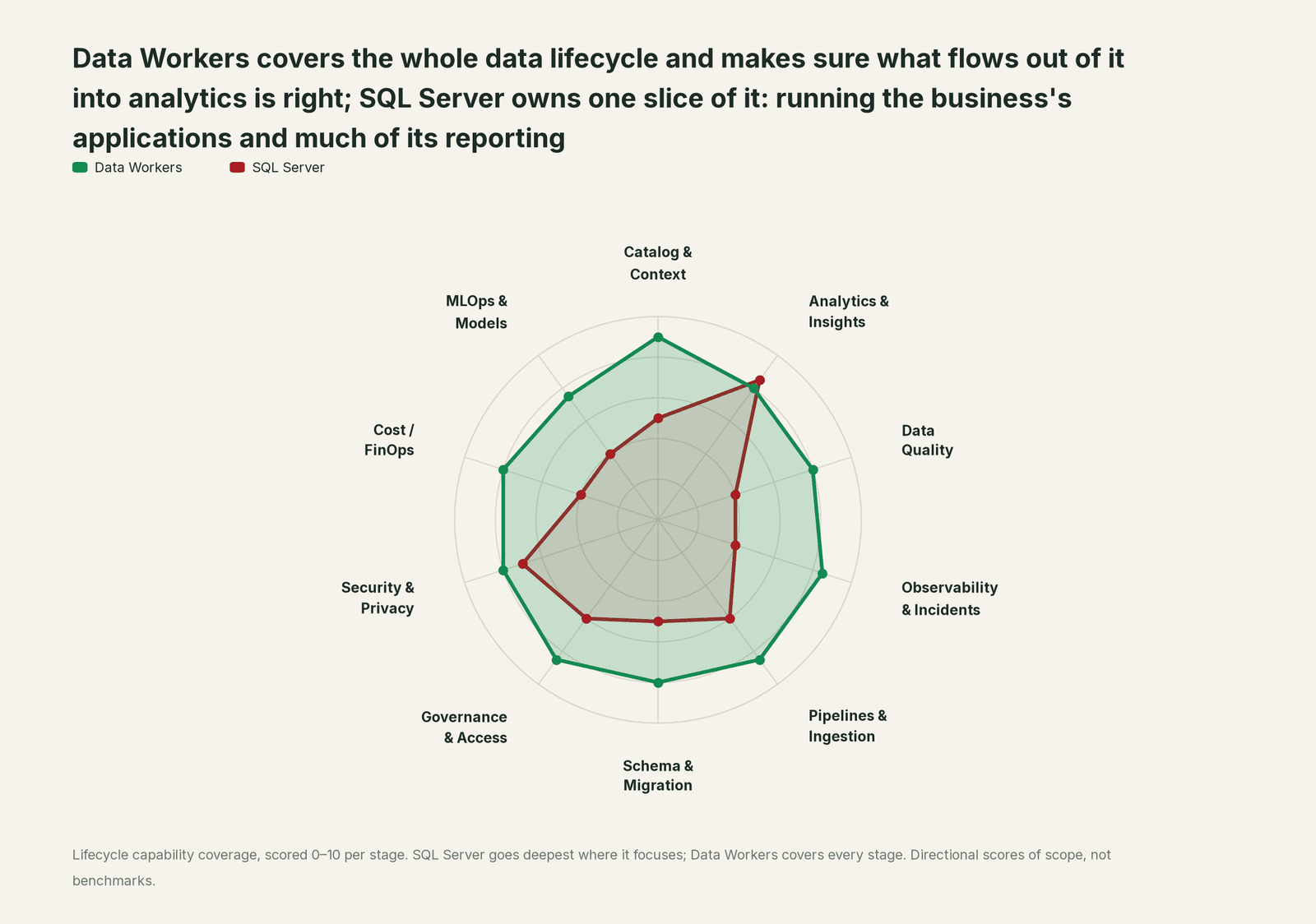
Every tool owns a slice. Data Workers covers the whole lifecycle
SQL Server owns its slice deeply: running the applications and answering queries fast. Each point tool adds another console, contract and handoff. Data Workers covers the whole lifecycle with one context, one approval flow and one audit trail, and builds on the SQL Server already running your business.
| Stage | Data Workers | SQL Server | Why we scored it this way |
|---|---|---|---|
| Catalog & Context | 9 | 5 | The system catalog describes every table, temporal pair, procedure and job, and Purview can scan it. Data Workers keeps one governed context graph of tables, models, owners and lineage across SQL Server, Fabric, dbt and BI. |
| Analytics & Insights | 8 | 8.5 | SQL Server's home stage: T-SQL, in-database analytics, vector functions, JSON and regular expressions, with Copilot in SSMS answering questions about your data. Data Workers answers data questions from governed definitions with lineage behind every number. |
| Data Quality | 8 | 4 | Constraints, check rules and the tests you write in T-SQL keep rows valid inside one database. Data Workers watches the metrics your team records on what lands downstream and flags the ones that leave their baseline. |
| Observability & Incidents | 8.5 | 4 | Query Store, Extended Events, SQL Agent job history and mirroring status describe the engine and its jobs. Data Workers diagnoses why a correct source produced a wrong number three systems later and verifies the fix. |
| Pipelines & Ingestion | 8.5 | 6 | SSIS packages, SQL Agent jobs, Mirroring in Fabric and change event streaming (preview) move data out reliably. Data Workers queues the approved rebuild through the orchestrator and checks what lands. |
| Schema & Migration | 8 | 5 | Temporal tables keep row history, and .dacpac deployments version the schema. Data Workers flags a change whose effect crosses into Fabric, dbt or BI, and plans moves off SQL Server in approved waves. |
| Governance & Access | 8.5 | 6 | Logins, roles, row-level security and Entra ID authentication govern the database. Data Workers routes every data change to a named approver with a receipt. |
| Security & Privacy | 8 | 7 | Always Encrypted, dynamic data masking, TDE and ledger tables protect data inside the engine. Data Workers flags sensitive column names in pull request review and proposes masking for the owner to approve and apply, so protection follows the data downstream. |
| Cost / FinOps | 8 | 4 | Editions, cores and resource governor workload groups shape what the server spends. Data Workers attributes Snowflake spend to the dbt model behind it when the analytics side runs there. |
| MLOps & Models | 7.5 | 4 | Vectors, external AI model objects and REST endpoint calls bring AI into T-SQL. Data Workers keeps the data under your models healthy. |
That security row matters here. Microsoft's mirroring limitations page says row-level security permissions, object-level permissions, dynamic data masking and sensitivity labels defined in SQL Server aren't carried to OneLake. The copy needs its own protection; Data Workers proposes it and the owner applies it.
Running more of the Microsoft estate? See you're on Azure Data Factory, you're on Microsoft Purview and, for the other system of record most enterprises run, you're on Oracle.
How SQL Server and Data Workers work together
Engineers ask from GitHub Copilot or Claude Code; approvers decide in Spellbook Data Catalog (in preview). Data Context Wizard keeps one governed context graph across SQL Server, OneLake, dbt, Purview and Power BI, the Data-Agents Swarm does the work, and the Autonomous Data-Conductor runs each incident end to end.
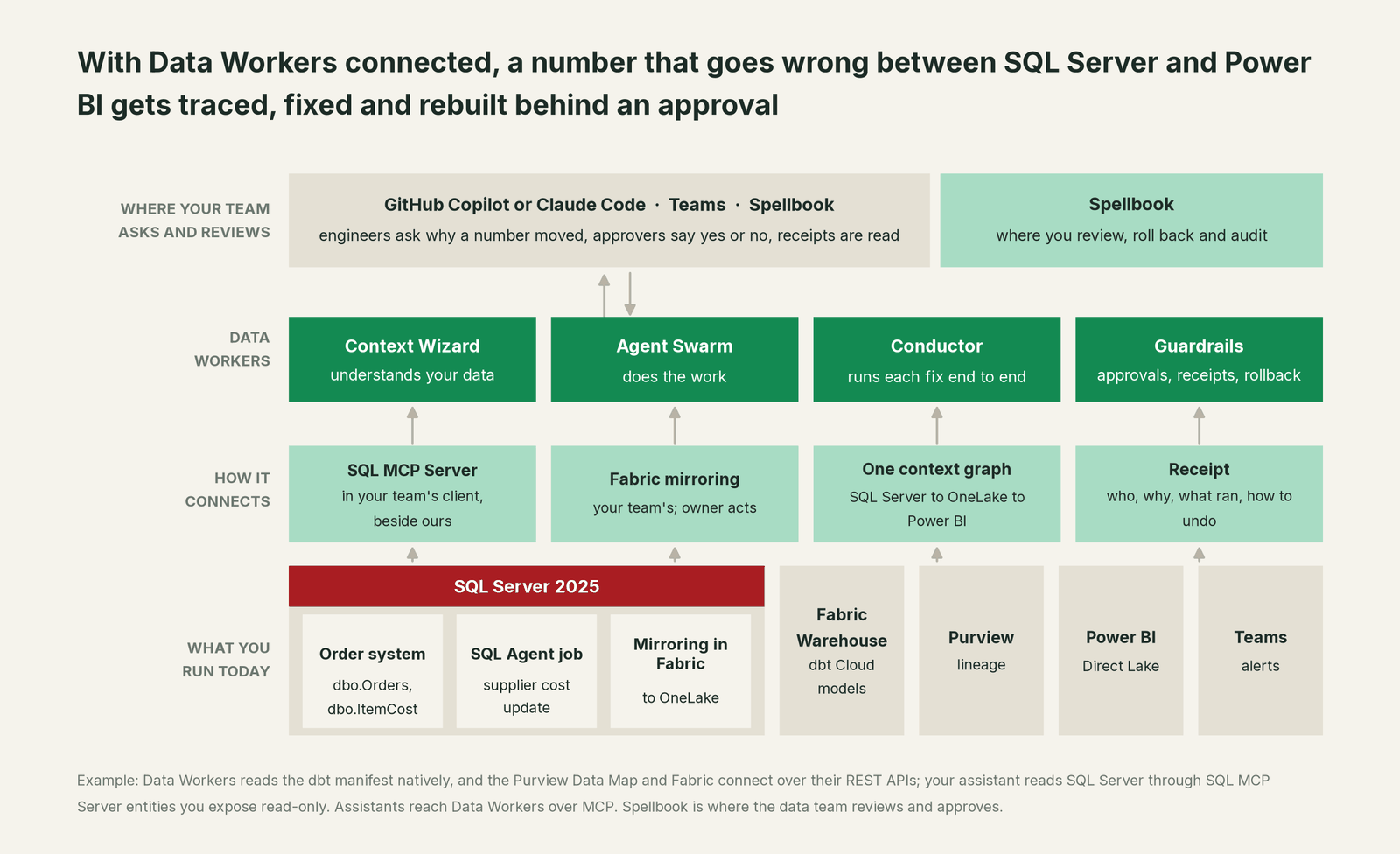
How SQL Server is reached. Data Workers connects to SQL Server over its API today and never writes to it. SQL MCP Server is the clean path for your team's assistant, side by side with Data Workers' MCP servers: your DBA lists the entities it may see (here ItemCost, ItemCostHistory and the order header), grants a role read only and turns off create, update and delete. dbt Cloud, ADF and Teams are native connectors; the Microsoft Purview Data Map, Fabric and Power BI connect over their REST APIs or MCP servers today.
Setup over MCP today. Every Data Workers agent is an MCP server. Per the client setup guide, clone the repo and add one start-agent.sh entry per agent. SQL MCP Server sits in the same client, with its readable entities and a read-only role in the Data API builder config.
# Example: SQL MCP Server and Data Workers agents in Claude Code
claude mcp add --scope user --transport http sql-server http://localhost:5000/mcp

# From a clone of the Data Workers open-source repo
claude mcp add --scope user dw-incidents -- "$(pwd)/start-agent.sh" dw-incidents
claude mcp add --scope user dw-catalog -- "$(pwd)/start-agent.sh" dw-context-catalog
claude mcp add --scope user dw-schema -- "$(pwd)/start-agent.sh" dw-schema
claude mcp add --scope user dw-connectors -- "$(pwd)/start-agent.sh" dw-connectors
Over stdio, name the role, because Microsoft documents the stdio default as anonymous. List tools with your client's own command, such as /mcp. In this story: monitor_metrics and diagnose_incident catch and explain the move; trace_cross_platform_lineage and blast_radius_analysis map the path to Power BI; get_incident_history shows whether this model has broken before; the approved rebuild runs on the team's dbt Cloud schedule, with the approval on record.
Where things run. The agents run in your infrastructure on every tier and hold the SQL Server, Fabric, dbt and model credentials. Your data stays in your systems; the hosted Conductor sees workflow metadata only. The remote endpoint takes an API key or OAuth tokens from Microsoft Entra ID, verified through JWKS. See read-only warehouse access for LLM agents.
Moving off SQL Server, in waves. Many SQL Server estates are mid-move, to Fabric through mirroring or to Snowflake. Data Workers plans each wave with its parity checks, tracks them and holds the completion gate for the owner's sign-off. It maps each table's readers from lineage in dbt and ADF and records who signed. For Snowflake targets it translates T-SQL stored procedures into Snowflake SQL and annotates low-confidence constructs for a person; for Fabric, mirroring does the copy and Data Workers runs the plan around it. Our design target is 4 to 8 weeks per migration against a typical 6 to 12 months. More in the Data Migration agent, the SSIS to modern data stack guide and Data Workers on Microsoft Fabric.
One incident, L0 to L4, set per domain:

- •L0 manual. A branch manager asks at 08:30 why a closed month's margin dropped.
- •L1 observe. The incident opens at 02:20 with cause and blast radius. Nothing changes.
- •L2 propose. Nothing runs until named people approve; an unanswered request expires and escalates, never auto-grants.
- •L3 act reversibly. The rebuild is queued as soon as an approved fix merges, with the undo written first.
- •L4 autonomous. A scoped domain handles that class end to end; people read receipts.
More in how approvals work, autonomy levels, is it safe to let AI agents change production data, where does our data go and integrations.
What changes for your team
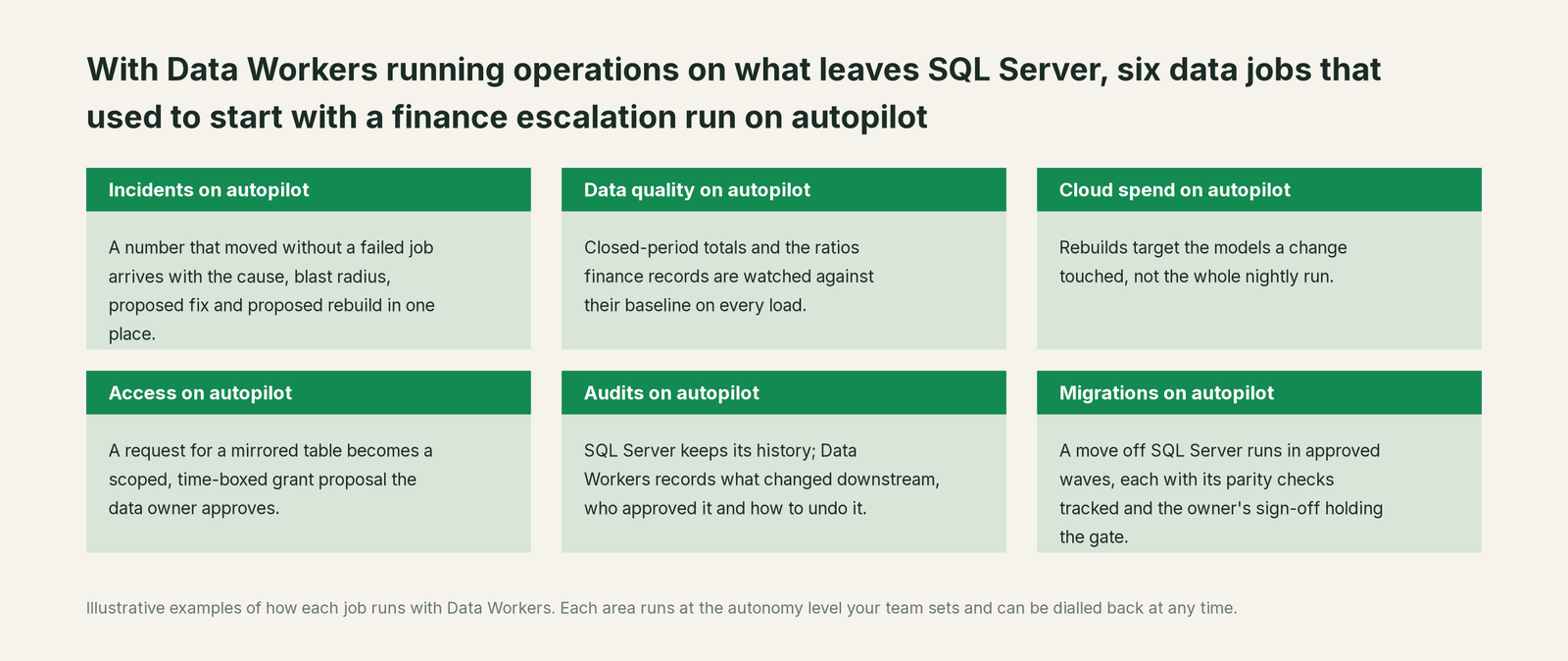
Your DBAs keep running SQL Server: patching, tuning with Query Store, owning the SQL Agent jobs. What changes is the work after the data leaves. "Why did a closed month move?" becomes a diagnosed incident with a diff and a rebuild waiting for an approval, and the audit trail records who said yes.
Go deeper with the Incident Debugging agent, data engineering on Azure and who owns the agents.
Keep SQL Server, or consolidate?
Keep SQL Server if you love it; Data Workers works with it from day one. Many teams consolidate once Data Workers runs that slice too.
For the applications, keep it: SQL Server 2025 has mainstream support to January 2031 and Microsoft keeps shipping. What consolidates is the scaffolding around the data on its way out: the SQL Agent job that emails row counts, the hand-kept list of which reports read which table, the closed-month totals compared by eye, the "rerun, refresh, tell finance" runbook. See Data Workers vs data observability, or, if you are weighing a build, build it ourselves with Claude Code and MCP servers.
The case for your CFO
The outcome: the numbers built from your SQL Server data stay right after the data leaves it. A closed month that moves is caught overnight, traced, fixed behind an approval and verified before anyone opens the report. In the illustration, that is a pricing committee setting October prices on real margins instead of ones 2.3 points low.
The risk story is plain. Autonomy is set per domain. At L2 a named person approves every fix and rebuild, and no agent can promote its own work. Data Workers never writes to SQL Server. Model changes go to their owner as diffs; rebuilds are queued through your orchestrator with the undo written first. Every change carries a receipt, and an org-wide stop halts all autonomous dispatch. Zero migration: SQL Server, mirroring, dbt, Fabric and Power BI stay as they are.
Why now: SQL Server 2025 made it easy to copy a whole database into OneLake, and Synapse Link is discontinued in favor of mirroring. More copies mean more places a correct source can become a wrong number. The first win is L1 on one domain finance reads every week. For the numbers, see the ROI of agentic data operations.
The sentence to repeat upstairs: "SQL Server keeps running the business; Data Workers makes sure the numbers we build from it are right, and fixes them behind an approval when they aren't."
Getting started
Start with a pilot. Pick one domain where SQL Server data feeds numbers someone acts on, such as margin, inventory or billing, connect the dbt project, expose the source tables read-only through SQL MCP Server for your team's assistant, and run at L1. Record the metrics that must not move, then turn on L2 for that domain with the owners named. Plans are on the pricing page, and the pilot is credited in full against the first year.
FAQ
Does Data Workers write to our SQL Server databases? No. Data Workers connects over SQL Server's API and never writes to it; your team's assistant reads the entities your DBA exposes through SQL MCP Server under a read-only role. Fixes land downstream, in dbt models, pipelines and copy jobs, as diffs for their owners.
We already use Copilot in SSMS. What does Data Workers add? Keep Copilot for T-SQL work inside the database you are connected to. Data Workers takes the incidents that cross systems, from SQL Server through Fabric and dbt to Power BI, and fixes them behind an approval with a receipt.
Does Fabric mirroring make this unnecessary? Mirroring is a faithful copy with documented limits: up to 1,000 tables, no temporal or ledger history tables, no tables with json or vector columns, a full reseed of a table after a DDL change in SQL Server 2025, and no carry-over of permissions or masking. Data Workers checks what gets built on the copy, where those limits show up.
Can we use change event streaming instead of mirroring? You can, though it is in preview in SQL Server 2025 and Microsoft doesn't recommend preview features for production. Data Workers works on whatever the stream lands.
We're moving off SQL Server. Where does Data Workers help? It plans each wave with its parity checks, maps every table's readers, tracks the checks and holds the completion gate for the owner's sign-off. For Snowflake targets it translates T-SQL into Snowflake SQL; for Fabric, mirroring does the copy.
Does it work with Azure SQL Database and Managed Instance? Yes, the same way as on-premises: Data Workers connects over the API, SQL MCP Server serves your team's assistant, and the work happens on the systems downstream. Azure SQL Database also has vector indexes and VECTOR_SEARCH generally available since September 2026.
Sources
- •Microsoft Learn, What's new in SQL Server 2025 (17.x), updated Sept 28, 2026, https://learn.microsoft.com/en-us/sql/sql-server/what-s-new-in-sql-server-2025 (checked Oct 3, 2026)
- •Microsoft Learn, SQL Server 2025 release notes (vector index and change event streaming in preview), updated Aug 19, 2026, https://learn.microsoft.com/en-us/sql/sql-server/sql-server-2025-release-notes (checked Oct 3, 2026)
- •Microsoft Lifecycle, SQL Server 2025 (start Nov 18, 2025; mainstream end Jan 7, 2031), https://learn.microsoft.com/en-us/lifecycle/products/sql-server-2025 (checked Oct 3, 2026)
- •Microsoft Learn, GitHub Copilot in SSMS (Agent mode from SSMS 22.7), updated Sept 28, 2026, https://learn.microsoft.com/en-us/ssms/github-copilot/overview (checked Oct 3, 2026)
- •Microsoft Learn, sp_invoke_external_rest_endpoint (disabled by default), updated June 19, 2026, https://learn.microsoft.com/en-us/sql/relational-databases/system-stored-procedures/sp-invoke-external-rest-endpoint-transact-sql (checked Oct 3, 2026)
- •Microsoft Learn, What is change event streaming (preview), updated July 31, 2026, https://learn.microsoft.com/en-us/sql/relational-databases/track-changes/change-event-streaming/overview (checked Oct 3, 2026)
- •Microsoft Learn, Mirroring SQL Server in Microsoft Fabric, updated Nov 6, 2025, https://learn.microsoft.com/en-us/fabric/mirroring/sql-server (checked Oct 3, 2026)
- •Microsoft Learn, Limitations in Fabric mirrored databases from SQL Server, updated May 15, 2026, https://learn.microsoft.com/en-us/fabric/mirroring/sql-server-limitations (checked Oct 3, 2026)
- •Microsoft Learn, What's new in Azure SQL Database (vector indexes GA September 2026), updated Oct 1, 2026, https://learn.microsoft.com/en-us/azure/azure-sql/database/doc-changes-updates-release-notes-whats-new (checked Oct 3, 2026)
- •Microsoft Learn, What is SQL MCP Server (Data API builder 1.7 and later), updated May 15, 2026, https://learn.microsoft.com/en-us/azure/data-api-builder/mcp/overview (checked Oct 3, 2026)
- •dbt Developer Hub, Connect Microsoft Fabric, https://docs.getdbt.com/docs/cloud/connect-data-platform/connect-microsoft-fabric (checked Oct 3, 2026)
- •Data Workers open-source repository, https://github.com/DataWorkersProject/dataworkers-claw-community (checked Oct 3, 2026)
- •Data Workers client setup guide, https://dataworkers.io/opensource-docs/client-setup/ (checked Oct 3, 2026)