You're on Oracle: It Holds Your Systems of Record. Data Workers Keeps Every Copy of Them Right
Oracle AI Database holds your systems of record. Data Workers keeps every copy of that data in Snowflake, dbt and BI complete and right, behind named approvals.
Your business runs on Oracle. The ERP, the billing engine, the transportation or policy system sits in schemas your DBAs have tuned for a decade, with PL/SQL packages doing the nightly batch and an Active Data Guard standby ready for failover. The release is now Oracle AI Database 26ai, the long-term support release after 23ai, on Exadata in your data center, on Autonomous AI Database in OCI, or as Oracle AI Database@AWS, @Azure and @Google Cloud. Select AI turns questions into SQL, the Select AI Agent framework and Private Agent Factory 26.4 build agents inside the database, and SQLcl, the Autonomous AI Database MCP Server and the OCI Database Tools MCP Server let an assistant query it.
Most of what the business reads isn't read in Oracle, though. GoldenGate copies the schemas into Snowflake, dbt models turn them into revenue and margin, and Looker puts them in front of finance. Oracle guarantees what it stores. Whether every row that should have left it arrived, and whether the dashboard is right, is a job across four other systems. Data Workers takes that job and builds on the Oracle estate already there.
Key takeaways
- •Oracle keeps its job. The database, the PL/SQL, Data Guard, GoldenGate and your DBAs' change process stay as they are. Data Workers owns the copies downstream.
- •Gaps get caught where they land. Volume and null checks on the Snowflake tables, plus the row counts and totals your team records with
monitor_metrics, flag a load that went quiet even when every job is green. - •Oracle stays with your DBAs. Data Workers reads Snowflake, dbt Cloud and Looker natively and never queries Oracle. When an engineer needs Oracle facts, SQLcl MCP runs beside it in the same client, on a read-only account on a standby, as Oracle advises.
- •Every fix goes through a named owner. DBAs change Oracle, integration owners re-sync GoldenGate, and Data Workers queues the rebuild after approval and checks the result.
- •The move off Oracle, when you decide on it, runs in approved waves. Oracle SQL is translated into Snowflake SQL for review, and each wave carries its parity checks and a gate held for the owner's sign-off.
Oracle holds your systems of record. Data Workers keeps every copy of them right.
Oracle's job is to commit every transaction correctly and keep it safe. The job downstream is different: know which warehouse tables, models, reports and extracts depend on each Oracle table, notice when a feed is complete in shape but short in substance, get it fixed by the person who owns that system and prove the numbers are whole again. Here is one night at a freight carrier whose transportation management system (TMS) runs on Oracle Database 19c with an Active Data Guard standby. Times are CT. This is an illustration, not a customer case.
| Time | System | What happens |
|---|---|---|
| Tue 18:40 | Oracle 19c | A tuning release ships for the nightly rating batch. PKG_RATING.load_charges now uses direct-path inserts, and SHIPMENT_CHARGES is set to NOLOGGING to shorten the batch. The database is not in FORCE LOGGING mode |
| Wed 01:15 | Oracle 19c | The batch writes 412,000 charge rows for Tuesday. Direct-path inserts into a NOLOGGING table are not logged in the redo |
| 01:31 | GoldenGate | Extract reads the redo and Replicat applies it to Snowflake. The only charges in the redo are 9,800 manual re-rates keyed in with ordinary inserts. Both processes stay green with normal lag |
| 03:00 | dbt Cloud | Job finance_nightly builds fct_shipment_revenue from RAW.TMS.SHIPMENT_CHARGES. Every model and test passes |
| 03:05 | Data Workers + Snowflake | The 01:31 load finished on time. The nightly row count the team records with monitor_metrics does not: 9,800 rows against a baseline near 410,000. Data Workers opens an incident |
| 03:20 | SQLcl MCP + Data Workers | In the on-call engineer's Claude Code session, SQLcl MCP runs a read-only count on the standby and gets ORA-26040: the block "is loaded on primary database using NOLOGGING option". The dictionary shows SHIPMENT_CHARGES with LOGGING = NO and PKG_RATING compiled Tue 18:41. The engineer adds those facts to the incident, and diagnose_incident classifies it as an upstream code regression: the rows exist in Oracle and never reached the redo GoldenGate reads |
| 03:25 | Data Workers + Looker | blast_radius_analysis from dbt lineage and the team's context-graph notes: fct_shipment_revenue feeds the Looker "Lane revenue" Explore and the 09:00 accrual extract finance uses |
| 03:30 | Slack | send_slack_alert tells #finance-data that Tuesday's lane revenue is incomplete and a fix is in review. The approval request goes to the on-call DBA and the finance data owner: restore logging, re-sync Tuesday's partition, then rebuild finance_nightly |
| 06:45 | Spellbook | Both owners approve the plan |
| 06:55 | Oracle 19c | The DBA sets SHIPMENT_CHARGES back to LOGGING and puts the database in FORCE LOGGING mode, as GoldenGate's own setup guide recommends |
| 07:10 | GoldenGate | The integration owner re-syncs Tuesday's partition into Snowflake with a one-partition initial load |
| 07:40 | dbt Cloud | The row count is back inside its baseline. The finance data owner queues the finance_nightly rerun in dbt Cloud under the 06:45 approval, recorded in Spellbook |
| 08:10 | Data Workers | The rerun finishes. Row count and the revenue total the team records sit inside their baselines; get_quality_score on fct_shipment_revenue is back to normal. The receipt records the evidence, both approvals, the rerun and the checks after it |
| 08:30 | Looker | Lane revenue shows all of Tuesday; the 09:00 accrual extract runs on complete numbers |
| 09:30 | Oracle 19c | The DBA repairs the standby's NOLOGGING blocks with RMAN, on the team's own runbook |
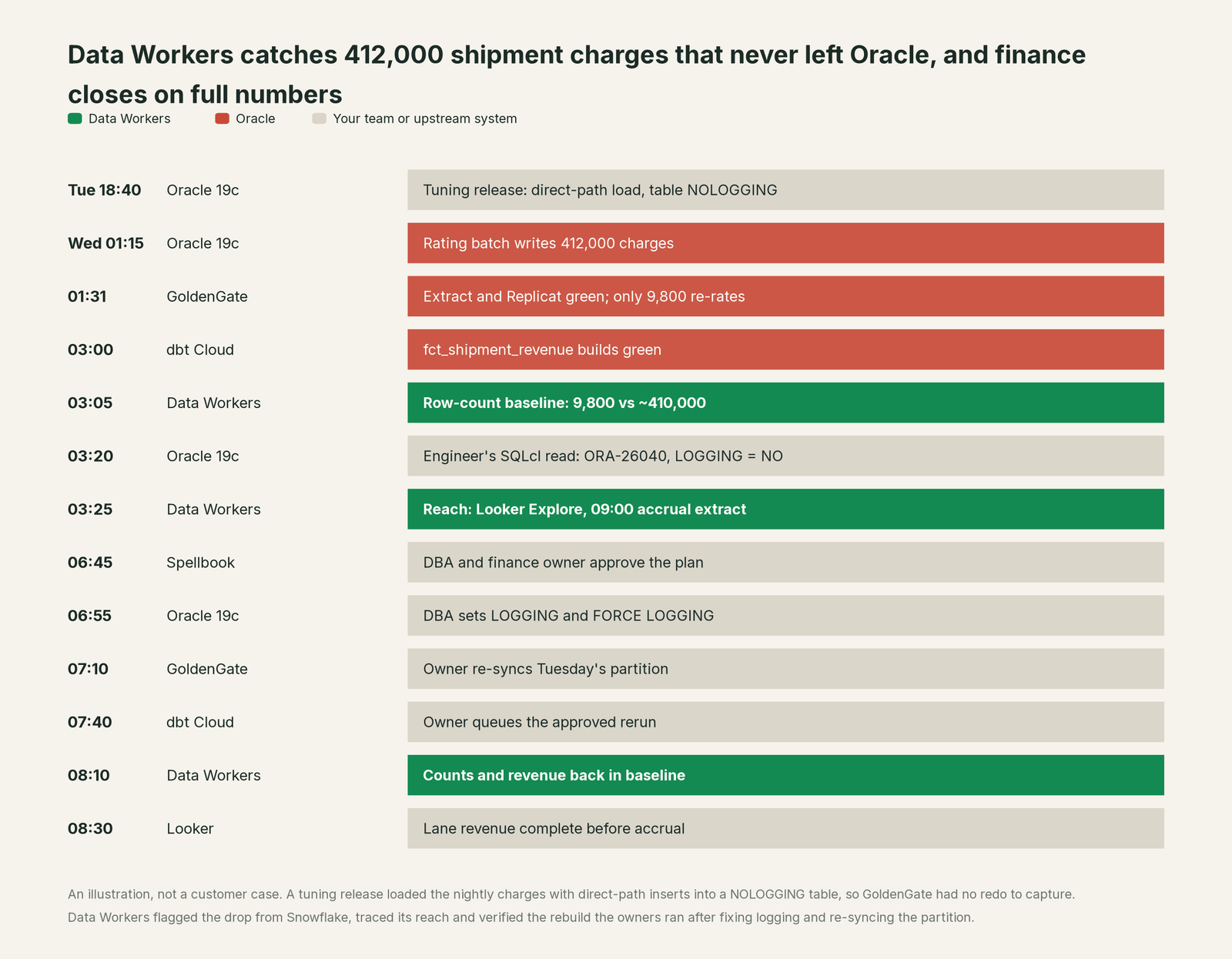
Every system did what it was built to do. Oracle honoured a documented NOLOGGING choice, GoldenGate replicated every change it could see, Snowflake stayed fresh, and dbt built what it was given. Catching the gap took things none of them hold: a baseline for how many charges a Tuesday produces, the path from SHIPMENT_CHARGES to an accrual extract, and one approval flow across a DBA, an integration owner and finance.
| Job | What Oracle does | What Data Workers does |
|---|---|---|
| The record | Commits every transaction, enforces constraints and types, protects the data | Treats Oracle as the source of truth and checks that its copies downstream are complete |
| The batch | PL/SQL packages, direct-path loads and partitions run the nightly work | Watches what each feed should produce once it lands and flags a load that goes quiet |
| The copy | GoldenGate captures from the redo log; Data Guard keeps a standby | Reads the Snowflake landing tables natively and traces a gap back to the Oracle table behind it through lineage |
| The diagnosis | AWR, the dictionary and errors such as ORA-26040 tell a DBA what happened inside the database | Joins the facts your engineers bring with metrics, lineage and run history into one incident and a blast radius |
| The repair | DBAs change logging, packages and the standby through their change process | Proposes the plan, routes it to named owners, records the approval for the dbt Cloud rebuild the owner runs, and verifies it |
| The proof | Oracle's audit trail records database activity | Keeps a receipt for the change downstream: evidence, approvals, what ran, the checks after it |
Why doesn't Oracle just do this itself?
Because Oracle builds the database, and the database's job is to store every transaction safely and answer queries fast. It does that job extremely well, and its AI follows the same scope. Select AI writes SQL against the schemas you point it at. Select AI agents and Private Agent Factory build agents that work on data inside Oracle. The Autonomous AI Database MCP Server exposes Select AI Agent tools while "enforcing minimum-privilege policies", and SQLcl MCP starts at its most restrictive level, which blocks host commands and scripts.
Oracle is also clear about risk. The SQLcl MCP guide asks for "the absolute minimum permissions", audits of what the model runs, and: "Do not grant LLMs direct access to production databases. Instead, you should use a sanitized, read-only replica or a dedicated data subset." That is the right design for a system of record.
NOLOGGING shows why the downstream job sits elsewhere. To Oracle, a direct-path load into a NOLOGGING table is a supported performance choice with a documented trade-off; GoldenGate's guide recommends FORCE LOGGING for exactly this reason. Whether it starves a warehouse table and the models and extracts other teams own is a question about systems Oracle doesn't run. Owning it takes cross-system context, baselines, blast radius, named approvals and receipts. That is Data Workers. More in is it safe to let AI agents change production data.
Every tool owns a slice. Data Workers covers the whole lifecycle
Each point tool adds another console, contract and handoff. Data Workers covers the whole lifecycle with one context, one approval flow and one audit trail.
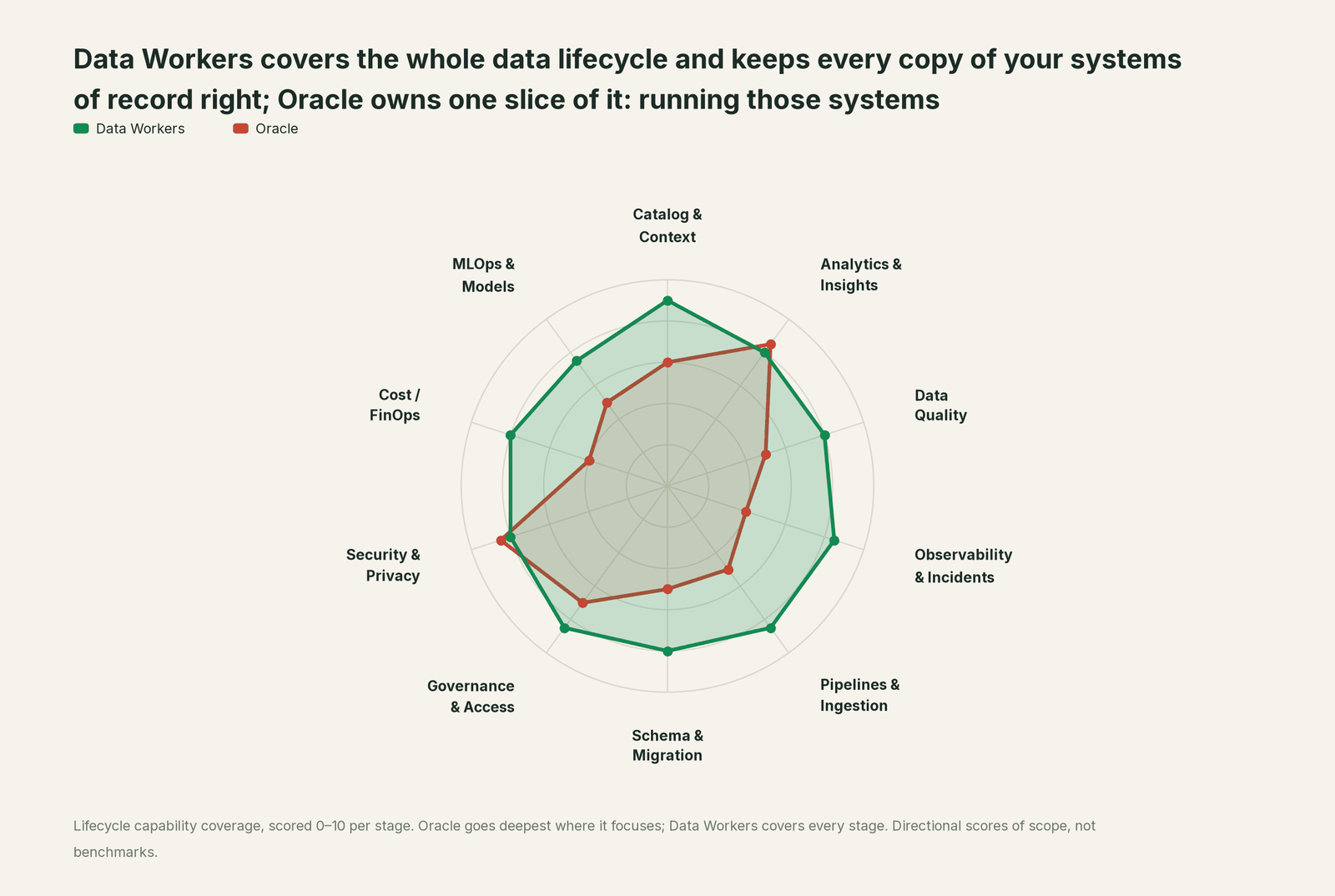
| Stage | Data Workers | Oracle | Why we scored it this way |
|---|---|---|---|
| Catalog & Context | 9 | 6 | The data dictionary, comments and annotations describe each schema in the database. Data Workers keeps one governed context graph of meaning, owners and consumers across Oracle, Snowflake, dbt and BI. |
| Analytics & Insights | 8 | 8.5 | One of Oracle's home stages: SQL analytics, materialized views, in-database AI Vector Search and Select AI on Exadata and Autonomous AI Database. Data Workers answers data questions from governed definitions across every platform. |
| Data Quality | 8 | 5 | Constraints and data types keep each row valid inside the database; nothing watches whether the copies downstream are complete. Data Workers checks volume and watches lateness and the numbers the team records against baselines. |
| Observability & Incidents | 8.5 | 4 | AWR, alert logs and Autonomous operations watch the database itself. Data Workers turns a gap in the data downstream into a diagnosed incident with blast radius and a fix. |
| Pipelines & Ingestion | 8.5 | 5 | GoldenGate, Data Pump and SQL*Loader move data in and out, each run by its owner. Data Workers watches what lands and queues reruns through the orchestrator after approval. |
| Schema & Migration | 8 | 5 | SQLcl Projects track schema changes in Git; migrating off Oracle is not Oracle's job. Data Workers translates Oracle SQL into Snowflake SQL, plans waves with parity checks and holds the completion gate. |
| Governance & Access | 8.5 | 7 | Roles, privileges, Virtual Private Database and Real Application Security govern access in the database. Data Workers routes every data change to a named approver with a receipt. |
| Security & Privacy | 8 | 8.5 | One of Oracle's home stages: encryption at rest and in flight, data masking, auditing and database-native guardrails. Data Workers leaves a receipt on every data change and flags new sensitive column names in pull request review. |
| Cost / FinOps | 8 | 4 | Autonomous AI Database scales compute; license and OCPU costs live in Oracle's own billing. Data Workers attributes Snowflake spend down to the dbt model through query tags and reads AWS Cost Explorer. |
| MLOps & Models | 7.5 | 5 | Oracle Machine Learning and the in-database ONNX runtime train and score models next to the data. Data Workers keeps the data under models and agents healthy across platforms. |
How Oracle and Data Workers work together
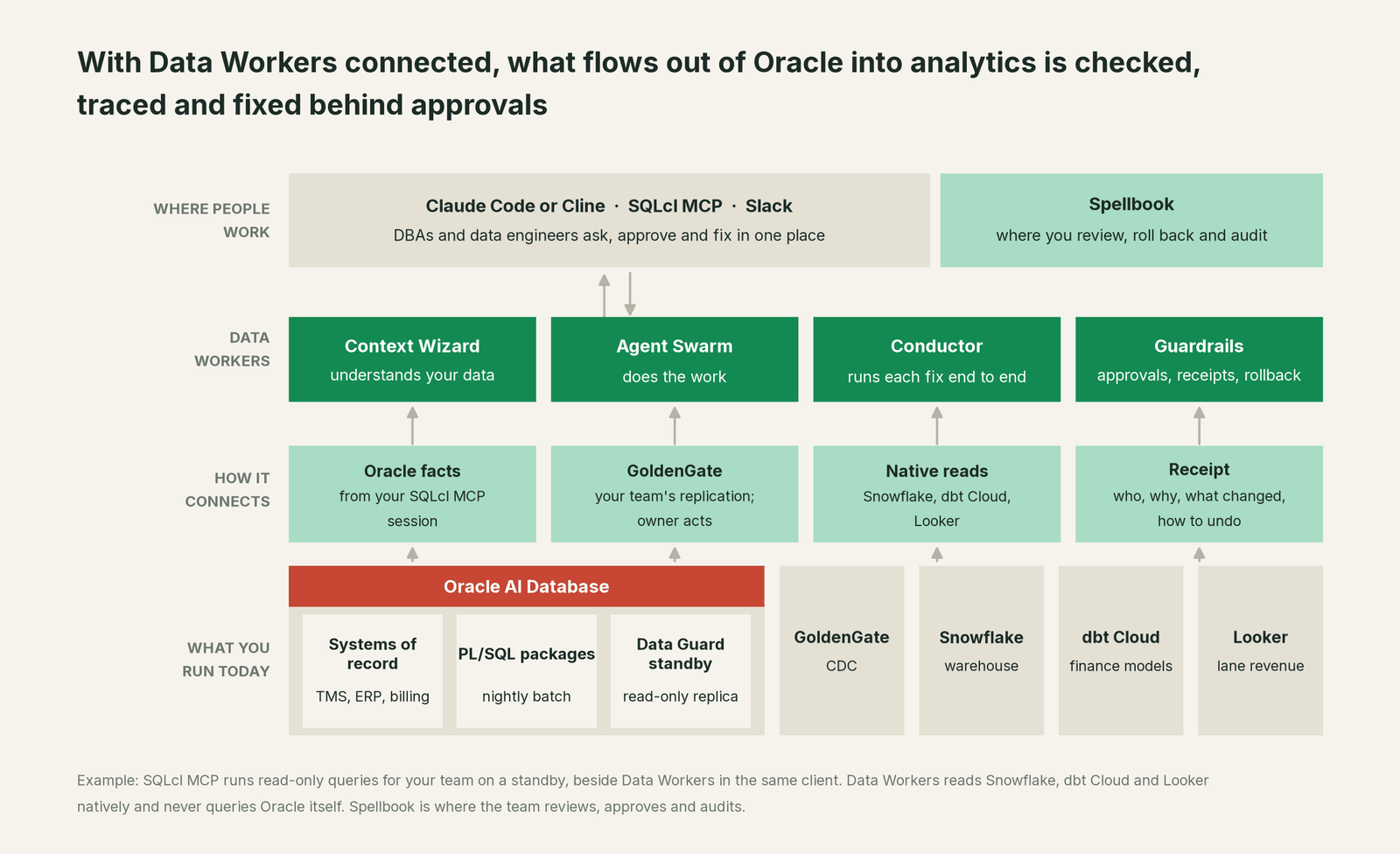
Data Workers works where Oracle's data lands. Snowflake, dbt Cloud, Looker (read), Slack and the orchestrators around them connect natively, among 50+ connectors; GoldenGate connects over its API or MCP server today. Data Workers does not query Oracle. Detection rests on what its own connectors read (Snowflake volume and nulls, baselines recorded with monitor_metrics) plus the owners' own checks. See Data Workers integrations.
Data Workers never changes an Oracle schema, logging setting or standby, and never starts, restarts or re-syncs a GoldenGate Extract or Replicat. DBAs and integration owners do that, with the plan and evidence in front of them. Data Workers checks, traces, proposes, queues reruns through Airflow or ADF after a named approval (dbt Cloud reruns go to the owner), and verifies.
When an engineer needs facts from inside Oracle, Oracle's own MCP server runs in the same client as the Data Workers agents. Data Workers' agents don't call it; the engineer's assistant does, on a least-privilege, read-only account on a standby. SQLcl MCP works with Oracle Database from 19c, on premises and in OCI, AWS, Azure and Google Cloud. The Data Workers side follows the documented client setup: clone the open-source repo and add each agent's start-agent.sh entry.
# Example: Oracle SQLcl MCP beside Data Workers agents in Claude Code
# SQLcl MCP at its default restrict level; its saved connection is a read-only account on the standby
claude mcp add sqlcl -- /opt/sqlcl/bin/sql -mcp

# Data Workers agents, from a clone of the open-source repo
claude mcp add --scope user dw-catalog -- "$(pwd)/start-agent.sh" dw-context-catalog
claude mcp add --scope user dw-incidents -- "$(pwd)/start-agent.sh" dw-incidents
claude mcp add --scope user dw-quality -- "$(pwd)/start-agent.sh" dw-quality
claude mcp add --scope user dw-connectors -- "$(pwd)/start-agent.sh" dw-connectors
List the tools with your client's own command (/mcp in Claude Code). In the night above, dw-quality checked the Snowflake tables, dw-incidents flagged and classified the drop, dw-context-catalog mapped its reach (explain_table gives a table's definition, lineage and documentation), and dw-connectors warned finance. SQLcl logs every model-issued statement to DBTOOLS$MCP_LOG, so your DBAs see exactly what was read.
In production the agents run in your infrastructure and hold the warehouse credentials and model key. Your data stays in your systems; the hosted Conductor sees workflow metadata only. More in where does our data go and read-only warehouse access for LLM agents.
When you move workloads off Oracle. The migration agent in the Data-Agents Swarm translates Oracle SQL into Snowflake SQL for review (NVL and NVL2, DECODE into CASE, SYSDATE, ROWNUM and the type mappings), with low-confidence constructs left annotated for an engineer. Schema changes come as generated migrations with rollback SQL for the owner to apply. Each wave is planned with its parity checks; Data Workers proposes the comparison queries your team runs, tracks the results and holds the completion gate for the owner's sign-off. More in inside the data migration agent, Data Workers on Snowflake and, for scope, Data Workers vs Oracle AI Database.
One night, L0 to L4, set per domain:

- •L0 manual. Finance books a short accrual; someone notices on Thursday.
- •L1 observe. Data Workers flags the drop at 03:05 with its reach. Nothing changes.
- •L2 propose. Nothing moves until the named owners approve; an unanswered request expires and escalates, never auto-grants.
- •L3 act reversibly. For classes with a clean record, Data Workers queues the rebuild and re-checks once the owner's re-sync lands.
- •L4 autonomous. For a scoped domain, Data Workers runs the whole downstream loop and reports with the receipt.
Who sets those levels: who owns the agents, how approvals work for AI data agents and autonomy levels L0 to L4 explained.
What changes for your team
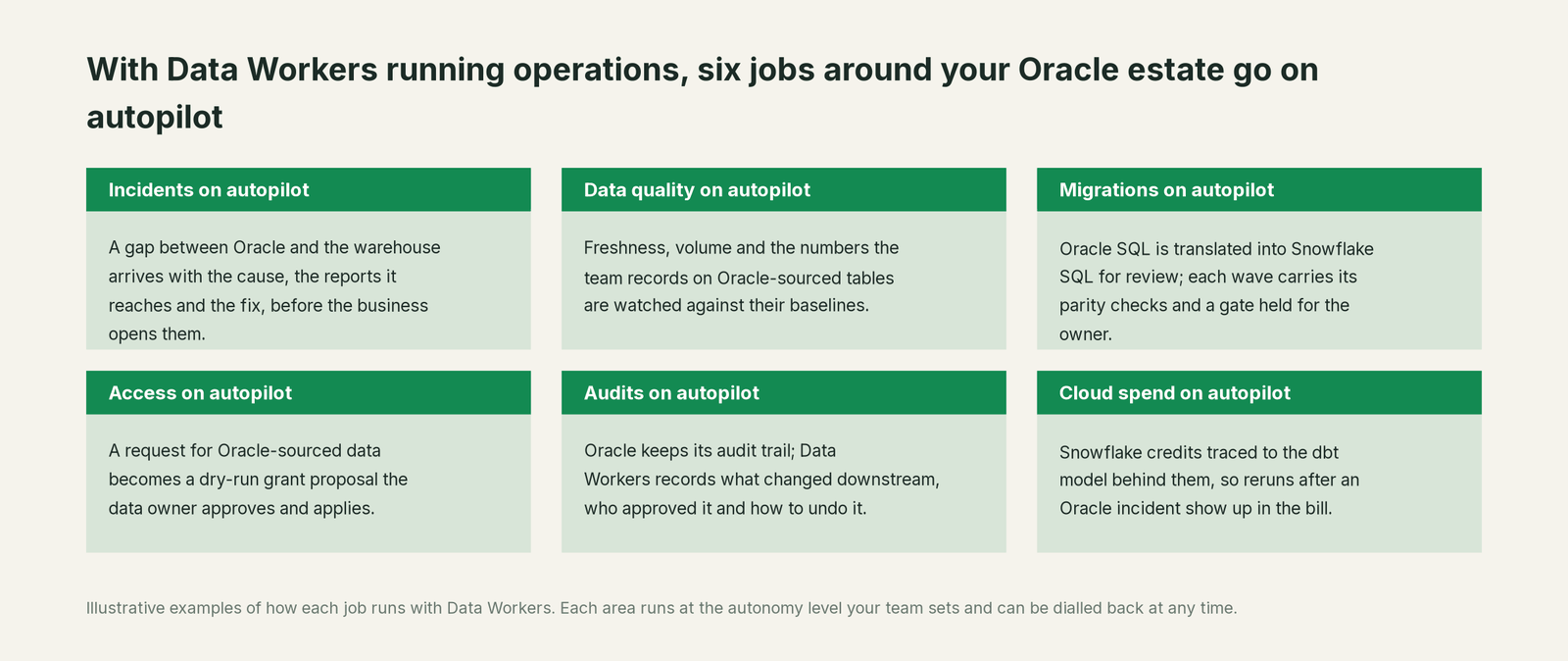
- •DBAs hear about downstream effects with evidence attached. A tuning change that starves a feed arrives as an incident with the reports it reached, before the business opens them.
- •Integration owners stop guessing at completeness. Green CDC processes and fresh tables get checked against what a normal day produces.
- •Finance gets a warning before it books. Readers of an affected report hear about it in Slack while the fix is in review.
- •One record across teams. Evidence, approvals and checks live in Spellbook Data Catalog (in preview), next to the context graph Data Context Wizard keeps across Snowflake, dbt and Looker.
Keep Oracle, or consolidate?
Keep Oracle if you love it; Data Workers works with it from day one. Many teams consolidate once Data Workers runs that slice too.
For the system of record, keep it: nobody moves a TMS or an ERP to fix a reporting gap. What teams consolidate is the work around it: hand-written count scripts, spreadsheets of who reads which table, a monitor per tool and the Slack thread that is the only record of who approved a rerun. Estates mid-move from other engines run the same way: see you're on Teradata and you're on SQL Server. If your Oracle CDC runs on Debezium, see you're on Debezium.
Weighing a build on SQLcl MCP and a coding agent? Read build it ourselves with Claude Code and MCP servers: a count on a standby from a chat is easy; the baselines, lineage, approvals, undo and receipts are the work. For the category view, see what is an agentic data platform and Data Workers vs data observability.
The case for your CFO
The outcome. The numbers the business reads from Oracle-sourced data are complete and right before anyone books on them, and every fix names who approved it. Revenue, margin and accruals stop depending on someone noticing a dip.
The risk story. At L0 and L1, agents only read, and Oracle is not on their list: they read the warehouse, dbt and BI. At L2 they propose and a named person approves; at L3 they act on reversible steps inside the domains you open. Changes to Oracle and to replication stay with DBAs and integration owners. No agent can promote its own work, an org-wide stop halts all autonomous dispatch, and every change carries a receipt: what changed, who approved it, the blast radius and the undo.
Why now. Oracle AI Database 26ai puts agents and MCP servers next to your systems of record, and every new consumer adds paths for data leaving Oracle.
The first win. L1 on the Oracle-sourced tables finance reads: freshness, volume and recorded baselines with lineage behind them, so a gap shows up hours before the morning report.
What stays the same. Oracle, your PL/SQL, Data Guard, GoldenGate, Snowflake, dbt, Looker and your change process. For the numbers, see the ROI of agentic data operations.
The sentence for upstairs: "Oracle runs our systems of record; Data Workers makes sure every copy in our reporting is complete and right, and nothing changes without a named owner's approval."
Getting started
Start with a pilot. Pick the Oracle-sourced Snowflake tables behind one finance report, give Data Workers read access to the warehouse, dbt Cloud and Looker, have the team record the nightly row counts and totals as baselines, and run at L1 so gaps and blast radius show up before anything changes. Then turn on L2 so fixes flow through named approvals, and open L3 for narrow classes once the receipts show the agents were right. The pilot path is on the pricing page, and the pilot is credited in full against the first year.
FAQ
How does Data Workers work with Oracle? Where Oracle's data lands. It reads Snowflake, BigQuery, Databricks, PostgreSQL, dbt, Airflow, Looker and Slack natively and does not query Oracle. GoldenGate connects over its API or MCP server today. Engineers who need Oracle facts use SQLcl MCP in the same client.
Will an agent touch our production Oracle database? No. Data Workers' agents don't connect to Oracle. If your engineers use SQLcl MCP, follow Oracle's advice: a read-only account on a standby or sanitized replica. SQLcl MCP starts at its most restrictive level and logs every model-issued statement to DBTOOLS$MCP_LOG.
We already have Select AI and Oracle's agents. Why add Data Workers? They answer questions and run agents on data inside Oracle, and do it well. Data Workers owns what happens after the data leaves: the warehouse, the models, the reports and the approvals between the teams that own each one.
GoldenGate already monitors its processes. What does this add? GoldenGate reports accurately on what it captured and applied. The night above had green processes and normal lag because the rows never reached the redo. Data Workers checks the landed result against what a normal day produces, traces its reach and coordinates the fix. It never restarts an Extract or replays a trail.
Can Data Workers move our Oracle marts to Snowflake? It translates Oracle SQL into Snowflake SQL for review, generates schema changes with rollback SQL for the owner to apply, plans each wave with its parity checks and holds the completion gate for the owner's sign-off. PL/SQL business logic stays with the engineers who know it.
Sources
- •Oracle, Oracle AI Database 26ai (name, Private Agent Factory 26.4, managed MCP, Oracle AI World Oct 25 to 28 2026), https://www.oracle.com/database/26ai/ (checked Oct 3, 2026)
- •Oracle AI Database New Features, Release 26ai ("the next long-term support release"), https://docs.oracle.com/cd/G47991_01/nfcoa/oracle-ai-database-26ai-new-features-guide.pdf (checked Oct 3, 2026)
- •Oracle, Autonomous AI Database (name, Select AI, Oracle AI Database@Azure and @Google Cloud), https://www.oracle.com/autonomous-database/ (checked Oct 3, 2026)
- •Oracle, Autonomous AI Database Select AI (Select AI Agent framework, 26ai and 19c support), https://www.oracle.com/autonomous-database/select-ai/ (checked Oct 3, 2026)
- •Oracle, Multicloud (Oracle AI Database@AWS, @Azure, @Google Cloud), https://www.oracle.com/cloud/multicloud/ (updated Sep 18, 2026; checked Oct 3, 2026)
- •Oracle, SQLcl product page (MCP server, 19c onward, on premises and in hyperscalers; SQLcl Projects), https://www.oracle.com/database/sqldeveloper/technologies/sqlcl/ (checked Oct 3, 2026)
- •Oracle SQLcl 26.2 User's Guide, Using the Oracle SQLcl MCP Server (security caution, monitoring), https://docs.oracle.com/en/database/oracle/sql-developer-command-line/26.2/sqcug/using-oracle-sqlcl-mcp-server.html (dated Sep 23, 2026; checked Oct 3, 2026)
- •Oracle SQLcl 26.2 User's Guide, SQLcl MCP Server Tools and Configuring Restrict Levels, https://docs.oracle.com/en/database/oracle/sql-developer-command-line/26.2/sqcug/sqlcl-mcp-server-tools.html and https://docs.oracle.com/en/database/oracle/sql-developer-command-line/26.2/sqcug/configuring-restrict-levels-sqlcl-mcp-server.html (checked Oct 3, 2026)
- •Oracle, Autonomous AI Database MCP Server, https://docs.oracle.com/en/cloud/paas/autonomous-database/serverless/adbsb/mcp-server.html (dated Sep 30, 2026; checked Oct 3, 2026)
- •Oracle Cloud Infrastructure, Working with the Database Tools MCP Server, https://docs.oracle.com/en-us/iaas/database-tools/doc/working-database-tools-mcp-server.html (checked Oct 3, 2026)
- •Oracle, AI Database Private Agent Factory User's Guide, Release 26.4, https://docs.oracle.com/en/database/oracle/agent-factory/26.4/paias/ (July 2026; checked Oct 3, 2026)
- •Oracle AI Database SQL Language Reference, logging_clause (direct-path inserts not logged under NOLOGGING; conventional inserts logged), https://docs.oracle.com/en/database/oracle/oracle-database/26/sqlrf/logging_clause.html (dated Sep 10, 2026; checked Oct 3, 2026)
- •Oracle GoldenGate 26ai, Oracle transaction log settings and requirements (FORCE LOGGING "strongly recommended for all Oracle GoldenGate use cases" and overrides table-level NOLOGGING), https://docs.oracle.com/en/database/goldengate/core/26/coredoc/prepare-transaction-logs-settings-and-requirements-ogg-oracle.html (dated Sep 12, 2026; checked Oct 3, 2026)
- •Oracle, ORA-26040 error help (text and RMAN recovery action), https://docs.oracle.com/en/error-help/db/ora-26040/ (updated Jul 19, 2026; checked Oct 3, 2026)
- •Data Workers open-source repository (tool registrations in dw-quality, dw-incidents, dw-context-catalog, dw-connectors), https://github.com/DataWorkersProject/dataworkers-claw-community (checked Oct 3, 2026)
- •Data Workers client setup guide, https://dataworkers.io/opensource-docs/client-setup/ (checked Oct 3, 2026)