You're on Looker: LookML Defines Your Metrics. Data Workers Owns Whether the Data Under Them Is Right
Already on Looker? Data Workers checks the tables under every Explore, traces a wrong tile to its cause, proposes the fix behind a named approval and verifies the number, with a receipt.
Your business runs on LookML. Views say what each column means, measures say how pipeline and revenue are summed, and every Explore says which joins are safe and how they relate. Dashboards and scheduled deliveries go out every morning, embedded analytics reach customers, and since Conversational Analytics went GA, sales leaders ask a data agent about the Sales Explore instead of waiting for an analyst. LookML developers work in Development Mode, Looker CI runs the validators on every pull request, and engineers connect Claude Code or Gemini CLI to the Looker-managed MCP server (Preview). Looker defines your metrics and serves them. Data Workers owns whether the data under those metrics is right: it checks the tables every Explore reads, traces a wrong tile to the load or model that caused it, proposes the fix behind a named approval and verifies the number with a receipt.
Key takeaways
- •Looker keeps its job. LookML, Explores, dashboards, deliveries, datagroups and Conversational Analytics stay where they are, owned by the people who own them today.
- •LookML assumes things about your tables. Data Workers checks them. A join declared
many_to_oneassumes one row per key. Data Workers checks the tables under each Explore after every load. - •The fix lands where the cause is. A wrong Looker number almost always starts in a sync, a dbt model or a warehouse table. Data Workers proposes that fix as a diff for its owner, behind a named approval, and queues the rerun.
- •Read-only on Looker, by design. Data Workers reads Looker natively (a dashboard's tiles by ID, saved Looks and connections) and writes nothing to it. LookML, cache rebuilds and deliveries stay with Looker's owners.
- •Start with one Explore. Pick the Explore behind your forecast or board pack, check every table it joins, and climb from L0 manual to L4 autonomous per domain.
Looker defines and serves your metrics in LookML. Data Workers owns whether the data under them is right.
LookML is a contract with your tables. Looker's own documentation says it plainly: "symmetric aggregates depend on a unique primary key and the correct join relationship being specified in the model." When the tables keep that contract, every Explore, dashboard and data agent answers consistently. When something upstream breaks it overnight, the SQL still compiles, the validators still pass, and the numbers move.
Here is a Friday morning with Data Workers next to a Looker instance on Snowflake. This is an illustration, not a customer case.
| Time | System | What happens |
|---|---|---|
| Thu 16:50 | Fivetran | An ingestion engineer switches the Salesforce account table to history mode for a churn study. Fivetran now keeps every version of each account, with _fivetran_active marking the current one. |
| Thu 18:30 | Salesforce | RevOps runs the Q4 territory realignment; 1,140 accounts change owner. |
| Fri 01:00 | Fivetran | The sync lands a second version of each of those 1,140 accounts in Snowflake. |
| 02:00 | Airflow, dbt, Snowflake | The dbt_nightly DAG run (Airflow 2) builds dim_account from stg_salesforce__account, which has no filter on _fivetran_active. The run is green. 1,140 account_id values now appear twice. |
| 02:35 | Data Workers | The post-run run_quality_check on dim_account fails uniqueness on account_id. Checks on fct_opportunities pass, and the open pipeline total the team records with monitor_metrics holds at $48.6M. |
| 02:38 | Data Workers, Looker, Slack | blast_radius_analysis finds three dbt models and the Pipeline coverage dashboard, from a context-graph note the team recorded. The context graph holds the Sales Explore's join as the team recorded it from LookML: dim_account joined many_to_one on account_id, so two rows per account sum each of its opportunities twice. Data Workers reads the dashboard from Looker by ID (four tiles on the Sales Explore); graph notes add the 07:00 delivery and the Sales data agent. It opens an incident and posts to #data-alerts with send_slack_alert. |
| 06:10 | Slack | The London on-call analytics engineer picks it up. The ingestion engineer confirms history mode went on at 16:50 and asks to keep it for the churn study. |
| 06:20 | Looker | The Looker admin pauses the 07:00 Pipeline coverage delivery. |
| 06:55 | Looker Conversational Analytics | The EMEA sales director asks the Sales data agent for Q4 pipeline coverage. It answers 4.1x on $61.9M. The right answer is 3.2x on $48.6M. The on-call replies in the thread with the incident link. |
| 07:05 | Data Workers | Proposes the fix as a diff for the owner to merge: stg_salesforce__account keeps only rows where _fivetran_active is true, and a dbt unique test guards dim_account.account_id. History mode stays on. With it: the blast radius, the rerun plan and the undo. The approval request reaches the analytics engineering lead in Slack. |
| 07:30 | Spellbook | The lead approves in Spellbook; the dbt owner merges the diff. |
| 07:35 | Airflow | Data Workers queues the approved dbt_nightly rerun through Airflow with trigger_airflow_dag. |
| 08:05 | Snowflake | The run finishes. run_quality_check passes uniqueness on dim_account, and the open pipeline total still reads $48.6M. |
| 08:15 | Looker | The BI owner triggers the sales_nightly datagroup so cached Explore results rebuild, and resumes the delivery. |
| 08:40 | Claude Code, Looker MCP server | The RevOps analyst runs the Pipeline coverage query through the Looker-managed MCP server: $48.6M and 3.2x, matching the recorded value. The Sales data agent now answers 3.2x. Data Workers writes the receipt (cause, diff, approver, rerun, checks) and a graph note that the Sales Explore's join depends on a unique account_id. |
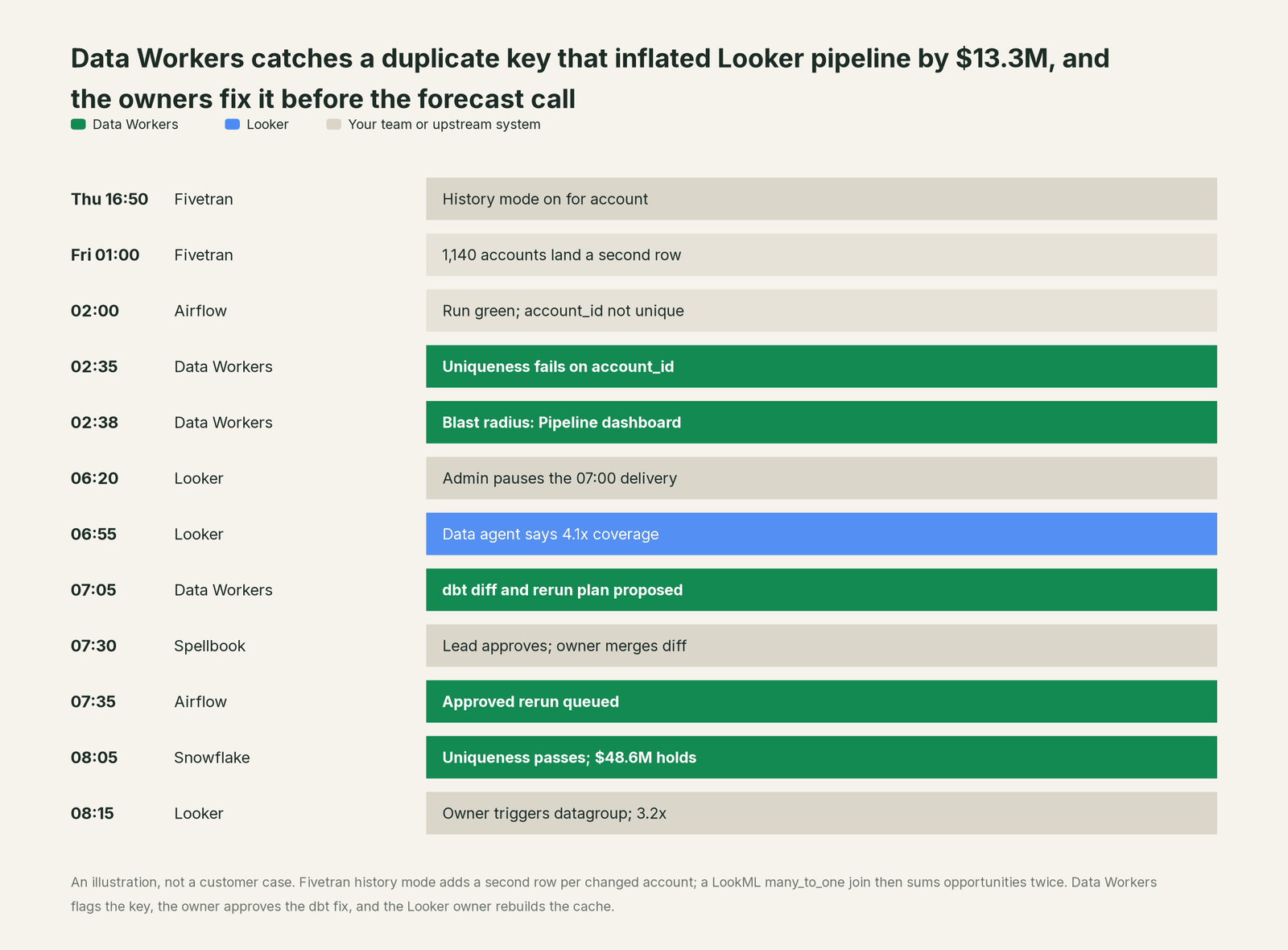
Every tool did its job. Fivetran kept history as configured, dbt built what the model said, and the LookML was correct for the table it was written against. The problem lived between them: a warehouse change that quietly broke an assumption written into an Explore. Data Workers caught it before business hours, a named person approved the fix, and the forecast call opened on the right number.
| Job | What Looker does | What Data Workers does |
|---|---|---|
| The metric | Defines measures, dimensions, Explores and join relationships in LookML, versioned in Git | Records the measures and joins your team brings in as governed context, tied to the tables and dbt models they read |
| The answer | Serves Explores, dashboards, deliveries, embeds and Conversational Analytics data agents from one model | Checks the tables under each Explore after every load (duplicate keys, nulls, row counts) and holds headline values to their baseline |
| The break | Shows whatever the warehouse returns; validators confirm the LookML still compiles | Catches the broken assumption, traces it to the model that caused it and lists the dashboards and Explores it reaches |
| The fix | Owners edit LookML, rebuild PDTs, trigger datagroups and pause deliveries | Proposes the upstream fix as a diff for its owner, routes it to a named approver and queues the approved rerun |
| The proof | Rebuilds the cache and answers again | Re-checks the tables, compares the recorded value and writes a receipt with cause, diff, approver and undo |
Why doesn't Looker just do this itself?
Looker made a deliberate, sensible bet: define each metric once in code, query the warehouse live, and let every person and agent answer from that one model. Its guardrails fit that job. Looker CI runs the LookML, SQL, Content and Assert validators, and since August 2026 it can run when a dbt Cloud CI job finishes, catching dbt changes that would break Explore SQL. The managed MCP server starts with every tool disabled, labels each one read or write, and gives an agent only its user's roles and access. Conversational Analytics grounds every answer in the LookML schema and the agent's instructions.
All of that protects the model. The change that broke Friday morning never touched the model, and a duplicate key breaks no SQL. It came through an ingestion setting, a source system and a dbt run, in tools Looker doesn't run. Fixing it meant a dbt change, an analytics lead's approval, an Airflow rerun and a warehouse check afterwards. That is a different product with different liability: cross-system context, blast-radius scoping, approvals, rollback and receipts across vendors. It is the product Data Workers is, and it builds on the Looker instance your business already reads.
Every tool owns a slice. Data Workers covers the whole lifecycle
Looker owns one slice outright: defining the business's metrics in LookML and serving them to every person, dashboard and agent. Each point tool adds another console, contract and handoff. Data Workers covers the whole lifecycle with one context, one approval flow and one audit trail, and builds on the Looker instance you already run.
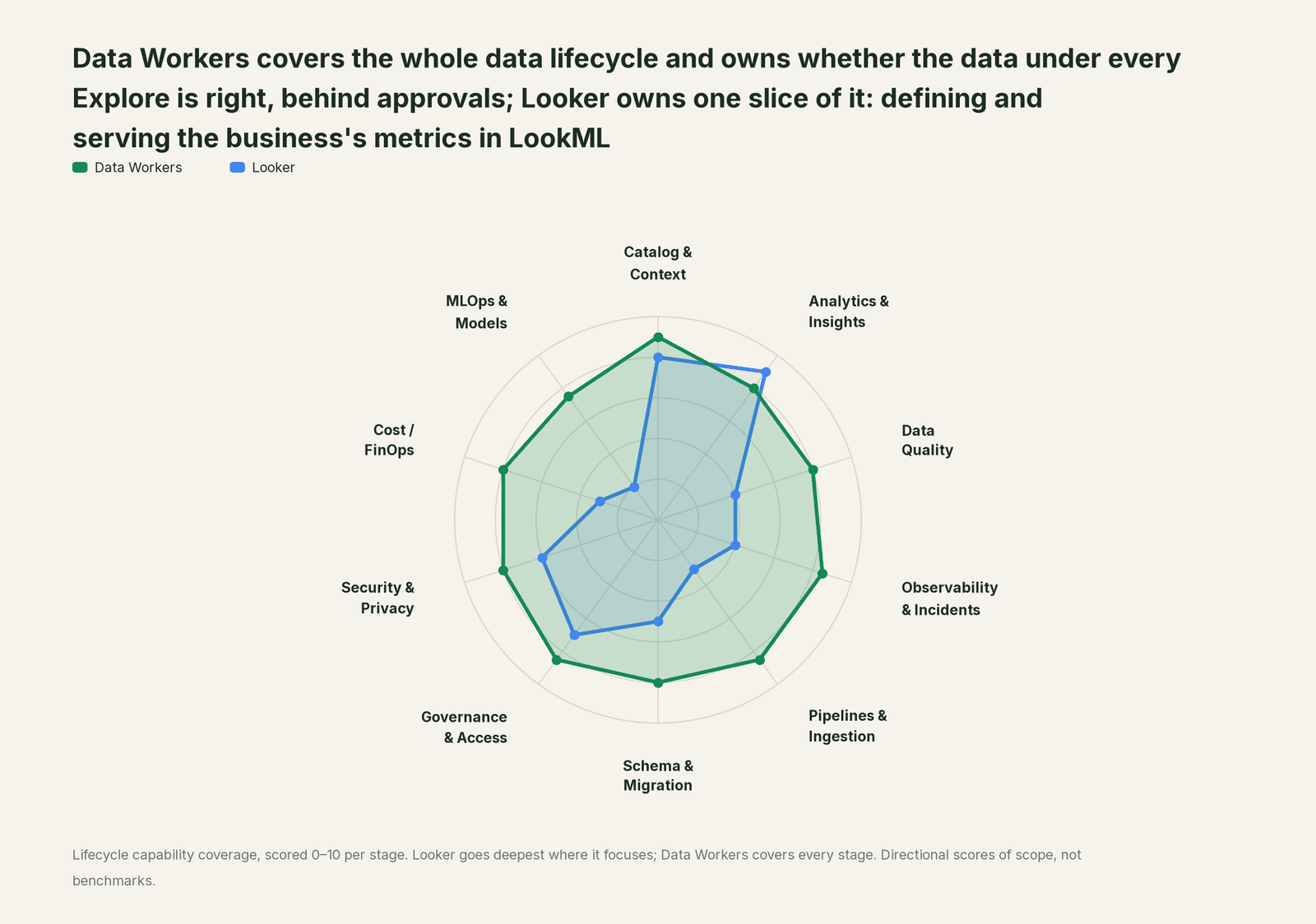
| Stage | Data Workers | Looker | Why we scored it this way |
|---|---|---|---|
| Catalog & Context | 9 | 8 | LookML is a strong semantic model: views, measures, Explores and joins in Git, and Semantic Search (GA Sep 2026) finds fields across it. Data Workers keeps one governed context graph across every platform and joins the LookML the team brings in to lineage, quality and owners. |
| Analytics & Insights | 8 | 9 | Looker's home stage: Explores, dashboards, Looks, embedded analytics and Conversational Analytics (GA since Nov 2025) all answer from LookML. Data Workers answers through governed definitions and makes sure the tables under them are right. |
| Data Quality | 8 | 4 | LookML data tests and Looker CI's Assert validator check what someone wrote a test for. Data Workers checks the tables under each Explore after every load for duplicate keys, nulls and row counts, and holds headline values to a baseline. |
| Observability & Incidents | 8.5 | 4 | System Activity and Looker alerts watch Looker's own usage and metric values. Data Workers traces a wrong tile back to the load or model that caused it, proposes the fix and verifies it. |
| Pipelines & Ingestion | 8.5 | 3 | PDTs and datagroups build and cache derived tables inside Looker. Data Workers queues approved dbt and orchestrator reruns for the pipelines that feed the warehouse. |
| Schema & Migration | 8 | 5 | Looker CI runs the LookML, SQL and Content validators on LookML changes and, since Aug 2026, after dbt Cloud CI jobs. Data Workers reviews dbt changes and their manifest diff and scopes the blast radius across the models and dashboards they reach before merge. |
| Governance & Access | 8.5 | 7 | Roles, model sets, access filters and an MCP tool allowlist with read or write labels govern Looker itself. Data Workers routes every data change to a named approver. |
| Security & Privacy | 8 | 6 | Access filters, VPC Service Controls and CMEK protect what Looker serves. Data Workers leaves a receipt on every data change and proposes masking for the owner to apply. |
| Cost / FinOps | 8 | 3 | Datagroup caching and PDTs cut repeat warehouse queries for Looker's own traffic. Data Workers reads Snowflake spend down to the dbt model and BigQuery spend from the Jobs API. |
| MLOps & Models | 7.5 | 2 | Advanced Analytics runs Python on query results in Conversational Analytics. Data Workers keeps the data under models and agents healthy. |
How Looker and Data Workers work together
Your people stay where they are: Explores, dashboards and data agents for the business, Claude Code or Gemini CLI with the Looker MCP server for engineers, Slack for alerts and approval requests. Spellbook Data Catalog (in preview) is where the data team looks: each proposed fix, its blast radius, approver and rollback. Underneath, Data Context Wizard keeps one governed context graph, the Data-Agents Swarm does the work with more than 20 specialist agents, the Autonomous Data-Conductor runs each fix end to end (detect, diagnose, fix, review, verify, remember), and per-domain guardrails hold approvals, receipts and rollback.
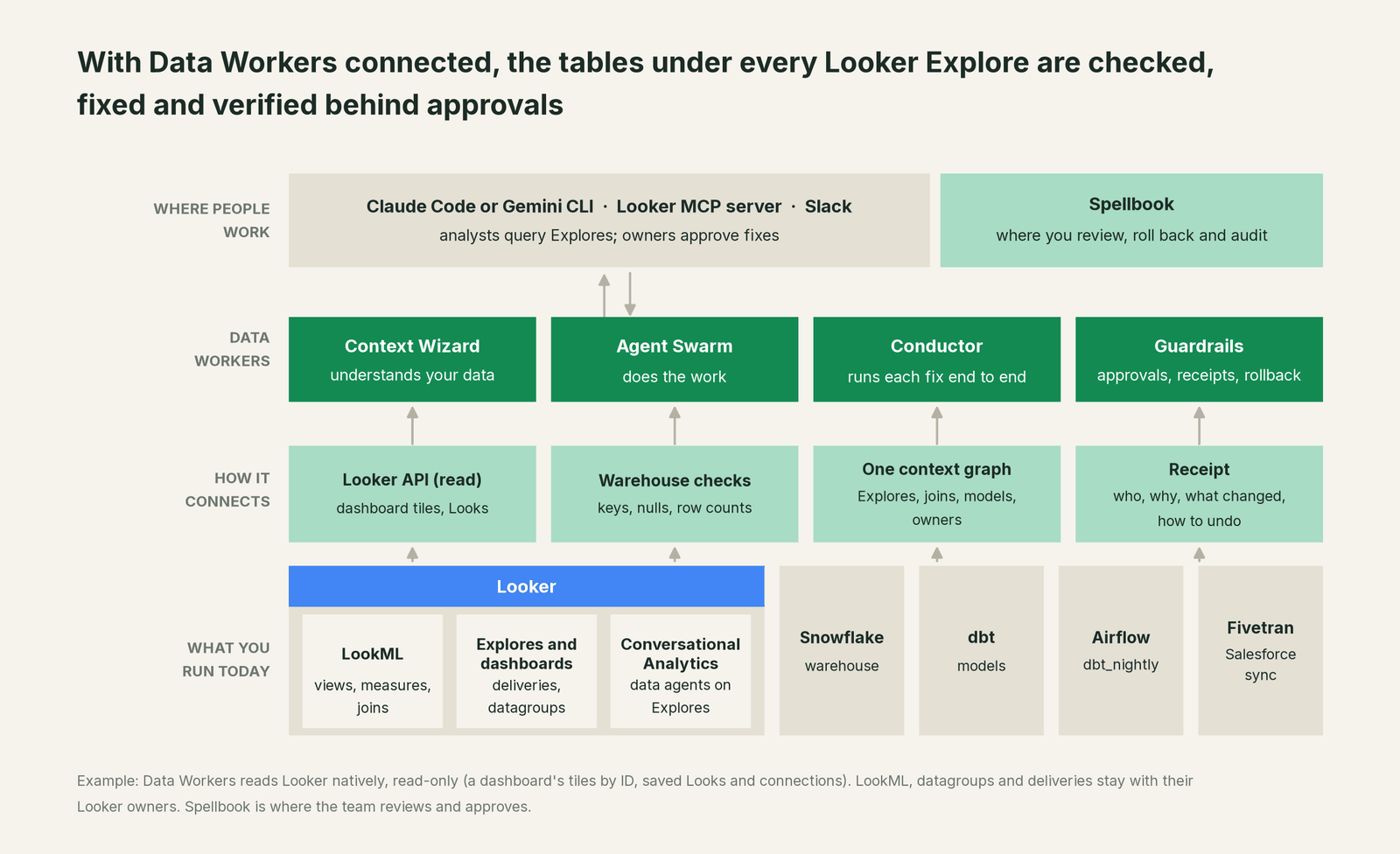
What Data Workers reads from Looker. Natively and read-only, through the Looker API: a dashboard's tiles by ID, saved Looks and the database connections. LookML comes in through your coding agent, which reads the project and hands each measure and the joins it depends on to Context Wizard as governed definitions; LookML to Data Context Wizard walks through that path. Dashboards enter the blast radius through context-graph notes your team records; when a fix goes through a pull request, change review's lineage diff also reads the dbt exposures your project declares. Data Workers writes nothing to Looker: no LookML edits, datagroup triggers, PDT rebuilds or delivery changes. BI is read by design.
What Data Workers checks under each Explore. run_quality_check runs nulls, uniqueness on id columns and minimum row counts on Snowflake tables (and BigQuery with a service-account key); get_quality_score rolls them up. monitor_metrics holds the values your team records, such as open pipeline from fct_opportunities or hours since the last load, against their baseline. explain_table returns a table's definition, lineage, documentation and trust score. trace_cross_platform_lineage and blast_radius_analysis follow a table back to its source and forward to every model and declared dashboard. diagnose_incident, remediate and get_incident_history run and record the incident. Your data stays in your systems: the agents, warehouse credentials and model key run in your infrastructure, and the hosted Conductor sees workflow metadata only.
Setup over MCP today. Clone the open-source repository and add start-agent.sh entries to your client's MCP config, as the client setup docs show. The Looker-managed MCP server can sit next to Data Workers in the same client for your own queries; Data Workers' agents never call it. Have your Looker admin enable only read tools such as looker_query.
// Example: .mcp.json for Claude Code. The looker entry is your team's own
// connection to the Looker-managed MCP server; Data Workers does not call it.
{
  "mcpServers": {
    "looker": {
      "type": "http",
      "url": "https://LOOKER_INSTANCE_URL/mcp",
      "oauth": { "clientId": "CLIENT_GUID", "callbackPort": 8080 }
    },
    "dw-context-catalog": {
      "command": "/path/to/dataworkers-claw-community/start-agent.sh",
      "args": ["dw-context-catalog"]
    },
    "dw-quality": {
      "command": "/path/to/dataworkers-claw-community/start-agent.sh",
      "args": ["dw-quality"]
    },
    "dw-incidents": {
      "command": "/path/to/dataworkers-claw-community/start-agent.sh",
      "args": ["dw-incidents"]
    }
  }
}
List the tools with your client's own command (for example /mcp in Claude Code). An analyst can then ask "is everything under the Sales Explore healthy?" and get the Explore's fields from Looker's server and the lineage, checks and open incidents from Data Workers in one answer.
Where fixes go. Data Workers proposes the change as a diff for the owner to merge, usually a dbt model or source mapping, with its blast radius and undo step. It opens the pull request itself only when your team turns on the dbt GitHub pull-request target. After approval it queues the dbt or orchestrator rerun; Looker's owners decide when caches rebuild and deliveries resume.
One request, L0 to L4. The autonomy ladder is set per domain.

- •L0 manual. Data Workers is connected and not acting. Analysts chase wrong tiles by hand.
- •L1 observe. Data Workers checks every table under your Explores and logs what it would do. Nothing changes.
- •L2 propose. Data Workers drafts the upstream fix with its blast radius. A named owner approves in Spellbook before anything runs.
- •L3 act reversibly. For proven classes, such as rerunning a dbt model after an approved staging fix, Data Workers acts, verifies and can roll back.
- •L4 autonomous. For a narrow class in one domain, Data Workers fixes and verifies on its own and posts the receipt.
Approvals go to a named person; a request nobody answers expires and escalates, and never grants itself. No agent can promote its own work. Read is it safe to let AI agents change production data, how approvals work in practice and where does our data go for the full safety model.
If you also run Tableau or Power BI, Data Workers + Tableau, Power BI and Looker covers the three-tool wiring, and the BI MCP server roundup compares the servers. For the layers around Looker, see You're on Fivetran, You're on the dbt Semantic Layer and You're on Tableau; for a side-by-side, Looker vs Tableau.
What changes for your team
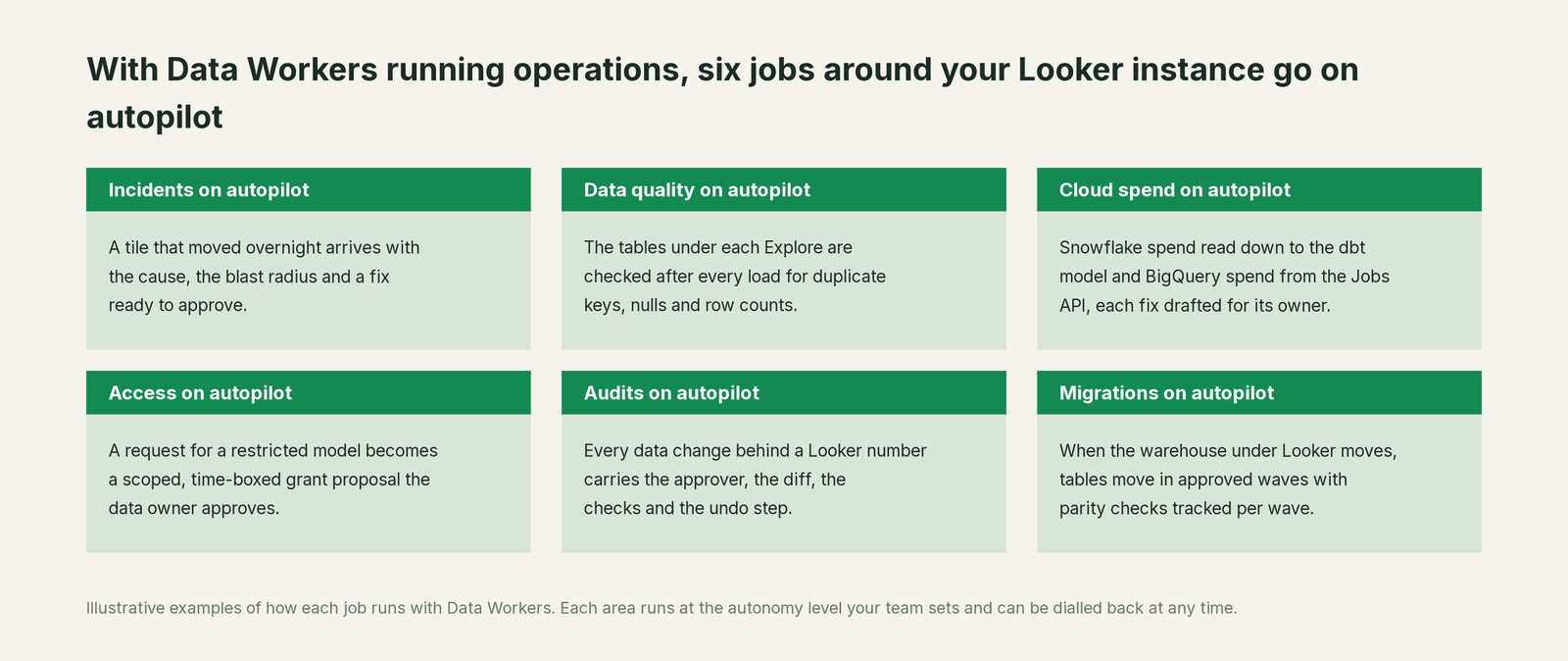
Looker teams lose much of the week to work that isn't modeling: is a moved tile the measure, the model or the data? With Data Workers next to Looker, those jobs run on autopilot at the level you set.
- •Incidents. A tile that moved overnight arrives with the cause, the blast radius and a fix ready to approve.
- •Data quality. The tables under each Explore are checked after every load for duplicate keys, nulls and row counts.
- •Cloud spend. Snowflake spend is read down to the dbt model and BigQuery spend from the Jobs API, each fix drafted for its owner.
- •Access. A request for a restricted model becomes a scoped, time-boxed grant proposal the data owner approves.
- •Audits. Every data change behind a Looker number carries the approver, the diff, the checks and the undo step.
- •Migrations. When the warehouse under Looker moves, tables move in approved waves with parity checks tracked per wave.
Keep Looker, or consolidate?
Keep Looker if you love it; Data Workers works with it from day one. Many teams consolidate once Data Workers runs that slice too.
For most teams the answer is to keep Looker: LookML, the Explores your business trusts, embedded analytics and Conversational Analytics belong there, and Data Studio (formerly Looker Studio) stays where it is too. What teams consolidate is the tooling around it: a separate data-quality tool, scripts that diff dbt changes against LookML, and a spreadsheet of metric owners. If you are weighing building this yourself on the Looker MCP server, read build it ourselves with Claude Code and MCP servers: connecting servers is the easy part; cross-system context, approvals and rollback are the work.
The case for your CFO
The outcome: the numbers Looker shows the board, the sales team and every data agent stay right, and when something upstream breaks, the fix arrives before the meeting, with a named approver.
The risk story: Data Workers reads Looker and changes nothing in it. It checks the warehouse tables under each Explore, proposes upstream fixes as diffs, and nothing runs until the named owner approves. Every change is verified afterwards and leaves a receipt: what broke, what changed, who approved it and how to undo it. Autonomy is set per domain from L0 manual to L4 autonomous, and an org-wide stop halts all autonomous dispatch. There is zero migration.
Why now: Conversational Analytics turned every Explore into an answer engine. A broken table now reaches a sales director as a confident sentence, before any analyst sees the chart.
The first win: one Explore that feeds the forecast or the board pack, with every table it joins checked after each load. What stays the same: your LookML, your Looker roles and deliveries, your Fivetran, dbt and Airflow, and your review process. For the numbers, see the ROI of agentic data operations.
The sentence to repeat upstairs: "Looker keeps defining our metrics; Data Workers makes sure the data under them is right, and a named owner approves every fix with a receipt."
Getting started
Start with a pilot. Pick the Explore behind a number people act on, such as pipeline coverage or the board revenue tile, connect Data Workers read-only to Looker and the warehouse, and let it check every table that Explore joins for a few weeks before turning on the first fix class. The pilot path and plans are on the pricing page, and the pilot is credited in full against the first year.
FAQ
Does Data Workers change our LookML or our Looker content? No. It reads Looker natively and read-only: dashboard tiles by ID, saved Looks and connections. LookML changes go through your developers, Development Mode and Looker CI as they do today.
Does Data Workers refresh dashboards or reset datagroups? No. After an approved fix and rerun, your datagroup triggers or your BI owner rebuild the cache. Data Workers re-checks the warehouse tables and records the result.
We have LookML data tests and Looker CI. Why add this? Keep them. They check the model and the tests your developers wrote. Data Workers checks the tables after every load, traces a failure to the dbt model behind it, and carries the fix through approval and verification.
Our Conversational Analytics agent gave a wrong answer. Can Data Workers tell why? Usually the answer was faithful to LookML and the data underneath was wrong. Data Workers traces the Explore's tables back to the load or model that changed, and its receipt records the cause and the fix.
Do Data Workers' agents use the Looker MCP server? No. Your team can run it side by side in the same client. Data Workers relies on its own Looker read and its warehouse, dbt and orchestrator connections.
Which warehouses does this cover? The table checks run natively on Snowflake, BigQuery and Postgres. Across 50+ connectors, Data Workers also works natively with dbt, Airflow, Dagster and Prefect; what integrations Data Workers supports lists what each one reads and changes.
Sources
- •Google Cloud, Conversational Analytics in Looker overview (both editions; up to five Explores; dashboard agents and triggered agentic workflows in Preview; responses based on the LookML schema and agent instructions; Advanced Analytics runs Python), https://docs.cloud.google.com/looker/docs/conversational-analytics-overview (last updated Sep 30, 2026; checked Oct 3, 2026)
- •Google Cloud, Looker release notes (Conversational Analytics GA Nov 12, 2025; managed MCP server Preview in the Looker 26.8 entry dated May 27, 2026; Advanced Analytics GA May 2026; Looker CI after dbt Cloud CI jobs, Aug 2026; VS Code extension GA Sep 10, 2026; Semantic Search GA, entry added Sep 22, 2026), https://docs.cloud.google.com/looker/docs/release-notes (checked Oct 3, 2026)
- •Google Cloud, Looker-managed MCP server (Preview;
/mcpendpoint; OAuth; inherits the user's roles and access; Claude Code config), https://docs.cloud.google.com/looker/docs/mcp (last updated Sep 30, 2026; checked Oct 3, 2026) - •Google Cloud, Admin settings: Model Context Protocol (all tools disabled by default; read or write access shown per tool), https://docs.cloud.google.com/looker/docs/admin-panel-platform-mcp (last updated Sep 30, 2026; checked Oct 3, 2026)
- •Google Cloud, Understanding symmetric aggregates (unique primary key and correct join relationship), https://docs.cloud.google.com/looker/docs/best-practices/understanding-symmetric-aggregates (checked Oct 3, 2026)
- •Google Cloud, LookML join relationship parameter (default
many_to_one), https://docs.cloud.google.com/looker/docs/reference/param-explore-join-relationship (checked Oct 3, 2026) - •Google Cloud, Data Studio release notes (Looker Studio rebranded as Data Studio, Apr 16, 2026), https://docs.cloud.google.com/data-studio/release-notes (checked Oct 3, 2026)
- •Fivetran, History mode (
_fivetran_active; switching a table to history mode), https://fivetran.com/docs/core-concepts/sync-modes/history-mode (checked Oct 3, 2026) - •Fivetran, Salesforce connector (history mode selectable for all tables), https://fivetran.com/docs/connectors/applications/salesforce (checked Oct 3, 2026)
- •Data Workers, Client setup (open-source docs), https://dataworkers.io/opensource-docs/client-setup/ (checked Oct 3, 2026)
- •Data Workers open-source repository, agent tools and start-agent.sh, https://github.com/DataWorkersProject/dataworkers-claw-community (checked Oct 3, 2026)