LookML to Data Context Wizard: Give Every Agent Your Looker Definitions, Checked Against dbt
How to bring LookML views, measures and Explores into Data Context Wizard over MCP today, check them against dbt metrics, and settle each conflict with a named owner, a drafted LookML change and a receipt.
Your Looker team has spent years in LookML. Every view says what a column means, every measure says how revenue is summed and filtered, and every Explore says which joins are safe. Dashboards, Conversational Analytics and the Looker MCP server all answer from that model. The trouble starts one hop away. The same net_revenue also lives in a dbt MetricFlow metric, and maybe in a Snowflake semantic view or a Power BI model, and those copies drift without anyone noticing until two numbers show up in one meeting.
LookML holds the meaning of your Looker metrics. Data Context Wizard plugs that LookML in as a first-class source with provenance, joins it to lineage, quality and usage and to every other platform's definitions, and gives every agent one governed view. This guide shows how to connect the two over MCP today, what moves in each direction, and one run end to end with the receipt it leaves.
Key takeaways
- •LookML stays the Looker source of truth. Data Workers reads your LookML project; every change goes back as a drafted LookML change your developers open, review, merge and deploy.
- •Connect over MCP today. Your coding agent reads views, measures and Explores through the Looker-managed MCP server, the Looker API or the project's Git repository, and records each measure in Context Wizard with its source file, owner and commit.
- •Conflicts go to a named owner. When a LookML measure and a dbt metric disagree, the conflict lands in Spellbook for the owner, and agents see both versions with sources until the owner decides.
- •Every decision leaves a receipt: the variants, the approver, the checks and the time.
What this connects
On the Looker side: the LookML project, which lives in Git. Looker's Development Mode gives each developer a personal dev- branch, changes merge to the production branch and deploy, and teams can require pull requests through their Git provider. Looker Continuous Integration (GA) runs the LookML, Content, SQL and Assert validators on those pull requests through its GitHub app, on a schedule, or when a dbt Cloud CI job finishes. The Looker API 4.0 returns every model and Explore, including each field's SQL, through lookml_model_explore. The Looker-managed MCP server (Preview) sits at your instance URL plus /mcp, with OAuth 2.1 and the connecting user's Looker permissions. An admin turns its tools on from the MCP page in the Admin panel; they start disabled.
On the Data Workers side: Data Context Wizard, run by the Data Context & Catalog agent. Data Workers is the agentic data platform that runs the whole data lifecycle, and Context Wizard is the part that keeps one governed context graph across every platform. It imports dbt MetricFlow, Databricks metric views and Wren MDL directly, and reads the live dbt Semantic Layer (the Data Workers + dbt guide covers that side). LookML comes in through your coding agent: it reads the project over the Looker MCP server, the API or Git, and hands each measure to Context Wizard with define_metric, which records the expression, grain, dimensions, owner and source through the governed write path. For other semantic layers, read Data Workers with Cube, AtScale, MetricFlow and Ossie. For checking the number on a Looker dashboard after a fix, read Data Workers + Tableau, Power BI and Looker.
What moves in each direction
| From LookML into Data Workers | From Data Workers back to Looker and your team |
|---|---|
Views and measures: sql, type, filters, read from the LookML files | A conflict report: LookML and dbt side by side, each with its source and when it was read |
Explores and joins, with each field's SQL, from lookml_model_explore | An owner review in Spellbook, routed to the named owner of the metric |
| Git history: who changed a measure, and in which commit | A drafted LookML change, for your developers to open as a pull request on your LookML repo |
| Query activity from System Activity: which Explores people use | The approved definition, served to every agent that asks Data Workers over MCP |
| Model and project owners | A receipt for every decision |
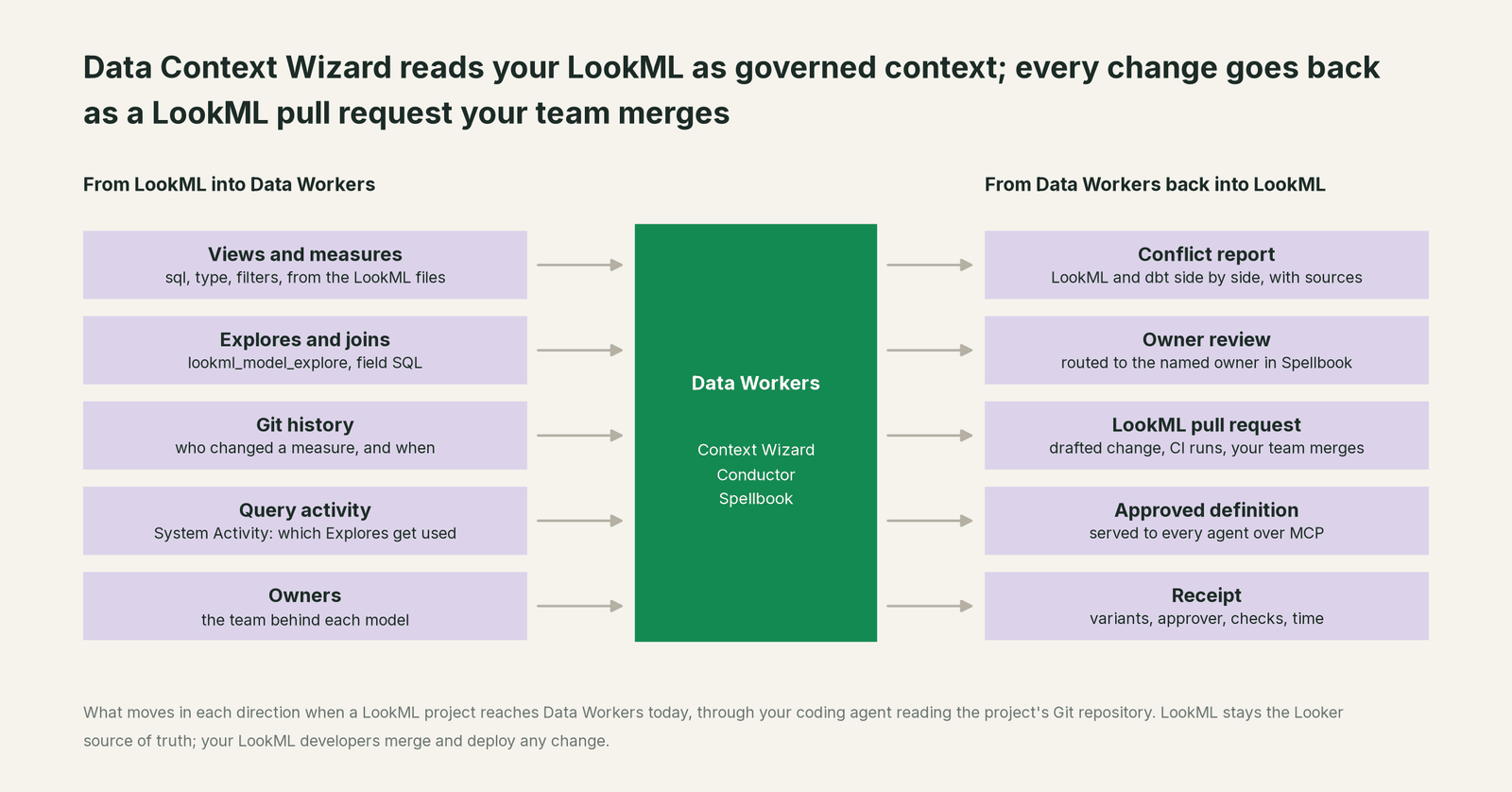
Nothing in the right-hand column changes Looker by itself. LookML changes go through your pull request, your Looker CI and your deploy, the same path your developers use today.
Prerequisites
- •A Looker service user with a least-privilege role:
see_lookmlandexploreon the models you want read, anddeveloponly if you want the agent to read through Development Mode. - •The managed MCP server enabled for the tools you want (model, Explore and project file reads), if your instance is Looker-hosted. Customer-hosted instances use MCP Toolbox for Databases, the Looker API and the Git repository instead.
- •Read access to the LookML repository, plus a developer or coding agent to open drafted changes as pull requests.
- •dbt: a Semantic Layer service token, or the compiled
semantic_manifest.json, for the metrics you want checked. - •An owner per metric, named in Spellbook Data Catalog (in preview), so every conflict has somewhere to go.
Setup
Data Workers agents are MCP servers. Register Context Wizard next to the Looker MCP server in the client your team already uses: Claude Code, Codex or Cursor.
Example (.mcp.json for Claude Code; values are placeholders):
{
  "mcpServers": {
    "looker": {
      "type": "http",
      "url": "https://<your-instance>.looker.app/mcp"
    },
    "dw-context-catalog": {
      "command": "npx",
      "args": ["-y", "@data-workers/dw-context-catalog"],
      "env": {
        "DBT_SEMANTIC_LAYER_TOKEN": "${DBT_SL_TOKEN}"
      }
    }
  }
}
The client runs Looker's OAuth flow on first connect, so the session carries the service user's permissions. Then ask in plain words: "Read the measures in our finance model, compare them with our dbt metrics, and show me every metric defined differently." The coding agent reads the LookML files or the Explore metadata, records each measure with define_metric (source file, commit, owner, expression), pulls the dbt side through the Semantic Layer reader, and runs scan_for_contradictions across the two. Everything starts at L1, observe: Data Workers reads and reports, and changes nothing.
One run, end to end
Here is a run most teams on Looker and dbt will recognize. It's an illustration, not a customer case. Seven systems are involved: the dbt repo on GitHub, the dbt platform, the LookML repo, Looker, BigQuery, Spellbook and a coding agent.
| Time | System | What happens | Who decides |
|---|---|---|---|
| 08:40 | GitHub (dbt) | A pull request changes the dbt net_revenue metric to exclude refunded orders as well as cancelled ones. It merges. | An engineer |
| 09:05 | dbt platform | The job builds; the dbt metric changes. | dbt |
| 09:20 | Looker | Data Workers reads orders.net_revenue from the finance model. The measure still filters out cancelled orders only. scan_for_contradictions flags the conflict. | Data Workers, read-only |
| 09:22 | BigQuery | Data Workers runs both definitions read-only for September: a 2.1% gap. System Activity shows the Explore feeds the month-end close dashboard. | Data Workers, read-only |
| 09:30 | Spellbook | The conflict goes to the Promotion Inbox, tagged with the metric's named owner, the finance analytics lead, with both expressions, their files and the dbt commit. | Data Workers routes |
| 10:10 | Coding agent | An analyst asks for September net revenue through Data Workers. resolve_metric returns both candidates with sources instead of picking one silently. | Data Workers, read-only |
| 11:15 | Spellbook | The owner approves the dbt definition: refunds come out. | The named owner |
| 11:25 | GitHub (LookML) | Data Workers drafts the change to views/orders.view.lkml and the coding agent opens it as a pull request, citing the approval. | Data Workers proposes |
| 11:40 | GitHub (LookML) | Looker CI runs; the LookML and Content validators pass. | Looker CI |
| 12:05 | Looker | A LookML developer merges and deploys to production. | A LookML developer |
| 12:20 | BigQuery | Data Workers re-reads the measure, runs both queries again, confirms they match, and closes the conflict with a receipt. | Data Workers, read-only |
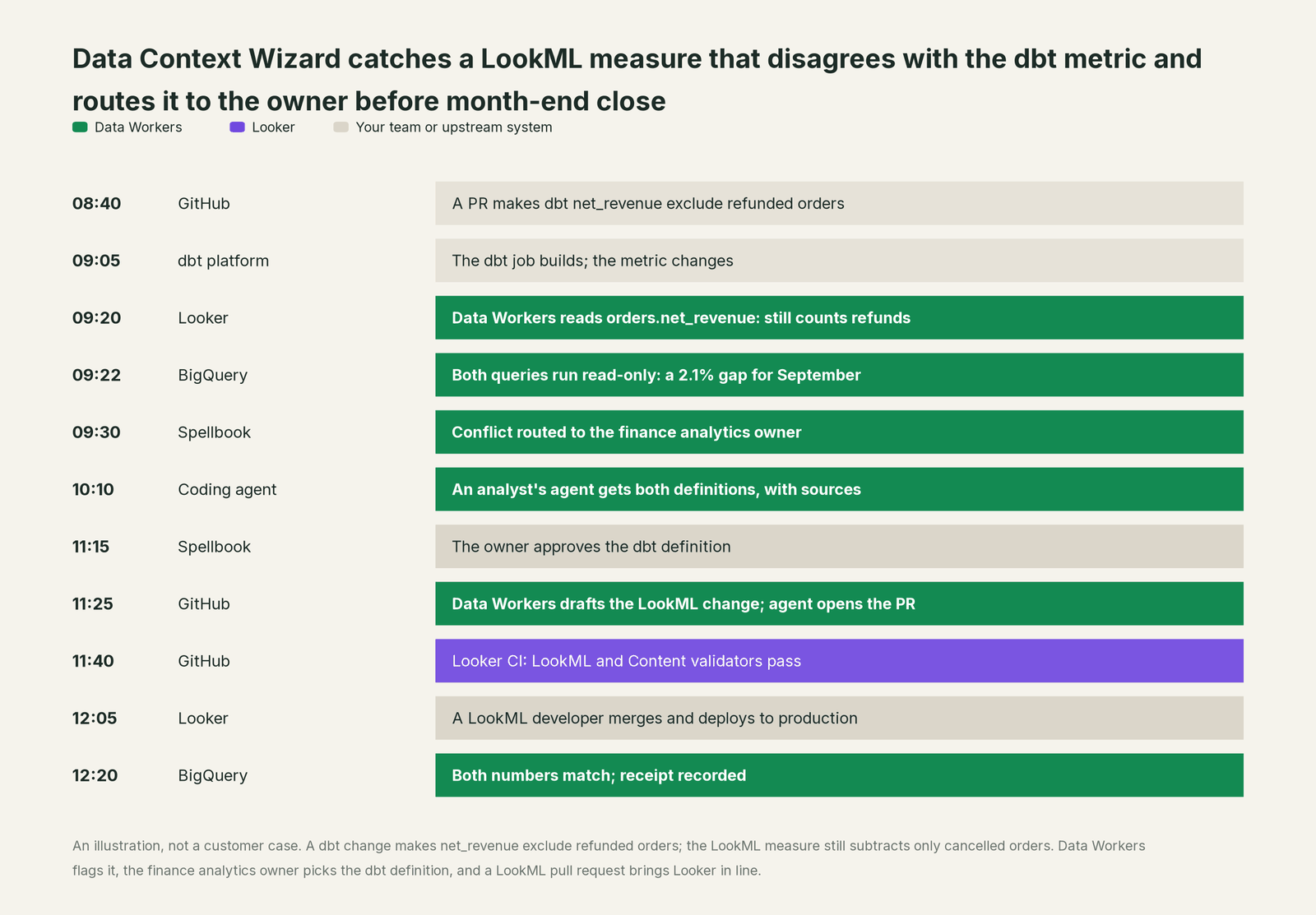
The pull request is small and reviewable. Example (the drafted LookML change):
measure: net_revenue {
  type: sum
  sql: ${sale_price} ;;
  filters: [status: "-cancelled, -refunded"]
  value_format_name: usd
}
Had the owner chosen the Looker definition, the proposal would have been a dbt diff instead, and the LookML would never have changed.
The receipt. resolve_contradiction only accepts a named human approver, and the write goes through the governed path: PII scrub, tenant isolation, an authority guard that stops any agent approving its own work, and a hash-chained log. The receipt, fetched with get_change_receipt, holds:
| Field | Value in this run |
|---|---|
| Metric | net_revenue, finance domain |
| Variants | LookML orders.net_revenue (excludes cancelled; read 09:20); dbt MetricFlow (excludes cancelled and refunded; commit at 08:40) |
| Approved | The dbt definition, as authoritative |
| Approver | The finance analytics lead, 11:15 |
| Change | LookML pull request, Looker CI passed 11:40, merged and deployed 12:05 |
| Checks | Both definitions re-read and both queries re-run at 12:20; numbers matched |
| Supersedes | The earlier LookML measure, kept for audit |
Why doesn't Looker just do this itself?
Looker built LookML for one job: making Looker the place a metric means one thing, for every dashboard, every Explore and every agent that queries through it. Inside that job the design is right. LookML is authoritative in its instance, the MCP server and the Open SQL Interface serve it with Looker's permissions, and Development Mode plus pull requests keep changes reviewed.
Reconciling LookML with definitions that other tools own is a different job. Looker CI can run when a dbt Cloud CI job finishes, which catches LookML that breaks after a dbt change; a measure that still runs but now means something different than the dbt metric is the case Data Workers settles. Looker's MCP server and API have no input for a dbt or Snowflake definition to compare against, and Apache Ossie, the open interchange format, has no LookML converter today. Deciding which version wins means approvals, rollback and accountability for a change in a dbt repository or a warehouse that Looker doesn't run. That cross-system layer, with a named owner and a receipt for every decision, is the product Data Workers is.
Next autonomy step
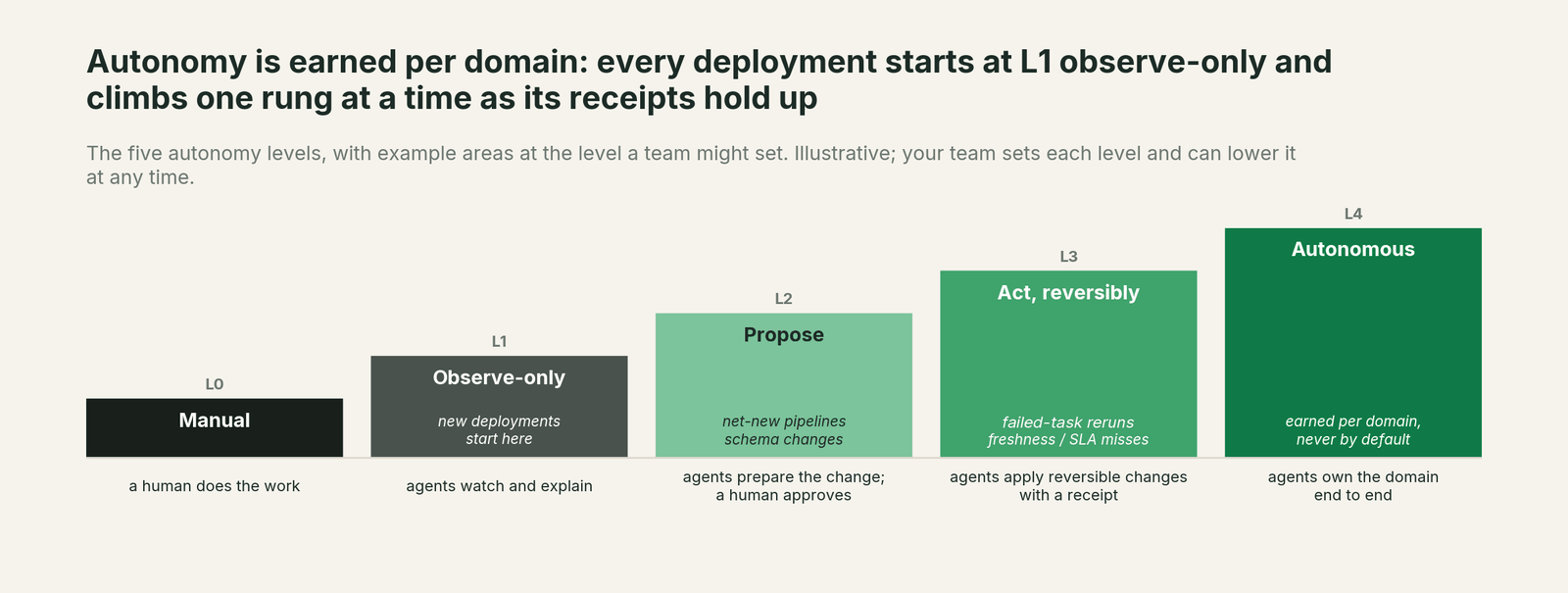
Start at L1, observe, for one domain: Data Workers reads your LookML and dbt metrics and reports every conflict. When the reports are right, move metric conflicts to L2, propose: Data Workers drafts the LookML or dbt diff for the owner, with the variants and the blast radius (the Explores, Looks and dashboards that use the measure) attached. Promotion of a definition to authoritative stays a human decision at every level, and Data Workers' authority guard enforces that in the write path. L3 suits reversible, low-risk work such as refreshing LookML description text from an approved definition. For how the levels play out once Looker is in your stack, read you're on Looker.
The case for your CFO
The outcome. Every number in the close and the board pack has one approved definition, and every dashboard and agent that reads it gives the same answer, with a record of who approved it.
The risk story. The real exposure is two revenue numbers in front of the board, found after the deck ships. At L1 Data Workers only reads LookML, dbt metrics and query activity, and reports. At L2 it drafts diffs; your LookML developers and your Looker CI decide what merges. No agent can promote its own definition, every change has a rollback path in Git, and every receipt shows the variants, the approver, the checks and the time. Nothing migrates.
Why now. Looker opened its model to agents this year through the managed MCP server, and dbt, Snowflake and Databricks keep growing their own semantic layers. More agents read more copies of each metric every quarter.
The first win. The measures behind the board pack: read them in LookML and dbt, and give each owner a list of conflicts with sources inside the first week of a pilot.
What stays the same. LookML, your Explores and dashboards, Looker CI, dbt, your roles and your deploy process.
The pilot path. Start with a pilot on one domain, read-only first. The pilot is credited in full against the first year.
One sentence for upstairs: "Our LookML stays the Looker source of truth; Data Workers checks it against dbt and every other definition, and a named owner approves the one version every agent uses."
FAQ
Does Data Context Wizard import LookML directly? Your coding agent reads the project over the Looker MCP server, the Looker API or Git, and Context Wizard records each measure as a governed definition with its file, commit and owner. Its direct importers cover dbt MetricFlow, Databricks metric views and Wren MDL.
Will Data Workers edit our LookML? Only through a pull request your developers open from the drafted change. They review it, Looker CI validates it, and your team merges and deploys.
What about refinements and `extends`? The agent reads the resolved Explore from the Looker API, so the definition it records is the one Looker actually runs, and the source files come from Git.
Can we use Apache Ossie to move LookML? Not today. Ossie's converters cover dbt, Snowflake, Databricks, Cube and others, but not LookML, so LookML comes across as LookML.
We run customer-hosted Looker. Does this work? Yes. The managed MCP server preview covers Looker-hosted instances; customer-hosted teams connect through MCP Toolbox for Databases, the Looker API and the Git repository.
Which Looker identity does the agent use? The service user you connect with OAuth. Looker tracks managed MCP server usage in System Activity and Cloud Audit Logs, so your admins can see what it read.
Sources
Looker capabilities and statuses, checked October 2, 2026: version control and deploying changes (Development Mode, branches, pull requests, advanced deploy), Looker Continuous Integration (GA; validators; pull request runs; updated September 30, 2026), the Looker API lookml_model_explore method, the Looker-managed MCP server (preview, endpoint, OAuth 2.1, Looker-hosted only; updated September 30, 2026), MCP admin settings (tools disabled by default), MCP Toolbox for Looker (model, query and LookML authoring tools; updated September 30, 2026), the Open SQL Interface (GA per the release notes; updated September 30, 2026), Looker release notes (managed MCP server in preview, usage tracked in System Activity and Cloud Audit Logs; Open SQL Interface generally available; CI triggers from dbt Cloud CI jobs, June 22, 2026; VS Code extension for LookML GA with MCP support, September 10, 2026), the Looker MCP announcement, and the Apache Ossie converters and ecosystem page. Product names and statuses change quickly; if we've got something wrong, tell us and we'll fix it.