Data Workers + Tableau, Power BI and Looker: A BI Integration That Checks the Number
A Tableau, Power BI and Looker integration for AI data agents: Data Workers traces a wrong dashboard number to its cause, names every dashboard it touches and checks the number against source.
Tableau, Power BI and Looker show the number. Data Workers makes sure it's right, and checks it again after every fix. That is the shape of this Tableau, Power BI and Looker integration: Data Workers reads what each dashboard depends on, traces a wrong number to the system that caused it, routes the fix through your reviews, and once each dashboard's refresh picks up the fix, checks the number it reads against the agreed query on the source. Every step leaves a receipt.
Your estate probably looks like this. Fivetran lands billing and CRM data in Snowflake, BigQuery or Databricks. dbt builds the marts. Then the number reaches people through more than one BI tool: finance lives in a Power BI semantic model with a scheduled import refresh, sales ops has Tableau workbooks on a published data source with a nightly extract, and the product team asks questions in a Looker Explore defined in LookML. When revenue looks wrong, the first question in every one of those tools is the same: is it the measure, the model, or the data underneath?
Data Workers is the agentic data platform that runs the whole data lifecycle around those tools. Here is how it wires into each of them, what it reads, what it sends back, and what stays exactly where it is.
Key takeaways
- •Your BI tools stay where people read the numbers. Workbooks, semantic models, LookML, refresh schedules and permissions stay in Tableau, Power BI and Looker.
- •Data Workers reads each tool as context. It maps every dashboard to the warehouse tables and definitions it depends on, through each tool's own API or MCP server today.
- •It checks the number behind the dashboard. After a fix, Data Workers runs the agreed query on the table the dashboard reads and on the source, and the receipt records both values. The vendor's MCP server can read the tile's own figure in the same session.
- •BI stays read by design. Data Workers fixes the cause where it lives, usually a dbt diff for the owner to merge, and its plan names each extract, model and cache to refresh, for your BI admins or the next scheduled refresh. DAX and LookML changes go to their owners as diffs.
- •Each vendor's AI keeps its job. Tableau MCP, the Power BI Authoring MCP server and Looker's MCP server and Conversational Analytics help people build and ask. Data Workers works across the estate behind them.
- •Start read-only. Connect read identities first and let Data Workers check one finance dashboard per tool after each refresh.
What Tableau, Power BI and Looker do, and why teams keep them
These three tools are where the business meets its data. Each one carries years of work: Tableau workbooks and calculated fields that sales ops trusts, Power BI semantic models with DAX measures and row-level security that finance signs off, and LookML that turns the warehouse into governed Explores. Teams keep them because people know them, permissions are set, and the definitions inside them took real effort to agree. Replacing a BI tool is a multi-year project nobody wants, and nothing on this page asks you to.
All three have moved fast on agents in 2026. Each now has an MCP server and its own AI for people asking questions.
| Tool | Agent and MCP surface | What it does | Status, October 2026 |
|---|---|---|---|
| Tableau | Tableau MCP (Apache 2.0, Tableau Supported) | Query published data sources through VizQL Data Service, explore content, Pulse, jobs, extract refresh tasks, flows; admin-only delete | Hosted at mcp.tableau.com for Tableau Cloud (any SKU); self-host for Tableau Server; v4.13.3, Sept 23, 2026 |
| Tableau | Write gate in Tableau MCP | Mutating tools run as preview, then confirm with a single-use token; with the confirm panel on, the last step needs a person's click | Documented per tool |
| Power BI | Power BI Authoring MCP server (formerly Power BI Modeling MCP) | Create and change tables, measures, relationships, calculation groups and security roles; run DAX; work with PBIP and TMDL | Hosted in preview; local generally available; v1.0.0, Sept 25, 2026 |
| Power BI | Write default | --readwrite is on by default, with a confirmation prompt once per database; --readonly is the safe mode | Documented in the server README |
| Power BI | Fabric IQ MCP | Natural language answers over semantic models, respecting RLS and OLS | Microsoft's consumption path for Power BI data |
| Looker | Looker managed MCP server | Governed queries, dashboard tile generation, LookML development, on the instance's /mcp path with OAuth | Preview |
| Looker | MCP Toolbox for Databases (Looker tools) | Query, Looks and dashboards, LookML file tools, health checks | Pre-1.0 tools |
| Looker | Conversational Analytics | Read-only questions over one Explore, or a data agent over up to five | GA; dashboard agents in preview |
Each tool also has the API surface your BI admins use to refresh on demand: Tableau's REST API runs extract refresh tasks, the Power BI REST API refreshes a semantic model and executes DAX queries, and the Looker API can mark a datagroup's cache stale with stale_before.
What Data Workers reads from each tool, and what it sends back
This is the core of the integration. Data Workers reads Tableau and Looker through their REST APIs, with the identity and scopes you grant; Power BI connects over its API or MCP server today, used by your team's assistant side by side with Data Workers. BI is read by design: the fix lands where the cause lives, and the refresh stays with the tool's owners.
| Data Workers reads | Data Workers sends back |
|---|---|
| Tableau: published data sources and workbooks through the REST API, mapped to the warehouse tables they read | Tableau: the extract refresh to run, named in the plan for your Tableau admin or the next scheduled refresh |
Power BI: semantic model tables, measures and Power Query sources (Authoring MCP in --readonly mode, or PBIP files in Git); refresh history | Power BI: the semantic model refresh to run, named in the plan; DAX changes as a diff for the PBIP/TMDL project's owner |
| Looker: LookML models, Explores and measures from the API and the project repo | Looker: the datagroup to mark stale, named in the plan; LookML changes as a diff for the owner to merge |
| The number behind the tile: the agreed read-only query on the table the dashboard reads, with Tableau MCP, Power BI's MCP server or Looker's MCP server reading the tile's own figure in the same session | A note to each dashboard owner: what changed, when it was fixed and when it was checked |
| Owners and users, so the blast radius names the people who read the number | The receipt, linked from Spellbook |
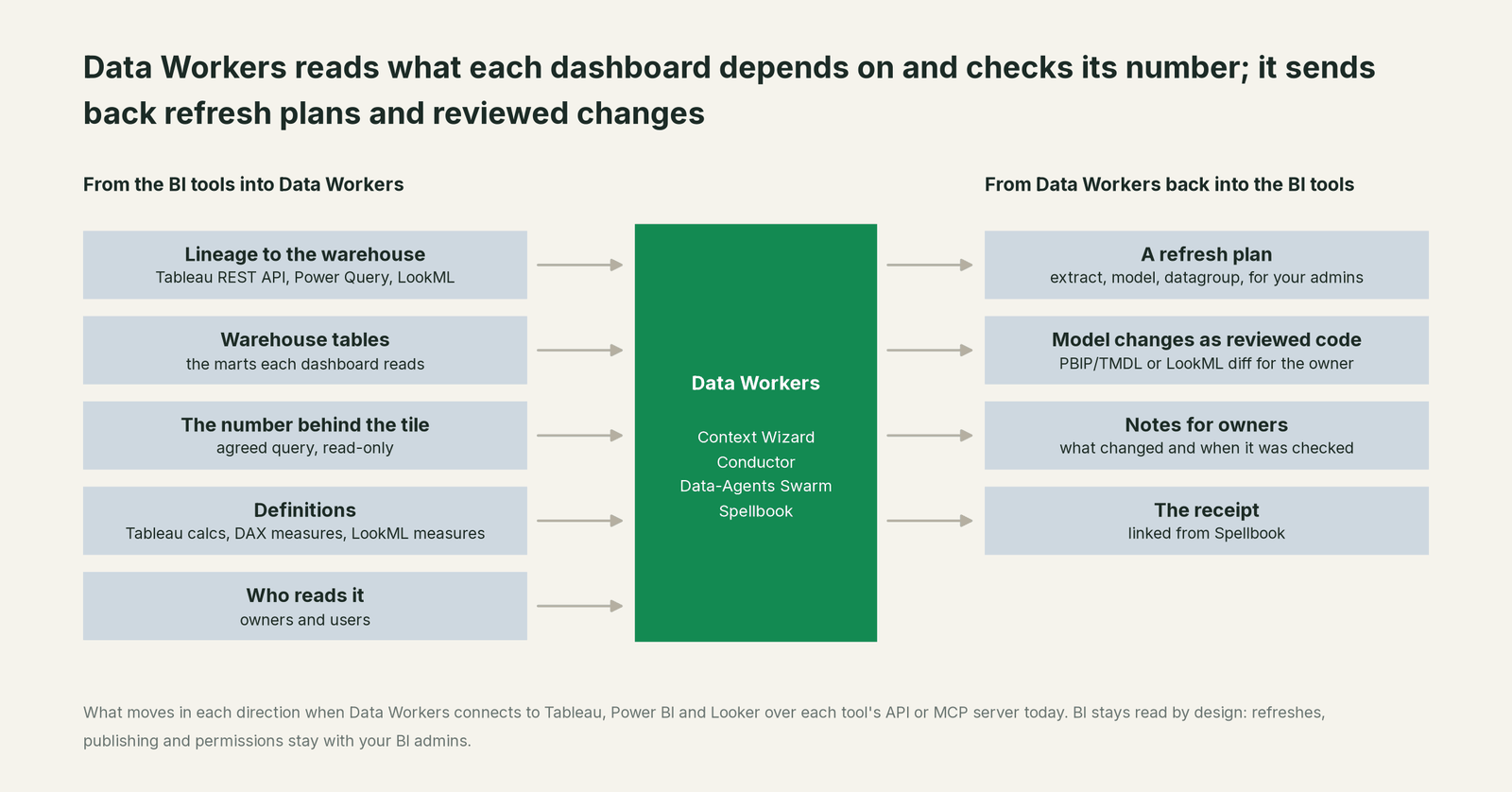
A few agents do most of the BI work. The Data Context & Catalog agent joins each dashboard's lineage to dbt and the warehouse in Data Context Wizard, so a measure called Revenue in Tableau, a DAX measure called Total Revenue in Power BI and a LookML measure called total_revenue all point back to the same column with their definitions side by side. The Incident Debugging agent follows a wrong number upstream. The Schema Evolution agent marks every dashboard that depends on a changed column. The Data Change Review agent posts the blast radius, down to named dashboards, on every dbt pull request. The Autonomous Data-Conductor sequences them and closes the incident only after the number checks out.
How "checks the number" works. For each dashboard you care about, you agree one query with its owner: last week's revenue, by region, from the billing source. Data Workers runs that query against the source, and the matching query against the warehouse table the dashboard reads. If the two match within the tolerance you set, the check passes and the receipt records both values. If they don't, the incident stays open. It is a read-only check, and it runs after every fix and, if you like, after every scheduled refresh. Teams that want the tile's own figure as well read it through the vendor's MCP server in the same session.
One incident, through all three tools
Here is a scenario most BI teams will recognize. It's an illustration, not a customer case.
At 22:10 on Sunday, the billing team changes the Postgres billing service so new invoices store amount in cents. The column type doesn't change, so Fivetran syncs it at 02:05 without complaint. At 02:30 dbt builds fct_revenue; not_null and a positive-amount test pass because the new values are still positive numbers. Finance reviews last week's revenue in Power BI at 09:00, sales ops opens the Tableau dashboard at 08:00, and the product team has a Looker Explore on the same table.
| Step | Where it runs | What happens | Who decides |
|---|---|---|---|
| 1. Detect | Snowflake | At 02:52 Data Workers flags that average amount per invoice in fct_revenue jumped about a hundredfold for rows loaded since the 02:05 sync. | Data Workers, read-only |
| 2. Diagnose | Postgres, dbt | Data Workers follows lineage to the billing source and confirms the change starts with invoices created after 22:10. | Data Workers, read-only |
| 3. Blast radius | Tableau, Power BI, Looker | From the lineage it reads through each tool's API, it maps three dashboards to fct_revenue: the Tableau sales dashboard (extract at 05:00), the Power BI finance model (import refresh at 05:30) and the Looker revenue Explore (cached by a datagroup). It names their owners. | Data Workers, read-only |
| 4. Propose | GitHub, Spellbook | One plan: a dbt pull request (the GitHub pull-request target is on) that converts cents back to dollars in the staging model, plus a bounded range test; then a rebuild, and the refresh each BI tool needs. The plan carries the blast radius and the rollback path. | Data Workers proposes |
| 5. Scheduled refreshes run | Tableau, Power BI | The 05:00 extract and the 05:30 import refresh pick up the inflated revenue on schedule. Nothing is lost; the plan already covers both. | Tableau and Power BI, as scheduled |
| 6. Approve | GitHub | The on-call analytics engineer reviews the PR, dbt CI passes, and they merge at 06:40. The same approval covers the rebuild in the plan. | A named engineer |
| 7. Rebuild | dbt, Snowflake | The team's scheduler reruns the approved dbt job; at 06:55 Data Workers confirms fct_revenue totals match the billing source again. | Approved in step 6 |
| 8. Refresh | Tableau, Power BI, Looker | At 07:10 the BI admins run the refreshes the plan names: the Tableau extract refresh task, the Power BI semantic model refresh and the Looker datagroup reset, each in its own tool. | The BI admins, from the plan |
| 9. Verify | All three, plus Postgres | At 07:35 it runs each dashboard's agreed query for last week's revenue on the refreshed tables and compares it with Postgres. All three match. The receipt records every value. | Data Workers, read-only |
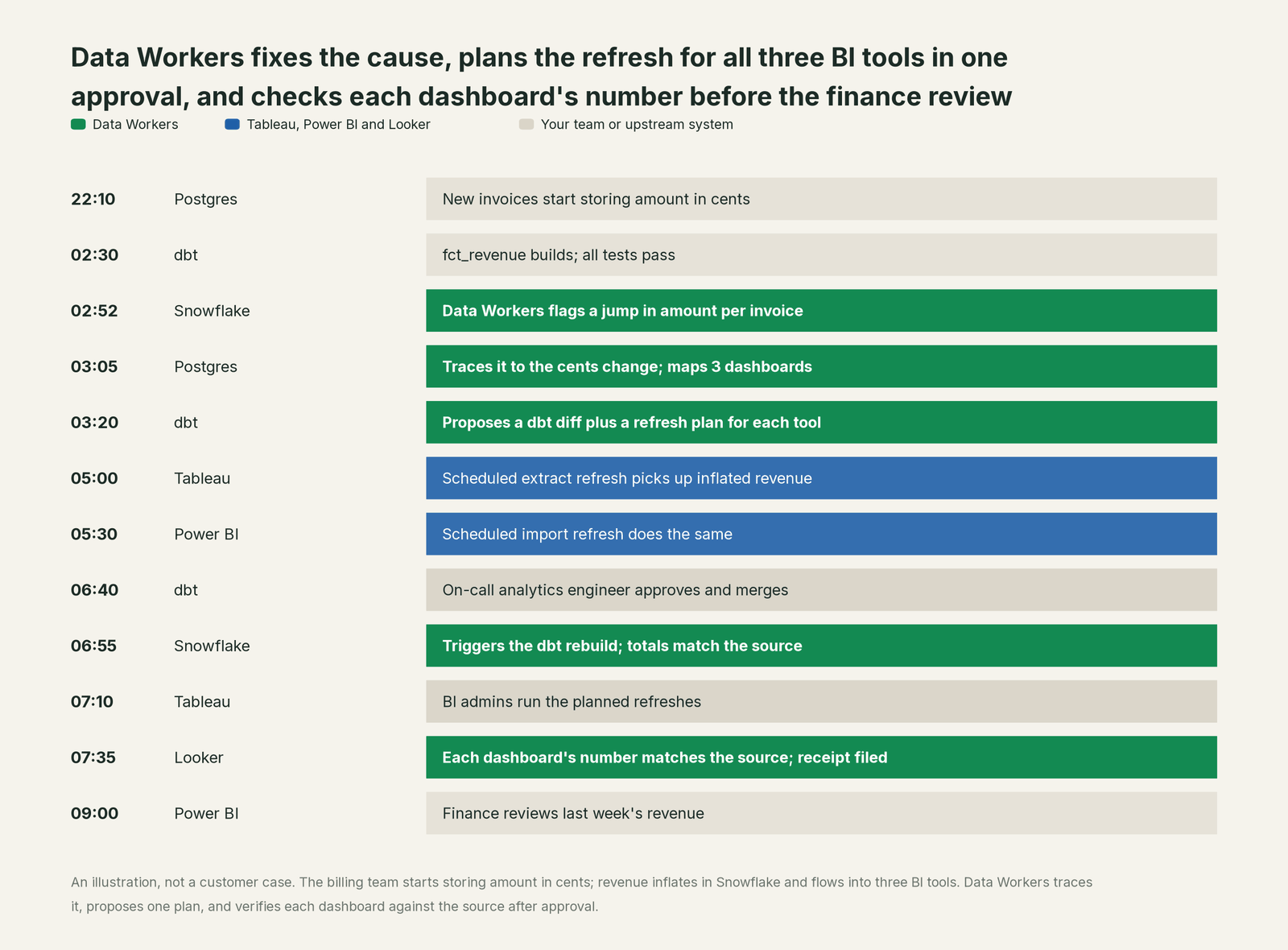
Every change ran through the tool that owns it: the fix through dbt and your reviewers, the refreshes in each BI tool, run by the people who own it. Data Workers supplied the parts no single BI tool owns: noticing the problem in the warehouse, tracing it to Postgres, naming every dashboard it touched, sequencing the plan, and checking each dashboard's number against the source before anyone opened it.
Why don't Tableau, Power BI and Looker just do this themselves?
Each of these teams built a great product for one job: turning governed data into answers people trust. Their designs follow from that job, and they are the right designs.
Their agents work inside their own model. Tableau MCP acts on site content and calls the REST API as the signed-in user, and Tableau's docs are careful about writes: each mutating tool previews first and asks the agent to get explicit approval before it confirms. The Power BI Authoring MCP server performs modeling operations only; Microsoft's docs say it "can't change other Power BI metadata, such as report pages", and they warn that an agent's changes to a model "might be irreversible". Looker's MCP server works through LookML and Explores, and Conversational Analytics is read-only by design. Each of those is a sensible boundary for a BI product.
The cause of a wrong number usually isn't in the BI tool. In the incident above it was a Postgres service, synced by Fivetran and built by dbt into Snowflake. Fixing it there is a different product category: blast-radius scoping across systems the BI vendor doesn't run, one plan that covers a dbt pull request and three refreshes, rollback for each step, receipts an auditor can read, context about every other system, and accountability for changes in tools the BI vendor doesn't own. Microsoft's own overview notes that safeguards such as flags that block destructive operations "aren't standardized in the MCP specification". That cross-system layer, with one approval flow and one audit trail, is the product Data Workers is.
Why a neutral layer matters with three BI tools. Most companies run more than one. Definitions drift between them: revenue in a Tableau calculated field, a DAX measure and a LookML measure can each be reasonable and still disagree. Data Workers reads all three side by side, flags where they diverge, and checks each against the same source query, without asking you to pick a winner among your BI tools.
The vendors' AI and Data Workers, side by side
Tableau MCP, the Power BI Authoring MCP server, Fabric IQ, Looker's MCP server and Conversational Analytics help people build models and ask questions. They are good at that, and Data Workers works alongside them.
The split is simple. An analyst who wants a new measure asks the Power BI Authoring MCP server in VS Code, or a LookML change through Looker's MCP server. A business user asks Conversational Analytics or Fabric IQ a question. An incident that starts in a source system, a schema change that lands overnight, or a check that the CFO's number matches the source runs through Data Workers, with nobody at the keyboard until the approval. Your coding agent can call a BI vendor's MCP server and Data Workers' MCP servers in the same session; they are separate servers with separate jobs.
If you're weighing a data observability tool for the alerting half of this loop, Monte Carlo and Data Workers covers that choice. For the wiring on the transformation side, see Data Workers + dbt, which is where most BI fixes end up.
How to connect today
Data Workers reads Tableau and Looker through their REST APIs; Power BI connects over its API or MCP server today, in your team's client. Each agent is an MCP server, so your coding agent (Claude Code, Codex or Cursor) can ask which dashboards a column feeds, hand off a fix, or look up a receipt from the same session.
Week one: read only.
- •Tableau. A read identity on the site, with a personal access token, for data sources and workbooks. If you use Tableau MCP, scope it with
INCLUDE_PROJECT_IDSorINCLUDE_DATASOURCE_IDS, and exclude write tool groups for this identity. - •Power BI. A service principal with Build permission on the semantic models you choose, enough to read metadata and run DAX queries. If you use the local Authoring MCP server for model metadata, start it with
--readonly. PBIP projects in Git are read from the repository. - •Looker. An API user with a role that can see the models and Explores, plus read access to the LookML repository.
- •Warehouse and source. A read-only role for the agreed queries.
- •Pick one finance dashboard per tool, agree its check query with the owner, and let Data Workers run the check after each scheduled refresh. Every agent starts observe-only.
Week two onward: refresh plans, then reviewed changes.
- •Add refresh steps to the plan for named extracts, semantic models and datagroups, so your BI admins run each one from the approved plan.
- •Turn on the GitHub pull-request target for the dbt project, and route PBIP or LookML changes to their owners as diffs, with no permission to merge.
- •Keep publishing, permissions and row-level security with your BI admins. Data Workers never needs them.
The scopes above are an illustration; use the permission sets your plans and admins allow.
Guardrails: approvals, and what each BI tool owns
What Tableau, Power BI and Looker stay responsible for. Workbooks, reports and dashboards. Semantic models, DAX, Tableau calculated fields and LookML. Row-level security, site roles and sharing. Refresh schedules and capacity. Their own AI for building and asking. Data Workers never bypasses any of them, and it doesn't edit report pages or dashboards.
What Data Workers enforces on top.
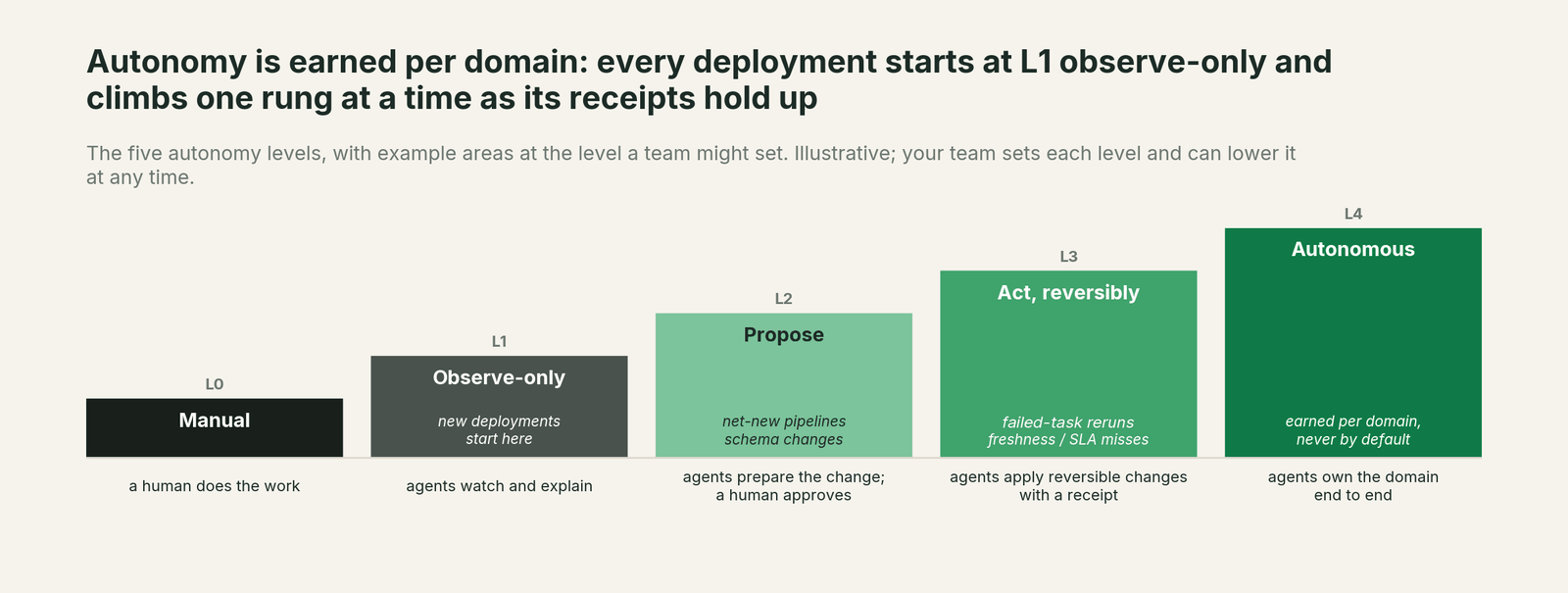
- •Read-only start. New deployments are observe-only. You extend autonomy one domain at a time as the receipts earn trust.
- •Autonomy per domain, L0 to L4. The number check for one finance dashboard can run after every scheduled refresh while model changes stay at "propose".
- •Approvals where they belong. Model and LookML changes are diffs your reviewers merge, so your reviewers decide. Refreshes stay with your BI admins, named in the approved plan. Anything irreversible needs a named human.
- •No self-approval. No agent can promote its own work.
- •Receipts. Every change records the diff, the approver, the blast radius, the checks run, the before and after values of each dashboard's number, and the rollback path in a tamper-evident, hash-chained log.
- •Least privilege. Data Workers reads with the identities you grant, through each BI tool's own permission system.
How it fits together
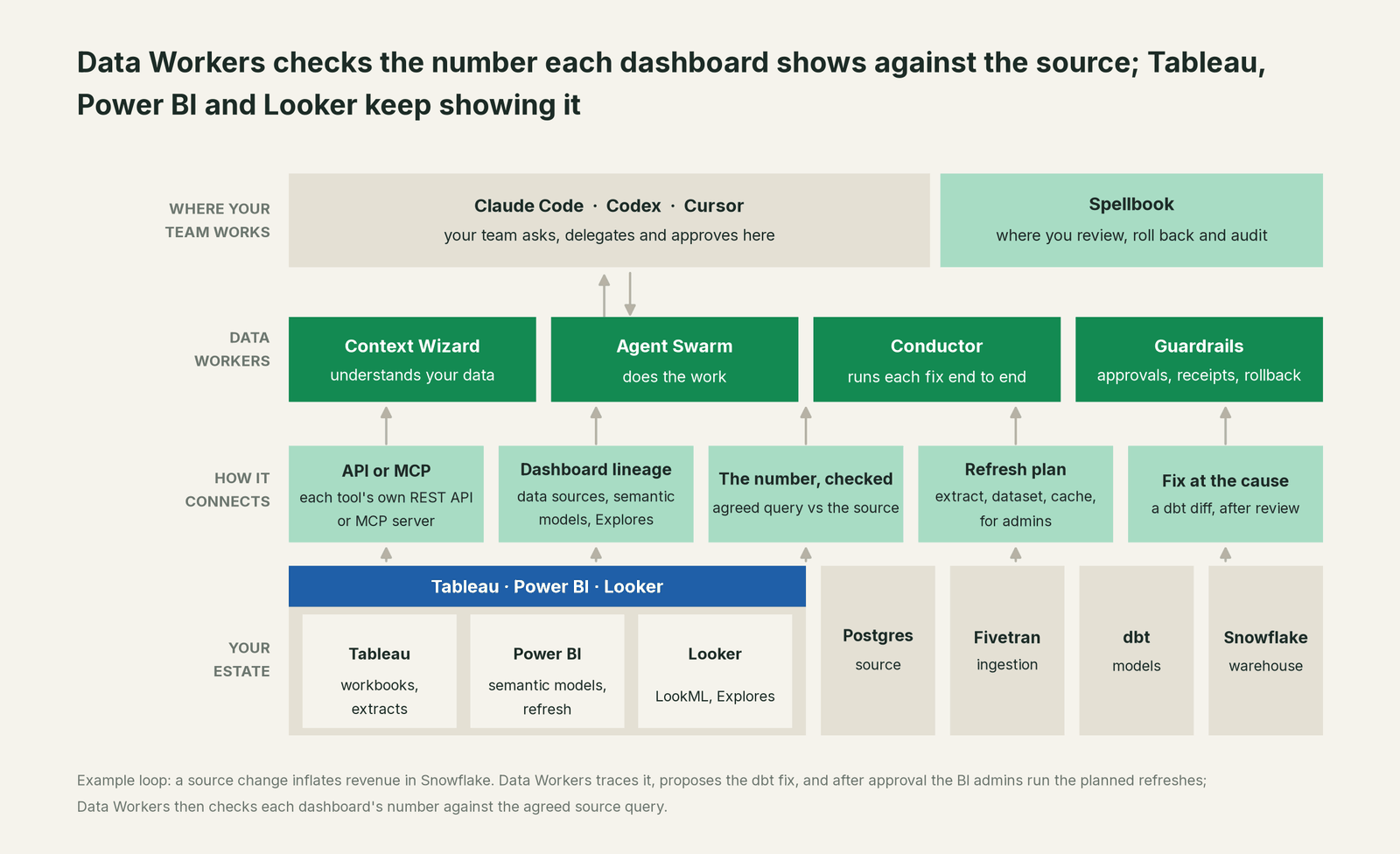
Your team works in its coding agent and reviews in Spellbook Data Catalog, which is in preview. The Data-Agents Swarm does the work, and the Autonomous Data-Conductor runs each fix end to end. Tableau, Power BI and Looker stay where people read the numbers. Nothing migrates, and Data Workers stores metadata and scrubbed facts, not copies of your tables. It connects to the rest of the estate through 50+ connectors.
What changes for your team
BI developers stop spending Monday mornings proving whether a wrong number is their measure or someone else's data. When something breaks upstream, they get a note that names the cause, the fix and the time each dashboard was checked. Analytics engineers see, on every dbt pull request, which dashboards and owners a change touches. Data platform leads get one record of every fix across Postgres, dbt, the warehouse and three BI tools. Finance and sales ops get the number right before they open the dashboard, and when they ask "is this right?", the answer is a receipt. For the path from alerts to agents that fix and verify, read the autonomous data platform playbook.
The case for your CFO
The outcome. The numbers in finance and sales dashboards match the source systems, and every fix comes with a record of what changed, who approved it and what each dashboard showed afterwards.
The risk story. At the observe level, agents read your BI metadata, warehouse and sources and run read-only checks; they change nothing. At the propose level, they propose diffs and plans, and a named engineer approves. Acting levels are reversible and only for domains you choose, such as rebuilding one finance mart after an approved fix. No agent can promote its own work, every change has a rollback path, and each receipt holds the diff, the approver, the blast radius, the checks run and the before and after values. There is no migration: your BI tools, models and permissions stay as they are.
Why now. All three BI vendors now ship MCP servers that let agents query, and some that let them write. Agents are arriving in your BI estate either way, so you want one approval flow and one audit trail across them, and a check that the number is right.
The first win. One finance dashboard per tool, checked against the source after every refresh.
What stays the same. Tableau, Power BI and Looker, your dashboards, your definitions, your admins, and the coding agent your engineers already use.
The pilot path. Start with a pilot on one source system and one dashboard per tool, read-only first, then proposed fixes and refresh plans. The pilot is credited in full against the first year.
One sentence for upstairs: "Our BI tools stay where people read the numbers; Data Workers traces a wrong number to its cause, routes the fix through our reviews, and checks that every dashboard shows the source value again, with a receipt."
When your BI tool on its own is enough
If one team owns the warehouse, the models and a single BI tool, and wrong numbers almost always trace to a measure inside it, the vendor's own tools and AI can carry you. Once breaks start in source systems or ingestion, or the same number lives in more than one BI tool, an operating layer that sees the whole estate and checks every dashboard after a fix starts paying for itself.
FAQ
How does Data Workers integrate with Tableau, Power BI and Looker? Through each tool's own surfaces. Data Workers connects over each tool's API or MCP server today, reads lineage and definitions, and sends back refresh plans and proposed diffs for model changes. BI stays read by design.
What does "checks the number" mean? For each dashboard you choose, Data Workers runs an agreed query against the source, then runs the matching query on the warehouse table the dashboard reads. The incident closes only when they match within your tolerance, and both values go in the receipt. The vendor's MCP server (Tableau MCP's VizQL Data Service query, a DAX query or a Looker query) can read the tile's own figure in the same session.
Will Data Workers change our semantic models or LookML? Only as reviewed code, if you allow it. DAX changes go to your PBIP or TMDL project and LookML changes go to the LookML repository as diffs your team merges. Data Workers doesn't edit report pages or dashboards.
Does it work with the vendors' own MCP servers? Yes. They run as separate MCP servers in the same client. Your coding agent can hold Tableau MCP, or the Power BI Authoring MCP server in read-only mode, next to Data Workers, and Tableau's preview-and-confirm design applies to any write tool you enable there.
Does refreshing on demand cost capacity? A refresh uses the same capacity as a scheduled one. Data Workers names only the extracts, models and datagroups the fix touches, and a person on your BI team runs each refresh.
Which tool's revenue definition wins? Yours. Data Workers shows where Tableau, Power BI and Looker definitions differ and checks each against the agreed source query. Your team decides which definition is right and changes it in the tool that owns it.
Do we need to change BI permissions or row-level security? No. Data Workers reads with the identities you grant and never needs publishing, sharing or security admin rights.
Sources
Sources for Tableau, Power BI and Looker capabilities and statuses, current as of October 2, 2026: Tableau MCP on GitHub (v4.13.3, Sept 23, 2026), hosted Tableau MCP, Tableau MCP Delete Content and Update Cloud Extract Refresh Task (two-phase confirmation), tool scoping, Query Datasource, the Tableau REST API on jobs, tasks and schedules and metadata, VizQL Data Service, the Power BI MCP servers overview (Sept 24, 2026), the Power BI Authoring MCP server (Sept 2026), the powerbi-modeling-mcp repository (v1.0.0, Sept 25, 2026), Power BI REST Refresh Dataset In Group and Execute Queries In Group, Power BI Projects, the Looker managed MCP server announcement (June 24, 2026), Looker with MCP Toolbox, Conversational Analytics in Looker (updated Sept 30, 2026), the Conversational Analytics API (GA update, Aug 2026), the Looker API Datagroup type and caching and datagroups. Product names and statuses change quickly; if we've got something wrong, tell us and we'll fix it.