You're on Tableau: It Is Where the Business Looks at Its Data. Data Workers Owns Whether the Data Behind Every View Is Right
Already on Tableau? Data Workers checks the tables under your published data sources, fixes bad loads upstream behind approvals, and verifies the number before the extract and subscriptions go out.
Your analysts build workbooks on published data sources, most of them extracts on a refresh schedule, a few live connections to Snowflake. Regional managers open their subscriptions at 07:00, finance reads Pulse digests in Slack and Teams, and executives get to the number through a dashboard someone certified two years ago. Tableau has been moving fast: on September 30, 2026 it announced capacity-based pricing for Tableau Cloud, with blocks that cover viewers and AI agents, plus new Tableau Cloud+ and Tableau Server+ editions, and Tableau Knowledge (available now in Cloud+ and Tableau+), which turns your published data sources, workbooks, dashboards and metrics into knowledge graphs that Tableau Agent and any agent over MCP can query. Tableau Next, Salesforce's agentic analytics experience, now comes in new Sales, Service and Industries Cloud editions. Tableau Server returns to a major release every four months with 2026.3 this October. Tableau is where the business looks at its data. Data Workers owns whether the data behind every view is right, and fixes it upstream behind approvals when it isn't.
Every one of those surfaces reads the same published data source. When the rows under it are wrong, every view, subscription and agent answer is wrong the same way.
Key takeaways
- •Tableau keeps its job. Workbooks, published data sources, extracts, subscriptions, Pulse and Tableau Agent stay as they are. Data Workers works next to them from day one.
- •The data under each published data source gets checked after every load. Data Workers runs key, null and volume checks on the Snowflake tables your extracts read, and watches the headline numbers your team names against a baseline.
- •Data Workers knows which extracts a bad table reaches. It reads workbooks and published data sources on Tableau Server natively, read-only, and the notes owners record in the context graph tie each data source to its models, so a broken table comes with its list of affected data sources and workbooks.
- •Fixes happen upstream, behind a named approval. The dbt change goes to its owner as a diff, the rebuild is queued through your orchestrator after approval, and the extract refresh stays with the Tableau owner.
- •The number is verified before the business reads it. Data Workers records the right value at the source, and your team's client confirms it through Tableau MCP after the refresh. A receipt records cause, approver, verification and undo.
Tableau is where the business looks at its data. Data Workers owns whether the data behind every view is right.
Tableau turns data into views people understand and act on, and its extracts make them fast. Tableau's documentation is precise about what an incremental refresh does: it adds "only the rows that are new since the previous time you extracted the data", identified by a date field or an ID column that increases as rows arrive. An optional "Minimum date range to refresh" (Tableau 2024.2 and newer) replaces a recent window too. That is the right design for speed. It also means rows that were appended wrongly stay in the extract until someone runs a full refresh.
Here is one Sunday night at an online retailer on Tableau Server, Snowflake, dbt Core on Prefect, and order events streamed through Kafka Connect. This is an illustration, not a customer case. Every system reports success.
| Time | System | What happens |
|---|---|---|
| Sun 21:52 | Kafka Connect | A worker restart rebalances the Snowflake sink connector. Order events from 21:52 to 22:33 are delivered again and written twice to RAW.ORDER_EVENTS. The connector and both tasks stay RUNNING |
| Mon 02:00 | Prefect + dbt Core | The nightly_dbt deployment runs dbt build. fct_orders was switched to an incremental append on loaded_at last month, and no unique test was added, so 3,118 duplicate orders land. The build passes |
| 02:30 | Tableau Server | The incremental refresh of the "Orders" published data source appends every row with a newer loaded_at, the duplicates included. 14 workbooks read it, among them Regional Sales Daily with a 07:00 subscription |
| 02:41 | Data Workers + Snowflake | run_quality_check on fct_orders fails uniqueness on order_id: 3,118 fewer distinct values than rows. The scheduled query that posts Sunday gross sales to monitor_metrics reads $1.94M against a baseline near $1.77M (+9.6%). Data Workers opens an incident and send_slack_alert posts it to #data-incidents and the on-call owner |
| 02:46 | Data Workers | diagnose_incident with trace_cross_platform_lineage: the same uniqueness check fails on RAW.ORDER_EVENTS.event_id by the same margin, so the duplicates entered at landing, not in dbt. get_connector_status shows the sink and both tasks RUNNING. blast_radius_analysis follows the owners' context-graph note to the Orders data source and its 14 workbooks |
| 02:50 | Data Workers + Tableau Server | Data Workers reads the Orders published data source natively: it is extract-based. The BI owner's note in the context graph records an incremental refresh keyed on loaded_at. The plan says it plainly: fixing Snowflake alone will not clean the extract |
| 02:55 | Spellbook | One proposal for the analytics engineering lead: a diff that dedupes stg_orders on event_id, makes fct_orders a merge on order_id and adds a unique test; a full rebuild of fct_orders through Prefect after the merge; a full extract refresh for the BI owner. The blast radius and undo travel with it |
| 05:50 | Kafka Connect | The platform engineer confirms the rebalance window, 21:52 to 22:33, in the worker logs |
| 06:05 | GitHub + Spellbook | The lead reviews the receipt, merges the diff and approves the rebuild |
| 06:10 | Data Workers + Prefect | trigger_prefect_flow queues nightly_dbt with a full refresh of fct_orders |
| 06:34 | Data Workers + Snowflake | Uniqueness passes on fct_orders. Sunday gross sales reads $1.77M, inside the baseline. Data Workers records the value in the incident |
| 06:40 | Tableau Server | The BI owner runs a full refresh of the Orders extract. An incremental refresh would have kept all 3,118 duplicates |
| 06:52 | Claude Code + Tableau MCP | The owner asks for Sunday gross sales through query-datasource: $1.77M, matching the recorded value. Data Workers closes the incident with the receipt |
| 07:00 | Tableau Server | Regional Sales Daily goes to 40 managers with the right numbers |
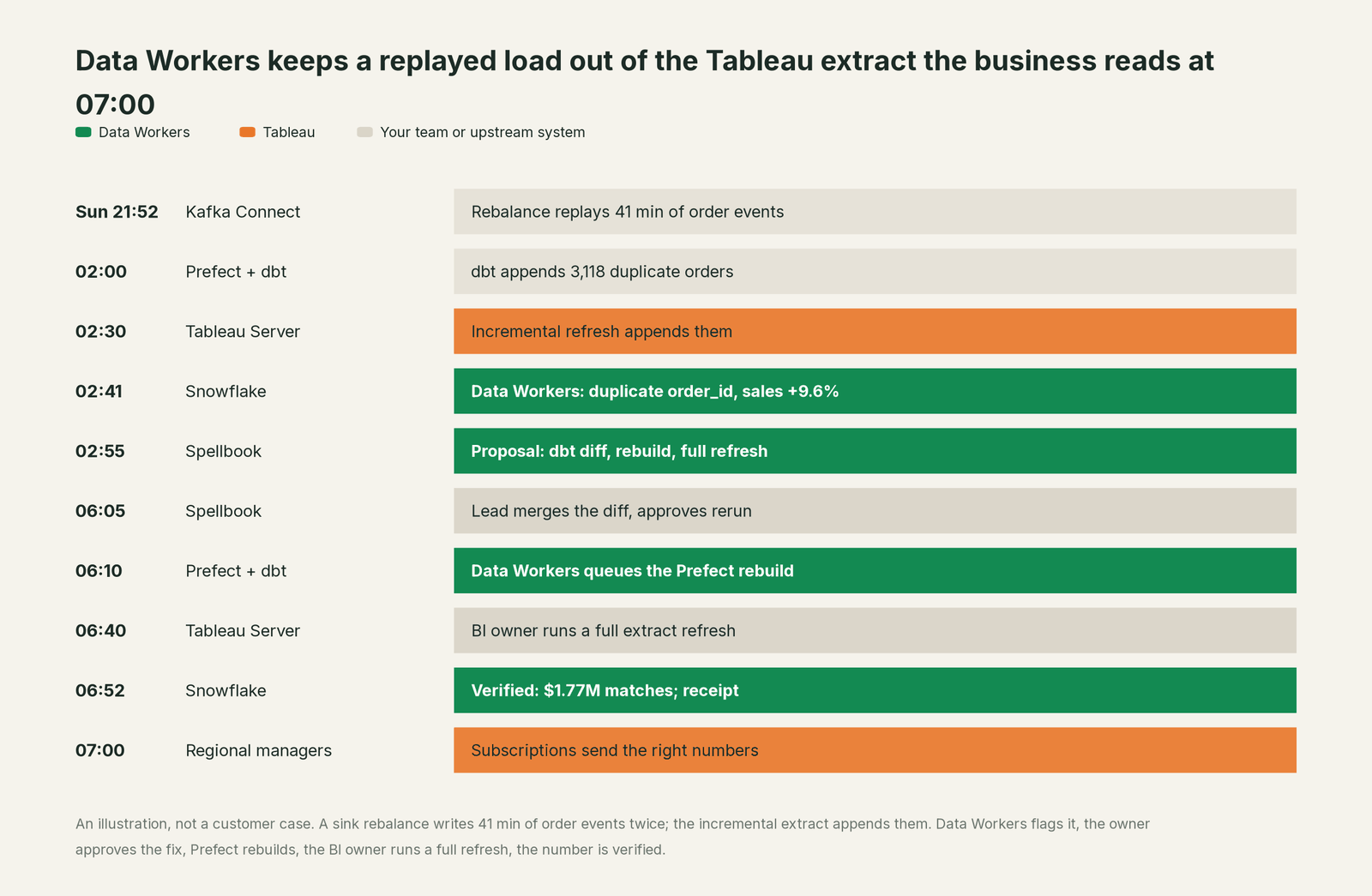
Every tool did its job: Kafka Connect delivered at least once, dbt appended what it was told to, Tableau added the new rows. Without the check at 02:41, Snowflake would have been fixed later in the week while the extract kept the duplicates, and the warehouse and Tableau would disagree, the worst outcome for trust. Data Workers also attached one hardening suggestion to the receipt for the BI owner to decide: a minimum date range on the Orders extract, so a future restatement in the last few days is replaced on the next refresh.
| Job | What Tableau does | What Data Workers does |
|---|---|---|
| The view | Workbooks, dashboards, subscriptions, Pulse metrics and Tableau Agent | Makes sure the data under each published data source is right before people read it |
| The data source | Holds fields, calculations and the extract or live connection | Ties each published data source to the dbt models, tables and owners behind it in the context graph |
| The refresh | Runs full and incremental extract refreshes on a schedule | Says when a refresh carries a bad load and which kind of refresh the fix needs; the owner runs it |
| The fix | Shows what the source returns | Proposes the upstream change as a diff for the owner and queues the approved rerun |
| The proof | Answers queries on the extract, including through Tableau MCP | Records the right value at the source and leaves a receipt with cause, approver, verification and undo |
| The context | Tableau Knowledge builds graphs of Tableau assets for agents | Keeps one context graph across sources, the warehouse, dbt, orchestrators and BI |
Why doesn't Tableau just do this itself?
Because Tableau built the place where people see their data, and its design choices fit that job. A published data source faithfully shows what the warehouse returns; an extract is a fast copy; an incremental refresh assumes new rows are new facts. Tableau MCP follows the same care: its delete and extract-refresh-task tools are two-phase, a preview and then a confirmation.
The fix in the incident lived in four systems Tableau doesn't run: a sink connector, a raw table, a dbt model and an orchestrator. Changing those means writing to production data owned by other teams, with a blast radius, an approval, a rollback path and accountability for the result. A BI tool sensibly keeps that out of the place executives read numbers. That cross-system, approval-gated work is the product Data Workers is. For how the guardrails work, read is it safe to let AI agents change production data.
Every tool owns a slice. Data Workers covers the whole lifecycle
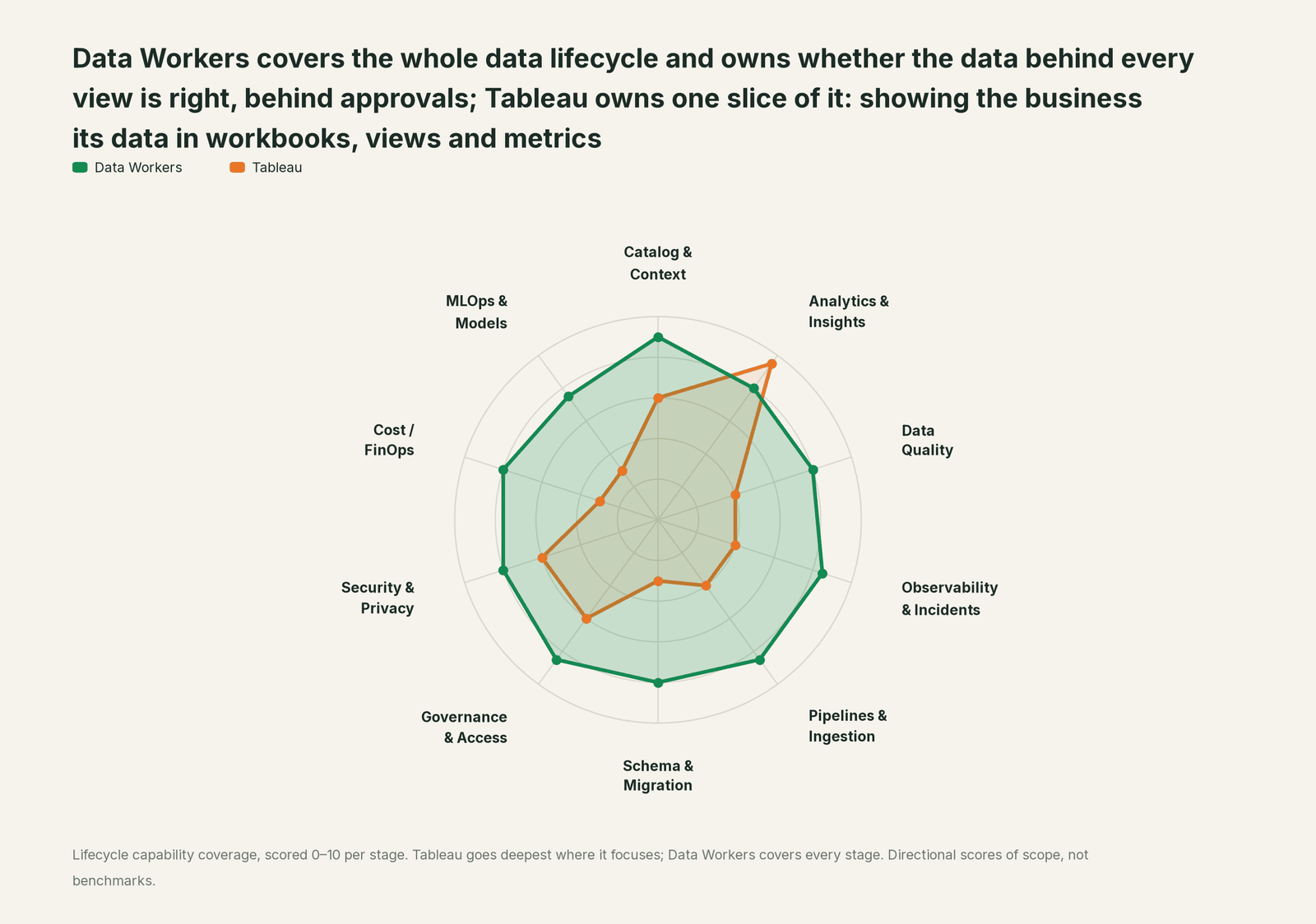
Tableau owns one slice of the data lifecycle outright: showing the business its data. Each point tool adds another console, contract and handoff. Data Workers covers the whole lifecycle with one context, one approval flow and one audit trail, and builds on the Tableau estate you already run.
| Stage | Data Workers | Tableau | Why we scored it this way |
|---|---|---|---|
| Catalog & Context | 9 | 6 | Published data sources carry the fields and calculations analysts reuse, and Tableau Knowledge (Cloud+, Sep 2026) turns them into graphs for agents. Data Workers keeps one governed context graph across the source, warehouse, dbt and every consumer. |
| Analytics & Insights | 8 | 9.5 | Tableau's home stage: workbooks, views, dashboards, Pulse metrics and Tableau Agent for building vizzes and calculations (in dashboards, Beta). Data Workers makes sure the data under each view is right. |
| Data Quality | 8 | 4 | Tableau shows whatever the published data source returns; testing the tables is a different job. Data Workers checks keys, nulls and volume on the tables under each data source after every load. |
| Observability & Incidents | 8.5 | 4 | Extract refresh jobs report success or failure, and Pulse insights flag outliers in a metric. Data Workers traces a wrong number back to the load or model that caused it and verifies the fix. |
| Pipelines & Ingestion | 8.5 | 4 | Extract refresh schedules and Tableau Prep flows shape data for Tableau itself. Data Workers queues approved dbt and orchestrator reruns for the pipelines that feed the warehouse. |
| Schema & Migration | 8 | 3 | A full extract refresh picks up a changed source structure inside Tableau. Data Workers reviews the dbt changes underneath and scopes their blast radius before they merge. |
| Governance & Access | 8.5 | 6 | Projects, permissions and certified data sources govern who sees and edits content. Data Workers routes every data change to a named approver. |
| Security & Privacy | 8 | 6 | User filters and site permissions protect what each viewer sees. Data Workers leaves a receipt on every data change and proposes masking for the owner to apply. |
| Cost / FinOps | 8 | 3 | Capacity-based pricing (Sep 2026) and admin views help manage Tableau's own footprint. Data Workers reads Snowflake spend down to the dbt model and BigQuery spend from the Jobs API. |
| MLOps & Models | 7.5 | 3 | Tableau Agent and Pulse use AI to explain and summarize metrics. Data Workers keeps the data under models and agents healthy. |
How Tableau and Data Workers work together
Your people stay where they are: the business in Tableau, engineers in Claude Code or Cursor, approvals in Slack or email. Spellbook Data Catalog (in preview) is where the data team reviews each proposal, its blast radius, approver and rollback. Underneath, Data Context Wizard keeps one governed context graph, the Data-Agents Swarm's 20+ specialist agents do the work, and the Autonomous Data-Conductor runs each fix end to end (detect, diagnose, fix, review, verify, remember).
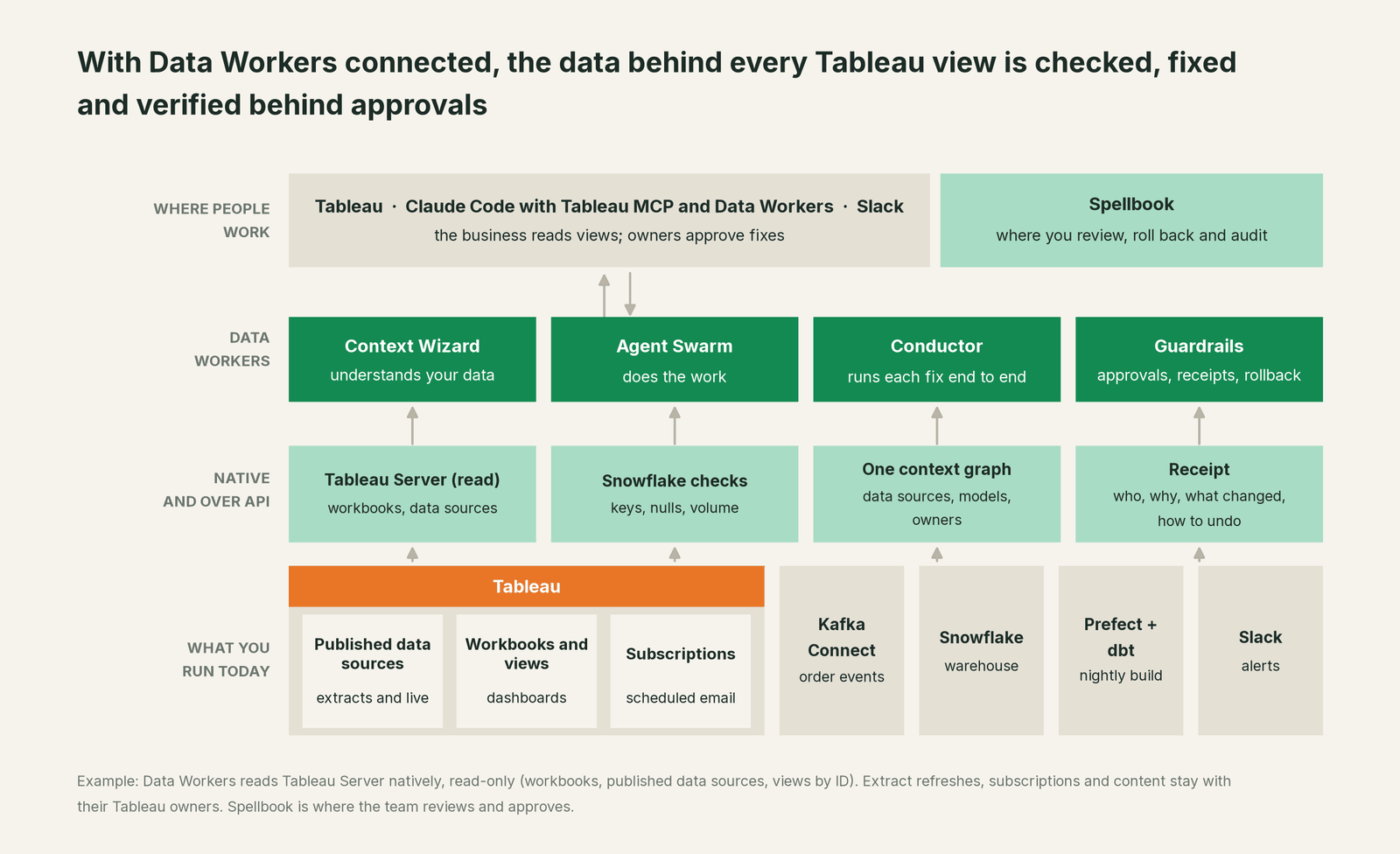
What Data Workers reads in Tableau. On Tableau Server, Data Workers signs in to the default site with a personal access token and reads workbooks, published data sources and individual views by ID, read-only. It writes nothing to Tableau by design: refresh schedules, subscriptions, certification and content stay with their owners. Tableau Cloud connects over Tableau's REST API or the hosted Tableau MCP server in your team's client. Which data sources and workbooks a table reaches comes from owners' notes in the context graph; when a fix goes through a pull request, change review's lineage diff also reads the dbt exposures your project declares.
What Data Workers reads underneath. Snowflake checks with run_quality_check (nulls, uniqueness on ID columns, row counts), baselines for the numbers your team names through monitor_metrics, dbt Core manifest lineage, Kafka Connect status through get_connector_status, and Prefect runs it can queue with trigger_prefect_flow once approved. explain_table adds a table's definition, lineage, documentation and trust score, and get_incident_history its open incidents. Your data stays in your systems: the agents run in your infrastructure with your credentials and model key, and the hosted Conductor sees workflow metadata only (where does our data go).
Setup over MCP today. Data Workers' agents are MCP servers from the open-source repository: clone it and add start-agent.sh entries to your client, as the client setup docs show. Tableau MCP sits next to them in the same client, limited to read tools by name, so an analyst can check a number in Tableau and ask Data Workers why it moved in one conversation. Data Workers' agents never call Tableau MCP themselves; the client holds both side by side.
// Example: .mcp.json for Claude Code. Tableau MCP limited to read tools,
// next to Data Workers agents from a clone of the open-source repo.
{
  "mcpServers": {
    "tableau": {
      "command": "npx",
      "args": ["-y", "@tableau/mcp-server@latest"],
      "env": {
        "SERVER": "https://tableau.example.com",
        "SITE_NAME": "",
        "PAT_NAME": "<read-only PAT name>",
        "PAT_VALUE": "<from your secret store>",
        "INCLUDE_TOOLS": "datasource,view,list-workbooks,get-workbook"
      }
    },
    "dw-context-catalog": { "command": "/path/to/dataworkers-claw-community/start-agent.sh", "args": ["dw-context-catalog"] },
    "dw-quality":         { "command": "/path/to/dataworkers-claw-community/start-agent.sh", "args": ["dw-quality"] },
    "dw-incidents":       { "command": "/path/to/dataworkers-claw-community/start-agent.sh", "args": ["dw-incidents"] },
    "dw-connectors":      { "command": "/path/to/dataworkers-claw-community/start-agent.sh", "args": ["dw-connectors"] }
  }
}
List the tools with your client's own command (for example /mcp in Claude Code). On Tableau Cloud, point the client at https://mcp.tableau.com instead and sign in with OAuth.
One request, L0 to L4. The autonomy ladder is set per domain.

- •L0 manual. Data Workers reads; your team traces a bad number by hand.
- •L1 observe. Data Workers checks the tables under each published data source and names the affected workbooks. It changes nothing.
- •L2 propose. Data Workers drafts the dbt diff and the rebuild with the blast radius. A named person approves; an unanswered request expires and escalates, never auto-grants.
- •L3 act reversibly. For change classes with a proven record, such as queuing the Prefect rerun of a late partition, Data Workers acts, verifies and records the undo.
- •L4 autonomous. For a scoped, trusted class in one domain, Data Workers fixes and verifies on its own and posts the receipt. No agent can promote its own work, and the org-wide stop halts all autonomous dispatch.
More on how approvals work and the autonomy levels. See also Data Workers + Tableau, Power BI and Looker, MCP servers for BI tools, the guides for Looker, Power BI, Apache Kafka and Prefect, and Looker vs Tableau.
What changes for your team
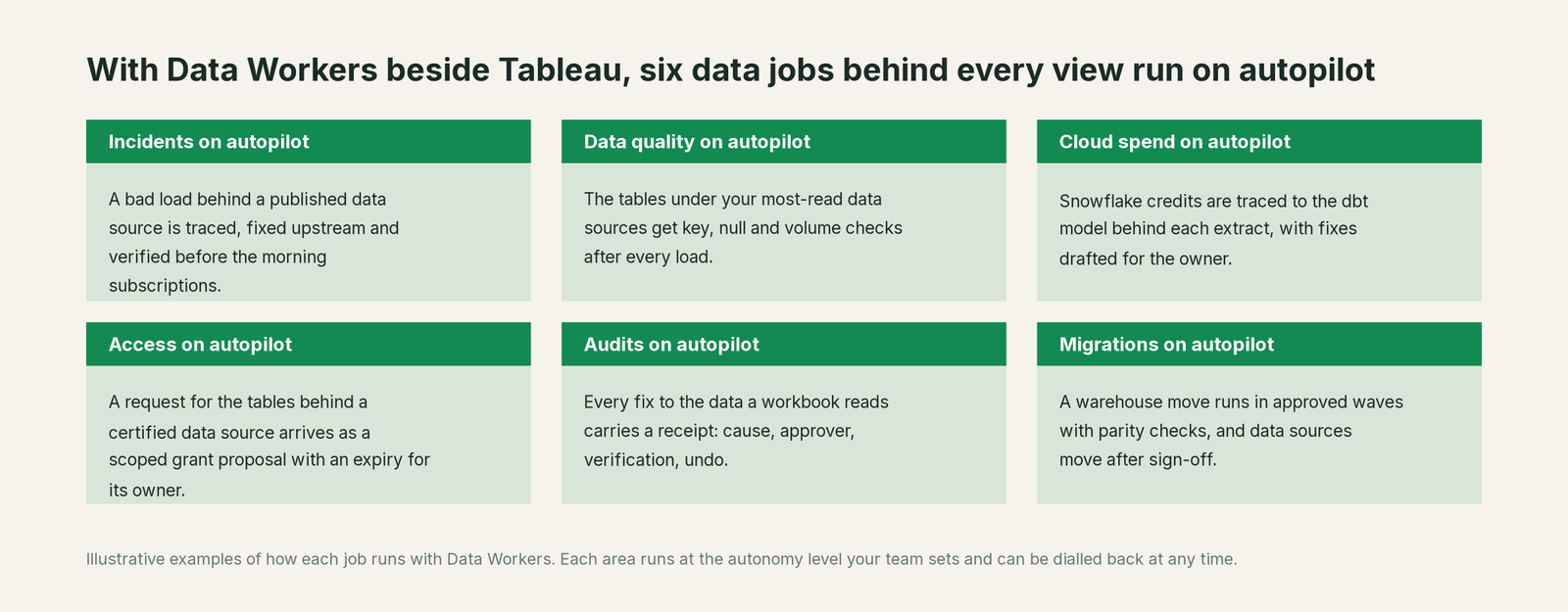
BI teams lose much of the week to work that isn't analysis: why did the dashboard move, is the warehouse or the extract wrong. With Data Workers next to Tableau, those jobs run on autopilot at the level you set.
- •Incidents. A bad load behind a published data source is traced, fixed upstream and verified before the morning subscriptions.
- •Data quality. The tables under your most-read data sources get key, null and volume checks after every load.
- •Cloud spend. Snowflake credits are traced to the dbt model behind each extract, with fixes drafted for the owner.
- •Access. A request for the tables behind a certified data source arrives as a scoped grant proposal with an expiry for its owner.
- •Audits. Every fix to the data a workbook reads carries a receipt: cause, approver, verification and undo.
- •Migrations. A warehouse move is planned in approved waves with parity checks tracked, and data sources move after the owner signs off.
Analysts get back to building views. See Data Workers for data analysts.
Keep Tableau, or consolidate?
Keep Tableau if you love it; Data Workers works with it from day one. Many teams consolidate once Data Workers runs that slice too.
Tableau is the interface the business trusts, and it should stay. What teams consolidate is the tooling around it: a separate warehouse quality monitor, a spreadsheet mapping data sources to dbt models, a Slack thread as the incident record. If you are weighing building this layer yourself on Tableau MCP and a coding agent, read build it ourselves with Claude Code and MCP servers: the connection is the easy part; the cross-system context, approvals and rollback are where the work is.
The case for your CFO
The outcome: the numbers regional managers, finance and executives read in Tableau are right when they open them, and when something upstream breaks, it is fixed before the 07:00 subscription instead of after the 10:00 meeting.
The risk story is plain. Data Workers reads Tableau, read-only, and changes nothing there. Upstream, every change is proposed with its blast radius, approved by a named owner, applied through the review and orchestration your team already runs, verified against a recorded value, and written up in a receipt: who approved it, what it touched, how to undo it. Autonomy is set per domain, L0 to L4, and can be dialled back any time. Zero migration: Tableau, Snowflake, dbt, Prefect and Kafka stay put.
Why now: Tableau is putting your published data sources in front of AI agents through Tableau Knowledge and MCP, and capacity pricing invites more viewers and agents onto the same extracts. One bad load now reaches more people, faster, in more confident sentences. The first win is small and fast: the three published data sources behind your most-read workbooks, watched read-only, so the next duplicate load is caught the night it lands. What stays the same: your workbooks, refresh schedules, permissions and certification process. For the numbers, see the ROI of agentic data operations.
The sentence to repeat upstairs: "Tableau is where we look at the business; Data Workers makes sure what we see there is true, and fixes it with an owner's approval and a receipt."
Getting started
Start with a pilot. Pick the published data sources behind the workbooks your leaders read most, record them in the context graph against their models, connect Tableau Server and Snowflake read-only, and let Data Workers check the tables under them for a few weeks before you enable the first fix class. The pilot path and plans are on the pricing page, and the pilot is credited in full against the first year.
FAQ
Does Data Workers refresh our Tableau extracts? No, by design. Data Workers reads Tableau and writes nothing there. When a fix needs a refresh, the plan says which kind (full or incremental) and the Tableau owner runs it, or the next scheduled refresh picks it up.
Why would an extract stay wrong after the warehouse is fixed? An incremental refresh adds new rows identified by a date or ID column; it does not remove rows already in the extract unless they fall inside a configured minimum date range. Duplicates or restated rows outside that window stay until a full refresh. Owners record each extract's refresh pattern in the context graph, so Data Workers' plan accounts for it.
How does Data Workers know which workbooks a bad table affects? From the notes owners record in the context graph that tie each published data source to its models. blast_radius_analysis walks that lineage from the table to every recorded data source and workbook, and the native Tableau Server read confirms each one and whether it is an extract.
We are on Tableau Cloud. Does this work? Yes. Data Workers checks and fixes the warehouse side the same way, and your team's client reads Tableau through the hosted Tableau MCP server at mcp.tableau.com, side by side with Data Workers' agents.
How is this different from Tableau Knowledge? Tableau Knowledge gives agents a curated map of your Tableau assets so their answers use the right data source and definitions. Data Workers makes sure the rows under those data sources are correct, and fixes them upstream behind approvals when they are not. The two work well together.
Sources
- •Tableau, How Tableau is Expanding Access to Agentic Analytics Across the Enterprise (Sep 30, 2026: capacity-based pricing, Tableau Cloud+ and Server+ editions, Tableau Next in CRM editions), https://www.tableau.com/blog/tableau-agentic-analytics-pricing-updates (checked Oct 3, 2026)
- •Tableau, What is Tableau Knowledge? (Sep 30, 2026: knowledge graphs from published data sources, workbooks, dashboards and metrics; Tableau Agent and any agent via MCP; available now in Tableau Cloud+ and Tableau+, coming to Server and Tableau Next), https://www.tableau.com/blog/what-is-tableau-knowledge (checked Oct 3, 2026)
- •Tableau, Tableau Updates Product Release Cadence (Sep 30, 2026: Server returns to four-month major releases starting with 2026.3 in October), https://www.tableau.com/blog/tableau-updates-product-release-cadence (checked Oct 3, 2026)
- •Tableau, What is Tableau Next? (Agentforce 360 Platform, Data 360, Tableau Semantics, availability), https://www.tableau.com/blog/what-is-tableau-next (checked Oct 3, 2026)
- •Tableau, Tableau Next product page (connect to Tableau Semantics from Tableau Cloud and Server; no status label on the page), https://www.tableau.com/products/tableau-next (checked Oct 3, 2026)
- •Tableau Help, Tableau Agent (capabilities, Tableau+, Server 2025.3, beta for dashboards), https://help.tableau.com/current/online/en-us/web_author_einstein.htm (checked Oct 3, 2026)
- •Tableau Help, Tableau Pulse Release Notes (digests and alerts in Microsoft Teams, Aug 26, 2026; Slack and email digests), https://help.tableau.com/current/online/en-us/pulse_intro.htm (checked Oct 3, 2026)
- •Tableau Help, Refresh Extracts (incremental refresh adds new rows by a date or increasing ID column; Minimum date range to refresh in 2024.2 and newer; full refresh), https://help.tableau.com/current/pro/desktop/en-us/extracting_refresh.htm (checked Oct 3, 2026)
- •Tableau MCP, GitHub repository (v4.13.3, Sep 23, 2026; hosted at mcp.tableau.com with OAuth 2.1; self-hosted with a PAT), https://github.com/tableau/tableau-mcp (checked Oct 3, 2026)
- •Tableau MCP, tool and group names (
query-datasource;datasource,view,workbookgroups; INCLUDE_TOOLS accepts tool and group names), https://github.com/tableau/tableau-mcp/blob/main/src/tools/web/toolName.ts and https://tableau.github.io/tableau-mcp/docs/configuration/mcp-config/env-vars (checked Oct 3, 2026) - •Data Workers, Client setup (open-source docs), https://dataworkers.io/opensource-docs/client-setup/ (checked Oct 3, 2026)
- •Data Workers open-source repository (agent tools and start-agent.sh), https://github.com/DataWorkersProject/dataworkers-claw-community (checked Oct 3, 2026)