You're on ThoughtSpot: Anyone Can Ask the Data a Question. Data Workers Owns Whether the Data Behind the Answer Is Right
Already on ThoughtSpot? Data Workers checks the tables under every Model, traces a wrong Spotter answer to its cause, proposes the fix behind a named approval and verifies the number, with a receipt.
Your business asks ThoughtSpot questions in plain language. The BI team curates Models: which tables join, on which keys and join type, plus the formulas and column names Spotter searches. Executives open Liveboards, KPI Monitor alerts land in email, and a sales leader asks Spotter 3 "why did hardware revenue drop this week?" and gets a reasoned answer with a chart. Spotter Analysts went GA in the 26.10 release, and engineers connect Claude or ChatGPT to the Spotter MCP server. ThoughtSpot lets anyone ask the data a question. Data Workers owns whether the data behind the answer is right: it checks the tables every Model joins, traces a wrong answer to the source, sync or dbt model that caused it, proposes the fix behind a named approval and verifies the number with a receipt.
Key takeaways
- •ThoughtSpot keeps its job. Models, Liveboards, Answers, KPI Monitor, Spotter and Analyst Studio stay with the people who own them today.
- •A Spotter answer is only as true as the tables under the Model. When a table under it changes overnight, the answer stays fluent and turns wrong. Data Workers checks those tables after every run.
- •The fix lands where the cause is. A wrong ThoughtSpot number usually starts in a source system, a sync or a dbt model. Data Workers proposes the fix there as a diff for its owner, behind a named approval, and queues the rerun.
- •Nothing in ThoughtSpot changes. Data Workers connects to ThoughtSpot over its REST API or MCP server today and never edits a Model, Liveboard or TML file. Your team's client holds the Spotter MCP server next to Data Workers'.
- •Start with one Liveboard. Pick the one behind a number people act on, check every table its Model joins, and climb from L0 manual to L4 autonomous per domain.
ThoughtSpot lets anyone ask. Data Workers owns whether the data behind the answer is right.
A ThoughtSpot Model is a set of promises about your tables. The Model editor asks for a join type for every join (INNER, FULL OUTER, LEFT OUTER or RIGHT OUTER) and a cardinality. An inner join from invoice lines to an item dimension promises that every item ever sold is in that dimension. When something upstream breaks the promise, nothing errors: rows quietly fall out of every answer built on the Model.
Here is a Friday morning with Data Workers next to a ThoughtSpot instance on BigQuery. This is an illustration, not a customer case.
| Time | System | What happens |
|---|---|---|
| Thu 17:30 | NetSuite | Ahead of the 2027 price book, the finance systems admin marks 1,141 discontinued SKUs inactive. Most still have stock selling through this quarter. |
| Fri 00:40 | Airbyte | The NetSuite connection syncs the item table into BigQuery raw_netsuite.item: still 4,212 rows, 1,141 now flagged inactive. The sync succeeds. |
| 01:30 | Dagster, dbt Core, BigQuery | The nightly revenue_daily job builds dim_item, which keeps only active items (a filter added last spring for the web catalog feed): 3,071 rows. fct_invoice_lines is untouched. The run is green; every test passes. |
| 02:05 | Data Workers | run_quality_check on fct_invoice_lines (BigQuery, service-account key) passes: no null keys, line_id unique, rows above the minimum. But the values the team posts to monitor_metrics after each run are off baseline: dim_item rows at 3,071 against roughly 4,200 (−27%), and seven-day Hardware revenue, computed with the Model's join, at $2.38M against roughly $3.45M (−31%). Data Workers opens an incident and send_slack_alert posts it to #data-incidents. |
| 02:12 | Data Workers | diagnose_incident with trace_cross_platform_lineage: the recorded row count for raw_netsuite.item holds at 4,212 and the dbt manifest shows no model change since Thursday, so the rows leave at dim_item, whose compiled SQL in the manifest keeps active items only. blast_radius_analysis lists four dbt models and two readers the BI lead recorded in the context graph: the ThoughtSpot Revenue Model and the Weekly Revenue Liveboard. A graph note the BI lead recorded from the Model's TML says it joins invoice lines to dim_item INNER, Many:1. |
| 07:00 | ThoughtSpot, Slack | The KPI Monitor alert on "Hardware revenue (7d)" fires in #revenue: down 31%. |
| 07:20 | Slack | The on-call analytics engineer picks up the thread, cause and blast radius already in it. |
| 08:05 | Slack | The finance systems admin confirms the cleanup and asks that the items stay inactive in NetSuite. |
| 08:15 | ThoughtSpot Spotter | The CRO asks Spotter why hardware revenue dropped. Spotter answers: down 31% week over week, driven by fewer SKUs sold. Faithful to the Model, wrong about the business. The on-call replies with the incident link. |
| 08:30 | Data Workers | Proposes the fix as a diff for the owner to merge: dim_item keeps every item and adds an is_active column, the catalog feed model filters on it, and a dbt relationships test checks that every item_id in fct_invoice_lines exists in dim_item. With it: the blast radius, the rerun plan and the undo. The approval request reaches the analytics engineering lead in Slack. |
| 09:05 | Spellbook, GitHub | The lead approves in Spellbook; the dbt owner merges the diff. |
| 09:08 | Dagster | Data Workers queues the approved revenue_daily job through Dagster with trigger_dagster_job. |
| 09:40 | BigQuery | The run finishes. The post-run monitor_metrics values read dim_item at 4,212 rows and seven-day Hardware revenue at $3.44M, inside the baseline. Data Workers records them in the incident. |
| 09:50 | Claude, Spotter MCP server | ThoughtSpot queries BigQuery live, so nothing needs refreshing. The BI lead asks Spotter through the Spotter MCP server in Claude: $3.44M, matching the recorded value. Data Workers writes the receipt (cause, diff, approver, rerun, checks) and a graph note that the Revenue Model's inner join depends on dim_item holding every item ever sold. |
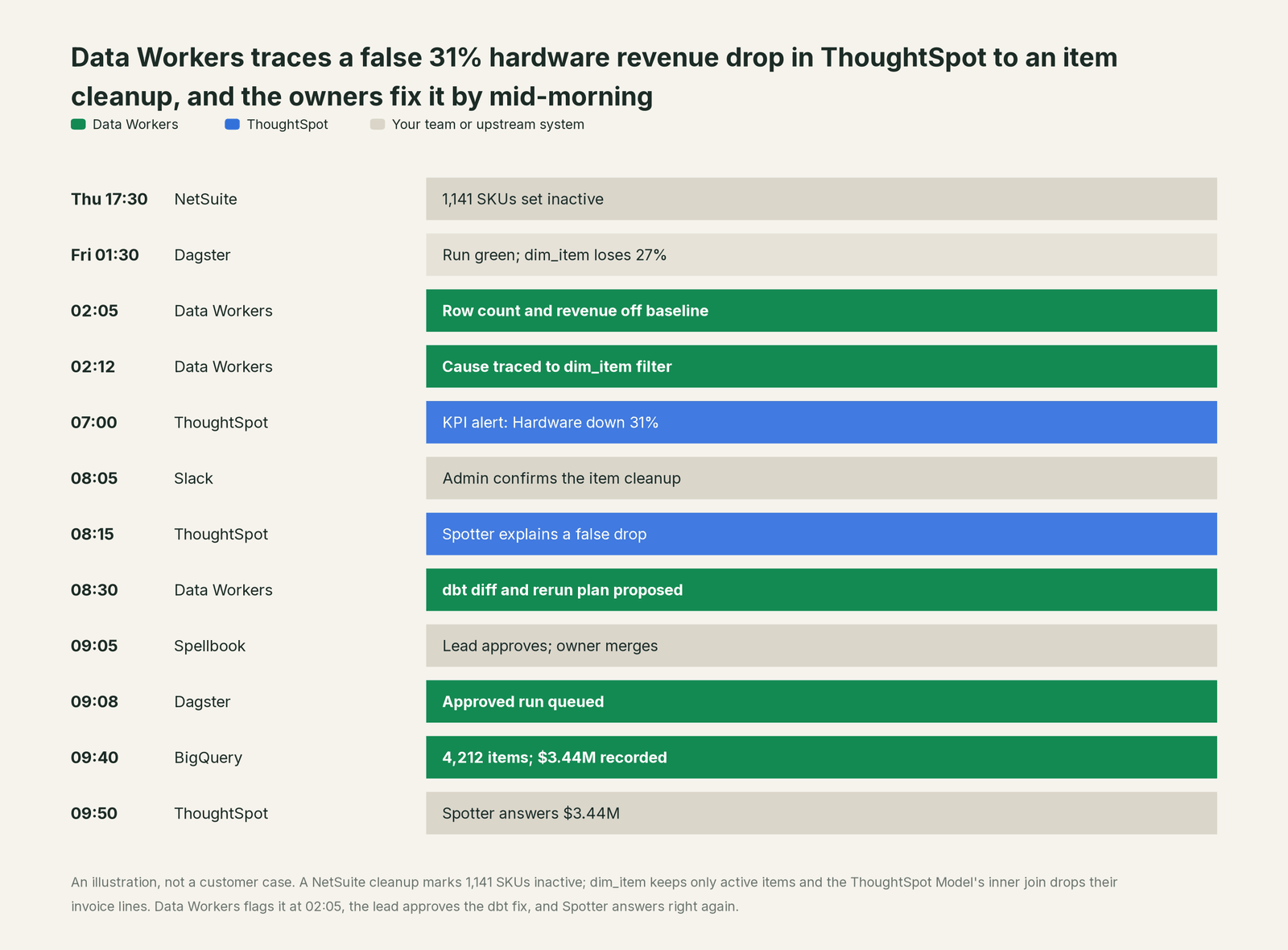
Every tool did its job. NetSuite stored the admin's decision, Airbyte synced it, dbt built what the model said, and the ThoughtSpot Model was right for the table it was written against. The problem lived between them: an ERP change met a filter written for another use, and an inner join turned it into missing revenue. Data Workers caught it five hours before the KPI alert, a named person approved the fix, and Spotter's next answer was right.
| Job | What ThoughtSpot does | What Data Workers does |
|---|---|---|
| The question | Lets anyone search or ask Spotter in plain language, with RLS and CLS applied | Makes sure the tables under each answer are right before people ask |
| The Model | Defines joins, join types, formulas and column names in Models and TML | Records the joins your team brings in as governed context, tied to the tables and dbt models they read |
| The alert | KPI Monitor flags an anomalous or threshold-crossing KPI by email (Slack delivery is Early Access) | Flags the table or baseline that moved, hours earlier, and traces it to the change that caused it |
| The fix | Owners edit Models and Liveboards | Proposes the upstream fix as a diff for its owner, routes it to a named approver and queues the approved rerun |
| The proof | Answers again, live, from the warehouse | Re-checks the tables, compares the recorded value and writes a receipt with cause, diff, approver and undo |
Why doesn't ThoughtSpot just do this itself?
ThoughtSpot made a clear bet: query the warehouse live, ground every answer in a governed Model, let anyone ask. Its guardrails fit that job. Spotter Semantics (announced March 2026) gives agents a governed Metrics Catalog, and Spotter "checks its own work". Liveboard dependency management (GA in 26.10) shows which Liveboards break when a Model column is deleted. KPI Monitor watches metrics, and RLS and CLS hold everywhere, the Spotter MCP server included.
All of that protects the answer's faithfulness to the Model. Friday's change never touched the Model. It came through an ERP setting, a sync and a dbt filter, in systems ThoughtSpot doesn't run, and fixing it meant a dbt change, an approval, a Dagster rerun and a warehouse check. That is a different product with different liability: cross-system context, blast-radius scoping, approvals, rollback and receipts across vendors. That is Data Workers, built on the ThoughtSpot instance your business already asks.
Every tool owns a slice. Data Workers covers the whole lifecycle
ThoughtSpot owns one slice outright: letting anyone ask the data a question and get a governed answer. Each point tool adds another console, contract and handoff. Data Workers covers the whole lifecycle with one context, one approval flow and one audit trail.
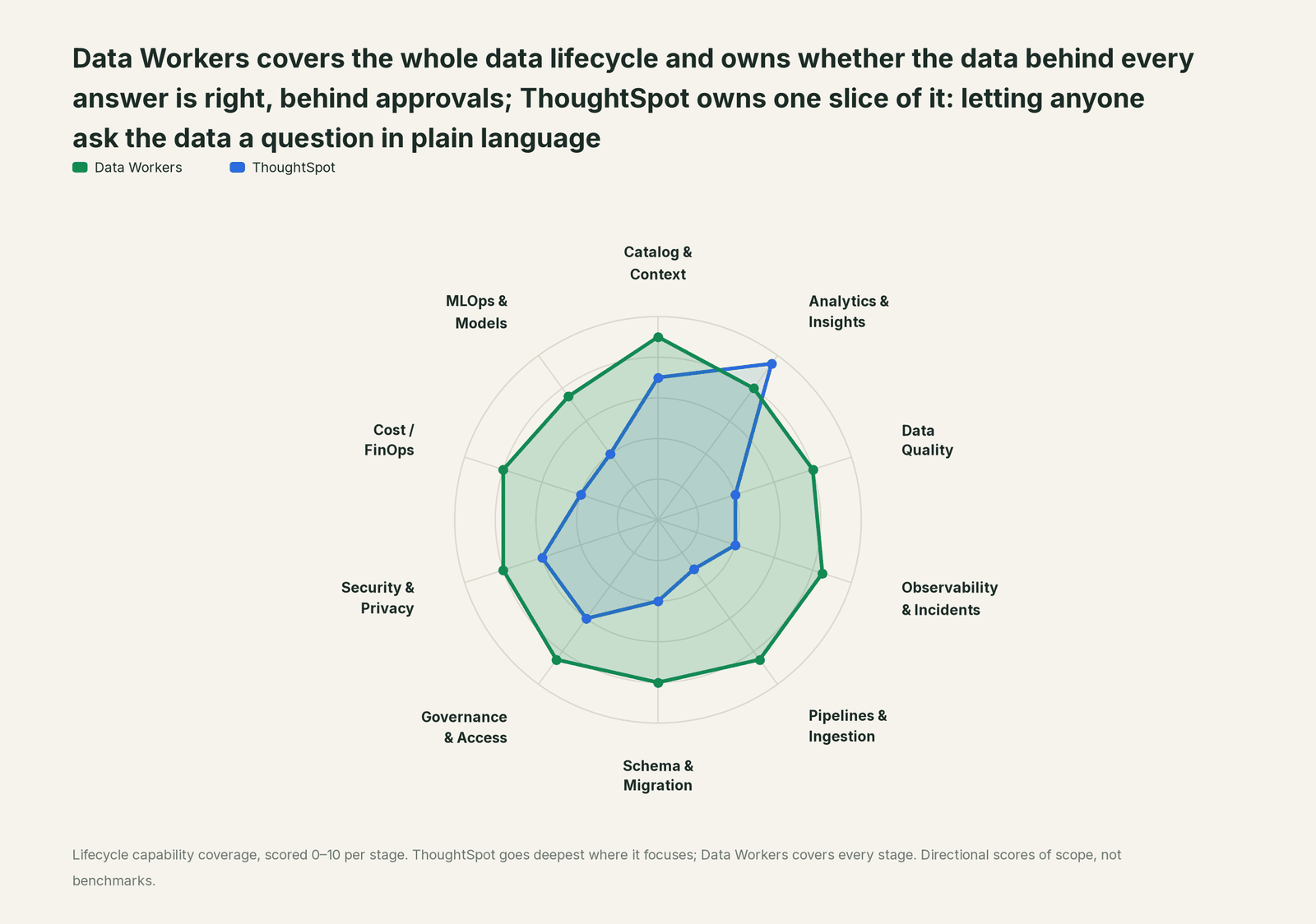
| Stage | Data Workers | ThoughtSpot | Why we scored it this way |
|---|---|---|---|
| Catalog & Context | 9 | 7 | Models hold the joins, formulas and column names Spotter searches, Spotter Semantics (Mar 2026) adds a governed Metrics Catalog, and Snowflake Semantic Views move both ways. Data Workers keeps one governed context graph across the source, warehouse, dbt and every consumer. |
| Analytics & Insights | 8 | 9.5 | ThoughtSpot's home stage: search, Answers, Liveboards, Spotter 3, SpotterViz, and Spotter Analysts (GA in 26.10). Data Workers makes sure the tables under each answer are right. |
| Data Quality | 8 | 4 | ThoughtSpot answers from whatever the Model's tables return. Data Workers checks those tables after every run for nulls, duplicate keys and row counts, and holds headline values to a baseline. |
| Observability & Incidents | 8.5 | 4 | KPI Monitor flags an anomalous KPI to email or Slack. Data Workers traces the move back to the source, sync or dbt model that caused it, proposes the fix and verifies it. |
| Pipelines & Ingestion | 8.5 | 3 | Analyst Studio's SpotCache and data mashups (GA Feb 2026) prepare data for ThoughtSpot itself. Data Workers queues approved orchestrator reruns of the dbt and pipeline jobs that feed the warehouse. |
| Schema & Migration | 8 | 4 | Liveboard dependency management (GA in 26.10) shows which Liveboards break when a Model column is deleted. Data Workers reviews dbt changes and their manifest diff and scopes the blast radius before merge. |
| Governance & Access | 8.5 | 6 | Roles, Orgs, publishing and row- and column-level security govern ThoughtSpot content and answers. Data Workers routes every data change to a named approver. |
| Security & Privacy | 8 | 6 | RLS and CLS hold in Liveboards, Spotter and the Spotter MCP server. Data Workers leaves a receipt on every data change and proposes masking for the owner to apply. |
| Cost / FinOps | 8 | 4 | SpotCache and aggregate-aware queries cut repeat warehouse spend for ThoughtSpot's own traffic. Data Workers reads Snowflake spend down to the dbt model and BigQuery spend from the Jobs API. |
| MLOps & Models | 7.5 | 4 | Spotter 3 adds Python and forecasting skills, and Analyst Studio runs Python and R notebooks. Data Workers keeps the data under models and agents healthy. |
How ThoughtSpot and Data Workers work together
Your people stay where they are: Liveboards and Spotter for the business, Claude or ChatGPT with the Spotter MCP server for analysts and engineers, Slack for alerts and approval requests. Spellbook Data Catalog (in preview) is where the data team reviews each fix, its blast radius, approver and rollback. Underneath, Data Context Wizard keeps one governed context graph, the Data-Agents Swarm's 20+ specialist agents do the work, and the Autonomous Data-Conductor runs each fix end to end.
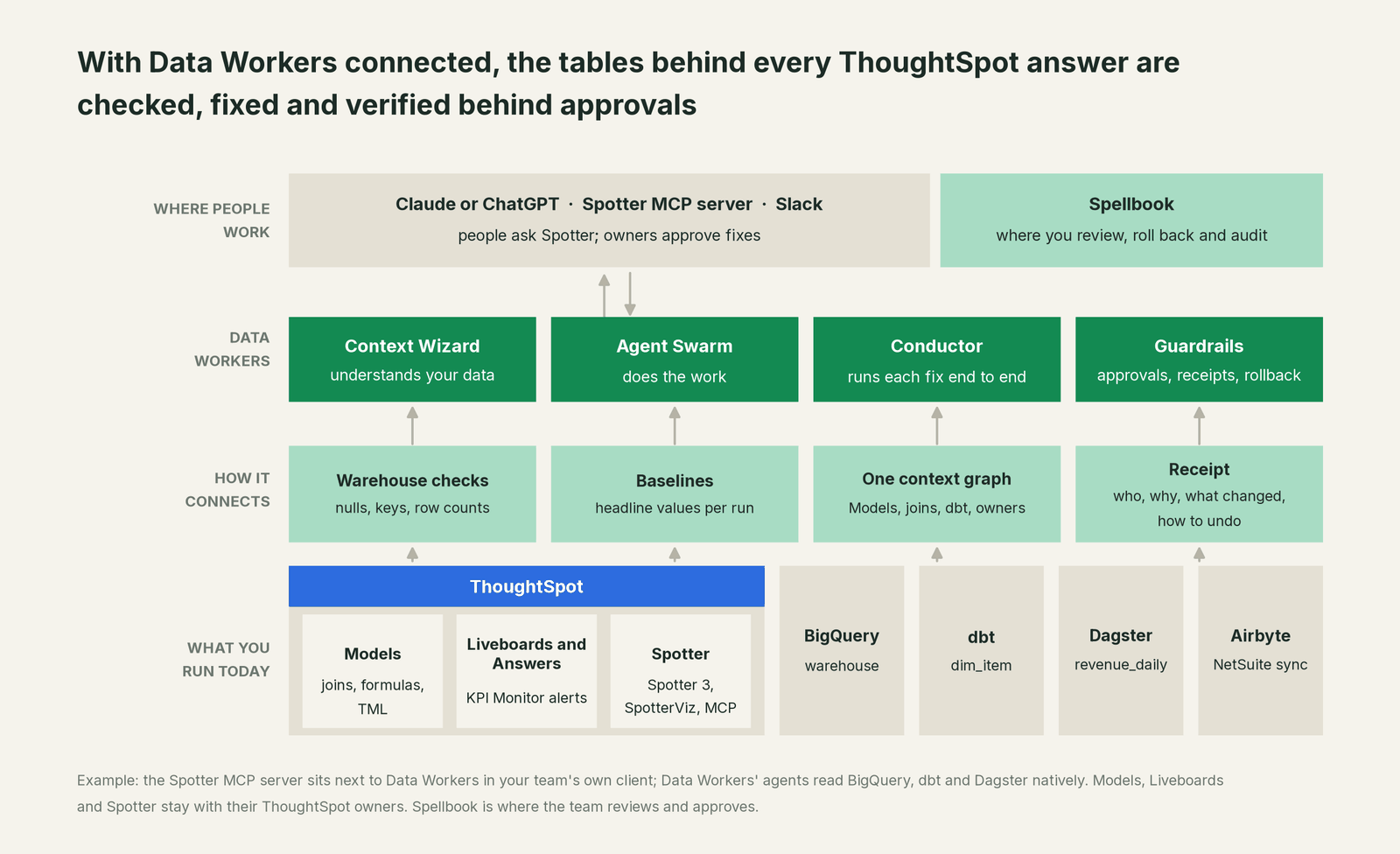
What Data Workers works from. Data Workers connects to ThoughtSpot over its REST API or MCP server today, and does its own checking on the systems under it. run_quality_check runs nulls, uniqueness on id columns and minimum row counts on Snowflake and Postgres, and on BigQuery with a service-account key; get_quality_score rolls them up. monitor_metrics holds the values your team records after each run, such as a Liveboard KPI's source query or a dimension's row count, against their baseline: that is where a 31% drop shows. trace_cross_platform_lineage and blast_radius_analysis follow a table back to its source and forward to every dbt model and to any Model or Liveboard your team records in the context graph; when a fix goes through a pull request, change review's lineage diff also reads the dbt exposures. diagnose_incident, remediate and get_incident_history run and record the incident. Your data stays in your systems; the hosted Conductor sees workflow metadata only.
How Models come in. Your coding agent exports a Model's TML through ThoughtSpot's REST API and hands its joins and formulas to Context Wizard as governed definitions, the path LookML to Data Context Wizard walks through for Looker (Snowflake Semantic Views over MCP covers Models that start there). Data Workers never edits a Model, Liveboard or TML file; their owners do.
Setup over MCP today. Clone the open-source repository and add start-agent.sh entries to your client's MCP config, per the client setup docs. ThoughtSpot documents the Spotter MCP server (an add-on for Enterprise Edition and ThoughtSpot Embedded) for local clients through mcp-remote, pinned to a dated api-version; the current documented version is 2026-05-01. It sits next to Data Workers for your own questions; Data Workers' agents never call it. Its create_dashboard tool creates a Liveboard, so approve those calls in your client.
// Example. The ThoughtSpot entry is your team's own Spotter MCP
// connection; Data Workers does not call it.
{
  "mcpServers": {
    "ThoughtSpot": {
      "command": "npx",
      "args": ["mcp-remote", "https://agent.thoughtspot.app/mcp?api-version=2026-05-01"]
    },
    "dw-context-catalog": {
      "command": "/path/to/dataworkers-claw-community/start-agent.sh",
      "args": ["dw-context-catalog"]
    },
    "dw-quality": {
      "command": "/path/to/dataworkers-claw-community/start-agent.sh",
      "args": ["dw-quality"]
    },
    "dw-incidents": {
      "command": "/path/to/dataworkers-claw-community/start-agent.sh",
      "args": ["dw-incidents"]
    }
  }
}
List the tools with your client's own command. An analyst can then ask "is everything under the Revenue Model healthy?" and get Spotter's answer and Data Workers' lineage, checks and open incidents side by side. Data Workers + Hex and ThoughtSpot covers running both.
Where fixes go. Data Workers proposes the change as a diff for the owner to merge, usually a dbt model or source mapping, with its blast radius and undo step; it opens the pull request itself only when your team turns on the dbt GitHub pull-request target. After approval it queues the rerun through your orchestrator. ThoughtSpot queries the warehouse live, so the next answer reads the fixed table; where results are cached, the ThoughtSpot owner decides when to rebuild.
One request, L0 to L4. The autonomy ladder is set per domain.

- •L0 manual. Someone notices a strange Spotter answer and chases it by hand.
- •L1 observe. Data Workers checks every table under your Models and logs what it would do.
- •L2 propose. It drafts the upstream fix with its blast radius; a named owner approves in Spellbook first.
- •L3 act reversibly. For proven classes, such as queuing the orchestrator rerun after an approved dbt fix, it acts, verifies and can roll back.
- •L4 autonomous. For a narrow class in one domain, it fixes and verifies on its own and posts the receipt.
Approvals go to a named person; an unanswered request expires and escalates, never grants itself. No agent can promote its own work. Read is it safe to let AI agents change production data, how approvals work in practice, what the autonomy levels mean, who owns the agents and where does our data go for the full safety model.
Around ThoughtSpot: You're on Airbyte, You're on Dagster, You're on Snowflake Semantic Views. Sibling BI pages: You're on Looker, You're on Power BI and You're on Mode (now part of ThoughtSpot, which sells it as Analyst Studio). Choosing between tools: ThoughtSpot vs Data Workers, ThoughtSpot alternatives for AI insights and ground LLM analytics in a semantic layer.
What changes for your team
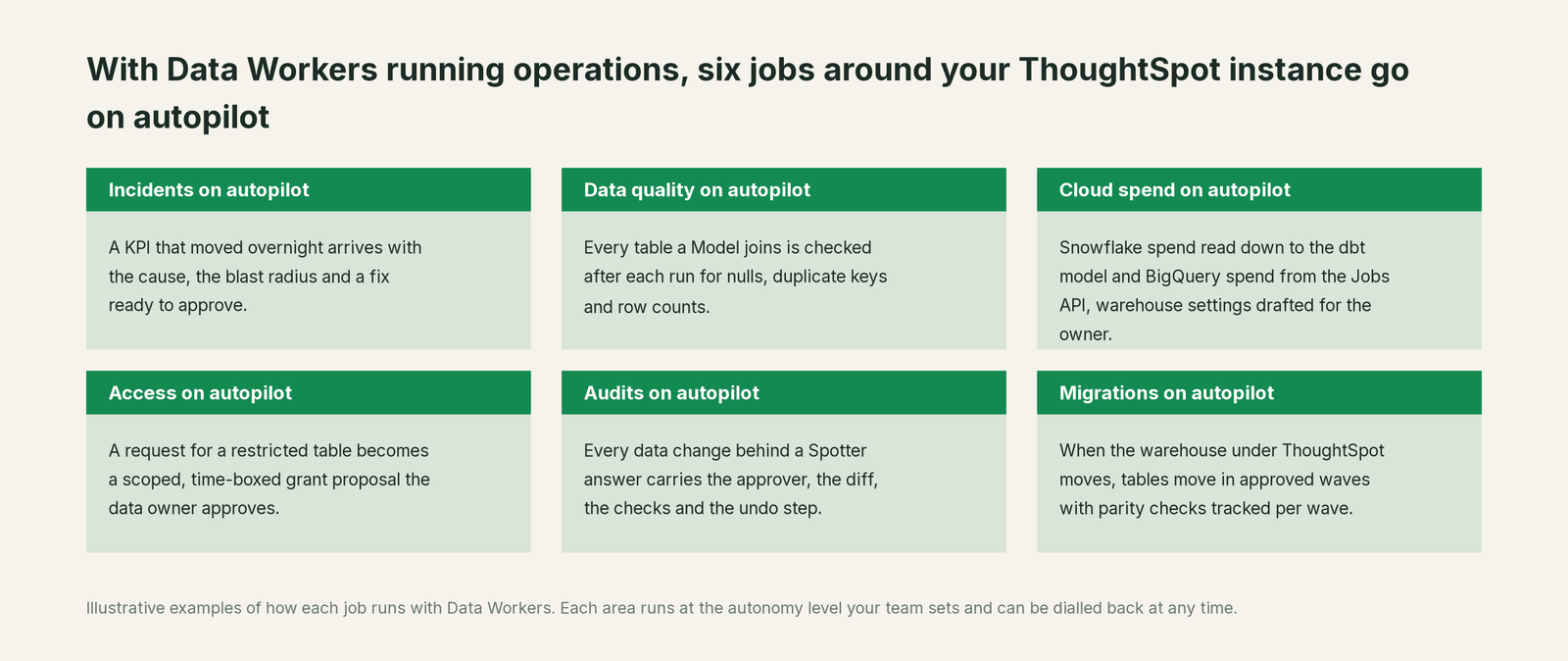
ThoughtSpot teams lose much of the week to one question: is a strange answer the Model, the question or the data? With Data Workers next to ThoughtSpot, these jobs run on autopilot at the level you set.
- •Incidents. A KPI that moved overnight arrives with its cause, blast radius and a fix ready to approve.
- •Data quality. Every table a Model joins is checked after each run for nulls, duplicate keys and row counts.
- •Cloud spend. Snowflake spend is read down to the dbt model and BigQuery spend from the Jobs API, with warehouse settings drafted for the owner to apply.
- •Access. A request for a restricted table becomes a scoped, time-boxed grant proposal the data owner approves.
- •Audits. Every data change behind a Spotter answer carries its approver, diff, checks and undo step.
- •Migrations. When the warehouse under ThoughtSpot moves, tables move in approved waves, parity checks tracked per wave.
Keep ThoughtSpot, or consolidate?
Keep ThoughtSpot if you love it; Data Workers works with it from day one. Many teams consolidate once Data Workers runs that slice too.
Most teams keep ThoughtSpot: search, Spotter, Liveboards and the Models your business trusts belong there, and Analyst Studio stays with its analysts. What they consolidate is the tooling around it: a separate data-quality tool, scripts that compare Liveboard numbers with warehouse queries, a spreadsheet of who owns which table. Weighing a build on the Spotter MCP server? Read build it ourselves with Claude Code and MCP servers: connecting servers is easy; cross-system context, approvals and rollback are the work.
The case for your CFO
The outcome: the answers ThoughtSpot gives the board and everyone who types a question stay right, and when something upstream breaks, the fix arrives before the meeting, with a named approver.
The risk story: Data Workers changes nothing in ThoughtSpot. It checks the warehouse tables under each Model and proposes upstream fixes as diffs; nothing runs until the named owner approves. Every change is verified and leaves a receipt: what broke, what changed, who approved it, how to undo it. Autonomy is set per domain from L0 manual to L4 autonomous, and an org-wide stop halts all autonomous dispatch. There is zero migration.
Why now: Spotter turned every Model into an answer engine for people who never open a Liveboard. A broken table now reaches a CRO as a confident explanation, with no analyst in between to catch it.
The first win: one Liveboard that feeds a weekly decision, every table its Model joins checked after each run. What stays the same: your Models, Liveboards and RLS, your ERP, Airbyte, dbt, Dagster and review process. For the numbers, see the ROI of agentic data operations.
The sentence to repeat upstairs: "ThoughtSpot keeps answering our questions; Data Workers makes sure the data behind every answer is right, with a named approver and a receipt on every fix."
Getting started
Start with a pilot. Pick the Liveboard behind a number people act on, connect Data Workers read-only to the warehouse, dbt and your orchestrator, record its headline values as baselines, and let it check every table the Model joins for a few weeks before turning on the first fix class. The pilot path and plans are on the pricing page, and the pilot is credited in full against the first year.
FAQ
Does Data Workers change our Models, Liveboards or TML? No. They stay with their ThoughtSpot owners. Data Workers proposes fixes in the systems underneath, such as a dbt model, and a named owner approves them.
Spotter gave a wrong answer. Was it the question or the data? Check the tables first. Often Spotter answered faithfully from the Model and the data underneath had moved. Data Workers shows whether a table under the Model failed a check or left its baseline, and traces it to the source, sync or dbt model that changed.
We already use KPI Monitor. Why add this? Keep it. KPI Monitor tells you a metric moved. Data Workers tells you why, often hours earlier, and carries the fix through approval, rerun and verification.
Do Data Workers' agents use the Spotter MCP server? No. Your team runs it side by side in the same client. Data Workers relies on its own warehouse, dbt and orchestrator connections.
Does Data Workers refresh anything in ThoughtSpot after a fix? No. ThoughtSpot queries the warehouse live, so the next answer reads the fixed table. Data Workers re-checks the tables and records the result.
Which warehouses does this cover? The table checks run natively on Snowflake, Postgres and BigQuery (with a service-account key). Across 50+ connectors Data Workers also works natively with dbt, Airflow, Dagster and Prefect; what integrations Data Workers supports lists each one.
Sources
- •ThoughtSpot, BI Agents: Spotter, SpotterModel, SpotterViz, SpotterCode (Spotter 3, "checks its own work", Python and forecasting skills), https://www.thoughtspot.com/product/agents (checked Oct 3, 2026)
- •ThoughtSpot, 26.10.0.cl release notes (Spotter Analysts GA; Liveboard dependency management GA), https://docs.thoughtspot.com/cloud/latest/notes.html (current release; checked Oct 3, 2026)
- •ThoughtSpot, Release history (26.9.0.cl, September 2026: aggregate-aware query execution GA), https://docs.thoughtspot.com/cloud/latest/release-history.html (checked Oct 3, 2026)
- •ThoughtSpot, Create Models (join types INNER, FULL OUTER, LEFT OUTER, RIGHT OUTER; cardinality), https://docs.thoughtspot.com/cloud/latest/models (26.10.0.cl; checked Oct 3, 2026)
- •ThoughtSpot, Monitor for KPIs (anomaly, threshold and scheduled alerts; Slack alerts Early Access), https://docs.thoughtspot.com/cloud/latest/monitor (checked Oct 3, 2026)
- •ThoughtSpot Developers, Spotter MCP Server (add-on for Enterprise Edition and ThoughtSpot Embedded; RLS and CLS; date-based api-version), https://developers.thoughtspot.com/docs/mcp-integration (checked Oct 3, 2026)
- •ThoughtSpot Developers, MCP Server changelog (latest version string 2026-05-01; search_objects, August 2026), https://developers.thoughtspot.com/docs/mcp-server-changelog (checked Oct 3, 2026)
- •ThoughtSpot Developers, MCP Server with Spotter 3 (create_dashboard), https://developers.thoughtspot.com/docs/mcp-server-spotter3 (checked Oct 3, 2026)
- •ThoughtSpot Developers, Connecting MCP clients (mcp-remote config for local clients), https://developers.thoughtspot.com/docs/connect-mcp-server-to-clients (checked Oct 3, 2026)
- •ThoughtSpot, press release: next-generation Analyst Studio, SpotCache and data mashups generally available (Feb 18, 2026), https://www.thoughtspot.com/press-releases/thoughtspot-launches-agentic-data-prep-to-accelerate-ai-readiness-with-next-generation-analyst-studio (checked Oct 3, 2026)
- •ThoughtSpot, press release: Spotter Semantics (Mar 12, 2026), https://www.thoughtspot.com/press-releases/thoughtspot-introduces-spotter-semantics-to-bring-trust-and-context-to-enterprise-ai (checked Oct 3, 2026)
- •ThoughtSpot, press release: Snowflake Cortex AI and Semantic Views, bi-directional semantic management (Jun 2, 2026), https://www.thoughtspot.com/press-releases/thoughtspot-expands-governed-enterprise-ai-with-snowflake-cortex-ai-and-semantic-views (checked Oct 3, 2026)
- •ThoughtSpot, Press releases 2026 (no ownership or funding change listed), https://www.thoughtspot.com/press-releases (checked Oct 3, 2026)
- •Data Workers, Client setup (open-source docs), https://dataworkers.io/opensource-docs/client-setup/ (checked Oct 3, 2026)
- •Data Workers open-source repository, agent tools and start-agent.sh, https://github.com/DataWorkersProject/dataworkers-claw-community (checked Oct 3, 2026)