Data Workers + Hex and ThoughtSpot: Making Sure the AI Analyst's Answer Is Right
A Hex and ThoughtSpot integration for AI data agents: Data Workers traces a wrong answer in a Hex app or Spotter to its cause, fixes it through your reviews and checks it against source.
Hex and ThoughtSpot show the answer. Data Workers makes sure it's right. Your analysts build in Hex notebooks and publish apps; your business users ask Threads or Spotter in plain English and get a chart back in seconds. Both tools are excellent at turning a question into an answer. Neither one is built to notice that the table under the answer broke at 2 a.m., trace it to a Salesforce admin's cleanup, fix it through your dbt reviews, and prove the next morning that the answer matches the source again. That is the job Data Workers does, and this page shows how it wires into both tools.
Your estate probably looks like this. Fivetran lands Salesforce, billing and product data in BigQuery, Snowflake or Databricks. dbt builds the marts. Data scientists and analysts work in Hex: SQL and Python notebooks, published apps that refresh on a schedule, and Threads for the questions that used to land in a Slack channel. Sales and finance leaders use ThoughtSpot: Liveboards for the weekly reviews, and Spotter for the follow-up questions nobody built a chart for. Both tools sit on semantic models, and both now ship agents and MCP servers.
When an AI analyst gives a confident answer on top of a broken table, the answer is wrong in a way nobody sees. Data Workers is the agentic data platform that runs the whole data lifecycle under those answers. Here is how it works next to Hex and ThoughtSpot, what it sends back, and what stays exactly where it is.
Key takeaways
- •Hex and ThoughtSpot stay where people ask. Notebooks, apps, Threads, Liveboards, Spotter, semantic models and permissions stay in each tool.
- •Every app and Liveboard is mapped to its tables. Recorded in the context graph, each Hex app and ThoughtSpot Liveboard sits in Data Workers' blast radius next to the warehouse tables and definitions behind it. Your team's assistant uses each tool's MCP server alongside Data Workers' MCP servers.
- •It checks the tables under the answer people see. After a fix, Data Workers checks the warehouse tables against an agreed query on the source, and the owner confirms the Hex app and the Liveboard show the same figure.
- •Writes are narrow and approved. The fix lands where the cause lives, usually a dbt diff for the owner to merge. Data Workers writes nothing into Hex or ThoughtSpot; the app owner reruns the published app the plan names.
- •Each vendor's agents keep their job. Hex's Notebook Agent, Threads and Modeling Agent and ThoughtSpot's Spotter agents help people build and ask. Data Workers works across the estate behind them.
- •Start read-only. Connect read identities and let Data Workers check one Hex app and one Liveboard after every dbt run.
What Hex and ThoughtSpot do, and why teams keep them
Hex is where analysts and data scientists think out loud: SQL and Python in one notebook, a published app for the stakeholders, and a semantic model so the same metric means the same thing in every project. ThoughtSpot is where business users search their data: type a question, get a governed answer, pin it to a Liveboard. Teams keep both because the work inside them took years to agree, and because people actually use them.
Both have moved fast on agents in 2026. Here is where each stands on October 2, 2026.
| Tool | Agent and MCP surface | What it does | Status, October 2026 |
|---|---|---|---|
| Hex | Notebook Agent | Creates and edits Python, SQL, Markdown, Pivot and Chart cells | GA |
| Hex | Threads | Conversational self-serve questions, preferring endorsed and semantically modeled data | GA |
| Hex | Modeling Agent | Generates and edits semantic models in Hex, for Managers and Admins | GA |
| Hex | Generative Apps, Chat with App | Build apps from a prompt; app viewers ask follow-ups | Generative Apps in beta; Chat with App GA |
| Hex | Hex MCP server | Knowledge tools (search projects, threads) and project editing tools (cells, runs, get_cell_output, data connections) | Beta, Team and Enterprise; project building via MCP added Sept 15, 2026; edits apply to a project's draft, never the published app |
| Hex | Context Studio | Monitor AI usage and manage the context that steers Hex's agents, for Admins and Managers | GA |
| Hex | Semantic models | Author in the Modeling Workbench, or sync from dbt MetricFlow, Cube or Snowflake Semantic Views; pull specs via CLI | Current; CLI added Aug 18, 2026 |
| ThoughtSpot | Spotter, SpotterModel, SpotterViz, SpotterCode | Analytics agent, semantic model automation, Liveboard assembly, IDE coding agent | Listed on ThoughtSpot's agents page; on Snowflake Marketplace since June 2, 2026 |
| ThoughtSpot | Spotter MCP server | Natural language answers, Liveboard creation, content search; enforces row-level and column-level security | Hosted add-on for Enterprise Edition and Embedded, date-versioned; SpotterModel tools Oct 1, 2026; get_data Oct 2, 2026 |
| ThoughtSpot | Snowflake Semantic Views | Import semantics from Snowflake and export enriched models back | Available since June 2, 2026 |
| ThoughtSpot | Analyst Studio | SQL, Python and R notebooks and spreadsheets that publish into the semantic layer | Add-on on Essentials, Pro and Enterprise |
Both tools also have a full API surface for your team. Hex's REST API runs published projects with RunProject (including updatePublishedResults and useCachedSqlResults), lists runs, and on Enterprise returns the warehouse tables a project queried with GetQueriedTables. ThoughtSpot's REST API v2 searches metadata, returns Liveboard and Answer data, runs a search query, exports and imports TML, and commits and deploys TML through Git.
What Data Workers reads around each tool, and what it sends back
This is the core of the integration. Hex and ThoughtSpot connect over their APIs or MCP servers today: your team's assistant uses those servers side by side with Data Workers' MCP servers, and Data Workers' own work rests on what its connectors read in the warehouse, dbt and the orchestrator. Most of what it does is read.
| Data Workers reads | Data Workers sends back |
|---|---|
The warehouse tables under each app and Liveboard: run_quality_check on BigQuery (with a service-account key) or Snowflake, and monitor_metrics baselines on the totals that matter | A rerun plan for the Hex app owner: which published app, after which fix |
| The dbt manifest (models, lineage, MetricFlow metrics) and the context-graph notes that tie each Hex app and Liveboard to its models and owner | Semantic changes as reviewed code: a dbt diff for the owner to merge, or a spec change the owner makes through Hex's CLI workflow |
| Hex semantic models and ThoughtSpot Models your team exports (Hex specs through the CLI, TML) and hands to Context Wizard as definitions | ThoughtSpot: model changes as TML for your Git branch and its deploy step, after review |
| The agreed check query, run against the landed source table in the warehouse | A note to each app and Liveboard owner: what broke, what changed, when the tables were checked |
| Orchestrator runs that build the tables | The receipt, linked from Spellbook |
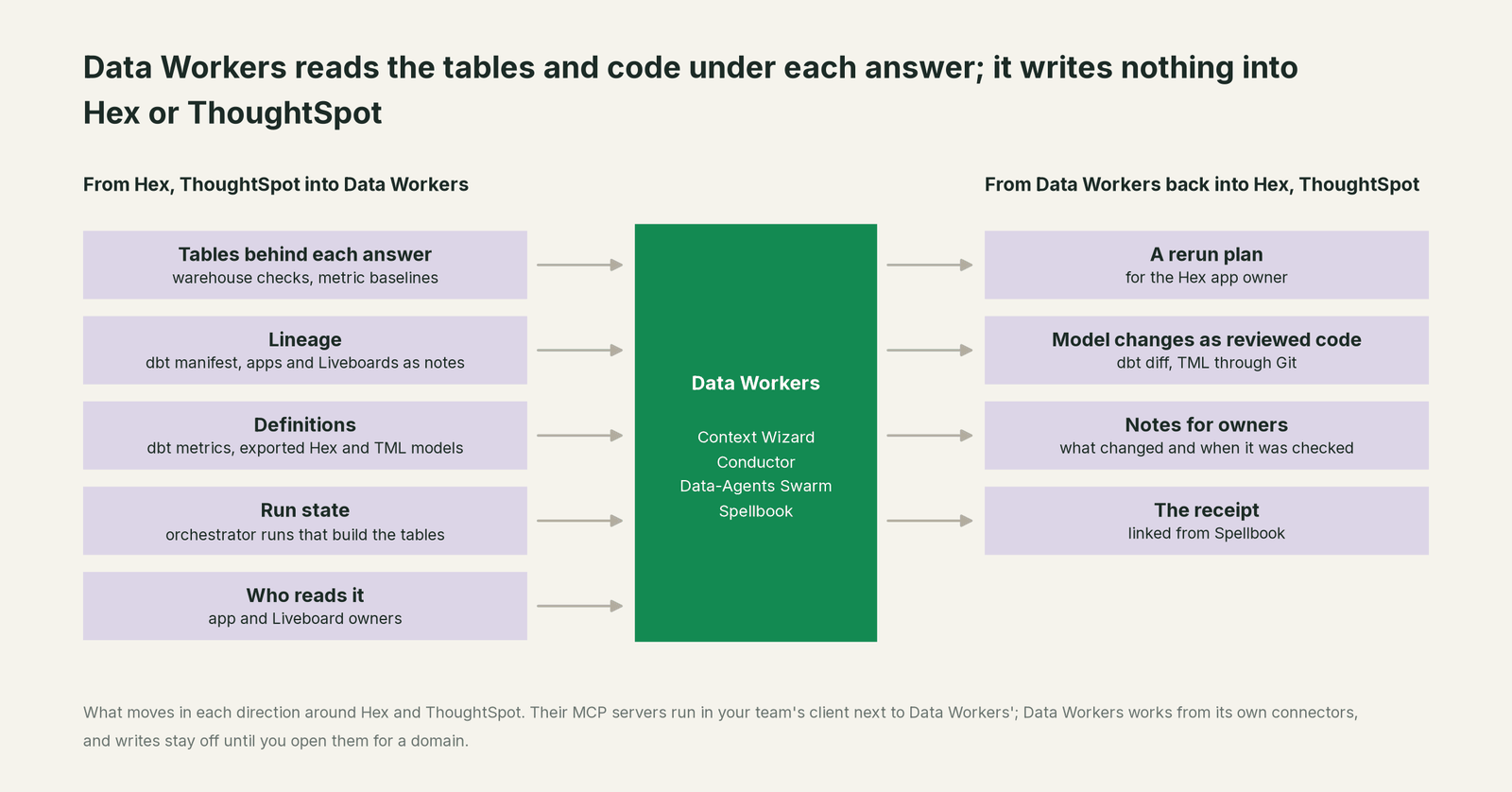
A few agents do most of this work. The Data Context & Catalog agent joins each Hex app and ThoughtSpot Model to dbt and the warehouse in Data Context Wizard, so a bookings measure in a Hex semantic model, a ThoughtSpot Model formula and the dbt MetricFlow metric sit side by side, pointing at the same column. The Incident Debugging agent follows a wrong answer upstream. The Schema Evolution agent marks every app and Liveboard that depends on a changed column or value. The Data Change Review agent posts the blast radius, down to named Hex apps and Liveboards, on every dbt pull request. The Autonomous Data-Conductor sequences them and closes the incident only after the answer checks out.
How "checks the answer" works. For each app or Liveboard you care about, you agree one query with its owner: this quarter's bookings, by segment, from Salesforce. Data Workers runs that query against the landed Salesforce table and checks the mart behind the app, after every fix and every dbt run, and keeps the total as a monitor_metrics baseline. The figure each tool shows is read where it lives: the owner opens the app and the Liveboard, or your team's assistant reads the headline cell over the Hex MCP server (get_cell_output) and the visualization over Spotter's get_data, side by side with Data Workers. Data Workers' agents never call the Hex or Spotter MCP servers. If the figures match within your tolerance, the incident closes and the receipt records the checks and the confirmed values. If they don't, the incident stays open. The check is read-only.
One incident, through Hex and ThoughtSpot
An illustration, not a customer case, that most revenue analytics teams will recognize.
At 21:40 on Sunday, a Salesforce admin tidies the opportunity stage picklist and renames "Closed Won" to "Won", updating historic records. At 23:15 Fivetran re-syncs the updated opportunities into BigQuery. At 02:00 dbt builds fct_bookings, which filters on stage_name = 'Closed Won'. Almost nothing matches. not_null and unique tests pass, because the rows that remain are valid. The sales team's Hex app "Weekly bookings" runs on a 06:00 schedule. The VP of Sales opens the ThoughtSpot "Pipeline review" Liveboard at 09:00 and usually asks Spotter a few follow-ups.
| Step | Where it runs | What happens | Who decides |
|---|---|---|---|
| 1. Detect | BigQuery | At 02:20 a monitor_metrics baseline the team records flags that quarter-to-date bookings in fct_bookings fell 92% overnight while opportunity row counts held flat. | Data Workers, read-only |
| 2. Diagnose | Salesforce, Fivetran, dbt | Following lineage, it finds the stage values changed in the 23:15 sync and the dbt filter still expects the old label. | Data Workers, read-only |
| 3. Blast radius | Hex, ThoughtSpot | From the team's context-graph notes it names the Hex app and the ThoughtSpot Liveboard behind Spotter's answers that read fct_bookings, and their owners. | Data Workers, read-only |
| 4. Propose | GitHub, Spellbook | One plan: a dbt pull request (the GitHub pull-request target is on) that maps both stage labels in stg_salesforce__opportunities, plus an accepted_values test on stage; then a rebuild, and a rerun of the Hex app by its owner. The plan carries the blast radius and the rollback path. | Data Workers proposes |
| 5. Scheduled run | Hex | The 06:00 scheduled run publishes the low number, as scheduled. The plan already covers it. | Hex, as scheduled |
| 6. Approve | GitHub | The on-call analytics engineer reviews the PR, dbt CI passes, and they merge at 07:30. The same approval covers the rebuild and the rerun. | A named engineer |
| 7. Rebuild | dbt, BigQuery | The scheduler rebuilds fct_bookings; at 07:45 Data Workers' checks show bookings match the agreed query against Salesforce's landed table. | Approved in step 6 |
| 8. Rerun | Hex | At 07:55 the app owner reruns the published app with fresh SQL results, as the plan lists. | The app owner |
| 9. Verify | Hex, ThoughtSpot | At 08:10 the on-call's assistant reads the headline figure over the Hex MCP server and the Liveboard figure over Spotter's get_data, next to Data Workers' checks. Both match. The receipt records the checks and the confirmed values. | Data Workers and the on-call, read-only |
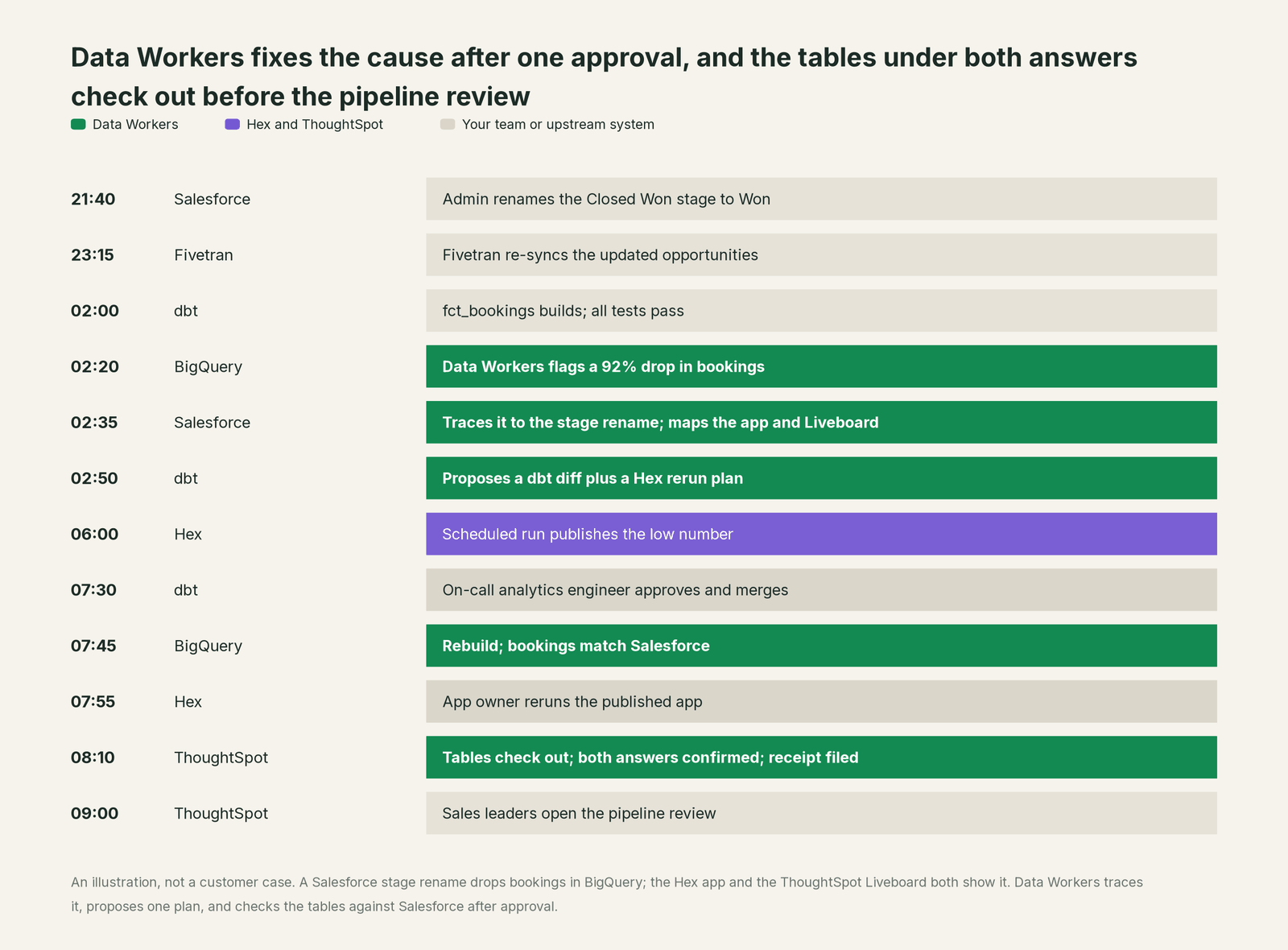
ThoughtSpot needed no write at all. The Liveboard runs its queries against BigQuery over ThoughtSpot's live connection, so once the table was right, so was the answer, and the on-call confirmed it. When the VP asks Spotter "why did bookings change week over week" at 09:05, Spotter reasons over correct data. Every change ran through the tool that owns it: the fix through dbt and your reviewers, the rerun by the app's owner in Hex. Data Workers supplied the parts neither tool owns: noticing the drop in the warehouse, tracing it to Salesforce, naming every app and Liveboard it touched, sequencing the plan, and checking the tables under both answers before the 09:00 review.
Why don't Hex and ThoughtSpot just do this themselves?
Both teams built a great product for one job: turning governed data into answers people trust and can explore. Their designs follow from that job, and they are the right designs.
Their agents work inside their own workspace and their own semantic model. Hex's Notebook Agent is, in Hex's words, "intended to be used by technical users who can audit the SQL and code that the agent suggests", and the Hex MCP server edits a project's draft, never the published app. Hex's Skip approvals mode (Sept 15, 2026) lets its agent work straight through inside a project, which is a sensible speed choice for analysis work. Spotter answers within ThoughtSpot's governed Models and enforces row-level and column-level security; its MCP tools search, answer, build Liveboards and now draft models. Each of those is a sensible boundary for an analytics product, and each assumes the tables underneath are right.
The cause of a wrong answer usually isn't in the analytics tool. In the incident above it was a Salesforce picklist, synced by Fivetran and built by dbt into BigQuery. Fixing it there is a different product category: blast-radius scoping across systems Hex and ThoughtSpot don't run, approvals that cover a dbt pull request and an app rerun in one plan, rollback for each step, receipts an auditor can read, context about every other system, and accountability for changes in tools neither vendor owns. That cross-system layer, with one approval flow and one audit trail, is the product Data Workers is.
Why a neutral layer matters with two answer engines. Many teams run Hex for analysts and ThoughtSpot for business users, and the same metric lives in both: a Hex semantic model, a ThoughtSpot Model, and often a dbt metric underneath. Context Wizard holds all of them side by side (the dbt metric from the manifest, the Hex and ThoughtSpot definitions your team exports to it), flags where definitions diverge, and checks the tables under each answer against the same source query, without asking you to pick one tool.
The vendors' agents and Data Workers, side by side
The split is simple. An analyst who wants a new analysis asks the Notebook Agent. A business user asks Threads or Spotter. A data team that wants a new semantic model uses Hex's Modeling Agent or SpotterModel. An incident that starts in a source system, a schema or value change that lands overnight, or a check that the number in the board deck matches Salesforce runs through Data Workers, with nobody at the keyboard until the approval.
They also meet in the same client. Your coding agent (Claude Code, Codex or Cursor) can call the Hex MCP server, the Spotter MCP server and Data Workers' MCP servers in one session: ask Spotter a question, then ask Data Workers which dbt models and sources sit under that Liveboard and whether anything upstream changed today. For the same pattern with dashboard tools, see Data Workers + Tableau, Power BI and Looker, and for a wider look at BI vendors' MCP servers, MCP servers for BI tools. If you're building on top of either tool rather than wiring it in, start with you're on Hex or you're on ThoughtSpot. Most fixes in this loop end in dbt, which Data Workers + dbt covers.
How to connect today
Hex and ThoughtSpot connect over their APIs or MCP servers today, in your team's client next to Data Workers. Each Data Workers agent is an MCP server too, so the same session that talks to Spotter can talk to Data Workers.
Week one: read only.
- •Hex. Record each target app in the context graph with its URL, owner and the models it reads, so Data Workers' blast radius reaches it; declared as a dbt exposure too, it shows in pull-request review's lineage diff. In your team's client, add the Hex MCP server for reading the headline cell with
get_cell_output; Hex requires the Editor role for its project tools. - •ThoughtSpot. Record each target Liveboard in the context graph the same way. In your team's client, add the Spotter MCP server and pin an
api-version, as ThoughtSpot recommends;get_dataneeds the data-download privilege. - •Warehouse and source. A read-only role for the agreed queries.
- •Pick one Hex app and one Liveboard, agree a check query with each owner, and let Data Workers check the tables behind them after every dbt run. Every agent starts observe-only.
Week two onward: rerun plans, then reviewed changes.
- •Add reruns of named published Hex apps to the incident plan, for the app owner to run after the approval.
- •Turn on the GitHub pull-request target for the dbt project, and route TML changes to their owner as diffs, with no permission to merge or deploy.
- •Keep publishing, sharing, permissions and row-level security with your Hex and ThoughtSpot admins. Data Workers never needs them.
The scopes above are an illustration; use the permission sets your plans and admins allow.
Guardrails: approvals, and what each tool owns
What Hex and ThoughtSpot stay responsible for. Notebooks, apps, Threads, Liveboards and Answers. Semantic models and ThoughtSpot Models. Row-level and column-level security, sharing and roles. Schedules. Their own agents for building and asking. Data Workers doesn't edit or run notebooks, cells, apps or Liveboards; it works on the tables and code under them.
What Data Workers enforces on top.
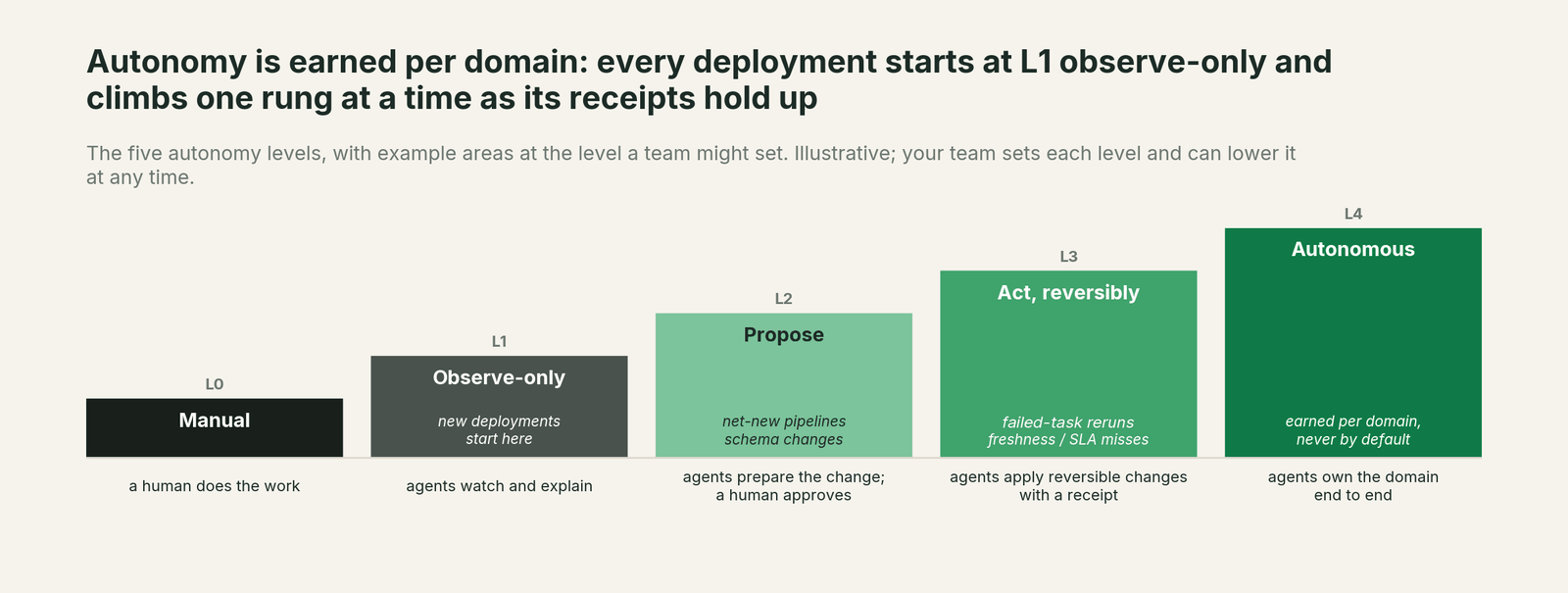
- •Read-only start. New deployments are observe-only. You extend autonomy one domain at a time as the receipts earn trust.
- •Autonomy per domain, L0 to L4. Checks on the bookings marts can move to "act reversibly" while model changes stay at "propose".
- •Approvals where they belong. Model changes are diffs your reviewers merge, so your reviewers decide. App reruns are listed in the approved plan for their owners. Anything irreversible needs a named human.
- •No self-approval. An authority guard in the write path stops any agent approving its own work.
- •Receipts. Every change records the diff, the approver, the blast radius, the checks run, the before and after values of each answer, and the rollback path in a tamper-evident, hash-chained log.
- •Least privilege. Data Workers acts with the identities you grant, through each tool's own permission system.
How it fits together
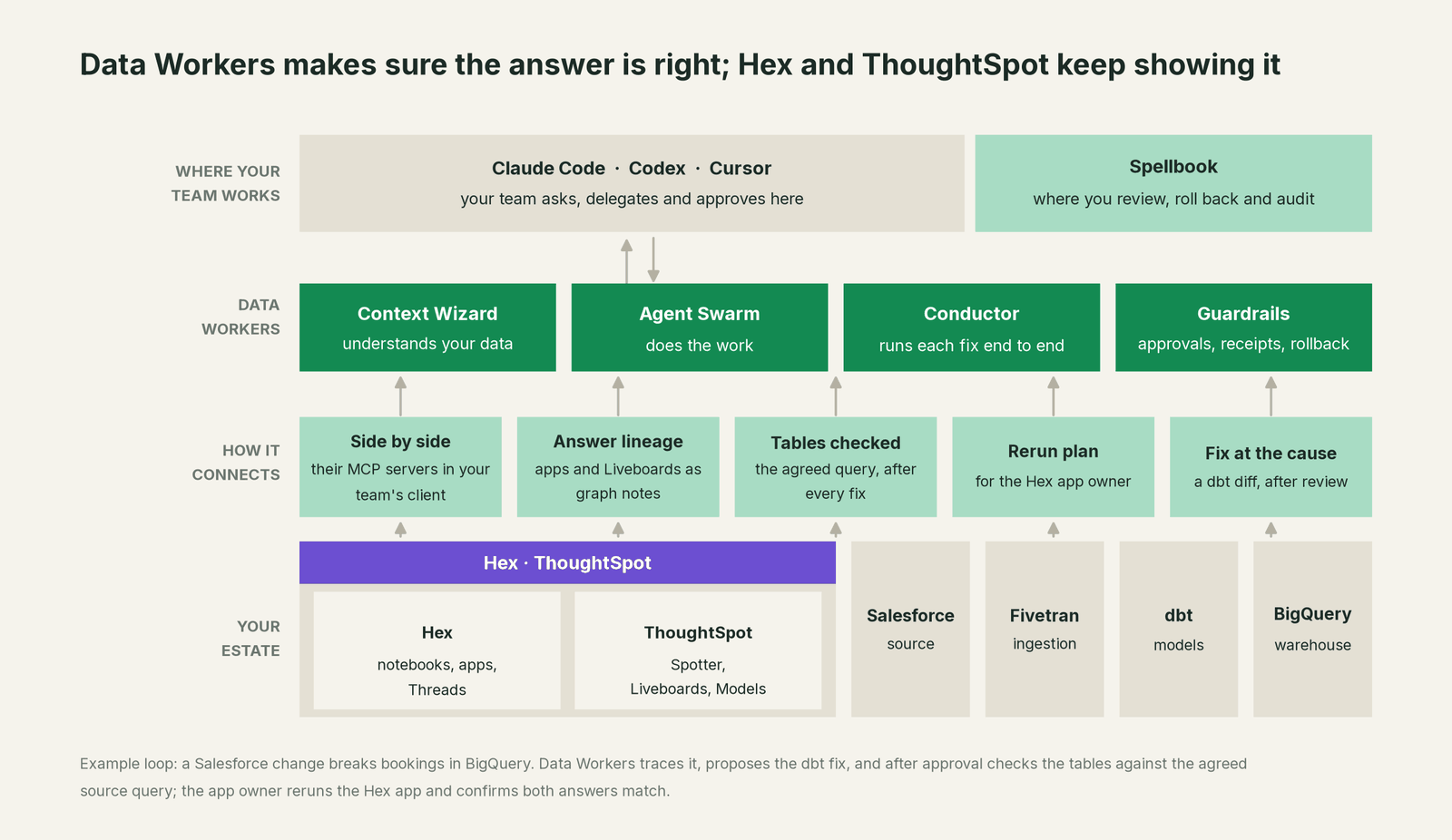
Your team works in its coding agent and reviews in Spellbook Data Catalog, which is in preview. The Data-Agents Swarm does the work, and the Autonomous Data-Conductor runs each fix end to end. Hex and ThoughtSpot stay where people ask questions. Nothing migrates, and Data Workers stores metadata and scrubbed facts, not copies of your tables.
What changes for your team
Analysts stop being the help desk for "is this number right?" When something breaks upstream, the app owner gets a note naming the cause, the fix and the time the app was checked. Analytics engineers see, on every dbt pull request, which Hex apps and Liveboards a change touches. The analytics lead running ThoughtSpot gets one record of every fix across Salesforce, Fivetran, dbt, BigQuery and both tools. Sales and finance leaders get answers from Spotter and Threads that rest on checked tables. For the path from alerts to agents that fix and verify, read the autonomous data platform playbook, and for how approvals and rollback keep production safe, is it safe to let AI agents change production data.
The case for your CFO
The outcome. The answers your leaders get from Hex apps, ThoughtSpot Liveboards and Spotter match the source systems, and every fix comes with a record of what changed, who approved it and what each answer showed afterwards.
The risk story. At the observe level, agents read metadata, the warehouse and sources and run read-only checks; they change nothing. At the propose level, they propose diffs and plans, and a named engineer approves. Acting levels are reversible and only for domains you choose, such as the bookings marts. An agent can't approve its own work, every change has a rollback path, and each receipt holds the diff, the approver, the blast radius, the checks run and the before and after values. There is no migration: Hex, ThoughtSpot, your models and your permissions stay as they are.
Why now. Self-serve AI is moving questions away from analysts, who used to catch a wrong number before it reached a leader. Spotter and Threads answer instantly from whatever the tables hold, so the check has to move under them.
The first win. One Hex app and one ThoughtSpot Liveboard, checked against the source after every dbt run.
What stays the same. Hex, ThoughtSpot, your semantic models, your admins, and the coding agent your engineers already use.
The pilot path. Start with a pilot on one source system, one Hex app and one Liveboard, read-only first, then rerun plans and proposed diffs. The pilot is credited in full against the first year.
One sentence for upstairs: "Hex and ThoughtSpot stay where people ask; Data Workers makes sure the tables under their answers are right, fixes the cause through our reviews, and checks the answer again, with a receipt."
When Hex or ThoughtSpot on its own is enough
If one team owns the warehouse, the models and one analytics tool, and wrong answers almost always trace to a definition inside it, the vendor's own agents and semantic tools can carry you. Once breaks start in source systems or ingestion, or the same metric lives in Hex, ThoughtSpot and dbt at once, an operating layer that sees the whole estate and checks every answer after a fix starts paying for itself.
FAQ
How does Data Workers integrate with Hex and ThoughtSpot? Side by side. Hex and ThoughtSpot connect over their APIs or MCP servers today, in your team's client next to Data Workers' MCP servers. Data Workers works from what its connectors read: the warehouse, the dbt manifest, the context-graph notes that tie each app and Liveboard to its models, and the orchestrator. It sends back proposed diffs for model changes and a rerun plan for the app owner.
Will Data Workers edit our Hex notebooks or ThoughtSpot Liveboards? No. It writes nothing into either tool; the app owner reruns a published app when the approved plan calls for it. Definition changes go to dbt, or to your TML Git branch, as diffs your team merges.
Does it work with the Hex and Spotter MCP servers? Yes, side by side. They run as separate MCP servers in the same client: your team's assistant reads the headline cell with the Hex MCP server's get_cell_output and Liveboard data with Spotter's get_data, and asks Data Workers what sits upstream. Data Workers' agents never call those servers themselves.
How does this help Spotter and Threads give correct answers? Both answer from governed models over your warehouse. Data Workers keeps the tables under those models correct and checked, so an AI answer at 9 a.m. rests on data that was verified against the source earlier that morning.
Which bookings definition wins: Hex, ThoughtSpot or dbt? Yours. Data Workers shows where the definitions differ and checks each against the agreed source query. Your team decides which one is right and changes it where it lives; Hex can sync semantic models from dbt MetricFlow, and ThoughtSpot can exchange semantics with Snowflake Semantic Views.
Does rerunning a Hex app cost anything extra? A rerun uses the same warehouse compute as a scheduled run. The plan lists only the apps a fix touched, and the app owner triggers each rerun.
Do we need to change permissions or row-level security? No. Data Workers reads with the identities you grant and never needs sharing, publishing or security admin rights. ThoughtSpot's row-level and column-level security apply to your team's assistant as they do to any user.
Sources
Sources for Hex and ThoughtSpot capabilities and statuses, current as of October 2, 2026: Hex AI overview (feature names and statuses, including Context Studio), Hex MCP server (beta, tools, draft-only edits), Hex changelog (Aug 18, Sept 15, Sept 23 and Sept 29, 2026 entries, including Skip approvals mode), Hex API overview and API reference (RunProject, GetRunStatus, GetCellOutput; GetQueriedTables on Enterprise), Hex semantic models, Hex dbt integration, Hex pricing, ThoughtSpot agents, ThoughtSpot and Snowflake announcement (June 2, 2026), Spotter MCP server documentation, the ThoughtSpot MCP server repository (version registry: 2026-10-01 and 2026-10-02 releases), ThoughtSpot REST API v2 reference, Analyst Studio and ThoughtSpot pricing (Spotter MCP server and Analyst Studio as add-ons). For a direct comparison, see ThoughtSpot vs Data Workers.