You're on Mode: Your Analysts Write the SQL, Python and Reports. Data Workers Owns Whether the Data Those Reports Query Is Right
Already on Mode or ThoughtSpot Analyst Studio? Data Workers checks the tables every scheduled report reads, traces a wrong emailed number to its cause, routes the fix to a named approver and verifies it.
Your analysts live in Mode. They write SQL in the editor, pull results into a Python or R notebook, reuse the shared Definitions for "active customer" and "net bookings", and publish reports the business reads every morning. A scheduled report runs itself at 07:00 and lands in 40 inboxes and a Slack channel, with no analyst awake to look at it first. Mode is where your analysts write SQL, Python and reports in one place. Data Workers owns whether the data those reports query is right, behind approvals: it checks the tables each scheduled report reads, traces a wrong number to the load or model that caused it, routes the fix to a named owner and verifies the number with a receipt.
A note on the name. Mode is part of ThoughtSpot: mode.com carries the banner "ThoughtSpot acquires Mode to define the next generation of collaborative BI", and ThoughtSpot's documentation calls the product Analyst Studio, "an interactive data science environment that augments BI workflows in ThoughtSpot", with a training lesson titled "Transitioning from Mode to Analyst Studio (former Mode customers only)". Everything here applies to both. For Liveboards and Spotter, read You're on ThoughtSpot.
Key takeaways
- •Mode keeps its job. Reports, notebooks, Definitions, datasets and schedules stay with the analysts who own them.
- •A schedule is a clock, not a check. Mode runs the report at the time you set against whatever the table holds then. A half-loaded table produces a successful run and a wrong email.
- •The fix lands where the cause is. A wrong Mode number usually starts in a load, a sync or a dbt model. Data Workers proposes the fix there as a diff for its owner, behind a named approval, and queues the rerun.
- •Nothing in Mode changes on its own. Data Workers connects to Mode over its API today and never runs, schedules or edits a report or Definition.
- •Start with one scheduled report. Pick the one that emails a number people act on, guard every table it reads, and climb from L0 manual to L4 autonomous per domain.
Mode is where your analysts write SQL, Python and reports in one place. Data Workers owns whether the data those reports query is right.
Mode's documentation is plain about schedules: anyone with edit access to a report can set it to run, and optionally be shared, on a regular schedule, to email subscribers and Slack channels. When a scheduled run fails, Mode emails the report creator, the schedule creator and the last editor. When it succeeds, it delivers. A schedule has no reason to know that the run succeeded against a table another system was halfway through reloading.
Here is a quarter-end morning with Data Workers next to a Mode workspace on Aurora PostgreSQL. This is an illustration, not a customer case.
| Time | System | What happens |
|---|---|---|
| Wed Sep 30, 23:59 | Aurora MySQL | The quarter closes. The order system books about 1.4 times a normal day's invoice lines on the last day. |
| Thu 02:00 | AWS Step Functions | The nightly_load state machine starts by exporting 92 days of invoice lines from the MySQL read replica to S3 as 24 files. Under quarter-end volume the export runs until 05:56 instead of 03:10. |
| 05:58 | Step Functions, Aurora PostgreSQL | The load state truncates raw_billing.invoice_lines, then imports the 24 files in date order, committing after each. On a normal night it finishes by 04:20. |
| 07:00 | Mode | The Daily Bookings Flash schedule runs. Its queries read analytics.fct_bookings_daily, a dbt view over the raw table; 17 of 24 files are in, so September stops on the 4th. The run succeeds. Mode emails 42 subscribers and posts to #exec-flash: Q3 bookings $29.4M, 71% of plan, September $1.9M. |
| 07:09 | Slack | The CFO asks in #exec-flash whether September really fell 86% on August. |
| 07:14 | Data Workers | The on-call analytics engineer opens an incident from Claude. diagnose_incident with trace_cross_platform_lineage reads the dbt manifest natively: fct_bookings_daily is a view on stg_billing__invoice_lines, which reads the raw table directly. Data Workers reads the Step Functions execution natively: still running, export entered at 02:00, load entered at 05:58. run_quality_check on raw_billing.invoice_lines returns 8.9M rows; against the post-load row count the team records with monitor_metrics, about 11.6M, that is 23% short. get_incident_history finds no earlier case. |
| 07:18 | Data Workers, Slack | blast_radius_analysis follows the view to three Mode reports the team recorded in the context graph: the Daily Bookings Flash, Bookings by Rep and the Board KPI Pack. The same notes add their schedules: Bookings by Rep posts to #sales at 07:30, the KPI Pack emails nine people at 08:00. send_slack_alert posts the incident to #data-incidents; the on-call replies in #exec-flash with the link. |
| 07:24 | Mode | The analytics lead, who owns all three reports, deletes the 07:30 and 08:00 schedules from the Schedules page in Workspace Settings for the morning. |
| 07:51 | Step Functions, dbt Core | The last file lands. The dbt_build state runs dbt build, finished at 08:06. |
| 08:12 | Data Workers | run_quality_check passes on the raw table: invoice_line_id unique, no null keys, 11.9M rows, back inside the monitor_metrics baseline. The Q3 and September totals the team records read $41.7M and $14.2M, inside their baselines. Data Workers records $41.7M in the incident as the agreed source value. |
| 08:25 | Data Workers, Spellbook | One plan, three owners. Platform engineer: the load state fills raw_billing.invoice_lines__next, swaps the two tables in one transaction and writes a completion row to ops.load_audit. Analytics engineering, as a diff to merge: fct_bookings_daily becomes a table, plus the team's own singular dbt test that fails the build when quarter-to-date rows fall below a floor they set. Report owner: a shared Mode Definition that makes the query fail when today's ops.load_audit row is missing. Blast radius, rerun plan and undo (revert the diffs, rebuild) travel with it. The approval request reaches the analytics engineering lead in Slack. |
| 08:50 | Spellbook, GitHub | The lead approves in Spellbook. The dbt owner merges the diff; the platform engineer deploys the state machine change. |
| 08:56 | Step Functions | Data Workers queues an execution of the dbt_rebuild state machine with trigger_step_function and reads its status until it succeeds. |
| 09:10 | Data Workers | run_quality_check passes on the new fct_bookings_daily table, and monitor_metrics matches the recorded $41.7M. Data Workers writes the receipt: cause, diffs, approver, rerun, checks, undo. |
| 09:15 | Mode | The analytics lead adds the Definition to the three reports, runs the Daily Bookings Flash with Run Now, shares it to the 42 subscribers with a one-line correction and recreates the two schedules. |
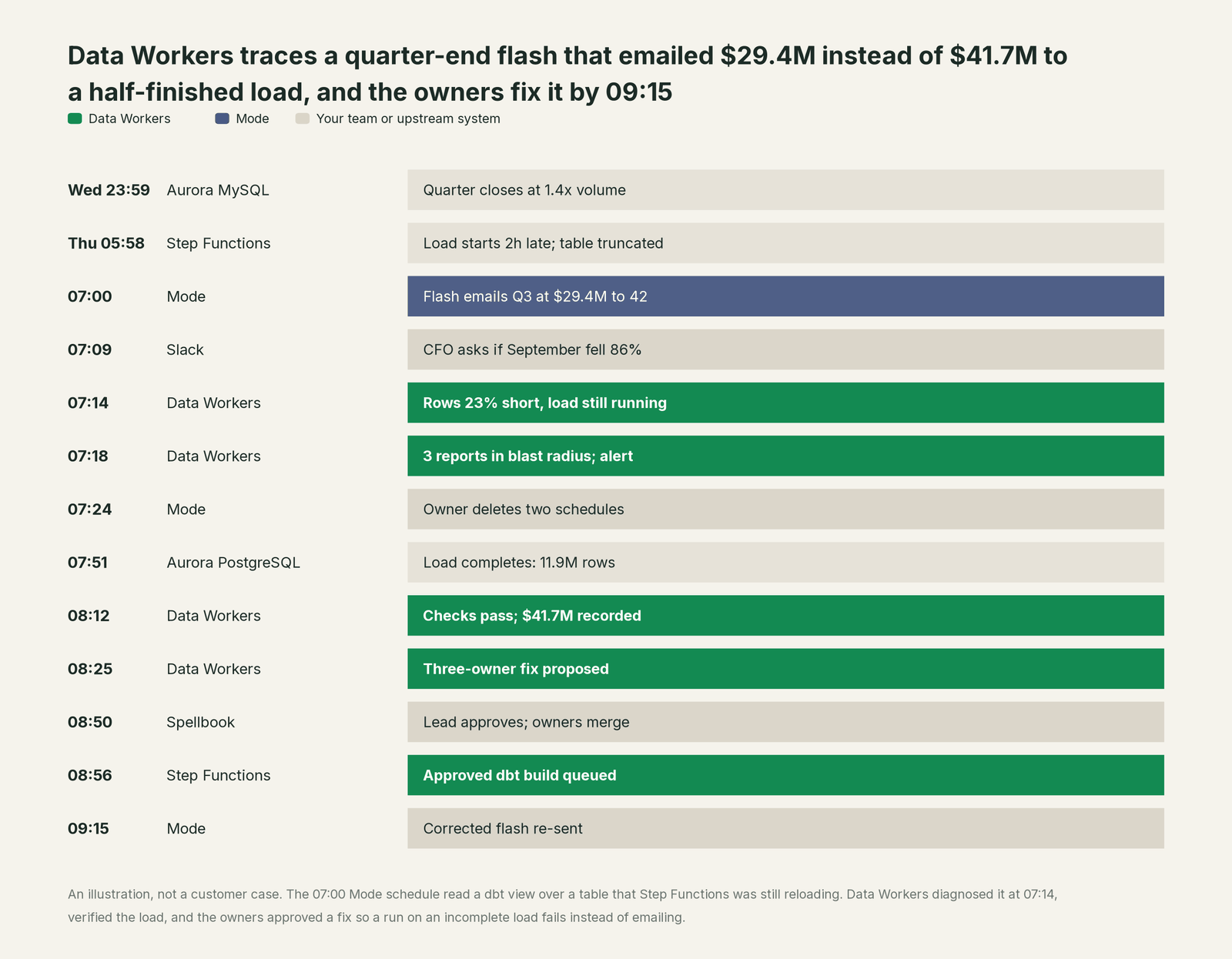
Every tool did its job; the problem lived between them: a clock-based schedule met a truncate-and-reload that ran late. Data Workers had the cause and the blast radius as soon as the on-call asked, kept two more wrong reports from going out, and left a fix in place so the next late load fails the scheduled run to its owners instead of mailing a wrong number.
| Job | What Mode does | What Data Workers does |
|---|---|---|
| The analysis | SQL editor, Python and R notebooks, Helix calculated fields, visual explorer | Makes sure the tables each query reads are right |
| The shared logic | Definitions hold business logic once for every report that references them | Records which reports read which tables as governed context, tied to dbt and the load |
| The delivery | Runs the report on schedule; failure emails go to the report's owners | Flags the table or baseline that is off, traces it to the load or model and maps every scheduled report it reaches |
| The fix | Report owners edit queries, Definitions and schedules | Proposes the upstream fix as a diff for its owner, routes it to a named approver and queues the approved rerun |
| The proof | Runs the report again | Re-checks the tables, compares the recorded value and writes a receipt with cause, diff, approver and undo |
Why doesn't Mode just do this itself?
Mode made a clear bet: give analysts every tool they reach for, SQL, Python, R and charts, in one place, and let them share the result on a schedule. Its guardrails fit that job. Failure emails go to the people who can fix a broken query. Webhooks fire on report_run_completed and definition_updated, so a team can wire its own alerts. With a paid dbt Cloud plan and source freshness configured, Analyst Studio shows "Source data last refreshed" next to a report's last successful run. AI Assist writes SQL from a prompt and does not share sample column values. ThoughtSpot lists prompting an AI agent in Analyst Studio as coming soon.
All of that protects the report. Thursday's problem came from an export that ran long and a load that empties a table before refilling it, in systems Mode doesn't run, and the fix meant a state machine change, a dbt change, an approval, a rebuild and a warehouse check. Tracing a wrong number across those systems, scoping every report it reached, routing the fix through the right owners and proving the number afterwards is a different product with different liability. That is Data Workers, built on the Mode workspace your analysts already use.
Every tool owns a slice. Data Workers covers the whole lifecycle
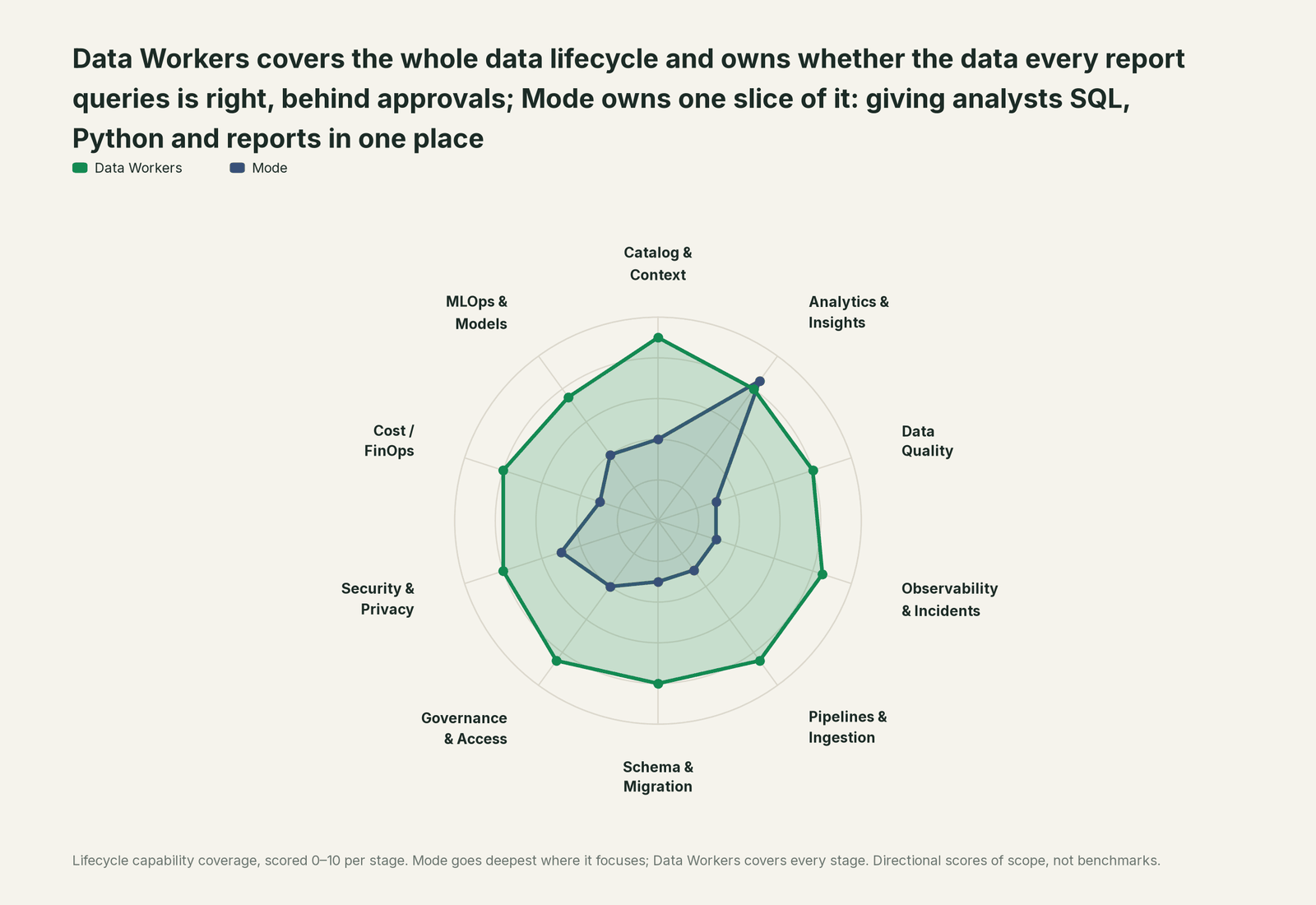
Mode owns one slice outright: giving analysts SQL, Python and reports in one place. Each point tool adds another console, contract and handoff. Data Workers covers the whole lifecycle with one context, one approval flow and one audit trail.
| Stage | Data Workers | Mode | Why we scored it this way |
|---|---|---|---|
| Catalog & Context | 9 | 4 | Mode keeps datasets and shared Definitions, and can show dbt Cloud source freshness on a report. Data Workers keeps one governed context graph across the source, the load, dbt and every report. |
| Analytics & Insights | 8 | 8.5 | Mode's home stage: the SQL editor, Python and R notebooks, Helix calculated fields, reports and schedules. Data Workers makes sure the tables under each report are right. |
| Data Quality | 8 | 3 | Mode runs the report's SQL against whatever the table holds at that moment. Data Workers checks those tables for nulls, duplicate keys and row counts, and holds headline values to a baseline. |
| Observability & Incidents | 8.5 | 3 | Schedule failure emails go to the report's owners, and webhooks fire when a run finishes. Data Workers traces a wrong number to the load or model that caused it and verifies the fix. |
| Pipelines & Ingestion | 8.5 | 3 | Notebooks can call APIs to ingest data, and Analyst Studio's SpotCache refreshes on a schedule. Data Workers queues approved orchestrator reruns for the pipelines that feed the warehouse. |
| Schema & Migration | 8 | 3 | Analyst Studio detects schema changes when a dataset is republished (Jul 2026). Data Workers reviews dbt changes and their manifest diff and scopes the blast radius before merge. |
| Governance & Access | 8.5 | 4 | Collections, report access and admin roles, synced with ThoughtSpot users and groups in Analyst Studio. Data Workers routes every data change to a named approver. |
| Security & Privacy | 8 | 5 | A bridge connector reaches databases behind a firewall, and AI Assist shares no sample column values. Data Workers leaves a receipt on every data change. |
| Cost / FinOps | 8 | 3 | SpotCache in Analyst Studio reuses cached datasets to cut repeat warehouse queries. Data Workers reads AWS spend from Cost Explorer and Snowflake spend down to the dbt model. |
| MLOps & Models | 7.5 | 4 | Python and R notebooks run forecasts and models next to the SQL. Data Workers keeps the data under those notebooks and models healthy. |
How Mode and Data Workers work together
Your people stay where they are: Mode for analysts and the business, Claude or Cursor for engineers, Slack for alerts and approval requests. Spellbook Data Catalog (in preview) is where the data team reviews each fix, its blast radius, approver and rollback. Underneath, Data Context Wizard keeps one governed context graph, the Data-Agents Swarm's 20+ specialist agents do the work, and the Autonomous Data-Conductor runs each fix end to end.
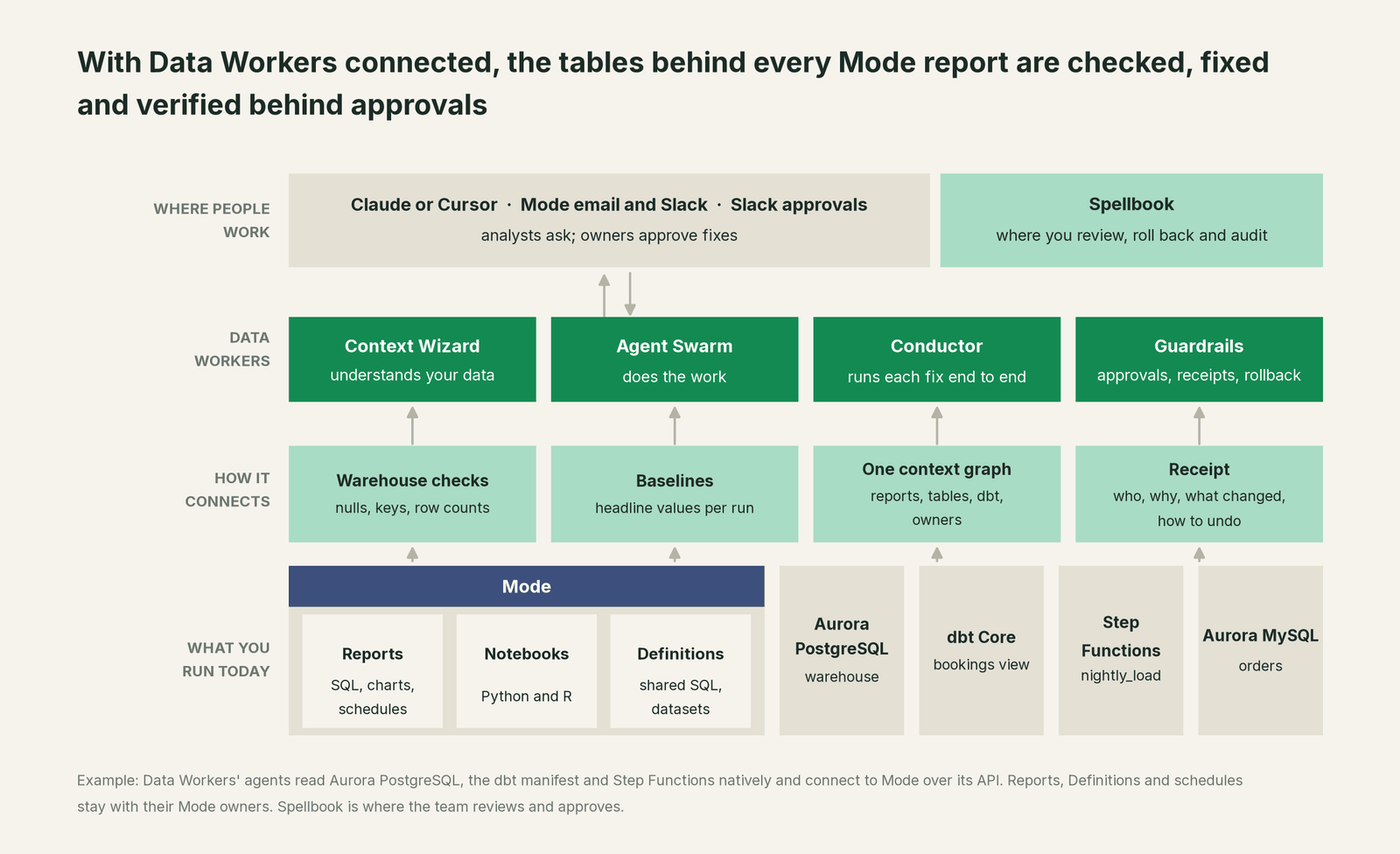
What Data Workers works from. Data Workers connects to Mode over its API today and does its own checking on the systems under it. run_quality_check runs null checks, uniqueness on id columns and a deployment-wide minimum row count on Postgres (Aurora PostgreSQL included) and Snowflake, and on BigQuery with a service-account key; get_quality_score rolls them up. monitor_metrics holds the values your team records after each run, such as a table's post-load row count or a report's headline total, against their baselines; that is where a short load or a late table shows. trace_cross_platform_lineage and blast_radius_analysis follow a table back to its source and forward to every dbt model and every Mode report your team records in the context graph; when a fix goes through a pull request, change review's lineage diff also reads the dbt exposures. Data Workers reads Step Functions executions natively through the AWS API, and diagnose_incident, remediate and get_incident_history run and record the incident. Aurora MySQL, the order system here, connects over its API or MCP server today. Your data stays in your systems; the hosted Conductor sees workflow metadata only.
How reports come in. Most Mode reports query tables directly, so capture the map from report to table: record each scheduled report in the context graph with its URL, the models it reads, its schedules and audience, and declare it as a dbt exposure for pull-request review; your coding agent can list reports and their queries through Mode's API to draft both. The Mode API needs a Mode Business Workspace.
Setup over MCP today. Clone the open-source repository and add start-agent.sh entries to your client's MCP config, per the client setup docs. We found no Mode MCP server; your coding agent reaches Mode through its REST API with your own token, separately from Data Workers.
// Example. Data Workers' agents in your MCP client.
// Mode is reached through its own REST API, not through this config.
{
  "mcpServers": {
    "dw-context-catalog": {
      "command": "/path/to/dataworkers-claw-community/start-agent.sh",
      "args": ["dw-context-catalog"]
    },
    "dw-quality": {
      "command": "/path/to/dataworkers-claw-community/start-agent.sh",
      "args": ["dw-quality"]
    },
    "dw-incidents": {
      "command": "/path/to/dataworkers-claw-community/start-agent.sh",
      "args": ["dw-incidents"]
    }
  }
}
List the tools with your client's own command. An analyst can then ask "is everything under the Daily Bookings Flash healthy?" and get the lineage, the checks and any open incidents. MCP servers for BI tools covers the wider BI landscape, and Data Workers + Hex and ThoughtSpot covers notebooks next to search.
Where fixes go. Data Workers proposes the change as a diff for the owner to merge, usually a dbt model or a load step, with its blast radius and undo step; it opens the pull request itself only when your team turns on the dbt GitHub pull-request target. After approval it queues the rerun through your orchestrator. Mode reruns stay with the report owner, who presses Run Now or starts a run through Mode's API.
One request, L0 to L4. The autonomy ladder is set per domain.

- •L0 manual. Someone replies to the flash email asking whether the number is real, and an analyst chases it by hand.
- •L1 observe. Data Workers checks every table your scheduled reports read and logs what it would do.
- •L2 propose. It drafts the upstream fix with its blast radius; a named owner approves in Spellbook first.
- •L3 act reversibly. For proven classes, such as queuing the rebuild after an approved fix, it acts, verifies and can roll back.
- •L4 autonomous. For a narrow class in one domain, it fixes and verifies on its own and posts the receipt.
Approvals go to a named person; an unanswered request expires and escalates, never grants itself. No agent can promote its own work. Read is it safe to let AI agents change production data, how approvals work in practice, what the autonomy levels mean, who owns the agents and where does our data go for the full safety model.
Sibling pages: You're on ThoughtSpot, You're on Hex and You're on Postgres. For analysts, see Data Workers for data analysts.
What changes for your team
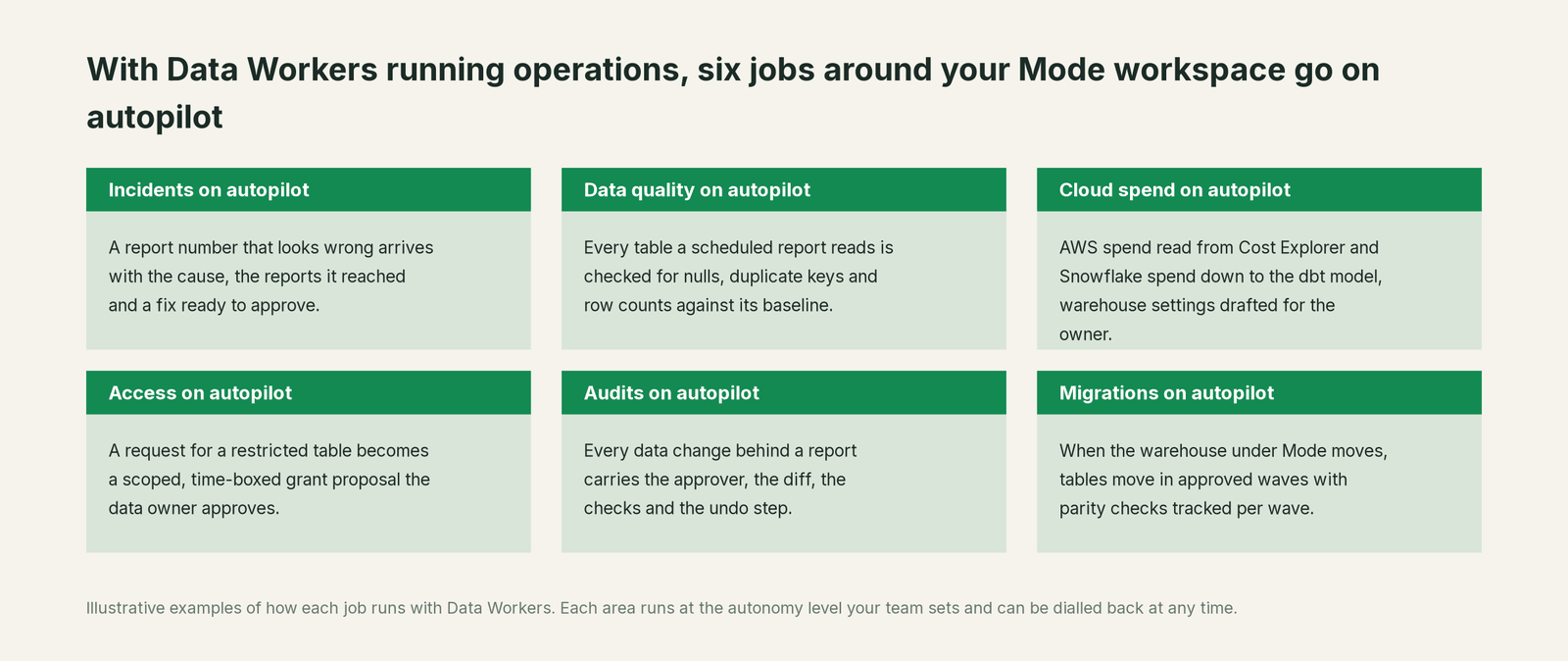
Mode teams lose mornings to one question: is the number in this email wrong, and who else got it? With Data Workers next to Mode, these jobs run on autopilot at the level you set.
- •Incidents. A report number that looks wrong arrives with its cause, every scheduled report it reached and a fix ready to approve.
- •Data quality. Every table a scheduled report reads is checked for nulls, duplicate keys and row counts against its baseline.
- •Cloud spend. AWS spend is read from Cost Explorer and Snowflake spend down to the dbt model, with warehouse settings drafted for the owner.
- •Access. A request for a restricted table becomes a scoped, time-boxed grant proposal the data owner approves.
- •Audits. Every data change behind a report carries its approver, diff, checks and undo step.
- •Migrations. When the warehouse under Mode moves, tables move in approved waves, parity checks tracked per wave.
Keep Mode, or consolidate?
Keep Mode if you love it; Data Workers works with it from day one. Many teams consolidate once Data Workers runs that slice too.
Most teams keep Mode: the SQL, notebooks, Definitions and reports your analysts built belong there, and Analyst Studio carries them into ThoughtSpot. What they consolidate is the tooling around it: a separate data-quality tool, webhook scripts that check a report's numbers after it has gone out, a spreadsheet of which report reads which table. Weighing a build on Mode's API and webhooks? Read build it ourselves with Claude Code and MCP servers: calling an API is easy; cross-system context, approvals and rollback are the work.
The case for your CFO
The outcome: the numbers your scheduled reports email to executives stay right, and when something upstream breaks, the cause, the reach and the fix arrive before the next meeting, with a named approver.
The risk story: Data Workers changes nothing in Mode. It checks the warehouse tables under each report and proposes upstream fixes as diffs; nothing runs until the named owner approves. Every change is verified and leaves a receipt: what broke, what changed, who approved it, how to undo it. Autonomy is set per domain from L0 manual to L4 autonomous, and an org-wide stop halts all autonomous dispatch. There is zero migration.
Why now: scheduled reports have become the company's morning briefing, and quarter-end is when loads run longest and readers care most. One wrong flash at close costs a morning of executive attention and a week of doubt about every number that follows.
The first win: one scheduled report that emails a number people act on, every table it reads checked, its load guarded so a late run fails to its owners instead of its subscribers. What stays the same: your reports, Definitions and schedules, your order system, Step Functions, Postgres, dbt and review process. For the numbers, see the ROI of agentic data operations.
The sentence to repeat upstairs: "Mode keeps producing our reports; Data Workers makes sure the data under every report is right, with a named approver and a receipt on every fix."
Getting started
Start with a pilot. Pick the scheduled report behind a number people act on, connect Data Workers read-only to the warehouse, dbt and your orchestrator, record the report in the context graph, record its row counts and headline values as baselines, and let it check every table the report reads for a few weeks before turning on the first fix class. The pilot path and plans are on the pricing page, and the pilot is credited in full against the first year.
FAQ
Does Data Workers run, pause or edit our Mode reports? No. Reports, Definitions and schedules stay with their Mode owners. Data Workers checks the warehouse through its own connections, tells the owner which reports a bad table reaches and proposes fixes in the systems underneath.
Is Mode the same product as ThoughtSpot Analyst Studio? ThoughtSpot acquired Mode, and its documentation calls the product Analyst Studio, with a lesson on transitioning from Mode for former Mode customers. The SQL editor, notebooks, Definitions and schedules described here appear in both, and Data Workers works the same way with either.
Our scheduled report ran successfully. How can the number be wrong? A schedule checks that the queries ran, not that the tables were complete. If a load empties a table before refilling it, or a dbt model changes underneath a view, the run succeeds on the data it found. Data Workers checks those tables against their baselines and reads the load behind them.
We already use Analyst Studio's dbt data freshness. Why add this? Keep it. It shows when dbt Cloud sources last refreshed, for teams on a paid dbt Cloud plan. A source can refresh on time and still land short. Data Workers checks keys, row counts and baselines on the tables themselves, works with dbt Core too, and carries a fix through approval, rerun and verification.
Which warehouses does this cover? The table checks run natively on Postgres, Snowflake and BigQuery (with a service-account key). Across 50+ connectors Data Workers also works natively with dbt, Airflow, Dagster, Prefect and Step Functions; what integrations Data Workers supports lists each one.
Sources
- •Mode, homepage ("ThoughtSpot acquires Mode to define the next generation of collaborative BI"), https://mode.com/ (checked Oct 3, 2026)
- •Mode, AI Assist ("Generate SQL with AI"), https://mode.com/ai-assist (checked Oct 3, 2026)
- •Mode Support, Report scheduling and sharing (schedules, Slack, failure emails, Schedules page), https://mode.com/help/articles/report-scheduling-and-sharing (checked Oct 3, 2026)
- •Mode Developer, API reference introduction (Business Workspace required), https://mode.com/developer/api-reference/introduction/ (checked Oct 3, 2026)
- •Mode Developer, Report Runs, https://mode.com/developer/api-reference/analytics/report-runs/ (checked Oct 3, 2026)
- •ThoughtSpot Documentation, Getting started with Analyst Studio, https://docs.thoughtspot.com/cloud/latest/analyst-studio-getting-started.html (checked Oct 3, 2026)
- •ThoughtSpot Documentation, Report scheduling (Analyst Studio), https://docs.thoughtspot.com/cloud/latest/analyst-studio-report-scheduling-and-sharing.html (checked Oct 3, 2026)
- •ThoughtSpot Documentation, dbt data freshness, https://docs.thoughtspot.com/cloud/latest/analyst-studio-dbt-data-freshness.html (checked Oct 3, 2026)
- •ThoughtSpot Documentation, Webhooks in Analyst Studio, https://docs.thoughtspot.com/cloud/latest/analyst-studio-webhooks.html (checked Oct 3, 2026)
- •ThoughtSpot Documentation, Analyst Studio AI Assist, https://docs.thoughtspot.com/cloud/latest/analyst-studio-ai-assist.html (checked Oct 3, 2026)
- •ThoughtSpot Documentation, Release notes for Analyst Studio (Jul 17 and May 7, 2026), https://docs.thoughtspot.com/cloud/latest/analyst-studio-release.html (checked Oct 3, 2026)
- •ThoughtSpot, Analyst Studio product page ("prompt your AI agent (coming soon)"), https://www.thoughtspot.com/product/analyst-studio (checked Oct 3, 2026)
- •ThoughtSpot, press release: Analyst Studio, SpotCache and data mashups generally available (Feb 18, 2026), https://www.thoughtspot.com/press-releases/thoughtspot-launches-agentic-data-prep-to-accelerate-ai-readiness-with-next-generation-analyst-studio (checked Oct 3, 2026)