Snowflake Semantic Views over MCP: Connect Them to Data Context Wizard and Settle Metric Conflicts
How to read Snowflake semantic views over MCP or SQL into Data Context Wizard, check them against dbt metrics, and route each conflict to a named owner with a receipt.
Your analytics engineers have spent the year moving metric logic into Snowflake semantic views. Cortex Analyst reads them, CoWork (formerly Snowflake Intelligence) answers from them, and CoCo looks for them before it falls back to tables. Inside Snowflake, active_customers now means one thing. The trouble starts one hop away: the same metric also lives in dbt MetricFlow, in a Databricks metric view, or in a Looker Explore, and those copies drift.
A semantic view holds what a metric means inside Snowflake. Data Context Wizard holds which definition your business approved, across Snowflake, dbt and every other place the metric is written, and serves that one approved version to every agent. This guide shows how to connect the two over MCP and SQL today, what moves in each direction, and one run end to end with the receipt it leaves.
Key takeaways
- •Semantic views stay the Snowflake source of truth. Data Workers reads them; it never edits a view without the owner applying the change.
- •Connect over MCP or SQL today. Read views with
SHOW SEMANTIC VIEWS,DESCRIBE SEMANTIC VIEW,GET_DDLor the Apache Ossie YAML export, through Snowflake's managed MCP server or a read-only role. - •Context Wizard records each view as a governed definition with its source, owner and the time it was read, next to the dbt MetricFlow definitions it imports.
- •Conflicts go to a named owner. When a semantic view and a dbt metric disagree, the conflict lands in Spellbook for the owner; agents that ask Data Workers see both versions, with sources, until the owner decides.
- •Every decision leaves a receipt: the variants, the approver, the checks and the time.
What this connects
On the Snowflake side: semantic views (GA), which store logical tables, relationships, dimensions, facts and metrics as schema-level objects; the Snowflake-managed MCP server (GA in Snowflake's docs, with the Horizon Context page listing its MCP integration as public preview); and the Apache Ossie export. Ossie is the Open Semantic Interchange, renamed when it entered the Apache Incubator, announced July 8. Snowflake's SYSTEM$READ_OSSIE_YAML_FROM_SEMANTIC_VIEW writes a view out as Ossie YAML. It's an open preview available to all accounts and follows spec 0.1.1. The older OSI-named procedures are deprecated.
On the Data Workers side: Data Context Wizard, run by the Data Context & Catalog agent. Data Workers is the agentic data platform that runs the whole data lifecycle, and Context Wizard is the part that keeps one governed context graph across every platform. Its semantic importers read dbt MetricFlow, Databricks Unity Catalog metric views and Wren MDL directly (the Unity Catalog metric views how-to and Data Workers + dbt cover those). For how this compares with Snowflake's own context layer, read Snowflake Horizon Context vs Data Context Wizard. Snowflake semantic views come in through the read surfaces above: your coding agent or a scheduled run reads the view and hands the definition to Context Wizard, which records it as a governed metric with its source. The Snowflake connector adds query history, so Context Wizard knows which metrics people query and how often.
What moves in each direction
| From Snowflake into Data Workers | From Data Workers back to Snowflake and your team |
|---|---|
SHOW SEMANTIC VIEWS: which views exist and where | A conflict report: each variant side by side, with its source and when it was read |
DESCRIBE SEMANTIC VIEW: one row per property of each table, relationship, dimension, fact and metric | An owner review in Spellbook, routed to the named owner of the metric |
GET_DDL: the full definition, stored as a version | A proposed change (dbt diff or semantic view DDL) for the owner to apply |
| Ossie YAML export, for teams standardizing on Ossie | The approved definition, served to every agent that asks Data Workers over MCP |
| Query history: which metrics people use, by whom | A receipt for every decision |
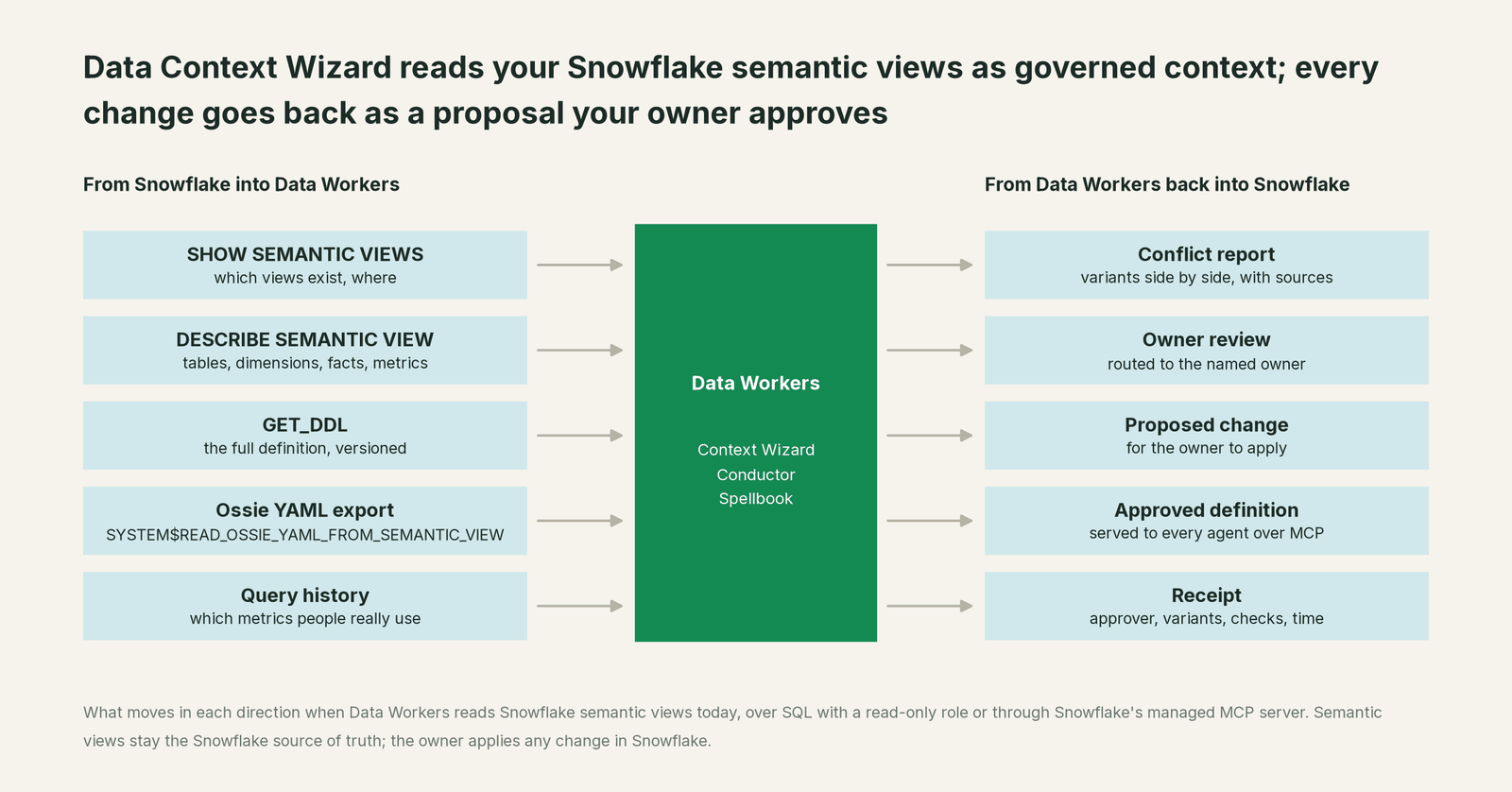
Nothing in the right-hand column writes to Snowflake by itself. Changes to a semantic view stay in your owner's hands, through your normal deploy path for Snowflake DDL.
Prerequisites
- •A dedicated read role, for example
DW_SEMANTIC_READER, with USAGE on the warehouse, database and schema, and SELECT and REFERENCES on each semantic view you want read. Snowflake documents SELECT and REFERENCES as the privileges to query or describe a view. - •If you use the managed MCP server: USAGE on the MCP server object, USAGE on its warehouse and SELECT on the semantic views behind any Cortex Analyst tool. Authenticate with OAuth, or a programmatic access token for a service user with a least-privilege role.
- •Optional, for usage signals: read access to query history in
SNOWFLAKE.ACCOUNT_USAGE. - •dbt: the MetricFlow definitions (or a compiled manifest) for the metrics you want checked.
- •An owner per metric, named in Spellbook Data Catalog (in preview), so every conflict has somewhere to go.
Example (Snowflake grants; adjust names to your account):
CREATE ROLE IF NOT EXISTS DW_SEMANTIC_READER;
GRANT USAGE ON WAREHOUSE ANALYTICS_XS TO ROLE DW_SEMANTIC_READER;
GRANT USAGE ON DATABASE FINANCE TO ROLE DW_SEMANTIC_READER;
GRANT USAGE ON SCHEMA FINANCE.SEMANTIC TO ROLE DW_SEMANTIC_READER;
GRANT SELECT, REFERENCES ON SEMANTIC VIEW FINANCE.SEMANTIC.CUSTOMER_METRICS TO ROLE DW_SEMANTIC_READER;
GRANT USAGE ON MCP SERVER DW_META.MCP.SEMANTIC_READER TO ROLE DW_SEMANTIC_READER;
Setup
Data Workers agents are MCP servers. Register Context Wizard next to Snowflake's managed MCP server in the client your team already uses (Claude Code, Codex or Cursor). On the Snowflake side, create the MCP server with a SYSTEM_EXECUTE_SQL tool set to read_only: true and, if you like, a CORTEX_ANALYST_MESSAGE tool pointed at the semantic view.
Example (.mcp.json for Claude Code; values are placeholders):
{
  "mcpServers": {
    "snowflake": {
      "type": "http",
      "url": "https://<account_url>/api/v2/databases/DW_META/schemas/MCP/mcp-servers/SEMANTIC_READER",
      "headers": { "Authorization": "Bearer ${SNOWFLAKE_PAT}" }
    },
    "dw-context-catalog": {
      "command": "npx",
      "args": ["-y", "@data-workers/dw-context-catalog"],
      "env": {
        "SNOWFLAKE_ACCOUNT": "<account>",
        "SNOWFLAKE_USER": "DW_SERVICE",
        "SNOWFLAKE_ROLE": "DW_SEMANTIC_READER",
        "SNOWFLAKE_WAREHOUSE": "ANALYTICS_XS"
      }
    }
  }
}
Then ask in plain words: "Read the semantic views in FINANCE.SEMANTIC, import our MetricFlow metrics, and show me every metric defined differently in the two." The coding agent runs DESCRIBE SEMANTIC VIEW or GET_DDL through Snowflake's SQL tool, records each metric in Context Wizard with define_metric (source, owner, expression and grain), imports the dbt side with import_semantic_definitions, and runs scan_for_contradictions across the two. If your read-only SQL tool refuses DESCRIBE or CALL, run the same statements under the read role from a scheduled job and pass the output in. Everything starts at L1, observe: Data Workers reads and reports, and changes nothing.
One run, end to end
Here is a run most teams on Snowflake and dbt will recognize. It's an illustration, not a customer case. Five systems are involved: GitHub, the dbt platform, Snowflake, CoWork and Spellbook.
| Time | System | What happens | Who decides |
|---|---|---|---|
| 09:02 | GitHub | A pull request changes the dbt MetricFlow active_customers metric from a 30-day to a 28-day activity window. It merges. | An engineer |
| 09:20 | dbt platform | The job builds; the dbt metric now means 28 days. | dbt |
| 09:25 | Snowflake | Data Workers reads FINANCE.SEMANTIC.CUSTOMER_METRICS with DESCRIBE SEMANTIC VIEW. The view still defines active_customers as paid accounts with a login in 30 days. scan_for_contradictions flags the conflict. Query history shows the view's metric feeds the board-reporting dashboard. | Data Workers, read-only |
| 09:30 | Spellbook | The conflict goes to the Promotion Inbox, tagged with the metric's named owner, the finance analytics lead, with both expressions, their sources and the commit that changed dbt. | Data Workers routes |
| 10:15 | CoWork | A VP asks CoWork for active customers. CoWork answers from the semantic view, as designed. | Snowflake |
| 10:20 | Coding agent | An analyst asks the same question through Data Workers. resolve_metric returns both candidates with their sources instead of picking one silently. | Data Workers, read-only |
| 11:40 | Spellbook | The owner approves the 30-day definition, the one the board pack uses. | The named owner |
| 11:45 | GitHub | Data Workers proposes a dbt diff that restores the 30-day window, citing the approval. | Data Workers proposes |
| 12:10 | GitHub | dbt CI passes; an engineer merges. | An engineer |
| 12:40 | Snowflake, dbt | Data Workers re-reads both definitions, confirms they match, and closes the conflict with a receipt. | Data Workers, read-only |
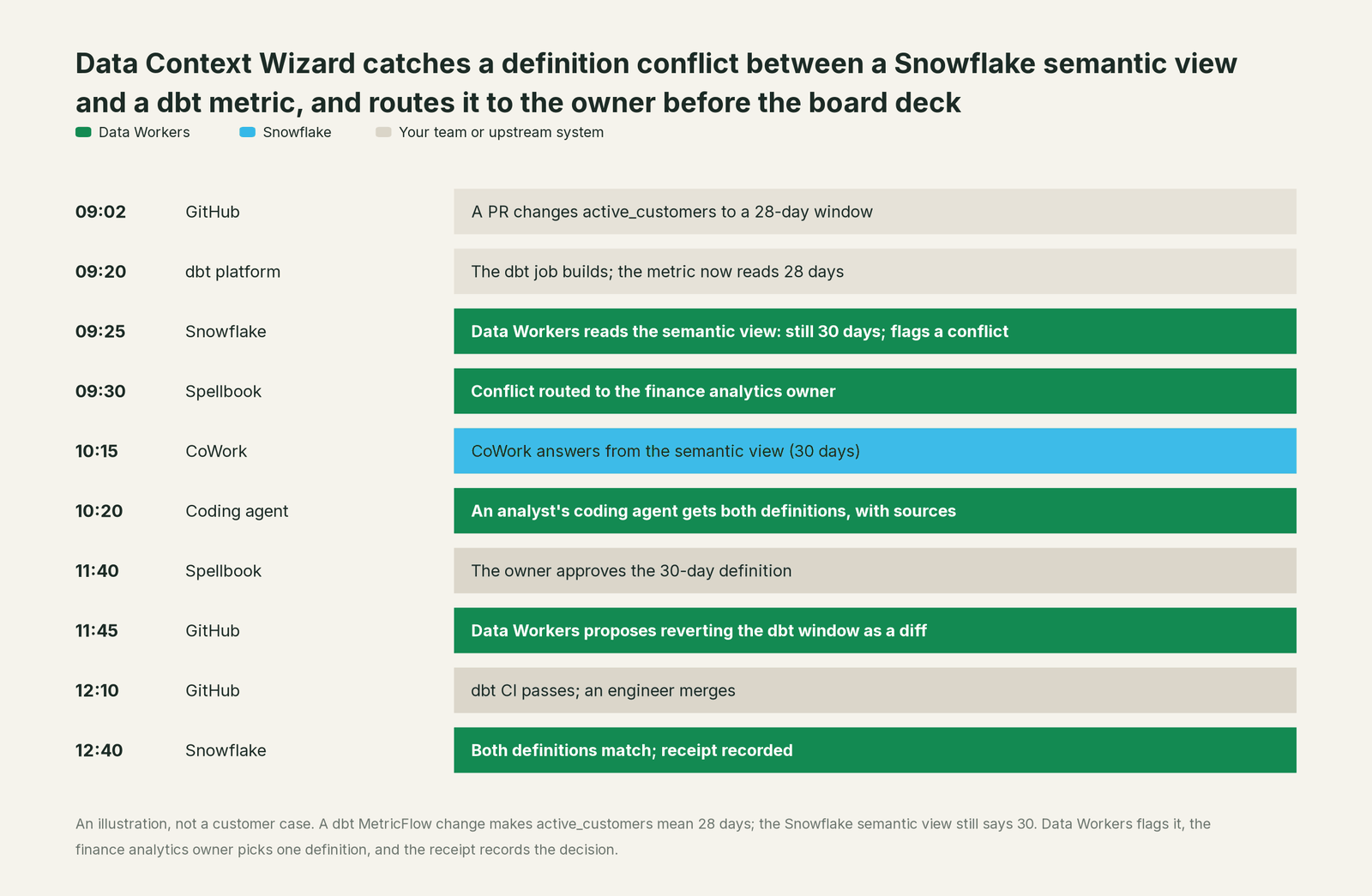
The semantic view never changed, because it was right. Had the owner chosen 28 days, the proposal would have been a semantic view DDL change for the owner to deploy in Snowflake.
The receipt. resolve_contradiction only accepts a named human approver, and the write goes through the governed path: PII scrub, tenant isolation, an authority guard that stops any agent approving its own work, and a hash-chained log. The receipt, fetched with get_change_receipt, holds:
| Field | Value in this run |
|---|---|
| Metric | active_customers, finance domain |
| Variants | Snowflake semantic view (30 days, read 09:25); dbt MetricFlow (28 days, commit at 09:02) |
| Approved | The 30-day definition, as authoritative |
| Approver | The finance analytics lead, 11:40 |
| Change | dbt change restoring 30 days, merged by its owner 12:10 |
| Checks | Both definitions re-read at 12:40 and matched |
| Supersedes | The 09:02 dbt definition, kept for audit |
Why doesn't Snowflake just do this itself?
Snowflake built semantic views for one job: making Snowflake the place an agent reads a metric correctly. Inside that job the design is right. A view is authoritative in its account, Cortex Analyst and CoWork trust it, and the managed MCP server serves it to outside clients with Snowflake's roles applied.
Reconciling definitions that other tools own is a different job. The Ossie import keeps only fields with a Snowflake or ANSI SQL expression and skips the rest silently, which is a sensible choice for building a Snowflake view and the wrong place to settle a disagreement. The MCP server has no input for a dbt or Databricks definition to compare against. And deciding which version wins means approvals, rollback and accountability for a change in a dbt repository or a Looker model that Snowflake doesn't run. That cross-system layer, with a named owner and a receipt for every decision, is the product Data Workers is.
Next autonomy step
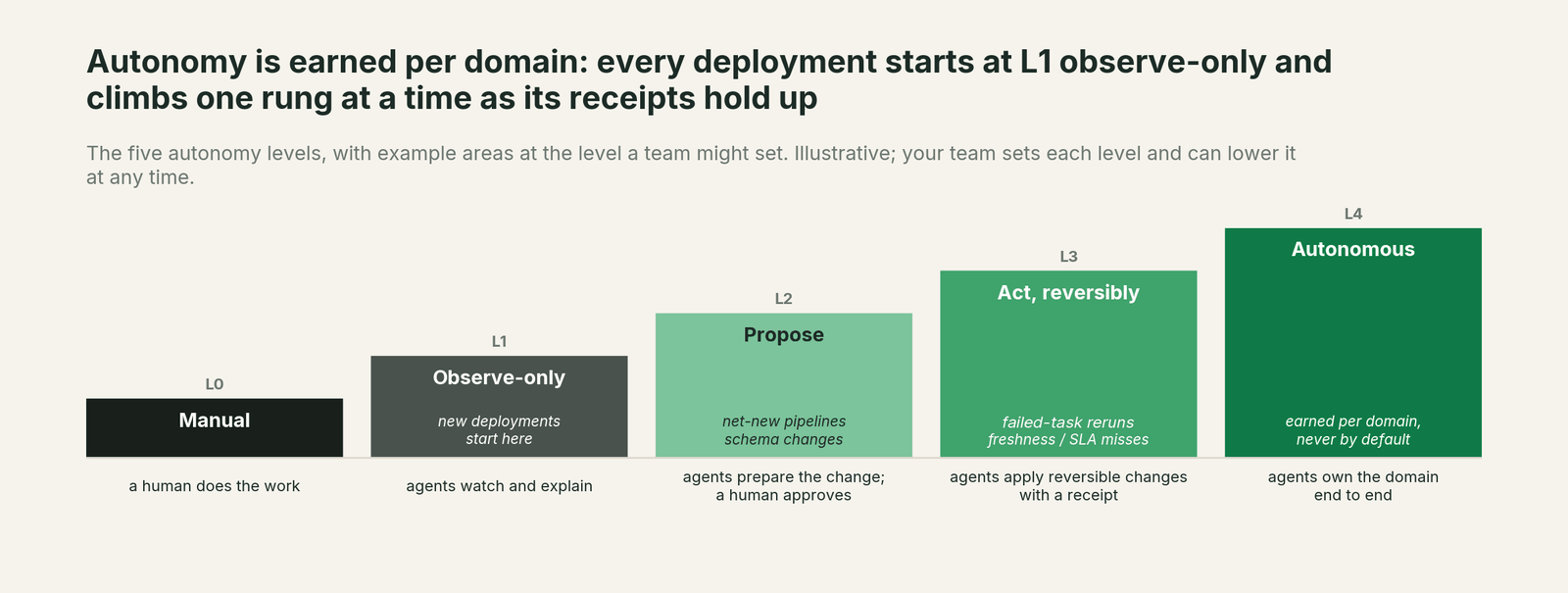
Start at L1, observe, for one domain: Data Workers reads your semantic views and dbt metrics and reports every conflict. When the reports are right, move metric conflicts to L2, propose: Data Workers drafts the dbt diff or the semantic view DDL change for the owner, with the variants and the blast radius attached. Promotion of a definition to authoritative stays a human decision at every level. Data Workers' authority guard enforces that in the write path. L3 suits reversible, low-risk work such as refreshing descriptions from an approved definition. For how the levels play out across a Snowflake estate, read what Data Workers adds on Snowflake.
The case for your CFO
The outcome. Every board metric has one approved definition, and every agent and dashboard that reads it gives the same number, with a record of who approved it.
The risk story. The real exposure is two numbers for one metric in front of the board, found after the deck ships. At L1 Data Workers only reads semantic views, dbt metrics and query history, and reports. At L2 it drafts changes; your owner and your reviewers apply them. No agent can promote its own definition, every change has a rollback path, and every receipt shows the variants, the approver, the checks and the time. Nothing migrates.
Why now. Snowflake's managed MCP server went GA late last year, the Ossie export arrived this year, and dbt and Databricks keep growing their own semantic layers. More agents read more copies of each metric every quarter.
The first win. The ten metrics in the board pack: read their semantic views and dbt definitions, and give each owner a list of conflicts with sources inside the first week of a pilot.
What stays the same. Semantic views, CoWork, Cortex Analyst, dbt, your roles and your deploy process.
The pilot path. Start with a pilot on one domain, read-only first. The pilot is credited in full against the first year.
One sentence for upstairs: "Our semantic views stay the Snowflake source of truth; Data Workers checks them against dbt and every other definition, and a named owner approves the one version every agent uses."
FAQ
Does Data Context Wizard import Snowflake semantic views directly? It takes them in today from your team's export (DESCRIBE SEMANTIC VIEW, GET_DDL or the Ossie YAML export, run directly or by your team's assistant over Snowflake's MCP server) and records each metric as a governed definition. Its direct importers cover dbt MetricFlow, Databricks metric views and Wren MDL.
Should we standardize on Apache Ossie? It's a good interchange to watch. Snowflake's export and import are open previews on spec 0.1.1, and the import skips expressions written for other engines, so check what comes across before you rely on it.
Will Data Workers change our semantic views? Only through your owner. It proposes; the owner applies the DDL in Snowflake through your normal process.
What if CoWork and a coding agent give different answers during a conflict? CoWork answers from the semantic view. Agents that ask Data Workers get both definitions with their sources until the owner decides.
Which role does the MCP session use? Snowflake's managed MCP server uses the connecting user's default role, with secondary roles off by default. Give the service user a dedicated least-privilege default role like the one above.
Sources
Snowflake capabilities and statuses, checked October 2, 2026: semantic views overview (GA; SELECT and REFERENCES; GET_DDL; SHOW SEMANTIC VIEWS), DESCRIBE SEMANTIC VIEW, SYSTEM$CREATE_SEMANTIC_VIEW_FROM_OSSIE_YAML (open preview, spec 0.1.1, skipped expressions, the export counterpart and privileges), the deprecated OSI-named procedure, the Snowflake-managed MCP server (tool types, endpoint, grants, authentication), Apache Ossie enters the Apache Incubator (July 8, 2026), the Horizon Context product page (MCP integration status) and the CoWork announcement (formerly Snowflake Intelligence). Product names and statuses change quickly; if we've got something wrong, tell us and we'll fix it.