Unity Catalog Metric Views and Lineage in Data Context Wizard: A How-To Over MCP
Connect Unity Catalog metric views and lineage system tables to Data Context Wizard over MCP: grants, setup, one worked run and the receipt it leaves.
Unity Catalog metric views hold the meaning of your Databricks metrics. Data Context Wizard plugs them in as first-class sources, joins them to lineage, usage and every other platform's definitions, and gives every agent one governed view with a named owner behind each answer.
If you run Databricks, you probably define net_revenue once as a metric view in YAML, query it with MEASURE(), and point AI/BI dashboards and Genie at it. Lineage in Catalog Explorer shows what feeds it. The gaps show up at the edges: the same metric also lives in dbt MetricFlow or a Snowflake semantic view with a slightly different filter, lineage tells you a table fed the view but not which notebook wrote it, and nobody can say which definition an agent used last Tuesday. This guide shows how to connect Unity Catalog metric views and lineage to Data Workers, the agentic data platform, over MCP today: what it reads, the grants it needs, a setup example, one run end to end, and the next autonomy step.
Key takeaways
- •Metric views stay the source of truth for Databricks metrics. Data Workers imports them and never edits the YAML.
- •Data Context Wizard imports metric view definitions next to dbt MetricFlow and Wren MDL, so agents resolve one metric across platforms, with provenance.
- •Lineage gets its code pointers. Your coding agent queries
system.access.table_lineagethrough Databricks' managed DBSQL MCP server and hands the rows to Data Workers; each row'sentity_metadatanames the job or notebook behind the edge. - •Conflicts go to a person. When two definitions disagree, Data Workers proposes one as authoritative and the metric owner approves it in Spellbook.
- •Start with a read-only service principal. A few read grants and one MCP config entry.
What it connects
Data Workers connects to Databricks through the Context Wizard's semantic importer and its Unity Catalog connector, which reads grants and applies approved changes through the permissions API. Lineage, query history and read-only checks come from system tables, which your coding agent queries through Databricks' managed DBSQL MCP server and hands to Data Workers over MCP, in the same session it already uses.
| Databricks surface | What it is | Status, October 2026 |
|---|---|---|
| Unity Catalog metric views | Measures and fields defined once in YAML (version: 1.1), with joins, filters and materialization; queried with MEASURE() | GA; Runtime 16.4+ to create |
| Lineage in Catalog Explorer | Table and column lineage across notebooks, jobs, pipelines, dashboards and queries | Available; not preserved across renames |
system.access.table_lineage | One row per read or write, with source_type and target_type that include METRIC_VIEW, plus entity_type and entity_metadata | GA; rolling one-year window |
system.query.history | Queries from SQL warehouses and serverless compute | GA |
What moves in each direction
| Data Workers takes in from Databricks | Data Workers sends back |
|---|---|
| Metric view definitions: measures, fields, source, owner, catalog and schema | Read-only checks: MEASURE() queries your coding agent runs on your SQL warehouse to compare values |
system.access.table_lineage rows, including metric view edges, handed over by your coding agent | Blast radius: every dashboard, query and job that reads a view, before anyone changes it |
The job or notebook behind each lineage edge, from the row's entity_metadata | Approval requests to the metric owner, in Spellbook |
system.query.history rows from the same agent: who queries which view, and how often | Grant changes through the Unity Catalog permissions API, only after a named approval |
| Unity Catalog grants on each securable | Receipts: approver, sources, evidence and time |
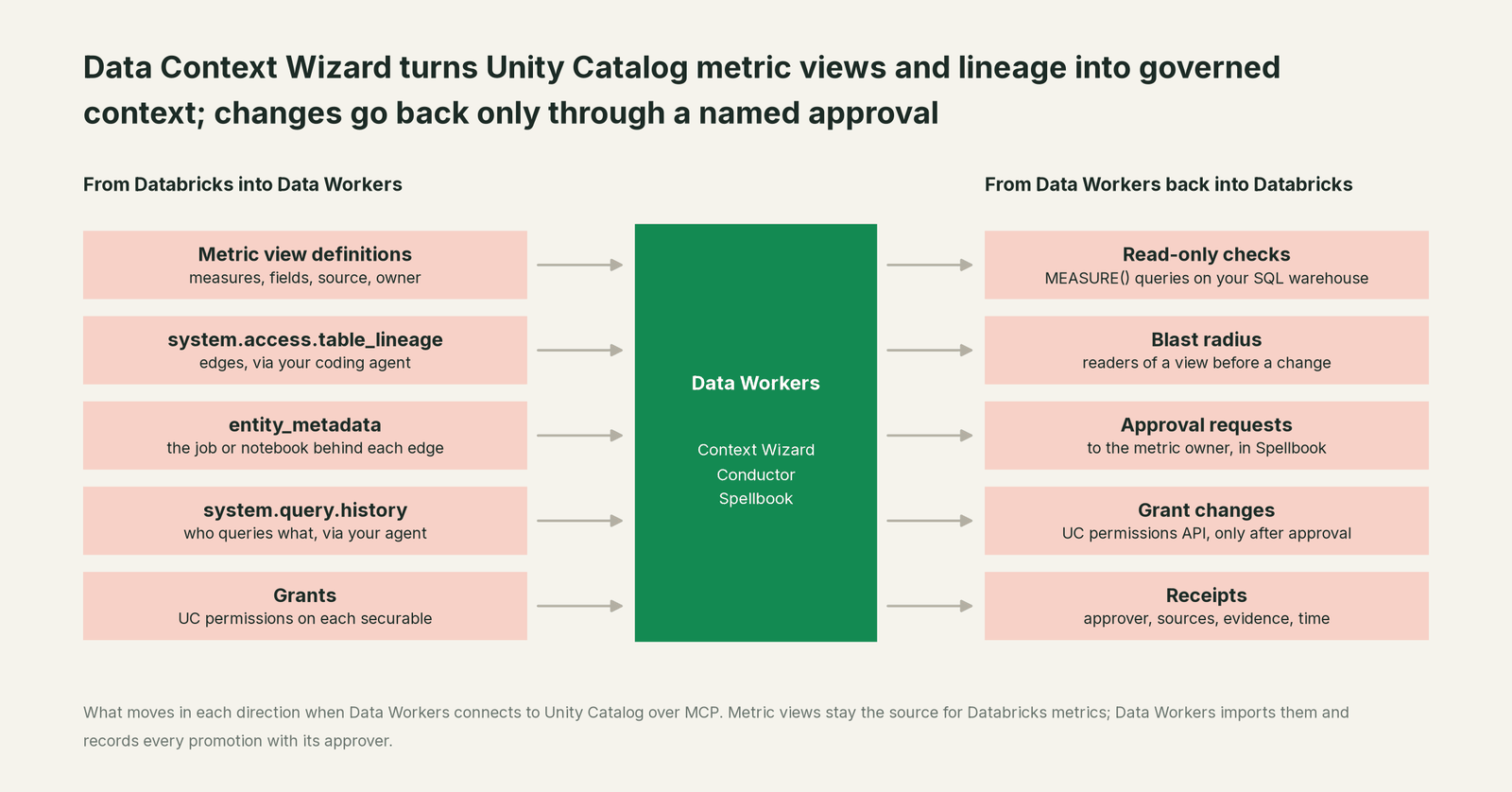
Two agents do most of this work. The Data Context & Catalog agent imports definitions into Data Context Wizard and keeps lineage and usage on each one. The Autonomous Data-Conductor sequences the run and holds every change at the autonomy level you set. Each fact records where it came from and when it was seen, so a metric view's net_revenue and a MetricFlow net_revenue sit side by side with their sources instead of overwriting each other.
Prerequisites
- •A service principal for Data Workers, with an OAuth token. Keep it separate from human accounts so every read shows up under one name in
system.query.history. - •System table access:
USE CATALOGonsystem,USE SCHEMAonsystem.accessandsystem.query, andSELECTontable_lineageandhistory. A metastore admin grants these; theaccessschema must be enabled. - •Catalog access:
BROWSEon the catalogs you want covered, andUSE CATALOG,USE SCHEMAandSELECTon the schemas that hold your metric views and their source tables.SELECTon a metric view is enough to query it. - •A SQL warehouse the principal has
CAN USEon, for lineage, query history and the read-only checks. - •The metric view YAML, from your repo or the YAML editor in Catalog Explorer. Most teams already keep it in Git.
No MANAGE and no write grants at this stage. Data Workers acts with the grants you give it.
Setup
Add the Data Workers context agent to your MCP client and point it at the workspace, with Databricks' managed DBSQL MCP server in the same client for the system-table queries. The connector reads the same variables in any client.
Example: MCP client config
{
  "mcpServers": {
    "dw-context-catalog": {
      "command": "./start-agent.sh",
      "args": ["dw-context-catalog"],
      "env": {
        "DATABRICKS_HOST": "https://<workspace>.cloud.databricks.com",
        "DATABRICKS_TOKEN": "<OAuth token for the dw-reader service principal>",
        "DATABRICKS_HTTP_PATH": "/sql/1.0/warehouses/<warehouse-id>",
        "DATABRICKS_CATALOG": "main"
      }
    },
    "dw-conductor": {
      "command": "./start-agent.sh",
      "args": ["dw-conductor"]
    }
  }
}
Then import each metric view. The import_semantic_definitions tool takes the definition as JSON: measures go in metric_definitions and fields in dimensions. Your coding agent can do that mapping from the YAML in the same session.
Example: import call
{
  "tool": "import_semantic_definitions",
  "arguments": {
    "format": "databricks_metrics",
    "domain": "finance",
    "content": "{\"catalog\":\"main\",\"schema\":\"finance\",\"metric_views\":[{\"name\":\"revenue_mv\",\"owner\":\"finance-stewards\",\"metric_definitions\":[{\"name\":\"net_revenue\",\"expression\":\"SUM(amount) FILTER (WHERE status <> 'refunded' AND NOT is_test_account)\"}],\"dimensions\":[{\"name\":\"order_month\",\"expression\":\"date_trunc('MONTH', order_date)\"}]}]}"
  }
}
Run list_semantic_definitions with source: databricks to confirm what landed. Import dbt MetricFlow the same way with format: metricflow; the dbt integration guide covers that side.
One run, end to end
Here is a run most Databricks teams will recognize. It's an illustration, not a customer case.
At 08:30 finance edits main.finance.revenue_mv so net_revenue excludes internal test accounts. The dbt project still has a MetricFlow net_revenue that only excludes refunds. Both are correct in their own tool, and they now disagree.
| Time | Step | What happens | Who decides |
|---|---|---|---|
| 09:00 | Import | Context Wizard imports revenue_mv: two measures, three fields, owner finance-stewards. | Data Workers, read-only |
| 09:02 | Import | Context Wizard imports the MetricFlow net_revenue from the dbt project. | Data Workers, read-only |
| 09:04 | Resolve | An analyst's agent asks for net revenue; resolve_metric returns two candidates instead of guessing. | Data Workers, read-only |
| 09:08 | Trace | The coding agent hands over the table_lineage rows for revenue_mv and its source orders_clean; the write edge's entity_metadata names the orders_clean_nightly job and its notebook. | Data Workers, read-only |
| 09:10 | Blast radius | The same rows show an AI/BI dashboard and two saved queries reading revenue_mv; query history shows which ones run daily. | Data Workers, read-only |
| 09:12 | Check | The coding agent runs a MEASURE(net_revenue) query for September; it and the MetricFlow value differ by the test-account rows. | Your coding agent, read-only |
| 09:15 | Propose | propose_context records revenue_mv as the proposed authoritative definition, at "derived", pending review in Spellbook, with the variant and the evidence attached. | Data Workers proposes |
| 14:20 | Approve | The finance metric owner approves. Only a named human can promote a fact past "derived". | A named person |
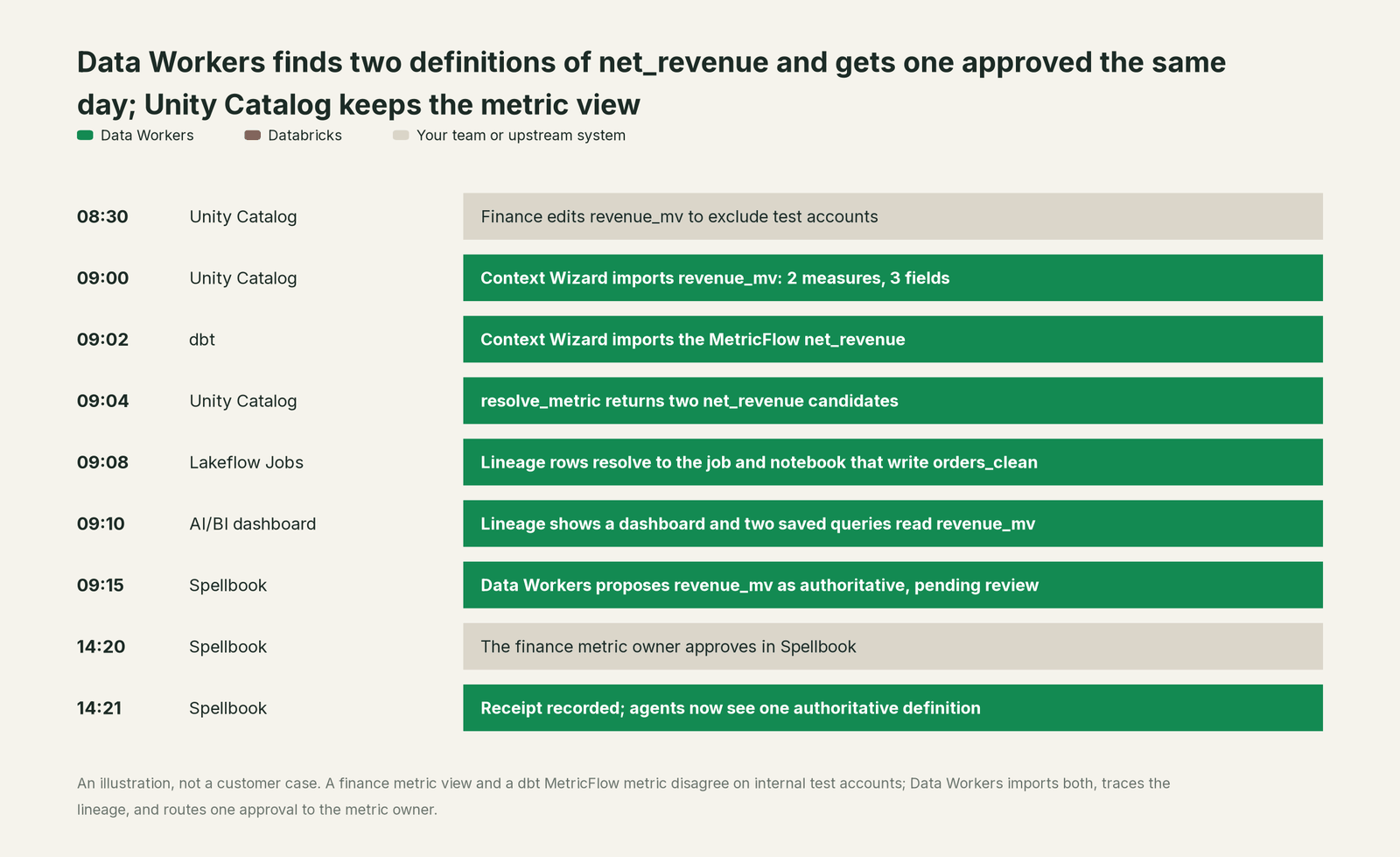
The receipt it leaves. One record, readable in Spellbook Data Catalog (in preview): the definition promoted (main.finance.revenue_mv.net_revenue, its expression and owner), the variant it outranks and where that lives, the lineage edges with the job and notebook behind them, the readers checked, the values compared, the approver, and the times each fact was observed. The metric view itself is unchanged. Agents that resolve net_revenue now see one authoritative definition and the variant flagged next to it.
Why doesn't Databricks just do this itself?
Databricks built metric views and lineage for one job: defining and tracing metrics on Databricks, governed by Unity Catalog. That focus is the right design. A metric view is a Unity Catalog object with Unity Catalog grants, and lineage describes what runs in your workspaces.
Deciding which of two definitions wins, when one lives in dbt and another in a Snowflake semantic view, is a different product. It needs context about systems Databricks doesn't run, an approval that a business owner signs, a record an auditor can read, and someone accountable for a call that crosses vendors. Databricks keeping metric views focused on Databricks is why they're good at it. That cross-platform authority layer is the product Data Workers is. For the wider comparison, read Unity Catalog vs Spellbook and what Data Workers adds on Databricks.
The next autonomy step
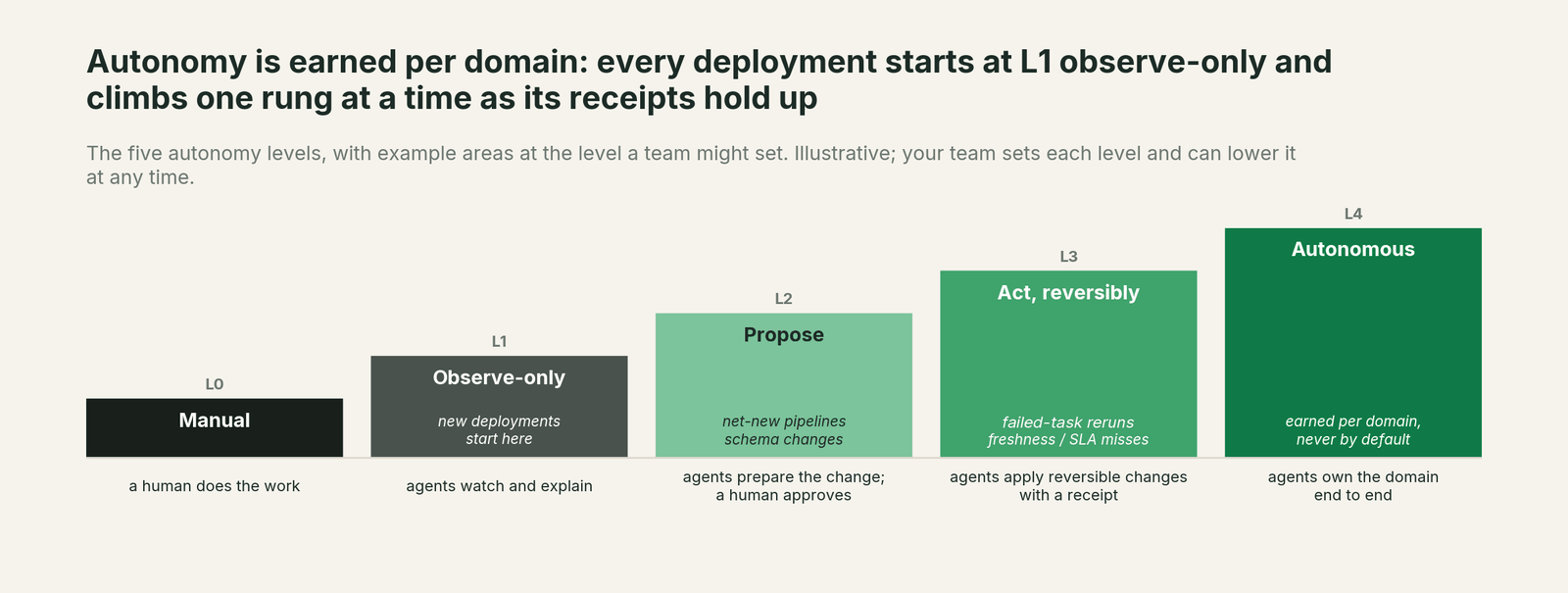
The run above is L0 and L1: observe, then propose a context fact. The next step for most teams is L2 for the variant: Data Workers drafts the matching change where the variant lives, such as a diff on the dbt metric for its owner to merge, with the blast radius attached, and your CI and reviewers decide. After a few weeks of clean receipts, documentation-only changes in the finance domain can move up while definitions stay at "propose". Autonomy is set per domain, an agent can't approve its own work, and every step keeps a rollback path.
The case for your CFO
The outcome. Every number an agent or dashboard gives finance traces to one approved definition, with the owner's name and the data behind it.
The risk story. At observe, Data Workers reads metric views, lineage and query history with a read-only service principal and changes nothing. At propose, it routes conflicts to the metric owner; only a named person promotes a definition. Your metric views, grants and YAML stay in Unity Catalog. Each receipt holds the definitions compared, the evidence, the approver and the time. There is no migration.
Why now. Agents are already answering business questions from metric views and from dbt and Snowflake definitions. Without one approved answer, two agents can give the board two revenue numbers.
The first win. The board metrics. Import the finance metric views and their dbt or Snowflake equivalents, and get one definition approved per metric inside the pilot.
What stays the same. Metric views, Catalog Explorer, Genie, your dashboards and your coding agent.
The pilot path. Start with a pilot on one domain, read-only first. The pilot is credited in full against the first year.
One sentence for upstairs: "Our metric views stay the source of truth for Databricks metrics; Data Workers makes every agent use them, shows what feeds them, and puts a named approver on any definition that conflicts."
FAQ
Does Data Workers change our metric view YAML? No. It reads definitions and proposes context facts. Changes to a definition stay with the owner in Unity Catalog.
Which lineage does it read? system.access.table_lineage rows through your SQL warehouse, resolved to jobs and notebooks through the Jobs and Workspace APIs. Lineage isn't kept across renames in Unity Catalog, so a rename shows up as a new edge.
What grants does the service principal need? USE CATALOG, USE SCHEMA and SELECT on the system tables and the metric view schemas, BROWSE on the catalogs, and CAN USE on one SQL warehouse.
Can it reconcile metric views with dbt and Snowflake? It imports metric views next to dbt MetricFlow and Wren MDL, and reads Snowflake natively. Conflicts go to an owner for approval.
Sources
Databricks capabilities and statuses, checked October 2, 2026: metric views overview (updated Sep 11, 2026), create a metric view (GA, runtime and privileges; Sep 11, 2026), metric view YAML syntax (version 1.1; Sep 17, 2026), manage metric views (SELECT to query; Sep 11, 2026), Unity Catalog data lineage (renames, retention, BROWSE; Sep 29, 2026), lineage system tables (columns, METRIC_VIEW type, one-year window; Sep 28, 2026) and system tables (lineage and query history tables listed without a preview label, grants; Sep 30, 2026). Product names and statuses change quickly; if we've got something wrong, tell us and we'll fix it.