You're on Snowflake Semantic Views: Keep Every Metric True to the Tables and dbt Models Under It
You already define metrics in Snowflake semantic views. Data Context Wizard reads them, checks them against the dbt models under them, catches drift and proposes fixes with approvals.
Your team already defines its metrics in Snowflake semantic views. Logical tables, relationships, facts, dimensions and metrics sit in the database as schema objects, with synonyms, custom instructions and verified queries attached. Some came from Semantic View Autopilot in Snowsight; others are DDL in a repo, or dbt models built with the Snowflake Labs dbt_semantic_view package. Cortex Analyst recommends semantic views over the older stage YAML files, Cortex Agents and CoWork (formerly Snowflake Intelligence) answer from them, and the Snowflake-managed MCP server serves them to clients outside Snowflake. Your semantic views are where Snowflake keeps what a metric means. Data Context Wizard is where every agent reads that meaning, next to the dbt models, lineage, quality and usage behind it, with a named owner on every change. Data Workers is the agentic data platform that acts when the tables under a view move.
That last part is the day-two job. A semantic view is a definition over tables that dbt builds, Fivetran loads and engineers change every week. When a column under a view is renamed or redefined in a pull request, the view either breaks or keeps answering with a meaning nobody approved. This guide covers what Data Workers reads, what it checks, and how it fixes drift with an owner's approval and a receipt.
Key takeaways
- •Semantic views keep their job. Cortex Analyst, Cortex Agents and CoWork keep reading them. Data Workers takes them in today from the DDL or Ossie YAML your team exports, with Snowflake's managed MCP server in your team's client alongside it, and changes a view only through its owner.
- •Every view is joined to what it reads. Data Context Wizard records each metric with its source and owner and links it to the dbt models and columns underneath.
- •Upstream changes are caught before they land. A dbt pull request that renames or redefines a column under a view is flagged with the metrics, verified queries, agents and dashboards it touches.
- •The owner decides; Data Workers does the work. The fix arrives as a dbt diff or semantic view DDL for the metric's named owner, and is verified after it ships.
- •Start with a pilot. Read-only on the views behind your board pack, then one change class, on the ladder from L0 manual to L4 autonomous.
Snowflake semantic views are where the meaning lives. Data Workers is the crew that keeps it true.
Snowflake built semantic views to make business meaning a first-class database object, and the design is a good one: definitions live next to the data, Snowflake roles govern them (SELECT and REFERENCES to query or describe a view), and every Snowflake agent reads the same metric. The change that matters usually happens one layer down, in a dbt repository or a source system, before Snowflake builds the new table.
Here is a Thursday morning with Data Workers connected. This is an illustration, not a customer case, across GitHub, Data Workers, Spellbook, the dbt platform, Snowflake and CoWork.
| Time | System | What happens |
|---|---|---|
| 08:02 | GitHub | An analytics engineer opens a pull request on the dbt project: fct_subscriptions.arr_usd becomes arr_net_usd, now net of discounts |
| 08:06 | Data Workers | Its pull-request review reads the manifest diff and classifies the change as breaking: metric total_arr in the semantic view FINANCE.SEMANTIC.REVENUE_METRICS reads arr_usd |
| 08:10 | Data Workers | assess_impact and blast_radius_analysis list what depends on it: two verified queries, the CoWork revenue agent and the board-pack dashboard |
| 08:15 | Spellbook | The change goes to the controller, the named owner of total_arr, with both meanings side by side: gross ARR today, net ARR in the PR |
| 09:40 | Spellbook | The controller decides: ARR stays gross for the board; net ARR becomes a new metric, with her name and reason on the record |
| 09:50 | GitHub | Data Workers proposes a diff on the pull request for its author to merge: keep arr_usd, add arr_net_usd, and add a net_arr metric with a description and synonyms to the semantic_view model |
| 10:30 | GitHub | dbt CI passes; the engineer merges |
| 11:00 | dbt platform | The production job rebuilds fct_subscriptions and the semantic view |
| 11:10 | Snowflake | Data Workers reads the view with DESCRIBE SEMANTIC VIEW, confirms both metrics, reruns the verified queries and compares total_arr with yesterday's value |
| 11:20 | CoWork | The CFO asks for ARR and gets the same gross number as yesterday; net ARR is now a question CoWork can answer too |
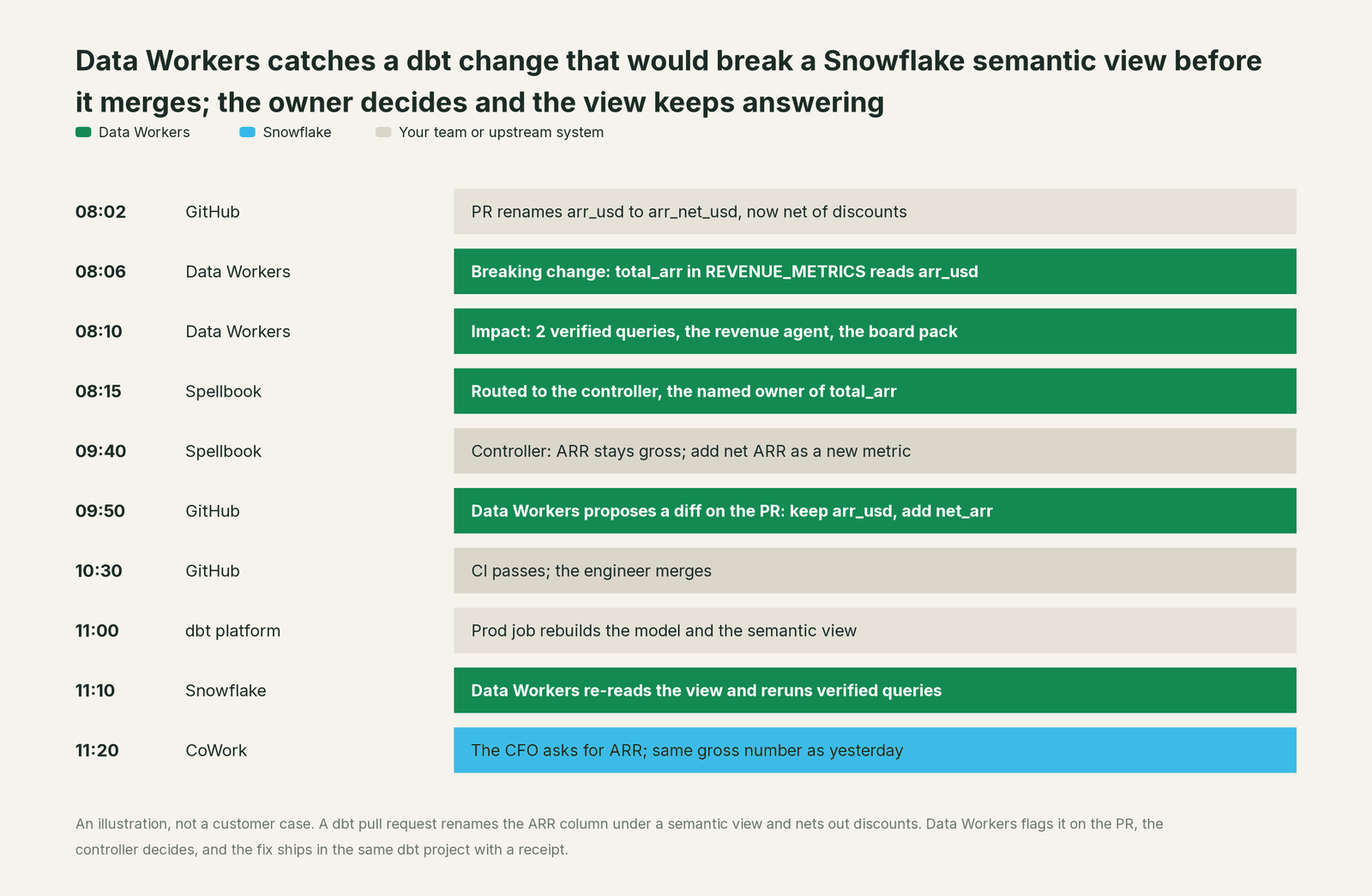
Nothing in Snowflake failed here. The view did exactly what it was told. The change started in a repository Snowflake doesn't run, and Data Workers was watching that seam from 08:06. If your team manages views as Snowflake DDL instead of dbt models, the same run ends with Data Workers drafting the CREATE OR REPLACE SEMANTIC VIEW statement for the owner to deploy.
| Job | What Snowflake semantic views do | What Data Workers does |
|---|---|---|
| The definition | Store metrics, dimensions, facts and relationships as governed schema objects | Reads each one into one governed graph with its source, owner and read time |
| Authoring | Semantic View Autopilot suggests from query history and BI files; a person reviews and applies | Routes every definition change to a named owner and records who approved it |
| Answers | Ground Cortex Analyst, Cortex Agents, CoWork and the managed MCP server | Gives every other agent the same approved definition over MCP |
| Testing answers | Verified queries evaluate how Cortex Analyst answers from a view | Reruns verified queries after every upstream change and compares results |
| What the view reads | References tables by name | Joins each metric to the dbt models, columns and sources underneath |
| Upstream change | Reads whatever the table holds after the next build | Catches the change on the pull request, with blast radius, before it merges |
| The fix | CREATE OR REPLACE by the view's owner | Proposes the dbt or DDL change, verifies it after deploy, keeps a receipt |
Why doesn't Snowflake just do this itself?
Because Snowflake built semantic views to do one job very well: be the authoritative meaning of a metric inside a Snowflake account. A view is deliberately a definition over tables, and Autopilot deliberately suggests and lets a person apply. Those are sensible boundaries for an object every CoWork answer depends on.
Keeping a view true to its tables is a different product. The pull requests that change those tables live outside Snowflake, so catching a column change at review time means reading the dbt project and its Git history. Deciding whether ARR is gross or net is a finance call. Fixing it means editing a dbt repository with approvals, rollback and receipts, and owning a change in a system Snowflake doesn't operate. That cross-system layer, with a named owner on every decision, is the product Data Workers is. For how Snowflake's own context engine fits in, read Snowflake Horizon Context vs Data Context Wizard.
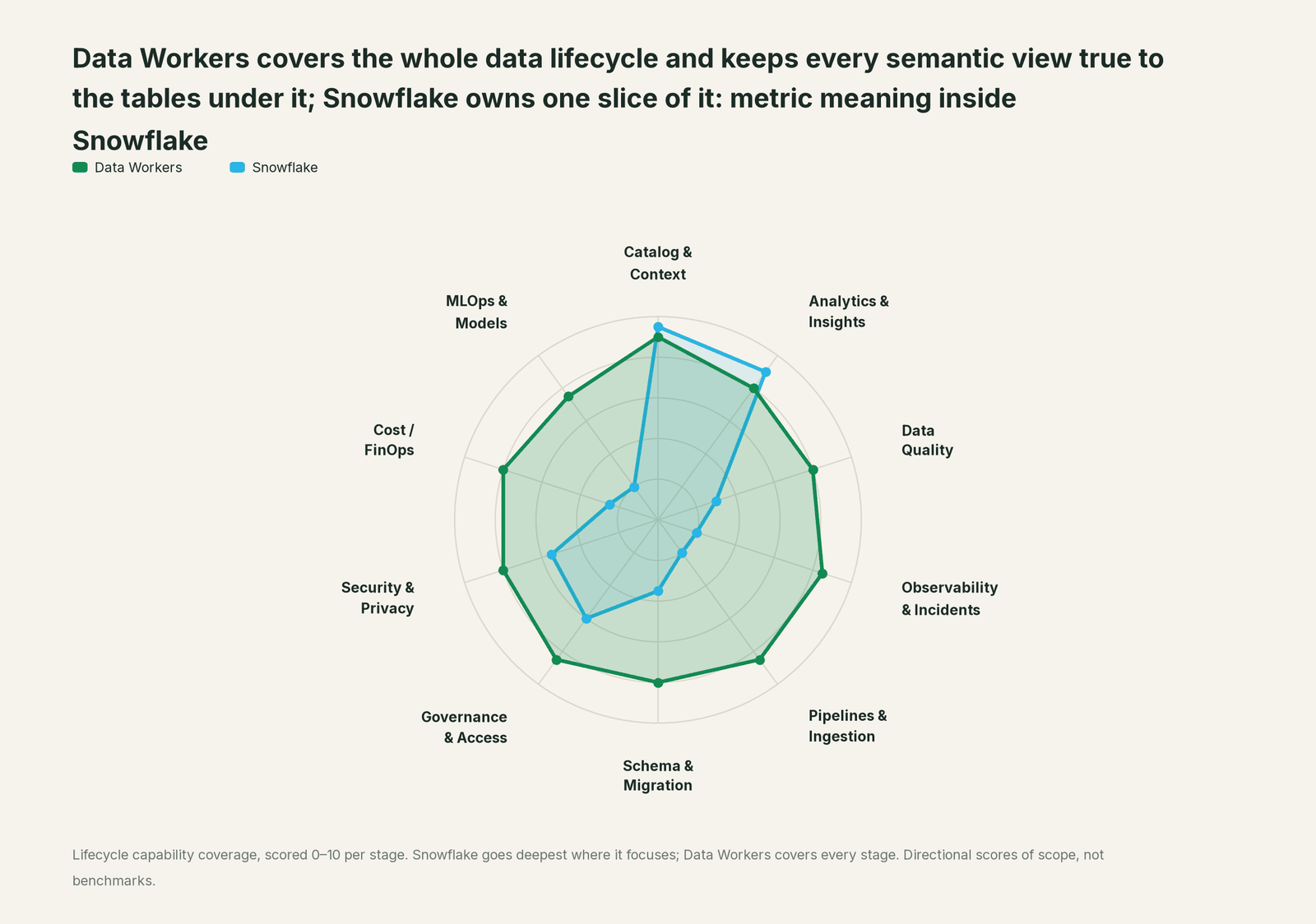
Every tool owns a slice. Data Workers covers the whole lifecycle
Semantic views own one slice of the lifecycle, and own it well: metric meaning inside Snowflake. Each point tool adds another console, another contract and another handoff. Data Workers covers the whole lifecycle with one context, one approval flow and one audit trail, and builds on the views you already maintain.
| Stage | Data Workers | Snowflake | Why we scored it this way |
|---|---|---|---|
| Catalog & Context | 9 | 9.5 | Snowflake's home stage: semantic views store logical tables, relationships, facts, dimensions, metrics, synonyms and verified queries as governed schema objects. Data Workers reads them as a first-class source next to every other definition. |
| Analytics & Insights | 8 | 9 | A second home stage: Cortex Analyst recommends semantic views, Cortex Agents, CoWork and CoCo (formerly Cortex Code) answer from them, and plain SQL can query them. Data Workers answers across platforms from the same approved definitions. |
| Data Quality | 8 | 3 | Verified queries let you test how well Cortex Analyst answers from a view. Data Workers writes, runs and repairs checks on the tables and dbt models the view reads. |
| Observability & Incidents | 8.5 | 2 | A view reports what its tables say; it doesn't watch them. Data Workers traces a break from the source through dbt to the metric, fixes it and verifies it. |
| Pipelines & Ingestion | 8.5 | 2 | The dbt_semantic_view package builds views as dbt models, and Snowflake loads the tables underneath. Data Workers builds, reruns and backfills the pipelines that fill them. |
| Schema & Migration | 8 | 3.5 | GET_DDL, CREATE OR REPLACE and the Ossie export keep a definition versionable and portable. Data Workers catches the upstream column change that would break a view and drafts the fix. |
| Governance & Access | 8.5 | 6 | Snowflake roles govern who can query or describe a view (SELECT, REFERENCES), and the managed MCP server applies them. Data Workers routes definition changes and grants to a named owner. |
| Security & Privacy | 8 | 5.5 | Views live inside your Snowflake account under its security model. Data Workers leaves a receipt on every change it makes, in Snowflake and outside it. |
| Cost / FinOps | 8 | 2.5 | Cortex Analyst and agent usage bill through Snowflake's consumption tables. Data Workers traces Snowflake credits to the dbt model behind them and drafts the fix for its owner. |
| MLOps & Models | 7.5 | 2 | Views ground the agents Snowflake runs. Data Workers keeps the data under your own models healthy and connects to MLflow and W&B. |
How Snowflake semantic views and Data Workers work together
People keep asking in CoWork and Cortex Agents, and engineers in Claude Code, Cursor or Codex. Spellbook Data Catalog (in preview) is where the data team looks: every view, the dbt models under it, its owner and every pending change. Between them, Data Context Wizard holds one governed context graph, the Data-Agents Swarm does the work with more than 20 specialist agents, the Autonomous Data-Conductor runs each fix end to end (detect, diagnose, fix, review, verify, remember), and per-domain guardrails hold approvals, receipts and rollback.
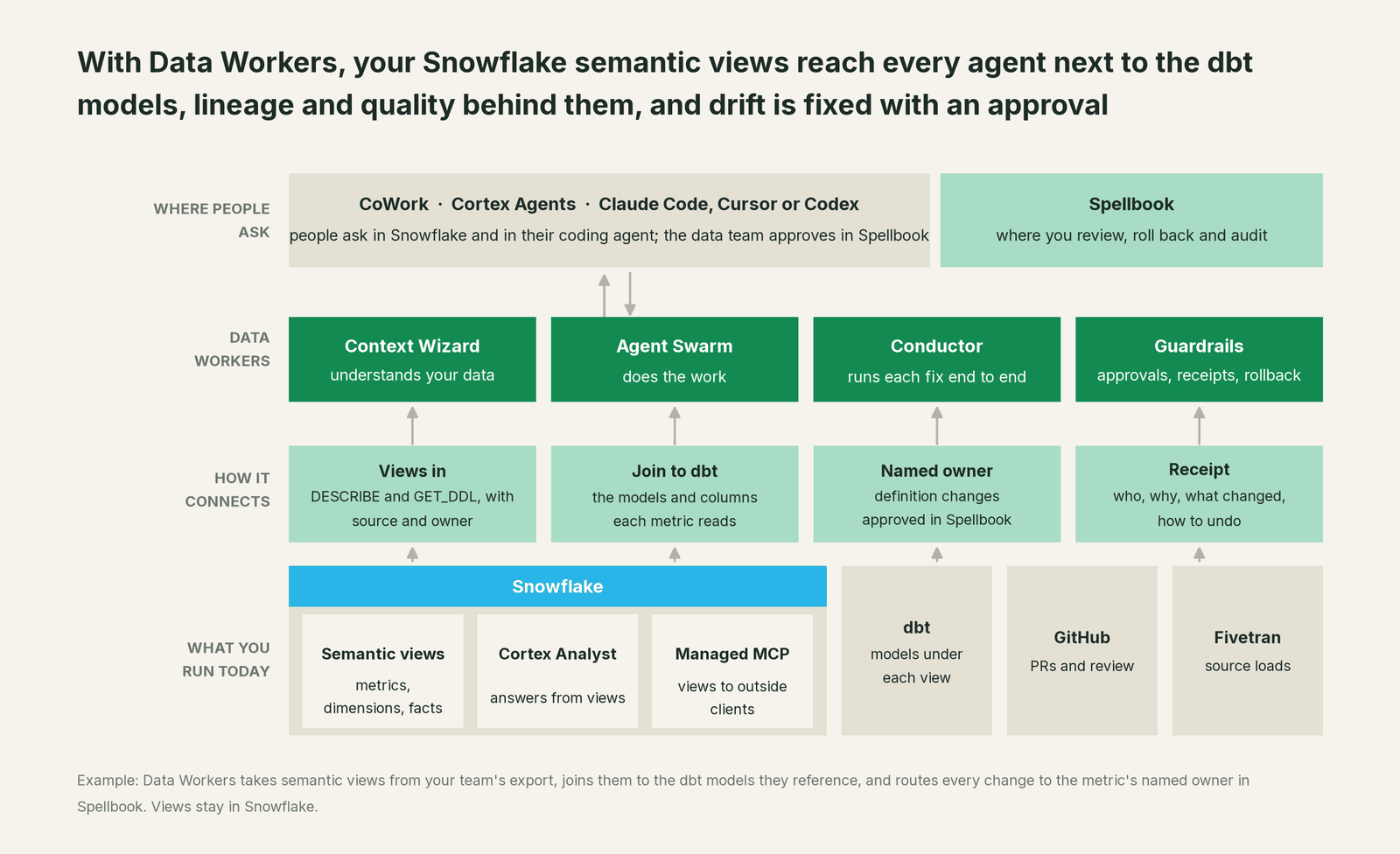
How the views come in. Your team exports your semantic views with SHOW SEMANTIC VIEWS, DESCRIBE SEMANTIC VIEW and GET_DDL from a scheduled run under a dedicated read role, or its assistant reads them over Snowflake's managed MCP server, and hands them to Context Wizard. Each metric, dimension and verified query lands in Data Context Wizard with provenance: the view, the owner, the DDL version and when it was read. Only a named person can make a definition authoritative. If your views are dbt_semantic_view models, their ref() and source() calls already say which models each view reads. The Data Workers Snowflake connector adds tables, columns, grants and query history, so Context Wizard knows which metrics people actually use.
What Data Workers does with them. resolve_metric returns every candidate when a metric name is ambiguous; mark_authoritative and get_authoritative_source record which definition the owner signed off. trace_cross_platform_lineage follows a metric from the view through dbt to the source. Pull-request review and assess_impact catch the column change under a view in the dbt manifest diff and list everything it touches, and flag_stale_context marks a definition whose table changed since it was last checked. The Data Workers + dbt guide covers the dbt side, and the semantic views over MCP how-to walks through the read role, the grants and the Ossie export.
Setup today. Follow the client setup docs: clone the open-source repository, then add Data Workers agents to your MCP client next to Snowflake's managed MCP server. Example for Claude Code's .mcp.json (values are placeholders):
{
  "mcpServers": {
    "snowflake": {
      "type": "http",
      "url": "https://<account_url>/api/v2/databases/DW_META/schemas/MCP/mcp-servers/SEMANTIC_READER",
      "headers": { "Authorization": "Bearer ${SNOWFLAKE_PAT}" }
    },
    "dw-context-catalog": { "command": "/path/to/dataworkers-claw-community/start-agent.sh", "args": ["dw-context-catalog"] },
    "dw-schema": { "command": "/path/to/dataworkers-claw-community/start-agent.sh", "args": ["dw-schema"] },
    "dw-quality": { "command": "/path/to/dataworkers-claw-community/start-agent.sh", "args": ["dw-quality"] }
  }
}
On the Snowflake side, give the MCP server a SYSTEM_EXECUTE_SQL tool with read_only: true and, if you like, a CORTEX_ANALYST_MESSAGE tool pointed at a view, and connect with OAuth or a programmatic access token for a least-privilege service role. List each server's tools with /mcp in your client, then ask: "Read the semantic views in FINANCE.SEMANTIC, show me the dbt models each metric reads, and tell me which open pull requests would change them."
The climb, L0 to L4. Autonomy is set per domain, on top of Snowflake's own roles.

- •L0 manual. Views and dbt models are maintained separately; a broken metric surfaces when a Cortex Analyst answer looks wrong.
- •L1 observe. Data Workers reads every view and the models under it and flags upstream changes with their blast radius. It changes nothing.
- •L2 propose. Data Workers drafts the fix, a dbt diff or semantic view DDL, and routes it to the metric's owner.
- •L3 act reversibly. For change classes with a clean record, such as repointing a dimension after an approved rename or refreshing synonyms from an approved glossary, Data Workers applies the change, reruns the verified queries and can roll it back.
- •L4 autonomous. For a scoped domain like descriptions and synonyms, Data Workers keeps views in step on its own, with a receipt for each change.
Promoting a definition to authoritative stays a human decision at every level. For the safety model, read is it safe to let AI agents change production data; for where data and credentials live, read where does our data go. For the rest of Snowflake, read what Data Workers adds on Snowflake. For other semantic layers, see you're on the dbt Semantic Layer, you're on OSI semantics and the hub, bring your own context.
What changes for your team
Semantic views say what a metric means in Snowflake. Data Workers gives the data team a crew that keeps that meaning true while everything under it changes.
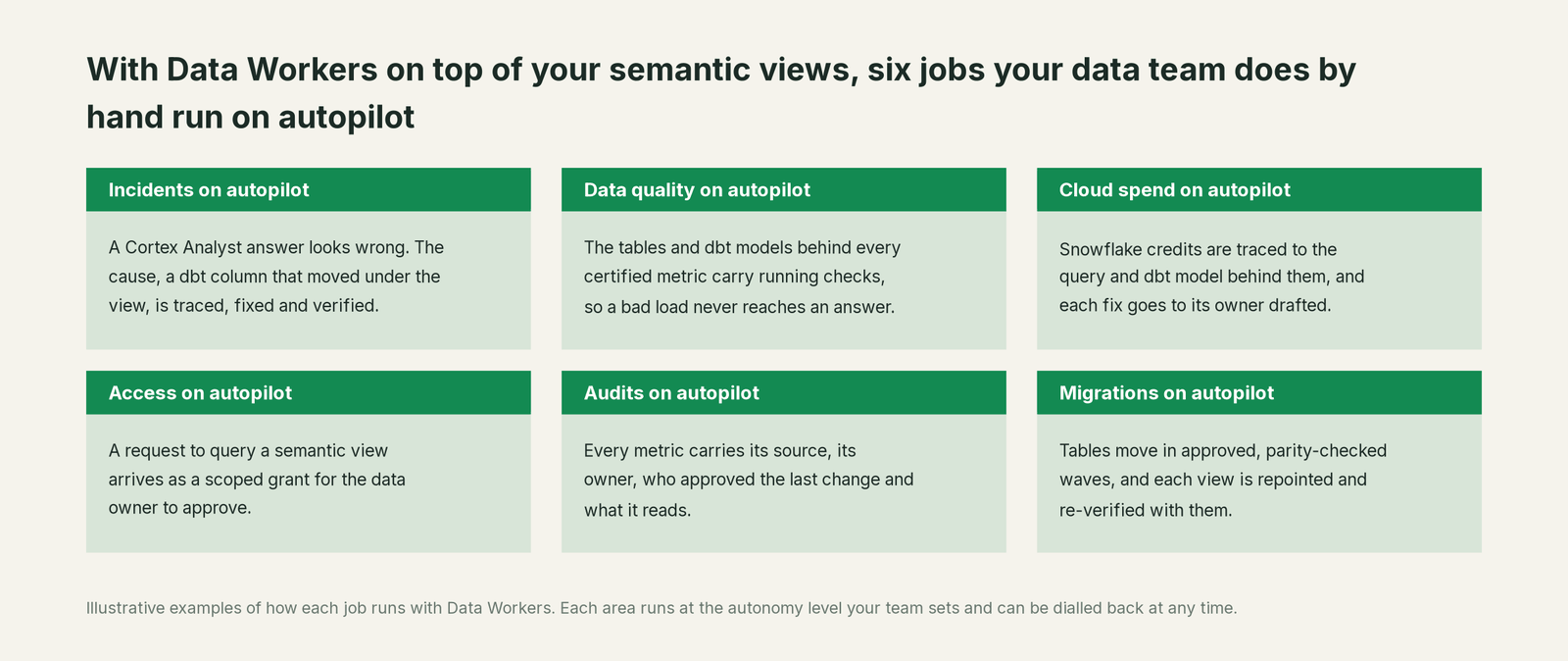
- •Incidents. When a Cortex Analyst answer looks wrong, the column that moved under the view is traced to its pull request, fixed at the source and checked with the view's verified queries.
- •Data quality. The tables and dbt models behind every certified metric carry running checks, so a bad load is stopped before an agent repeats it (schema drift detection in Snowflake).
- •Cloud spend. Snowflake credits are traced to the query and dbt model behind them, and each fix goes to its owner drafted.
- •Access. A request to query a semantic view arrives as a scoped grant for the data owner.
- •Audits. Every metric carries its source, owner, last approver and the tables it reads.
- •Migrations. Tables move in approved, parity-checked waves; each view is repointed and re-verified with them.
Keep Snowflake semantic views, or consolidate?
Keep Snowflake semantic views if you love them; Data Workers works with them from day one. Many teams consolidate once Data Workers runs that slice too.
For most Snowflake shops the answer is to keep them. Semantic views are where Cortex Analyst, Cortex Agents and CoWork read your metrics, and a semantic layer is what makes those answers reliable (why text-to-SQL fails without one). What teams consolidate is everything around them: the spreadsheet mapping each view to its dbt models, the second glossary, hand-built checks on the fact tables, and often a separate observability tool. If you are weighing building this layer yourself on Snowflake's MCP server and a coding agent, read build it ourselves with Claude Code and MCP servers first: reading a view is the easy part; impact analysis, approvals and rollback are where the work is.
The case for your CFO
The outcome: your metrics live in Snowflake semantic views so CoWork and every Snowflake agent give the same answer. Data Workers keeps that answer right as the data under it changes, so ARR in CoWork matches ARR in the board pack, and a named person signed off on what ARR means.
The risk story: the real exposure is a board number that moves because someone renamed a column, found after the deck ships. Snowflake roles and the MCP server's read-only settings stay as they are. Autonomy is set per domain, from L0 manual to L4 autonomous. At L1 Data Workers only reads and reports; at L2 it drafts changes your owners apply. Every change has a named approver and a rollback path, and every receipt shows what changed, who approved it, which checks ran and how to undo it. Zero migration: Snowflake, dbt and your deploy process stay where they are.
Why now: CoWork puts semantic views in front of every business user and the managed MCP server serves them to outside agents, so a view that drifts misleads everyone who asks. The first win is the views behind the board pack, read-only, every metric joined to its dbt models and to the open pull requests that would change them. What stays the same: your views, dbt project, roles and review process. For the numbers, see the ROI of agentic data operations. Start with a pilot (pricing); the pilot is credited in full against the first year.
The sentence to repeat upstairs: "Our semantic views stay where Snowflake's agents read our metrics; Data Workers keeps them true when the tables under them change, and every fix has an owner's approval and a receipt."
Getting started
Start with a pilot. Pick the semantic views behind one domain, such as revenue, connect Data Workers read-only next to your dbt project, and let it map every metric to the models it reads and flag the next upstream change before it merges. Then turn on the first change class. The pilot path and plans are on the pricing page, and the pilot is credited in full against the first year.
FAQ
Does Data Workers replace our semantic views? No. Semantic views stay the source of metric meaning in Snowflake. Data Workers reads them, joins them to the dbt models, lineage and usage around them, and routes changes to named owners.
How does Data Context Wizard read our semantic views? Over Snowflake's managed MCP server or SQL under a read-only role (SHOW SEMANTIC VIEWS, DESCRIBE SEMANTIC VIEW, GET_DDL). The semantic views over MCP how-to has the grants.
Will Data Workers change a semantic view? Only through its owner: as a dbt diff for the owner to merge when the view is a dbt_semantic_view model, or as CREATE OR REPLACE SEMANTIC VIEW DDL. At L3 and above, a change class the owner approved can be applied and rolled back by Data Workers, with a receipt.
We use Semantic View Autopilot. Does that conflict? They work in sequence. Autopilot suggests from query history, BI files and table metadata, and a person reviews and applies. Data Workers keeps the result true to the tables after it ships.
Why did a Cortex Analyst answer change when nobody touched the view? Usually something under the view changed: a column renamed, a filter added or a definition netted out in a dbt model. Data Workers traces the metric through dbt to the pull request that moved it.
Our metrics live in dbt and in semantic views. Which one wins? The one your owner approves. Data Workers shows both versions with their sources and routes the decision to a named person. For the dbt side, read you're on the dbt Semantic Layer.
Sources
- •Snowflake documentation, Overview of semantic views (contents, creation paths, consumers), https://docs.snowflake.com/en/user-guide/views-semantic/overview (checked Oct 2, 2026)
- •Snowflake documentation, Semantic View Autopilot (suggestion sources; review and apply), https://docs.snowflake.com/en/user-guide/views-semantic/autopilot (checked Oct 2, 2026)
- •Snowflake documentation, Cortex Analyst (semantic views recommended; legacy YAML; verified queries), https://docs.snowflake.com/en/user-guide/snowflake-cortex/cortex-analyst (checked Oct 2, 2026)
- •Snowflake documentation, DESCRIBE SEMANTIC VIEW (object kinds incl. METRIC, DERIVED_METRIC, AI_VERIFIED_QUERY), https://docs.snowflake.com/en/sql-reference/sql/desc-semantic-view (checked Oct 2, 2026)
- •Snowflake documentation, Using SQL commands to create and manage semantic views (privileges, REFERENCES, SHOW SEMANTIC VIEWS, GET_DDL), https://docs.snowflake.com/en/user-guide/views-semantic/sql (checked Oct 2, 2026)
- •Snowflake documentation, Snowflake CoWork (agents answer from semantic views), https://docs.snowflake.com/en/user-guide/snowflake-cortex/snowflake-intelligence (checked Oct 2, 2026)
- •Snowflake documentation, Snowflake-managed MCP server (GA; tool types incl. SYSTEM_EXECUTE_SQL with read_only; endpoint; grants; OAuth and programmatic access tokens), https://docs.snowflake.com/en/user-guide/snowflake-cortex/cortex-agents-mcp (checked Oct 2, 2026)
- •Snowflake press release, June 2, 2026, Snowflake CoWork (formerly Snowflake Intelligence), https://www.snowflake.com/en/news/press-releases/snowflake-cowork-powers-the-agentic-enterprise-as-the-personal-agent-for-knowledge-workers-to-work-smarter/ (checked Oct 2, 2026)
- •Snowflake Labs, dbt_semantic_view package (
semantic_viewmaterialization,ref()andsource()), https://github.com/Snowflake-Labs/dbt_semantic_view and https://hub.getdbt.com/Snowflake-Labs/dbt_semantic_view/latest/ (v1.0.6, checked Oct 2, 2026) - •Data Workers client setup docs, https://dataworkers.io/opensource-docs/client-setup/, and the open-source repository https://github.com/DataWorkersProject/dataworkers-claw-community (
start-agent.shand the tool definitions named above) (checked Oct 2, 2026)